- NewspaperThe Newspaper Mobile Theme: Introduction
- NewspaperThe Mobile Theme
- NewspaperModules Builder in Newspaper Theme
- NewspaperNewspaper theme documentation
- NewsmagTheme colors introduction
- NewspaperTheme Colors Introduction
- NewspaperWhat’s Included in the Newspaper Theme Package
- ApiUsing the Theme API in plugins
- NewspaperFilters and sorting for taxonomies
- NewspaperHow to Add a Logo in Newspaper
- NewspaperBig Grid Flex Settings
- NewspaperHeader Builder
- NewspapertagDiv AMP Plugin Tutorial
- TutorialsFrom WPBakery to tagDiv Composer
- NewsmagSmart list ads
- NewspaperBest Of Forums
- NewspaperCache plugin – install and configure
- NewsmagIntroduction
- NewsmagMain menu
- NewsmagLogo & Favicon
 Calin
Calin Hi,
Please notice that writing multiple times in the same topic only delays the answer. In order to get a fast response, please write once and wait for an answer. We answer from oldest to newest so if you keep posting, your post is moved to fresher ones thus receiving the answer later until we answer all posts before your last reply.
Please check our documentation for How to Make an AMP Ready Website with Newspaper Theme -> https://tagdiv.com/amp-newspaper-theme/ here you’ll find how and were to set the code ads.
There are tow section one for amp ads and one for mobile ads -> https://www.screencast.com/t/2Tz1ccuM3y1 here is an example -> https://www.screencast.com/t/JFFiV6li3ofE
-> https://www.ampproject.org/docs/reference/components/amp-auto-ads
Thank you for your understanding!
 TinyMountainsStudio
Hi there,
Can anyone tell me whether we can add a swipe to next article function on mobile with this theme?
Is it something already built in, or is there a plugin to implement this?
Thanks in advance,
Carmen
 GoingFor2
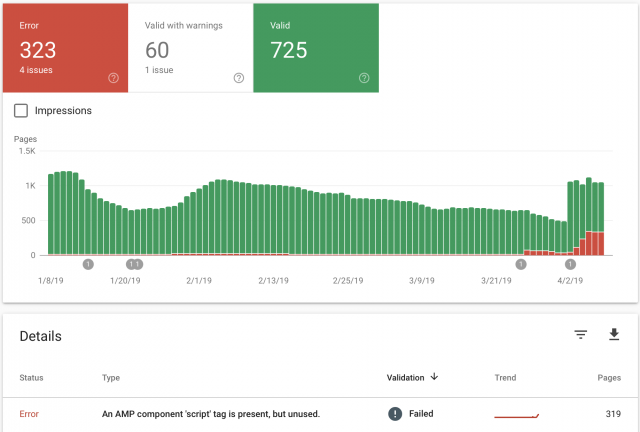
I recently updated the theme and the feature to use “mobile”, “Mobile + AMP” or “AMP” has started to create AMP errors, when previously there were none. It keeps telling me there, “An AMP component ‘script’ tag is present, but unused”. This was never an issue until after the upgrade. I had AMP Ads formatted the correct way without using the “Script” tag. As you can see from the image I attached, the errors started around March 26th, right around the time I updated. My website is GoingFor2.com. I currently have it set at “Mobile Only” because I don’t want to keep racking up errors, but I want to be able to use AMP as well. Thank you. Here is the link to the image: http://goingfor2.com/wp-content/uploads/2019/04/Screen-Shot-2019-04-08-at-10.12.43-PM.png
 haxigi
Hello. Till this new update, everything worked fine for me. Since Newspaper changed AMP plugin, my website doesn’t look like before in mobile view.
I have created static site and it work fine for desktop, but same site looks different.
It only shows: “Latest articles” and none of what i created with tdcomposer.
Why is that? My website: alilove.pl
 shelmes@liebertpub.com
I want to use AMP on my site, and to do that I apparently need the mobile theme activated along with the regular newspaper theme. When mobile theme is active it is asking for me to create my content twice, once for desktop and once for mobile. I don’t want this. I want one post content box that is used on both desktop and mobile, and I want my mobile pages to be served as AMP. How can I do this? It is a serious flaw if I have to have two post content sections, one for desktop and one for mobile…especially for the thousands of posts I have on my site already, we can’t go back into each one and make add in new content for the mobile editor.
 mehdiago
 hello , FYI the cause of the issue was caused by tagDiv Mobile Theme after deactivating it the mobile version worked fine .
 Casas.tech
 Hi,
In pages in code:
<h1 class="td-logo">

<span class="td-visual-hidden">Reformas Integrales Bilbao</span>
</h1>
In content:
<h1><span style="color: #2a9221;"><b><i>Estudio de arquitectos para interiores y proyectos técnicos en Bilbao</i></b></span></h1>
It’s not correct to appear two <h1> tags.
You can see for example in https://www.casas.tech/arquitectura/
In the code in the files logo-h1.php and logo-mobile-h1.php of the theme:
// H1 on logo when there's no title with H1 in page
It seems that it is not working properly.
Thanks in advance
 Jon Rice
 Hi, on the mobile theme if I click on a category, it displays the description at the top above the articles. That’s what I’m hoping to remove. Thanks!
Calin Hi,
Usually when you are on desktop and you are redirect to a mobile version of your website it is a cache problem, I would suggest as a first step to clear the cache then deactivate the caching plugin temporarily. Then check if the problem is solved.
The WP Super Cache is one of the plugins that was tested with our theme and was fully suported by our theme; this is our list with tested plugins with our theme -> https://www.screencast.com/t/cmPkh9jba4sZ
Thank you for your understanding!
 bobbymc
 Ah. So I can use mobile theme only for AMP posts and the rest of the theme will look as I designed it? 🙂
 Bogdan B.
 Hello,
There should be a mobile menu even if no mobile theme is used. Please provide a link to your site so we can inspect it.
Thank you!
Bogdan B. Hello,
In the latest theme versions there is a header manager that lets you implement custom elements on the mobile and desktop menus. You can create the mobile menu implementation you need. Please read this guide: https://tagdiv.com/newspaper-theme-customize-the-header-manager/
Thank you!
Bogdan B. Hello,
Please read this guide carefully: https://tagdiv.com/amp-newspaper-theme/
Amp only works through the mobile theme
You can activate the mobile theme only for amp, not across the entire website.
Thank you!
Bogdan B. Hello,
Please read this guide:
https://tagdiv.com/mobile-theme-automatic-optimization-for-mobile-newspaper-theme/
Thank you!
 inav
inavHello,
Google Page Speed Insights showed a pretty bad score (3 for mobile around 30 for desktop) after I’d installed and configured the Cache plugin, as per your tutorial. I made some server-side/hosting optimizations and was able to to increase the score to 45 mobile / 72 desktop.
Apart from setting up the mobile theme + AMP pages, is there anything else I can do to score above average on desktop and mobile?
Thanks in advance,
Ina
Calin Hi @Nicholas Gibbs,
Those options are available only if you have the mobile theme plugin deactivate, if is activate the mobile will set the amp automatic.
Hi @buddymantra,
Please make sure that there is no plugin conflicts, please deactivate all non theme plugins, clear all cache deactivate cache plugin and try again.
Also is possible to take some time until google will index your new amp links.
Please check this article:
Ask Google to recrawl your URLs -> https://support.google.com/webmasters/answer/6065812?hl=en
Thank you!
Calin Hi,
If you chose to use the mobile theme plugin stead of responsive version of Newspaper this this problem will be fix.
Thank you for your understanding!
Calin Hi,
If you are using the mobile menu you can change the menu from Appearance > Menus
-> https://www.screencast.com/t/bGcit1Zoyn
If you are not using mobile theme you can use the header editor and edit the menu -> https://www.screencast.com/t/hoQItj7LO
Thank you!
 Catalin
 Hi,
If you want to have some control over your Ads in mobile, you need to use the Mobile theme, Mobile Ads. Otherwise, the theme does not have any such an option for this case, sorry! As a hint, you can check the following useful guide from here -> https://isabelcastillo.com/adsense-native-in-article-amp Maybe this guide could be helpful for you.
Thank you!
 artimag
 Hi Catalin,
I have found a solution in your forum that solves the featured article problem.
I added the code
‘category__not_in’ => ‘2’,
in mobile -> front-page.php at the “query used on Latest Articles section” and it works great!
About the second problem: you were absolutely right! All six AMP errors were caused by the Faceboo Pixle.
I have removed the Facebook Pixel now.
I inserted the Facebook pixel into “Theme panel -> Analytics / Js Codes -> Google Analytics and JavaScript Codes -> Header Script Code”.
Do you have an idea where I could insert the Facebook pixel without causing an AMP error?
Many Thanks!
 thelastpoet
 This theme was great, especially the previous AMP plugin. The ad spots were well optimized for mobile. Now I am confused, should I turn all my Adsense Ad Units to AMP Units or leave them as they are.
I could use AMP Ads for AMP and responsive ads for the mobile plugin. Now they are combined and you have to serve just ads. This has led to revenue loss.
Catalin Hi,
Regarding your first problem, after some investigations, it seems to be a mini bug in our theme, when you are using the Mobile Theme plugin for mobile mode, sorry! Unfortunately, the duplicated posts are not excluded from the latest articles. I have added to our list of improvements and we hope to fix it in future updates.
I have checked your website AMP errors and all of these seems to comes from your Facebook Pixel implementation, as you can see here -> https://www.screencast.com/t/ww1POIXpoc1 Unfortunately, this conversion tracking has not been tested with our theme (AMP version) and we cannot say for sure if you will bring good theme results, sorry!
Thank you for your understanding!
Calin Hi,
Please set this code in Newspaper>Theme panel> Mobile theme > Custom code>Css too
-> https://www.screencast.com/t/7FGPy4FWV
#td-mobile-nav {

position: fixed;

}
This will fix the menu on mobile.
Thanks.
 digitalgauravdm
After installing theme , it is not openng on mobile. Error message :Mobile page could not be set.Please check if you already have another mobile theme or similar 🙂 if you use a cache plugin clear it before checking the results.
Calin Hi,
Unfortunately I can not access your website -> https://www.screencast.com/t/ATrFvCoTVQbX
Hi,
The mobile theme is a plugin that provide you a better speed then responsive version of theme, but in order to achieve that speed you’ll need to create a new content for pages because in the most of cases those were made with builders ( tagDiv Composer, WPBakery ) and you need to use only the mobile editor ( you need to set the content for pages in mobile editor and this content will be display on mobile theme)
-> https://www.screencast.com/t/ebUIzt4se
Also please check our documentation for Mobile Theme: Automatic Optimization for Mobile with Newspaper Theme -> https://tagdiv.com/mobile-theme-automatic-optimization-for-mobile-newspaper-theme/
I think that you are referring to those 3 blocks, for those you’ll need to have set seam feature posts (that have set feature category) -> https://forum.tagdiv.com/featured-posts-2/ -> https://www.screencast.com/t/QsJ6ppY4
You’ll need to add some post in feature category -> https://forum.tagdiv.com/featured-posts-2/ if you do not have this category you can create it, just make sure that you set the category name to be
Featured
I think this is because you are using the mobile theme plugin.
If you want to use the mobile theme with amp, but you need to have the desktop design you can use the “AMP” option from Newspaper>Theme panel>Mobile theme>Mobile settings
-> https://www.screencast.com/t/CEVSensTM6
Thank you for your understanding!