
- NewspaperThe Newspaper Mobile Theme: Introduction
- NewspaperThe Mobile Theme
- NewspaperModules Builder in Newspaper Theme
- NewspaperFilters and sorting for taxonomies
- NewspaperHow to Add a Logo in Newspaper
- NewspaperBig Grid Flex Settings
- NewspaperHeader Builder
- NewspapertagDiv AMP Plugin Tutorial
- TutorialsFrom WPBakery to tagDiv Composer
- NewsmagSmart list ads
- NewspaperNewspaper theme documentation
- NewspaperBest Of Forums
- NewspaperCache plugin – install and configure
- NewsmagIntroduction
- NewsmagMain menu
- NewsmagLogo & Favicon
- NewsmagHeader ads
- NewsmagSmart sidebar
- NewsmagSharing buttons
- NewsmagCategory tag on modules/blocks
 Bettina
 Hello!
From my point of view, if you don’t use the Mobile Theme plugin, then there is no reason or benefit from AMP.
Check our documentation about this plugin here:
https://forum.tagdiv.com/tagdiv-amp-plugin-tutorial/
Thank you!
 Anamaria
 Hi,
This message appears in most cases when you set a custom JavaScript for ads and this is not allowed in the custom JavaScript section, please remove the code from there.
The codes for auto ads need to be set only in analytics -> https://i.imgur.com/bRcp2zK.png or in mobile theme > amp analytics -> https://i.imgur.com/gxVsaOe.png
That looks like an AMP error message
– https://www.ampproject.org/docs/troubleshooting/validation_errors#custom-javascript-is-not-allowed
Thank you!
 chvojkapavel@gmail.com
Hi, please, could you answer each of the questions below? Webpage is: http://www.manzelskyslub.sk
1. Is it possible to use the theme without the mobile version? Will it be of good quality?
2. Could you let me know why is it not possible to see the menu on each page of an article and category like it is on Homepage?
3. Why the grid pictures are not visible? What is needed to be updated? Please see the screenshot: https://snipboard.io/cLE2T8.jpg
4. Please, how is it possible to set up the same header and footer like it is on the Homepage?
5. How can I delete the section for COMMENTS and logo below under the articles? Please see the screenshot: https://snipboard.io/QoiMjl.jpg
6. Where can I delete the count of views in each article?
7. Where can I delete the social icons under each article under a title picture?
8. Under each article there is a repeater for my bio and again social icons and again, how can I delete them?
Thanks!
 Anonymous
 Another follow up:
“Another thing that can be done is to set the font-display:swap; in wp-content/plugins/td-composer/mobile/style.css -> https://i.imgur.com/kxMEzky.png”
And it worked!
 thoughtful
As most, I am very interested in the speed of my website. However, there it appears that there are two options for a mobile site – I can either use the mobile theme, the mobile templates. Unfortunately, the mobile theme does not offer much cusomization, so I would like to use the mobile template.
However, I am concerend about site performance and was wanted to ask – can I make my site just as fast with the mobile template as I can with the mobile theme? (or close being to as fast at least)
 mikadim
 Hi Anamaria,
Ι have solved the problem with the help of the support of the snax poll plugin.
We used the hook below in the child theme and the problem solved for the desktop version. I need your help so i can apply the same thing in the mobile version (mobile theme plugin).
add_action( ‘pre_get_posts’, function( $query ) {
if ( ! function_exists( ‘snax_get_quiz_post_type’ ) || ! function_exists( ‘snax_get_poll_post_type’ ) ) {
return;
}
if ( is_admin() ) {
return;
}
// Skip for pages.
if ( $query->is_page() ) {
return;
}
// Skip for attachments.
if ( $query->is_attachment() ) {
return;
}
// Skip for custom post types.
// Only “posts” page (is_home) has to be changed.
if ( $query->is_post_type_archive() ) {
return;
}
if ( $query->is_tax() ) {
return;
}
$post_type = $query->get( ‘post_type’ );
// Normalize.
$post_type = ( ” === $post_type ) ? array( ‘post’ ) : (array) $post_type;
// Skip if query is not for “post” type.
if ( ! in_array( ‘post’, $post_type, true ) ) {
return;
}
$post_type[] = snax_get_quiz_post_type();
$post_type[] = snax_get_poll_post_type();
$query->set( ‘post_type’, $post_type );
} );
Thanks,
Katerina
Anamaria Hello,
I just did a test for page speed and it looks like you have a good score for the desktop => https://prnt.sc/10iqz14 the problem seems to be on mobile => https://prnt.sc/10ir0ji
If you follow the steps which are presented in this tutorial here: https://tagdiv.com/how-to-increase-page-loading-speed/ you’ll be able to increase the speed of your website.
Also, to increase the page speed you can check these similar topics for more solutions:
– https://forum.tagdiv.com/topic/optimize-script-to-improve-site-speed/
– https://www.infophilic.com/get-almost-100-pagespeed-newspaper-theme/
– https://forum.tagdiv.com/topic/a-few-tips-for-newspaper-x-speed-high-cpu-usage-issues/
– https://tagdiv.com/how-to-increase-page-loading-speed/
Also, our developers are working to improve the page speed, so we hope in a short time we will deliver the improvement in future updates.
Thank you for your understanding!
 qzconsulting
Hello,
So after a year away from AMP and tagDiv’s mobile theme, I’ve renabled it to work on AMP pages only. Problem is that now when i try to publish or save on articles on the site i get ‘update failed’ Looking at console its JSON throwing an error 502.
I have also discovered the AMP plugin of today gives the error: Error: The response is not a valid JSON response. everytime i press Save changes.
If i disable this plugin then the site works fine but obv no AMP. Is there a work around for this? or a version of AMP that your plugin/theme is tested till?
Anamaria Hello,
1. Ads may not appear inside posts, because you are using a single post template from Cloud Library, to add ads inside a single post template, you must edit with tagDiv Composer, select the Single Post Content to select the ADS tab where you can ads => https://prnt.sc/10ion0t -> https://prnt.sc/10ionmq
2. If the code needs to be set between the head tags, then you need to add the code in Theme Panel -> Analytics/JS Codes => https://prnt.sc/10ipdlw or if the code is auto ads for AMP then the code needs to be inserted in Theme Panel -> Mobile Theme -> AMP ads => https://prnt.sc/10ipfgs
Hope this helps you!
Thank you!
 azurik
Hi, in Newspaper for Mobile Theme, I know that in order for pages to show up, you need to edit the page through the special text field box that’s added with the Mobile Theme plug-in. My question is how do you change the font size for paragraphs? Normally, I’d go to the Theme Panel to change this, but there isn’t an option for page text sizes for Mobile Theme.
 eker.ozgur
 it is really strange. when i hit f12 on desktop, switching to mobile version, images are loaded, and stayed even on desktop.
what a weird problem.
eker.ozgur the problem is only on desktop version, mobile and amp is ok. i deactivated all plugins. do not worked.
 eicreview
I used the mobile theme plug in and it crashed my whole site. Without it there are a lot of glitches on mobile, is there anything I can do to resolve this?
 achmadsya
 Hi, it looks like it happens when I activate the amp plugin. The issue happens when I activate the AMP plugin and deactivate the Tagdiv Mobile Theme so that the web could only load amp without mobile theme. (I need a specific layout for my website and the mobile theme seems not supporting that).
I have not tried to activate both amp and Tagdiv Mobile Theme as I am afraid it would activate the mobile theme instead amp. A bit of feedback, the description on Tagdiv Mobile AMP 3 selection settings is not really helpful and clear.
If I want to try activating both AMP and Tagdiv Mobile Theme plugin, could you please further explain which Mobile Theme Integration setting that I need to select so that the web would only show amp mode on mobile google search result and mobile display?
 David
DavidHi,
Since switched to Cloud Templates and updated my site to latest WordPress and Newspaper, my content scrolls behind my footer. This happens on Categories and Tags, no matter which browser I use. Example
Please scroll down to the footer to see how the page hides behind it. On mobile its even worse, after scrolling down around half of the page, the background starts scrolling instead of the grid.
Please help.
Thanks!
 AhmedB
Hello,
my question is: is there any use of AMP plugin if I am not using Mobile theme for the mobile version of my website?
Thanks,
Berbic A.
 Richardrady
Hello,
I have two questions.
1. I wanted to add advertisement inside posts and after post. I added code generated by google adsense and pasted it into:
Theme panel > Ads > Article inline ad. And another google adsense code to Article bottom ad.
But nothing happened… What is wrong ?
2. Google Adsense offers ad optimalized for AMP devices. I have AMP plugin, but not mobile theme plugin. So where to copy this generated advertisement code for AMP ? In Adsense is written that this needs to be copyied between <head> tags in AMP theme. But where is it ?
Thank you for your answer.
 Leedr
Leedr Is there anything that can be added to allow this to happen? The theme doesn’t seem to support mobile very well.
 danna
dannaHey!
i don’t know why, but the google bot has big problems rendering my page (f. ex. https://rauf-und-davon.at/sommerprojekt-seven-summits-osterreich/). The thing is that most of the siteresources can’t be loaded (images, javascript and stylesheets). That’s why i always get notifications from my search console that there are issues on my mobile pages. I guess it would be good for SEO, that google thinks i have a proper page online. I tried everything (deactivated all the plugins except the ones from tagdiv as you can see on the screenshot) but that didn’t fix the problem (so the plugins can’t be the problem):
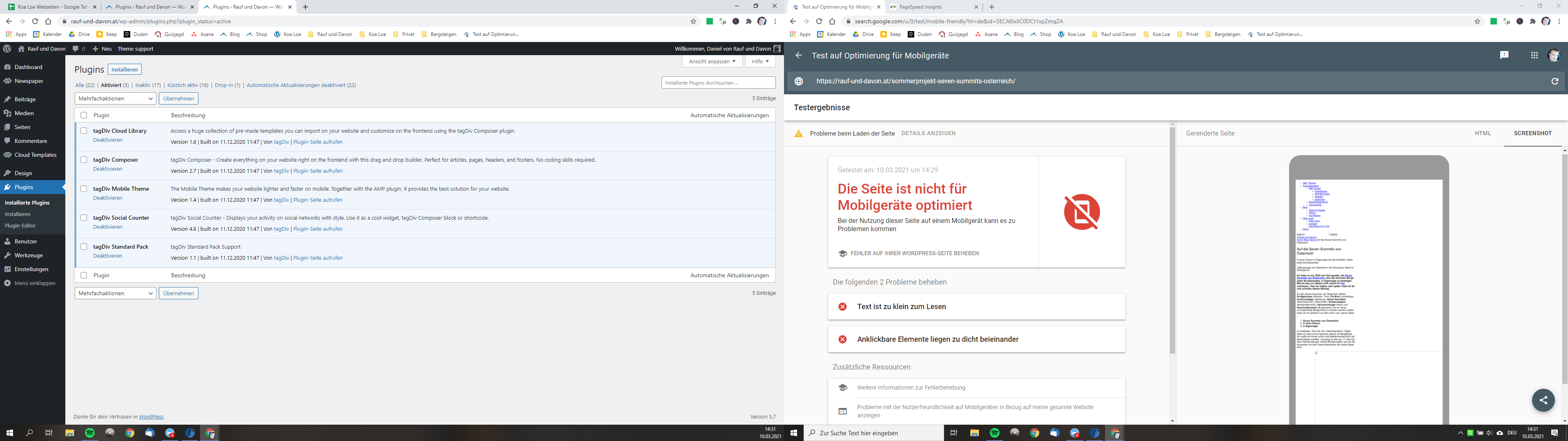
We use the theme on another page and there it gets rendered by google without any problems. Even on my subdomain (with an extra installation) it’s working (so the server can’t be the problem too). Can you maybe help me and tell what the problem could be?
I use Newspaper 10.3.9.1 | WordPress 5.7 | Mobile Theme activated
That would be awesome as i try to fix that problem for months!
All the best,
Daniel
Anamaria Hello,
If you have made a mobile page, please verify if you set the mobile page for mobile page what you created like this => https://www.screencast.com/t/olI1bW8Cg92
Please check this article on how to create the mobile page => https://tagdiv.com/newspaper-10-3-7-update-brings-customizable-and-fast-mobile-pages/ and information about header and footer -> https://prnt.sc/10h7mqt
Also, please make a test only with tagDiv plugins enables, and see if is still a problem.
Hope this helps you!
Thank you!
Bettina Hello!
A solution could be to access the homepage, edit with TagDiv Composer, click on the mobile viewport: https://www.screencast.com/t/XDQJedlggSB and here will display your mobile version.
Click on the element and set the module height so that fits the design in your mobile version.
Thank you!
 TomChen25
 Hi Anamaria,
I do pay for the support, and to be honest, it’s quite expensive. I understand that maybe I’m annoying you but you didn’t give me an answer.
“you have to do the same steps for the homepage” – Of course!!! how do I do that??? I can’t find the settings for that.
My question is not very complicated. I want the homepage layout to be the same as category pages and the same as featured on the mobile theme – https://forum.tagdiv.com/the-mobile-theme/
If you can help me, I appreciate that. If not, please ask someone who knows the answer. If this was something that requires me to hire a developer, I would do so. But this is something that should be part of the support service, which I’m paying for!!!
Thank you!!!
 Zdenko12
 Hi ty for support ! done.
But i have one problem with footer,, desktop version is ok! Mobile on homepage doasne have footer and whwn i go to post i see footer with black background without logo like is in desktop version,, look on mobile https://telegraf.si/
What i must to do?
Regards
Zdenko
 Pukacza
 This is the default mobile layout which I’m using on my website, becouse it is better optimized (look at the screenshot of page in page insight)
https://prnt.sc/10hzhvy
This is cloud library theme mobile layout which I don’t set on any subpage
https://prnt.sc/10hzeth
I want to block second cloud library mobile layout from anybody or any robot like pageinsight, couse it give worse results for page speed.
LeedrHi, I really require an option to make secondary navigation better for mobile.
I currently have a left hand that will direct users to relevant content within the existing section. As seen here: https://firstcardev.wpengine.com/test-page/
Is there any way for the the existing approach – https://ibb.co/tQYGxhG to look more like this – https://ibb.co/s52SYkW



