- NewsmagUsing other ads
- NewspaperUsing Other Ads
- NewsmagSidebar ads
- NewspaperSidebar ads
- NewspaperIntroduction to CPT and ACF with Newspaper Theme
- NewspaperHow to edit modules for Flex Block X
- NewspaperHow to use the Posts List shortcode
- NewspaperCreate a frontend submission form
- NewspaperHow to Use the Tabbed Content shortcode
- NewspaperWooCommerce: Happy “Add to Favorites!”
- NewspaperHow to generate Facebook App ID
- NewspaperLink Tracker
- NewspaperFlex Block Settings Guide
- NewspaperGeneral Options that May Interfere with the Newspaper Theme
- NewspaperSocial Icons
- NewspaperPosts Loop Element
- NewspaperSet a Background for Category Page
- NewspaperThe Newspaper Mobile Theme: Introduction
- NewspaperHow to Add a Logo in Newspaper
- NewspapertagDiv Shop
 Simion C.
 Hi,
We are aware that there are issues with the auto load feature, we will try to fix them as quickly as possible.
1. It will not work on mobile if the mobile theme is active, this is true.
2. There will be an option added to be able to control how soon the next post loads, I can’t provide specific details about how this will work exactly. This should provide a smoother experience.
3. This should not happen if the option mentioned at point 2 will be added. The post will be loaded before the user reaches the footer.
4. Please provide some more details about this, what exactly is happening. I will try to recreate it and if there is an issue I will add it on the list.
5. We could investigate this on your website if possible. Post a link to where this happens and we will take a look.
The issue with the sticky sidebars is under investigation currently. Seems that starting from the second post it will not function correctly. It will be fixed.
From what I tested the post view count is increasing for the posts that are auto loaded. The count goes up. Let me know about followups to these questions.
Thanks
 VideoFilm
Strongly loads CPU
My site https://otdyh-na-more.su/ heavily loads the CPU. Although the same topic on another hosting works well. Plugin installed
WP Super Cache. There was a version 5.6 spy, I installed php 7.2. Disconnected third-party plug-ins, the load did not fall. What could be the reason. Can you tell?
 Claudiu
 Hi simion,
Well, this is interesting. Considering this happens on your blog too 🙂
Take a look at this
I tested your post https://tagdiv.com/infinite-loading-for-single-posts/amp/
Use the google structured data testing tool to test this url: https://search.google.com/structured-data/testing-tool?hl=ro
You will notice that the tool will see 2 Article elements on the page. Click on the article and it will display both. You can expand them both and you will be able to click on the values and it will take you on the source code to where that value is coming from
You will notice that one article element comes from the JSON code, which is great ( it is actually the recommended method ) and the second one comes from structured data html
Example
<span class=td-page-meta itemprop=author itemscope itemtype="https://schema.org/Person"><meta itemprop=name content="Alexandra I."></span><meta itemprop=datePublished content="2019-02-07T15:10:00+00:00"><meta itemprop=dateModified content="2019-02-07T15:36:38+00:00">
Things like this.
Screenshots:
https://prnt.sc/mjja2v
https://prnt.sc/mjjada
May I also mention that one of the article data ( the html one not the JSONLD one ) has some values that do not appear right. For example it ads an @id that creates an url that has /post-idnr at the end. In your case it created an url that has /amp/post-5951 at the end. That url is invalid i do not know why it was created like this
I cannot say more about this aspect with the extra values as I have not seen it happen on other similar websites
Maybe someone has more info on it, at least in regards to the 2xarticle data
 CameronWeb
 Hi Catalin,
Updated the theme as you asked and tried other things but still having no luck, even with inline article adds.
I’m not wanting to use ‘adsence’ code but rather custom ads.
The site is ecommunitynews.net.au and you will see in the sidebar the broken images signalling the ad boxes.

I tried one a sidebar ad and the other custom using this code;
<div class=”td-all-devices”></div>
I tried it with the inline for articles without joy. I’m guessing it is something simple but it is eluding me.
Cheers
-
This reply was modified 7 years by
CameronWeb.
-
This reply was modified 7 years by
 spu
spuFirst, thanks for trying, but the new auto load feature has a lot of bugs and needs fixing:
1) The auto load feature does not work on the Mobile theme at all. Auto load function not working. My suggestion is always think of mobile strategy first.
2) The auto load on normal single posts takes tooooo much time to load. This is just killing the experience. And we have a pretty quick server.
3) When you scroll down, you end up in the footer, and the next article has loaded above it. So user has no idea the article has loaded above the footer.
4) Auto load does not work on smart lists. Each list item should load as a scroll up. But it does not. If there is a way then please let us know.
5) At times the auto load function does not start, it keeps showing the load icon, if it loads another articles, then article immediately goes away. Some bug, does not let the next article load. Happened to us a lot of times. It also happens when you scroll back up, the loaded article evaporates.
A good example of infinite scrolling and auto loading is – https://scroll.in/article/912444/these-mouth-watering-food-podcasts-tell-you-the-stories-behind-the-things-we-eat
(they are also on wordpress)
Our website is http://www.gadgetbridge.com
ClaudiuHi,
I noticed that the article structured data for “Article” on the amp page shows twice when tested with the structured data testing tool from google.
This happens because it reads one from the html structured and the second from the JSON LD script that holds the same thing on the amp page
So, on the normal page of a post only one article structured data shows On the amp page, shows 2 of the same
How can i fix this ? Is there a place i can modify the html for the amp template?
This happens with the tagdiv amp plugin. I tested with other amp plugins and they do not have this issue. I guess the solution would be to strip the html structured data from the amp html and work only with json ld. Any help please? Perhaps point me into the direction of the file i need to modify for the amp template and i will try to do it myself , see if i manage
Thank you
 lifecoderx
We do not use Google Adsense or do advertising on our blog. We want to change the header by adding our phone number and other information. So far I have only been able to upload our logo. The right 2/3 of the header is blank. How can we modify that space with the information we want in our header?
 candersonnm
I haven’t used Newspaper for quite a while, but installed it on a new site the other day.
While trying to build pages (and insert shortcodes into text), hit the edit content button to bring up the WP Editor. The window pops up, but the gray circle continually spins and never loads.
I’ve deactivated all plugins and it still does it.
Here’s system status:
Theme config
Registration key i
f9a2fa18 – **** – **** – **** – 91414dbe5b72 Reset key
Theme name i
Newspaper
Theme version i
9.5
Theme database version i
9.5
HTTP channel test
wordpress
Installed demo i
News Magazine – demo ID: magazine | install type: full
php.ini configuration
Server software i
Apache
PHP Version i
7.0.33
post_max_size i
128M – You cannot upload images, themes and plugins that have a size bigger than this value. To see how you can change this please check our guide here.
max_execution_time
300
max_input_vars
5000
SUHOSIN installed
false
PHP extensions
mbstring
available
GD library
available
WordPress and plugins
WP Home URL i
http://www.discovermuscatine.com
WP Site URL i
http://www.discovermuscatine.com
WP version i
5.0.3
WP multisite enabled i
No
WP Language i
en_US
WP Memory Limit
128 MB/request
WP_DEBUG
False
Caching plugin
No caching plugin detected – for best performance we recommend using WP Super Cache
 jakobe75
The Mobile menu drop down arrows are on the far extreme right.
How can I position these arrows to be just after the menu item instead on the other side of the screen?
I dont want to remove them from desktop, they are fine.
and I dont want to remove them from mobile, just position the arrows closer to the menu item.
so the user knows that its a drop down, because since the arrows are far on the right, they are obscured by the image.
We have an image on the menu to the right, and the menu itself loads to the left normally, but the arrow dropdowns are just too far to the right.
here is an illustrated example from your demo site.
https://www.screencast.com/t/q4nrwqBB
suggestions?
Simion C. Hi,
It is true that the auto load post feature is currently available only through the cloud library plugin. So the starting post has to be a post using a cloud template, the other posts that will be auto loaded can have any template (cloud or default templates). This was decided to be the best solution for auto loading posts. I can’t say at the moment if this functionality will change in the future. Sorry for any inconvenience.
There are users that do not use the cloud library plugin, it is true. It is an optional plugin that ads a great deal of flexibility by being able to create templates for almost everything, access to the template cloud library, it ads extra elements in the composer, now the auto-load and header builder/manager.
@sgupta_newspaper Some of the requests you mention are already on our list and are strongly considered to be implemented/modified/fixed. The ones that are not I have added them.
Thanks
Simion C. Hi,
Having an option to display different headers per page was a feature that many of users have asked for a long time, also being able to create your own headers and customize the header elements without resulting to code modifications or CSS. Now it is possible. Having this option would be necessary for some users.
It is true that the auto load post feature is currently available only through the cloud library plugin. So the starting post has to be a post using a cloud template, the other posts that will be auto loaded can have any template (cloud or default templates). I can’t say at the moment if this functionality will change in the future.
There are users that do not use the cloud library plugin, it is true. It is an optional plugin that ads a great deal of flexibility by being able to create templates for almost everything, access to the template cloud library, it ads extra elements in the composer, now the auto-load and header builder/manager.
Sorry for any inconvenience.
Thanks
 Laudess
Hi,
My clients would like to use the Ads Pro 4 plugin with your Newspaper theme. Could you help me for make plugin works fine with our own ads management ? I try to install the Ads Pro shortcode in your ads area code, but ad not appear on devices ; it just works when i used widget in sidebar… Just Header ad works too. The background image does not works.
I try to installed your code <div class=”td-all-devices”></div> but don’t works too.
Thanks for help,
Regards,
Laurent
Simion C. Hi,
In posts as well, post templates can be built with the composer and the cloud library plugin. So the rows containing the post content and sidebar can be stretched, you can set custom widths, just like in pages.
Please check the guide carefully – https://forum.tagdiv.com/tagdiv-cloud-library-plugin/
Also experiment with the cloud single templates here, preview and edit one to see what the possibilities are
– https://affiliate.tagdiv.com/#/load/Single
Regarding reviews, only posts can have reviews. Use a cloud post template, set review elements from the composer which can be saved as shown. You will still have to add the actual review criteria in the post edit screen – https://forum.tagdiv.com/reviews-2/
Maybe this will change in the future so one can make the full review directly in the composer, I can’t say for sure at the moment.
Regarding the gutter, note that split rows have a column gap setting, so for example if the post content is in one column and the sidebar in another, that setting can be used to customize the space between them – http://prntscr.com/mhrv83
The featured image element can have a custom width as well – http://prntscr.com/mhrzm7
You can design the post template in any way you want. As a note, be sure to check how the template will look on other devices – http://prntscr.com/mhrzzi
About the ads, I made some inquiries and this will be looked over as soon as possible. It is true that no changes have been made or settings added for quite a while in this matter, this will change.
A header builder is now available in update 9.5, along the infinite load for posts which is a much requested feature.
In the footer you can display pages, here are some footer designs made by us
– https://affiliate.tagdiv.com/#/load/Footers
So a builder would not be so necessary when the footer can be designed with the composer.
There are many plans to add new setting, but these take time to create and test. Gradually there will be more. Also we have plans to optimize the theme for increased performance overall, we have to be careful what is implemented in the theme having this in mind.
Let me know if you have more questions.
Thanks
 Calin
Calin Hi,
The default templates get the ads for content from theme panel, but the template from tagDiv Cloud Library have on single post content specifics fields for content ads.
So, you can use cloud templates because the ads will appear only on that template that have set the ads, if you download one template more times and change the name ( example template_name_with_ads and template_name_with_ out_ads ) after that set the template with ads on post were you want to have ads, and the other one on posts with out ads.
All you need to do is to set the ads in post cloud template and not in theme panel, if in theme pane are not set ads on that post will not appear ads.
Also if you want you can check the new version of theme v9.5 and there are more more options and news
-> https://www.screencast.com/t/yw4BVPDl0
Thank you for your understanding!
 AhoraRoma
Hi, my website is ahoraroma.com
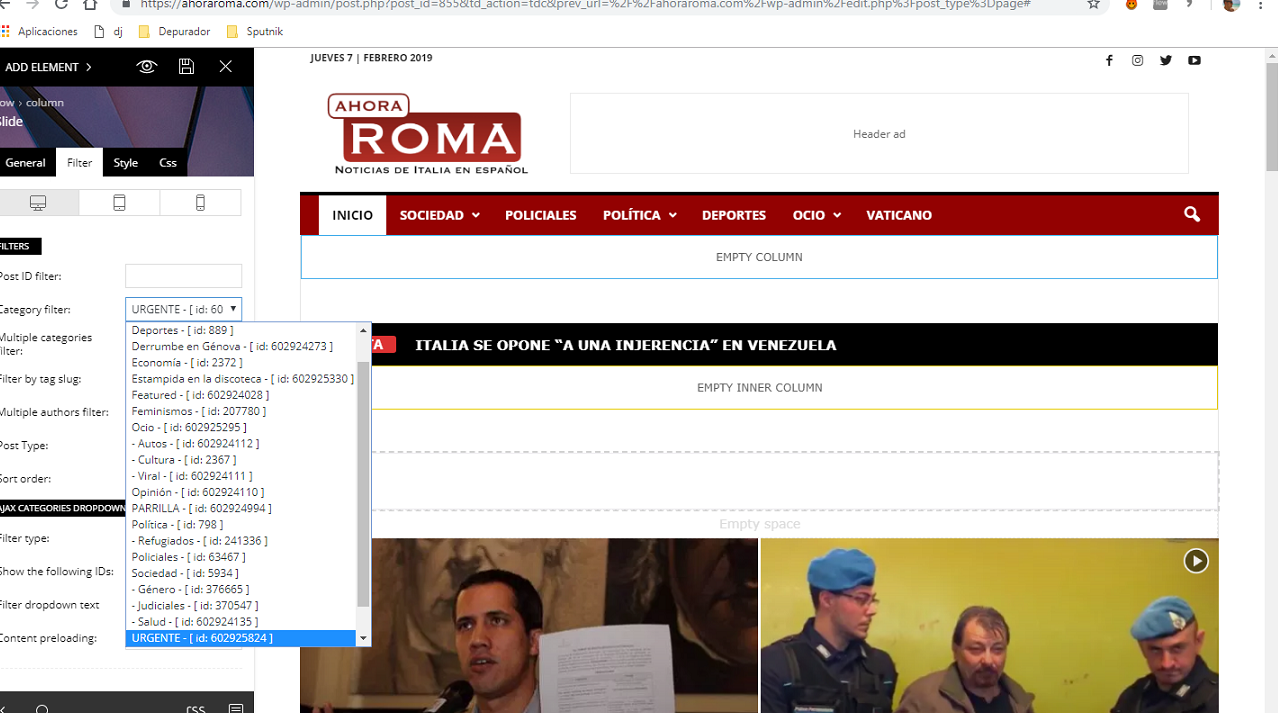
I have a problem with the slide box at my home. Screenshot
https://ahoraroma.com/wp-content/uploads/2019/02/slide.png
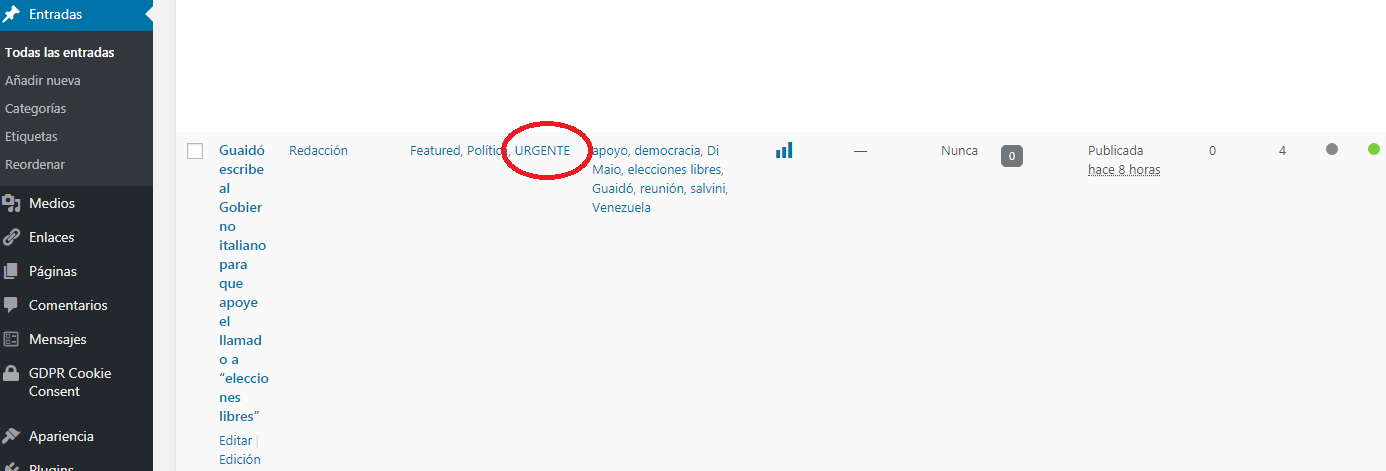
I have set the filter to show post under the ‘Urgente’ category, but it doesnt work. The funny thing is that if i choose any other category, the post goes on. I have tried to add a new element, to create a new category, but its impossible.
For ex, this post its in ‘Urgente’
https://ahoraroma.com/wp-content/uploads/2019/02/urgente.png
https://ahoraroma.com/2019/02/06/guaido-carta-italia-elecciones/
 RichFarina
So, I updated my Newspaper Theme to the 9.5 version using the FTP method with Filezilla and it totally changed the layout of the entire site. Plus it added code and it now looks nothing like it did before.
See it here: https://blog.truthentics.com/
I had a nice layout before with the posts in one column and the ads on the other. Plus I had the nice large post highlighted at the top showing the large feature images.
Now nothing like it.
I even re-installed the backup version and that’s not even the same.
How horrible!
Please advise.
Rich Farina
 NexusFred
 Hello,
“– All rows and columns have width settings. So in page and cloud templates where you can use the tagDiv composer, you can have custom widths.”
Yes in PAGE, not in POST
“- Regarding this gutter, I don’t exactly understand what it is supposed to do.”

“– The post title in cloud templates has padding and margin settings, all elements in the tagDiv composer have this in the CSS tab”
Yes in PAGE, not in POST
“– Regarding the reviews, you could create a review … Most if not all the elements can be saved once configured and re-used.”
Yes in PAGE, not in POST
“– For what element would you like to chnage the image size? Maybe there is a way.”
If I change the Content/Sidebar ratio to 75%/25% and the container width like this
.td-container{width:1114px !important;}
.td-pb-span8{width:75% !important;}
.td-pb-span4{width:25% !important;}
like you take a pre-sized image as Featured Image, this one will not have the correct width so I will need a new Featured Image size to fit the new content div size.
And I cannot use a CSS resizing because the Featured Image selected is smaller than the new content width, so it’s will be an enlargement CSS resizing who always provide a blurry outcome
“There are plans to add a scrollbar to the composer element list in coming updates.”
Great !! Thanks a lot, that will be very appreciated 😉
“The theme has predefined ad spots …”
Really you need to make a little survey of your competitors about that, your Ads system is really outdated and inefficient.
-No shortcode ad
-No default ad per category
-No Post ad override
-No Campaigns manager
-No Banners manager
-No Ad Blockers Fallback
“While the theme is compatible with the Woocommerce plugin, it doesn’t have specific settings for it like other themes that are built with this in mind. If you want to set up a shop and have questions let me know.”
I do not ask to Newspaper to be like Porto or Flatsome but some templates for it will be welcome. Do not forget that not all Newspaper build a website for the glory, they want also make money. It’s a little annoying to add a lot of “add_action” and “add_filter” into the functions.php just for some Woocommerce customisation.
Newspaper is real good theme, I like the Demos, his stability, but in one year I do not notice a significative evolution of his functionalities.
-No Header builder.
-No Footer builder.
-A non interactive Reviews system (readers can’t write their own reviews).
-A outdated Ad system.
-No Social Media Auto Publish.
-A complicated way to add Custom Posts.
-No dissociation between Custom Posts and Taxonomies.
-No Featured Image thumbnail in the POST list.
-No Smart Thumbnail Generator (choose the point of interest of the image).
Ok we can do all that with external plugins, but as you know more external plugins you have, more bugs you get. All this functions build by the Theme builder will work better than external ones.
Your builder is great but we do not build a new PAGE everyday, but POSTS !
Best Regards
Nexus
Simion C. Hi,
You can create HTML ads with a link containing an image, and use theme in the theme ad spots, here is a guide
– https://forum.tagdiv.com/using-other-ads-non-adsense-ads/
You can even use different ones per device as mentioned.
Thanks
 nikos mantis
Hello team im a new customer, purchased your theme and i have some issues.
I wrote also on comments but i didnt took a clear answer so i respond here.
Well my point is to create a homepage with full width and left sticky sidebar.Also in middle i want to bring other posts and right a sidebar i dont care to be sticky though.Thats what my layout i want it to be but the point is i cant create left sticky sidebar in full width with visual composer and if i try to switch to tagdiv composer it says that the page was not created by td composer and it loads infinetely.
So how can i achieve that?I saw that in options i can create smart sidebar on left for categories only but how i can do this for homepage also?
2)is it possible somehow to have hamburger menu on homepage?
Thanks for assist team !Have a nice day!
 simplyben
Love the theme so far by the way. But I’ve been working on this issue for a few hours now and couldn’t come up with a solution.
I created a custom post with a Cloud Template that I could use sitewide. Then using a wordpress plugin called Quick Adsense (I’ve also tried other plugins that do the same thing) I tried to place an ad after the 4th paragraph. The strange thing is that the ad shows up perfectly in any of the default and built in templates. But the ad will not show up at all in the custom template I built. Also, if i set the ad to show up at the end or beginning of the post the ad will work perfect in the custom template, but again if I set it somewhere in the middle of the post it will not show up at all.
So the ad just won’t show up in the middle of a post with the custom template.
Could this be caused by the custom templates not being able to be seen in paragraphs or something else?
I know you don’t support any of these other ad plugins, but why would it work fine in a default template and not in a custom one?
The reason I’m not using the built in ad box with the custom template is that on some posts I need to have the ad removed and this option is not available as of yet on a post by post basis.
Thank you for your time.
 lvivport
I made site with some changes in theme settings, blocks and widgets. After result was satisfied on my develope server for me and client I made a copy of site (files and DB) and uploaded to clients hosting and his domain. But now I have something wierd. I can’t see a lot of my changes. Theme is wite, but I use black style. There is no logo, no ads, no translations. What did I did wrong?
 sbconle
Hi all,
I’ve dug into these forums quite a bit and while I’ve seen other users with similar issues, I can’t find something that specifically addresses what I’m experiencing.
I have 93 pages with the error “Custom JavaScript is not allowed.” in my Google Search Console. One example of these pages is: https://rascalhoney.com/beauty/herbal-essences-naked-cleansing-conditioner/amp/.
I ran another page, http://rascalhoney.com/beauty/what-in-the-heck-is-a-nonzer/amp, through the Google AMP test tool and received the following result: The parent tag of tag ‘amp-auto-ads extension .js script’ is ‘div’, but it can only be ‘head’. Line 146:109 abs-icon”></i></div>”.
Another AMP validator returned this error: “The parent tag of tag ‘amp-auto-ads extension .js script’ is ‘div’, but it can only be ‘head’.” for the page http://rascalhoney.com/beauty/what-in-the-heck-is-a-nonzer/amp.
Perhaps these are associated with my Google AdSense code? This is a sample of the code that I have in the AMP > Ads section of the Theme Panel: “<script async custom-element=”amp-auto-ads”
src=”https://cdn.ampproject.org/v0/amp-auto-ads-0.1.js”>
</script>
<amp-auto-ads type=”adsense”
data-ad-client=”ca-pub-7727580238736205″>
</amp-auto-ads>”
I’ve tried to understand the associated help articles, but they’re a bit above my skill level. Can anyone break it down for me? Many thanks in advance for your knowledge + patience.
Calin Hi,
If you do not want to have ads in header all you need to do is to remove the code from Newspaper>theme panel>Ads> header ad -> https://www.screencast.com/t/9wgpPn5Ck5WK
Here is our documentation for Header ads -> https://forum.tagdiv.com/header-ads-adsense/
Using other ads -> https://forum.tagdiv.com/using-other-ads-non-adsense-ads/
Thank you!
 Inma
InmaHi! I disable some columns on home visual composer (like screencast) for mobile devices, but when I review it they continue appears.
Screencast: https://www.lasacristiadelcaminante.com/wp-content/uploads/2019/01/screencast.jpg
There is another method to hidden elements on mobile devices?
How could I do it?
Thanks, regards.
Calin Hi,
Ad codes for AMP will have to be entered in the dedicated AMP section, be sure to use the proper codes, for example for Adsense
– https://support.google.com/adsense/answer/7183212?hl=en
– https://www.screencast.com/t/vc3VzKSIEHTi
If you want to use another brand of Ads other than AdSense, notice that you need to access the header section of AMP and add the code of your Ad provider.
The amp header is found here: https://www.screencast.com/t/eSsRZ3cItk7u
AMP will work properly for pages created with the default WordPress editor if you want to use it for pages, not with page builder content. The main purpose of AMP is speed, not loading heavy pages with blocks and grids.
Of course, our plugin is optional, you can use other AMP plugins if needed. We will try however to improve it and add more options for it in future updates. Let me know if you have more questions.
Hope this helps!
Thanks.