
- NewspaperDesign your Post Pages using the Cloud Library Templates
- NewspaperDesign your post pages using the Default Templates
- NewspaperPage templates
- NewspaperCreate a form contact page
- NewspaperCloud Library Templates
- NewspaperCloud Library – Category Templates
- NewspaperHomepage – How to build and set it
- NewspaperPost templates
- NewspaperDefault post templates
- NewspaperCategory templates
- NewspaperPost template ads
- NewspaperSingle External Shortcode and External Shortcode
- NewspaperWP Rocket and Newspaper Theme: Optimization Guide
- NewspaperSearch setup for custom post type
- NewspapertagDiv Composer – Website Manager
- NewspaperBookmark – Save For Later
- NewspaperFlex Block Builder and Flex Loop Builder
- NewspaperModules Builder in Newspaper Theme
- NewspaperIntroduction to CPT and ACF with Newspaper Theme
- NewspaperCreate a frontend submission form
 Anamaria
 Hi,
You use a standard template, to have infinite loading, you need to use a Single Post Template.
Thank you!
 JohnTT
Hi , I´m having some issues with Woo commerce + Newspaper theme:
(Pictures: https://imgur.com/a/AOHUpvG)
1. Woo Menu Favorites is not counting items added to /Wishlist page (TI WooCommerce Wishlist plugin used).
Short code used inside column text element: [ti_wishlistsview].
Is there a way for this to work? Or how can I use the Woo Menu Favourites in a native way only using Tag Div Shop? Is there documentation on how to use this block?
2. Zoom not working on product images. The zoom button is present, but it only shows a normal slideshow gallery once pressed. Tried all common zoom plugins and none worked, it seems the theme is not compatible with them.
I know there´s a code floating around the forum regarding zoom. Is there a way to solve this without editing functions.php file? In case it isn´t, can you point me step by step how to edit this? I´m new to coding and don´t want to break my site.
3. Search results are eliminated once I change in Theme Panel the search template from the default – Theme Template – to a Cloud Library Woo search specific template. Curiously enough, the woo posts block still shows the correct results in composer editing mode, but not outside of it.
I´m using Relevanssi plugin, but this happens with it deactivated too, and their documentation says they should not have Woo commerce problems anymore since lasts updates.
Many thanks!
Jonatan
 liliaf
 Sorry, that wasn’t very helpful.
1. I publish about 5 stories a day. Instead of the most recent showing, I want the one marked sticky to show first.
2. I know how to use cloud/PRO templates but do not know which is the default template for pages such as https://vypeplusok.com/category/players-to-watch/ It is not the same as my global template for Categories.
 Bettina
 Hello @liliaf !
1. I don’t understand what you need to achieve. In your screenshot is a ID of only one post/article. That ID can be seen like this: https://prnt.sc/oIWX2VXPfgvQ
2. We recommend using cloud/PRO templates in order to have the possibility to edit them with the TagDiv Composer, which contains a lot of functions and features, Please check our tutorial here: https://forum.tagdiv.com/tagdiv-composer-tutorial/
More documentation about the cloud templates is here:
– https://forum.tagdiv.com/cloud-library-templates/
– https://forum.tagdiv.com/design-post-pages-using-cloud-library-templates/
– https://forum.tagdiv.com/cloud-library-category-templates/
Thank you!
Bettina Hello @msassanelli !
Yes, you can install 2 CPT templates in that section. You can assign which templates you like by accessing the page in the frontend, for example: https://prnt.sc/p5oTUmjLtnHM
Thank you!
 Calin
Calin Hello robbykasch,
I apologize for the confusion, I don’t know how the initial site should look, and the homepage looks pretty decent, even the logo element.
What please check is to make sure that all cloud templates are assigned as global as they were before the update – https://i.imgur.com/jKlgMuj.png
Also, make sure that all theme plugins that were installed before the theme update are still enabled (you can check/install theme from Newspaper > plugin).
If you want to restore a backup and you want we can make the update for you to be sure that everything will be ok.
Thanks
Anamaria Hello,
You need to edit with tagDiv Composer the cloud template/page, and you can remove the block with a right-click you can delete => https://www.screencast.com/t/BEJIVduVFyZ , or selecting the element and with drag & drop place into the deleting red zone from the bottom right of the page.
Thank you!
liliaf1. I need to find the Post ID filter for all sticky posts. I know how to do an individual post but not all sticky as shown here: https://imgur.com/a/4Z9k1gh
2. I also need to edit the default Category pages as shown here: https://vypeplusok.com/category/players-to-watch/. Here are images of my Global Category template and Date template https://imgur.com/a/NBgG71l
Please note that ‘allow_url_fopen’ directive is enabled as shown here: https://vypeplusok.com/php_test_fopen.php and here: https://vypeplusok.com/phpinfo.php
Please help.
 libertylens
 I am trying to remove ads from a template (the top of posts and category pages). I think they’re removed from the Home page, but they’re still showing up on other pages, even when I disable ads on a given post. How can I adjust that? Here is an example: https://libertylens.news/2023/08/zack-rackkovan/
Thanks,
Ken
 msassanelli
I use the version 12.4 of your Newspaper Theme. I have a question about the usage of Custom Post Type – Cloud Templates.
I have created a Custom Post Type “Interview”. For this Post Type I want to have at least two cloud templates. I can create them in the tab “Cloud Templates -> CPT/Taxonomies” where I can see a panel “Interview”.
My question is, how the author can select between them while writing the post.
Unlike standard posts, there is no option to select post templates in the admin entry page.
libertylens I am trying to remove ads from a template (the top of posts and category pages). I think they’re removed from the Home page, but they’re still showing up on other pages, even when I disable ads on a given post. How can I adjust that? Here is an example: https://libertylens.news/2023/08/zack-rackkovan/
Thanks,
Ken
 aitoolsjournal
Hi, I am using the newspaper theme with the new App listing demo. While customizing, the single app page URL appears like this: https://aitoolsjournal.net/tdcpt_app_listing/velocrm/
I want to rename this tdcpt_app_listing part but I am not sure how. I have looked into cloud templates and other options, including installing the CPT UI extension. However, since the custom post type of apps listings is a part of demo, i am unable to figure out how I can edit it.
Any help or guidance would be appreciated.
Bettina Hello!
If you are using a cloud template then you can build it by using a blank page template: https://prnt.sc/DU5Sdl3nIufZ
Thank you!
Anamaria Hi,
Using our theme, you can choose from 3 mobile versions; please check if you have the mobile theme plugin activated.
-> mobile responsive => https://www.screencast.com/t/oJ2ShOp47
-> mobile theme plugin => https://forum.tagdiv.com/the-mobile-theme/
-> mobile page => https://tagdiv.com/newspaper-10-3-7-update-brings-customizable-and-fast-mobile-pages/
Suppose you created the mobile pages with tagDiv Composer. In that case, when you install the Mobile Theme plugin, your pages will be overwritten by the plugin (the mobile theme comes with its templates for page, post, category, etc so your current templates from the desktop theme will get converted to the mobile theme layout, the page content is made without builders in mobile editor => https://www.screencast.com/t/xbgZG8kH also, the options that are provided to edit the mobile theme version are limited (this keeps the things simple)).
This is a video about Responsive Newspaper Theme, AMP & Mobile Theme, Mobile Pages & Templates -> https://www.youtube.com/watch?v=SpGkOnJeNZY
So, the mobile responsive is what you see then that you select the viewport on phone => https://www.screencast.com/t/matV17hH, so some settings may apply for each viewport(where is the border blue), and others are not(where the border is black).
The mobile page has the mobile templates from Cloud Library => https://www.screencast.com/t/YCcZ8rL8
Mobile responsive version of the theme and the mobile page editor can be edited with tagDiv Composer, the mobile theme plugin not.
For example, you can have the mobile theme plugin activated and use the mobile page/mobile responsive version for the homepage/pages, but for the categories pages/404 page you can’t use the mobile page/mobile responsive version if you have the mobile theme plugin activated.
So, if you want to design the pages with tagDiv Composer, you can use the mobile page or mobile responsive version.
Thank you!
Anamaria Hi,
Please tell me where it only appears on one page or the entire site. Did you add any code or elements from another plugin?
Please follow the steps from this topic https://forum.tagdiv.com/topic/error-at-zones-6models-1dom-the-model-does-not-match-the-content-currene/ if you have a child theme; please use the main theme.
You can try to revert an old revision on a page/template -> https://www.wpbeginner.com/beginners-guide/complete-guide-to-wordpress-post-revisions/
If there is still a problem, you can send us an email at contact@tagdiv.com and provide wp-admin and cPanel login. We will take a look at the problem and we’ll fix it. Include a link to this topic in the email.
Thank you!
Anamaria Hello,
You need to edit with tagDiv Composer the cloud template/page, and you can remove the breadcrumbs with a right-click you can delete => https://www.screencast.com/t/BEJIVduVFyZ , or selecting the element and with drag & drop place into the deleting red zone from the bottom right of the page.
Thank you!
 Sam194
 To add context. This has happened before for the Elementor editer. They had this article explaining it. https://elementor.com/help/the-edit-with-elementor-link-has-disappeared/
I would post a screen shot of my wp admin toolbar but I can’t paste in this support request text field?
Anyway, I really can’t move forward until I find a way to modify the single post templates, I can’t even set any that I select from cloud library, I don’t know where they go? (I understand that posts have to be written in the WordPress post section, I have 3 test posts there, these are showing in my template website. I can modify the pages well, I understand how to put a row in first, then drag elements needed into those. All is good there.
I just can’t work our why I have no ‘Edit with TagDiv Composer’ or ‘Single Post’ showing in the wp-admin toolbar. Once I get this resolved I can just go to an article, click edit with TagDiv and the post will open up in the tag div composer and I can tweak a few things. (I have spent nearly 2 days searching videos online for this, reading your Docs, and watching your Docs video explain it all, but I have no way in… lol)
Cheers
-
This reply was modified 3 years by
Sam194.
 ThrustMedia
 Secondly, this is also marketed as no coding skills needed. I’m not a developer, that’s why I use plugins and why plugins are built. I also had trouble with your CPT component for a basic submission page and had to search for a plugin that wouldn’t break with your template. Why put so much effort into building a product that breaks with basic WordPress plugins? Makes zero sense to me. Be upfront with potential customers about the limitations of this template. We are trying to run businesses here and not being upfront with the fact that basic plugins don’t work is beyond frustrating after months of trying to develop this site. It’s only costing me money at this point on top of the stress of running ads that are useless because the formatting of the site is screwed up when they click the link!
Sam194Hi,
I’m pretty new to the theme. I can modify pages by clicking the TagDiv Composer button fine. But the video showing how to modify single post template’s with the TagDiv composer, says go to an article on your site. And in the first video in this link in the Docs: https://forum.tagdiv.com/design-post-pages-using-cloud-library-templates/
I can see they have an Edit with TagDiv composer button and a Single-Template drop down menu in their wordpress admin toolbar at the top of the page. I have the wordpress admin toolbar, I’m the admin of my site and I’m logged in and I’m in an article on my site, but I don’t have any Edit with TagDiv composer button or Single Post drop down menu in my toolbar for some reason? So I can’t change any CSS of my website articles.
– I’m using FireFox browser
– I’ve cleared cache and relogged in
– I have the latest version of Newspaper and all plug-ins active
Any tips would be great, Thanks.
Sam
 Teachy
Hi,
I am struggling to setup my website by using a mobile page. I do not want to use the mobile plugin, since I find it not very flexible. I managed to figure out how to get a mobile theme, header and footer, but the follwing is happening:
When I edit the mobile page and save, the mobile template is seen on both desktop as mobile.
When I login again and edit the desktop version, the desktop version is seen on both tablet as mobile.
I clear cache every time and also when I am logged in it looks like everything is fine (mobile page on mobile and desktop view on desktop) But when I log out, i get the situation as described. It’s very slowly driving me insane and I would appreciate some insights and directions.
 PKramik
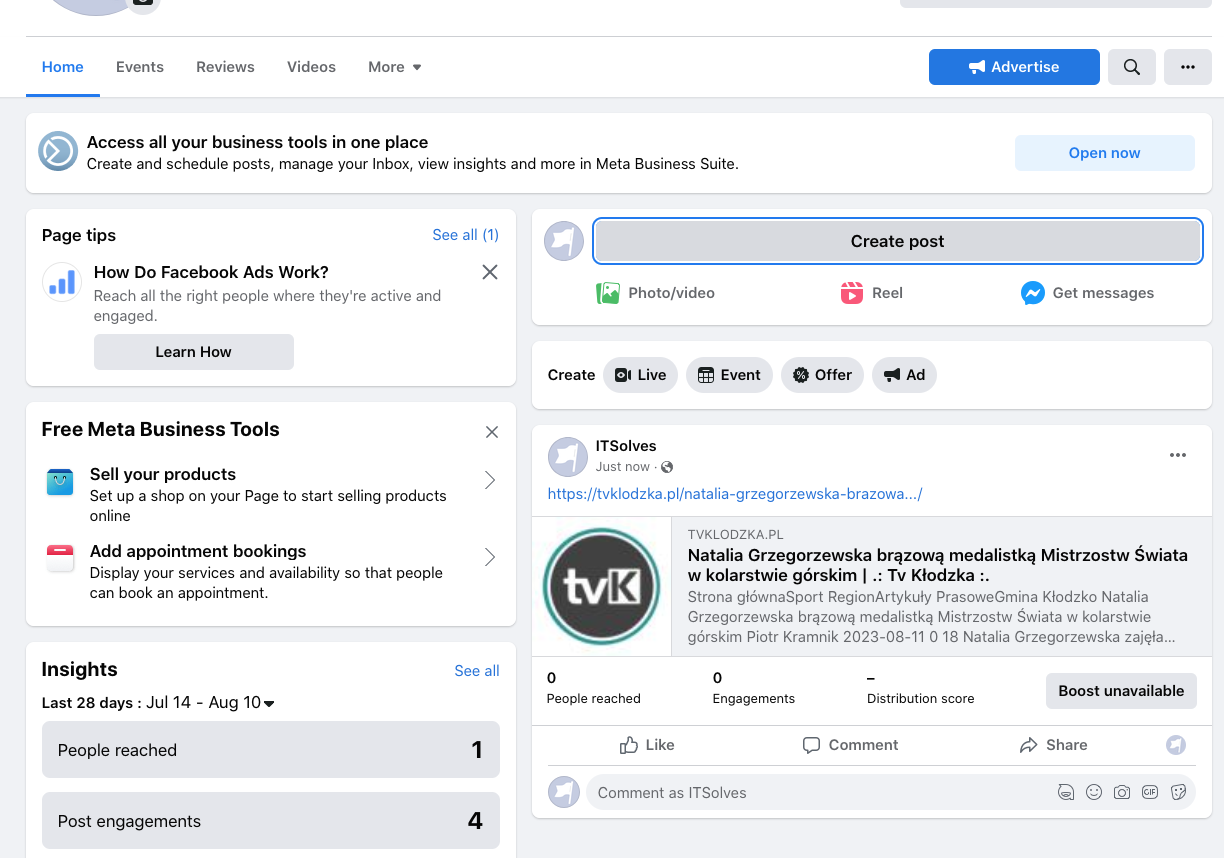
 I don’t think it’s a question of the size of the photos or illustrations. I noticed after adding a post on FB, only the logo of the page is loaded. There is definitely something wrong with the template. Because if I download the address from the demo site, it is displayed incorrectly, the logo is downloaded from our site. I am now adding two images, one shows adding a post and here is the image with news and the second one after adding to the FB page is just the logo of the page.
Create a post:

Added post:
Bettina Hello!
Actually, we have 3 options for mobile versions that you can use:
1. Responsive version: A responsive version of your website looks similar to the desktop version. TagDiv Composer is used to edit the page.Click on the mobile viewport: https://www.screencast.com/t/XDQJedlggSB. There, you can see your mobile version and edit or adjust the elements to look better.
2. Mobile pages: https://tagdiv.com/newspaper-10-3-7-update-brings-customizable-and-fast-mobile-pages
3. Mobile theme plugin: The Mobile Theme is a performance-optimized theme included in the main Newspaper theme that only loads on mobile devices. It comes with its own templates and designs for pages, posts, categories, etc., so your current templates from the desktop theme will get converted to the mobile theme layout. Please see https://forum.tagdiv.com/the-mobile-theme/ and https://forum.tagdiv.com/mobile-theme-introduction/ for more information.
A full explanation is here: https://www.youtube.com/watch?v=SpGkOnJeNZY
If you need to use the mobile version 1 or 2, then you need to uninstall the Mobile Theme plugin and AMP.
Thank you!
Calin Hi DanniBoi,
You’ll need to use only one builder per page, otherwise you’ll get errors like the one mentioned in the first message.
On pages you can make your own sidebar using the tagDiv Composer and setting the columns from row in 2, 3.. – https://i.imgur.com/5sbP640.png
Also, there are some page templates -> if you use an page template like Page Builder + Latest Articles + Pagination then at the bottom of the page it will be add a section with the latest posts that will use a sidebar made with widgets (from widget section).
Thank you!
Anamaria Hi,
You activate the mobile theme plugin, deactivate it, and clear the cache.
Using our theme, you can choose from 3 mobile versions
-> mobile responsive => https://www.screencast.com/t/oJ2ShOp47
-> mobile theme plugin => https://forum.tagdiv.com/the-mobile-theme/
-> mobile page => https://tagdiv.com/newspaper-10-3-7-update-brings-customizable-and-fast-mobile-pages/
Suppose you created the mobile pages with tagDiv Composer. In that case, when you install the Mobile Theme plugin, your pages will be overwritten by the plugin (the mobile theme comes with its templates for page, post, category, etc so your current templates from the desktop theme will get converted to the mobile theme layout, the page content is made without builders in mobile editor => https://www.screencast.com/t/xbgZG8kH also, the options that are provided to edit the mobile theme version are limited (this keeps the things simple)).
This is a video about Responsive Newspaper Theme, AMP & Mobile Theme, Mobile Pages & Templates -> https://www.youtube.com/watch?v=SpGkOnJeNZY
So, the mobile responsive is what you see then that you select the viewport on phone => https://www.screencast.com/t/matV17hH, so some settings may apply for each viewport(where is the border blue), and others are not(where the border is black).
The mobile page has the mobile templates from Cloud Library => https://www.screencast.com/t/YCcZ8rL8
Mobile responsive version of the theme and the mobile page editor can be edited with tagDiv Composer, the mobile theme plugin not.
For example, you can have the mobile theme plugin activated and use the mobile page/mobile responsive version for the homepage/pages, but for the categories pages/404 page you can’t use the mobile page/mobile responsive version if you have the mobile theme plugin activated.
So, if you want to design the pages with tagDiv Composer, you can use the mobile page or mobile responsive version.
Thank you!
 cyrille malher
hello,
my website : motorsmag.fr
in mobile version i don’t have the template like the desktop in responsive mode, why ?
look, in page template i haven’t mobile template, and mobile version of newspaper magazine pro cloud templates doesn’t exist ?
https://ibb.co/rxhwTZC
https://ibb.co/37t0HVy
thanks a lot


