
- NewspaperDesign your Post Pages using the Cloud Library Templates
- NewspaperDesign your post pages using the Default Templates
- NewspaperPage templates
- NewspaperCreate a form contact page
- NewspaperCloud Library Templates
- NewspaperCloud Library – Category Templates
- NewspaperHomepage – How to build and set it
- NewspaperPost templates
- NewspaperDefault post templates
- NewspaperCategory templates
- NewspaperPost template ads
- NewspaperSingle External Shortcode and External Shortcode
- NewspaperWP Rocket and Newspaper Theme: Optimization Guide
- NewspaperSearch setup for custom post type
- NewspapertagDiv Composer – Website Manager
- NewspaperBookmark – Save For Later
- NewspaperFlex Block Builder and Flex Loop Builder
- NewspaperModules Builder in Newspaper Theme
- NewspaperIntroduction to CPT and ACF with Newspaper Theme
- NewspaperCreate a frontend submission form
 salocharly
 Hi, I guess I was not clear enough to see this is the site I am trying to model after for better understanding:
https://lost-car-keys-replacement.com/audi/
https://lost-car-keys-replacement.com/audi/audi-80/
none of these are “category” pages or what you suggest ” taxonomies”
Each is a static page, page for Audi has general information about the brand (lot of text) and the models listed.
and the individual model pages have the relevant info on each model.
The question is there any way to generically nest CPTs? and also set custom page templates for each.
Thanks in advance!
 Anamaria
 Hi,
The forum topics provide 404 errors because you must copy the link not access it directly after a search as the bold tags that mark your keywords also get dragged in the URL making it invalid -> https://i.imgur.com/kzDQ3vk.png
You can try to import a Single Post Template and customize it with tagdiv Composer. -> https://forum.tagdiv.com/design-post-pages-using-cloud-library-templates/
To display the related articles or more from author, you can use Flex Block and filter it https://www.screencast.com/t/SEmxo13Fo2X -> https://i.imgur.com/YIg3nPP.png
Thank you!
 gozlist
 Hi,
I didn’t remove the button Read More, I just changed the post template as other display. So I still need to know how to remove the button Read More to customize in future.
BTW, this topic https://forum.tagdiv.com/topic/remove-more-by-this-author-related-articles-tab-on-posts/ return 404 page.
Thank you for your support!
 Bettina
 Hello @ezioboy!
A code in your frontend is appearing only when you have a plugin uninstalled when it should be installed, so instead of the code, it will display the element from that plugin.
Make sure you have the latest update of the theme and plugins, too. Check if all the necessary tagdiv plugins are active in Newspaper -> Plugins.
Yes, but wait until the new update comes because there was a problem with the social login. You can only log in with Facebook.
The TagDiv Composer contains a lot of functions and features; please check our tutorial here: https://forum.tagdiv.com/tagdiv-composer-tutorial/
More documentation about the cloud templates is here:
– https://forum.tagdiv.com/cloud-library-templates/
– https://forum.tagdiv.com/design-post-pages-using-cloud-library-templates/
– https://forum.tagdiv.com/cloud-library-category-templates/
Also, check out our video tutorials at https://www.youtube.com/c/tagdivThemes/videos
Yes, with cloud templates, you can import sections and various templates. You can assign a different template for each page. Access the page and choose from the list : https://prnt.sc/aDWGj9oH3ZIO
In the Cloud Templates, you can see a “+” sign, and there you can have access in order to add all the templates you want. Also, you can build it from scratch by importing a blank template. Please check out this video about how to create a website from scratch: https://www.youtube.com/watch?v=SoGQ0d5kIBg
If you don’t find a template from a demo, then it means that demo’s templates have not been uploaded yet.
I hope that helps you!
Thank you!
Anamaria Hello,
Depends, if you like only the same templates, you can import them from tagdiv Cloud Library -> https://forum.tagdiv.com/design-post-pages-using-cloud-library-templates/
-> https://forum.tagdiv.com/design-post-pages-using-default-templates/
-> https://forum.tagdiv.com/cloud-library-category-templates/
-> https://forum.tagdiv.com/cloud-library-templates/
Thank you!
 Stexs
StexsHi, I have a problem with displaying template settings when editing a page.
Before I could see “page template setting”, not now.
The blue tick is selected in the settings: https://imgur.com/a/fd2NL5r
Thank you
salocharlyhi there,
I have been trying to use the custom post types/taxonomies to create a structure for my website.
what I am looking to create is the following structure:
https://replacecarkeys.com/toyota/ (with a template for all brands)
https://replacecarkeys.com/toyota/corolla (additional template for models)
so I am really having a hard time making this reality. I don’t understand if the brand should be a taxonomy or a custom post type and what the model should be. I installed CPT UI and created a custom post type called brands.
The idea is to have a post template for the brands and for the models and fill it up manually.
I did try to create a template but is not connecting to the custom post type template (I added it to brands in CPT/taxonomies section)
https://replacecarkeys.com/brand/ford/ (still structure is incorrect)
https://www.screencast.com/t/f7MIB1MztN
https://www.screencast.com/t/Eu2K73erOrQ cpt setting
https://www.screencast.com/t/GjdWQat4U0S5 template a created
Thanks for any assistance on his matter.
Bettina Hello @ljunganbladet!
You need a 404 cloud template because you cannot edit the default one with the TagDiv Composer. Check in the Dashboard -> Cloud templates -> 404 template.
We recommend to use cloud/PRO templates in order to have the possibility to edit them with the TagDiv Composer which contains a lot of functions and features, please check our tutorial here: https://forum.tagdiv.com/tagdiv-composer-tutorial/
More documentation about the cloud templates is here:
– https://forum.tagdiv.com/homepage-how-to-build-and-set-it/
– https://forum.tagdiv.com/cloud-library-templates/
– https://forum.tagdiv.com/design-post-pages-using-cloud-library-templates/
– https://forum.tagdiv.com/cloud-library-category-templates/
Thank you!
Anamaria Hello,
Unfortunately, you cannot have a page template assigned to all your pages. However, you can copy and paste the elements to have the same design on all of your pages. Or, you can save elements or sections so you can import them easily on the other page. If you need text on a page template, then you should use column text or text with title element. “Column text” and “text with title” elements have a button called “edit content” and if you click on that button, the WP Editor will open, and you can add some text/code/shortcode there. Close the WP Editor from X, save the changes from Composer and view the page to see the changes. You cannot add custom text to each page as you can with single post content. You need to create each page with its own text in Composer.
Thank you!
Anamaria Hello,
Maybe you have installed a Prebuilt Website Pro, and the changes from Theme Panel will not apply to the Pro Prebuilt Website.
You can edit the pages and templates from the front end using tagdiv Composer.
Also, on our channel https://www.youtube.com/channel/UCOT1RiNysIPCTPSnVZskwtQ, you can find more videos that can help you and documentation https://forum.tagdiv.com/newspaper-theme-documentation/ and you can ask us here on the forum if you have any questions
Thank you!
 fconte174
 I don’t think we are on the same page (excuse the pun). I have made a mistake with a global setting. For some reason the desired heading (logo and lead advertisement) disappeared. I do not know how to restore it. I may have made matters worse when I imported themes (or templates) from Newspaper when I tried to correct the situation. I can’t seem to find Revisions in my posts.
 kbelimpassakis
 Thanks for replying, but i do not really understand what you mean.Maybe i did not explain well my point.
How i have to set up the child theme without loosing any data after an update?
I havent done any code modification to my child theme apart from adding the gtag code in functions.
I am asking about changes made to css, content and modicications to outlook through theme;s builder on templates that i added to cloud library.
Do i have to save these renamed templates (page,header,footer,author etc) in my child theme in order not be overwritten in a future update?Is this necessary?
Anamaria Hello,
Only with css, you can change it. You can import a Single Post Template that looks like the standard template -> https://forum.tagdiv.com/design-post-pages-using-cloud-library-templates/
Thank you!
Bettina Hello Antonio!
It seems that you use the Mobile Theme and AMP plugin.
I can see your hamburger menu, which is displaying well on your mobile version. Delete your cache and try again in an incognito window in your browser.
We have 3 options for mobile versions that you can use:
1. Responsive version: A responsive version of your website looks similar to the desktop version. TagDiv Composer is used to edit the page.Click on the mobile viewport: https://www.screencast.com/t/XDQJedlggSB. There, you can see your mobile version and edit or adjust the elements to look better.
2. Mobile pages: https://tagdiv.com/newspaper-10-3-7-update-brings-customizable-and-fast-mobile-pages
3. Mobile theme plugin: The Mobile Theme is a performance-optimized theme included in the main Newspaper theme that only loads on mobile devices. It comes with its own templates and designs for pages, posts, categories, etc., so your current templates from the desktop theme will get converted to the mobile theme layout. Please see https://forum.tagdiv.com/the-mobile-theme/ and https://forum.tagdiv.com/mobile-theme-introduction/ for more information.
A full explanation is here: https://www.youtube.com/watch?v=SpGkOnJeNZY
If you need to use the mobile version 1 or 2, then you need to disable the Mobile Theme plugin.
Thank you!
kbelimpassakishi there i made a fresh install about 2-3 weeks ago.
i installed a child theme from the first place.
a few days ago i saw that a new update was available.
i changed theme from child to newspaper theme and after i switched back the page layout stored in cloud library was set back to the original template used (i lost all the css and content hanges made).
i want to ask that it is a bit confusing for me the artcile relatively the child theme use if it is compulsory since using a child theme to copy the files (single templates etc) there in order not to loose changes made with editor to cloud library templates???
i m not sure after reading it in case somenones using child theme after an update the changes and the templates stored in cloud library will remain as they are, or they will change unless they are copied on achild theme files?
Can u please help me with that cause i do not want to loose all the work done in a future update or in case i revert to main.
finally, i am showing some deprecated api to the contact form i added, i do not know if it is noticed and u plan to fix it in future.
Bettina Hello @yagiz !
Unfortunately, there is no option to add text in multiple languages in that element. From what I know, the translation plugin has different templates with different languages, or they translate the entire page text.
Thank you!
Bettina Hello @aurelienmatte !
Unfortunately, you cannot have a page template assigned to all your pages. However, you can copy and paste the elements to have the same design on all of your pages. Or, you can save elements or sections so you can import them easily on the other page. If you need text on a page template, then you should use column text or text with title element. “Column text” and “text with title” elements have a button called “edit content” and if you click on that button, the WP Editor will open, and you can add some text/code/shortcode there. Close the WP Editor from X, save the changes from Composer and view the page to see the changes. You cannot add custom text to each page as you can with single post content. You need to create each page with its own text in Composer.
Thank you!
Anamaria Hi,
The mobile theme comes with its own templates for page, post, category, etc so your current templates from the desktop theme will get converted to the mobile theme layout, the page content is made without builders in mobile editor => https://www.screencast.com/t/xbgZG8kH also, the options that are provided to edit the mobile theme version are limited (this keeps the things simple)).
So, if you want to use the cloud templates, then you need to disable the mobile theme and AMP plugins, and then use the responsive version.
You can use cloud templates with AMP.
Also, please check this topic where I explained each mobile version -> https://forum.tagdiv.com/topic/mobile-version-not-working-properly-2/ and choose what mobile version you want.
Thank you!
Anamaria Hi,
The AMP works better only with the Mobile Theme plugin. From my point of view, if you don’t use the Mobile Theme plugin, then there is no reason or benefit to AMP. Please read all about AMP here: https://forum.tagdiv.com/tagdiv-amp-plugin-tutorial/
It comes with its own templates/design for page, post, category, etc so your current templates from the desktop theme will get converted to the mobile theme layout. Documentation here:
– https://forum.tagdiv.com/the-mobile-theme/
– https://forum.tagdiv.com/mobile-theme-introduction/
Please read all about AMP here: https://forum.tagdiv.com/tagdiv-amp-plugin-tutorial/
Note that you can not customize AMP so much, because it comes with its own design.
There are some settings in the Theme panel -> Mobile Theme and Dashboard -> AMP only.
You can not add a shortcode as in the TagDiv Composer. Please note that you can’t customize the AMP pages with the TagDiv Composer.
Make sure the redirect mobile visitors to amp option is disabled.
Please check this topic where I explained each mobile version -> https://forum.tagdiv.com/topic/mobile-version-not-working-properly-2/
Thank you!
Anamaria Hi,
You can’t edit the mobile theme. The mobile theme comes with its own templates for page, post, category, etc so your current templates from the desktop theme will get converted to the mobile theme layout, the page content is made without builders in mobile editor => https://www.screencast.com/t/xbgZG8kH also, the options that are provided to edit the mobile theme version are limited (this keeps the things simple)).
So, if you want to use the cloud templates, then you need to disable the mobile theme and AMP plugins, and then use the responsive version.
You can use cloud templates with AMP.
Also, please check this topic where I explained each mobile version -> https://forum.tagdiv.com/topic/mobile-version-not-working-properly-2/ and choose what mobile version you want.
Thank you!
Anamaria Hi,
Maybe you have the mobile theme plugin activated, please disable it. The mobile theme comes with its own templates for page, post, category, etc so your current templates from the desktop theme will get converted to the mobile theme layout, the page content is made without builders in mobile editor => https://www.screencast.com/t/xbgZG8kH also, the options that are provided to edit the mobile theme version are limited (this keeps the things simple)).
So, if you want to use the cloud templates, then you need to disable the mobile theme and AMP plugins, and then use the responsive version.
You can use cloud templates with AMP.
Also, please check this topic where I explained each mobile version -> https://forum.tagdiv.com/topic/mobile-version-not-working-properly-2/ and choose what mobile version you want.
Thank you!
 damir78
 this file is totally unnecessary.
td-composer/legacy/Newsmag/assets/css/td_legacy_main.css
It loads over 600Kb unnecessarily.
Most of that CSS is in the upper part of the site, which should be critical css.
The template knows a lot of problems for users who do not maintain pagespeed…
In the google search console, the website can get a rating of poor instead of good.
And then the ranking and the number of visits start to drop.
my new pagespeed result:
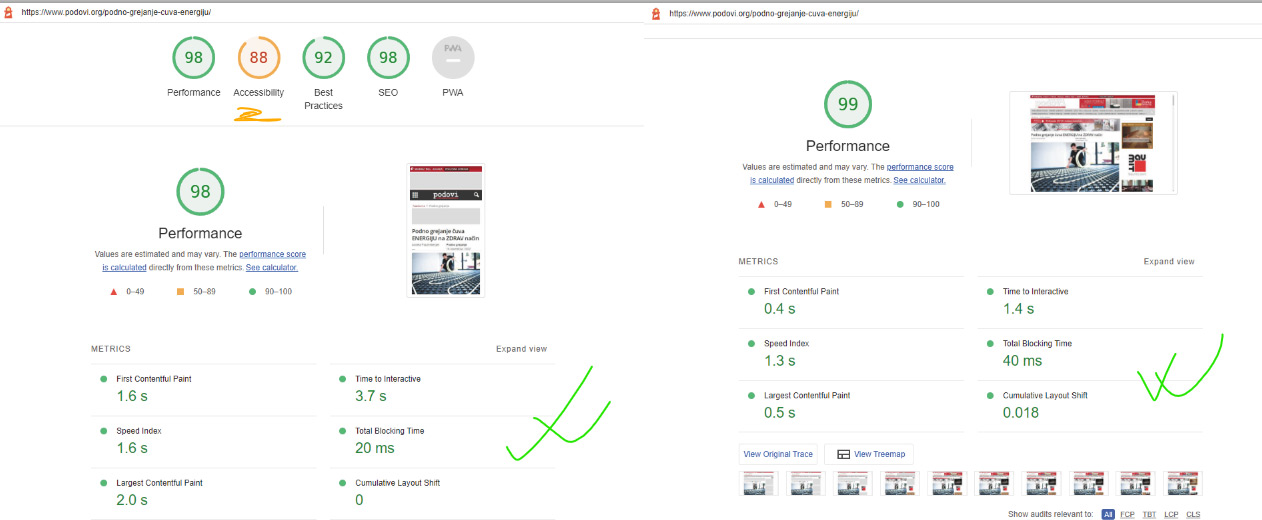

 Renu Bakshi
I can’t open any of my site’s posts. It gives the following error:
wp_booster error:
td_api_base::mark_used_on_page : a component with the ID: single_template_2 is not set.
/home/customer/www/justfitnesshub.com/public_html/wp-content/plugins/td-composer/legacy/common/wp_booster/td_api.php
Display backtrace
wp_booster error:
td_api_base::get_key : a component with the ID: single_template_2 Key: file is not set.
/home/customer/www/justfitnesshub.com/public_html/wp-content/plugins/td-composer/legacy/common/wp_booster/td_api.php
Display backtrace
 PeteMason
 Also on Post Loops, the date template Posts Loop from the cloud template in Magazine Pro seems to find all articles from 2022. But suppose I wanted a page for each year of our archives – could I do that?.
 sonicstadia
 Yes I did set the Support Templates for posts, and everything is working now… but most of the time the homepage doesn’t load on mobile, but other pages does… it’s not connection issues, I wonder what’s wrong
-
This reply was modified 3 years by
sonicstadia.


