
- NewspaperDesign your Post Pages using the Cloud Library Templates
- NewspaperDesign your post pages using the Default Templates
- NewspaperPage templates
- NewspaperCreate a form contact page
- NewspaperCloud Library Templates
- NewspaperCloud Library – Category Templates
- NewspaperHomepage – How to build and set it
- NewspaperPost templates
- NewspaperDefault post templates
- NewspaperCategory templates
- NewspaperPost template ads
- NewspaperSingle External Shortcode and External Shortcode
- NewspaperWP Rocket and Newspaper Theme: Optimization Guide
- NewspaperSearch setup for custom post type
- NewspapertagDiv Composer – Website Manager
- NewspaperBookmark – Save For Later
- NewspaperFlex Block Builder and Flex Loop Builder
- NewspaperModules Builder in Newspaper Theme
- NewspaperIntroduction to CPT and ACF with Newspaper Theme
- NewspaperCreate a frontend submission form
 Idevart
Hi,
I recently bought the WordPress Newsmag template I cannot use its page builder, instead I have an error that appears on the right side of my screen, here is what it says:
– (Error at rows : 5 (models): 1 (dom). The model does not match the content Current state has involved an issue. You could try an UNDO operation (CTRL + Z / CTRL + SHIFT + Z)).
On my home page, there is only the header and the footer of the template that appear.
 Bettina
 Hello!
You can only modify the footer with TagDiv Composer if you go to a page where it is assigned and edit that page with TagDiv Composer, and then you will have access to the footer also.
Also, it is normal to appear right there with no settings because those settings are for the default footer templates which you can not edit with TagDiv Composer. For example, if you will select there a default template you could see the setting on, but only for them and not for a PRO footer which is a cloud template.
Thank you!
-
This reply was modified 5 years by Bettina.
 Vlad S
 Hello !
The Mobile theme was specially designed for optimization on mobile devices. Unfortunately on mobile theme you cannot do much changes of design. If you want to have the same design as on desktop mode you can achieve that by simply disabling the mobile theme.
You will have to recreate your pages into the Mobile editor or completely disable the mobile theme. The mobile editor will not render shortcodes !
Also you can disable mobile theme on certain pages or posts by following this setting: 
Please take a look here: https://forum.tagdiv.com/the-mobile-theme/
Mobile theme plugin can be disabled from Newspaper Plugins as you can see here: https://www.screencast.com/t/LnkZCEVC
You are now able to create mobile viewport templates as you can see in our guide here: https://tagdiv.com/newspaper-10-3-7-update-brings-customizable-and-fast-mobile-pages/
! Atention ! If you are using mobile templates you will have to remove the mobile theme plugin and also at the moment AMP is not working with mobile templates.
Please note that at the moment the Support team is not 24/7 available. We answer the topics from Latest to Newest Monday – Friday from 08:00AM to 05:00PM GMT+2
Thank you !
 Calin
Calin Hi ozgunminare, according to our screen you are using a cloud footer template from tagDiv Cloud Library, this can be edited using tagDiv Composer and add the element in footer zone -> https://i.imgur.com/ik7EQb4.jpg
Hope this will help you!
Vlad S Hello !
Please note that tagDiv Composer is available on editing the pages and post templates. It will not work on editing the content. Let us know what exactly you want to achieve so we can guide you. Also it may be helpful if you peek our youtube short videos as you can see here: https://www.youtube.com/user/tagdiv
Thank you !
Calin Hi,
The mobile page is a new option, that we hope it will be better then responsive eversion and why not then mobile theme (for the moment this part is in developing), now the only difference is that you can create with tagdiv Composer the mobile pages and cloud templates for responsive version. Therefore is recommended to be use for the users that want to have a different mobile content/layout.
Thank you!
Bettina Hello!
It seems you have installed Mobile theme plugin. If you created the mobile pages with TagDiv Composer, then when you install Mobile Theme plugin, your pages will be overwritten by the plugin.
The Mobile Theme is a performance optimized theme included in the Newspaper main theme and it loads only for mobile devices. It comes with it’s own templates for page, post, category, etc so your current templates from the desktop theme will get converted to the mobile theme layout. For more details, please take a look here: https://forum.tagdiv.com/the-mobile-theme/
Better deactivate the plugin and see the results.
Thank you!
 Redlemon
 Hi Vlad,
Thanks for touching base. We managed to address those issues as well in the meantime, but thanks for the suggestion.
Thanks again for your input, and kind regards.
Edit (for other people who may be facing similar issues): We found out the footer and headers were overridden by the mobile pages created through the tag div composer (left hand side panel, top options). Once a mobile page is created, settings for those should be set separately through the cloud templates, and applied to those as well. At least that’s what did the trick in our case.
-
This reply was modified 5 years by
Redlemon.
 sejpost
I keep getting the following error every time I try to modify the “single post” page template:
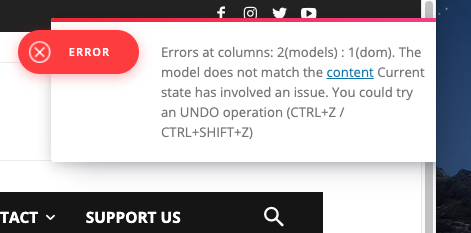
I see that many others are experiencing this issue. I’ve sent an email to contact@tagdiv.com with all the admin login info. Please help ASAP as we need to put in banner ads inline and cannot access the area at all to do this.
Thanks.
Bettina Hello!
A demo theme you should be able to edit with TagDiv Composer or set from Website manager which header or footer you need right there. Read more about TagDiv Composer here: https://forum.tagdiv.com/tagdiv-composer-tutorial/
If you created the mobile pages with TagDiv Composer, then when you install Mobile Theme plugin, your pages will be overwritten by the plugin.
The Mobile Theme is a performance optimized theme included in the Newspaper main theme and it loads only for mobile devices. It comes with it’s own templates for page, post, category, etc so your current templates from the desktop theme will get converted to the mobile theme layout. For more details, please take a look here: https://forum.tagdiv.com/the-mobile-theme/
Thank you!
Calin Hi,
If you want to disable the comments from pages, you can do it from here https://i.imgur.com/ZfjV6so.png, in order to be able to have comments in post, you need to make these settings -> https://i.imgur.com/83CnhKi.png -> https://forum.tagdiv.com/enabledisable-comments/ Also in your case you are using a pro demo and you need to edit the single post template from tagDiv Cloud Library using tagDiv Composer like this -> https://i.imgur.com/1kebAnv.png and add the single post comments where you want to have it -> https://i.imgur.com/i9pnmBJ.png
Hope this will help you!
Thank you!
Calin Hi mayaguez, you can not use the tagdiv Composer on your homepage, because this is blog (latest articles) set it from here -> https://i.imgur.com/abtKUPj.png only pages and cloud templates can be edited with tagDiv Composer.
Thank you for your understating!
Calin Hi Robert Turner, if you only want to change the social share then you need to do it from theme panel -> https://forum.tagdiv.com/design-post-pages-using-default-templates/ there were no option of this in tagDiv Composer.
For the rest of the problems, please make a full backed and make a test only with tagDiv plugins and main theme and if those options are still not working, then send us an email at contact@tagdiv.com and provide admin login, as well as cPanel. I will inspect the situations as soon as possible see what can be the problem. Include a link to this topic in the email.
Let me know the results!
Thanks you!
Calin Hi,
I see that the social share are displaying at the bottom of the article as in your screen -> https://i.imgur.com/DrJBX3z.png if you want to edit the social that will be display, then you need to do it from theme panel -> https://i.imgur.com/tcMbZTF.png -> https://i.imgur.com/c7SUyaV.png -> https://forum.tagdiv.com/design-post-pages-using-default-templates/
Please let us know the rest of the problems that you are facing with our theme and e’ll try to help!
Thank you!
Calin Hi,
The setting from theme panel will apply only if you are not using a pro demo (those are using cloud templates) and it should apply the global fonts from theme panel, but if you have some pages that were made with tagDiv Composer can have individual settings.
If the settings from theme panel are not apply, then you are using a pro demo, this can be edited using tagDiv Composer -> use the right click to remove the elements you do not want to have in your single post template -> https://i.imgur.com/1gAnLJW.png- > https://i.imgur.com/xCG0Z8h.png
The font can be change by selecting the element and in general tab or style tab you can set the fonts -> https://i.imgur.com/Q5jKCVA.jpg also using the manager you can see what fonts do you have on that page or template -> https://i.imgur.com/55UMHqU.jpg from there you can go on that element or you can change the font directly in manager.
Hope this will help you!
Thank you!
Calin Hi greenbooks,
That is a pre-build website -> https://forum.tagdiv.com/installing-demos/
What you can do is to make your own posts -> https://wordpress.org/support/article/writing-posts/ also that is a pro website, therefore it was created using tagDiv Composer and tagDiv Cloud Library for cloud templates. Therefore all pages and templates can be edited with tagdiv Composer builder -> https://i.imgur.com/IqjK0nX.jpg
You have some ore documentation for our theme here -> https://forum.tagdiv.com/tagdiv-composer-tutorial/ and here -> https://tagdiv.com/category/documentation/
Hope this will help you!
Bettina Hello!
It seems you have installed Mobile theme plugin, then your pages will be overwritten by the plugin.
The Mobile Theme is a performance optimized theme included in the Newspaper main theme and it loads only for mobile devices. It comes with it’s own templates for page, post, category, etc so your current templates from the desktop theme will get converted to the mobile theme layout. For more details, please take a look here: https://forum.tagdiv.com/the-mobile-theme/
If you want to display the responsive version on your mobile exactly like on desktop design, then you need to uninstall Mobile Theme plugin.
Thank you!
 Essentia
Hi, I’m trying to change the category filters on category pages so only the relevant content filters through, but when I change the filter it seems to be doing it to the global template and changing it on every category page please can you advise? Thanks
 GuillaumeFRK
Hi all 🙂 I need help to optimize the SEO of my site created with Newspaper.
Newspaper automatically integrates Hn titles (h2, h3, h4) on certain elements of the pages. But this is not always perfectly optimized unfortunately!
Example (https://image.noelshack.com/fichiers/2020/51/2/1608028428-articles-bas-page-jpg.jpg), I use Cloud Templates editor for my posts template (single), and I use “Block 3” element to display similar posts, and each post title is “H3”, I don’t want to display it in H3, juste simple text (span ou p). The “Custom title” is H4, instead of span ou p.
Other problem with “Flex Block 1”, for “Title tag (SEO)” we have 4 choice : H1, H2, H3 or H4, I want p or span (see : https://image.noelshack.com/fichiers/2020/51/2/1608028687-capture-d-ecran-2020-12-15-a-11-37-59.jpg) and all titles posts are H3, we can’t change that.
What I would like is to be able to keep the styles proposed by Newspaper for titles and subtitles, but keeping my hand on the Hn tags.
Thanks for help
 mikeadder1
Hello,
I use the Newspaper X theme and I like it. I am not familiar with tdv composer so please tell me how to customize the post template in a proper way.
This is the template I want to use,
https://walletguru.net/lawmakers-to-host-meeting-in-town-hall-on-missing-black-girls/ (single template 8)
but I am not able to add a sidebar widget like in a predefined layout
https://walletguru.net/how-to-make-money-online/ (single cloud template)
 msnsela
My mobile template is not working and saying—–
Invalid reply from server endpoint.
 Simion C.
 Hi,
Please provide an example, provide a link to each of the category pages, and mention with a few more details what you are doing to them.
Are you maybe using the same cloud template for both categories? If you are, then changes made in the template will affect both categories, since it is the same template used.
Let us know.
Thank you!
Simion C. Hi,
Widget sidebars can be created from a few places https://forum.tagdiv.com/sidebars-tutorial/ Then they can be set where needed. For the woocommerce pages the sidebars can be set in the theme panel -> template settings -> https://prnt.sc/w2fuai and they should be displayed correctly.
If there is a problem displaying a widget sidebar in the website, where you want to, let us know where exactly and we will try to help. Provide a link to where you want to display it as well.
Thank you!
 SVPrasad
In Flex Block Pagination Not Working
This is Normal Options : https://prnt.sc/w2ere8
After That i have selected Pagination is next and preview and I’m saved the template but not showing next and preview button : https://prnt.sc/w2et62
This is Page Not Showing Any Next And preview button : https://prnt.sc/w2euh3
and I’m settled load more button it’s work fine : https://prnt.sc/w2ew5y
public page : https://prnt.sc/w2ex6q
 Robert Turner
 Calin, we are clearly on different pages. Here is my issue which I posted again this morning.
The site may look fine to you however the social media share isn’t working. It is completely broken, we don’t have either Pinterest or Wahtsapp. Those are the only four platforms the plugin shows in the front end and the option to add any addresses in the Composer has been completely blanked out.
Our problem is the Composer. It refuses to add ANY image to a template or update the page settings. It only saves the header and footer, not the content, so we cannot make any changes to existing templates, new ones don’t work either.
The reason the sticky header is no more is that it won’t allow us to repair the header by adding an image back to the template, so I have had to disable it. Trust me this isn’t a plugin issue, we have disabled everything. Also, we’ve noticed that Profilegrid has lost some of its functionality since the TagDiv upgrade.
Again, we are WP latest version, tagdiv and PHP latest versions, 512k ram allocated. No other issues, site functions, but we cannot change anything using composer.
If we disable the Standard pack sections disappear of the site, new Pro sections that should be visible. Tried a pro template to see if that would make any difference as we are running on Medical one, no change, just crashed older pages.



