- NewspaperDesign your Post Pages using the Cloud Library Templates
- NewspaperDesign your post pages using the Default Templates
- NewsmagPage templates
- NewspaperPage templates
- NewspaperCreate a form contact page
- NewspaperCloud Library Templates
- NewspaperCloud Library – Category Templates
- NewsmagCategory templates
- NewsmagFooter templates
- NewsmagDefault post templates
- NewsmagPost templates
- NewsmagHomepage – How to build and set it
- NewspaperHomepage – How to build and set it
- NewspaperPost templates
- NewspaperDefault post templates
- NewspaperCategory templates
- NewspaperPost template ads
- Apitd_api_single_template::update_key
- Apitd_api_single_template::update
- Apitd_api_single_template::add
 Anamaria
 Hello,
This is not a mobile page; it is tagdiv mobile theme plugin, so please disable it.
Using our theme, you can choose from 3 mobile versions
-> mobile responsive => https://www.screencast.com/t/oJ2ShOp47
-> mobile theme plugin => https://forum.tagdiv.com/the-mobile-theme/
-> mobile page => https://tagdiv.com/newspaper-10-3-7-update-brings-customizable-and-fast-mobile-pages/ The option that you need to use.
Suppose you created the mobile pages with tagDiv Composer. In that case, when you install the Mobile Theme plugin, your pages will be overwritten by the plugin (the mobile theme comes with its templates for page, post, category, etc, so your current templates from the desktop theme will get converted to the mobile theme layout, the page content is made without builders in mobile editor => https://www.screencast.com/t/xbgZG8kH also, the options that are provided to edit the mobile theme version are limited (this keeps the things simple)).
This is a video about Responsive Newspaper Theme, AMP & Mobile Theme, Mobile Pages & Templates -> https://www.youtube.com/watch?v=SpGkOnJeNZY.
So, the mobile responsive is what you see when that you select the viewport on phone => https://www.screencast.com/t/matV17hH, so some settings may apply for each viewport(where is the border blue), and others are not(where the border is black).
The mobile page has the mobile templates from Cloud Library => https://www.screencast.com/t/YCcZ8rL8
The Mobile responsive version of the theme and the mobile page editor can be edit with tagDiv Composer, the mobile theme plugin cannot.
For example, you can have the mobile theme plugin activated and use the mobile page/mobile responsive version for the homepage/pages, but for the categories pages/404 page, you can’t use the mobile page/mobile responsive version if you have the mobile theme plugin activated.
So, if you want to design the pages with tagDiv Composer, you can use the mobile page or mobile responsive version.
Also, please check this topic https://forum.tagdiv.com/topic/amp-pages-not-working-well-with-this-theme/
Thank you!
 idove
idoveHello community,
I’m currently facing two specific issues with my website using tagdiv’s Newspaper and Magazine Pro templates, particularly with The Events Calendar. The main problem lies in a small detail within the tagdiv settings, and I’m unsure how to resolve it.
Additionally, we’re still dealing with the persistent error message in TD Composer: “Error at zones: 6(models) : 5(dom). The model does not match the content. The current state has involved an issue. You could try an UNDO operation (CTRL+Z / CTRL+SHIFT+Z)”.
Specifically, the issue revolves around adjusting the line in html code (F12 Developer):
<div class=”td-main-content-wrap td-container-wrap td_cl tdc-row stretch_row_content td-stretch-content”>
to:
<div class=”td-main-content-wrap td-container-wrap”>
If anyone has experience with this or suggestions on how to tackle it, I would greatly appreciate your assistance.
Examples:
https://www.mnovine.hr/dogadjaj/zabranjeno-pusenje-u-meta-baru-27-travnja/
https://www.mnovine.hr/dogadjanja/
Thank you!
 peters1964
Thanks for the last reply, however my problem is as follows:
I want to create a text post in a new page using the WordPress Gutenberg editor. I have previously installed a pre-designed template for the page.
However, my created “TestText” is not displayed correctly in the pre-designed template and is located under the pre-design template?
Where can I find the settings so that my texts for the new page are also displayed correctly in the pre-designed template?
Here is the link to the screenshot:
https://2024.mawi-westfalen.de/wp-content/uploads/2024/03/Screenshot-2024-03-04.png
Many thanks for your efforts
 Bettina
 Hello!
We have 3 options for mobile versions that you can use:
1. Responsive version: A responsive version of your website looks similar to the desktop version. TagDiv Composer is used to edit the page.Click on the mobile viewport: https://www.screencast.com/t/XDQJedlggSB. There, you can see your mobile version and edit or adjust the elements to look better.
2. Mobile pages: https://tagdiv.com/newspaper-10-3-7-update-brings-customizable-and-fast-mobile-pages
3. Mobile theme plugin: The Mobile Theme is a performance-optimized theme included in the main Newspaper theme that only loads on mobile devices. It comes with its own templates and designs for pages, posts, categories, etc., so your current templates from the desktop theme will get converted to the mobile theme layout. Please see https://forum.tagdiv.com/the-mobile-theme/ and https://forum.tagdiv.com/mobile-theme-introduction/ for more information.
A full explanation is here: https://www.youtube.com/watch?v=SpGkOnJeNZY
If you need to use mobile version 1 or 2, then you need to uninstall the Mobile Theme plugin and AMP.
Thank you!
Bettina Hello @discorigido!
If you use the cloud templates, then edit the mobile page or the mobile viewport: https://www.screencast.com/t/XDQJedlggSB and adjust that element in the tagdiv composer. Check the CSS tab of that element and delete all the values from there.
Thank you!
 oqt
oqtHello,
We imported a page template in a plain page using tagdiv editor.
When we click on the element that contains the text, the text is not displayed in popup editor. is this a glitch?
How we can use that element to add normal plain text?
Screenshot here; https://ibb.co/mN8hSc6
 Tech Lifestyle
Dear All,
we have next situation:
1. Displaying product images in search
In Woo Product Pages we have 3 different templates for 3 different product groups.
All three groups at the top of the visual have:
– Woo Product background Lifestyle image in the header, then
– Woo Product product image on a white background
1. For the 1st group, we want the Lifestyle photo to appear in the search,
1st Product group Template http://new.atv-nautica.com/product/sun-sport-230/
2. and for other groups of products, that a photo of the product on a white background appears in the search
2nd Product group Template http://new.atv-nautica.com/product/900dsx/
Do you have a recommendation for a solution?
2. Displaying product links from a group / series on the product page (a bit complicated)
This product exists in several versions.
http://new.atv-nautica.com/product/df-300-apx/
Each of these products has a separate page. I wouldn’t be able to define them as variations because they don’t just differ in color (Or maybe I’m wrong):
– same photo
– Same initial model designation (DF 300), with different ending (apx, apxx, btx)
– different specification
– different price
Example:
a. DF 300 APX – basic model
b. DF 300 APXX
c. DF 300 BTX
1. We want only the basic model to appear in the search
2. On the page of the basic model (DF 300APX), we want to have the option to “click to see” other versions of the model, e.g.
“See other versions: DF 300 APX / DF 300 APXX / DF 300 BTX”
Anamaria Hello,
We do not recommend setting two posts loop on the same page/template, because most of the settings from the first loop element will be set for the second one.
A workaround is to use flex blocks, and set the ads after each flex block and using the offset option -> https://forum.tagdiv.com/offset-feature/
Thank you!
Bettina Hello!
Set a global single cloud template in order to be automatically assigned to a new post. Please note that a single template cannot be assigned to a page, only to a post or article.
Thank you!
Anamaria Hello,
You can stretch the row like this -> https://i.imgur.com/QXIt4Gy.jpg or set the content width here -> https://i.imgur.com/oByDL6f.jpg.
To make the changes, you need to edit the Single Post Template with tagdiv Composer -> https://forum.tagdiv.com/design-post-pages-using-cloud-library-templates/
Thank you!
Anamaria Hello,
Now, you have the mobile theme plugin enabled.
For the Mobile Theme plugin, you can make changes from Newspaper -> Theme panel -> Mobile theme -> Header and for color and fonts from Newspaper -> Theme panel -> Mobile theme -> Theme colors/ theme fonts https://i.imgur.com/S8UQjVs.png
Also, to change the color for category please check here https://i.imgur.com/ivb0r38.png
This is a video about Responsive Newspaper Theme, AMP & Mobile Theme, Mobile Pages & Templates -> https://www.youtube.com/watch?v=SpGkOnJeNZY.
Thank you!
Bettina Hello @Ishola!
We have 3 options for mobile versions that you can use:
1. Responsive version: A responsive version of your website looks similar to the desktop version. TagDiv Composer is used to edit the page.Click on the mobile viewport: https://www.screencast.com/t/XDQJedlggSB. There, you can see your mobile version and edit or adjust the elements to look better.
2. Mobile pages: https://tagdiv.com/newspaper-10-3-7-update-brings-customizable-and-fast-mobile-pages
3. Mobile theme plugin: The Mobile Theme is a performance-optimized theme included in the main Newspaper theme that only loads on mobile devices. It comes with its own templates and designs for pages, posts, categories, etc., so your current templates from the desktop theme will get converted to the mobile theme layout. Please see https://forum.tagdiv.com/the-mobile-theme/ and https://forum.tagdiv.com/mobile-theme-introduction/ for more information.
A full explanation is here: https://www.youtube.com/watch?v=SpGkOnJeNZY
If you need to use mobile version 1 or 2, then you need to uninstall the Mobile Theme plugin and AMP.
Thank you!
Anamaria Hello,
You can try to revert an old revision on a page/template -> https://www.wpbeginner.com/beginners-guide/complete-guide-to-wordpress-post-revisions/
I think that your code for ads need to beset in the head section. Alos use the ad box, not the html element.
Please follow the steps from this topic https://forum.tagdiv.com/topic/error-at-zones-6models-1dom-the-model-does-not-match-the-content-currene/ if you have a child theme; please use the main theme.
Thank you!
Anamaria Hi,
Do you use the same header template for categories, tags, and authors? You can copy and paste the element from a page into templates where it is not the same menu in the viewport for the phone.
Thank you!
Anamaria Hello,
Please tell me where it only appears on one page or the entire site. Did you add any code or elements from another plugin?
Please follow the steps from this topic https://forum.tagdiv.com/topic/error-at-zones-6models-1dom-the-model-does-not-match-the-content-currene/ if you have a child theme; please use the main theme.
You can try to revert an old revision on a page/template -> https://www.wpbeginner.com/beginners-guide/complete-guide-to-wordpress-post-revisions/
Thank you!
 earthintransition
How do I specify which posts I want to appear on the home page. There are three elements on the home page: On the left, two posts; in the center, one post; on the right, four posts. And the right hand element is showing posts that are already on the left hand element. I can’t see how to change this.
The site is not yet on view, but it is at
https://sanctuarytimes.org/staging/5531/wp-admin/post.php?post_id=9&td_action=tdc&tdbTemplateType=page
 Laura
LauraHello,
I am currently using the same module with identical styles, including the spacing between modules, on various pages such as home, category, tags, and others. I’m wondering if there is a simpler way to globally modify styles instead of having to individually enter each template to change styles like module spacing.
I’m aware that there are global colors and fonts available. However, when I tried using variables for the module spacing, it didn’t work out well, as these variables can’t be applied negatively like normal pixel values.
Do you have any tips for me? It would save me a lot of time if I could change everything all at once.
Thank you for your assistance.
 booomcha
Hi there! I hope you’re having a great day!
I’m using the Urban Observer demo, and where the newsletter sign-up is, I put the WordPress subscription widget.
The problem with this is the top and bottom margins are too big.
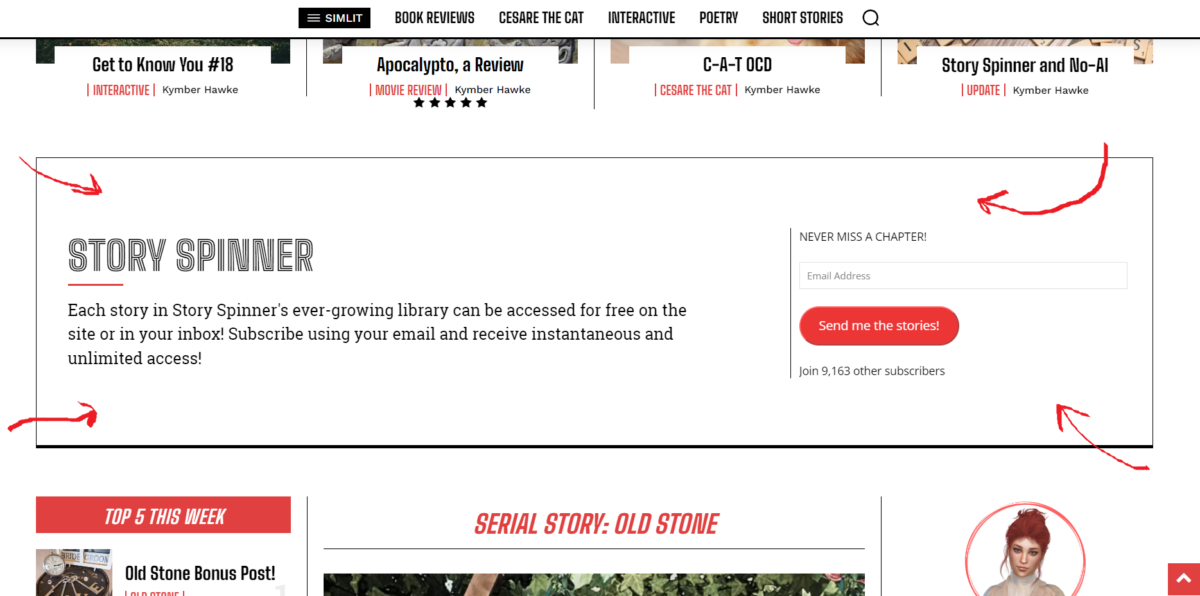
I’ve tried adjusting the margins in the cloud templates for the home page to no avail. I’m thinking the issue is to do with using a sidebar widget there, but I wondered if you had any suggestions to reduce the top and bottom margins?
Thank you.
My site is https://booomcha.com/
 smartgirlsearch.com
Hi,
I want to put a wpforms short code on a page. I cannot. TagDiv won’t allow it. Instead, I have to build a CPT UI type and use the external module option. The other option is to go into the “edit” option of the page, and click add form but then that triggers the page template with sidebar that I cannot remove for some reason.
Questions:
Why can’t I put an external shortcode module on a regular blog post or page within TagDiv?
Why does the column text edit content popup spin and spin? I deactivated all of the javascript and all the other plugins.
I’m hosting on GoDaddy and this description should be good enough to explain the problem.
What am I missing?
Thank you.
smartgirlsearch.comHi,
I want to put a wpforms short code on a page. I cannot. TagDiv won’t allow it. Instead, I have to build a CPT UI type and use the external module option. The other option is to go into the “edit” option of the page, and click add form but then that triggers the page template with sidebar that I cannot remove for some reason.
Questions:
Why can’t I put an external shortcode module on a regular blog post or page within TagDiv?
Why does the column text edit content popup spin and spin? I deactivated all of the javascript and all the other plugins.
I’m hosting on GoDaddy and this description should be good enough to explain the problem.
What am I missing?
Thank you.
 mande
mandeHello,
We are setting up Newspaper theme and found that the search page is not working.
We tried to import the fresh Search Template – Week PRO template using Cloud library but the search result is not loading correctly.
Can you please help?
Thanks
 Chris269
 Now when I try to change the single post template as your documentation says you can do, the page just comes up blank. So I cannot switch back and forth between single post templates as described.
Anamaria Hello,
You can import whatever template you like from the cloud template for header, footer, homepage, etc.
Check our documentation here: https://forum.tagdiv.com/how-use-tagdiv-cloud-library-templates/
You can change that color in the tagdiv composer: https://app.screencast.com/Zeot2ydVHgKZg
Edit your article with the TagDiv Composer; click on that element, and you can see those settings.
Also, you can global colors -> https://forum.tagdiv.com/tagdiv-composer-website-manager/
Please follow the video to see where you can find and build your sticky header on mobile and desktop too: https://www.screencast.com/t/l6v2Belt
Thank you!
Bettina Hello @eman!
We have 3 options for mobile versions that you can use:
1. Responsive version: A responsive version of your website looks similar to the desktop version. TagDiv Composer is used to edit the page.Click on the mobile viewport: https://www.screencast.com/t/XDQJedlggSB. There, you can see your mobile version and edit or adjust the elements to look better.
2. Mobile pages: https://tagdiv.com/newspaper-10-3-7-update-brings-customizable-and-fast-mobile-pages
3. Mobile theme plugin: The Mobile Theme is a performance-optimized theme included in the main Newspaper theme that only loads on mobile devices. It comes with its own templates and designs for pages, posts, categories, etc., so your current templates from the desktop theme will get converted to the mobile theme layout. Please see https://forum.tagdiv.com/the-mobile-theme/ and https://forum.tagdiv.com/mobile-theme-introduction/ for more information.
A full explanation is here: https://www.youtube.com/watch?v=SpGkOnJeNZY
If you need to use mobile version 1 or 2, then you need to uninstall the Mobile Theme plugin and AMP.
From my point of view, if you don’t use the Mobile Theme plugin, then there is no reason or benefit to AMP. Unfortunately, AMP is not working with the cloud templates because the AMP’s layout is not fully customized.
The AMP version works best with default templates and not cloud templates. That’s why we integrated it with the Mobile theme plugin.
The feedback from our clients about AMP was negative and it is not used anymore, that’s why we didn’t add more customization options.
Thank you!
Anamaria Hello,
When you have shortcodes on the pages and template, you need to check if you have the tagdiv plugins activated, like Composer, Cloud Library, Standard Pack and so on.
Thank you!