
No search results were found in Documentation!
 Calin
Calin Hi,
I do not quite understand very well your problem, you say that your website is made with theme “publisher” , and now you change the theme with Newspaper, and now you can not see some parts of WordPress dashboard.
If is so then there can be more possibilities
First please check the WordPress dashboard , see if you are the administrator
https://www.screencast.com/t/54FdRHanJ
Roles and Capabilities-> https://codex.wordpress.org/Roles_and_Capabilities
Also make sure that the theme system status is configured as mentioned in the requirements guide. Please follow the guide carefully
– https://forum.tagdiv.com/requirements-for-newspaper/
Also please contact your host and make sure that all servers requirements are well set.
Also of a better inspection please provide a link were I can inspect your website to see how is showing ( Thumbnails – Fix strange looking images on blocks )
Thank you for your understanding.
Calin Hi,
Please make sure that the theme system status is configured as mentioned in the requirements guide. Please follow the guide carefully
– https://forum.tagdiv.com/requirements-for-newspaper/
Is possible that your settings are not set as in the requirements
https://www.screencast.com/t/a4FX71p3yH
Thank you.
Calin Hi,
Most important, please be sure to check the updated theme requirements guide
– https://forum.tagdiv.com/requirements-for-newspaper/
Increase all the parameters if it’s the case.
WP_MEMORY_LIMIT try to increase it to a value of double you already have if possible.
https://www.screencast.com/t/sQswe1SWR
https://www.screencast.com/t/FswObjqqmr7
Thank you for your understanding.
Calin Hi,
Unfortunately I can not check your website because is in coming soon mode
Please make sure that you have the latest theme version and all requirements are proper set -> https://forum.tagdiv.com/requirements-for-newspaper/
Thank you.
Calin Hi,
Please make sure that the theme plugins are updated and activated
Also please make sure that you clear all cache, and if your image are not showing please deactivate lazyload
Most important, please be sure to check the updated theme requirements guide
– https://forum.tagdiv.com/requirements-for-newspaper/
Thank you.
Calin Hi,
Most important, please be sure to check the updated theme requirements guide
– https://forum.tagdiv.com/requirements-for-newspaper/
Increase all the parameters if it’s the case.
WP_MEMORY_LIMIT try to increase it to a value of double you already have if possible.
https://www.screencast.com/t/sQswe1SWR
If there is still a problem, you can send us an email at contact@tagdiv.com and provide admin login, as well as cPanel or FTP if possible. We will take a look. Include a link to this topic in the email.
Thank you.
Calin Hi,
Please make sure that the theme system status is configured as mentioned in the requirements guide. Please follow the guide carefully
– https://forum.tagdiv.com/requirements-for-newspaper/
Please make some tests activate only the theme plugins, clear all cache and try again, if the problem persist please change the theme with a default theme and see if the problem persist.
If the problem is still there please send us an email at contact@tagdiv.com and provide admin login, also cPanel or FTP if possible. Please include a link to this topic in the email.
Thank you for your understanding.
 Simion C.
 Hi,
@doktorjasper That code has to be entered in htaccess file, if you have similar problems please try it. It is provided in the theme requirements guide from above, many users reported that it solves the issues
– https://forum.tagdiv.com/topic/gray-page-tagdiv/
If maybe you cannot find the htaccess file, check some topics for example
– https://www.wpbeginner.com/beginners-guide/why-you-cant-find-htaccess-file-on-your-wordpress-site/
– https://www.shoutmeloud.com/how-to-edit-your-wordpress-htaccess-file.html
– https://my.bluehost.com/hosting/help/2139
– https://support.hostgator.com/articles/how-to-edit-your-htaccess-file
– https://www.inmotionhosting.com/support/website/htaccess/where-is-my-htaccess-file
Or contact the hosting provider and ask for help, they should be able to help you.
Thanks
Calin Hi,
In most cases the issue is caused by one of the cases below.
Could be caused by insufficient resources
– https://forum.tagdiv.com/requirements-for-newspaper/
In this case the hosting provider should be able to increase them.
Or it could be a security setting, module or firewall, as in this case where the theme panel was not saving any settings
– https://forum.tagdiv.com/topic/cant-save-theme-options-2/
Also if you use Wordfence try to set it on learning more
– https://www.wordfence.com/help/firewall/learning-mode/
If you already checked or tried these, we could take a look. Send us an email at contact@tagdiv.com and provide admin login, also cPanel or FTP if possible. Please include a link to this topic in the email.
Thanks
Calin Hi,
Please try to re-save the permalinks, go in Settings>Permalinks
https://www.screencast.com/t/mrI6iYKKONr5
Also make sure that the theme system status is configured as mentioned in the requirements guide. Please follow the guide carefully
– https://forum.tagdiv.com/requirements-for-newspaper/
Thank you for your understanding.
Calin Hi,
Please make sure that the theme system status is configured as mentioned in the requirements guide. Please follow the guide carefully
– https://forum.tagdiv.com/requirements-for-newspaper/
https://www.screencast.com/t/ZvHNhdQI
Please increase more the wp_memory_limit
Also please make sure that your connection to the internet is good.
Thank you.
Calin Hi,
Please make sure that the theme system status is configured as mentioned in the requirements guide. Please follow the guide carefully
– https://forum.tagdiv.com/requirements-for-newspaper/
and please increase all requirements that are lower.
https://www.screencast.com/t/FswObjqqmr7
Also please make a test change the homepage and try to edit it, if this works, after you edit it set it back.
Thank you for your understanding.
Calin Hi,
Please notice that this is a very old php version.
To run WordPress we recommend your host supports: -> https://wordpress.org/about/requirements/
try to make update to php at list 5.6 ( requirements ), please contact your host if you can not update the php version.
Thank you for your understanding.
Simion C. Hi,
So the footer page resets itself? I would suggest that you check the theme requirements to begin with
– https://forum.tagdiv.com/requirements-for-newspaper/
These would be recommended settings for the theme and theme plugins to function correctly, they should be set higher if possible.
WPML has these minimum requirements as well – https://wpml.org/home/minimum-requirements/
These accumulated, and with other plugins as well, may need higher requirements. Try to increase all the parameters mentioned in the guide to higher values, set the desired page again, then monitor the situation.
Also maybe there could be problems with the database, the theme panel settings are saved in the website database. Maybe your hosting provider can investigate if there are any issues with the database.
Simion C. Hi,
That is quite an an old theme version from which you are updating. Here you can find a changelog for each theme update, to see what has been modified, new features etc
– https://themeforest.net/item/newspaper/5489609 (bottom of the page).
Update guide if necessary here – https://forum.tagdiv.com/how-to-update-the-theme-2/
That error you mention is in most cases related to insufficient memory
– https://www.wpbeginner.com/wp-tutorials/fix-wordpress-memory-exhausted-error-increase-php-memory/
The theme requirements guide has been updated as well, please check it carefully and if necessary ask your hosting provider to increase the values of the parameters mentioned in it
– https://forum.tagdiv.com/requirements-for-newspaper/
For the WP memory we recommend a value of 256M.
After the update, deactivate/delete all the old theme plugins and install the new ones from the theme package plugins folder.
As a side note, the tagDiv composer will be automatically installed and activated after you update the theme. This composer could interfere with specific WPBakery elements or layouts. If that is the case, please disable it.
Also update WPBakery to the latest version if you use it (theme package contains version 5.6)
– https://forum.tagdiv.com/how-to-update-visual-composer-plugin/
The option to edit pages with WPBakery should appear same as before
– https://www.screencast.com/t/ag8uBzu2Hzx
– https://www.screencast.com/t/JhLAoUdzm
After you update clear all the website caches, CDN, browser cache. Let us know if you have problems.
Thanks
Calin Hi,
So after you update the theme to the latest version the theme panel will not save anything anymore? In most cases the issue is caused by one of the cases below.
Could be caused by insufficient resources
– https://forum.tagdiv.com/requirements-for-newspaper/
In this case the hosting provider should be able to increase them.
Or it could be a security setting, module or firewall, as in this case where the theme panel was not saving any settings
– https://forum.tagdiv.com/topic/cant-save-theme-options-2/
Also if you use Wordfence try to set it on learning more
– https://www.wordfence.com/help/firewall/learning-mode/
If you already checked or tried these, we could take a look. Send us an email at contact@tagdiv.com and provide admin login, also cPanel or FTP if possible. Please include a link to this topic in the email.
Thanks
 Bangormedia
 Thank you for the email. I have gone through all the plug ins. I disabled all of them and that yielded nothing. I also have increased resources so that they are way over the requirements and that id not work either. I really did try to remove the issue so that I did not have to bother anyone.
 ben.hinc
 Hello Catalin,
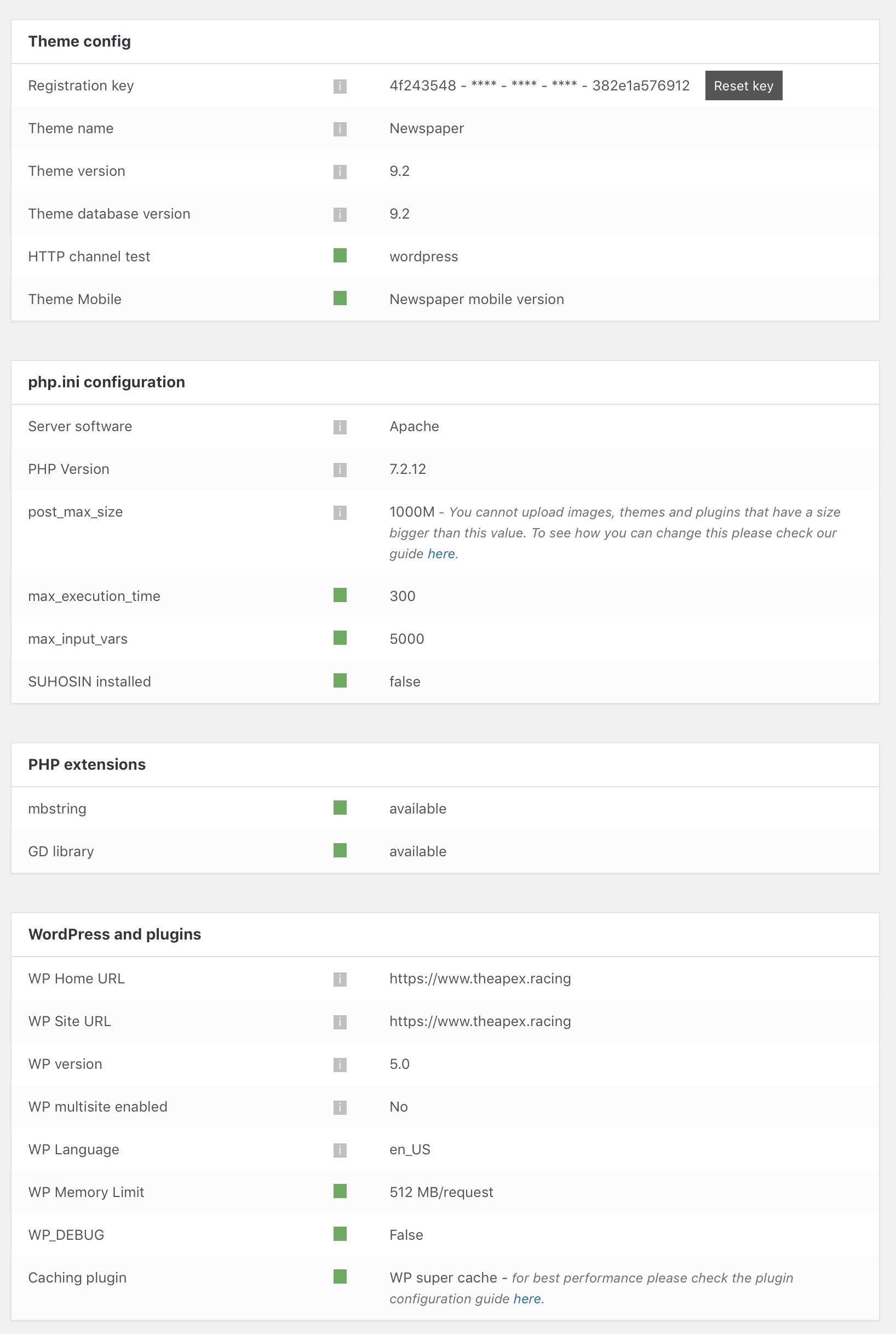
I have modified the memory limit and I’m still unable to save pages. The progress spinner just spins and the page is never saved. As I said previously, cloud templates save without any problem.
I have verified that everything in the theme status panel is green, which should mean that my site is meeeting all of the requirements as outlined in the link you provided above.
 Catalin
 Hi,
Notice that the Speed Booster is an optional plugin and if you are using another untested plugin with the theme, this plugin will be automatically disabled. The speed booster is an optional plugin and it is tested only with these plugins – http://screencast.com/t/hcjLnOqh4i2 and if you use other plugins it will be automatically disabled. A lot of people install the plugin without knowing what it does and after that, they add many plugins and some of them are not written fine so the developer took this decision. If you want to always enable speed booster, delete this code from speed booster file: http://screencast.com/t/RZLIOPUNdqh
Please notice that the speed of your website depends on how well your site is optimized.
Notice that is not a simple task and if you do not have any experience in this regard you will do not bring good results for the theme. Also, notice that we have a speed optimization tutorial but this is addressed only to advanced users. So, if you follow the steps which are presented in this tutorial here -> https://forum.tagdiv.com/how-to-make-the-site-faster/ you can increase the page speed loading and if you are not aware of the steps in this regard, please consider hiring a freelancer/developer to help you because the speed optimization services are not covered by our support policy, as you can read here -> https://forum.tagdiv.com/support-policy-2/ Check our documentation here -> https://forum.tagdiv.com/requirements-for-newspaper/ regarding on dedicated server to fit our requirements.
Unfortunately, our theme does not have such an option to minify the style.css file and we cannot recommend any plugins with this functionality because is not tested with our theme. For minifying this file, we are using CloudFlare for our demo and works fine. If you want to read other views from our users, please check this topic -> https://forum.tagdiv.com/topic/tip-how-to-easily-minify-your-css-without-breaking-your-site/
Also, check all of your Ad Spots and if you have entered any suspicious code through them, remove all of them and check the results without them.
One of our top members here on the forum wrote his own optimization tutorial here:
https://forum.tagdiv.com/topic/tutorial-chriss-custom-optimizations-for-functions-php-etc/ and here -> https://www.infophilic.com/get-almost-100-pagespeed-newspaper-theme/
Basically, these are the theme requirements
– https://forum.tagdiv.com/requirements-for-newspaper/
Another useful guide for increasing the page speed can be found here -> https://kinsta.com/blog/google-pagespeed-insights/
Thanks for your understanding!
Calin Hi,
Unfortunately I do not know what version of theme you have install, but please make sure that the theme system status is configured as mentioned in the requirements guide. Please follow the guide carefully
– https://forum.tagdiv.com/requirements-for-newspaper/
Also please make a test on subdomain or localhost and install the latest WP and Newspaper theme.
Thank you for your understanding.
Simion C. If the problem persists even after clearing all caching (browser cache, website cache, CDN etc) you could investigate plugins as well. Ultimately disable the theme lazyload for the time being, in the theme panel.
Please let us know if you should find anything that can help in our investigation.
@mscgluk The out of memory error would mean there is not enough memory, we recommend the values mentioned in the requirements guide
– https://forum.tagdiv.com/requirements-for-newspaper/
– https://www.wpbeginner.com/wp-tutorials/fix-wordpress-memory-exhausted-error-increase-php-memory/
Calin Hi,
Please do no post your credentials here.
Also make sure that the theme system status is configured as mentioned in the requirements guide. Please follow the guide carefully
– https://forum.tagdiv.com/requirements-for-newspaper/
Also your website is down, please contact your host .
Thank you.
Calin Hi,
If I understanding correctly, your theme disappear from WordPress dashboard.
First when is disappear please check the theme in Appearance if the theme is still there and what status have https://www.screencast.com/t/ZqmkDyLRroto
You can try to deactivating all non theme plugin and give it a try, is possible that some plugins to make some conflicts with the theme.
Also make sure that the theme system status is configured as mentioned in the requirements guide. Please follow the guide carefully
– https://forum.tagdiv.com/requirements-for-newspaper/
Thank you.
Calin Hi,
Maybe there aren’t enough resources available, the theme has these requirements for the server
– https://forum.tagdiv.com/requirements-for-newspaper/
If these are met the theme should work properly. If there are problems with the server you could check the error log. Most servers keep error logs.
Also check with the browser inspector console, potential errors will be displayed there. Maybe there are 404 errors, or resources that load slowly. Investigate plugins as well, could be a problem with a plugin you have installed.
If the problem is still there, please provide some more details and some screenshots would be very helpful.
Thank you.
Calin Hi,
Please make sure that the theme system status is configured as mentioned in the requirements guide. Please follow the guide carefully
– https://forum.tagdiv.com/requirements-for-newspaper/
https://www.screencast.com/t/ZvHNhdQI
Maybe you need to increase more the wp_memory_limit
Also please read this topic -> https://forum.tagdiv.com/topic/520-error-with-td-composer-after-updating-to-newspaper-9-1/
Thank you for your understanding.
