
- NewsmagRequirements for Newsmag
 Simion C.
 Hi,
If you have made fresh theme install and used only the latest version of the plugins provided in the theme package, the problem should not be present anymore. But I see nothing has changed at the moment, and the Big grid is still missing from the homepage. Try making a test page and add some elements from Visual composer in it, then save and check if there is any problem.
Also check the theme status – https://forum.tagdiv.com/system-status-parameters-guide/ and see if there are any modifications needed to be made according to the guide.
Thanks
 utzgurx
 Ok, I will talk to my host to php.ini issue, but now the main important thing for me is wp-config.php because I have 2 websites with the same error using Newspaper with Visual Composer and there is no way to change it.
I checked the system status in the theme panel (as I told you before after changing it) and nothing has changed after I added the line you told me.
Thanks
-
This reply was modified 9 years by
utzgurx.
 Bogdan B.
 Hello,
Yes it seems to be added correctly. You should see those values increased in the system status in the theme panel. Always check after you change a parameter.
If you cannot find php.ini, please contact your host as some hosts do not allow access to php.ini.
Thank you!
utzgurx Ok, no problem. Thanks. I created a new site starting from zero and have the same initial problem.
I am trying to follow this steps because I have some warnings in “Newspaper System Status”
https://forum.tagdiv.com/system-status-parameters-guide/
But when I open wp-config.php and php.ini I can’t find this lines to change. Any of them and I’m using edit>search to do it of course if you mind.
How can I fix this warnings then?
1) max_input_vars 1000 – the max_input_vars should be bigger than 2000, otherwise it can cause incomplete saves in the menu panel in WordPress. To see how you can change this please check our guide here.
2) 40 MB/request – We recommend setting memory to at least 64MB. The theme is well tested with a 40MB/request limit, but if you are using multiple plugins that may not be enough. See: Increasing memory allocated to PHP. You can also check our guide here.
Where must I change this then? Thanks
Simion C. Hi,
I do not know how are you getting these problems. Please note that Visual composer is fully supported with the Newspaper theme and we did not have any bad reports in this regard. There are no known incompatibility issues between the theme and Visual composer if used as recommended.
Conflicts can happen with other plugins, so please try and make a fresh theme install – https://forum.tagdiv.com/install-via-ftp/ and then test this while having only Visual composer active, and no other plugins. Also please consider that if you are using Visual composer on posts, this is not recommended and could provide unexpected issues.
The theme has these requirements – https://forum.tagdiv.com/requirements-for-newspaper/ and also some modifications to some parameters as mentioned here – https://forum.tagdiv.com/system-status-parameters-guide/
Thanks
Bogdan B. Hello,
Unfortunately any code added wrong will cause errors. You maybe missed a ‘;’ or a parentheses or anything else that can go wrong in a code. Please revert to the unmodified file and use the guide in order to increase your system status parameters.
Some rules must be added in not just modified on existing code.
You can also use htaccess for some of the parameters as specified in the guide.
Thank you!
Simion C. Hi,
Please check these parameters and make modification to them if required, as mentioned in this guide
– https://forum.tagdiv.com/system-status-parameters-guide/
This could be the reason for settings not saving or applying in some cases, and can be fixed by setting these values for the parameters.
Thanks
utzgurxI am trying to follow this steps because I have some warnings in “Newspaper System Status”
https://forum.tagdiv.com/system-status-parameters-guide/
But when I open wp-config.php and php.ini I can’t find this lines to change. Any of them and I’m using edit>search to do it of course if you mind.
How can I fix this warnings then?
1) max_input_vars 1000 – the max_input_vars should be bigger than 2000, otherwise it can cause incomplete saves in the menu panel in WordPress. To see how you can change this please check our guide here.
2) 40 MB/request – We recommend setting memory to at least 64MB. The theme is well tested with a 40MB/request limit, but if you are using multiple plugins that may not be enough. See: Increasing memory allocated to PHP. You can also check our guide here.
 Irreverent Gent
 Hi Simion,
I can confirm that my settings are set correctly in the Theme Panel, exactly as your example showed, but the font is still not displaying properly.
To illustrate the problem, here’s what the font should look like. This is how Playfair Display SC looks in the pop-up form builder I use:
https://www.irreverentgent.com/wp-content/uploads/2017/04/Screen-Shot-2017-04-02-at-3.07.38-PM.png
But here’s how it looks when it appears live on my site:
https://www.irreverentgent.com/wp-content/uploads/2017/04/Screen-Shot-2017-04-02-at-3.07.20-PM.png
I realize the difference is subtle, but the font is clearly not appearing as bold as it should, despite being set properly in the theme panel.
After looking at your system status parameters guide, I still don’t understand what, if any, changes I would need to make in order to solve this issue.
Again, the issue began after I switched to https. Any further advice or suggestions about what specific actions I could take would be greatly appreciated, because as of now the theme is not quite working properly.
Thank you for continued support on this – it is very much appreciated.
Dave
utzgurx I found this warning in yellow in System Status:
WP Memory Limit 40 MB/request – We recommend setting memory to at least 64MB. The theme is well tested with a 40MB/request limit, but if you are using multiple plugins that may not be enough. See: Increasing memory allocated to PHP. You can also check our guide here.
Could be related? I am not a programmer and don’t know how to use code as indicated in the guide.
How can I set the memory at 64? Any other way?
Or maybe its ok 40 and it’s not even related with the main problem.
🙂
 truth
truthHello,
the theme panel is not saving settings anymore. When I click on SAVE SETTINGS the OK symbol appears, as it should, but after I refresh the page everything remains as it was before.
I’ve already tried:
1) disabling cache on my browser
2) disabling all plugins
3) switching from the child-theme to the main theme (all my widgets sidebar settings are lost :'( )
4) updating the theme to the latest version
5) increasing my WP_MEMORY_LIMIT to 96MB
6) updated my .htaccess file following the guide here: https://forum.tagdiv.com/system-status-parameters-guide/
Plus, I’ve noticed when I use HTTPS connection on my website the theme settings goes on loop: when I click on SAVE SETTINGS the theme keeps loading infinitely: http://i66.tinypic.com/11ad4q0.png
 fenomeno0chris
 Thank you very much for your fast and extensive response!
1) The line appears after you visit some articles and scrolling up and down. I don’t know if its just my mac, but that would be weird, since all macs are using same safari browser.
Another weird thing I noticed: If im using Google Chrome browser, the big grid at the top of the site has this great animation (image gets zoomed in), if I move the mouse cursor over one article. On safari there is no animation at all. 🙁
2) I know that your theme has a custom login build in and Im already using it, as you can see (by the way it looks awesome). My problem is, that a user gets an email notification from WordPress after he registered on my site. In this email, he gets a link to set a new password. By clicking the link he gets redirected to this unpleasant site:
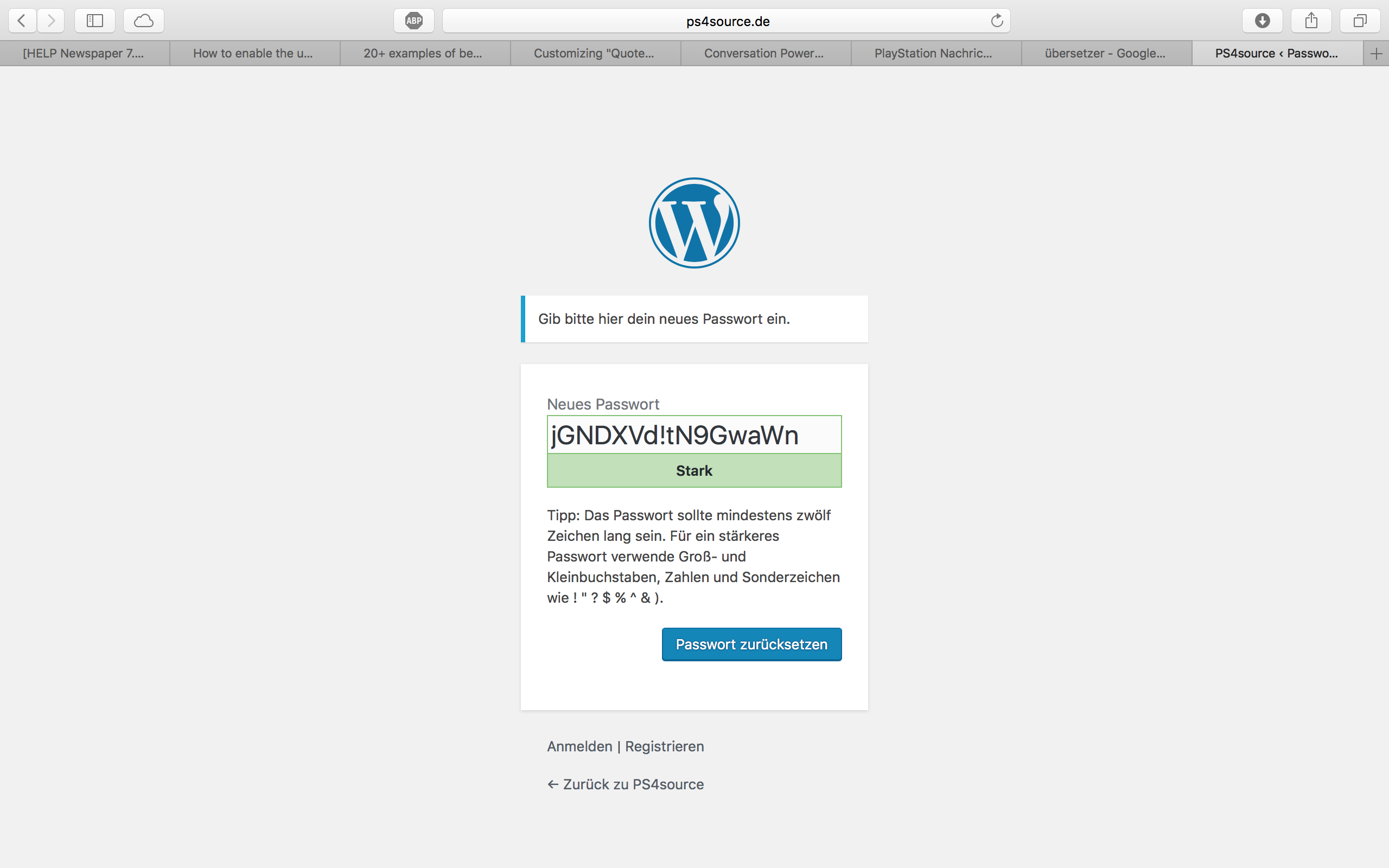
How can I change this registration process? Which plugin do you recommend?
2.1) Also Im using Disqus Comment System, as I mentioned before. Ive used my own button to let the users register without having to use a social media account. Unfortunately I don’t know the link address to open the beautiful login/registration window of newspaper7.
Right now it looks like this, which is not very beautiful:
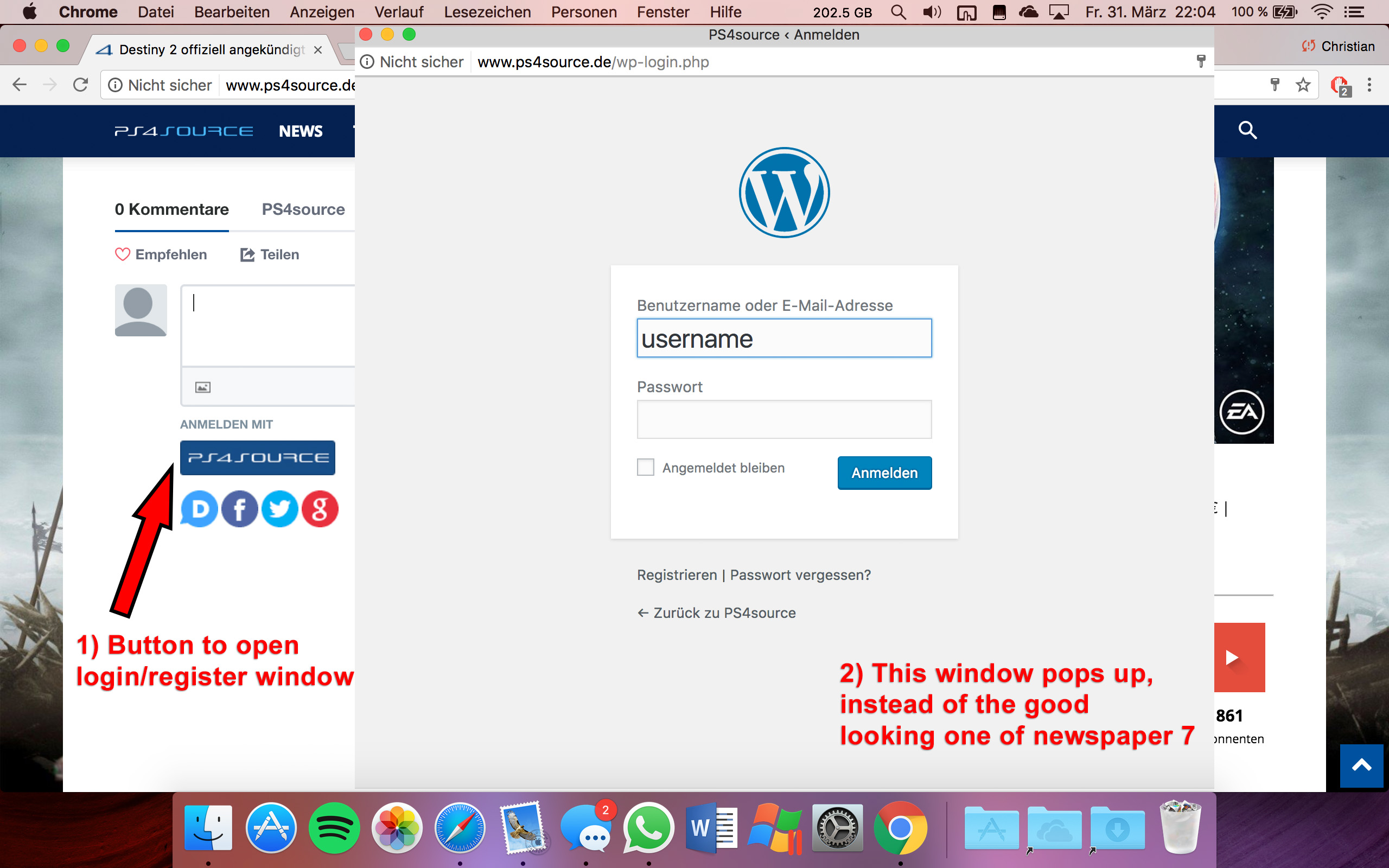
Disqus Button Code:
// Single Sign-on Integration

function dsq_sso_login() {
    global $current_site;
    $sitename = get_bloginfo('name');
    $siteurl = site_url();
    $button = get_option('disqus_sso_button');
    $sso_login_str = 'this.sso = {
          name: "' . esc_js( $sitename ) . '",
          button: "' . $button . '",
          url: "' . $siteurl . '/wp-login.php",
          logout: "' . $siteurl . '/wp-login.php?action=logout",
          width: "800",
          height: "700"
    };';
What should I enter at the url line, which is obviously responsible for the window?
3) CHECK
4) CHECK
5) Which Font do I have to use to get this vertical line on my quotes?
6,7,8) I do not know if I lost so many readers because the pagepeed has dropped or something else, but obviously I really want to get the numbers back to the state before I transferred to Newspaper7. Ive managed to increase the google pagespeed by reducing nearly all uploaded images. And I also read the Newspaper7 documentation to set the status parameters, the cache plugin and booster plugin as instructed. Unfortunately there are still some warnings, which should be solved as you can see here. Could you please help me, to get the best page speed as possible?
Should I change something on my .htaccess file?
# BEGIN WordPress
<IfModule mod_rewrite.c>
RewriteEngine On
RewriteBase /
RewriteRule ^index\.php$ - [L]
RewriteCond %{REQUEST_FILENAME} !-f
RewriteCond %{REQUEST_FILENAME} !-d
RewriteRule . /index.php [L]
</IfModule>

# END WordPress

# Deflate Compression by FileType
<IfModule mod_deflate.c>
 AddOutputFilterByType DEFLATE text/plain
 AddOutputFilterByType DEFLATE text/html
 AddOutputFilterByType DEFLATE text/xml
 AddOutputFilterByType DEFLATE text/css
 AddOutputFilterByType DEFLATE text/javascript
 AddOutputFilterByType DEFLATE application/xml
 AddOutputFilterByType DEFLATE application/xhtml+xml
 AddOutputFilterByType DEFLATE application/rss+xml
 AddOutputFilterByType DEFLATE application/atom_xml
 AddOutputFilterByType DEFLATE application/javascript
 AddOutputFilterByType DEFLATE application/x-javascript
 AddOutputFilterByType DEFLATE application/x-shockwave-flash
</IfModule>

# turns cache on for 1 month
<IfModule mod_expires.c>
ExpiresActive On
ExpiresDefault "access plus 1 week"
ExpiresByType image/jpg "access plus 1 week"
ExpiresByType image/jpeg "access plus 1 week"
ExpiresByType image/png "access plus 1 week"
ExpiresByType application/x-shockwave-flash "access plus 1 week"
</IfModule>

# gzip Compression if availiable
<IfModule mod_gzip.c>
 mod_gzip_on       Yes
 mod_gzip_dechunk  Yes
 mod_gzip_item_include file      \.(html?|txt|css|js|php|pl)$
 mod_gzip_item_include handler   ^cgi-script$
 mod_gzip_item_include mime      ^text/.*
 mod_gzip_item_include mime      ^application/x-javascript.*
 mod_gzip_item_exclude mime      ^image/.*
 mod_gzip_item_exclude rspheader ^Content-Encoding:.*gzip.*
</IfModule>

php_value memory_limit 256M
php_value max_input_vars 5000
php_value max_execution_time 300
php_value post_max_size 50M
php_value upload_max_filesize 50M
8) CHECK
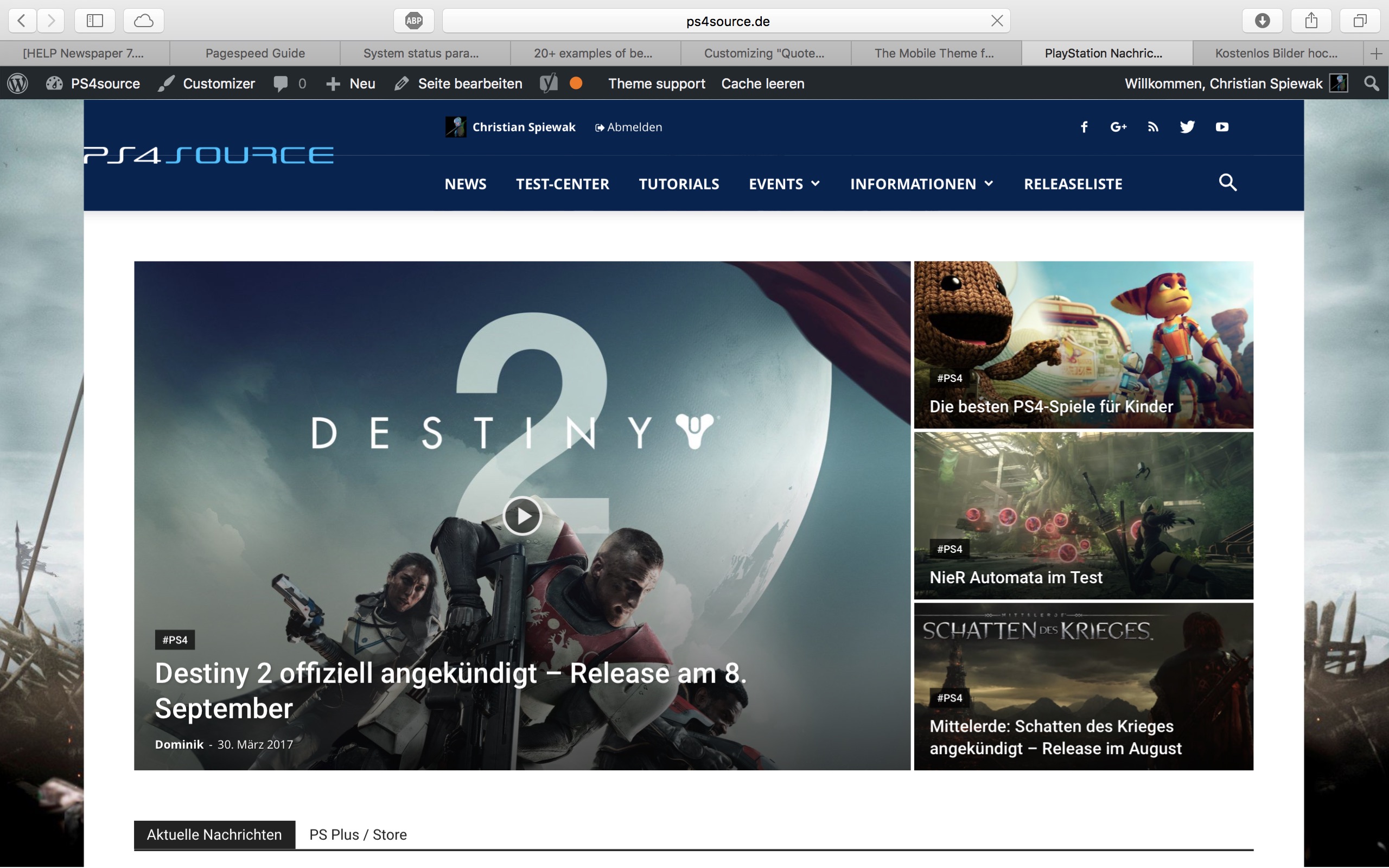
9) 
(link)
10) CHECK
11) [Newspaper->System status->php.ini configuration] I have this PHP Version 5.6.29-nmm1 (5.6 CGI). Is this ok?
-
This reply was modified 9 years by
fenomeno0chris.
Simion C. Hi,
Basically the theme has these requirements – https://forum.tagdiv.com/requirements-for-newspaper/ and modifications to these parameters as mentioned here if needed – https://forum.tagdiv.com/system-status-parameters-guide/
The theme is fully tested and works properly if these conditions are met. After you make these changes try deactivating all your plugins and activate Visual composer only, and check if you are still having these errors. Also test if this is happening while using a default wordpress theme as a test.
Thanks
 Catalin
 Hello Robert Rodziewicz,
It is possible to be a problem happen due to your system status. Ensure that it is setup according to our documentation here -> https://forum.tagdiv.com/system-status-parameters-guide/ Use only the plugins that come bundled with the theme core files, remove all your additional customizations (custom code) and check the results.
Clear all your caches and check the results.
Thanks for your understanding!
Catalin Hello ttalleur,
Please check your system status parameters to be according to our documentation here -> https://forum.tagdiv.com/system-status-parameters-guide/ Clear all your caches and check the results.
Thanks for your understanding!
 kaifanun
 hi, sorry to open this post back up again. I’m experiencing the same issue here. I have followed the instructions here https://forum.tagdiv.com/system-status-parameters-guide/ however, i’m still unable to insert images into the post. I’m also unable to insert logo using the theme panel. It seams like when I click save it is not saving.
any assistance appreciated.
-
This reply was modified 9 years by
kaifanun.
Catalin Hello muxurou,
Please notice that the speed booster is an optional plugin which can be activated in the same way as you install a new plugin.
The Speed Booster works only with the tested plugins. If you use other plugins, it will be automatically disabled, and I suggest to check this first in System Status. However there is a workaround to make it also work with other plugins, you can read more here – https://forum.tagdiv.com/topic/speed-booster-not-compatible-with-vaultpress/
Unfortunately, the time doesn’t allow us tot provide any custom and optimization services. We provide support only for the theme related issues based on Envato support policy – https://themeforest.net/page/item_support_policy I suggest to get someone to help you if you want to optimize your site.
Thanks for your understanding!
Bogdan B. Hello,
If you use wordfence, please set the firewall on learning mode first.
Then increase your system status parameters like so: https://forum.tagdiv.com/system-status-parameters-guide/
If this still does not fix it, please disable all plugins except visual composer, clear cache and reset cdn files if you use it. Please also check any custom code you might have added to the theme panel or the theme files. If you use a child theme, please switch to the main theme to make sure it does not affect the proper functionality of the theme.
Thank you!
Simion C. Hi,
We have not had any negative feedback regarding this. Please make sure that you use the latest version of the theme and the plugins bundled in the package.
The theme has these server requirements – https://forum.tagdiv.com/requirements-for-newspaper/ and requires modifications to be made to some parameters if needed – https://forum.tagdiv.com/system-status-parameters-guide/
It is recommended to use WP Super Cache – https://forum.tagdiv.com/cache-plugin-install-and-configure/ with the theme. There is also an available tutorial about improving website performance – https://forum.tagdiv.com/how-to-make-the-site-faster/
If you are saying that everything was fine before moving to the new host, maybe the problem is there since we have no complaints regarding this issue and everything is working as intended. Please let us know how it goes.
Thank you for understanding!
Simion C. Hi,
Please check these parameters and make the necessary modifications if required – https://forum.tagdiv.com/system-status-parameters-guide/ The translation should work properly if you are using the latest version. Also try this while having only the plugins bundled with the theme active, just to be sure that a plugin is not interfering with the process.
Thanks
Bogdan B. Hello,
Thank you for your appreciation.
1) I have tested your site on mac but could not see the line you mention. https://www.screencast.com/t/kHdvVpdbcJUN
2) Our theme has a custom login already which can be accessed on the front-end: https://forum.tagdiv.com/login-how-to-enable-user-registration/ – https://www.screencast.com/t/D0BiMNXRTqyG
3) sorry but there is no gradient color section for the header and footer but you can add a footer background image: https://www.screencast.com/t/rKgVA4TL
For the header it can only be done with custom css.
4) Sorry but only by using the obile theme can you have a separate menu for mobile devices.
5) The quotes can be changed from the fonts option: https://www.screencast.com/t/tcwLRz4daHU
6) and 7) It is ok as there are no restrictions in this regard. It will load all of the elements, yes, but you should not experience drastic loading speed drops. It is recommended to increase your overall loading speed by using this guide: https://forum.tagdiv.com/how-to-make-the-site-faster/ and increase your system status parameters like so: https://forum.tagdiv.com/system-status-parameters-guide/
lease only use wp super cache and these settings: https://forum.tagdiv.com/cache-plugin-install-and-configure/ if you plan on using a cdn server: https://forum.tagdiv.com/cloudflare-cdn/
8) This topic explains how to use speedbooster together with other plugins: https://forum.tagdiv.com/topic/tinymce-advanced-and-other-various-disabling-speed-boster/
9) Please provide an example as the image is not working
10) The validator also provides errors for ALL of the well known sites including google, facebook, Amazon, Yahoo, etc. We have stopped trusting it 🙂
Thanks
Bogdan B. Hello,
This could be a plugin conflict so please disable all plugins except visual composer, clear cache and reset cdn files if you use it. Please also check any custom code you might have added to the theme panel or the theme files. If you use a child theme, please switch to the main theme to make sure it does not affect the proper functionality of the theme.
Also make sure you increase your system status parameters like so: https://forum.tagdiv.com/system-status-parameters-guide/
Thank you!
Simion C. Hi,
Please specify where in theme panel are you making these changes to the font. For example if you want to change the article title on the article from the link in the post page, changes must be made like this in theme panel – https://www.screencast.com/t/eGY5v6j24 with this result in my case – https://www.screencast.com/t/KqZNUyXhU27j
A possible cause for this could be that some of these parameters are not set according to this guide – https://forum.tagdiv.com/system-status-parameters-guide/ You can check this in the theme system status.
Please let us know how it goes.
Thanks
Simion C. Hi,
Basically the theme has these requirements as specified here – https://forum.tagdiv.com/requirements-for-newspaper/ in order to get the best results. Some further modifications are recommended to be made according to this guide – https://forum.tagdiv.com/system-status-parameters-guide/
If all these simple conditions are met it is recommended to use a caching plugin and the CDN as mentioned in the previous reply. Also a tutorial about improving page loading speed is available here – https://forum.tagdiv.com/how-to-make-the-site-faster/ meant to help you optimize website speed.
Some of these recommendation are not mandatory and a website can work properly without them. Please note that some plugins can have a negative effect on websites and cause unexpected results, so you should test this using only the latest version of the plugins, provided in the theme package.
Thank you for understanding!
Catalin Hello STEFEN1,
First of all, check your system status parameters to be according to our documentation here -> https://forum.tagdiv.com/system-status-parameters-guide/ If the problem is still there, please send us an email at contact@tagdiv.com with your log-in information (wp-admin) so we can further inspect it closer your setup page. Provide there the link to this topic so we can easily identify you.
Thanks for your understanding!



