
- TutorialsSystem status parameters guide
- NewspaperUser review system
- NewspaperHow to use the Flex Blocks cache option
- NewsmagRequirements for Newsmag
- NewspaperRequirements for Newspaper
 Bogdan B.
 Hello,
Please check your system status parameters and make sure they are set to the recommended values: https://forum.tagdiv.com/system-status-parameters-guide/
You can also check the post title to make sure you do not have any ‘special’ characters set to it. !@#$%^&* will cause wordpress to glitch. Please also check the issue on other posts not just the one, to check if all of them behave like this. Also check pages as well.
If it still won’t work, then please send an email at contact@tagdiv.com and provide wp-admin so we can take a look. Please also include a link to this topic.
Thank you!
 beermoney
 Alright, I finally got everything in the System Status increased and in the Green. But, its still not using the sidebar on the Podcast Episode posts.
I have the right sidebar selected, and its showing right sidebar in the post editor

But when published….no sidebars.

I have sidebars working in other areas where I was having troubles before….but still have issues with these podcast pages.
Bogdan B. Hello,
You can test this in a localhost wordpress (not server-side). It can be created like so: https://premium.wpmudev.org/blog/how-to-install-wordpress-locally-for-pcwindows-with-xampp/
But before that, you can try one more thing. Please check the system status parameters here: http://screencast.com/t/DrDgNkcGee and make sure they are set properly: https://forum.tagdiv.com/system-status-parameters-guide/
Thank you!
Bogdan B. Hello,
These issues can come from your system status parameters. Please check your system status here: http://screencast.com/t/z9DGWDEmpKFR
You can follow this guide to increase the values: https://forum.tagdiv.com/system-status-parameters-guide/
These settings are important and must be increased (green status) as they are a theme requirement.
If the problem is still there after you get all the options green, you can also try it without any plugins. Disable all of them except visual composer and check your sidebar again.
I hope this helps.
Thank you!
Bogdan B. Hello,
This maybe has something to do with your WP settings.
Please first try to disable all your plugins except visual composer and clear your cache. If the problem is still there, you need to check the system status settings and try to get all the options green: http://screencast.com/t/z9DGWDEmpKFR
You can follow this guide: System status parameters guide
These settings are part of the theme requirements and should be adjusted.
Let us know how it goes.
Thank you!
Bogdan B. Hello,
We are sorry for the inconvenience of the update, First of all, did you run the update script? That is an important step If you updated from version 4 to the latest version, the update script must be run for the shortcodes to change. Unfortunately the update script was removed in the current version and we will have to provide it via email. Please send an email at contact@tagdiv.com and provide a link to this topic so we can provide the update script in order for you to run it. Please also provide a link to your website as all your requests must be done on your website (we cannot recreate the issues on our end) and also include a link to this topic.
I will try to answer the questions that do not involve access to your website
1) You can change the title for big grid 2 by using this css:
.td_module_mx9 .td-big-grid-meta h3{

font-size:20px!important;

}
2) you can deactivate these features for the whole website from here: http://screencast.com/t/7O9whCMbZ , but this also removes the meta from the post as well. If you only want to remove it from that particular big grid, you can use css to do it like so:
.td_module_mx9 .td-module-meta-info{
display:none;
}
3)The zoomong effect is handled by the lazyload animation. In order to remove this effect you need to change this setting:
http://screencast.com/t/CQazK7EQB3Zw
4) we need a link to inspect it.
5) The theme does not stretch images to fit the container, it only crops images. In order to get your image to fit the container you can either upload bigger images or use the thumbnail upscale plugin.
6) We need a website to inspect and an example of what padding you need to adjust
7) We need to inspect the issue.
8) The cause could be the system status parameters. Please try to get all these options green like so:
http://screencast.com/t/z9DGWDEmpKFR
You can follow this guide to do it: https://forum.tagdiv.com/system-status-parameters-guide/
Thank you and sorry for the inconvenience.
 weirdo261
 Thanks a lot for your support.
So I managed to change it to 96 and it’s reported correctly on the System Status page.
When I click on Backend Editor, this is all I see.
http://www.otrodiaotrodolar.com/bites/TROUBLESHOOT.PNG
Please note the “waiting” gif just under the “visual composer” label and a little bit below, a Plus sign. That is the result of me adding a ROW, but nothing happens so I can add objets to it.
The waiting gif just goes on forever
weirdo261 So I have placed the following line on my wp-config.php
define( ‘WP_MEMORY_LIMIT’, ’96M’ );
And uploaded it. However, the system status tab still says 64 MB, how can I “flush” the settings?
Thanks!
 simchris
 Changelog files are usually in the all files download zip (newspaper-tf) and always have been. 🙂
=== note files “update_log.txt” and “changed_files.html”
(granted they have forgotten to update these couple of times; but almost *all* theme developers that don’t suck include changelog with download, as do most plugin authors worth their salt)
REF;
[ Version 2.3.3]
– fix: pagination was not working on categories with big grid disabled on WordPress 4.4
[ Version 2.3.2 ]
– new social counter version. Facebook requiers now an API key, read more here: https://forum.tagdiv.com/tagdiv-social-counter-tutorial/
[ Version 2.3.1 ]
– new: added http channel test status in the system status panel. You can now check if the theme is able to get the tweet count, like count etc from your host.
– improvement: added the new google ads sizes to the panel
– fix: sorting bug on custom page loops
– fix: removed unused code from the theme + theme panel. We shipped the weather widget code by mistake. The widget is not ready yet.
– fix: the documentation url for demos was wrong in wp-admin
– fix: error that was showing up in logs when the theme panel was saved
– fix: we updated the ads links to point to the right documentation
================
Bogdan B. Hello,
You need to add the embed iframe in text mode. not visual: http://screencast.com/t/y73yqRwd
try this code in the text mode :
<iframe width="560" height="315" src="https://www.youtube.com/embed/3Fhx2YgbskE" frameborder="0" allowfullscreen></iframe>
result: http://screencast.com/t/rB61fT78
If it disappears then it could be a number of things. YOu can first check your system status options and see if they are in the correct parameters: http://screencast.com/t/9GCxLdlosO0 if they are not, then you can follow this guide: https://forum.tagdiv.com/system-status-parameters-guide/
Another thing you can try is dissable all your plugins except visual composer and clear your cache and cdn if you use it in order to rule out a plugin conflict.
Let us know if the problem is still there afterwards.
Thank you!
-
This reply was modified 10 years by Bogdan B..
 Catalin
 Hello Ecrea,
I’ve checked your website and I saw that you have some js errors in your console, like this: http://screencast.com/t/JoMEzgBh …
First of all, please try to disable all the active plugins, except Visual Composer, clear all your caches and install only the plugins that come bundled with our theme. I saw that you have a big list of plugins and some of those are not tested with our theme and might produce conflicts.
Here, http://screencast.com/t/nOIuuSWpvE you can see our list of plugins tested. You should also check your system status parameters: http://screencast.com/t/bpnfaltKJ and try to get them all green by following this tutorial: https://forum.tagdiv.com/system-status-parameters-guide/ After you have followed these steps, if your problem is still there, please let us know.
Hope this helps and let us know how it goes!
Thank you for the message!
Bogdan B. Hello,
We asked around concerning the system status social cache info and found that it was not useful for our users so we decided to remove the option.
Thank you!
 cubebleu
 Hi Catalin,
Thanks for the fast answer, I appreciate.
Many items on the system status page were yellow so I did my best to change most settings, here’s what I have now:

However, I’m still getting the same loading loop when I try to save the translation. Just to make sure, I’m able to select and apply “French”, but whenever I try to change any line of translation and I press “save settings”, I get the infinite loading animation.
Any ideas?
Catalin Hello cubebleu,
I’ve tested on my side and everything seems to works fine. http://screencast.com/t/fGCdP7rn
Make sure that the directives from system status: http://screencast.com/t/3nSry7u94 have the proper values, max_execution_time at least at 300 and the max_input_vars should be bigger than 2000. Those values are set in php.ini file so try to access it but note that some hosts may restrict the access at this file, if you don’t have access to it contact your host provider and let him know about this situation.
For more information about System status, please check our documentation here: https://forum.tagdiv.com/system-status-parameters-guide/
Hope this helps and let us know how it goes!
Thank you for the message!
 robfrancisco
 Thanks Bogdan.
I’ve tried all that (except I can’t check the system status) and I’m still having problems. This is what it looks like on the Newspaper panel from here:
Plugins tab:http://screencast.com/t/wi8uXFJt8ahG
System Status tab:http://screencast.com/t/8ZG0C2s9m
Theme panel tab: http://screencast.com/t/HktPR8bKjxo
I’m trying to activate Visual Composer from the plugins tab and I don’t think it’s working. Is that the problem? If so, how do I activate Visual Composer – is there an alternative way?
Thank you!
Rob
-
This reply was modified 10 years by
robfrancisco.
Bogdan B. Hello,
I’m not sure why you are getting this error but you can try a few things to see if it works.
Please deactivate all plugins except visual composer, clear your cache (very important. clearing cache fixed this sort of issue for other users) and purge cdn files if you use it.
If the problem is still there you can check theme panel and reset the thumbnail setting. Disable thumbnails and enable them again from the theme panel.
You can also check your system status to see if all parameters are set according to this guide: https://forum.tagdiv.com/system-status-parameters-guide/
If all else fails, you can try to do a clean install of the theme. The best way to do it is via ftp: https://forum.tagdiv.com/install-via-ftp/
Let us know how it goes.
Thank you.
Bogdan B. Hello,
Unfortunately to make a website run faster you will need to have at least basic knowledge not necessarily ‘tech savvy’
You will need to follow this tutorial on page speed:
https://forum.tagdiv.com/how-to-make-the-site-faster/ Gzip compression needs to be active and also read about how you can compress the images. I suggest to get someone to help you if you cannot manage.
Also please make sure that Speed Booster is active, check System Status for this – http://screencast.com/t/LDPniI0Qpv The plugin is tested only with these plugins – http://screencast.com/t/hcjLnOqh4i2 and if you have others active it will be automatically disabled.
In order to use the tagdiv speedbooster with all plugins you will need to remove this code – http://screencast.com/t/RZLIOPUNdqh
I hope this helps
Thank you!
 omar ahmed
 1- Gzip compression is still not active
enable sir but this messege from third party ( facebook) — please check messege
يؤدي ضغط https://static.xx.fbcdn.net/rsrc.php/v2/yp/r/sOXUQGepNJD.js إلى توفير ١٦٥٫٨ كيلوبايت (تقليل بنسبة ٧٥٪).
يؤدي ضغط https://static.xx.fbcdn.net/rsrc.php/v2/yI/r/jG4p3Ps_5O2.js إلى توفير ١٢٢٫٦ كيلوبايت (تقليل بنسبة ٧٢٪).
يؤدي ضغط https://static.xx.fbcdn.net/rsrc.php/v2/yf/r/eItQ6CL9r9J.js إلى توفير ١٢٢٫٥ كيلوبايت (تقليل بنسبة ٧١٪).
يؤدي ضغط https://static.xx.fbcdn.net/rsrc.php/v2/yR/r/JgJ7uCwXCUZ.js إلى توفير ٧٠٫٥ كيلوبايت (تقليل بنسبة ٧٠٪).
يؤدي ضغط https://static.xx.fbcdn.net/rsrc.php/v2/yB/r/lSRul-v_nG1.js إلى توفير ٢٤٫٤ كيلوبايت (تقليل بنسبة ٧٠٪).
يؤدي ضغط https://static.xx.fbcdn.net/rsrc.php/v2/yH/r/WaT-PMT8du6.js إلى توفير ٢٤٫١ كيلوبايت (تقليل بنسبة ٦٧٪).
يؤدي ضغط https://static.xx.fbcdn.net/rsrc.php/v2/y0/r/d-obwDWT0IV.js إلى توفير ٢٢ كيلوبايت (تقليل بنسبة ٧٤٪).
يؤدي ضغط https://static.xx.fbcdn.net/rsrc.php/v2/y0/r/ZP_M6dihf5_.css إلى توفير ١٧٫٣ كيلوبايت (تقليل بنسبة ٧٧٪).
يؤدي ضغط https://static.xx.fbcdn.net/rsrc.php/v2/ys/r/MtMLhaIG7mj.css إلى توفير ١٦٫٩ كيلوبايت (تقليل بنسبة ٧٤٪).
يؤدي ضغط https://static.xx.fbcdn.net/rsrc.php/v2/y1/r/OnEtjpeyyGe.css إلى توفير ١٣٫٣ كيلوبايت (تقليل بنسبة ٧٣٪).
يؤدي ضغط https://static.xx.fbcdn.net/rsrc.php/v2/yo/r/wKMVsNFz5XR.js إلى توفير ١١ كيلوبايت (تقليل بنسبة ٦٩٪).
يؤدي ضغط https://static.xx.fbcdn.net/rsrc.php/v2/yP/r/FIuGH8jAmLq.js إلى توفير ٩٫٨ كيلوبايت (تقليل بنسبة ٦٤٪).
يؤدي ضغط https://static.xx.fbcdn.net/rsrc.php/v2/yS/r/ZDQXrINXZRK.js إلى توفير ١٫٨ كيلوبايت (تقليل بنسبة ٥٢٪).
يؤدي ضغط https://static.xx.fbcdn.net/rsrc.php/v2/yj/r/n0F_FGOE19x.css إلى توفير ٦٥٨ بايت (تقليل بنسبة ٥٦٪).
2- please give me type file to put this cpanel in option gzip compression
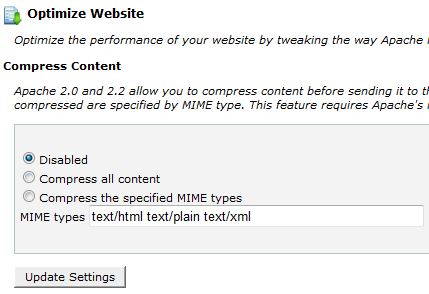
i used option number 3
3- Speed Booster show this messege in system status
v4.2 – Disabled – incompatible plugin detected: disqus-comment-system/disqus.php
i disable this plugin but still not active beacuse widget facebook and almost widget cause issue to speed booster
!!!!
finally i add plugin super cache and enable all option important in plugin but not effect also !!
-
This reply was modified 10 years by
omar ahmed.
 Alin [tagDiv]
 Hi,
Please make sure that the Speed Booster plugin is active, check the System Status – http://screencast.com/t/LDPniI0Qpv and the please go through this guide – https://forum.tagdiv.com/how-to-make-the-site-faster/
The theme stylesheet file should be moved by default, I have checked this on my side and works properly – http://screencast.com/t/XFyHAgsi
Thanks!
Alin [tagDiv] Hi,
I have checked your site again and you still have the following issues – http://screencast.com/t/qdONbihPTV
Please read and apply step by step to solve your errors – https://forum.tagdiv.com/how-to-make-the-site-faster/ Gzip compression is still not active and also read about how you can compress the images. I suggest to get someone to help you if you don’t have basic knowledge as we cannot provide custom services, sorry!
Also please make sure that Speed Booster is active, check System Status for this – http://screencast.com/t/LDPniI0Qpv as like Bogdan stated above it is tested only with these plugins – http://screencast.com/t/hcjLnOqh4i2 and if you have others active it will be automatically disabled.
To always enable speed booster remove or comment this code – http://screencast.com/t/RZLIOPUNdqh
Thanks!
simchris and, oh my gosh … it’s still there!
I guess the file names “update_log.txt” and “changed_files_6.5_6.6.1.html” are not specific enough?
===
NEWSPAPER THEME
Thanks for your support and feel free to contact us any time 🙂
https://forum.tagdiv.com/
~ Radu, Marius, Emil, Alina, Lucian, Nicu G., Alin and Nicu S. ~
[ Version 6.6.1 ]
– new social counter version. Facebook requiers now an API key, read more here: https://forum.tagdiv.com/tagdiv-social-counter-tutorial/
[ Version 6.6 ]
– new: Custom code panel. We realized that all the custom css, html and javascript should be in one panel. We also added a custom HTML code section. All the input areas from this panel have autocomplete (ctrl+space) and error checking.
– new: whatsapp share for article on mobile devices
– new: added http channel test status in the system status panel. You can now check if the theme is able to get the tweet count, like count etc from your host.
– new: filter posts by ID in blocks. You can add/exclude specific posts on all the blocks now.
– new: the theme now has it’s own logging system. We can now debug hosting issues easier.
– new: a new self diagnosting and self configurating module that allows our theme to pull data from other sites more reliably.
– fix: smart list 7 and 8 – sometimes the content was doubled
– fix: g+ new icon
– improvement: video playlist is now more reliable and all the code is loaded only when needed via autoload. The youtube videos information is now collected using just one API call instead of multiple API calls for each videos.
– improvement: speedbooster 4.2 now supports woocommerce better and moves the style.css to the bottom
– improvement: the theme panel works better now when adblock is used
– improvement: all the ajax functionality of the theme is now loaded only when needed
– improvement: better security checks on all the ajax requests
– improvement: html is allowed now in the copyright section of the footer
– improvement: social counter button is clickable on the entire area
– improvement: almost all the javascript code now passes jshint. We still have about 15-20% of the code to refactor to the new standards but with time we will get there.
– improvement: the theme’s data source class can now be overwritten from the child theme
– improvement: all the widgets from the theme are now optimized to work better. The widget_builder class is now deprecated and all the functionality was moved to td_block_widget
– improvement: the video playlist now downloads the videos metadata on render, not on save post. This allows us to use the playlist on the on click demos.
– improvement: the following modules of the theme are loaded on demand now: td_log, td_remote_http, td_remote_video, td_data_source, td_video_support, td_more_article_box, td_page_views, td_review, td_ajax. This means that the theme loads them only when needed. We mesured a 10% faster load time after this tweak.
– fix: theme animations where incompatible with some plugins and the visual composer gallery. The animations still worked but all of them looked a bit strange.
– fix: bug with the demo loader – the dinamic css for a specific demo was still loaded even after the demo was uninstall
– fix: header style 8 top submenu z-index fix
– fix: image aligment issue when using custom article paddings
– fix: the documentation url for demos was wrong in wp-admin
– fix: we updated the ads links to point to the right documentation
– fix: Social counter now shows the followers instead of +1 on google plus. Please update your social counter to see the improvement.
– fix: styling issues with the latest version of BuddyPress
– fix: on rare ocassions with some plugins the theme was emitting warnings in the server logs like: “Catchable fatal error: Object of class stdClass could not be converted to string”
– fix: error that was showing up in logs when the theme panel was saved
==
-
This reply was modified 10 years by
simchris.
 danielpfarmer
 Hi Catalin,
I have updated my php.ini file, and this has been reflected in the system status from the wordpress admin panel.
However, I am still getting the same error when I try to install demo content:
Ajax error. Cannot connect to server, it may be due to a misconfiguration on the server.
textStatus: parsererror
td_ajax_request_name: full_demo_media_1
errorThrown: SyntaxError: Unexpected token i
responseText: is_wp_error $id: Array http://demo_content.tagdiv.com/Newspaper_6/default/1.jpgis_wp_error $id: Array http://demo_content.tagdiv.com/Newspaper_6/default/2.jpgis_wp_error $id: Array http://demo_content.tagdiv.com/Newspaper_6/default/3.jpgis_wp_error $id: Array http://demo_content.tagdiv.com/Newspaper_6/default/4.jpg0
Any other ideas?
Cheers,
Dan
Bogdan B. Hello,
1) Please double check this issue on a wordpress default theme to see if it’s a WP issue or theme related. You can also check your system status parameters: http://screencast.com/t/bpnfaltKJ and try to get them all green by following this tutorial: https://forum.tagdiv.com/system-status-parameters-guide/
2)Make sure you install the SEO Yoast plugin and tick the open graph option: https://forum.tagdiv.com/system-status-parameters-guide/
3) You neet to config your sitemap. Use yoast and configure it to your prefference.
Thank you!
Bogdan B. Hello,
Please try to disable all your plugins, clear your cache and purge CDN if you use it. If the problem is still there another thing you can try is check the system status parameters and try to get the in the ‘green’ zone: http://screencast.com/t/bpnfaltKJ You can use this tutorial to do it: https://forum.tagdiv.com/system-status-parameters-guide/
If everything else fails you can do an update to the latest version (6.6) and make sure you make a back-up first:
https://forum.tagdiv.com/how-to-update-the-theme-2/ – https://forum.tagdiv.com/how-to-update-visual-composer-plugin/
Thank you!
Catalin Hi danielpfarmer,
Please check max_input_var from System Status – http://screencast.com/t/KrfqshTp and edit the php.ini file if you need to change the value. For more details about how to change this values, please consult our tutorial here: https://forum.tagdiv.com/system-status-parameters-guide/ .
Hope this helps and let us know how it goes!
Thank you!

