
- NewspapertagDiv Cloud Library Plugin
- NewspapertagDiv Shop
- NewspaperHow to Use tagDiv Cloud Library
- NewspaperCloud Library Templates
- NewspaperDesign your Post Pages using the Cloud Library Templates
- NewspapertagDiv Composer Tutorial
- NewspaperIntroduction to CPT and ACF with Newspaper Theme
- NewspaperSocial Sharing
- NewspaperInfinite Loading for Single Posts
- NewspaperCustom Post Type Support
- NewspaperHeader Builder
- NewspaperUsing the Theme Translations with WPML
- NewspaperInstagram in Newspaper WordPress Theme
- NewsmagRequirements for Newsmag
- NewspaperSmart Lists
- NewspaperAuthor Card
- NewspaperFeatured Images
- NewspaperSmart Sidebar
- NewspaperPost template ads
- NewspaperFooter Builder
 Calin
Calin Hi,
I think that this problem can be solve by adding an extra parameter in a theme file, the file path is wp-content/plugins/td-cloud-library/shortcodes/header/tdb_header_logo.php on line 792 set before getimagesize and ‘@’ like this -> https://i.imgur.com/VOWmTCI.png
Also make sure that allow_url_fopen = On;
-> https://chemicloud.com/kb/article/how-to-enable-or-disable-allow_url_fopen-in-cpanel/
-> https://www.a2hosting.com/kb/developer-corner/php/using-php.ini-directives/php-allow-url-fopen-directive
For the problem with Mailchimp, please make sure that you set it as in our guide from here -> https://forum.tagdiv.com/the-newsletter-plugin/
If there is still a problem, let us know, also if you want we can make the changes for you for getimagesize, just send us an email at contact@tagdiv.com and provide admin login. Include a link to this topic in the email.
Let me know the results!
Thank you!
Calin Hi,
1. You can remove these element using tagDiv Composer -> https://i.imgur.com/PO3m4lJ.png click on the menu and change it -> https://i.imgur.com/cs9sVrX.png or use the right click to remove it -> https://tagdiv.com/right-click-menu-tagdiv-composer/
2. Please do not use WPBakery with tagDiv Cloud Library, this will not work correctly. please disable the WPBakery plugin and the layout will be display correctly.
3. To remove the author you need to edit the single post template with tagDiv Composer and use the right click on author to remove it.
4. You can remove the comment count from the blocks using this option from theme panel -> https://i.imgur.com/F5Q1tDg.png also in order to remove it from posts you can use these settings for standard templates -> https://i.imgur.com/iRudzRZ.png if you are using a PRO Demo or just a single post template from tagDiv Cloud Library for posts, then you need to edit it with tagDiv Composer and use the right click on the elements you want to remove. -> https://i.imgur.com/tEctz6F.png -> https://i.imgur.com/eZNPb6Q.png using other ads.
Thank you!
 Vlad S
 Hello !
I have removed the text and added the image, but the size cannot be adjusted. When I add a width, it does nothing and when I return to the page it has defaulted to ‘auto’. When I try to delete an element in the header that I don’t want (eg the social icons), the screen goes dark and opaque and freezes, nothing is deleted.
This should not happen, there may be a plugin conflict on your website. please deactivate ALL plugins except tagDiv ones, also if you are using child theme or cache plugin, deactivate them, clear all cache and try again.
Can you provide a screenshot of your editor and show us what you are looking to change and how?
On posts you will have to use cloud library templates that are fully editable using tagDiv Composer: https://forum.tagdiv.com/design-post-pages-using-cloud-library-templates/ Once the templated installed you can open it using tagDiv Composer and remove the feature image element ( right click on it and delete )
You can import multiple templates and design each one to fit your taste. Each post can have only 1 design and it has to be set manually as you can see here: https://www.screencast.com/t/emXJrV3dO
For sidebars you can follow our guide here that will help you find lots of informations about how to use the tagDiv Composer more advanced: https://www.youtube.com/watch?v=fa7GenCHcBU&t=14s
The recommended image sizes are 800x600px or 1920x1080px this will create the image ratio that is needed.
That can be found in the ROW layout as you can see here:https://www.screencast.com/t/BVfRiPkUBAz
I hope this was helpful !
Vlad S Hello !
1. Please make sure that you do not have a plugin conflict, please deactivate ALL plugins except tagDiv ones, also if you are using child theme or cache plugin, deactivate them, clear all cache and try again.
2. For that you will have to use post templates from the cloud library: https://forum.tagdiv.com/design-post-pages-using-cloud-library-templates/ Those templates are fully editable using tagDiv Composer: https://forum.tagdiv.com/tagdiv-composer-tutorial/ and reproduce your layout as the homepage.
Thank you !
Calin Hi Adaras,
So the problem is with Cloud Library, I get the error message “Invalid reply from server endpoint” or you have some problems with tagDiv Composer too ?
As for “Invalid reply from server endpoint” if the theme requirements are set as in our guide and the problem persists, you can send us an email and we can take a look to this problem ( contact@tagdiv.com provide admin login, cPanel link and credentials. Include a link to this topic in the email.)
You can try a quick fix, try to use Enable jQuery Migrate Helper and check if tagDiv Composer is working again or not.
Another alternative is to add a fix in theme files, for this you need to go on wp-content/themes/Newspaper/includes/wp-booster/wp-admin/js/tagdiv-theme-plugins-setup.js and replace the jQuery(window).load(function () { from line 234 -> https://i.imgur.com/agaEJWA.png with jQuery(window).on(“load”, function () { -> https://i.imgur.com/zBFX5Ye.png also you need to do the same on this file wp-content/plugins/td-composer/assets/js/js_files_for_wp_admin.min.js but since this file is minify you can replace the code inside it with this one ->https://pastebin.com/YTiYVfU4
These warnings will be fix for the coming updates!
Let me know the results!
Thank you!
 Adaras
Hi,
I had to buy access to support again because I can’t fix this issue myself. My TD Composer has stopped working since the last Newspaper update.
I follow all requirements and have tried to:
– Deactivate all plugins except the TagDiv plugins
– Delete and reinstall TagDiv composer
– Clear all cache
– Temporarily disable the Firewall via Cloudflare
Also, when I try to access the Cloud Library, I get the error message “Invalid reply from server endpoint”. This issue was even before the latest theme update and I don’t know how to fix this.
I use the latest version of the Newspaper theme + the latest WordPress version.
My website: https://adaras.se
Hope you can help me!
Best wishes,
Ida
Calin Hi miroslavglavic,
Please note that the WPBakery Page Builder plugin is a bundled one -> https://help.market.envato.com/hc/en-us/articles/213762463-Bundled-Plugins you do not need to update it, when you’ll make a theme update we’ll include the the last version of this plugin.
Also we do not recommend to use it with PRO demos or tagDiv Cloud Library.
Thank you!
Calin Hi,
Please make sure that you do not have a plugin conflict, please deactivate ALL plugins except tagDiv plugins (theme plugins), also if you are using child theme or cache plugin, deactivate them, clear all cache and try again.
Please do not use WPBakery with tagDiv Cloud Library, this will not work correctly. Please deactivate WPBakery and import some demos from tagDiv cloud Library -> https://tagdiv.com/what-is-the-cloud-library/ or install a pro demo.
If there is still a problem, please provide me a link where I can inspect it.
Let me know the results!
 akprostudio
Hello,
After update wordpress to 5.5 I’m having problem with update any cloud template via tagComposer.
I get error like below:
Stack trace:
#0 /home/xyz/public_html/xyz.pl/cms/wp-content/plugins/woocommerce/includes/class-wc-query.php(363): WC_Query->adjust_total_pages()
#1 /home/xyz/public_html/xyz.pl/cms/wp-includes/class-wp-hook.php(289): WC_Query->handle_get_posts(Array)
#2 /home/xyz/public_html/xyz.pl/cms/wp-includes/plugin.php(249): WP_Hook->apply_filters(Array, Array)
#3 /home/xyz/public_html/xyz.pl/cms/wp-includes/class-wp-query.php(3190): apply_filters_ref_array(‘the_posts’, Array)
#4 /home/xyz/public_html/xyz.pl/cms/wp-includes/class-wp-query.php(3448): WP_Query->get_posts()
#5 /home/xyz/public_html/xyz.pl/cms/wp-includes/class-wp-query.php(3559): WP_Query->query(Array)
#6 /home/xyz/public_html/xyz.pl/cms/wp-content/plugins/td-cloud-library/state/tdb_state_loader.php(642) in /home/xyz/public_html/xyz.pl/cms/wp-content/plugins/woocommerce/includes/class-wc-query.php on line 376
[19-Aug-2020 10:29:07 UTC] PHP Notice: Trying to access array offset on value of type bool in /home/xyz/public_html/xyz.pl/cms/wp-content/plugins/td-cloud-library/state/single/tdb_state_single.php on line 275
[19-Aug-2020 10:29:07 UTC] PHP Notice: Trying to access array offset on value of type bool in /home/xyz/public_html/xyz.pl/cms/wp-content/plugins/td-cloud-library/state/single/tdb_state_single.php on line 275
[19-Aug-2020 10:29:07 UTC] PHP Notice: Trying to access array offset on value of type bool in /home/xyz/public_html/xyz.pl/cms/wp-content/plugins/td-cloud-library/state/single/tdb_state_single.php on line 275
[19-Aug-2020 10:29:07 UTC] PHP Notice: Trying to access array offset on value of type bool in /home/xyz/public_html/xyz.pl/cms/wp-content/plugins/td-cloud-library/state/single/tdb_state_single.php on line 275
[19-Aug-2020 10:29:13 UTC] PHP Notice: Trying to access array offset on value of type bool in /home/xyz/public_html/xyz.pl/cms/wp-content/plugins/td-cloud-library/state/single/tdb_state_single.php on line 275
[19-Aug-2020 10:29:13 UTC] PHP Notice: Trying to access array offset on value of type bool in /home/xyz/public_html/xyz.pl/cms/wp-content/plugins/td-cloud-library/state/single/tdb_state_single.php on line 275
[19-Aug-2020 10:29:13 UTC] PHP Notice: Trying to access array offset on value of type bool in /home/xyz/public_html/xyz.pl/cms/wp-content/plugins/td-cloud-library/state/single/tdb_state_single.php on line 275
[19-Aug-2020 10:29:13 UTC] PHP Notice: Trying to access array offset on value of type bool in /home/xyz/public_html/xyz.pl/cms/wp-content/plugins/td-cloud-library/state/single/tdb_state_single.php on line 275
[19-Aug-2020 10:29:45 UTC] PHP Notice: Trying to access array offset on value of type bool in /home/xyz/public_html/xyz.pl/cms/wp-content/plugins/td-cloud-library/state/single/tdb_state_single.php on line 275
[19-Aug-2020 10:29:45 UTC] PHP Notice: Trying to access array offset on value of type bool in /home/xyz/public_html/xyz.pl/cms/wp-content/plugins/td-cloud-library/state/single/tdb_state_single.php on line 275
[19-Aug-2020 10:29:45 UTC] PHP Notice: Trying to access array offset on value of type bool in /home/xyz/public_html/xyz.pl/cms/wp-content/plugins/td-cloud-library/state/single/tdb_state_single.php on line 275
[19-Aug-2020 10:29:45 UTC] PHP Notice: Trying to access array offset on value of type bool in /home/xyz/public_html/xyz.pl/cms/wp-content/plugins/td-cloud-library/state/single/tdb_state_single.php on line 275
[19-Aug-2020 10:29:48 UTC] PHP Notice: Trying to access array offset on value of type bool in /home/xyz/public_html/xyz.pl/cms/wp-content/plugins/td-cloud-library/state/single/tdb_state_single.php on line 275
[19-Aug-2020 10:29:48 UTC] PHP Notice: Trying to access array offset on value of type bool in /home/xyz/public_html/xyz.pl/cms/wp-content/plugins/td-cloud-library/state/single/tdb_state_single.php on line 275
[19-Aug-2020 10:29:48 UTC] PHP Notice: Trying to access array offset on value of type bool in /home/xyz/public_html/xyz.pl/cms/wp-content/plugins/td-cloud-library/state/single/tdb_state_single.php on line 275
[19-Aug-2020 10:29:48 UTC] PHP Notice: Trying to access array offset on value of type bool in /home/xyz/public_html/xyz.pl/cms/wp-content/plugins/td-cloud-library/state/single/tdb_state_single.php on line 275
Calin Hi wmvova, maybe you are not using Newspaper theme and you are using Newsmag theme this one do not have the tagDiv Cloud Library plugin, this part of forum is for Newspaper theme.
Please provide some more details about the theme you are using.
Vlad S Hello !
The header template from Cloud library can be found in here: wp-content\plugins\td-cloud-library\shortcodes\header
Let us know what you are looking to achieve maybe this can be done by using tagDiv Composer instead.
Thank you !
Calin Hi,
1-2. I just check this and on my install these settings are working correctly -> https://prnt.sc/u0zihh -> https://prnt.sc/u0zipd make sure that is not a plugin conflict, also what version of theme, WordPress and php are you using?
3. If you are using a single post template or a pro demo you can edit the cloud template with tagDiv Composer -> https://i.imgur.com/UITmXvv.png and replace the Single Related Posts with a flex block and filter it after Related Posts -> https://i.imgur.com/mfaGPiv.png in this way you can use the Title tag (SEO).
let me know the results!
Thank you!
Calin Hi Jin Koh, to can use the cloud templates, you need to install the Newspaper theme and activate the theme plugins -> https://i.imgur.com/ngSt7vi.png
Let me know the results!
Thank you!
 wmvova
 thank you for the answer.
I have not tagDiv Cloud Library plugin
neither in plugins nor in downloaded files. Where can I find it?
 Jin Koh
I want to use templets from the tagDiv cloud library but it never shows up to the plugin search results…I formatted my computer and this could be a problem?? How can I use the templets??
Vlad S Hello !
This is something that only you can decide. Newspaper Theme requires tagDiv Composer /TagDiv Cloud library / TagDiv Social Counter and optional the standard pack and mobile theme plugin.
Everything else is extra and is up to you if you use them or not.
Thank you !
 dhananjaymittal
 Yesterday, again I got update. But now i have tried to update one plugin (tagdiv cloud library) got corrupted due to my website got down 500- internal server error is coming. Please can you help me asap.
 SportsNewsIRLAND
getting the following error when trying to use the tagDiv composer.
Internal Server Error
The server encountered an internal error or misconfiguration and was unable to complete your request.
I have reloaded the theme and plugins but still getting this error
we are also getting PHP errors as follows
[07-Aug-2020 10:26:14 UTC] PHP Notice: Trying to get property ‘post_content’ of non-object in /opt/bitnami/apps/wordpress/htdocs/wp-content/plugins/td-cloud-library/includes/tdb_functions.php on line 251
[07-Aug-2020 10:26:14 UTC] PHP Notice: Trying to get property ‘post_content’ of non-object in /opt/bitnami/apps/wordpress/htdocs/wp-content/plugins/td-cloud-library/includes/tdb_functions.php on line 252
[07-Aug-2020 10:28:44 UTC] PHP Notice: Trying to get property ‘post_content’ of non-object in /opt/bitnami/apps/wordpress/htdocs/wp-content/plugins/td-cloud-library/includes/tdb_functions.php on line 251
[07-Aug-2020 10:28:44 UTC] PHP Notice: Trying to get property ‘post_content’ of non-object in /opt/bitnami/apps/wordpress/htdocs/wp-content/plugins/td-cloud-library/includes/tdb_functions.php on line 252
Vlad S Hello !
You will have to install the required plugins from theme panel – plugins. Make sure that TagDiv Composer plugin is active.
Homepage can be edited from here on frontend: https://www.screencast.com/t/nMsrX9jxka49
And from here on the backend: https://www.screencast.com/t/S3M8DyYz
Cloud library templates can be edited from here: https://www.screencast.com/t/h3q6AT14
This will enable the drag and drop options from tagDiv Composer.
Thank you !
 mrdragon9
Hello!
The recent theme update prompted the following PHP error email from WordPress:
An error of type E_ERROR was caused in line 2753 of the file /home/gnndev/public_html/wp-content/plugins/td-composer/legacy/common/wp_booster/td_util.php. Error message: Uncaught Exception: DateTime::__construct(): Failed to parse time string (@) at position 0 (@): Unexpected character in /home/gnndev/public_html/wp-content/plugins/td-composer/legacy/common/wp_booster/td_util.php:2753
Stack trace:
#0 /home/gnndev/public_html/wp-content/plugins/td-composer/legacy/common/wp_booster/td_util.php(2753): DateTime->__construct(‘@’)
#1 /home/gnndev/public_html/wp-content/plugins/td-composer/legacy/common/wp_booster/wp-admin/panel/views/td_panel_social_networks.php(54): td_human_readable_ts(NULL)
#2 /home/gnndev/public_html/wp-content/plugins/td-composer/legacy/common/wp_booster/wp-admin/panel/panel_core/td_panel_core.php(143): require_once(‘/home/gnndev/pu…’)
#3 /home/gnndev/public_html/wp-content/plugins/td-composer/legacy/common/wp_booster/wp-admin/panel/td_view_panel.php(2): td_panel_core::render_panel(Array, ‘theme_panel’)
#4 /home/gnndev/public_html/wp-content/plugins/td-composer/legacy/common/wp_booster/wp-admin/panel/td_panel.php(72): include(‘/home/gnndev/pu…’)
#5 /home/g
Query monitor also prompts the following 3 PHP error locations:
wp-content/plugins/td-cloud-library/includes/tdb_functions.php:1964
wp-content/plugins/td-cloud-library/includes/tdb_functions.php:1965
wp-content/plugins/td-composer/css-live/css-live.php:30
The PHP errors are not allowing me to update the theme panel. The rest of the site works fine from what I’ve gathered but the theme panel is all greyed out and won’t let me make any updates. I’ve also tried deactivating all non-tagdiv plugins without any success. Also contacted my hosting and toggled the site’s PHP version but didn’t see any effect. Any advice on how to fix this is much appreciated.
 HarrisonBands
 I’ve tried setting a new Instagram ID, but I can’t select it from the theme panel. The button is “greyed out” and not selectable. I also received the following message from WordPress after the upgrade. Note this says I’m running 10.3.5, but my theme panel confirms 10.3.6
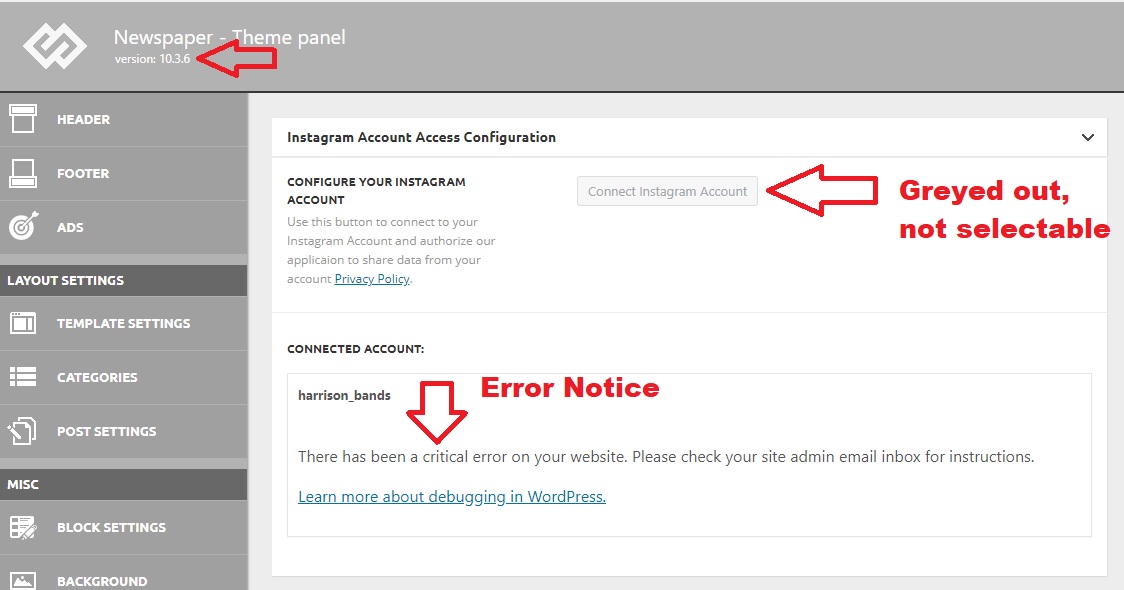
When seeking help with this issue, you may be asked for some of the following information:
WordPress version 5.4.2
Current theme: Newspaper (version 10.3.5)
Current plugin: tagDiv Cloud Library (version 1.5 | built on 06.05.2020 14:38)
PHP version 7.3.20
Error Details
=============
An error of type E_COMPILE_ERROR was caused in line 1358 of the file /home4/harritf2/public_html/wp-content/plugins/td-cloud-library/includes/tdb_functions.php. Error message: require_once(): Failed opening required ‘tdb_template_import.php’ (include_path=’.:/opt/cpanel/ea-php73/root/usr/share/pear’)
Calin Hi, if you are using a single post template from tagDiv Cloud Library, the on of files that need to be edited is -> wp-content/plugins/td-cloud-library/shortcodes/single/tdb_single_author.php unfortunately I do not know what code need to be use to store the name or editor, I take a look and you can duplicate these lines -> https://i.imgur.com/HFKiZpH.png -> https://i.imgur.com/YUyB9ts.png -> https://i.imgur.com/e55W5ot.jpg but you still need to get some how the editor of post name and store it in database to can display it.
Thank you!
Vlad S Hello !
1. Follow our video guide here: https://www.youtube.com/watch?v=HXQQygkCCJo
2. You will have to remove that using tagDiv Composer ( all the pro demos and cloud library templates are fully editable using tagDiv Composer) : https://www.screencast.com/t/l2L0bxfOx Simply right click and delete.
3. The Mobile theme was specially designed for optimization on mobile devices. Unfortunately on mobile theme you cannot do much changes of design. If you want to have the same design as on desktop mode you can achieve that by simply disabling the mobile theme.
You will have to recreate your pages into the Mobile editor or completely disable the mobile theme. The mobile editor will not render shortcodes !
Also you can disable mobile theme on certain pages or posts by following this setting: 
Please take a look here: https://forum.tagdiv.com/the-mobile-theme/
Mobile theme plugin can be disabled from Newspaper Plugins as you can see here: https://www.screencast.com/t/LnkZCEVC
4. Follow step 3.
5. That can be done from Theme panel – Mobile theme – Theme colors.
Thank you !
 snackgator
 Thanks! I did just try that guide, but my Newspaper doesn’t have an “Install Demos” button” or makes any mention of it at all. I installed these four plugins
tagDiv Composer
tagDiv Cloud Library
tagDiv Social Counter
tagDiv Standard Pack
but Composer is causing the entire site to CRASH when I install it. Do I need that to get the demo? How should I proceed? Thanks SO much!
 Anonymous
Hi team,
we ran some test on google page speed insights it suggests that we can remove these unused CSS & JS from loading can you please confirm if it is OK to block to remove it somehow ? will it not impact the website ?
https://techweu.com/wp-content/plugins/td-standard-pack/Newspaper/assets/css/td_standard_pack_main.css
https://techweu.com/wp-content/plugins/td-composer/legacy/Newspaper/assets/css/td_legacy_main.css
https://techweu.com/wp-content/plugins/td-cloud-library/assets/css/tdb_less_front.css
https://techweu.com/wp-content/plugins/aps-products/css/aps-styles.css
https://techweu.com/wp-content/plugins/td-composer/legacy/Newspaper/js/tagdiv_theme.min.js
https://techweu.com/wp-includes/css/dist/block-library/style.min.css
As all of the CSS & JS looks loaded from the Theme file ..
Here is the test results
https://developers.google.com/speed/pagespeed/insights/?url=https%3A%2F%2Ftechweu.com%2F&tab=mobile



