
- NewsmagtagDiv Composer Tutorial
- TutorialsFrom WPBakery to tagDiv Composer
- NewspapertagDiv Composer Tutorial
- NewsmagHow to use the Visual Composer plugin
- Apitd_api_block::update_key
- Apitd_api_block::update
- Apitd_api_block::add
- NewspaperCredit System
- NewspaperCreate a frontend submission form
- NewspaperHow to Use the Tabbed Content shortcode
- NewspaperCreate a form contact page
- NewspaperFilters and sorting for taxonomies
- NewspaperUser review system
- NewspaperModal Popup
- NewspaperFlex Block Settings Guide
- NewspaperSocial Sharing
- NewspaperSingle Post Shortcodes
- NewspaperInfinite Loading for Single Posts
- NewspaperThe Newspaper Mobile Theme: Introduction
- NewspaperHow to Add a Logo in Newspaper
 waqarahm3d
Where is the support how to access it. I have purchased this thinking this is going to make life easy but i am spending more times searching for answers to problems through forums now.
A. Can’t import cloud templates
b. every blog post i click on is giving me the following error
wp_booster error:
td_api_base::get_key : a component with the ID: single_template_8 Key: file is not set.
/home/customer/www/chumarkhan.com/public_html/wp-content/plugins/td-composer/legacy/common/wp_booster/td_api.php
would really appreciate if you can kindly reply please !!!
 WhiteMoth8259
Hi there,
I want to edit the author box (about us picture) in my SIDEBAR but I can not edit it through TD Composer and I can not find the function to change or upload a picture in the widget neither. I use the Baby Blog template. Can you help me please?
 marko3000
hi, I wrote yesterday in a private email but I still have not received a reply. I have a serious problem with thema, more precisely with td composer. If you can please answer me. Thank you
 mehedi57
Hello support team, I am facing a few problems in my site that I need to be fixed As soon as possible. Before going into the details, I would like to tell you that the theme’s system status is showing some mismatch information where WordPress site health information is correct. Please check the attachment https://prnt.sc/s0y0k4 and https://prnt.sc/s0y0vs . Now I will describe the problem.
1. Numbering page layout is not working on anywhere except homepage. You can check here https://www.ubuntupit.com/?s=programming , https://www.ubuntupit.com/category/linux/ ,https://www.ubuntupit.com/tag/linux-themes/
2. TD composer and tb cloud library are taking too much resources and exceding the requests in my server. Which makes the site unusable. see the screenshot given by the hosting provider. https://prntscr.com/s0xxtn and https://prntscr.com/s0xxrk
3. Is this much request is normal with this Theme? https://prnt.sc/s0y5a5
I am hosting my site on Kinsta.
 dailydream360
I have tried reloading the theme over again and I’m still getting Fatal erros on my site:
Fatal error: Uncaught Error: Class ‘td_style’ not found in /home/dailydre/public_html/wp-content/plugins/td-composer/td-multi-purpose/styles/tds_title/tds_title1.php:9 Stack trace: #0 /home/dailydre/public_html/wp-includes/template.php(723): require_once() #1 /home/dailydre/public_html/wp-content/plugins/td-composer/legacy/common/wp_booster/td_autoload_classes.php(42): load_template(‘/home/dailydre/…’, true) #2 [internal function]: td_autoload_classes->loading_classes(‘tds_title1’) #3 /home/dailydre/public_html/wp-content/plugins/td-composer/td-multi-purpose/shortcodes/tdm_block_column_title.php(49): spl_autoload_call(‘tds_title1’) #4 /home/dailydre/public_html/wp-content/plugins/td-composer/legacy/common/wp_booster/td_global_blocks.php(27): tdm_block_column_title->render(Array, ”) #5 /home/dailydre/public_html/wp-includes/shortcodes.php(343): td_global_blocks::proxy_function(Array, ”, ‘tdm_block_colum…’) #6 [internal function]: do_shortcode_tag(Array) #7 /home/dailydre/public_html/wp-includes/shortcodes.php(218): p in /home/dailydre/public_html/wp-content/plugins/td-composer/td-multi-purpose/styles/tds_title/tds_title1.php on line 9
There has been a critical error on your website
 ricardomena
 Hi Calin
Thank you very much for your answer.
The page is this: https://blogdecomics.com/blog/
The problem is that I can’t modify this page whith the Theme Panel or the tagDiv Composer.
If I go to Edit Page Ifind this:
TD Composer is disabled on Posts Page
And if I go to Theme Panel and I choose what you told me, the design doesn’t change.
https://imgur.com/a/o8blqE5
FYI I’m using a child theme, but I have tried whith the parent and the problem is the same.
It’s strange.
Thanks.
-
This reply was modified 6 years by
ricardomena.
 ludyma
 Hello, how can I create a new block in the TD Composer?
The block that exists is this Authors box.
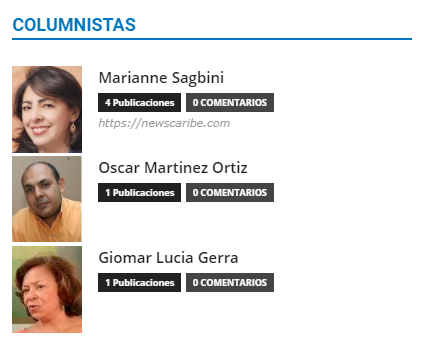
I want to create one like this.
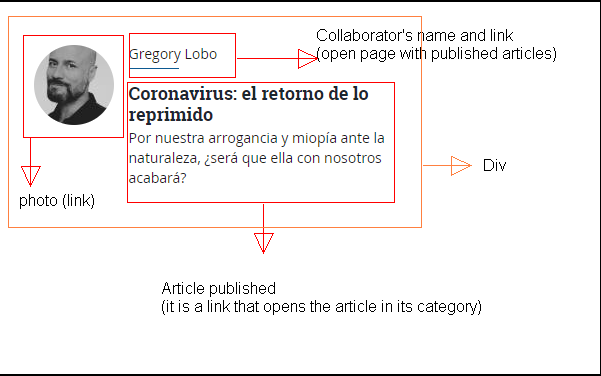
 Thomas Stodulka
Hi, I added a new page from the cloud tample and in my pages (theme newspeper). Now I cannot chagne the pictures in the TD composer – when i will upload a new jpg, it does not work: Invalid data Current state has involved an issue. You could try an UNDO operation (CTRL+Z / CTRL+SHIFT+Z)
any idea, whats the problem?
best regards tom
 fredpill
Hello, all my hamepage is open in Target Blank


I need to change to target _self
I make with TD composer!
Can you help me?
 Calin
Calin Hi,
Unfortunately there is no option and documentation for this, you can use only one template that can be set using our documentation -> https://forum.tagdiv.com/custom-post-type-support/
These parts -> https://i.imgur.com/d1FIcpp.png are set in the theme backed settings and even you have the proper skills to add the code, you can not set it in a child theme and when a theme update will be make, all these changes will be lost.
The file are in wp-content/plugins/td-composer/legacy/common/wp_booster/wp-admin/content-metaboxes/td_set_post_settings.php you can set the code from here in td_set_post_settings_cpt.php maybe it will work if you make some changes, but this is not sure.
Thank you for your understanding!
Happy Easter!
 kbmyers
Hello – I’m trying to add a Facebook tracking pixel to our site but I’m getting a popup with the following error when I go to the site:
TypeError: fbq.getState is not a function
6
I see this error in Firefox, but not in Chrome. Using the Google Pixel Helper in Chrome I see that the pixel code has successfully loaded.
Suggestions? I’ve added this same code to our smaller sites that don’t use the Newspaper theme and I don’t get the same error message.
Thanks,
Kent
 seyu77
hello I made 1200px homepage width with TD Composer. But I want to make the width of the post and page 1200px.
marko3000hi, i have a problem with your thema. as soon as i open the home it gives me fatal error with the wording about the plug in td composer. I tried to see if there were other plugins that were in conflict but no, even if I only leave the plug composer active td marks that error. what do I have to do?
Calin Hi,
The problem is that on IPAD PORTRAIT is a margin top that is removed, you can add a code, this can e corrected using tagDiv Composer, select the main row from the content and select the ipad ->https://i.imgur.com/NuBOwoy.jpg and in css tab add a margin bottom I think for you it is 140px like this -> https://i.imgur.com/6mnI2BB.png if this is not fixing the problem, you can try a custom css like this one -> https://i.imgur.com/6yjlboS.png
.tdb-template .td-main-content-wrap {

    margin-top: 140px;

}
The code need to be set in Theme panel> Custom code> Advance css > iPhone section.
Hope this will help you!
let me know the results!
ricardomena Hello and thanks but I’m not triying to design Single post Page.
Is’s activity page, The page tha swos all the posts
https://blogdecomics.com/actividad/
And if I try to configure I find this
Blog — Página de entradas
Editar |
| Enviar a la papelera | Ver | TD Composer is disabled on Posts Page | Clear Cache
WhiteMoth8259I have some difficulties in editing. I installed the baby blog theme with content but besides the header and the rev slider I can not edit anything with the TD Composer. I want to change the way my articles are shown on the home – page (instead of two next to each other just one) but also through the theme panel I can somehow not find this function. Can you please help me?
Is it maybe caused because I use the newspaper theme on two different websites right now? Do I have to get another licence? In any case I tried the “Classic Pro” and on this theme I can edit in the TD Composer without any problem…
Calin Hi,
The code need to be set on the files that are using as post templates for your posts, also please notice that all the changes made in them files will be lost when you’ll make a theme update.
If you are using a standard post style from 1 to 13 -> https://i.imgur.com/QQiXTjF.png the code need to be set in these files loop-single-x.php (x represent the number of post style) -> wp-content/plugins/td-standard-pack/Newspaper/parts/single/loop-single-1.php -> https://i.imgur.com/SjuUy38.png the code can be set there, also it need to be set on the post style you are using. If you are using the default post style and tagDiv Standard pack is enable https://i.imgur.com/YHYP2o5.png the file that need to be edited is this one -> wp-content/plugins/td-standard-pack/Newspaper/loop-single.php if this theme plugin is disable, then you need to edit for default post style this file -> wp-content/plugins/td-composer/legacy/Newspaper/loop-single.php
The above changes can be set in a child theme using our guide from here -> https://forum.tagdiv.com/the-child-theme-support-tutorial/
If you are using a single post template from tagDiv Cloud Library, then you need to set the code in one of the files from here -> wp-content/plugins/td-cloud-library/shortcodes/single for example in tdb_single_author.php -> https://i.imgur.com/iYm4uEd.png also the code that is provide to you need to be adjusted (these changes can not be set in a child theme).
Hope this will help you!
Thank you!
Calin Hi,
So you want to remove the elements from backend not from the frontend of article. These can be removed from here ->wp-content/plugins/td-composer/legacy/common/wp_booster/wp-admin/content-metaboxes/td_set_post_settings.php -> https://i.imgur.com/pN1BhpV.png
Hope this will help you better!
Thank you!
 jmpatrick63
In TD Composer I’ve figured out how to add a drop shadow to the box around the title using a Column Title block when building a page. Is it possible to apply a drop shadow to the title text instead of the box?
 3kk
3kk Thank you for your reply.
I modified the file as you told me.
This part is still not erased.
Is there any part that needs to be modified?
The following files have been modified:
wp-content/plugins/td-composer/legacy/Newsmag/parts/single/loop-single-1.php
wp-content/plugins/td-composer/legacy/Newsmag/parts/single_template_1.php
You have deleted the get_source_and_via(); part of the file above.
What I want is to publish a post on wp-admin/post-new.php.
Input from quote to blocks to via url in the displayed post setting panel
I want the parts erased.
I will attach the photo for the exact contents.

 Jumich
Hi,
few months ago I was wondering how to make my site faster. There wasn’t yet Newspaper X . Now you deliver super fast solution based on Cloud Template and deactivating Standard Pack plugin.
In my case I have about 30 pages in my website built on TD Composer. I need to consider if its worth to make a change (turn to cloud template, how much time does it cost)
Is there any step by step manual how to make a change? I’ve read your articles but its quite general. Maybe you have something more particular? To be honest I have no ideo how to build normal page from Cloud Templates witch would fits to my existing themplate.
For egzample: if I want to add new page called “our team” I have only option to import from cloud existing template or blocks, but what with my existing header and footer? New pages from cloud will look different than rest of my site. I’m not sure if you know what I mean…
Regards
JM
Calin Hi,
The background image can be change from theme panel -> https://i.imgur.com/1VgpHJj.png or if you are using the mobile theme plugin from here -> https://i.imgur.com/dxjz5o7.png if you are using the responsive version of the theme you can use a cloud header from tagDiv Cloud Library, you can edit it with tagDiv Composer and set the mobile elements where you want -> https://i.imgur.com/KWIqX8X.png
If you ware using the mobile theme plugin, then you need to use a custom css -> https://i.imgur.com/ERijDBY.png
#td-top-mobile-toggle {

    float: right;

    margin-right: -15px;

}

.td-search-icon {

    float: left;

    position: unset;

    right: -3px;

    top: 0;

    margin-left: -15px;

}

.td-main-menu-logo img {

    top: 52px;

}
The code need to be set in Theme Panel> Mobile theme > Custom code> css.
Hope this will help you!
Thank you!
 huynhhieutravel
 Hello!
Email and phone number are the default. I want to ask how to edit it. The background image is a video so you may not have downloaded it. But I want to focus on fixing my phone number and email.
Where is it located? i cant find in “Edit with TD composer”
My demo website: https://sayhappy.vn/
Thank you!
 Calin
Calin Hi,
Indeed some files were change in our theme, for example the block 6 is made from module 5 -> https://i.imgur.com/AjU2Hs7.png therfore you’ll need to edit that module -> wp-content/plugins/td-standard-pack/Newspaper/includes/modules/td_module_5.php also the category template -> https://i.imgur.com/fvzioIp.png -> wp-content/plugins/td-standard-pack/Newspaper/includes/category_templates/td_category_template_1.php -> https://i.imgur.com/SKeKpkJ.png -> wp-content/plugins/td-standard-pack/Newspaper/includes/category_top_posts_styles/td_category_top_posts_style_fl_1.php and this slide -> https://i.imgur.com/6datWPP.jpg is in wp-content/plugins/td-composer/legacy/Newspaper/includes/shortcodes/td_block_slide.php
Also we have a department for custom services here -> https://tagdiv.com/web-development-services/
Thank you!
Calin Hi,
Please notice that we do not recommend to make changes in theme files, because these will be lost after you’ll make a theme update.
Also all these elements are appearing only if these are set inside of article.
If you still want to make these changes in post style/template, then you’ll need to edit the post style you are using, for example if you are using the post style 2 you’ll need to edit this file wp-content/plugins/td-composer/legacy/Newsmag/parts/single/loop-single-2.php -> https://i.imgur.com/IrcINbf.png if you are using the default post style you’ll need to edit this file wp-content/plugins/td-composer/legacy/Newsmag/loop-single.php also will be better to set these files in a child theme to not lose theme after a theme update.
Hope this will help you!
Thank you for your understanding!



