- NewspapertagDiv Composer Tutorial
- NewspaperCredit System
- NewspaperCreate a frontend submission form
- NewspaperHow to Use the Tabbed Content shortcode
- NewspaperCreate a form contact page
- NewspaperFilters and sorting for taxonomies
- NewspaperUser review system
- NewspaperModal Popup
- NewspaperFlex Block Settings Guide
- NewspaperSocial Sharing
- NewspaperSingle Post Shortcodes
- NewspaperInfinite Loading for Single Posts
- NewspaperThe Newspaper Mobile Theme: Introduction
- NewspaperHow to Add a Logo in Newspaper
- NewspaperCustom Post Type Support
- NewspaperCloud Library Templates
- NewspaperDesign your Post Pages using the Cloud Library Templates
- NewspaperHeader Builder
- NewspapertagDiv Cloud Library Plugin
- NewspaperAd Box Element and Ads Overview
 apricot0122
Recently I switched my WordPress theme to NewspaperX from ion mag and I’m encountering the issue that images don’t show on my each article post.
I tried to deactivate all my plugins to see what caused this problem and noticed that it happens only when Td composer plugin is active. So I am assuming td composer itself causes this issue not other plugins. And also when td composer is active, the following error messages appear on the bottom of my each post.
Fatal error: Uncaught Error: Call to undefined function get_post_datetime() in /home/newdaysinusa/daysintheusa.com/public_html/wp-content/plugins/td-composer/legacy/common/wp_booster/td_module_single_base.php:671 Stack trace: #0 /home/newdaysinusa/daysintheusa.com/public_html/wp-content/plugins/td-composer/legacy/common/wp_booster/td_module_single_base.php(796): td_module_single_base->get_item_scope_meta() #1 /home/newdaysinusa/daysintheusa.com/public_html/wp-content/plugins/td-standard-pack/Newspaper/loop-single.php(63): td_module_single_base->show_item_scope_meta() #2 /home/newdaysinusa/daysintheusa.com/public_html/wp-content/plugins/td-standard-pack/Newspaper/single.php(26): require_once('/home/newdaysin...') #3 /home/newdaysinusa/daysintheusa.com/public_html/wp-includes/template-loader.php(78): include('/home/newdaysin...') #4 /home/newdaysinusa/daysintheusa.com/public_html/wp-blog-header.php(19): require_once('/home/newdaysin...') #5 /home/newdaysinusa/daysintheusa.com/public_html/index.php(17): require('/home/newday in /home/newdaysinusa/daysintheusa.com/public_html/wp-content/plugins/td-composer/legacy/common/wp_booster/td_module_single_base.php on line 671
I have no idea what they mean and not sure these messages are related to the image issue, but please please please help me! Thanks!!
 mrsuperhost
My TD composer is working but, everything on the right of TD composer is white and the dashboard of WordPress is showing on the left side. how to fix this problem?
 Sourav Ghosh
 I have checked all the things which has given in the link, you send to run the TD Composer and the Newspaper theme preperly. My System requirements are showing green marks in the required boxes. After all this still when I am clicking on edit with TD Composer option, I am getting this message,
“This site can’t be reached
The webpage at https://blogs.professionalbytes.in/wp-admin/post.php?post_id=tdc&tdbTemplateType=page might be temporarily down or it may have moved permanently to a new web address. ERR_HTTP2_PROTOCOL_ERROR” please please it’s a humble request kindly help me to resolve this issue. ????
 Satwik
 Yes. I had already sent a detailed report to the developer team. Few tips are:
1. Use the Heartbeat Control Plugin and reduce or disable post editor activity
2. Avoid using td-Composer blocks that use Admin-Ajax such as Load more pagination
3. Live search
4. Megamenu etc.
Use chrome dev. tools to identify which block is using the Admin-ajax.
 vampireprincess
I installed a fresh copy of the Newspaper template
only with the 4 TagDIV plugins, NOTHING else
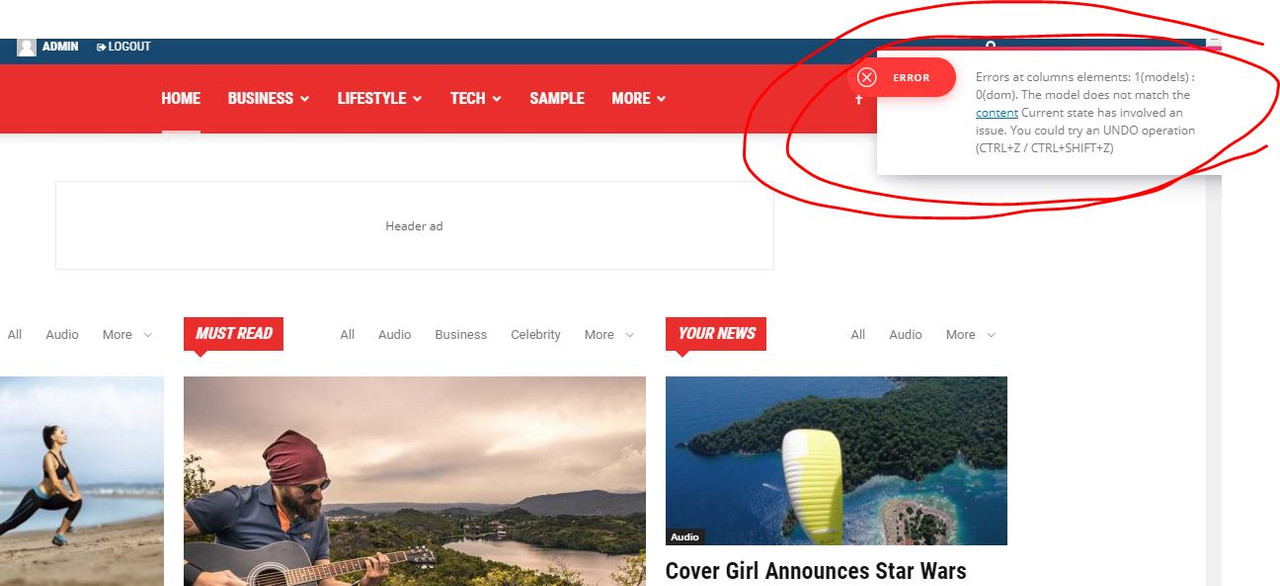
installed a demo City News … try to edit it with TD Composer => Error
https://i.postimg.cc/0QyFM5VG/3.jpg
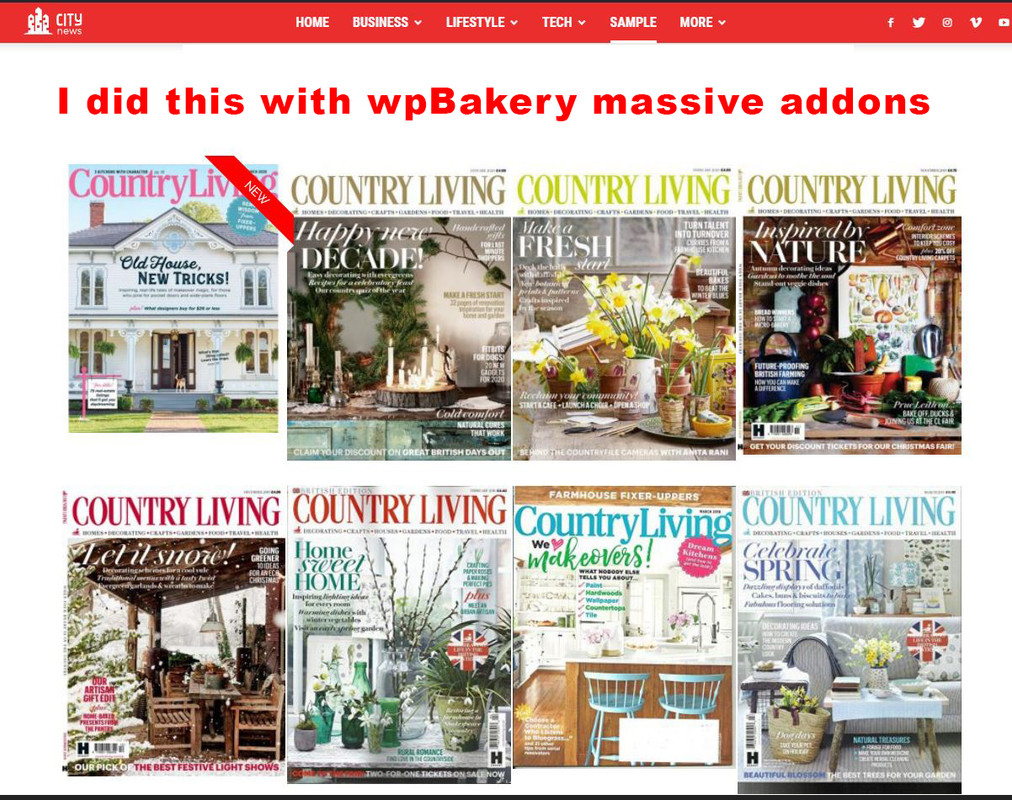
vampireprincessI wish to achieve the same effect for my magazine editions as you achieved on your demo page.
I want that each image direct me to a page or category where are located 30-35 articles only from that issue.
I wish to have on some editions a ribbon, a Title and some hover over effect.
Did you achieved all with the TdComposer, or it was done through wpBakery?
Because I cant get nothing similar with any of the Td codeblocks for images, for images I found a very limited options.
I installed a “massive addons” for wpBakery and I got similar effect but
now I cant edit anyomore the pages which was done with TdComposer it gives me some error.
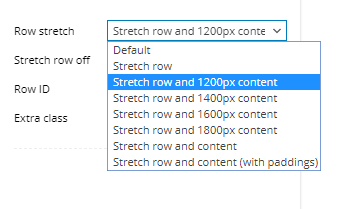
Finally in WpBakery how can I get the stretch row and 1200px content, that is exist in TD?
https://i.postimg.cc/zXVKfm5s/1.jpg
https://i.postimg.cc/SsSVTZ8m/2.jpg
https://i.postimg.cc/0QyFM5VG/3.jpg
https://i.postimg.cc/G23t4Y0M/5.png
 rais29
Why I am having this error and my webpage get distorted.
Howdy!
Since WordPress 5.2 there is a built-in feature that detects when a plugin or theme causes a fatal error on your site, and notifies you with this automated email.
In this case, WordPress caught an error with one of your plugins, tagDiv Composer.
First, visit your website (http://www.kimpavitapress.no/) and check for any visible issues. Next, visit the page where the error was caught (http://www.kimpavitapress.no/wp-admin/post.php?post=5010&action=edit) and check for any visible issues.
Please contact your host for assistance with investigating this issue further.
If your site appears broken and you can’t access your dashboard normally, WordPress now has a special “recovery mode”. This lets you safely login to your dashboard and investigate further.
To keep your site safe, this link will expire in 1 day. Don’t worry about that, though: a new link will be emailed to you if the error occurs again after it expires.
When seeking help with this issue, you may be asked for some of the following information:
WordPress version 5.3.2
Current theme: Newspaper (version 10.2)
Current plugin: tagDiv Composer (version 2.5 | built on 11.11.2019 15:07)
PHP version 7.2.27-1+0~20200123.34+debian9~1.gbp63c0bc
Error Details
=============
An error of type E_ERROR was caused in line 181 of the file /home/4/k/kimpavitapress/www/wp-content/plugins/td-composer/legacy/common/wp_booster/td_block.php. Error message: Uncaught Error: Class ” not found in /home/4/k/kimpavitapress/www/wp-content/plugins/td-composer/legacy/common/wp_booster/td_block.php:181
Stack trace:
#0 /home/4/k/kimpavitapress/www/wp-content/plugins/td-composer/legacy/Newspaper/includes/shortcodes/td_block_slide.php(471): td_block->render(Array)
#1 /home/4/k/kimpavitapress/www/wp-content/plugins/td-composer/legacy/common/wp_booster/td_global_blocks.php(27): td_block_slide->render(Array, ”)
#2 /home/4/k/kimpavitapress/www/wp-includes/shortcodes.php(325): td_global_blocks::proxy_function(Array, ”, ‘td_block_slide’)
#3 [internal function]: do_shortcode_tag(Array)
#4 /home/4/k/kimpavitapress/www/wp-includes/shortcodes.php(199): preg_replace_callback(‘/\\[(\\[?)(td_blo…’, ‘do_shortcode_ta…’, ‘[td_block_slide…’)
#5 /home/4/k/kimpavitapress/www/wp-content/plugins/td-composer/includes/tdc_composer_block.php(198): do_shortcode(‘[td_block_slide…’)
#6 /home/4/k/kimpavitap
 Calin
Calin Hi,
Usually you can achieve all you need using a header for tagDiv Cloud library, these can be edited using tagDiv Composer.
If you are using a classic/standard header, then you need to set the code in this file -> wp-content/plugins/td-standard-pack/Newspaper/header.php
Hope this will help you!
Thank you!
Sourav GhoshI have purchased the Newspaper theme recently for my subdomain. I installed that theme in my WordPress account of my subdomain. That time my TD Composer was working perfectly. Then I was facing some problem regarding hosting services. then I removed that theme from there and deleted that subdomain and created that subdomain once again. Then I installed my Newspaper theme over there and activated it. Just right after that, I am facing multiple problems like ram exhausted problem and also My TD Composer is not working. It is showing some error like “This site can’t be reached” when I am clicking on that TD composer option I am getting this message. My site is up and running but after clicking on that option of page builder it is showing this error. And also while installing theme demo the “Default Pro” I am getting a few errors. I was just starting my blog that’s why I completely removed that theme for the first time from my subdomain and I already activated it first time over there and created that subdomain once again and Installed my theme in the same subdomain and also activated it. But It’s showing me multiple glitches. Please help me out to solve this issue because I am planning to buy the newspaper theme for few more websites also. If my problem will get resolved then my trust will be on this theme only for blogs. I am not able to properly utilise my Newspaper theme which I bought with huge expectations because of such errors, even not able to design my landing page. Some times that TD Composer plugin has crashed my whole site also. Please reply and help me asap.
 CristianR
Hi, my website is very slow after lastest version of Newspaper 10. I’m trying to disable the td-composer and the time is 1/4… 3,36s vs 0,89s.
The errore message is: Notice (abolished) – Undefined index: td_action – wp-content/plugins/td-composer/css-live/css-live.php:30 – Plugin: td-composer
The site is ponza.orarimarittimi.it
Do you know why? I have all ok on system status theme.
Thanks
 Jeremy D.
Hello.
I have a problem with loop category.
I create a loop on td composer, it work perfectly.
But in the website, doesn’t work.
TD Composer :
https://imgur.com/AFARZ0h
In live :
https://imgur.com/GD0nGS2
Thanks in advance,
Jeremy.
 docktera
 Thanks for your response. I’m already aware of the Font Awesome plugin due to reading the forum and documentation at first.
As long as pages are built with TD Composer, the theme included awesome font style sheet is already loaded, and therefor i don’t need (and i don’t want) this extra Font Awesome plugin.
With blog posts for example, single post pages are not built with TD composer, so the theme included awesome font style sheet is -not- loaded unfortunately.
I was hoping to initiate a feature request to use the theme included awesome font style sheet at all times without extra plugins.
Calin Hi,
If this banner is set with tagDiv Composer on ad box, then you can edit it and set the Horizontal align -> https://i.imgur.com/FW0ybNC.jpg
Or you can use a custom css -> https://i.imgur.com/OVxHkUs.png
.td-header-desktop-wrap  .td-a-rec img {

    margin: 0 auto;

}
The code need to be set in theme panel> custom code> custom css
Thank you!
 alincordos
E posibil sa am tema mobila precum imi apare in preview in td composer?
 IslandJim
 Hi I’ve upgraded to NewsPaper 10.3 and I am seeing some issues with MEC Calendar again. I’ve deleted my “evens” page and I am using their archive page “events” and I am seeing these errors:
Notice: Undefined property: WP_Post_Type::$post_type in /home/ulusolut/island3/staging/wp-content/plugins/td-composer/includes/shortcodes/vc_row.php on line 408
Notice: Undefined property: WP_Post_Type::$post_type in /home/ulusolut/island3/staging/wp-content/plugins/td-composer/includes/shortcodes/vc_row.php on line 415
Notice: Undefined property: WP_Post_Type::$post_type in /home/ulusolut/island3/staging/wp-content/plugins/td-composer/includes/shortcodes/vc_row.php on line 408
Notice: Undefined property: WP_Post_Type::$post_type in /home/ulusolut/island3/staging/wp-content/plugins/td-composer/includes/shortcodes/vc_row.php on line 415
Any thoughts on what might be causing this?
thanks
Brad.
-
This reply was modified 6 years by
IslandJim.
 minecraftresource
I am looking for a pagination plugin (or code) that will work with the TD Composer.
I saw the article on this, but its the WordPress (not tagdiv) editor
https://forum.tagdiv.com/posts-with-pagination/
I am having formatting issues with just creating buttons on different devices. https://minecraft-resourcepacks.com/esports/
 jfmombiela
Hi,
I am getting the following error caused by the td composer plugin.
Please, could you have a look?
Preload key requests
1.17 s
Consider using <link rel=preload> to prioritize fetching resources that are currently requested later in page load. Learn more.
URL
Potential Savings
…icons/mobile-theme.woff?9(lahistoriaviva.com)
1,170 ms
My site is: https://lahistoriaviva.com/
dockteraHi,
On normal pages the (theme included) style sheet “font_awesome-css” is loaded (as designed):
<link rel=’stylesheet’ id=’font_awesome-css’ href=’https://www.domain.com/wp-content/plugins/td-composer/assets/fonts/font-awesome/font-awesome.css?ver=xxxxxxxxxxxxxxxxxxxxxxxxxxxxxxxx’ type=’text/css’ media=’all’ />
Awesome icons are available and can be used on pages and header menus.
But,
On (single) post pages, i’m missing this style sheet because it is not loaded (within the <head> of the post page).
Is it possible to make a theme change that this Awesome style sheet is loaded on (single) post pages as well?
I can then use Awesome icons within posts (and the header menu) too.
Thanks!
Calin Hi,
You can edit the homepage with tagDiv Composer, check the mobile display, click on flex block and in css tab set a margin bottom -> https://i.imgur.com/nZM8pU4.png
Or you can use a custom css like this one -> https://i.imgur.com/shXLYuW.png
.page .td_block_big_grid_flex_1{

    margin-bottom: 2px !important;

}
Thank you!
 miwiley
(1) Great theme – I left another for this one [old: coronavirusdata.org] – 301’s coming
(2) Challenges with Youtube:Video – I opted to embed raw HTML (saw that this will get fixed)
(3) CSS options – are outstanding!
(4) Mobile (AMP+) hit and miss, settings confusion for the most part
(5) Templates @Cloud – not really utilized, but might play around later
(6) I feel like there should be more widget/options
(7) Social media – IMO = messy – I opted to again embed HTML [footer]
(8) No conflicts with plugins yet – i stayed pretty light
(9) Don’t ever try to edit pages with anything other than TDComposer – Holy Sh…!!, i had start over, good thing i did not get very far
(10) Don’t ever try to rename a template(d) page – Yikes, that caused a mess as well.
— so pretty much take the templates/demos and TDCompose them – I was trying to fixup how the code looked @dev
Overall 4-5 stars on this theme.
If you have any comments about the theme implementation – i would enjoy hearing them
— http://www.covid19data.com
 NMI
NMIHi!
Hope you can help with some issues we are having. I can send pictures and access to back end if needed
1. we don’t understand why the H1-H6 info from the theme settings are not being applied.
In the theme settings I have changed all possible fonts with H1-H6 title to the font we want. But it doesnt apply
https://fm.lujong.org/what-is-lu-jong/ (it should look like in the Homepage, but Homepage was done overriding, so manually in each block) This is not ideal, therefore my question to do it from the Theme Panel and that it works.
2. I dont know how to work with the mobile version. In other themes I had the option to set a block to be visible only to Desktop and other just visible for mobile/tablet. This affects to pictures, slides that we would change depending on the size of the screen, etc.
3. How can I do animations of elements, like fade in…I didn’t find it so far.
4. Would there be a way to do with you TD composer a Biography structure similar to this one?
https://www.leadershipfromwithin.org/tulku-lobsang/
Calin Hi,
The default template then you need to edit this files to -> wp-content/plugins/td-composer/legacy/Newspaper/loop-single.php
If you want all you post to have the same template, then all these need to be set from panel and in theme panel you select the post template you want to have.
Thank you!
Calin Hi,
This can be removed from here -> wp-content/plugins/td-composer/legacy/Newspaper/parts/register.php -> https://i.imgur.com/O3MVr09.png
Thank you!
 Luca Malagigi
Hi everyone,
This morning I noticed the theme generated this error on top of some category pages and the 404 page:
Notice: Trying to get property ‘ID’ of non-object in /home/iconsigl/public_html/wp-content/plugins/td-composer/legacy/common/wp_booster/td_wp_booster_functions.php on line 895
I don’t really have a clue how to solve this issue. Can you please help me out?
Looks like it appears only on those pages where there’s not a lot of content
Here is a URL where you can see the issue
https://iconsiglidelfantacalcio.it/calcioscommesse/
Thank you for your help!
 ruunmedia
 So I have disabled standard pack and not using WPBakery…I am saying I did a fresh install of newspaper 10.3 and then built out cloud templates using the premade styles (used Tech News Pro). Its happened on both the header and footer templates where I will go back into edit something and the same error appears in tagdiv composer:
“Errors at columns: 2(models) : 1(dom). The model does not match the content Current state has involved an issue. You could try an UNDO operation (CTRL+Z / CTRL+SHIFT+Z)”
In an effort to possibly explain the bug I was just including that it appears to show WPBakery shortcodes if you click to “edit” template section (not tagdiv composer)
Heres our footer https://share.getcloudapp.com/nOuNY7ro
But upon further inspection it actually looks like a mix of your tdc shortcodes prefix WPBakery vc prefixes like:
[tdc_zone type=”tdc_footer”][vc_row full_width=”stretch_row_1200 td-stretch-content”
If you “edit” a functioning cloud template it appears as encoded text:
https://share.getcloudapp.com/ApurNm0W
Thats why I was saying the bug probably has something to do with that or perhaps your tdcomposer is using VC elements?
The only thing I could think of is I sometimes work across multiple tabs and might have an edited td composer open not saved in one tab and then a more updated cloud template I’m saving over in the other…is there any versioning/support using tdcomposer so theres no conflict like a normal wp post?