
- NewsmagtagDiv Composer Tutorial
- TutorialsFrom WPBakery to tagDiv Composer
- NewspapertagDiv Composer Tutorial
- NewsmagHow to use the Visual Composer plugin
- Apitd_api_block::update_key
- Apitd_api_block::update
- Apitd_api_block::add
- NewspaperCredit System
- NewspaperCreate a frontend submission form
- NewspaperHow to Use the Tabbed Content shortcode
- NewspaperCreate a form contact page
- NewspaperFilters and sorting for taxonomies
- NewspaperUser review system
- NewspaperModal Popup
- NewspaperFlex Block Settings Guide
- NewspaperSocial Sharing
- NewspaperSingle Post Shortcodes
- NewspaperInfinite Loading for Single Posts
- NewspaperThe Newspaper Mobile Theme: Introduction
- NewspaperHow to Add a Logo in Newspaper
 pavel@earnware.com
We have encountered a notable surge in traffic originating from the Netherlands (some of the source IP’s are 176.222.55.137, 176.222.55.139 both listed here https://www.wordfence.com/threat-intel and 93.174.93.127), specifically targeting the path /wp-json/tdw/save_css, beginning on the 14th of December.
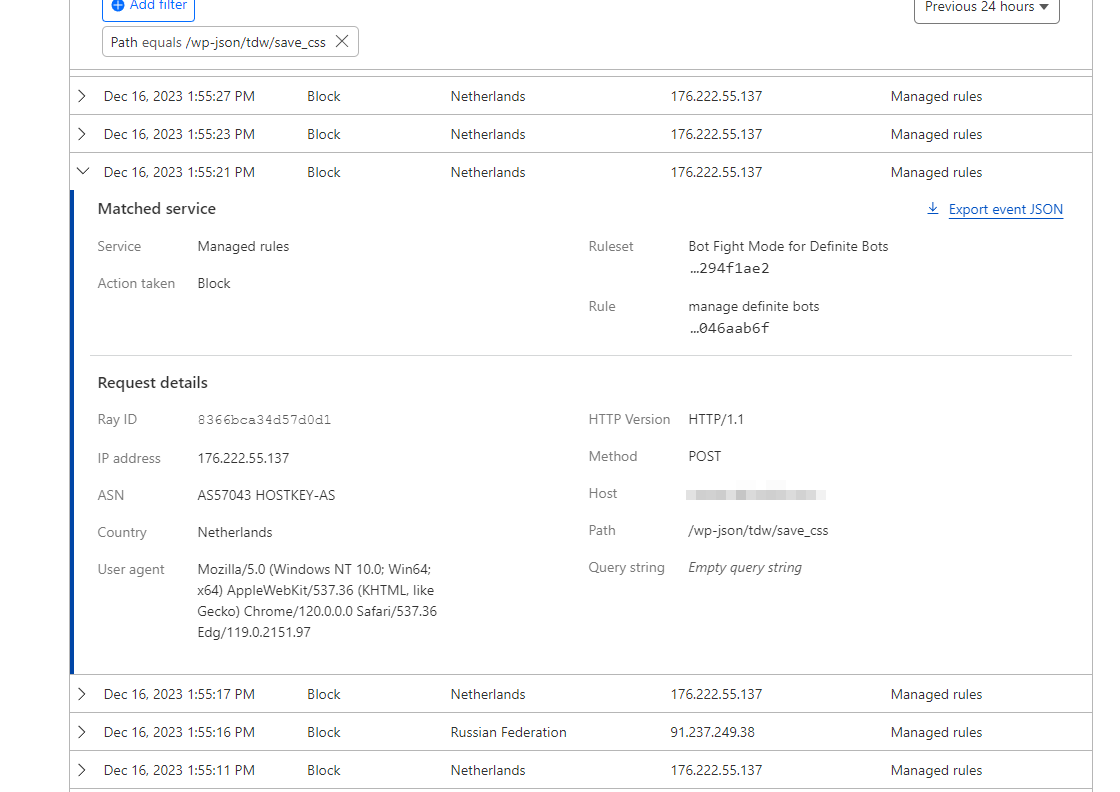
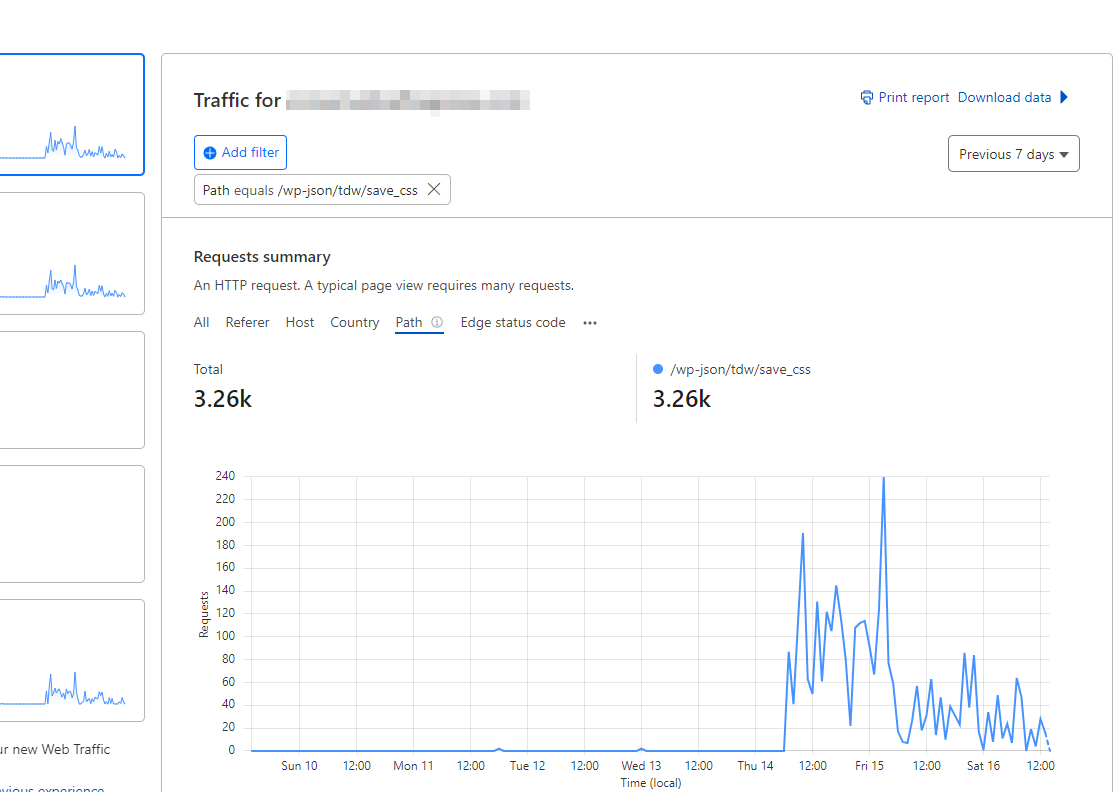
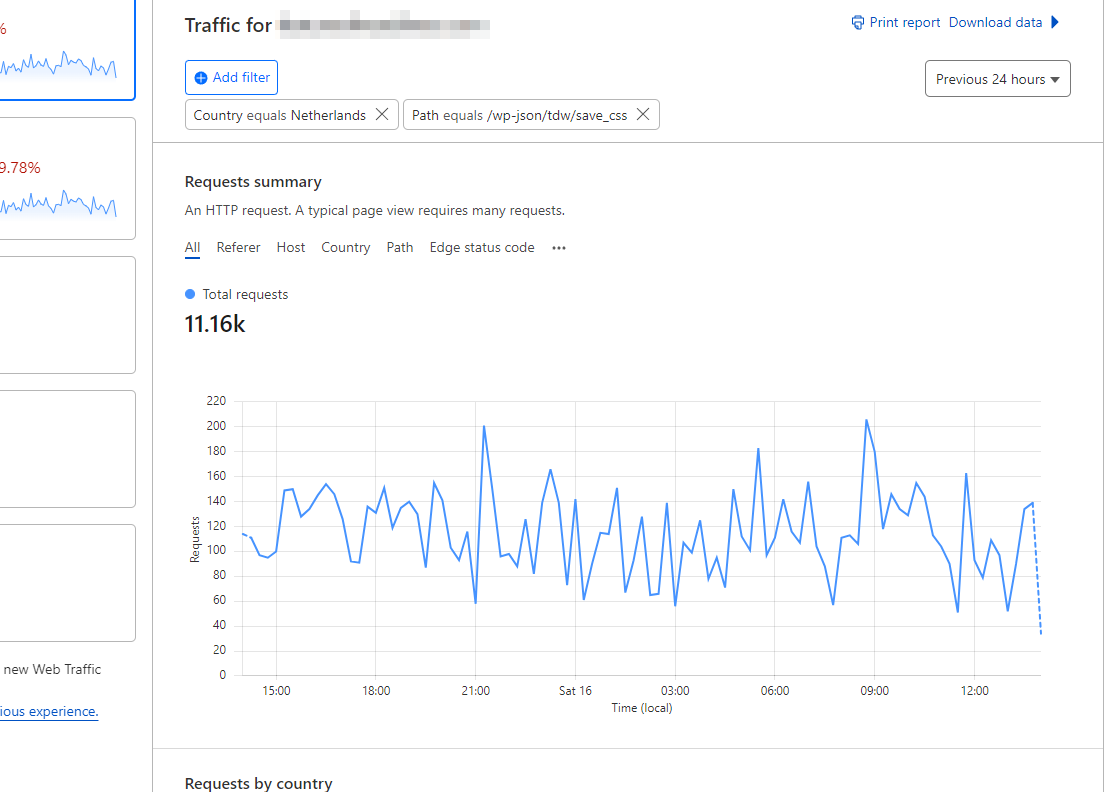
This surge is happening across multiple websites hosted on WPEngine or Digital Ocean. Despite updating all websites from version 12.6.2 to 12.6.3, the increased traffic persists.
Is this related to Balada Injector? https://blog.sucuri.net/2023/10/balada-injector-targets-unpatched-tagdiv-plugin-newspaper-theme-wordpress-admins.html
In our efforts to address the issue, we have also attempted the solution outlined here: How to Disable Access to Exploitation Path for Vulnerable Code in Outdated TagDiv Composer Plugin, but without success.
Is anyone else experiencing this issue (check your Cloudflare stats) and when a fix will be released?
 wordpressive
 I’m trying to get this working, I made a custom plugin following the documentation (https://forum.tagdiv.com/the-plugin-method/)
I copied the code for flex block 4 from td_config_blocks and put it into the plugin
        //hook used to add or modify items via Api
        add_action( 'tdc_loaded' , function() { //add the api code inside this function

            td_api_block::add( 'td_flex_block_4_custom',
            array(
                'map_in_visual_composer' => false,
                'map_in_td_composer'     => true,
                "name"                   => 'Flex Block 4 Custom',
                "base"                   => 'td_flex_block_4_custom',
                "class"                  => 'td_flex_block_4',
                "controls"               => "full",
                "category"               => 'Blocks',
                'tdc_category'           => 'Blocks',
                'icon'                   => 'icon-pagebuilder-td_flex_block_4',
                'file'                   => TDC_PATH_LEGACY . '/includes/shortcodes/td_flex_block_4.php',
I copied all the ‘tdc_style_params’ ‘tdc_start_values’ ‘params’ as well but don’t want to paste them here as they are very large.
I changed the parameters that seemed to need changing, by adding _custom ad the end of them. But kept all the code the same.
When I activate my plugin and try to load it in TD Composer it doesn’t load.
tdcJobManager.addJob - Error callback - textStatus: error errorThrown:
js_files_for_wp_admin.min.js?ver=e12b81d6cbdf467845997a891495df2cx:42 jobRequest {shortcode: '[td_flex_block_4_custom modules_category="image" m…xcerpt1="" show_excerpt2="none" hide_audio="yes"]', columns: 2, jobId: 1, postId: '40247', replyHtml: ''}
tdcJobManager.addJob - ERROR: 500 server error
I see in the logs this:
Fatal error: Uncaught Error: Class 'td_flex_block_4_custom' not found
in public_html/wp-content/plugins/td-composer/legacy/common/wp_booster/td_global_blocks.php on line 33
Any help getting this working would be appreciated.
-
This reply was modified 2 years by
wordpressive.
 Calin
Calin Hello,
A). Unfortunately for this it will be need to edit the theme files, because there is no option for that. The file path is – wp-content/plugins/td-subscription/includes/shortcodes/tds_create_account.php
B). Those are in the time panel, but the name are different, the ‘Sample Information Message’ / ‘Sample Error Message’ etc are only simple text in tagDiv Composer. The texts are – https://i.imgur.com/ThGgr09.png – https://i.imgur.com/vu3WpZV.png
Thank you!
 whichcamefirst
 Hello,
Same issue, the logs are flooded by lines like this:
PHP Warning: Undefined array key "widget_id" in /public_html/wp-content/plugins/td-composer/legacy/common/wp_booster/td_wp_booster_functions.php on line 3123
WordPress, theme and plugins are all up to date.
The issue can be fixed editing plugin code (as @bananaj specified) but it’s not really a fix, on next update the problem will be back.
Can you fix this in the next version?
Thanks.
 conbrio
https://con-brio.co
https://imgur.com/a/meY5tpp (problem screenshot)
I set up mobile template on td composer, but even if I set it the same, sometimes it applies properly and sometimes it doesn’t.
The link on the page that is applied properly is https://con-brio.co/news-231212 and the link on the page that is not applied is https://con-brio.co/news-231211.
 ewebfactory
 This is your child theme function
add_action( 'wp_enqueue_scripts', 'theme_enqueue_styles', 11);

function theme_enqueue_styles() {

    wp_enqueue_style('td-theme', get_template_directory_uri() . '/style.css', '', TD_THEME_VERSION, 'all' );

    wp_enqueue_style('td-theme-child', get_stylesheet_directory_uri() . '/style.css', array('td-theme'), TD_THEME_VERSION . 'c', 'all' );
}
This is mine
add_action( 'wp_enqueue_scripts', 'theme_enqueue_styles', 11);

function theme_enqueue_styles() {

    wp_enqueue_style('td-theme', get_template_directory_uri() . '/style.css', '', TD_THEME_VERSION, 'all' );

    wp_enqueue_style('td-theme-child', get_stylesheet_directory_uri() . '/style.css', array('td-theme'), TD_THEME_VERSION . 'c', 'all' );
}
// Preload Newspaper fonts for responsive theme (main theme)
function dns_prefetch_responsive() {
echo "<link href='https://www.telodoioildungeon.it/wp-content/themes/Newspaper/images/icons/newspaper.woff?21' rel='preload' as='font' type='font/woff' crossorigin>";
echo "<link href='https://www.telodoioildungeon.it/wp-content/plugins/td-composer/legacy/Newspaper/assets/images/icons/newspaper-icons.woff?1' rel='preload' as='font' type='font/woff' crossorigin>";
}
add_action( 'wp_head', 'dns_prefetch_responsive', 0 );
there are no other changes
 Bettina
 Hello @wordpressive!
The theme blocks are registered in td-composer/legacy/Newspaper/includes/td_config.php
Thank you!
 rajushrestha2005
Our site https://www.zapyard.com/ is having issue. tagDiv Composer plugin is giving the below error. Please help resolve it.
Version 4.5 | built on 09.11.2023 13:19 | By tagDiv | Visit plugin site
This plugin failed to load properly and is paused during recovery mode.
An error of type E_ERROR was caused in line 771 of the file /home3/sapyardc/public_html/wp-content/plugins/td-composer/legacy/common/wp_booster/td_global.php. Error message: Uncaught Error: Class ‘tdc_state’ not found in /home3/sapyardc/public_html/wp-content/plugins/td-composer/legacy/common/wp_booster/td_global.php:771 Stack trace: #0 /home3/sapyardc/public_html/wp-content/plugins/td-composer/legacy/common/wp_booster/td_util.php(2802): td_global::td_generate_unique_id() #1 /home3/sapyardc/public_html/wp-content/plugins/td-composer/legacy/common/wp_booster/td_api.php(37): td_util::error(‘/home3/sapyardc…’, ‘td_api_base: A …’, Array) #2 /home3/sapyardc/public_html/wp-content/plugins/td-composer/legacy/common/wp_booster/td_api.php(1273): td_api_base::add_component(‘td_api_module’, ‘td_module_mega_…’, Array) #3 /home3/sapyardc/public_html/wp-content/plugins/td-standard-pack/Newspaper/includes/tdsp_config.php(1802): td_api_module::add(‘td_module_mega_…’, Array) #4 /home3/sapyardc/public_html/wp-includes/class-wp-hook.php(324): tdsp_config::on_td_global_after_config(”) #5 /home3/sapyardc/public_html/wp-includes/class-wp-hook.php(348): WP_Hook->apply_filters(NULL, Array) #6 /
 Webmamadou
Hello My Web site design Break after I Update my theme ( form 9 to 12 version) un-Page Builder: td-composer.
How can I solve it
 besthomegear
I have been experiencing multiple URLs blocked (not indexed) as shown in GSC. Here is a sample URL and you can see “Blocked by robots.txt – and the description of 13 reasons, with TD (Tagdiv) composer named. We have been working with developers trying to Reindex and validate URLs in GSC, but to no avail, finally, we stumbled on this notification when Testing the URL and clicking More Information in Search Console.
Please offer any suggestions to look at our Tagdiv settings in Cloud Library, or elsewhere in theme panel, to fix the settings, and allow us to resubmit all nonindexed or blocked URLs ASAP,
Thank you
Kevin
 Alex
Alex Hi Calin,
Yes. Good you were able to replicate it.
1. From what I figured it is this for the Hover:
In file: td-cloud-library/shortcodes/author/tdb_author_socials.php the bold part below needs to be changed.
target=”_blank” title=”‘ . $author_socials_data[‘social_id’] . ‘“
2. For making it from “mail” to “Email” (bold below)
$buffy .= ‘<span class=”tdb-social-text”>’ . ( $author_socials_data[‘social_id’] == ‘mail-1’ ? ‘Email‘ : $author_socials_data[‘social_id’] )
But these two things can only be changed by editing file. Unless you will make it available as a setting of the block to be changed in TD composer?
 ganuk007
 Hello everyone,
I managed to resolve this issue manually. Please follow the steps below to help address the malware problem:
Step 1: Identification
Firstly, locate the malware within the database. Look for a row in the wp-option table named td_live_css_local_storage that contains JavaScript code resembling fast.quickcontentnetwork.com within the option value.
Step 2: Backup
Ensure you create a backup of your current site or application.
Step 3: Deactivate td-composer
Deactivate td-composer and proceed to delete it.
Step 4: Download the Newspaper zip file
Unzip and manually upload the plugin from the following path – Newspaper-tf > plugins > td-composer. If the issue persists, proceed to step 5.
Step 5: Manual Theme Reinstallation
Remove the theme from the server. Navigate to public_html > wp-content > themes and delete the “Newspaper” folder.
Step 6: Reinstall the Theme
Head to the WordPress dashboard, navigate to Appearance > Themes, click on Add New Theme, and install the theme.
Following these steps should help resolve the malware issue. Feel free to provide any feedback or if you need further assistance.

 Sophia_FACES
 These are the error logs from your website:
/home2/qzj6hn7y/public_html/wp-content/plugins/td-composer/legacy/common/wp_booster/td_util.php
/home2/qzj6h in /home2/qzj6hn7y/public_html/wp-content/plugins/td-cloud-library/td-cloud-library.php
Which direct to the plugins under your website.
 vikramrawat
Hi there,
I tried to upgrade the Newspaper theme from version 9.7.2 to 12 but after upgrading the theme plugins, the theme completely broke. It didn’t work as expected. All the pages made with TD composer stopped working.
Could you please help me with a safe process using which I can upgrade the theme? Is there any documentation that tells how to upgrade from 9 to 12.
Thanks,
Vikram
 analia
  chrisbrown73
Hello, I am getting an error message when trying to add or edit posts this morning. Only resolved when the tagDIV Composer plugin is deactivated. Copying the error code gives the following:
ReferenceError: lodash is not defined
at https://uwejournalism.net/bowernews/wp-content/plugins/td-composer/assets/js/js_files_for_gutenberg_style.min.js?ver=971d5171b3e19fdd336fb9bcd8706cdex:1:129
at wt (https://uwejournalism.net/bowernews/wp-includes/js/dist/vendor/react-dom.min.js?ver=18.2.0:10:47637)
at js (https://uwejournalism.net/bowernews/wp-includes/js/dist/vendor/react-dom.min.js?ver=18.2.0:10:120584)
at wl (https://uwejournalism.net/bowernews/wp-includes/js/dist/vendor/react-dom.min.js?ver=18.2.0:10:88659)
at bl (https://uwejournalism.net/bowernews/wp-includes/js/dist/vendor/react-dom.min.js?ver=18.2.0:10:88587)
at yl (https://uwejournalism.net/bowernews/wp-includes/js/dist/vendor/react-dom.min.js?ver=18.2.0:10:88450)
at il (https://uwejournalism.net/bowernews/wp-includes/js/dist/vendor/react-dom.min.js?ver=18.2.0:10:85274)
at fl (https://uwejournalism.net/bowernews/wp-includes/js/dist/vendor/react-dom.min.js?ver=18.2.0:10:85661)
at Nn (https://uwejournalism.net/bowernews/wp-includes/js/dist/vendor/react-dom.min.js?ver=18.2.0:10:32474)
at https://uwejournalism.net/bowernews/wp-includes/js/dist/vendor/react-dom.min.js?ver=18.2.0:10:83226
I could really do with some urgent help this morning as we are producing live content now!
Many thanks. Chris
 SP1
SP1 We tried rolling back to version 12.5.1 as well and same problem.
Further investigation we found this error in the log as soon as we turn on the TagDiv Coud Library plugin:
AH01071: Got error ‘PHP message: PHP Fatal error: Uncaught Error: Class “td_resources_load” not found in /var/www/vhosts/gadgetbridge.com/httpdocs/wp-content/plugins/td-cloud-library/includes/tdb_functions.php:222\nStack trace:\n#0 /var/www/vhosts/gadgetbridge.com/httpdocs/wp-includes/class-wp-hook.php(324): {closure}()\n#1 /var/www/vhosts/gadgetbridge.com/httpdocs/wp-includes/class-wp-hook.php(348): WP_Hook->apply_filters()\n#2 /var/www/vhosts/gadgetbridge.com/httpdocs/wp-includes/plugin.php(517): WP_Hook->do_action()\n#3 /var/www/vhosts/gadgetbridge.com/httpdocs/wp-content/plugins/td-composer/td-composer.php(178): do_action()\n#4 /var/www/vhosts/gadgetbridge.com/httpdocs/wp-includes/class-wp-hook.php(324): tdc_plugin_init()\n#5 /var/www/vhosts/gadgetbridge.com/httpdocs/wp-includes/class-wp-hook.php(348): WP_Hook->apply_filters()\n#6 /var/www/vhosts/gadgetbridge.com/httpdocs/wp-includes/plugin.php(517): WP_Hook->do_action()\n#7 /var/www/vhosts/gadgetbridge.com/httpdocs/wp-content/plugins/td-composer/legacy/common/wp_booster/td_wp_b…’
This error we got was when we rolled back the theme to 12.5.1
 SP1
SP1Hello Team Tagdiv,
Hope you have had a good holidays.
We are facing a problem since today.
We have the latest NewsPaper theme 12.6.2 on http://www.GadgetBridge.com and today morning when were editing the front page by clicking on edit with TD composer green button on top a problem has started to occur.
We wanted to add a link in the footer menu.
However as soon as we clicked save. Every resource in our (RAM, DISK iO and CPU) dedicated server went to 100%. We have lot of RAM and CPU cores, yet this happened. The site would just not open or respond because of that.
Upon looking the error logs we found this error – AH01067: Failed to read FastCGI header, referer: https://www.gadgetbridge.com/
Upon searching, found out it has to do with a plugin problem.
So, we carefully 1 by 1 from the server end renamed each plugin to deactivate.
As soon as we deactivated the tagDiv Cloud Library plugin, this website came back.
We rebooted the server and all resources went back to normal below 20%.
We thought it could be a plugin mismatch, so –
1) We deactivated all plugins and then just activated TagDiv ones like mobile, composer and all resources were fine. As soon as we activated tagDiv Cloud Library, the website went down again and resources went to 100%. We deactivated and rebooted, the website came back.
2) We have tried uninstalling and reinstalling tagDiv Cloud Library, that does not work. (all other plugins were deactivated)
3) We have tried going back to Newspaper 12.6.1 and activated that tagDiv Cloud Library plugin again same problem. (all other plugins were deactivated).
4) We have deactivated the tagDiv Cloud Library, and reactivated all others so some part of the website is working, however because tagDiv Cloud Library is not active, menu and other systems are not working and there is a naked code on every desktop page in header and footer.
We cannot figure out what the issue is and how to make it work.
Please help, how to solve this problem.
Best Regards
SP
 lacim.eth
Hello, im again stuck on the same problem of the composer not working. First time i fixed it by resetting the site to a new installation and made it from the beginning with the Tech News demo imported. Now the problem appeared again. I pulled out my backup with UptdraftPlus but the composer is still not working and i lost all the settings and translation from theme panel.
So i again reset the site and imported the main default pro demo. Composer not working. I´m only left with a blank page when i try to edit with the composer.
Plugins for optimalization and cache are used and set up like in the theme documentation. Cache we´re cleard and Disabling all the unnecessary plugins did not help. I really don´t know what to try out anymore.
site: https://lacim.sk
lacim.eth Hello, im again stuck on the same problem of the composer not working. First time i fixed it by reseting the site to a new instalation and made it from the begining. Now the problem appeared again. I pulled out my backup with UptdraftPlus but the composer is still not working and i lost all the settings and translation from theme panel.
Calin Hi Asif, indeed, the latest posts can not be edited> To edit the loop title you need to edit this page – wp-content/plugins/td-composer/legacy/Newsmag/page-pagebuilder-latest.php also for post title modules you need to edit the wp-content/plugins/td-composer/legacy/common/wp_booster/td_module.php – https://i.imgur.com/MfxG78b.png
Thank you!
Calin Hello,
If the button has the same link for all posts, then you can edit the post template in code and set the file in child theme – https://forum.tagdiv.com/newsmag-child-theme-support/
For example if you are using post template 1 you can edit the loop-single-1.php or the single_template_1.php (deepens where you’ll like the buttons), the path in theme files is wp-content/plugins/td-composer/legacy/Newsmag/parts/single/ and in child theme the path for files should be /Newsmag-child/parts/single/loop-single-1.php and single_template_1.php
I hope this will help you!
 Anamaria
 Hello,
The font causes the problem. You can try to reduce it .td-post-content p
{
margin-bottom: 2px;
}
Set the code in theme panel -> custom code-> custom css.
You can do the design with tagdiv Composer, and don’t use the latest posts option.
I see that you reduce the header and footer.
Thank you!
 Joophil
Since my last update of the code I have the following error on the log file.
PHP Warning: Undefined array key 1 in /home/unricorg/public_html/wp-content/plugins/td-composer/legacy/common/wp_booster/td_util.php on line 4909
 10v3eternal
Hi, I’m encountering a significant issue on my WordPress site (d5technews.com) with the ‘Newspaper’ theme. I’m facing 404 errors across all pages for ‘text.js’ and ‘mode-less.js’ files within the td-composer plugin, which may be related to the css live feature. Despite the files being on the server, these errors persist.
Examples of the errors include:
mode-less.js - 404 on 2023-11-25 17:09:53 (Homepage)

snippets/text.js - 404 on 2023-11-25 17:09:53 (Homepage)

mode-less.js - 404 on 2023-11-25 17:26:30 (Homepage)

snippets/text.js - 404 on 2023-11-25 17:26:30 (Homepage)
…[additional examples if needed]…
I’m seeking advice on:
Possible reasons for these site-wide 404 errors, especially given the files are present
Any specific issues within the ‘Newspaper’ theme or td-composer plugin, particularly concerning css live, that might be causing this
Recommended steps to diagnose and fix this issue
Your expertise and any guidance you can offer would be immensely helpful in resolving this urgent problem.



