
- NewspapertagDiv Composer Tutorial
- NewspaperCredit System
- NewspaperCreate a frontend submission form
- NewspaperHow to Use the Tabbed Content shortcode
- NewspaperCreate a form contact page
- NewspaperFilters and sorting for taxonomies
- NewspaperUser review system
- NewspaperModal Popup
- NewspaperFlex Block Settings Guide
- NewspaperSocial Sharing
- NewspaperSingle Post Shortcodes
- NewspaperInfinite Loading for Single Posts
- NewspaperThe Newspaper Mobile Theme: Introduction
- NewspaperHow to Add a Logo in Newspaper
- NewspaperCustom Post Type Support
- NewspaperCloud Library Templates
- NewspaperDesign your Post Pages using the Cloud Library Templates
- NewspaperHeader Builder
- NewspapertagDiv Cloud Library Plugin
- NewspaperAd Box Element and Ads Overview
 technologyadvicecom
My site allows random users to submit content, which is stored in the wp_posts and wp_postmeta tables. We’re not creating WordPress accounts for these readers, so we store the name they give us as pen_name in the postmeta table. On a post page we’re retrieving the pen_name from the postmeta table and linking it to the authors page (a cloud template). This cloud template uses the Flex Block 1 module to display posts.
While looking at this block I see that there are options under Filter > Category Filter, we’re using the Author - Current Author option. I’m looking through the theme code and I see that option comes from here:
/wp-content/plugins/td-composer/legacy/common/wp_booster/td_util.php (lines 2155 - 2187
and is implemented here:
/wp-content/plugins/td-composer/legacy/common/wp_booster/td_block.php (lines 191-208)
What I’d like to find out is if there’s a way for me to inject a new option into that list, one that I would write myself. I’ve already written two new blocks, so I’m a little familiar with your API. I just don’t know if this is possible.
 Calin
Calin Hi,
Unfortunately, Newsmag theme do not have an option for this, sorry! The theme files path for the header and top bar is this one wp-content/plugins/td-composer/legacy/Newsmag/parts/header
I hope this will help you!
 Rosa Dei Venti
I posted a problem 16 hours ago but no answer… Where is the problem?
https://forum.tagdiv.com/topic/tagdiv-composer-error-after-upgrading/
post content:
ood afternoon, how I wrote in the title the composer hang on after I click on save button ad does not save the pages.
url: https://openplanet.it
server plesk on linux os
Error log while enter in the pages in edit mode
122875#0: *2133235 open() “/var/www/vhosts/openplanet.it/httpdocs/wp-json/wp/v2/types” failed (2: No such file or directory)
Error log while saving
Error 79.60.17.103 404 POST /wp-json/td-composer/update_footer_template?uuid=5f784a23-0246-538b-ca22-31394e0426d7 HTTP/2.0
Error 79.60.17.103 404 POST /wp-json/td-composer/update_header_template?uuid=e9179030-13b6-b920-bdde-b7b35ae88e5f HTTP/2.0
Error 79.60.17.103 404 POST /wp-json/td-composer/save_post?uuid=0ac9462c-1229-83fd-76c1-3dc84d037548 HTTP/2.0
Error 79.60.17.103 122875#0: *2133235 open() “/var/www/vhosts/openplanet.it/httpdocs/wp-json/td-composer/update_header_template” failed (2: No such file or directory)
Error 79.60.17.103 122875#0: *2133235 open() “/var/www/vhosts/openplanet.it/httpdocs/wp-json/td-composer/update_footer_template” failed (2: No such file or directory)
Error 79.60.17.103 122875#0: *2133235 open() “/var/www/vhosts/openplanet.it/httpdocs/wp-json/td-composer/save_post” failed (2: No such file or directory)
 henrikkloster
Hi.
Bought Newspaper theme but cant use it.
When activating tagDiv composer it just give me Critical error on the website. 🙁
Can you help please else I cant use the theme i bought from you.
I have deleted TD-composer now so it works. Hope you can see if anything is wrong.
Regards,
Henrik
http://www.onlinefitness.dk
Rosa Dei VentiGood afternoon, how I wrote in the title the composer hang on after I click on save button ad does not save the pages.
url: https://openplanet.it
server plesk on linux os
Error log while enter in the pages in edit mode
122875#0: *2133235 open() “/var/www/vhosts/openplanet.it/httpdocs/wp-json/wp/v2/types” failed (2: No such file or directory)
Error log while saving
Error 79.60.17.103 404 POST /wp-json/td-composer/update_footer_template?uuid=5f784a23-0246-538b-ca22-31394e0426d7 HTTP/2.0
Error 79.60.17.103 404 POST /wp-json/td-composer/update_header_template?uuid=e9179030-13b6-b920-bdde-b7b35ae88e5f HTTP/2.0
Error 79.60.17.103 404 POST /wp-json/td-composer/save_post?uuid=0ac9462c-1229-83fd-76c1-3dc84d037548 HTTP/2.0
Error 79.60.17.103 122875#0: *2133235 open() “/var/www/vhosts/openplanet.it/httpdocs/wp-json/td-composer/update_header_template” failed (2: No such file or directory)
Error 79.60.17.103 122875#0: *2133235 open() “/var/www/vhosts/openplanet.it/httpdocs/wp-json/td-composer/update_footer_template” failed (2: No such file or directory)
Error 79.60.17.103 122875#0: *2133235 open() “/var/www/vhosts/openplanet.it/httpdocs/wp-json/td-composer/save_post” failed (2: No such file or directory)
 what-the
 Yeah the woo add to cart from the td composer just isn’t working

We created a global product attribute for size (M, L, XL) and it’s still not showing up. Also the product price is not showing up either. We need some help.
what-theHow can we define the product attributes? Such as the “size”? I created a size attribute but it’s not showing up on the td composer “woo add to cart” attributes tab section. I set it to “variations” also but to no avail.
Help!!!
 mattinodiverona
Hello Guys! I Have a problem with right click in TD composer…when I click nothing happen…
Can you help me?
 lyon
lyonHello, We are using Newspaper Theme version 10.4 on our multisite network, with WordPress 5.7.2. Ever since updating to 10.4, we’ve had an issue that affects just two of our sites on the network, one of which is the main site. All the other sites have no issue.
What happens is when we build a page with a sidebar in TD Composer, and leave the page template set to default, we are seeing a strange overlapping sidebar:
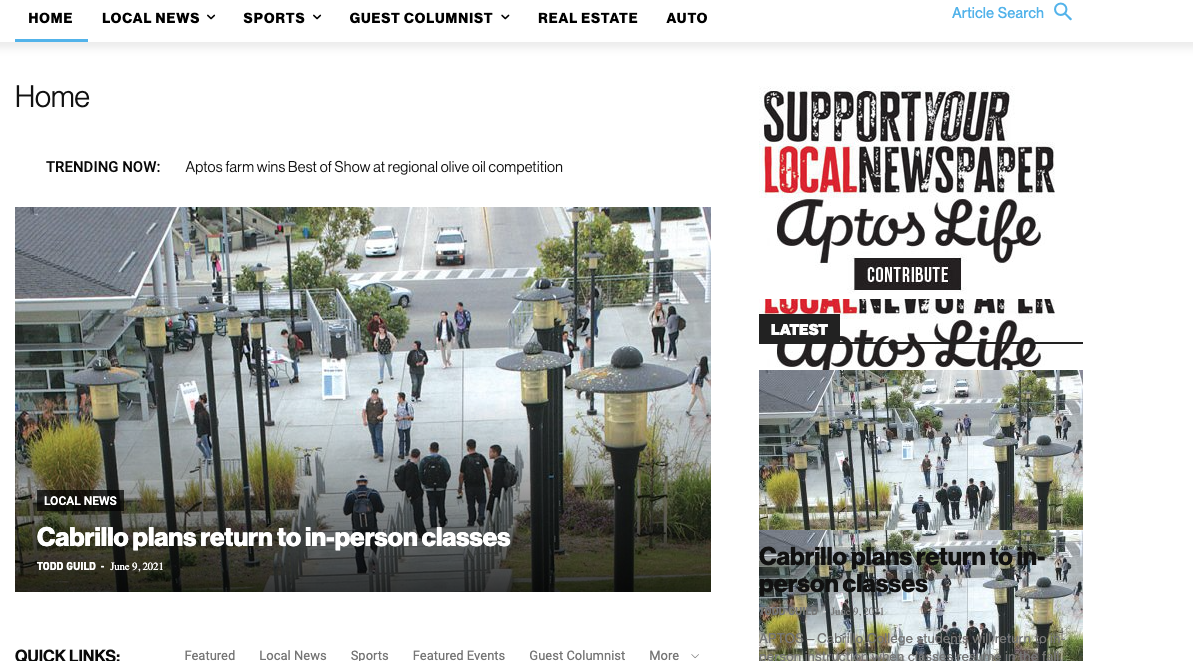
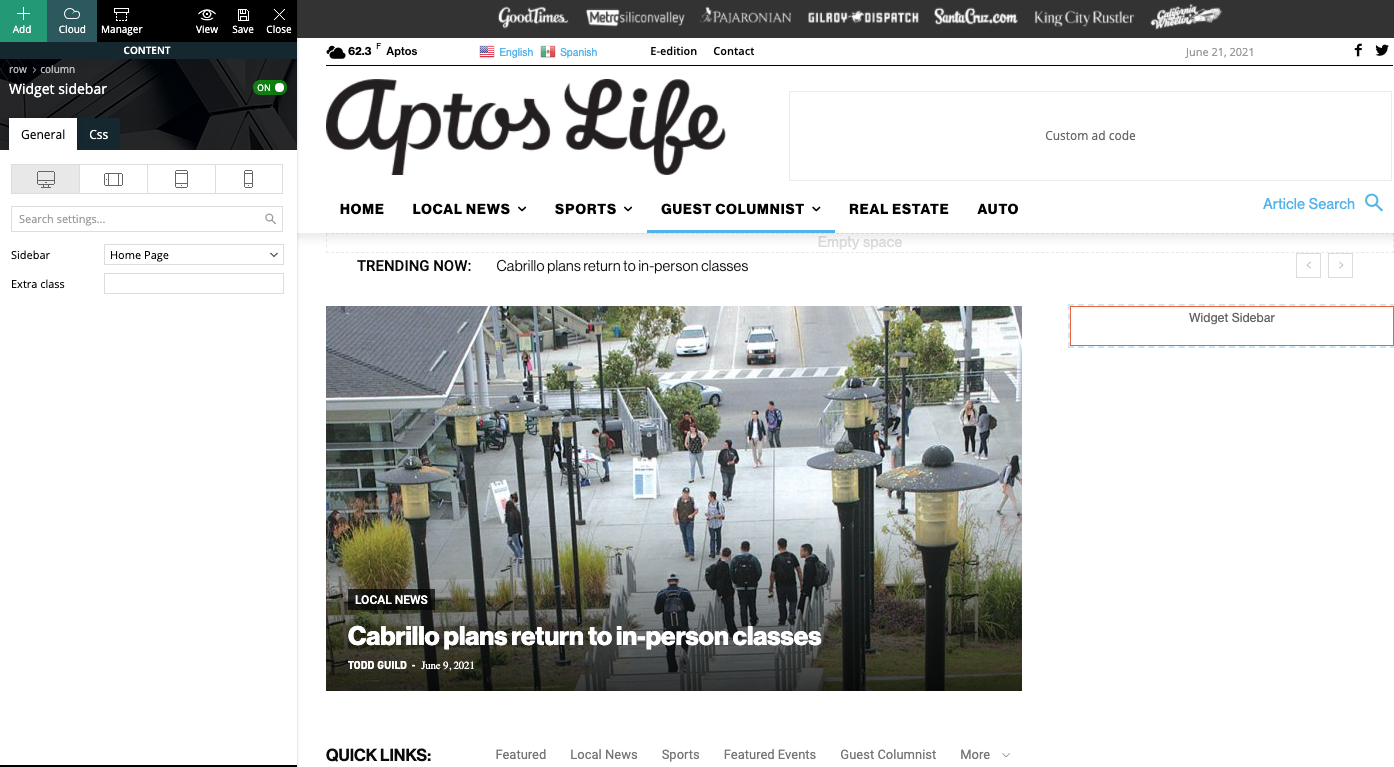
This is how we have the sidebar set in TD Composer:
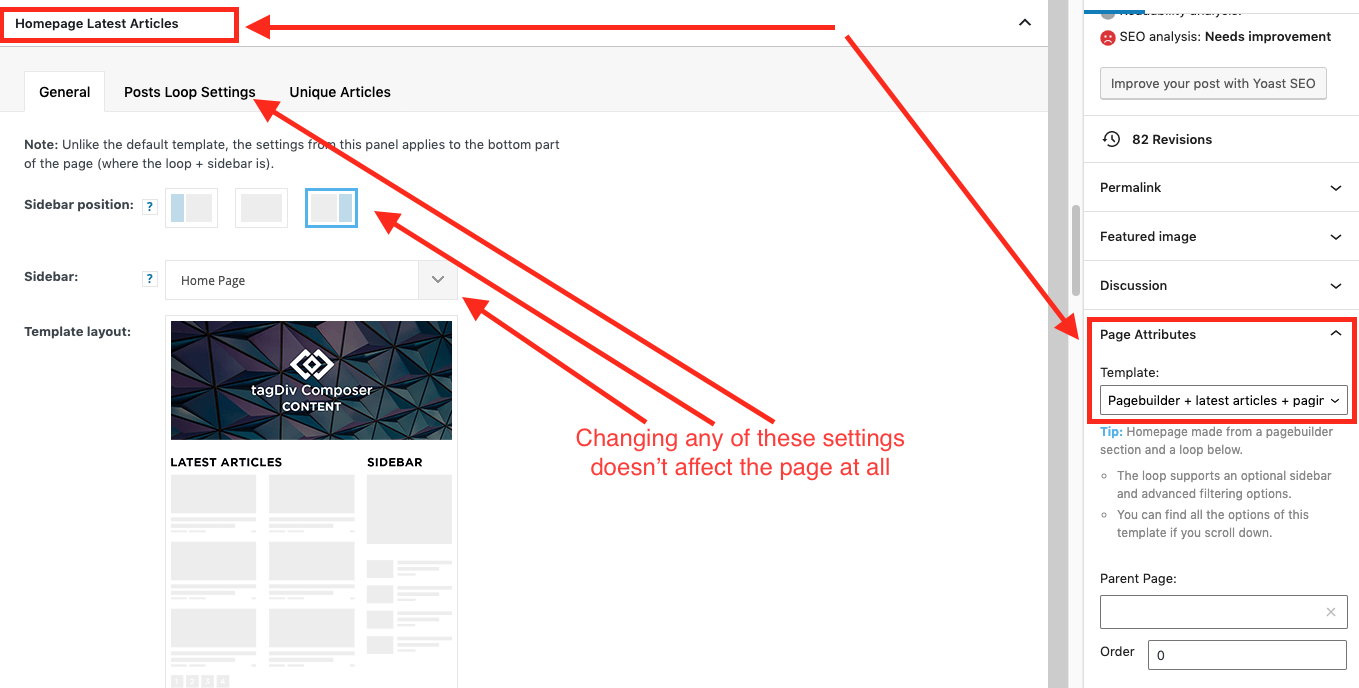
As a temporary workaround we can set the page template to Pagebuilder + latest articles + pagination, but this opens up a whole new set of problems. For example, if we try to change or hide the sidebar in the “Homepage latest articles” settings, no changes occur. Even something such as changing the title on the post loop won’t take affect.
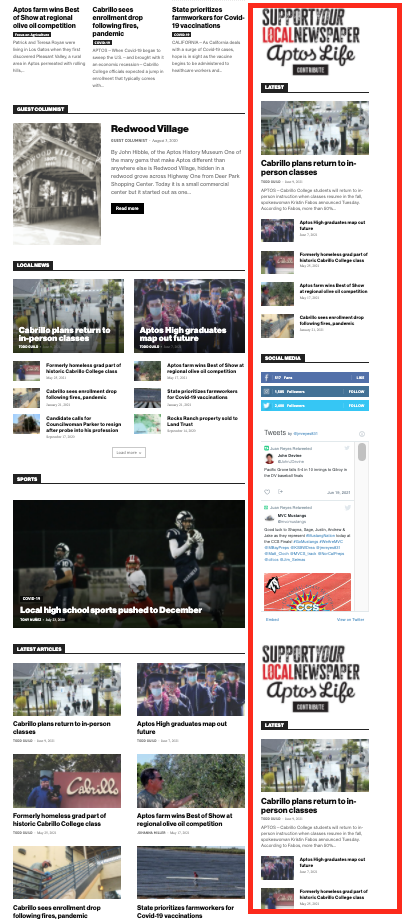
As a result, instead of two overlapping sidebars, we now have two duplicate sidebars stacked on top of each other:
Is there any way to fix these issues? Ideally we would like to leave the page template set to default, with the overlapping sidebars eliminated.
We’ve already tried disabling all our plugins to check for conflicts. Here is some more info from the System Status panel:
Theme name Newspaper
Theme version 10.4
Theme database version 10.4
HTTP channel test wordpress
Installed demo Default – demo ID: default | install type: full
Theme Mobile Newspaper mobile version
php.ini configuration
Server software Apache/2.4.38 (Debian)
PHP Version 7.3.19-1~deb10u1
post_max_size 32M – You cannot upload images, themes and plugins that have a size bigger than this value. To see how you can change this please check our guide here.
max_execution_time 120
max_input_vars 3000
SUHOSIN installed false
PHP extensions
mbstring available
GD library available
WordPress and plugins
WP Home URL https://aptoslife.com
WP Site URL https://aptoslife.com
WP version 5.7.2
WP multisite enabled Yes
WP Language en_US
WP Memory Limit 1 GB/request
WP_DEBUG False
Caching plugin No caching plugin detected – for best performance we recommend using WP Super Cache
 domaincraft
Hi,
I need to upload header menu in mobile menu. I do it:
1) opening Tagdiv Composer on the page of interest;
2) selecting the phone viewport;
3) select the hamburger menu;
4) finally select “td-demo-header menu” from the drop-down menu of the option “select menu” of tagdiv composer.
The above procedure uploads correctly the mobile menu, but it causes the reset of the page text. In particularly the text in the page disappears and appaears the following string [tdc_zone type=”tdc_content”][vc_row][vc_column][/vc_column][/vc_row][/tdc_zone]
 republicanamerican
 Another fail, when updating a post I get the following error.
Notice: Undefined property: stdClass::$thumbnail_url in /home/devrepam/public_html/wp-content/plugins/td-composer/legacy/common/wp_booster/td_video_support.php on line 440
This is probably connected the the Vimeo problem you had. I was testing this feature. I had previously reported that the vimeo thumbnail did not work.
republicanamericanI went through the process of updating.
I downloaded the new theme.
I updated the tagdiv composer plugin.
Now my site has this error.
Warning: require_once(legacy/Newspaper/functions.php): failed to open stream: No such file or directory in /home/devrepam/public_html/wp-content/plugins/td-composer/td-composer.php on line 191
Fatal error: require_once(): Failed opening required ‘legacy/Newspaper/functions.php’ (include_path=’.:/opt/cpanel/ea-php74/root/usr/share/pear’) in /home/devrepam/public_html/wp-content/plugins/td-composer/td-composer.php on line 191
 baldguystudio
Greetings,
I didn’t see anything about steps along an upgrade path, and my client’s site was showing errors when I was on 8.6. We resolved those errors by rolling back to an earlier version of PHP, so I went ahead with the upgrade to 11 and updated the theme plugins, and now have new issues such as “[td_block_big_grid_1 td_grid_style=”td-grid-style-1″ sort=”” category_id=”2″]” that you’ll see at:
https://freepressdailynews.com/
It looks like a theme component isn’t loading, but I’m not sure. I have tagDiv Cloud Library, Composer, and Social Counter plugins activated, but trying to activate Multi-Purpose throws a fatal error (Fatal error: Cannot declare class td_api_multi_purpose, because the name is already in use in … /wp-content/plugins/td-multi-purpose/td-multi-purpose.php on line 44).
WP is 5.7.2, and I’m running PHP 7.3.28. Disabling third-party plugins doesn’t help. Everything is up to date.
Can anyone see what may be causing this issue? Should I have installed an in-between version instead of going 8.6 > 11?
Thank you!
 Anamaria
 Hello,
Please give us more details about duplicate queries made by TD Composer, with screenshots or video.
If you want you can post them here on the forum or you can contact us via email at contact@tagdiv.com, where you can provide us with as much information as possible about this problem.
Thank you in advance! Have a nice day!
 topmagazin
Hey there,
after updating to v11 the images on the “team widget” are not showing anymore. They are showing in backend (when editing with td composer) but not on frontend.
All plugins are up to date. I already deleted TD Composer and did a fresh download and install.
Your help is appreciated.
 Anonymous
 Hi!
Thanks for the fix of the duplicate calls made by TD Newsletter in this new update!
I would also like to report the increasing number of duplicate queries made by TD Composer… hope that it will be addressed soon!
Thanks!
 Micha
Micha Go into the plugins menu and turn the TD plugins back on (Composer etc), then it should work, if you are using a cache, clear it once.
Anamaria Hello,
If you have a standard header template, then you need to go in Theme Panel -> Multi-purpose -> General settings => https://www.screencast.com/t/TTDr97cEDm2
If you have a header template from Cloud Library, edit it with tagDiv Composer => https://www.screencast.com/t/6YUYLowF -> https://www.screencast.com/t/34PJWwRxVUNC
Thank you!
Anamaria Hello,
Please try to deactivate, delete and reinstall tagDiv Composer => https://www.screencast.com/t/WLy01lbc and clear all cache.
Also, if the problem persists after that, you need to use a custom code CSS => https://www.screencast.com/t/nBelRAdE
.single .td-post-sharing {

opacity: 1;

}
Please use the code above and insert it in here: https://www.screencast.com/t/OtVh8O82sN
Thank you!
Anamaria Hello,
Most likely it will not work by installing the plugin, but if it needs to be implemented in code, then in these paths you can find the files for login.
wp-content/plugins/td-composer/legacy/Newspaper/parts/header/td-login-modal.php
wp-content/plugins/td-cloud-library/parts/tdb-login-modal.php
wp-content/plugins/td-composer/legacy/Newspaper/parts/register.php
Please note that any change you make in the theme files after the update will be overwritten and you have to make the changes again. Better save the code somewhere and then apply it again after every update.
Thank you!
Micha You can add the code to Function.php (and extend it with your fonts)
function dns_prefetch_mobile() {
echo ‘<link rel=”preload” href=”/wp-content/plugins/td-composer/assets/fonts/td-multipurpose/td-multipurpose.ttf” as=”font” type=”font/ttf” crossorigin=”anonymous”>’ . “\n”;
echo ‘<link rel=”preload” href=”/wp-content/themes/Newspaper/images/icons/newspaper.woff” as=”font” type=”font/woff” crossorigin=”anonymous”>’ . “\n”;
}
add_action( ‘wp_head’, ‘dns_prefetch_mobile’, 0 );`
 furanzu
 Hi Calin,
Thanks for the reply.
Unfortunately, i am a bit confused with your suggestion on adding code from wp-content/plugins/td-composer/mobile/includes/modules/td_module_single_mob.php into posts sidebars -> wp-content/plugins/td-composer/legacy/Newsmag/parts/single…
How can i do so?
To make it clearer, please go to this link: http://verztec-online.com/clients/annals/recurrent-vascular-events-in-ischaemic-stroke-patients-with-diabetes/ and look at the Sidebar on the bottom right side. I am trying to add Related Articles inside sidebar here.
So basically, i want the Related Articles box (located at bottom of every Posts) to be shifted into the Sidebar instead.
Hopefully this is illustrating my situation better.
Looking forward for your advice!
Thank you in advance.
 Vlad S
 Hello!
For this you will have to uncheck the unused options from here: https://www.screencast.com/t/hNwAlg88r As you can see each thumb is assigned to some blocks. You can check only the thumbs that are used by your blocks. That you can see by opening tagDiv Composer on your page and click on the blocks as you can see here: https://www.screencast.com/t/mKdqNzTdddk
Thank you!
Calin Hi,
In case that you do not have many categories, then it is a better idea to make sidebar for each category and and set in it a block that it is filtered after that category (after that you set the correspondent sidebar for each article).
In case that you have many categories and articles, then the above suggestion is not so good and the only way is to make changes in theme files and the code used for this is on this file path -> wp-content/plugins/td-composer/mobile/includes/modules/td_module_single_mob.php -> https://i.imgur.com/mfRpJ3i.png you need to set that code in posts sidebars -> wp-content/plugins/td-composer/legacy/Newsmag/parts/single
I hope this will help you!
Thank you!
 lifein
Hi,
Some of my categories are not showing the content as they suppose to do. For example, the category page: “https://www.lifeinbelfast.es/category/tramites/” properly renders the styles and content, but the category page: “https://www.lifeinbelfast.es/category/ciudades/” doesn´t render the header styles and doesn’t load any posts.
The majority of the category pages have this problem and I was not able to determine why. I checked on the theme panel and they inherit the same templates and looking at them in tagdiv composer they also have the same blocks, etc.
Also, my 404 pages behave the same, the template: “https://www.lifeinbelfast.es/tdb_templates/404-template-default-pro/” works ok, but if I write a non existing page e.g. “https://www.lifeinbelfast.es/sdfhsdhds” it shows the same problem I deescribed.
I also cleared the cache, disable the plugins, etc. but the problem persists.
The rest of the blog posts, pages, HomePage, etc. work fine. Please, can you have a look at this?
Thanks,
Gonzalo

