
- NewspaperHow to update a plugin
- NewspaperHow to update the WPBakery Page Builder plugin
- NewspaperHow to Update the Newspaper Theme
- NewspaperSingle Post Excerpt
- NewspaperWP Rocket and Newspaper Theme: Optimization Guide
- NewspaperCredit System
- NewspaperHow to use the Bing Maps API
- NewspaperModules Builder in Newspaper Theme
- NewspaperCreate a frontend submission form
- NewspaperCustom Fields Support
- NewspaperFlex Block Settings Guide
- NewspapertagDiv Opt-In Builder
- NewspaperHow to use the YouTube API
- NewspaperDefault Category Settings
- NewspapertagDiv Composer Tutorial
- NewspaperHow to Set the Image Avatar
- NewspaperUnique Articles
- NewspaperFacebook Share
- NewspaperCache plugin – install and configure
- NewspaperFeatured Image, Video or Audio
 byothe
Hello
I think last update (or previous one) did a bad job at optimisation…
My site has now a very bad CLS on mobile which is affecting my mobile traffic.
Since I didn’t make any major change on my site other than theme update I guess it comes from last version… Is it something you are trying to repair for next version ?
https://pagespeed.web.dev/analysis/https-byothe-fr/dsuxwegn8x?form_factor=mobile
Regards
 sdfasdfsdf
 Hi,
Thanks for your reply, the undo and redo button are working.
I had already updated all you mentioned. My site is hosted on SiteGround and meets all the requirements.
I must clarify that the issue is not with page speed or the delivery of content on my site, the issue is with the TagDIV Composer itself as I can edit (with the WP editor) and view the page as normal.
The TagDiv Composer takes 5+ min to load any page, often failing to load entirely and any changes made lag considerably before they are reflected in the preview, often with the window freezing entirely. This is only a recent problem, after changing to the Ridgemont demo site and I am using a fairly powerful computer which rules out any hardware issues.
 Bettina
 Hello @ewebfactor!
The child theme is not overwritten by the update. An issue for that could be the compatibility of your child theme with the new version of our theme.
Thank you!
Bettina Hello!
Update WordPress, PHP, the theme, and plugins to the latest version.
Check all these requirements for the theme: https://forum.tagdiv.com/requirements-for-newspaper/
You should enable this option: https://app.screencast.com/RyRHDwn8G4Jad in order to have the undo and redo buttons.
Please note that page speed or optimization is not covered by the support team: https://forum.tagdiv.com/newspaper-theme-support/
Thank you!
 Romi
Romi Hello Anamaria
I will try your suggestion. I will update this thread if there is any progress.
Thank you very much
Muhammad Nagib Alaydrus
 Calin
Calin Hello,
Please check our guide for how to update the theme – https://forum.tagdiv.com/how-to-update-the-theme-2/ if you have an old version please use the manual theme update – https://i.imgur.com/YleKvwf.png
Also, please make a full backup or try the update on staging not directly n live website.
In case that you want a developer to update the theme for you, please do a request here – https://tagdiv.com/submit-a-request/
Thank you!
 Anamaria
 Hello,
Please try to update the plugin manually: https://forum.tagdiv.com/newspaper-how-to-update-a-plugin/
Also, please make sure that you have the tagdiv Standard pack plugin activated.
Thank you!
 rajushrestha2005
Our website https://www.zapyard.com/ has been down since Nov 9th 2023 update. Error “Error establishing a database connection”.
I think the plugin tagDiv Cloud Library is the culprit. As soon as we activate it, our site does not recognize the database. Also tagDiv Composer seems not working. As our website home page has bunch of tagDiv code showing up.
Can someone help?
 Webmamadou
Hello My Web site design Break after I Update my theme ( form 9 to 12 version) un-Page Builder: td-composer.
How can I solve it
 _Adam_
Hi,
I wanted to follow the tutorial https://forum.tagdiv.com/the-child-theme-support-tutorial/
Except that there is no child theme in the envato download folder.
So I would like to know how to create a child theme so that all the modifications I make on the theme are not lost during updates.
thank you in advance for your help.
 Hazarcan Doğa Bakan
Hi,
My website uses older version of the theme (9.0c). How can I update the theme AND it’s child theme?
 pratul11
 Small Update: If you hard refresh by hitting Ctrl+F5 like 7-10 times, it might load fresh content.
 chabotjeff
 What exactly is the tagdiv composer? Is it the entire left column section? Or does it include the header section as well (where the Edit templates options are)?
My website header is not working correctly and tagdiv elements stopped working yesterday.
In addition, the sidebar no longer shows up. Wondering if there was an update to the code to cause this.
 miltonrodas
Hello,
I have reviewed https://forum.tagdiv.com/mega-menu/ and it is no help for this issue. Also read many support posts and nothing explains how to fix this. Please, help!
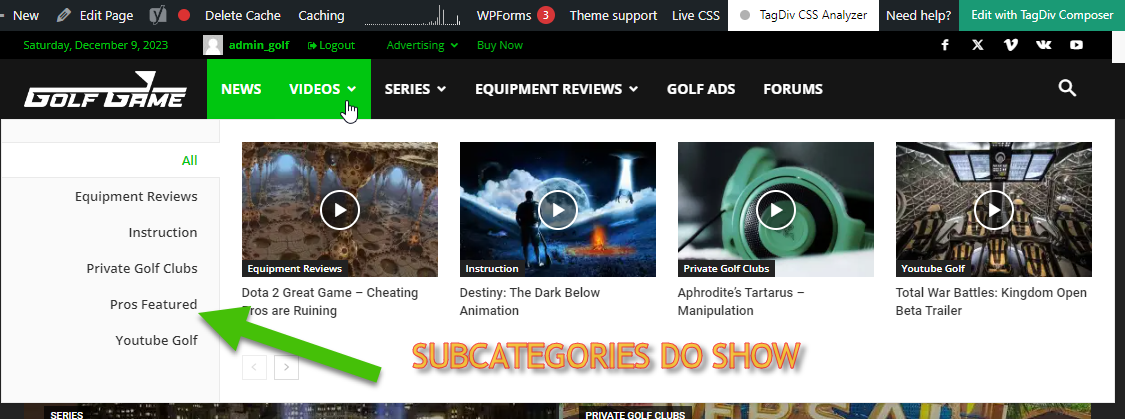
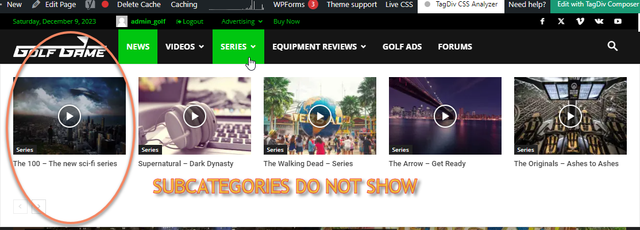
Basically, in building this new website, I like the Mega Menu drop downs. I have set Mega Menus to [parent] Categories that have Sub-Categories within them.
— There is nothing different about what was done. The process is exactly the same and it gives different results.
Is there a way to customize which drop-downs show Sub-Categories and which do not? How do I find this way, if it exists? Please, help! Thank you! (Btw, tried using Tagdiv composer and it said menus cannot be updated with it, just FYI)
 Praga
PragaGood afternoon, my website with the theme is working poorly. You can enter http://www.viviendopraga.com, but in none of the articles….
After doing a thousand things, I went to see if there is any update on the topic. And it says that my theme license is not activated with my domain.
I’ve been like this since day 4, please, I need a solution urgently. Can you help me?
pratul11 I think nobody is understanding what I want to say and what exactly are my problems.
Let me put it in simple terms.
The latest posts published are not visible in the Website. However, if somebody logs in, then he can see the latest posts.
For example, the weather on top menu is not visible if you are not logged into the site. See the Screenshot
However, if someone is logged into the site, he can see the weather on top menu as well as latest post (in this case Quotation by Walt Disney). See the Screenshot
Same goes for the Shop (https://anopenedmind.com/shop/ ). If you are not logged in you cannot see the latest products published. But if you log in, you can see the latest products. Click the Screenshot
All my posts, categories are set as Public and all caches are cleared. May be it is a bug of the theme after the latest update. I did not face this problem before. Please help.
 BennySG
Hi, I’m trying to edit the content/labels within the Login/Register form (and associated forms too). The current form displays such text as ‘Sample Success Message’ – and I’m unable to locate where this can be modified. I’m assuming there is somewhere within TagDiv/Newspaper which allows me to update this? When I try and edit from the front end using the TagDiv composer, I notice it’s a shortcode. Which forms are used for this? Or am I required to create entirely new pages/forms for this?
Appreciate this is a relatively simple task, but I’ve spent >1 hour looking through the dashboard and searching google/these forums for help, but I’m unable to locate any resolutions to this issue. Thank you
 Eighthats
We’ve had a site on Newspaper for a while using Big Grid Flex 3 on the home page, and after we finally needed to update the site due to a vulnerability caused by an out-of-date theme, the Big Grid Flex 3 no longer functions as a slider and seems like it cannot anymore. Our client is very unhappy, and I’m curious if there is any way to replicate the functionality from previous versions of the theme. I am also curious why this feature was deprecated.
OLD FUNCTIONALITY
https://imgur.com/a/SmLfjtf
CURRENT SITE
https://www.rcrwireless.com/?nocache
 seolatino
Need help to update Newspaper theme
 Southview92
 to be honest it should be. i love the tagdiv support and theme, but when i have approached hosting companies they keep telling me that tagdiv themes are one of the slowest available. is there any chance on the updates to improve this. even when you dont have much on the theme it is slow.
 ZimaKunta
After upgrading my website to WordPress 6.4 (or 6.4.2), when entering posts I encounter a white screen, the home page is still accessible normally.
Example: https://efootball-pes.click/pes-2021-option-file-wepes-ps4-ps5/
My PHP ver: 8.1.24
My newspaper theme ver: 12.6.2
But when I downgraded the WordPress version to 6.3.2 or older, it worked fine!
Please check for me!
 GoodNewsLiverpool
Hello,
I have been tasked with updating a website for someone who has newspaper v4.
Once we upload the updated theme and activate plugins the site homepage is reset and looks like this:
https://app.screencast.com/oxUfHXCU2IsKm
is their an upgrade guide as i can’t see one in the download from todays purchase?
 thayashi
 Yes, everything is updated
Calin Hi muterobert,
Most likely this happened due to old versions of the theme that is used, it is not secured for the latest vulnerabilities discovered, nor does it have the updates for compatibility with the latest versions of WordPress and php.
My suggestion is to make a staging and update the theme there to be up to date.
– https://forum.tagdiv.com/newsmag-how-to-update-the-theme/
Thank you!
Bettina Hello @bananaj!
Please deactivate all the non-tested plugins with our theme before updating.
Update WordPress, PHP, the theme, and plugins to the latest version.
Check all these requirements for the theme: https://forum.tagdiv.com/requirements-for-newspaper/
Let me know the results!
Thank you!

