
- NewsmagHow to update a plugin
- NewspaperHow to update a plugin
- NewsmagHow to update the theme
- NewsmagHow to update the WPBakery plugin
- NewspaperHow to update the WPBakery Page Builder plugin
- NewspaperHow to Update the Newspaper Theme
- Apitd_api_top_bar_template::update_key
- Apitd_api_top_bar_template::update
- Apitd_api_single_template::update_key
- Apitd_api_single_template::update
- Apitd_api_footer_template::update_key
- Apitd_api_footer_template::update
- Apitd_api_smart_list::update_key
- Apitd_api_smart_list::update
- Apitd_api_thumb::update_key
- Apitd_api_thumb::update
- Apitd_api_category_top_posts_style::update_key
- Apitd_api_category_top_posts_style::update
- Apitd_api_category_template::update_key
- Apitd_api_category_template::update
 JJ0000
Not sure what’s causing this, might be some simple setting, but I’m getting a duplicate sidebar on the home page and extra blocks below my existing one.
Also how to update WPBakery Page Builder plugin? Maybe it’s related to that. Using Version 6.6.0
 beasteh
 .tdb_single_featured_image .wpb_video_wrapper iframe{
width: 100%;
}
Please can you fix this in an update, we shouldn’t have to add this basic css. Thank you (it works)
 itgrcapitallink
The Mobile AMP is Active and the Tagdiv Mobile is Deactivate.
The posts of https://capitallinkshipping.com are not synced on mobile and desktop.
Please check the INDUSTRY NEWS section and the CAPITAL LINK CHANNEL
Why does this happen?
How can be fixed?
Thank you.
 stonedsociety
 Hmm yeah you could be right that it’s a caching issue.
I made a slight update to the homepage and now it does show the right one again (triggered cache).
Now the desktop version is showing on the mobile though. But that’s less of an issue than vice versa.
Thanks anyways!
 Bettina
 Hello!
First of all, please make sure you have a backup done and then you can update the theme and the TagDiv plugins also.
Please take a look for this advice before updating: https://forum.tagdiv.com/topic/action-required-please-read-how-to-update-to-the-newspaper-theme-v-10/
I recommend you to make a backup and update plugins and the theme via file transfer, so that you don’t face any error: https://forum.tagdiv.com/how-to-update-the-theme-2/
Please make sure you have the latest version of the PHP, WordPress, theme and plugins(11.3.1).
If that problem is still there, then please execute these steps:
1. disable TagDiv Composer
2. uninstall(delete) TagDiv Composer
3. clear cache (if cache plugin exists)
4. install TagDiv Composer
5. activate TagDiv Composer
6. clear cache (if cache plugin exists)
Make sure your required tagdiv plugins are installed and active, check in Newspaper -> Plugins.
If you can not achieve what you need, then we can help you as I mentioned above.
Thank you!
 Lian
Lian Update: I already resolved the problem
 menneskedyr
 Thanks again. Yes, I’m aware of that and we’re working on a new, Cloud Templates-based website. Standard Pack is discontinued then, I guess. Note that this was not always there, this bug appeared after the latest update. Until then, Standard Pack worked fine.
With that in mind, there are probably still people out there that have had Newspaper powering their websites for 5+ years and many are still using old designs, with old Newspaper templates. Maybe this helps someone.
It could also be useful for debugging if a site is running Standard Pack and experiences massive SQL spikes.
Have a good day 🙂
-
This reply was modified 4 years by
menneskedyr.
Bettina Hello!
Let me explain you which options of mobile versions are:
1. Responsive version: A responsive version of your website is looking similar like on desktop, edit the page with TagDiv Composer, click on the mobile viewport: https://www.screencast.com/t/XDQJedlggSB ; there you can see your mobile version and you can edit the elements there.
2. Mobile pages: https://tagdiv.com/newspaper-10-3-7-update-brings-customizable-and-fast-mobile-pages/
3. Mobile theme plugin: The Mobile Theme is a performance optimized theme included in the Newspaper main theme and it loads only for mobile devices. It comes with its own templates for page, post, category, etc so your current templates from the desktop theme will get converted to the mobile theme layout. For more details, please take a look here: https://forum.tagdiv.com/the-mobile-theme/ https://forum.tagdiv.com/the-mobile-theme/
A full explanation you can find here: https://www.youtube.com/watch?v=SpGkOnJeNZY
Please provide more information about your issue, screenshots or a video with the settings you make in order to help you efficiently.
A solution for sending a screenshot/video is this:
Download, capture, send: https://www.techsmith.com/jing-tool.html
After making the screenshot, you will have a link, paste it here.
Thank you!
 John Prince
 Anamaria,
Just an update. Regarding 1. I deactivated most of my plugins and all of the tagdiv ones with no success. Still have the same problem. However, I may have stumbled onto something that might help you help me. When adding an extra block ‘single post content’ (which is where the problem is) the problem goes away on the new addition. However, after deleting one or the other (single post content block) the problem persists no matter which block I delete. Knowing this, I hope this helps you somehow.
 mchiaretti
Hello to all,
I have been desperately trying to put publication time in my articles for a long time.
From the editor I can only find the latest update of the post, but not the exact time it is published.
How can I do?
Thanks to those who will help me
 wwti
wwtiWhen I did the latest update I have lost some CSS and the layout in the header was gone. I had to do a restore:
https://www.wewilltransportit.com
I will need to send the wp login information, let’s communicate using this email: jsocarras71@gmail.com
Has been for all the websites that I am using the Newspaper theme.
menneskedyr Thank you for the quick response, but that’s not quite it. Yes, TD Composer has a lot of queries and we live with it, but this was caused by a single (double, actually) repeating query from TD Standard Pack apparently fetching the site logo, using what seems to be a highly inefficient function:
attachment_url_to_postid()
And it was doing it twice, once for the desktop and once for the mobile logo, on every single page load. This caused mysqld to spike to 200% and above.
I see now that I have posted the wrong screenshot above, sorry. Here’s the correct one:
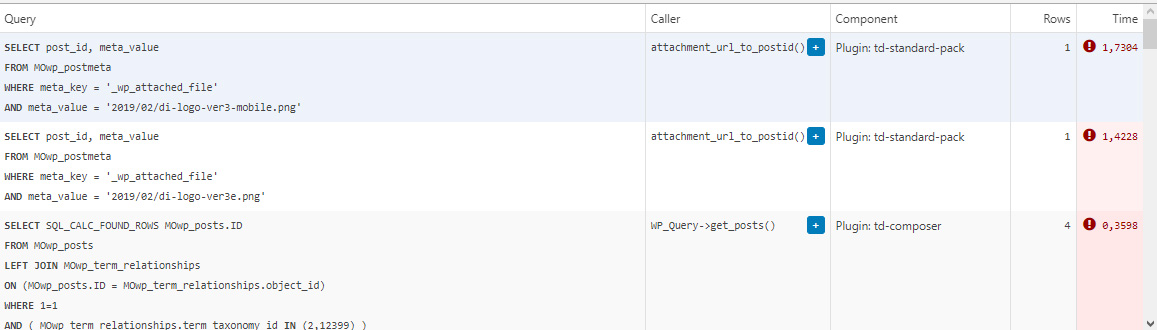
This morning I managed to patch up the problem, it’s a crude solution but may help someone. In header template I found that it was loading the logos from
plugins/td-standard-pack/Newspaper/parts/header/header-menu-h1.php
(yours may be different of course)
There I simply removed the PHP block fetching the logos and hardcoded the HTML for the logos in. As soon as I did that, the SQL spike went away. So I’d say it’s a bug, or inefficient code at least.
To be clear, we’re running the latest versions of WP, PHP, MySQL, the theme & plugins, all on a solid VPS. Yes there is quite a bit of SQL load, we’re working to optimize it with new blocks and Cloud Templates, but this was something else. Could be related to the latest Standard Pack update, don’t know, team didn’t report it before.
-
This reply was modified 4 years by
Bettina Hello!
This issue has been discussed already here: https://forum.tagdiv.com/topic/td-composer-creates-27-slow-db-queries-on-every-page-load/
I recommend you to have the latest version of the PHP, WordPress, theme and plugins(11.3.1).
Thank you!
Bettina Hello!
Let me explain you which options of mobile versions are:
1. Responsive version: A responsive version of your website is looking similar like on desktop, edit the page with TagDiv Composer, click on the mobile viewport: https://www.screencast.com/t/XDQJedlggSB ; there you can see your mobile version and you can edit the elements there.
2. Mobile pages: https://tagdiv.com/newspaper-10-3-7-update-brings-customizable-and-fast-mobile-pages/
3. Mobile theme plugin: The Mobile Theme is a performance optimized theme included in the Newspaper main theme and it loads only for mobile devices. It comes with its own templates for page, post, category, etc so your current templates from the desktop theme will get converted to the mobile theme layout. For more details, please take a look here: https://forum.tagdiv.com/the-mobile-theme/ https://forum.tagdiv.com/the-mobile-theme/
A full explanation you can find here: https://www.youtube.com/watch?v=SpGkOnJeNZY
If you created the mobile pages with TagDiv Composer, then when you install Mobile Theme plugin, your pages will be overwritten (disappear) by the plugin layout.
If you use Mobile theme plugin, then you can not edit the pages with TagDiv Composer.
You have only some settings for this layout, which you can find in Theme panel -> Mobile Theme. Please note that if a page is made by Composer, than the content won’t be displayed on Mobile theme version. You should create the content with the Mobile Editor.
Unfortunately, AMP is faster and works better only with Mobile Theme, because it is not compatible with cloud templates.
From my point of view, if you don’t use the Mobile Theme plugin, then there is no reason or benefit from AMP.
Check our documentation about this plugin here:
https://forum.tagdiv.com/tagdiv-amp-plugin-tutorial/
Thank you for understanding!
Bettina Hello!
Please make sure you have the latest version of the PHP, WordPress, theme and plugins(11.3.1).
If that problem is still there, then please execute these steps:
1. disable TagDiv Composer
2. uninstall(delete) TagDiv Composer
3. clear cache (if cache plugin exists)
4. install TagDiv Composer
5. activate TagDiv Composer
6. clear cache (if cache plugin exists)
It seems that you use Mobile Theme plugin. Please note that if you need to use mobile pages or a responsive version, then you need to uninstall the Mobile Theme plugin.
Thank you!
Bettina Hello!
Please make sure you have the latest version of the PHP, WordPress, theme and plugins(11.3.1).
If you use default templates, then please install and activate the Standard Pack plugin.
If the problem is still there, then contact us via email at contact@tagdiv.com and provide the following:
– admin url and credentials
– a link to this topic in order to identify you
Our team will take a look!
Thank you!
 Tom C
Tom C I fixed my issue by changing menu-mobile.php, under the ‘login/register,’ also making it ‘if else’ like the ‘login’ section of code a few paragraphs up. I wish this thread could be looked at by dev team before future updates to these plugins.
 melihkotbas
 Update: When I use the 1st option, when any module is changed, the desktop version is also broken. Although this option makes the desktop version responsive, it does not give freedom on the mobile side.
Bettina Hello!
There is a huge configuration which is tested with our theme: https://forum.tagdiv.com/cache-plugin-install-and-configure/
Let me explain you which options of mobile versions are:
1. Responsive version: A responsive version of your website is looking similar like on desktop, edit the page with TagDiv Composer, click on the mobile viewport: https://www.screencast.com/t/XDQJedlggSB ; there you can see your mobile version and you can edit the elements there.
2. Mobile pages: https://tagdiv.com/newspaper-10-3-7-update-brings-customizable-and-fast-mobile-pages/
3. Mobile theme plugin: The Mobile Theme is a performance optimized theme included in the Newspaper main theme and it loads only for mobile devices. It comes with its own templates for page, post, category, etc so your current templates from the desktop theme will get converted to the mobile theme layout. For more details, please take a look here: https://forum.tagdiv.com/the-mobile-theme/ https://forum.tagdiv.com/the-mobile-theme/
A full explanation you can find here: https://www.youtube.com/watch?v=SpGkOnJeNZY
If you created the mobile pages with TagDiv Composer, then when you install Mobile Theme plugin, your pages will be overwritten (disappear) by the plugin.
This is how that element works there on the mobile version: https://www.screencast.com/t/tt0ZFk3XX5tT
Thank you!
Bettina Hello!
Please make sure you have the latest version of the PHP, WordPress, theme and plugins(11.3.1).
All requirements should be as you can see here: https://forum.tagdiv.com/requirements-for-newspaper/
The issue how you explained it’s from a plugin conflict or a cache issue, that’s why, please deactivate ALL plugins except tagDiv ones, also if you are using a cache plugin, deactivate it, clear all cache (also from your browser) and try again.
If this problem is not solved after that, then we need to take a look and see what happened there.
Please contact us via email at contact@tagdiv.com and provide the following:
– admin url and credentials
– cPanel url and credentials
– a link to this topic in order to identify you
Our team will take a look!
Thank you!
 Anamaria
 Hello,
Please make sure the tagDiv Standard Pack plugin is updated and activated.
Those shortcodes and the error are from tagDiv Standard Pack, and this plugin is not required from version 10.4, because the new demos are using cloud templates.
Thank you!
Anamaria Hello,
Please make sure the tagDiv Standard Pack plugin is updated and activated.
Those shortcodes and the error are from tagDiv Standard Pack, and this plugin is not required from version 10.4, because the new demos are using cloud templates.
Also, you can use a header template / footer template , posts, etc from Cloud Library, and you can customize it with tagDiv Composer => https://www.youtube.com/watch?v=HXQQygkCCJo
Also, please check our documentation -> https://forum.tagdiv.com/newspaper-theme-documentation/
Thank you!
Bettina Hello!
Please make a full backup before and please check our documentation about Autoptimize here: https://forum.tagdiv.com/autoptimize-install-configuration/
Every demo has the required plugins (Newspaper -> Plugins) which you can see the notification if you hover over the Install button of the demo.
For the page speed, I can recommend you some solutions in order to increase the score.
Our developers are working a lot to improve the page speed in every update.
Also, to increase the page speed you can check these similar topics for more solutions:
– https://www.infophilic.com/get-almost-100-pagespeed-newspaper-theme/
– https://forum.tagdiv.com/topic/score-100100-pagespeed-with-newspaper-wordpress-theme/
– https://developers.google.com/speed/docs/insights/v5/about
– https://www.youtube.com/watch?v=tnkVapqhIHc
Please note that page speed is not covered by the support team: https://forum.tagdiv.com/newspaper-theme-support/
Thank you!
 Philwat
Hi,
My website theme was on 11.2 version, after update it with 11.3.1, many errors appeared.
Rollback with old version stable for my site not change anything.
In panel theme i cannot see header style, top bar…
Result: no logo, no footer, all settings are lost
In post settings, i see only one default post template, so the result is, where are disappears my features, result:
https://www.australien-backpackersguide.com/australien-blog/
Other result: https://www.australien-backpackersguide.com/unglaubliche-koala-geschichten/
wp_booster error:
td_api_base::mark_used_on_page : a component with the ID: single_template_3 is not set.
/var/www/clients/client1/web3/web/wp-content/plugins/td-composer/legacy/common/wp_booster/td_api.php
with a button display backtrace
I have two others website with same theme, same features etc and i make an update on one of it and there are no problems.
Please i need support, investigate, i can create credentials, how do you proceed in this case ?
Regards.
Bettina Hello Roberto!
You can edit your mobile pages with the TagDiv Composer and customize them.
Please check the documentation about mobile pages and please assign them to the desktop version page in order to display in the mobile devices:
– video tutorial here: https://www.youtube.com/watch?v=SpGkOnJeNZY (06:00)
– https://tagdiv.com/newspaper-10-3-7-update-brings-customizable-and-fast-mobile-pages/
Hope that helps you!
Thank you!
