- NewsmagHow to use the Visual Composer plugin
- NewspaperFlex Block Builder and Flex Loop Builder
- NewspaperModules Builder in Newspaper Theme
- NewspapertagDiv Shop
- NewsmagtagDiv Composer Tutorial
- TutorialsFrom WPBakery to tagDiv Composer
- NewspapertagDiv Composer Tutorial
- TutorialsDefault Block Settings Guide
- NewspaperCreate Custom Code with the browser’s Inspector or the Live CSS Box
- NewspaperCompare theme files – Winmerge tutorial
- NewsmagWhat’s included in Newsmag theme package
- NewsmagNewsmag documentation
- NewsmagBlock settings tutorial
- NewsmagHow to update the WPBakery plugin
- NewsmagCustom ad spots
- NewspaperHow to update the WPBakery Page Builder plugin
- NewspaperBlock settings tutorial
- NewspaperPost Formats (for TinyMCE)
- NewspaperFont Customization
- NewspaperBackground Introduction
 Bogdan B.
 Hi,
1) If you want to have the homepage exactly like the one in our demo, then simply install the default demo with content from here and it will be created automatically for you: http://screencast.com/t/pxg0tmg8Bgxa
If you do not want the demo content, then please follow this guide to see how to use visual composer and make use of modules and blocks to get your desired layout: https://www.youtube.com/watch?v=ss-BEobegAw
Please read the documentation as well as you will find lots of useful information in there about the theme settings.
2) The sidebars can be found here: http://screencast.com/t/rhLu9CAWfLFJ
Here is a link to the documentation: https://forum.tagdiv.com/wordpress-information/
Thank you!
Bogdan B. Hi,
Buddypress is compatible with our theme, but that only means it works with the theme, not that there will be implementation from one plugin to another. Woocommerce has this by default as they have an agreement with visual composer. We are not the authors of any of these plugins so we cannot dictate what visual composer will contain or not. Buddypress seems to need an add-on if you want to use it together with visual composer. That depends only on the plugin authors and we have no say in it.
Thank you!
 Catalin
 Hello javierpenia,
Unfortunately, for your first request, please notice that is talking about Aspect Ratio.
Your Video has been registered with a specific aspect ratio that differs to our aspect ratio used by the theme Those black bands appear to your featured image when these characteristics are different (aspect ratio). As I explained you in the previous reply, our theme uses a specific cropping system, namely center to top. In your case, if you want to display the featured video you need by another system cropping which should be implemented on your theme and which involve custom work. Please notice that is not a simple task and if you are not aware of the steps in this regard, please consider hiring a freelancer/developer to help you because we cannot provide customization services at the moment, sorry! For more information about Aspect Ratio system, please consult our documentation here -> https://forum.tagdiv.com/theme-thumbs/
For your second request, please try to disable all the plugins, leave just Visual Composer and Thumbnail Regeneration to active, clear all cache and install only the plugins that come bundled with our theme and rule out the conflicting plugins. It is possible to have some interference in your theme generated by your untested plugins which can cause some unknown issues.
After this advice, if your problem is still theme with your thumbnails and if you need more assistance in this regard, please send us an email at contact@tagdiv.com with your log-in information (wp-admin) so I can further inspect your setup page. Also, please provide the link of this topic so we can know who you are and what the issue is.
Hope this helps!
Thank you for the message!
 Andrei L.
 Hi
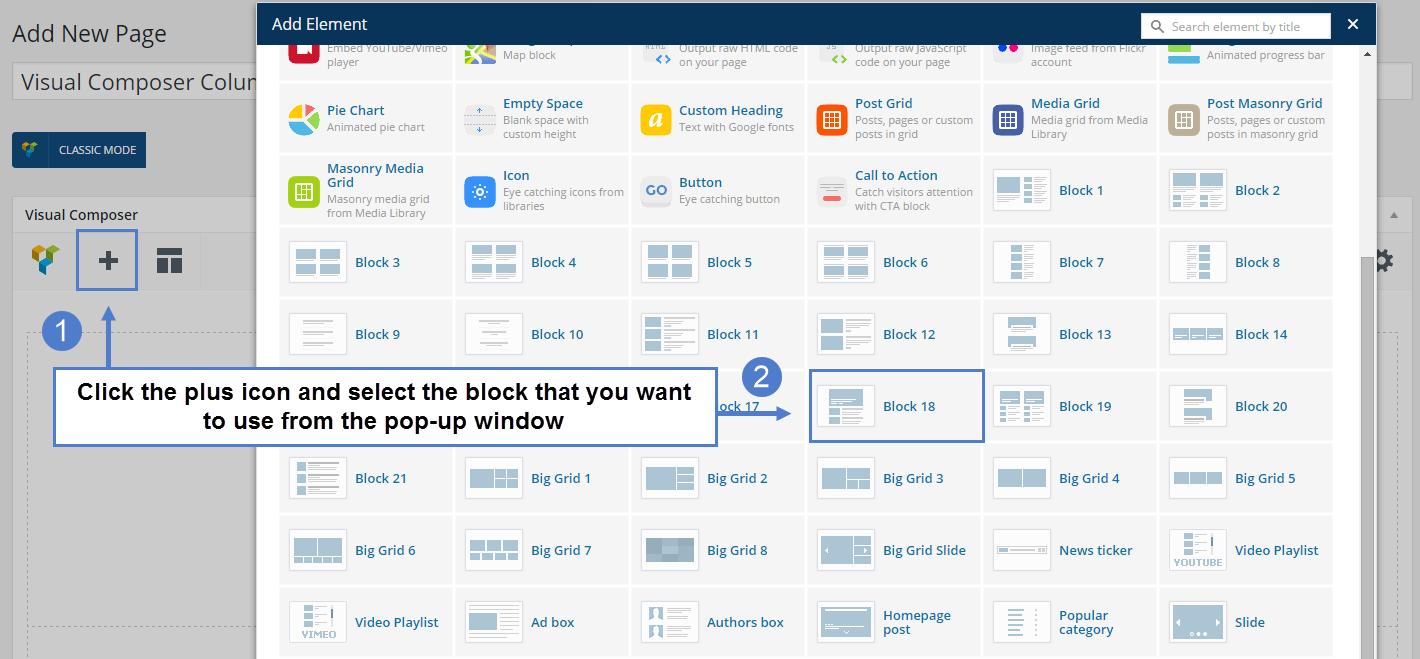
My screen is from Visual Composer page-builder: http://screencast.com/t/hKHDeVHEte For more details about block settings and homepage setup please check our documentation: https://forum.tagdiv.com/newsmag-block-settings-tutorial/ – https://forum.tagdiv.com/newsmag-homepage-how-to-build-and-set-it/ – https://forum.tagdiv.com/newsmag-how-to-use-visual-composer/ Also you can check our youtube videos here: https://www.youtube.com/watch?v=TUdVeZ1pbuc&list=PL6CsDkMaejhpWFcFNOIDfdp5nIT0NbUbj
I hope this help.
Thanks!
 shariarkuasa
 I’m having the same problem. Running on wordpress 4.4.2. The homepage seem works fine but the category pages repeating posts on pagination. I don’t want to update the full theme as i have a lot of customization.
Is there a way to replace few files from the latest version of theme that would fix the problem. I didn’t install the visual composer as i don’t use any elements from that plugin, it’s very flat website.
Plugins: Disqus, tagDiv Speed Booster, W3 Total Cache and Yoast SEO only
Please have a look here: http://getandroidstuff.com/
-
This reply was modified 10 years by
shariarkuasa.
 Ankush Das
Hello,
As you’re providing the Visual composer plugin for free with every purchase. If you can, then you should try enabling the automatic updates of Visual composer plugins for your user. For what? For security reasons… If there’s a new plugin version, that means there may be a security vulnerability in the previous version (may be a serious thing or a least thing of concern).
However, you provide new plugin updates along with a new version of Newspaper. You try to give it as soon as possible. I understand. But, “Security Breaches” don’t really wait for “as soon as possible”. Hope you understand my security concern. And, I don’t want anyone’s site getting compromised because of the outdated Visual Composer plugin.
Bogdan B. Hi,
We have not tested this but visual composer offers this solution: https://vc.wpbakery.com/addons/buddypress-shortcodes/
We cannot say for sure if this will work or not though. Maybe some of our users that bought this package can confirm if it works or not.
Thank you!
Catalin Hello poiya,
Unfortunately, I cannot find your problem. I need more details about your issue so I can further inspect it closer. Please provide some useful screenshots with your problem, using Jing or your Print screen button. Also, I have checked your page source and I have noticed that you have used a lot of untested plugins which can interact with the theme and also could cause some unknown issues through the theme. Please try to disable all the active plugins, leave just Visual Composer to active, clear all cache and install only the plugins that come bundled with our theme and rule out the conflicting plugins.
Hope this helps!
Thank you for your understanding!
Catalin Hello willysawa,
If you are using more block 9 for your website, and you want to target the specific one, you have to add custom class for each row that contains your block and this you can set from Visual Composer, like this -> http://screencast.com/t/ZQmbJHLEz and then you have to use this code ->
.customclass .td-post-author-name{

display:none!important;

}
Hope this helps!
Thanks.
Catalin Hello markg,
Please ensure that you have correctly set your timezone from your WordPress and also please make sure that you local time are the same with your real time, from this -> http://screencast.com/t/r74r1y2MATM I have checked the code from this feature and the function which compare the time uses local time. Also, please try to disable all the active plugins, leave just Visual Composer, clear all cache and install only the plugins that come bundled with our theme and rule out the conflicting plugins.
Let us know how it goes.
Thank you!
Catalin Hello benj0612,
Please ensure that you have correctly installed the Visual Composer and also, make sure that you have the latest version of this. Please set your Visual Composer, according to our documentation here -> https://forum.tagdiv.com/how-to-update-visual-composer-plugin/ Also, please check your system status and try to increase all the parameters, according to our documentation here -> https://forum.tagdiv.com/system-status-parameters-guide/ Please try to disable all plugins except visual composer, clear cache and reset CDN files if you use it.
Hope this helps and let us know how it goes!
Thanks.
Bogdan B. Hi,
It seems some code is ‘breaking’ the theme so please make a few tests to see whare the error comes from:
1) Disable all plugins except visual composer, clear cache and reset cdn files to exclude a plugin conflict
2) Restore any custom modifications made to the theme code to their default values
3) If you use a child theme, please activate the main theme to see if the child is not the issue. (if you update the theme and you do not update the child theme as well, then this can happen. A child theme is not update proof)
Let us know how it goes.
Thank you!
Catalin Hello Irreverent Gent,
Try to disable all your active plugins, leave just Visual Composer and Seo Yoast to active, clear all cache again, reset CDN file if you use and install only the plugins that come bundled with our theme and rule out the conflicting plugins.
If you need more assistance in this regard and your problem is still there, please send us an email at contact@tagdiv.com with your log-in information (wp-admin) so I can further inspect your setup page. Also, please provide the link of this topic so we can know who you are and that the issue is.
Thank you for your understanding!
Bogdan B. Hi,
Please deactivate all plugins except visual composer, clear cache and reset cdn files if you use it. This is most likely a plugin conflict.
Also, please make sure you use the version of visual composer that comes with the theme. if you use any other version, uninstall the plugin and delete the files and install it again from here: http://screencast.com/t/SAEFvZVv
Thank you!
Catalin Hello rodmvin,
Unfortunately, I think that it is not a workaround to rebuild this post because if you have problems with your code, the problem will appear again. Please keep in mind that your all modifications remain in your database and you will not lose anything. Try to disable all the active plugins, leave just Visual Composer to active, clear all cache and install only the plugins that come bundled with our theme and rule out the conflicting plugins. Check if your problem is still there and then try to install your plugins one by one and find the culprit that cause the problem and then try to disable it and find an alternative using another plugin with the same functionality.
Hope this helps and let us know how it goes!
Thank you for the message!
Bogdan B. Hi,
Please try to disable all plugins except visual composer, clear cache and reset cdn files. There is no problem with the reset key as our theme uses the default wordpress registration only styled differently. If you use any registration tool, please disable it and use the default one.
You can also try to reset the password by following this guide: http://codex.wordpress.org/Resetting_Your_Password
Let us know how it goes.
Thanks
Bogdan B. Hi,
Please try to revert the theme to it’s default state by disabling all plugins except visual composer, clear cache and reset cdn files, and restore any custom modification made and test again in the google tool. There should be no errors from the theme perspective. I suspect you use plugins that are not compatible with the google webmaster tool. I have checked both our live demo (http://demo.tagdiv.com/newspaper/) and my testing site with google structure data, but no errors came up. Please revert the theme to it’s defaults and test again.
Let us know how it goes.
Thanks.
Catalin Hello abistock,
Unfortunately, I cannot access your website because is required to have the password, as you can see here -> http://screencast.com/t/84Q50cGq Also, please ensure that this kind of issue is not generated by some untested plugins. Please try to disable all the active plugins, leave just Visual Composer to active, clear all cache and install only the plugins that come bundled with our theme and rule out the conflicting plugins. Also, please ensure that you have the latest version of the theme and plugins (e.g Visual Composer in special).
After this advice, if your problem is still there, please give me the access for your website so I can inspect it closer and also so I will be able to provide a more accurate response.
Thank you for the message!
 salimnazer
Visual composer on my theme is acting weird. It was not showing up until i deactivated and activated the plugin again. Even then, i dont see no access to use the editor in visual mode.
Visual Edtior screenshot
please check the word count @ bottom left and what appears in visual editor.
 willysawa
I understand one can not increase the width of the theme.
Can you please give the required fraction to use in the custom column using the visual composer assuming i want
First column It should be using the left over space
Second column 162px
Third column 301px
 benj0612
Hi,
I’ve noticed that when I go into Page/visual composer, and click on add (plus “+”), I don’t have icone news to grid etc. : http://www.screencast.com/t/Z7G5rFEVd I wrote “?” to show you.
It’s very useful in your theme documentation : https://forum.tagdiv.com/wp-content/uploads/2015/06/visual-composer-new_03.png .
Why ? I tried on IE, Firefox and Chrome and it’s the same thing.
Thank you very much.
Benj’
 TechRanker
 @Bogdan B.,
Newspaper is the most functional AND visually appealing theme I’ve ever tested. Most themes are one or the other. Newspaper is both. Unfortunately, until the SEO issues are resolved, I can’t use this theme.
The last time I checked Newspaper’s HTML5 implementation, it didn’t appear to be 100%. In the thread below I suggested some HTML5 changes:
https://forum.tagdiv.com/topic/feature-requests-and-suggested-improvements/
Here’s another thread questioning Newspaper’s HTML5 implementation:
https://forum.tagdiv.com/topic/newspapers-html5-outline-does-not-seem-right/
If these HML5 issues still exist, it’s going to be harder to rank pages with this theme compared to ranking the same content in another theme that implements HTML5 correctly. With the same content and same optimized on-page SEO, Newspaper caused my organic results to drop.
This stuff isn’t hard to fix. You just need someone with proven experience with SEO, ranking pages, and theme development to review Newspaper.
I’m not posting this to give you grief. I genuinely would like to see the SEO improvements done so that I can use this theme again.
Of note, most of the top selling themes on Theme Forest have HTML5, header tag, and/or alt tag issues when I checked last year. One of the top themes was <H1> multiple times on a post and was using <H2> in the sidebar! lol
Bogdan B. Hi,
1) It will not be difficult to replicate the design of that particular site as it’s very similar to our themes.
You can pick a similar header style from the theme panel. Here is a list of headers you can use:
https://forum.tagdiv.com/newsmag-header-styles/
Then you can change the menu color to red: http://screencast.com/t/SsHD68vpVc
The content layout can easily be replicated with our content blocks you can use in visual composer. Here is a tutorial on how to use it: https://forum.tagdiv.com/newsmag-how-to-use-visual-composer/
The sidebars can also be replicated in visual composer.
Unfortunately the left widget cannot be done as our theme has no such option, but you can maybe find a plugin for it.
2)The best way to learn how to set up the bbpress forums is by reading their official guide here: https://codex.bbpress.org/step-by-step-guide-to-setting-up-a-bbpress-forum/
3)For seo optimization we recommend the seo yoast plugin. They also have a comprehensive guide on how to set it up: https://yoast.com/wordpress-seo/
https://yoast.com/adding-a-description-to-your-categories/
Hope this helps.
Thank you!
Catalin Hello nomadhermit,
If you want to add the widget to the bottom of individual posts, you have to use the Widgetised Sidebar and place it with do_shortcode method where you want in the posts. First of all, you have to create the code with the desired widget from your Visual Composer editor, like this -> http://screencast.com/t/maoAeYKaIFo -> http://screencast.com/t/pXvfBOVQgU (example for td_demo_category_widget) and then, this snippet of the code <?php echo do_shortcode('[vc_widget_sidebar sidebar_id="td-td_demo_category"]'); ?> you have to place in the post template used by you in the bottom of the page, like this -> http://screencast.com/t/kXiU748n (this is just an example for post template 1). Also, please notice that you can set your widgets from Widgets area section, like this -> http://screencast.com/t/LoSeuujRP0
Hope this helps!
Thanks.
Andrei L. Hi
6,7. Please provide your site url so I can inspect this closer and get back to you with a more accurate answer.
9. You can use one of theme’s ad-spots to display the ad on top of the page. First insert the html ad’s code in one of custom ad-spots from theme panel > ads then use do_shortcode() function to display a banner ad on top of the page. Just edit the file corresponding with the header style used and add this code like here: http://screencast.com/t/itasx4W4T – http://screencast.com/t/FSgnXBREg3
<?php echo do_shortcode('[td_block_ad_box spot_id="custom_ad_1"]'); ?>
I’ve used custom ad 1 for this example but you can use any custom ad, just adapt the shortcode. For example if you use custom ad 5 the shortcode will be: td_block_ad_box spot_id=”custom_ad_5″
To insert the banner ad below big grid you can use the ad-box block from visual composer like here: http://screencast.com/t/trJzEe9Ufr – http://screencast.com/t/veASTnq2d
Thanks!