Bettina
 Hello @tsc_site!
No ETA or details yet, but I added this feature on our improvement list.
Thank you for understanding!
Bettina Hello @newsng!
The issue can be from a plugin conflict or a cache issue, that’s why, please deactivate ALL plugins except tagDiv ones, also if you are using a cache plugin, deactivate it, clear all cache (also from your browser) and try again.
However, page loading speed can depend on many factors, and each website is unique from this point of view. Let me explain some of these factors and maybe they give you some starting points for optimizing your website.
External factors: server speed, if you are using CDN or not, the external resources loaded by your website like ads, fonts, tracking scripts like Facebook Pixel, Google Analytics, Twitter analytics, Hotjar and so on.
Internal factors: the number of elements on the page, image size, image formats, if you are using mobile optimized layouts, console errors, if you are using the Standard Pack plugin on not, if you are using PRO demo or a standard one.
For the page speed, I can recommend you some solutions in order to increase the score.
Our developers are working a lot to improve the page speed in every update.
Also, to increase the page speed you can check these similar topics for more solutions:
– https://www.infophilic.com/get-almost-100-pagespeed-newspaper-theme/
– https://forum.tagdiv.com/topic/score-100100-pagespeed-with-newspaper-wordpress-theme/
– https://developers.google.com/speed/docs/insights/v5/about
– https://www.youtube.com/watch?v=tnkVapqhIHc
Please check the tutorials from those platforms gt metrix and Google Pagespeed Insights and I’m sure you can increase the page speed.
Please note that page speed is not covered by the support team: https://forum.tagdiv.com/newspaper-theme-support/
Thank you!
Bettina Hello Mario!
Please make sure that you have enabled the proper thumbs with sizes 324 X 160 in order to show the featured images properly, check this: https://www.screencast.com/t/N18dR3qZrh
After activating the thumbnail sizes you need to regenerate your thumbnails using a plugin. Check this: https://forum.tagdiv.com/using-the-theme-with-existing-content/
For more customizations, we recommend to use cloud/PRO templates in order to have the possibility to edit them with the TagDiv Composer which contains a lot of functions and features, please check our tutorial here: https://forum.tagdiv.com/tagdiv-composer-tutorial/
Documentation here:
– https://forum.tagdiv.com/cloud-library-templates/
– https://forum.tagdiv.com/design-post-pages-using-cloud-library-templates/
– https://forum.tagdiv.com/cloud-library-category-templates/
Check also our video tutorials here: https://www.youtube.com/c/tagdivThemes/videos
We recommend you to use Yoast SEO plugin because is a tested plugin with our theme.
Thank you!
Bettina Hello @RapTijd!
Please make sure you have all the required plugin up to date, installed, active and all the requirements are done as you can see here: https://forum.tagdiv.com/requirements-for-newspaper/
If your settings from the theme panel are missing and you use default templates, then please make sure you have Standard pack plugin installed and active.
Sometimes, the issue can be from a plugin conflict or a cache issue, that’s why, please deactivate ALL plugins except tagDiv ones, also if you are using a cache plugin, deactivate it, clear all cache (also from your browser) and try again.
Hope that helps you!
Thank you!
Bettina Hello @kimstipguide!
Paste this CSS code when you access a post in the Live CSS:
.tdb_single_content a:hover {

    text-decoration: underline!important;
Let me know if this is what you mean.
Thank you!
Bettina Hello @catalingeangos!
Unfortunately, you can set only one heading there and not choose for some titles.
Thank you for understanding!
Bettina Hello @mastaliyev!
Yes, click on the first global one: https://banker.az/wp-content/uploads/2021/12/Screen-Shot-2021-12-10-at-16.39.25-scaled.jpg and let me know the results!
Thank you!
Bettina Hello Pete!
Yes, we recommend to make a new topic about other problem.
Click on the element with pictures, access the column from here and set it as off: https://www.screencast.com/t/urgWoVNt
Thank you for your kind words!
Bettina Hello @auntiegold!
If the image size is correct and also you didn’t solved the issue, then you can upload again the image in full size and set it again as full size as you can see here: https://www.screencast.com/t/Oxue274e
Let me know about your results!
Thank you!
Bettina Bettina Hello panda!
Unfortunately, there are no settings on blocks to display image attribution/caption on the modules.
Thank you!
Bettina Hello @ComicsBeat!
Please make sure you have the latest version (11.3.2) of the theme, plugins and all the requirements are done as you can see here: https://forum.tagdiv.com/requirements-for-newspaper/
If your settings from the theme panel are missing and you use default templates, then please make sure you have Standard pack plugin installed and active.
Please make a test, deactivate all the cache plugins, clear the cache from your browser and see the results.
Hope that helps you!
Thank you!
Bettina Hello Sébastien!
You should place the products in categories and then it should appear there if you select from that dropdown.
If you did these settings and the categories are not appearing there, then contact us via email at contact@tagdiv.com and provide the following:
– admin url and credentials
– cPanel url and credentials
– a link to this topic in order to identify you
Our team will take a look!
Thank you!
Bettina Hello @baijubenance!
Please deactivate ALL plugins except tagDiv ones, also if you are using a cache plugin, deactivate it, clear all cache and try again.
If the problem is still there, then contact us via email at contact@tagdiv.com and provide the following:
– admin url and credentials
– cPanel url and credentials
– a link to this topic in order to identify you
Our team will take a look!
Thank you!
Bettina Hello @mastaliyev!
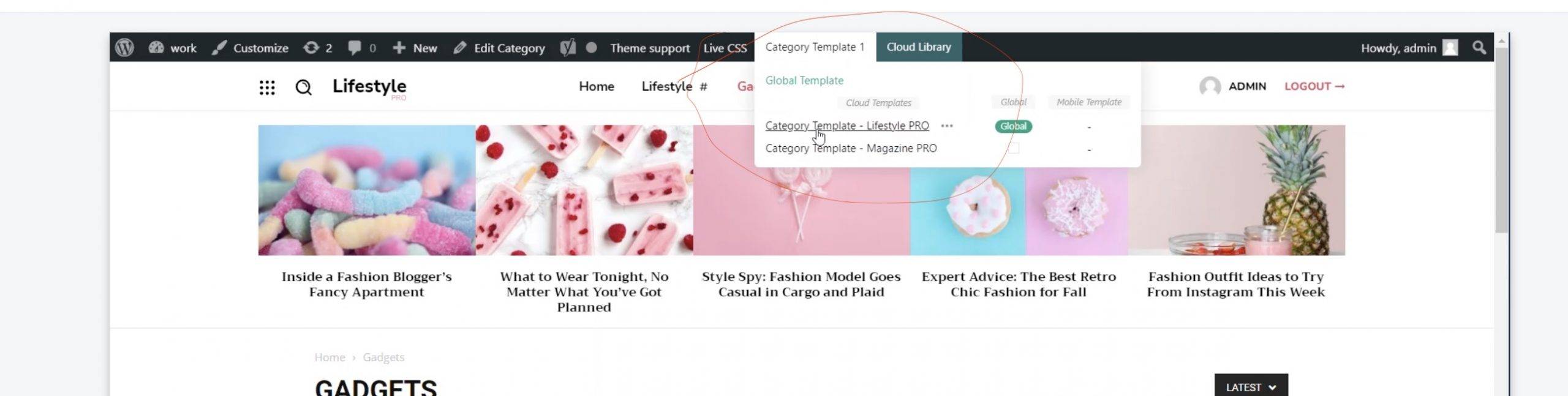
You should install a cloud template for that page and assign it. To assign the new cloud template you need to click on template and choose the cloud one.
For example, check this video: https://www.screencast.com/t/Ufid7bL3
Thank you!
Bettina Hello @darshit!
Please access this category and check if the category template is set up correctly here: https://www.screencast.com/t/SGKoE5SP
Thank you!
Bettina Hello @cfasencio!
This issue has been discussed already here, please check: https://forum.tagdiv.com/topic/tagdiv-social-counter-plugin-not-showing-corrrect-numbers/
Hope that helps you!
Thank you!
Bettina Hello @nockeeee!
Unfortunately, there is no effect on our theme like the one you describe.
Check this article because it could help you: https://forum.tagdiv.com/create-custom-code-using-the-browsers-inspector/
Thank you!
Bettina Hello @kimstipguide!
To underline a text in your post, edit normally the post, select the text and press CTRL + U (on Windows) or CMD + U (on macOS) on your keyboard. This will underline the selected text. Check this article too: https://ultimateblocks.com/underline-text-wordpress/
Thank you!
Bettina Hello Kishore!
Please deactivate the Mobile theme plugin and see the results.
We have 3 options of mobile versions:
1. Responsive version: A responsive version of your website is looking similar like on desktop, edit the page with TagDiv Composer, click on the mobile viewport: https://www.screencast.com/t/XDQJedlggSB ; there you can see your mobile version and you can edit the elements there.
2. Mobile pages: https://tagdiv.com/newspaper-10-3-7-update-brings-customizable-and-fast-mobile-pages/
3. Mobile theme plugin: The Mobile Theme is a performance optimized theme included in the Newspaper main theme and it loads only for mobile devices. It comes with its own templates/design for page, post, category, etc so your current templates from the desktop theme will get converted to the mobile theme layout. For more details, please take a look here: https://forum.tagdiv.com/the-mobile-theme/ and https://forum.tagdiv.com/mobile-theme-introduction/
A full explanation you can find here: https://www.youtube.com/watch?v=SpGkOnJeNZY
Thank you!
Bettina Hello Carlos!
Build, customize and assign the mobile pages to every desktop page: https://tagdiv.com/newspaper-10-3-7-update-brings-customizable-and-fast-mobile-pages/
A full explanation you can find here: https://www.youtube.com/watch?v=SpGkOnJeNZY
Please make a test, deactivate all the cache plugins, clear the cache from your browser and see the results.
Hope that helps you!
Thank you!
Bettina Hello @muktipolice!
Please make a full backup, send an email at contact@tagdiv.com and provide wp-admin, so we can investigate this issue. Also paste a link to this topic so we can easily identify you.
Let us know and we will gladly assist you.
Thanks!
Bettina Hello @alessiomz1981!
Please make sure you have the latest version (11.3.2) of the theme, plugins and all the requirements are done as you can see here: https://forum.tagdiv.com/requirements-for-newspaper/
It seems you use untested plugins with our theme, so please deactivate ALL plugins except tagDiv ones, also if you are using a cache plugin, deactivate it, clear all cache and try again.
In order to activate the amp plugin, please check our tutorial here: https://forum.tagdiv.com/tagdiv-amp-plugin-tutorial/
Thank you!
Bettina Hello @jchoi!
Yes, filter by tag slug or for example Special filters: Related from tags is displaying articles/posts which have the same tags as the article you are currently viewing.
Unfortunately, you can not display the tags or more categories tags there in flex blocks as here: https://ibb.co/VBh7BFv
Thank you!
Bettina Hello @globkeee!
Please make sure you have the latest version (11.3.2) of the theme, plugins and all the requirements are done as you can see here: https://forum.tagdiv.com/requirements-for-newspaper/
Please deactivate ALL plugins except tagDiv ones, also if you are using a cache plugin, deactivate it, clear all cache and try again from Newspaper -> Plugins.
Check this guide to solve the error: https://kinsta.com/knowledgebase/sorry-you-are-not-allowed-to-access-this-page-error-in-wordpress/
Let me know the results!
Thank you!