- NewspapertagDiv AMP Plugin Tutorial
- NewspaperTrack Subscription Sources with Locker URL in Opt-In Builder
- NewspaperWP Rocket and Newspaper Theme: Optimization Guide
- NewspaperCredit System
- NewspaperIntroduction to CPT and ACF with Newspaper Theme
- NewspaperHow to edit modules for Flex Block X
- NewspaperHow to use the Posts List shortcode
- NewspaperUser review system
- NewspaperCustom Fields Support
- NewspaperHow to generate Facebook App ID
- NewspaperHow to insert a block inside the content of a post
- NewspaperModal Popup
- NewspaperPayPal Setup
- NewspaperLink Tracker
- NewspaperLockers
- NewspaperGeneral Options that May Interfere with the Newspaper Theme
- NewspaperAdd Cryptocurrency Price Ticker Widget
- NewspaperPosts Loop Element
- NewspaperThe Newspaper Mobile Theme: Introduction
- NewspaperAutoptimize Plugin – install and configuration
 Anamaria
 Hello,
I think that you use a single post template, and you need to edit the single post template to add there a block, and filter it.
Hello,
We have some filters like this. For example, add a flex block in a post template, go to the filter tab of the element’s settings, and from the dropdown category filter, you can choose between Single – More from author, Single – Related by category, Single – Related from tags. Those special filters will work as expected.
Thank you!
Anamaria Hello,
Upon a quick analysis, I noticed that you’re using an older version of the theme.
Please update the theme to the latest version 12.6.5.
This malware infects not only theme files but also WordPress files or other plugin files. This malware was not detected only in our theme but also in many other themes and plugins https://www.bleepingcomputer.com/news/security/massive-balada-injector-campaign-attacking-wordpress-sites-since-2017 / -> https://cybernews.com/security/wordpress-malware-epidemic-balada-injector/ -> https://www.geoedge.com/balda-injectors-2-0-evading-detection-gaining-persistence /
You could consider reinstalling the WordPress version, reinstalling the theme, and checking for this plugin wp-zexit.php. It might be wise to inspect via FTP if it doesn’t appear in the WordPress -> Plugins. Additionally, using Wordfence to scan the website and remove unknown users would be prudent.
Change admin passwords and delete admin accounts you are not familiar with;
– Delete any weird/unknown plugins;
– Delete the weird/unknown themes;
– Clean unfamiliar Theme Panel injected code (example – https://i.imgur.com/4q70kCv.png);
– Clean WordPress files (example – https://i.imgur.com/stJCqiK.png)
If you’re not sure how to do it, our custom work team can help you with both theme updates and malware file cleanup https://tagdiv.com/submit-a-request/
Thank you!
 Garron Rose
 Hello Calin,
I appreciate your assistance. Unfortunately the last article you posted assumes that it works as it should, but it does not. The proper authors are appearing in the post editor, but this is not displaying on the home, archive page or the post page.
So, according to your input, I have added the code prescribed on the post exactly. (Following https://forum.tagdiv.com/topic/regarding-adding-multiple-authors-on-newspaper-theme/). Pasted code into child theme function.php. Added code to loop-single-2.php and single_template_2.php which is the primary template.
Again, this did not impact the homepage, listing page, or the post page:
See staging site:
https://nondoc1dev.wpenginepowered.com/category/sports/
This page has posts attributed to guest author Jeremy Cowen in the editor:
https://nondoc1dev.wpenginepowered.com/2023/12/23/big-man-on-campus-ryan-minor-made-memories-at-ou/
This shows all posts attributed:
https://nondoc1dev.wpenginepowered.com/author/jeremy-cowen-contributor-in-chief/
I have cleared caches. Do I have any recourse?
Thank you
 lub_mit
Hello,
My site is hosted on VPS & LiteSpeed Web Server & LiteSpeed Cache Plugin.
All cached pages have an issue with the paging buttons from Single Related Posts, Flex Block 1, Flex Block 3, Flex Block 4 and Posts Loop Modules of Newspaper theme.
When a request is sent to admin-ajax.php as a filter, it will have a security token, this is called a nonce.
This token is valid for 12-24 hours so I usually have this problem for less than a day because the page is still cached but the token has expired so it ends up with a 403 error.
To fix this issue, I need to add the nonce name to the ESI nonce list in LiteSpeed Cache Plugin.
Now please tell me what code generates this security token on action td_ajax_block.
Best regards
 Mix King
 Hello,
I’ve checked the plugins and found that there’s no conflict with the tagDiv template. The issue occurred when I was adjusting the hierarchical structure of the website menu. Since this menu belongs to a large menu segment of the main menu, I’ve tried various methods but couldn’t resolve it. Below, I’ve provided the backend management link of the website and an explanation of the website’s hierarchical structure. Could you please help me check the issue?
Thank you.
Trends
-Dynamic Developments
-B2B Insights
-Market Watch
-Digital Marketing
Diversity
-AI Applications
-Culture & Arts
-Travel Diaries
-Sustainable Living
 Bettina
 Hello!
Try to use a plugin for this, for example, the Members – Membership & User Role Editor Plugin.
I hope that helps you somehow!
Thank you!
 fespinal
 I do not think so. The box only ever randomizes the first 3 authors and should show 3 authors randomly.
For example:
Authors: A, B, C, D, E
Current: A,C,B – A,B,C – C,B,A
Expected: A,E,B – A,C,B – E,B,A
fespinalI think that Authors Box it’s not working as expected when “Sort authors by” is set to random and a value is set for the “Limit the authors” filter.
For example, if “Limit the authors” is set to 3:
Current:
3rd first authors in alphabetical order are sorted randomly
Expected:
3 authors sorted randomly
 idove
idoveHello community,
I’m currently facing specific issues with my website using tagdiv’s Newspaper and Magazine Pro templates, particularly with The Events Calendar. The main problem lies in a small detail within the tagdiv settings, and I’m unsure how to resolve it.
Specifically, under wp-admin in Cloud Templates, none of the Page templates are used, so I assume this is not related to the Magazine Pro theme, but likely solely to the Newspaper theme.
Specifically, the issue revolves around adjusting the line in html code (F12 Developer):
<div class=”td-main-content-wrap td-container-wrap td_cl tdc-row stretch_row_content td-stretch-content”>
to:
<div class=”td-main-content-wrap td-container-wrap”>
If anyone has experience with this or suggestions on how to tackle it, I would greatly appreciate your assistance.
Please check the pages and see how they are broken. If you use the advice I wrote above with F12 and manually edit or delete the specified classes, the problem disappear.
Examples:
https://www.mnovine.hr/dogadjaj/zabranjeno-pusenje-u-meta-baru-27-travnja/
https://www.mnovine.hr/dogadjanja/
Thank you!
 ganix33
 Hi,
Yes, this widget is a WP native element, but displayed content is filtered by a hook by TagDiv. This is the code at line #2919 in wp-content/plugins/td-composer/legacy/common/wp_booster/td_wp_booster_functions.php:
/**

 * Filter sets the global block template to the wp widgets

 * @see 'widget_display_callback' hook on 'class-wp-widget.php'

 */

add_filter('widget_display_callback', 'on_widget_display_callback', 10, 3);

function on_widget_display_callback($currentWidgetInstanceSettings, $currentWidgetInstance, $widgetArgs) {
if( isset($widgetArgs['widget_id']) && strpos($widgetArgs['widget_id'], 'td_block') !== 0 ) {
// var_dump($widgetArgs);
// var_dump($currentWidgetInstance);
$global_block_template_id = td_options::get('tds_global_block_template', 'td_block_template_1');
$widgetArgs['before_widget'] = str_replace(' class="', " class=\"$global_block_template_id ", $widgetArgs['before_widget']);
$block_title_class = 'td-block-title';
if ($global_block_template_id === 'td_block_template_1') {
$block_title_class = 'block-title';
}
$widgetArgs['before_title'] = '<h4 class="' . $block_title_class . '"><span>';
$widgetArgs['after_title'] = '</span></h4>';
call_user_func_array(array($currentWidgetInstance, 'widget'), array($widgetArgs, $currentWidgetInstanceSettings));
// Returning false will effectively short-circuit display of the widget.
return false;
}
// Returning $currentWidgetInstanceSettings, as the apply_filters of this hook require
return $currentWidgetInstanceSettings;
}
If you comment “add_filter” line all works fine. The problem is that the instruction
call_user_func_array(array($currentWidgetInstance, 'widget'), array($widgetArgs, $currentWidgetInstanceSettings));
sends false as second parameter but called function expects an array.
Anyway I tried PHP 8.0 as you suggested but error persists. If you want to check it out I can send you URL and credentials.
Regards.
Mix KingHello,
I’ve noticed an inconsistency between the submenu displayed on my template’s header and the menu settings I’ve configured. Could you please advise on the possible reasons for this discrepancy?
Thank you.
·Website Content Hierarchy
Trends
-Dynamic Developments
-B2B Insights
-Market Watch
-Digital Marketing
Diversity
-AI Applications
-Culture & Arts
-Travel Diaries
-Sustainable Living
Business Opportunities
https://app.screencast.com/zfbElTqySqIGV
https://app.screencast.com/HR2IapMFs0IFB
 hernanrojas
Hi guys, i really need help, i have a row with 4 columns, in each one of them, i have setup 4 different background images, i need that, in case of making hover on the columns, the background images make the moveup&scale effect, or just scale, but i need a sort of movement when i make hover, i dont find any options for making this effect on tagdiv
this is the row
https://i.ibb.co/VHd1xtt/image-4.png
ganix33Hi,
I found a bug in custom HTML widget when using WPML. Fatal error happens if you place a custom HTML widget choosing some language to display and visitor is browsing in a different language.
Stpes to reproduce
——————
- Add a custom HTML widget
- Select “Display in language” — spanish, for example.
- Browse a page where sidebar is shown getting it in english, for example.
You’ll get a fatal error:
Uncaught TypeError: array_merge(): Argument #2 must be of type array, bool given in /wp-includes/widgets/class-wp-widget-custom-html.php:133
Problematic code line is #2939 located in td_wp_booster_functions.php:
call_user_func_array(array($currentWidgetInstance, 'widget'), array($widgetArgs, $currentWidgetInstanceSettings));
This call passes false as second parameter and called function expetcs an array. PHP 7 passes this error but PHP 8 throws a fatal error.
Site settings
————-
- Theme version: 12.6.5
- PHP version: 8.3.3
- WP version: 6.5.2
Regards
 sixeleven
 C) Just had the same problem. Here is a quick function to to just that:
/* User should only see media files they uploaded themselves */
function restrict_media_library_to_user_uploads($query) {
if (!is_admin() || defined(‘DOING_AJAX’) && DOING_AJAX) {
$user_id = get_current_user_id();
if (!current_user_can(‘administrator’)) { // Optionally exempt administrators
$query[‘author’] = $user_id;
}
}
return $query;
}
add_filter(‘ajax_query_attachments_args’, ‘restrict_media_library_to_user_uploads’);
Just add this code to your functions.php and that’s it.
Anamaria Hello,
So, for example if you use this page for submission https://i.imgur.com/beKk7gQ.png you can do it as in this video ->
Also, please make sure that you like this in your account for google api -> https://prnt.sc/3zFwO9DR4sBJ -> https://prnt.sc/pe-g5Z4Xj6cN -> https://prnt.sc/GupKgQKEH0wq.
Thank you!
Anamaria Hello,
Using our theme, you can choose from 3 mobile versions
-> mobile responsive => https://www.screencast.com/t/oJ2ShOp47
-> mobile theme plugin => https://forum.tagdiv.com/the-mobile-theme/
-> mobile page => https://tagdiv.com/newspaper-10-3-7-update-brings-customizable-and-fast-mobile-pages/ The option that you need to use.
Suppose you created the mobile pages with tagDiv Composer. In that case, when you install the Mobile Theme plugin, your pages will be overwritten by the plugin (the mobile theme comes with its templates for page, post, category, etc, so your current templates from the desktop theme will get converted to the mobile theme layout, the page content is made without builders in mobile editor => https://www.screencast.com/t/xbgZG8kH also, the options that are provided to edit the mobile theme version are limited (this keeps the things simple)).
This is a video about Responsive Newspaper Theme, AMP & Mobile Theme, Mobile Pages & Templates -> https://www.youtube.com/watch?v=SpGkOnJeNZY.
So, the mobile responsive is what you see when that you select the viewport on phone => https://www.screencast.com/t/matV17hH, so some settings may apply for each viewport(where is the border blue), and others are not(where the border is black).
The mobile page has the mobile templates from Cloud Library => https://www.screencast.com/t/YCcZ8rL8
The Mobile responsive version of the theme and the mobile page editor can be edit with tagDiv Composer, the mobile theme plugin cannot.
For example, you can have the mobile theme plugin activated and use the mobile page/mobile responsive version for the homepage/pages, but for the categories pages/404 page, you can’t use the mobile page/mobile responsive version if you have the mobile theme plugin activated.
Thank you!
 curistorian
 I have done this. There is no result. The listing is just published without requesting payment.
Here is a screenshot of the button settings: https://ibb.co/hLnxqZ0
Screenshot of the plans I want them to choose from: https://ibb.co/K93bqd4
Screenshot example of how the plans are set up: https://ibb.co/KV9Qnn8
Bettina Hello @youthost!
Edit the homepage for example with the Tagdiv Composer, and here you can add/edit your custom SVG icons: https://app.screencast.com/E3XyAuxEI3iYh
Thank you!
curistorian For example, I would like to add a filter for ‘Pet Friendly’ and a filter to multi-select ‘Features’ the user wants in a property such as ‘fireplace’, ‘central air’, ‘city views’, etc.
 dimitrisv
 Having disabled the newsletter and optin plugins now the error is this:
AH01071: Got error ‘PHP message: PHP Fatal error: Uncaught TypeError: array_filter(): Argument #1 ($array) must be of type array, bool given in /home/850962.cloudwaysapps.com/hejdvngfwj/public_html/wp-content/plugins/td-cloud-library/state/single/tdb_state_single.php:957\nStack trace:\n#0 /home/850962.cloudwaysapps.com/hejdvngfwj/public_html/wp-content/plugins/td-cloud-library/state/single/tdb_state_single.php(957): array_filter()\n#1 /home/850962.cloudwaysapps.com/hejdvngfwj/public_html/wp-content/plugins/td-cloud-library/shortcodes/single/tdb_single_categories.php(328): tdb_state_single->{closure}()\n#2 /home/850962.cloudwaysapps.com/hejdvngfwj/public_html/wp-content/plugins/td-cloud-library/shortcodes/single/tdb_single_categories.php(328): Closure->__invoke()\n#3 /home/850962.cloudwaysapps.com/hejdvngfwj/public_html/wp-content/plugins/td-composer/legacy/common/wp_booster/td_global_blocks.php(27): tdb_single_categories->render()\n#4 /home/850962.cloudwaysapps.com/hejdvngfwj/public_html/wp-includes/shortcodes.php(433): t…’, referer: https://pathologia.eu/wp-admin/post.php?post_id=10238&td_action=tdc&tdbLoadDataFromId=21480&tdbTemplateType=single&prev_url=%2F%2Fpathologia.eu%2Fenimerosi%2Ftrith-hlikia%2Fnosos-alzheimer%2Fnosos-alzheimer-amfisviteitai-i-epikratesteri-theoria-gia-ti-noso-meta-apo-dyo-nees-meletes%2F
So it is obviously something that has to do with the single categories block.
The site runs on php 8.2

 happypeoplepickleball
Hi!
I am adding my products to Google and I need to provide my “Checkout URL” at either an account level or product level. I am going to try to add at the account level. This will let people who search on google and want to buy a product that I have listed go directly go to the checkout cart on happypeoplepickleball.com
Here are the instructions I am trying to follow: https://support.google.com/merchants/answer/13715458#method1
I need help finding the general URL checkout template that is applicable across all of my products.
However – if there is ONLY a customized checkout or cart URL then I need a different URL (per product).
The checkout URL that I need must:
Support the HTTP GET method (which enables adding an item to the cart or checkout to allow users to complete purchase)
Direct the customer to a checkout or cart page that doesn’t require signing in.
I tried to use: https://happypeoplepickleball.com/checkout/
but the google error was:
missing required parameter: {id}
Here are more instructions:
Opting in at the account level will apply the URL template you enter to all eligible products. If you opt in at the account level, make sure you aren’t sending the [checkout_link_template] attribute in your product feed.
How do I create the correct URL?
Here is more information:
https://support.google.com/merchants/answer/13580732#productsfromfeedapi&zippy=%2Caccount-level-url-formatting
I will need to provide a standard URL template. The URL template should include the {id} parameter to ensure shoppers are directed to the correct checkout experience:
{id} (required): Associated with a product ID. Google will substitute this with the ID [id] product data attribute.
Checkout URL template example:
The account level checkout URL template can either specify the required product parameters as part of the query string or as part of the URL path. For example, if your product feed had the following attributes:
title
color
item_group_id
id
Red Google Malibu sunglasses
red
12345
12345-R
Green Google Malibu sunglasses
green
12345
12345-G
Example #1: Take users to your store’s cart page:
https://www.mystore.com/cart?productid={id}
If your store supports the above URL template, Google will then substitute {id} with your product ID from the feed. Users will be redirected to your store’s cart page to complete the purchase.
title id URL
Red Google Malibu sunglasses
12345-R
https://www.mystore.com/cart?productId=12345-R
Green Google Malibu sunglasses
12345-G
https://www.mystore.com/cart?productId=12345-G
Example #2: Take users to your store’s checkout page:
https://www.mystore.com/checkout/{id}
If your store supports the above URL template, Google will then substitute {id} with your product ID from the feed. Users will be redirected to your store’s checkout page to complete the purchase.
title id URL
Red Google Malibu sunglasses
12345-R
https://www.mystore.com/checkout/12345-R
Green Google Malibu sunglasses
12345-G
https://www.mystore.com/checkout/12345-G
Appreciate your help!!
 jayflyer
Hi all, does tagdiv have a “pros and cons” table creating tool?
Or any recommended plugins for it ? Preferably something that looks artsy and mobile friendly (responsive)
 simchris
 Might be your site is too new, or your FB page not enough followers, etc. — Facebook is a bit more twitchy lately due to campaign season (elections).
 ISAAC LAMA
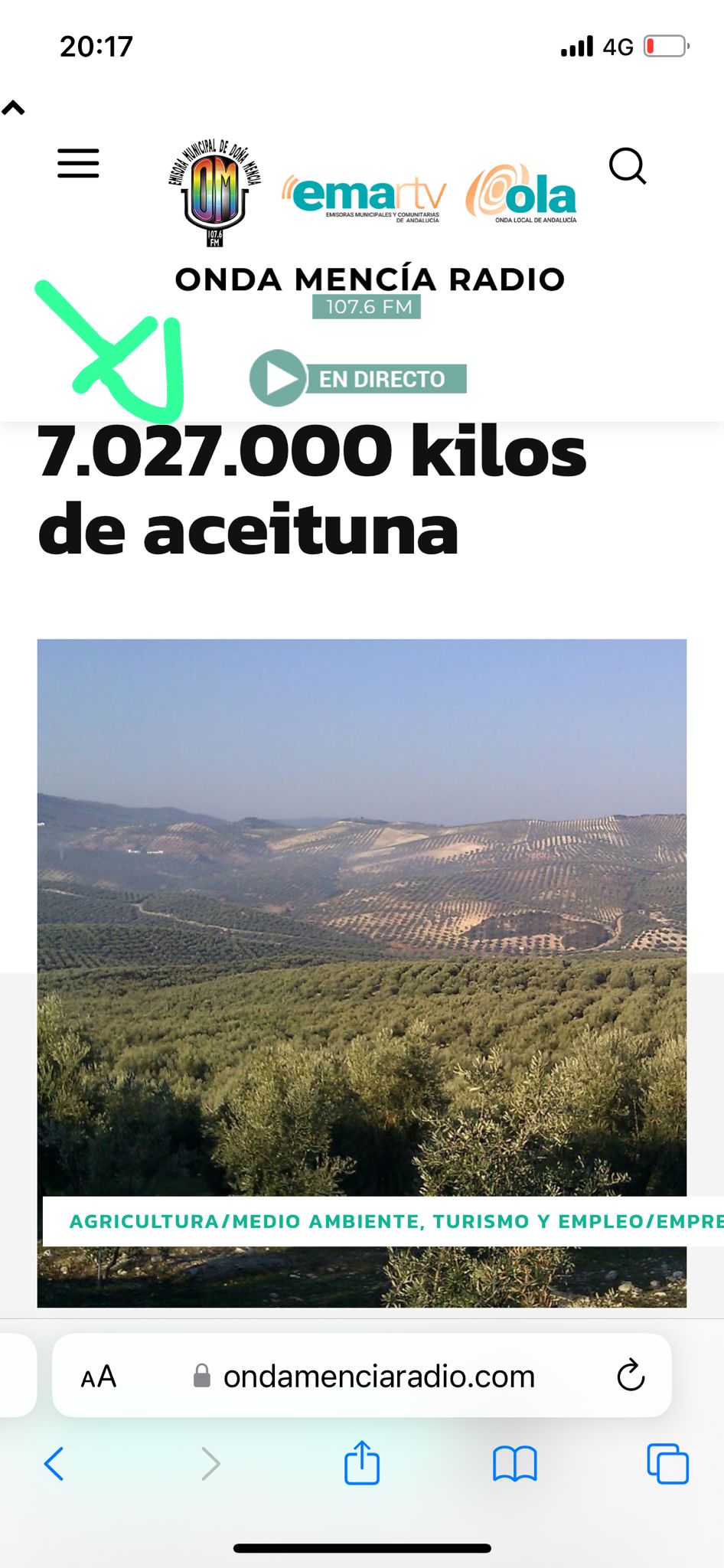
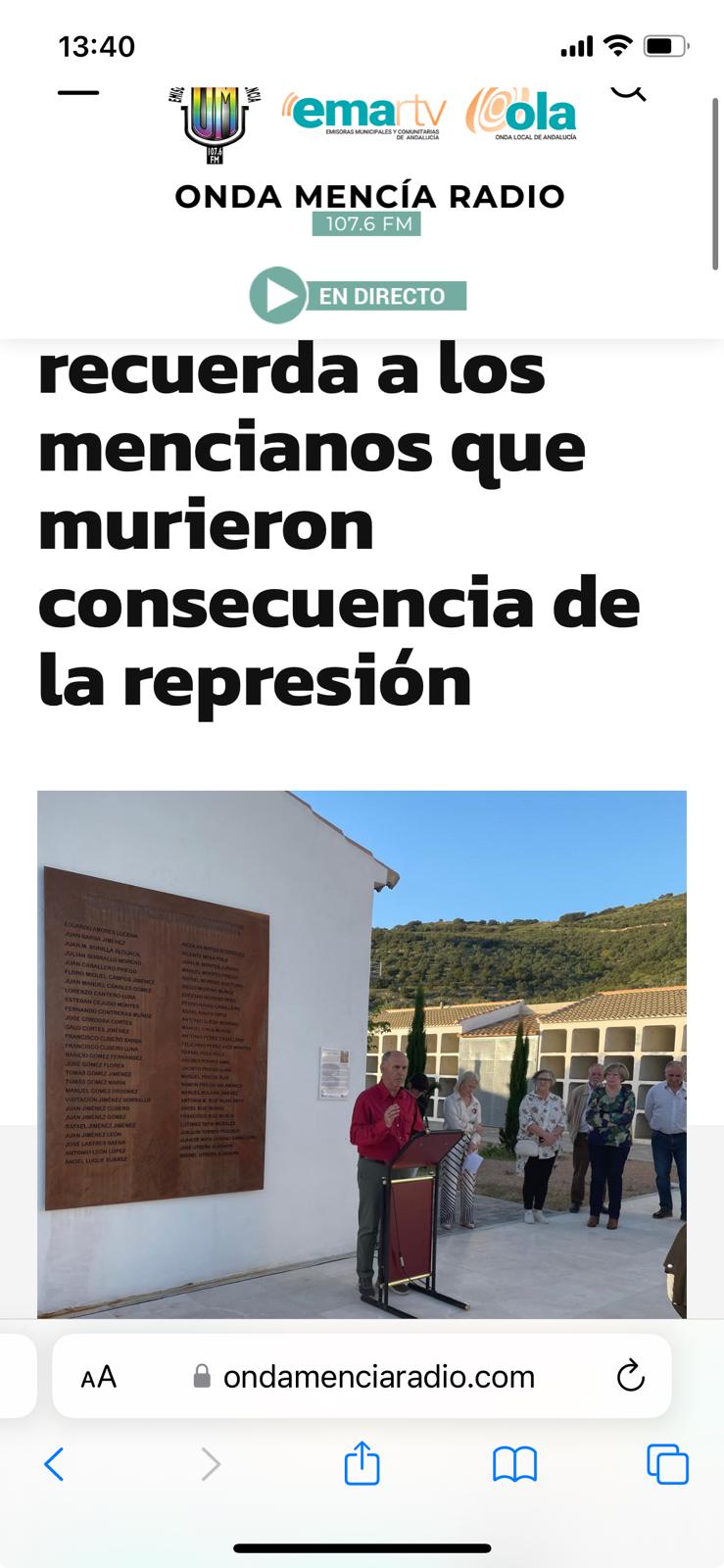
This is the url https://www.ondamenciaradio.com
The main titles of the Posts or entries do not look good in the mobile version and are cut off. Could you tell me where I can modify that?
I am looking forward to your response
thank you
 geniovi
Would it be possible to do something like this?
If my WordPress article is a video type, do not show advertising on mobile.
Example.
In article TOP AD in theme Config i have:
<div class=”td-visible-phone”>
MY ADS
</div>
Would it be possible to do something like this?
<div class=”td-visible-phone type-article”>
MY ADS
</div>
Clearly, I made up a code just to help you understand what I would like to do. I am open to any kind of suggestion