- NewspapertagDiv AMP Plugin Tutorial
- NewspaperTrack Subscription Sources with Locker URL in Opt-In Builder
- NewspaperWP Rocket and Newspaper Theme: Optimization Guide
- NewspaperCredit System
- NewspaperIntroduction to CPT and ACF with Newspaper Theme
- NewspaperHow to edit modules for Flex Block X
- NewspaperHow to use the Posts List shortcode
- NewspaperUser review system
- NewspaperCustom Fields Support
- NewspaperHow to generate Facebook App ID
- NewspaperHow to insert a block inside the content of a post
- NewspaperModal Popup
- NewspaperPayPal Setup
- NewspaperLink Tracker
- NewspaperLockers
- NewspaperGeneral Options that May Interfere with the Newspaper Theme
- NewspaperAdd Cryptocurrency Price Ticker Widget
- NewspaperPosts Loop Element
- NewspaperThe Newspaper Mobile Theme: Introduction
- NewspaperAutoptimize Plugin – install and configuration
 Graphic Oracle
 @ Simion C. I purchased Newspaper 8.5 Theme about a week ago. The multi-purpose plugin was not functioning properly from the initial install. After upgrading to 8.5.1 the multi-purpose plugin still does not function with the Child Theme active. Only when the Child Theme is disabled will the multi-purpose plugin work. I performed a fresh install of WordPress & Newspaper 8.5.1 (re-downloaded all files) with no additional plugins outside of the Newspaper 8.5.1 Theme to check for conflict, and the the multi-purpose plugin still does not function with the Child Theme active.
See these screen caps—
* Error message with both Child Theme and multi-purpose plugin in Newspaper 8.5.1 are “active”. SCREEN CAPTURE
• System Status Panel Shows all “green lights”. SCREEN CAPTURE
• Error appears only when Child Theme is “active”. Works fine when Child Theme is “inactive”. SCREEN CAPTURE
 applesandarrows
Would it be possible to change the grid colors on each category page? The pages are functionally and visually similar, but we’d like to be able to distinguish between them, and add a little visual variety to the site.
Examples:
http://news.leadingagetexas.org/category/advocacy-update/
http://news.leadingagetexas.org/category/association-news/
 Sergey Smirnov
Page sample:
https://blog.barnsly.ru/brand/cambridge-audio/cambridge-audio-dacmagic-xs2-usb-dac/
Registered users see it like this:

…and unregistered – like this:

How can we fix it?
Or NP version is 8.2
 primesolutions
Hi everyone, I have doubts, how do the categories appear in the Big Grid post?
for example> https://i.imgur.com/rALby65.png
Please, can you help me?
I new this place:D
thx
 joshwest3
 Hi, thanks for the response. Do you mean my browser cache? If so, I did that and they still appear off to me. Please see the list at this page for an example: http://comicbookcorps.com/category/comics/page/2/
 Simion C.
 Hi,
This has nothing to do with the articles. Installing the demo without content will import theme panel settings and custom design. If you install only settings from a demo, the custom design will apply to the homepage for example only if the same elements are used (same blocks, grids etc, same header and footer styles).
The demo you are referring to uses these elements
– https://demo.tagdiv.com/newsmag/big-grid-3/
– https://demo.tagdiv.com/newsmag/block-1/
– https://demo.tagdiv.com/newsmag/block-16/
– https://demo.tagdiv.com/newsmag/block-2/
– https://demo.tagdiv.com/newsmag/block-14/
– https://demo.tagdiv.com/newsmag/block-11/
If you use these elements in the page, then if the demo has design for them it will apply.
All this custom design can be seen here
– https://www.screencast.com/t/XlkgWrGQ
The homepage content can be seen in the same folder
– https://www.screencast.com/t/4FYgJISWwB
Hopefully this is useful to you.
Thanks
 drcocci@gmail.com
 Ok, it works but, after install update v8.5.1, I saw that multi-purpose plugin version was the same (v1.0) so I don’t replace the plugin.
Why don’t you have change to v1.1 (for example) the multi-purpose plugin version? That is crazy.
 julianpeaks
Hi,
we have the dark demo installed on our website. With the smooth configuration possibilities allowed by TD composer, we would like to invert colours only in some specific rows, for example using a white background.
Do you have a guide on where to insert custom CSS for that specific row so to override the font colour with a dark colour?
Thanks
J
 jowylin
Hi,
First of all thank you and congratulations for the great template you have made. The post template default is almost perfect, but my own needs are a little bit different and I’d need some little changes, so I’d be glad if you could help me. Basically is only a few change on the distribution of a few elements (I attached pics to show it better):
Default: https://imgur.com/a/l1GnS
Objective: https://imgur.com/a/FFu24
4. The cover image I’d like to have it in 1st place.
2. The tittle, would be perfect to have it overlapped with the image (like in style 3), but if that’s not possible just having it under the image would work for me.
1 & 3. Categories & Autor and date would be great to have them overlapped with the pic.
Thank you very much in advance. If you could help me with this would be amazing. Regards.
Simion C. Hi,
Most of the elements fonts can be customized in the theme panel, font settings. If the fonts you need are not present in the font drop-down list, you can upload the additional fonts that you require
– https://forum.tagdiv.com/font-customization/
Like these fonts for example
– https://www.fontsquirrel.com/fonts/list/language/thai
Thanks
 Aman Singh
Hello,
I want to know if there is an option or plugin using which we can allow visitors to give their ratings as well in the comments. Reference like this: https://www.tutorialadvice.com/siteground/
Where the Editor’s review(Available in Newspaper theme) & the User’s review should get displayed.
Any suggestions most welcome.
Thank you.
 Catalin
 Hello BlagojGjelevski,
You should try using our multipurpose plugin because there you will find a lot of useful elements which can use them for your project. As an example, if you want to add 4 images to your frontend, you should use the inline single image element, set up your Row for two columns and the results should look like this -> https://www.screencast.com/t/L8AjBvymU -> https://www.screencast.com/t/EcYLbzcLKLd
Hope this helps!
Thanks for the message!
Catalin Hello cointoday,
I guess that you cannot access your wp-admin because you do not know your right credentials, right? Please keep in mind that our theme does not control this because this functionality is just from WordPress. The theme only takes it and use it. Nothing special. For a testing, I have made a new user on my website with this kind of email as in your example and I tried to add a wrong password so I can forget my password to this email. I add that email and the new password was sent there. I do not know what exactly could be your problem but please notice that’s not theme related, sorry! Most likely, this email is incorrect and that’s why you bring this message. Please try to remember the correct email address so you can reset your password.
Thanks for your understanding!
Simion C. Hi,
You could simply create two pages, a homepage and set that accordingly. Then create another page using the latest articles template. Set that in the menu for example as the blog page. This demo uses this solution
– https://demo.tagdiv.com/newspaper_recipes/
The latest articles section can have a sidebar or not
– https://www.screencast.com/t/dbWTMxmnrnj
Thanks
Simion C. Hi,
That should work for posts that use post template 1. I have tried it as well. I entered the code mentioned in the header file like this
– https://www.screencast.com/t/A2t0dLAbTPO
Also I made a small modification in the code regarding the language
– https://www.screencast.com/t/RSUWLkdQA
Then modified for example post template 2 with the other code mentioned in the topic
– https://www.screencast.com/t/F9YPM8plWAsy
The result is that posts that use post template 2 display the Facebook comments
– https://www.screencast.com/t/anvgmQlO
Thanks
 LemhiRG
Hi there,
I’m using “Block 22” to show one big post at the top my website (http://camp.academy). I’d like to remove that grey/black overlay that takes up the bottom 1/10 of the image. I’m not sure what it’s purpose there is, as there isn’t any text shown in that area.
How do I go about getting rid of it?
 BlagojGjelevski
Hello,
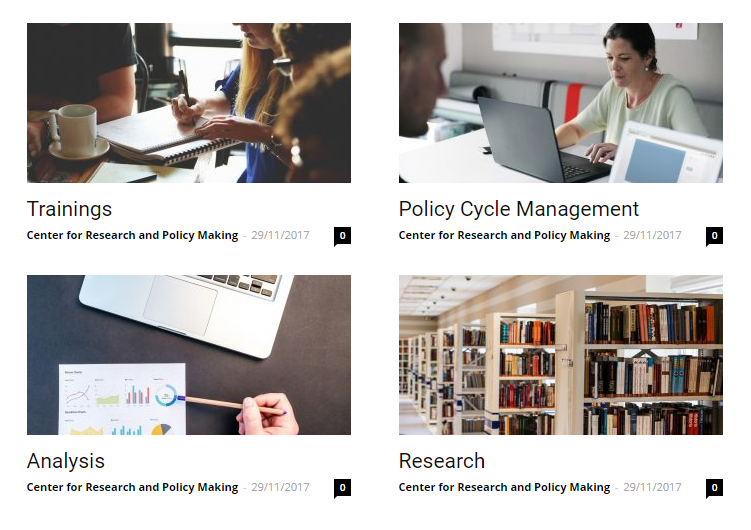
I would like to add 4 images that will represent 4 research areas, and want them to be clickable. Please see this example for what is my idea: http://www.crpm.org.mk/wp-content/uploads/2017/12/333.png
The website is http://www.crpm.org.mk.
However, I did that with tagdiv builder and those are posts. But instead I would like them to be just 4 different pictures that can be clickable and that will lead to four different pages. I tried with both tagdiv builder and visual composer and the pictures look like this: http://www.crpm.org.mk/wp-content/uploads/2017/12/photos.png
It doesn’t matter if I change the photo size into medium size, thumbnail or full size, it always look like this. Please advise me what to do?
Thanks,
Blagoj
 allcirca
When site opened in mobil – it shows a list of posts. You have to used the navigation button to access pages. Is their a way to have the pages show up in the ‘landing page’ list instead of posts?
My site does not really have any ‘posts’ , it is mostly comprised of pages. Ideally, would like these to be the first thing mobile viewers see when visit site.
Uninstalling the mobile plug-in & relying on the native them responsiveness seems to make everything “wonky”
additionally – can the social media buttons be removed from the mobile menu ?
Please advise – thanks !
Graphic Oracle @ Simion C. I’m developing locally in MAMP, so I cannot provide you with a login. I did disable the Child theme— the “tagDiv Multi-Purpose” plugin now appears to work. The buttons are available in the elements section of tagDiv Composer now. So what can I do about the Child Theme? Is there a replacement? I am using the Child Theme that came with the Newspaper Theme download, which I purchased about a week ago.
-
This reply was modified 8 years by
Graphic Oracle.
 sureshkundal
I have today installed demo version and choose the option include content. Now, there is lots of change took place. Sample content is also there with my contents. Please help me in this regard, what to do to remove that content from my website???
joshwest3I just activated “Retina” thumbnails for all modules/blocks to get better looking images on the site. I then regenerated all thumbnails using the plugin suggested at https://forum.tagdiv.com/existing-content/
Now, a lot of the thumbnails aren’t resizing properly and are throwing the grids and lists off.
You can see what I’m talking about on my website at http://comicbookcorps.com
For example, the first image on the landing page grid won’t resize properly. And a lot of images in the “Comics” category won’t resize either.
Did I miss a step somewhere? How can I fix this? Thanks ahead of time for the help.
 rvarnhem
 Update:
When opening the site on iPhone, there are no more issues and everything is exactly as test domain.
Desktop (Chrome & Internet Explorer) still shows the Mobile Menu on top of the page. Image of problem in Chrome (Desktop)
Further functions all seem to work correctly so it looks like the site thinks I’m on mobile or something. Unfortunately I cannot find it out myself..
-
This reply was modified 8 years by
rvarnhem. Reason: link didn't work
 johnson96590
 Hi,creb,many thanks for your reply, i sure know that, i once use the auto-optimize and fastest cache plugin to gzip the css and js and html file, so i can compress the css file from 1.1M to less than 900K, but i think it may still too big for the site, and i install the demo [helth&fitness], i visited the demo page, saw the transfer size only 87k, and the url is : https://demo.tagdiv.com/newspaper_health/, and i download the demo css file, when i saved the code into a css file, the size was 800k+, but i use develop tools of chrome to see the css transfer size, yes, still only 87K, so i am crazy now, what can i do for that.
Please help me, i can give a account of my plesk panel and a account of my wordpress to see what happened there.
Hope your reply.
 bwpage3
Check out http://www.satellitebeachdaily.com for an awesome example of what you can do with the Newspaper Theme.
rvarnhemHello,
I’ve created a website in a test subdomain on my domain camperreisverslagen.nl.
I used Newspaper theme and everything looks fine on test.camperreisverslagen.nl.
To test my migration I migrated complete site and database to dev.camperreisverslagen.nl. Still looks great and experienced no problems.
However, I migrated complete site to my root-domain and now the Theme settings seems to be different as there is a mobile menu popping up on the Home Screen (dekstop). Also background images have disappeared and Header style seems to be mixed up as both Logo as Text Logo are visible.
Also on mobile the site does not work correctly.
Any idea how this can occur and how it can be solved? It’s strange that migrating to my dev subdomain does work, and to my root domain changes things.
Thanks a lot, Rene