
- NewspapertagDiv AMP Plugin Tutorial
- NewspaperTrack Subscription Sources with Locker URL in Opt-In Builder
- NewspaperWP Rocket and Newspaper Theme: Optimization Guide
- NewspaperCredit System
- NewspaperIntroduction to CPT and ACF with Newspaper Theme
- NewspaperHow to edit modules for Flex Block X
- NewspaperHow to use the Posts List shortcode
- NewspaperUser review system
- NewspaperCustom Fields Support
- NewspaperHow to generate Facebook App ID
- NewspaperHow to insert a block inside the content of a post
- NewspaperModal Popup
- NewspaperPayPal Setup
- NewspaperLink Tracker
- NewspaperLockers
- NewspaperGeneral Options that May Interfere with the Newspaper Theme
- NewspaperAdd Cryptocurrency Price Ticker Widget
- NewspaperPosts Loop Element
- NewspaperThe Newspaper Mobile Theme: Introduction
- NewspaperAutoptimize Plugin – install and configuration
 boos11
Hi
I use mobile plugin
In the options, I added my menu to “main menu” and “footer menu”.
“Futer menu” have a links to static pages (not posts) for example contact, company, etc.
After entering the static page, the page has no content.
Thank you for your answer
 Bogdan B.
 I understand that, but our theme has no option ot hide ads from particular pages. There is no functionality added to the ad system that can allow that. It can be done by altering the theme files and adding conditions to the code but when adding more pages to the code you will always have to go in and edit the code again. That is why I suggested adrotate or another ad plugin you prefer so you can getan option to remove certain ads without altering the theme code.
If you are comfortable with editing code, then here is an example of how to remove an ad for a specific page:
For the header ad you will have to edit this file: https://www.screencast.com/t/MUURFMNomsy and wrap the code around a condition like so:
https://codex.wordpress.org/Function_Reference/is_404
https://www.screencast.com/t/21r56Y0PDaV
This will remove the header ad on all 404 pages. WordPress provide more functions like is_page where you can use the page id to remove the ad on specific pages.
Use the same method on the footer ad but for this one you will have to edit the footer template for the footer style that you use: https://www.screencast.com/t/usuTGXu6Y
Thank you!
 Simion C.
 Hi,
A sample child theme is available and included in the Theme package you have downloaded – https://forum.tagdiv.com/whats-included/ Also here is a tutorial on how to use the child theme, to help you get started – https://forum.tagdiv.com/the-child-theme-support-tutorial/
Thanks
 Berbi
Berbi Hi Catalin,
Thanks for your answer, but unfortunately the smart sidebar would not work on some pages.
Take here for example : http://www.emprunter-malin.com/simulateur-cout-credit/, I have set the class name as td-ss-row as sugested here https://forum.tagdiv.com/smart-sidebar-2/, but the sidebar doesn’t follow the scrolling.
Any suggestions ?
Thanks in advanced.
 mayaguez
What is Facebook Events-CPt? I see this in the Theme Panel-CPT & TAXONOMY?
Thanks
 DarkStarzs
Hi,
I have a little disturbance on the theme, indeed when I use the “post style 6” the background image does not appear in the background (it won’t load, I have only have a blank page in the background) while it appears with all the other styles of post … And post style 6 is just my favorite !
examples: – https://erreur42.fr/critique-de-quelques-minutes-apres-minuit/ (Post Style 6, won’t appear)
– https://erreur42.fr/civil-war-ii-fevrier-heros-sen-guerre/ (Default Post Style, appear)
Best regards
mayaguez Thanks Bogdan!
I have a much better understanding on all this now thanks to you but I “duplicated/cloned” my existing Most Popular column and corresponding row for Ads and named it Must Read but can not figure out why they display differently.
Both (Most Popular & Must Read) have the same number of posts in settings and the same 2 ad boxes but in the Most Popular displays a “large gap of empty space” on the sidebar after the 2 ads where the Must Read does not display this gap.
1. Why is this? Whats wrong?
2. What do I need to correct this/delete the empty space in Most Popular?
http://hispaniclatinonewsandevents.network
Thanks
P.S. I also notice that the ads tend to stick as I scroll down the page. This was not happening until recently..???
-
This reply was modified 9 years by
mayaguez.
 Sal12345
Hello, I have a question that is simple, not sure if it has been discussed in other forums
In your theme Newspaper, in using Visual Composer blocks with different shapes, I want to achieve this result as follow:
I have a category or multiple categories of posts to flow from one block (i.e. block 19) to and through multiple blocks to another (i.e. Block18; block 16, etc…) without showing the same (repeating)number of post/posts in a block into another one/ones (of the same category or other categories) on the same page.
Example: category All =20 posts or Category A; B; C; D with their amount of posts
Block 19 order Desc or random – category all or single, posts to show 6, the overflow of posts into another block with same settings.
This to avoid to show the same post in another block beside separating blocks to show single or multiple categories
Please help achieve this with your theme and visual composer
Thanks Sal
 slashedbeauty
 No, that’s not what I meant.
My problem is that I do not want the *video* thumbnail to be used as the featured image. For example, the thumbnail on YouTube is becoming the featured image of the blog post when I make it the featured video.
Before, I could add a featured video *and* featured image, and the theme would prioritize whatever photo I uploaded as featured image. Now, even if I add both, it just takes the YouTube thumbnail and makes that the post thumbnail across the site.
How can I switch back to it prioritizing the featured image I designate instead of defaulting to the video’s thumbnail?
 delizard
 Hello Catalin,
i have update Newspaper theme to 7.6.1 version but i keep seeing the input field code inside the page.
(For example you can see the source code of this page: http://www.tuttosullegalline.it/news-curiosita-galline/egg-balancing-uova-in-verticale/)
I think i can decide to disable logging section in “theme panel” but it still remains inside the code (it’s not visible ma it still there)…
how to solve?
Thank you, kind regards
Bogdan B. Hello,
Sorry but this element does not feature a block title url. You will have to find another method to add an url.
You can create your own title with link using html.
Here is an example:
add this in a raw html element: <div class="td-block-title-wrap"><h4 class="block-title"><span><a href="www.mycustomurl.com">Mycustomtitle</a></a></span></div>
Now you have your own title to place wherever you want
There will be a color issue https://www.screencast.com/t/nGq6CwMtS that can be fixed by adding a custom class to the row that contains the custom title we created. After adding a custom class to the row, you can use it together with css to change the color. https://www.screencast.com/t/ozDo9ebt
.mycustomclass .block-title a{
    background-color: red;
}
Thank you!
Simion C. Hi,
To achieve that you need to modify the loop single file corresponding to the post template style that you use (post template 2 – loop-single-2.php and so on) found in the theme folder – https://www.screencast.com/t/yxPPd1Lqwu2M and change the order of the structure in the file –
https://www.screencast.com/t/nhaw6ea8L
For example if you want to display related posts just under the post content, change it like this –
https://www.screencast.com/t/YCKjHos0RF by moving that code above the social sharing bottom
Result – https://www.screencast.com/t/nxamntnZN1
Thanks
 ahmedyakub
 Thanks for the reply but I have not got this option can you please elaborate so that I can complete it.
this is an example image that i am getting 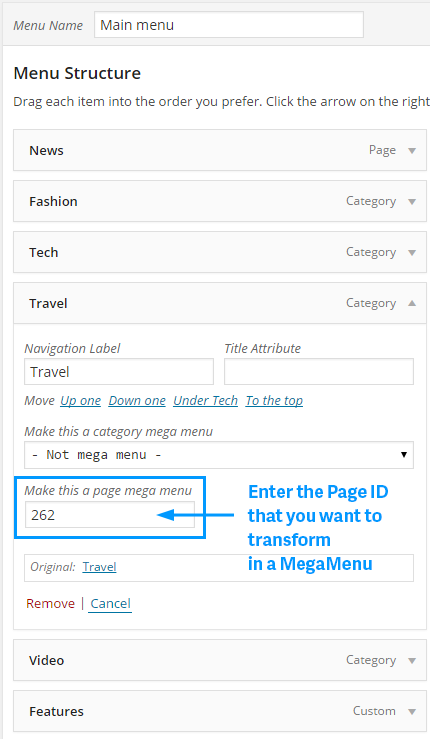
Thanks
Yakub.
-
This reply was modified 9 years by
ahmedyakub.
 leonardospina
 I have read your thread because i have the same problem but now, i know for sure that is possible to add a video background. What i don’t know is how to add some options to the video background. For example: how to turn on the sound and make visible the youtube play bar. Can you help me please?
 Catalin
 Hello stefania,
You should provide your website URL so I can take a closer look so I will be able to identify the problem and also, so I will be able to provide a more accurate response.
The sidebars are sensitive to the names you assign to them. The sidebars will get stripped of content if you use any symbols or language specific characters. Please only use standard characters, not any symbols such as!@#$%^&*(){}L:”><? as this will cause an error. The names cannot be seen anywhere else so you can use any name for them without language characters or symbols.
Also, ensure that you are using the latest version of theme without any untested plugins which can interact with the theme packet and cause a lot of unknown issues.
Thanks for your understanding!
 bpdigitalmedia
 Great, thank you!
One more thing about Mobile. Our language is portuguese, and I translated the site on Newspape> Theme Panel> Translations but on mobile it doesn’t seem to be working. On footer as an example, ABOUT US should be translated to SOBRE NÓS, but there are other cases.
In this page you can see a form: http://pescazila.com.br/contato/
Thank you so much for your help!
Catalin Hello mike6209,
I have checked your console, and I have noticed that you have some issues which are not theme related as you can see here -> https://www.screencast.com/t/uGY0geMp2S For example, this type of error -> https://www.screencast.com/t/EfpM1etS happens due to you do not have this snippet of the code in tagdiv_theme.js like this -> https://www.screencast.com/t/F1s9wHd7NLr and the first issue come from your plugins. Please try to remove all untested plugins, leave just Visual Composer to be active, clear all your caches and also, ensure that your tagdiv_theme.js file is intact. To be sure, you should make a new fresh install with the latest downloaded version for Theme Forest and check the results.
Thanks for your understanding!
 orlando
 hi,
I just want to know how to put the td-theme in the header
example
// $ This-> move_style_to_footer_queue (‘td-theme’); // This is the main style ofof the theme. It’s only moved on Newspaper 6
adding //
Quale’è the plugin line I have to change peer have this, it does not seem that difficult a question.
I hope this time you got me, I want to do.
Bogdan B. Hello,
I have checked your site but I cannot see this twitter button anywhere. Please provide an example of where should I look for it.
The social icons can be removed with this code:
.td-mobile-container .td-menu-socials{ display: none; }
Add the code in the theme panel->custom css box.
The comment counter on the front page can be removed from the theme panel like so: https://www.screencast.com/t/qDXO9jXbTcj
Thank you!
Catalin Hello m0re,
If you are referring to the pages or post pages? If you want to sort the authors on this block, you should check the Visual Composer like this -> https://www.screencast.com/t/9BIP5CDJ From where do you want to remove the authors? Please give me an example on your website so I can identify it the section and also, so I will be able to provide a more accurate response/code. Sorry for this, please provide more details about this.
Thanks for your understanding!
Simion C. Hi,
I don’t see any width differences between the demo and your site, this is the demo – https://www.screencast.com/t/yQpaGvsd and this is your site – https://www.screencast.com/t/p4ujen2tFj
Please provide an example of what differences in width you are experiencing with the theme so we can take a look.
Thanks
 sainthilaire
How can i change the logo in the diferent category like i change the backgroud logo? for examample, category 1 use the logo 1 category 2 use the logo 2…
 Maui No Ka Oi Magazine
Featured Images showing small / wrong size – after latest update.
I did some research and tried running the thumbnail resizer and tested my content halfway through to see its results and realized it was creating MORE of the problem instead of fixing the problem that just started (after latest theme update). So I stopped resizer but now many of my featured images are showing as smaller/incorrect size.
I turned off all plugins, went to newspaper base theme (not child) and confirmed that the preview images do not show at full size, they are all smaller and don’t look as good now.
Can you help please? This makes the whole site look bad, it’s heavy content for a magazine publisher with many articles. Example page where most images are now small – publisher’s note still showing correct width: http://mauimagazine.net/read/
Thank you for your help.
 josflachs
 Hi Bogdan & Catalan,
thanks for the offer. I can only say … “diddums!” … after solving it, it was so easy.
I had to turn on the Unique Articles in the Page Template Settings. Completely overlooked that one. Drove me nuts.
 ardian
Hi
I need help regarding to to import Authors & Contributors table at NewsMag DB, how can I do that ?
Need answer asap.
Best
