
- NewspapertagDiv AMP Plugin Tutorial
- ApiPractical example – How to add a new Block and Module
- NewspaperTrack Subscription Sources with Locker URL in Opt-In Builder
- NewspaperWP Rocket and Newspaper Theme: Optimization Guide
- NewspaperCredit System
- NewspaperIntroduction to CPT and ACF with Newspaper Theme
- NewspaperHow to edit modules for Flex Block X
- NewspaperHow to use the Posts List shortcode
- NewspaperUser review system
- NewspaperCustom Fields Support
- NewspaperHow to generate Facebook App ID
- NewspaperHow to insert a block inside the content of a post
- NewspaperModal Popup
- NewspaperPayPal Setup
- NewspaperLink Tracker
- NewspaperLockers
- NewspaperGeneral Options that May Interfere with the Newspaper Theme
- NewspaperAdd Cryptocurrency Price Ticker Widget
- NewspaperPosts Loop Element
- NewspaperThe Newspaper Mobile Theme: Introduction
 Arshad_mallick
 Can I edit the plan of subscriber from my admin Dashboard, How?
Also, Does it Possible to add any plan from my end or change any plan ?
Also If a subscriber has a free plan & he used the criteria, Does it possible to restart the free plan from my end ?
 nialmedia
Hello,
I have 2 problems.
Problem number 1: The Mobile Homepage
I have the website https://www.nialmedia.com/. I use the Newspaper theme. After entering all the details into my website, I went on to the mobile version. In theory, the homepage should be loading properly. In practice, it is a blank page showing “Latest articles”. I have 0 articles because the homepage that I want is not supposed to show any article, as you can see in the desktop version. I already tried all 3 options: Mobile, AMP + Mobile and AMP. Same issue.
Problem number 2: tagDiv Opt-In Builder cannot be updated.
I tried updating it 5 times. I still see the message to update it.
 Southview92
Hi, i want to be able to have an article on a page for example on a page or post page, or on a category. In wordpress you can do a read more tag where you can see part of the article and then press more to see the rest. is there anything like this on the template to use as the tag is not working with the theme
 Sidharth
 Below screenshot I have three post under one category SQL but if u can see above I am getting ‘Edit with TagDiv Composer”
But when I am click any post “ex: The ultimate List of SQL functions: With examples and syntax”
Then why I am not getting ‘Edit with TagDiv Composer” in the above could you pls let me know how to fix this issue ?
Earlier I was getting but now I am not getting
 kitthithach
 safari&chrome not save
 deekendown
Hello everyone,
I have the following problem: I recently changed my PHP version from 7.4 to 8.2 and am currently checking for errors. I have encountered an issue with the Flex Blocks. Here is an example:
When I try to display more than 2 articles, I get the following error:
Warning: Undefined array key “width” in /var/www/…/…/../wp-includes/media.php on line 1440
It is always the same error: Warning: Undefined array key “width”. As mentioned, this only happens when I try to display more than 2 posts, and only with the Flex Blocks.
Do you have any tips for me?
Thank you and best regards.
 Ericky
I want to create a calendar for my wordpress site, but is it possible to do it with Newspaper?
For example, this calendar will be a video game calendar and will list the names of the games coming out that month. I will make the entries.
Example: https://imgur.com/a/xCQABz2
 Anamaria
 Hello @parkaka
I think that you have malware on the website. Please update to the latest version 12.6.6
If you want to update the theme, you should download the latest version of it from the Theme Forest account and download it.
I recommend that you update the theme manually https://forum.tagdiv.com/how-to-update-the-theme-2/ via FTP/cPanel/File Manager, also if possible disable extra plugins during the theme update to avoid any problems that may arise and make sure that you have activated the tagDiv Standard pack plugin to keep the website’s look. You can try to update the theme on a staging website.
After you update the theme, you need to update the theme plugins too.
In the worst cases, the settings in the theme panel may be lost (there have been isolated cases), in these cases, after the theme plugins that were previously used are activated, you will have to use a backup for the theme panel -> https://forum.tagdiv.com/import-export-theme-settings/
You could consider reinstalling the WordPress version, and checking for this plugin wp-zexit.php. It might be wise to inspect via FTP if it doesn’t appear in the WordPress -> Plugins. Additionally, using Wordfence to scan the website and remove unknown users would be prudent.
Change admin passwords and delete admin accounts you are not familiar with;
– Delete any weird/unknown plugins;
– Delete the weird/unknown themes;
– Clean unfamiliar Theme Panel injected code (example – https://i.imgur.com/4q70kCv.png);
– Clean WordPress files (example – https://i.imgur.com/stJCqiK.png)
Please block /wp-json/tdw/save_css
If an attacker wants to target this URL /wp-json/tdw/save_css they can do so. Even if the website uses a different theme, the attacker can still try that URL. We could add an option to be able to enable/disable the Live CSS, it will be considered. But for now in order to remove it this can only be done with a modification to the composer plugin. I think that all that removing it requires is to comment this line of code – https://prnt.sc/RtwvL5Nc4ikR -> https://prnt.sc/ymZmhdUfp57U But as I mentioned, the attacker can still try to access the URL.
Thank you!
Anamaria Hi,
I don’t recommend to using amp, because it is deprecated -> https://developer.bigcommerce.com/docs/storefront/wordpress/platform-integration/enabling-amp -> https://forum.tagdiv.com/topic/amp-end-of-line/
Thank you!
Anamaria Hello,
The Flex block 2 doesn’t have an autoplay option.
You can use the “Slide” and you can do it automatically after 3 seconds for example: https://prnt.sc/sKrlljziRXx_ and you can choose a filter, so the function will know to display the posts you have filtered after how many seconds you set.
Thank you!
 simchris
 ideally you should entirely remove AMP and setup 301 redirects with regex statement. Google abandoned AMP in 2023 and no longer required for mobile SERPS.
 PDS
PDSHi, we have some sites with Newspaper + Moble Theme + AMP and we noticed that, the AMP site on mobile is displaying a blank page, even, we tried changing the mobile setting “Use Mobile Theme for” as follows and got these results:
Mobile:
https://mentalitch.com the site loads fine on desktop, but on mobile displays a blank page
https://mentalitch.com/?amp displays the not-AMP site on desktop, blank page on mobile
Mobile + AMP:
https://mentalitch.com fine on desktop, blank page on mobile
https://mentalitch.com/?amp displays the AMP site on desktop, blank page on mobile
AMP:
https://mentalitch.com the site loads fine on desktop, loads ok on mobile
https://mentalitch.com/?amp displays the AMP site on desktop, blank page on mobile
We already setting up the Mobile Theme and AMP as the tutorials
https://forum.tagdiv.com/tagdiv-amp-plugin-tutorial/
https://forum.tagdiv.com/the-mobile-theme/
Is there something else that we have to do? can some one help ust to solve it?
ErickyHello, as in the example in the image, I will place the fonts in the wp rocket in order to preload them. How can I access the locations of the fonts? I will transfer the information here.
 mellovv
The site has the option to autoload posts from the same category as the post opened by the user. But if the currently opened post is simultaneously in the category “Real Estate” and added to the special category “Featured”, then when the function of autoloading posts from the same category is enabled, the user will see posts from both categories: “Real Estate” and “Featured”. The problem is that posts added to the “Featured” category are by default attached to their thematic categories (“Real Estate” for example). Now, it turns out that a user looks at a post from the “Real Estate” category, but after it a post from a completely different category, “Cars” (for example), is loaded. This happens because the current post from the “Real Estate” category, opened by the user at the moment, is also added to the “Featured” category, as well as the automatically loaded post from the “Cars” category (for example). How can I make it so that when the “Autoload posts from the same category” function is enabled, posts from the “Featured” category are not loaded (not shown)?
 thekapow
when editing my page http://www.akutsygepleje.org nothing happens what so ever, its stuck in a load loop

 TheChrisLambert
 Hey, Anamaria! Thanks for the response. That makes sense!
My follow up question, though, is that we have over 200 posts already on the site. So I’m concerned about having to manually update every single one.
Is there any way to get around that? For example, if it checks “except box” first then goes to “post body”, can you change the place it looks from “post body” or “meta description”?
Cheers
 Bettina
 Hello!
You could fix it with some CSS code. For example:
.wp-block-button:not(.is-style-outline) a.wp-block-button__link:not([class*="has-background"]) {

    background-color: #fff;

    color:red;}
Thank you!
 gachugbu
 Thank you for your response.
However, I’m sad to report that the path you indicated for me—”Dashboard -> Appearance -> Permalinks”—does not have a permalink. There is only a permalink under Settings…then Permalink.
Please see the image of my permalink page attached.
I can’t figure out how to correct the URL by reordering my webpage structure from the attached permalink page.
For example, my webpage “Nigeria” is currently at https://joliba.com.ng/category/nigeria.
I want it to be https://joliba.com/nigeria.
I don’t need it to be behind the category in the URL.
Do I have the wrong permalink page? How can I do this with my permalink page in the image attached?
Thanks a lot.
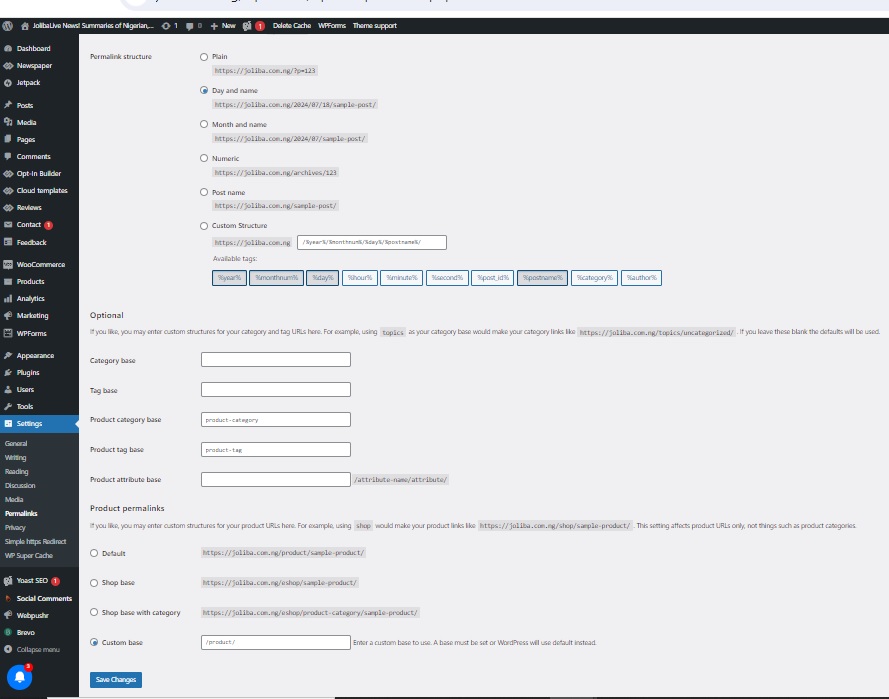
 perspektive
Hi, somehow the post-content changes the font, when using a list.
For example here
https://perspektive-online.net/2024/07/haushalt-2025-so-will-sich-die-regierung-durchwurschteln-und-die-reichen-verschonen/
or here
https://perspektive-online.net/2024/07/klammheimlich-zurueck-zu-hartz-iv-wie-die-wachstumsinitiative-das-buergergeld-verstuemmelt/
Eventhough in the theme panel “list” has same font like all the others.
https://ibb.co/gMYfykw
What can I do?
Thanks!
 Hüdai
Hüdai Hello,
Thank you for your response.
I would like to point out that the link format is not suitable for my needs. Specifically, I want to keep the main part of the link but remove the “category” section and everything that follows. For example, I do not want pages that include categories in the URL structure. Additionally, I would like to achieve this using the Newspaper theme.
Could you please assist me with this?
Thank you for your help!
 kerunet
 I want to create the template where I can modify, for example, the color of the button, fonts, among others. Thanks
Bettina Hello!
Can you please provide an example of exactly what you need to achieve?
Thank you!
Anamaria Hello,
Please check this topic to do the redirect https://forum.tagdiv.com/topic/kiss-amp-goodbye/
Thank you!
 jtoney
My homepage uses amp, has been for years. I see its now deprecated. How am I going to resolve this issue? If I edit the mobile page it looks fine, but actually going to it from my phone does not look correct.
 rafaelpetermann
Hello! Is there any way to create a filter with a date range in a category template? Example: I would like to create the possibility for the reader to filter posts from the ‘Sports’ category by a certain date range (with start / end date of publication). I tried using flex-loop-filters on the category template, but it doesn’t seem to solve this issue.


