
- NewspaperFlex Block Builder and Flex Loop Builder
- NewspaperHow to use the Flex Blocks cache option
- NewspaperHow to edit modules for Flex Block X
- NewspaperHow to insert a block inside the content of a post
- NewspaperFlex Block Settings Guide
- NewspaperMeta Info on Modules and Blocks
- NewspaperTheme modules and blocks
- NewspaperThumbnails – Fix strange looking images on blocks
- NewspaperBlock settings tutorial
- NewspaperCategory Tag on Modules/blocks
- NewspaperWP Rocket and Newspaper Theme: Optimization Guide
- NewspaperSearch setup for custom post type
- NewspapertagDiv Opt-In Builder – Emails
- NewspaperBookmark – Save For Later
- NewspaperModules Builder in Newspaper Theme
- NewspaperFilters and sorting for taxonomies
- NewspaperUser review system
- NewspaperWooCommerce: Happy “Add to Favorites!”
- NewspaperLockers
- NewspaperLeads
 ben.hinc
 AMP is not a ranking signal yet.
The key word here is “yet.” Isn’t it better to be proactive rather than reactive?
Forget about today’s ranking — it’s tomorrow’s ranking that AMP support will impact.
 Fidel de Rooy
Hi there!
I recently changed mi block header styles, and since then, some of my block titles are not functioning well. They seem to get cut in half or hidden under the row or something. Please see this two screenshots: http://www.screencast.com/t/Cg8ColYH and http://www.screencast.com/t/82eCP4I8ics.
My site is: http://www.psl.ucr.ac.cr
Thanks a lot for the help!
Fidel
 fenomeno0chris
Hello to the whole Newspaper/Newsmag team!
First I want to say, thank you very much for creating such great themes.
After 3 years I decided with my team to change the overall design of my homepage, by buying Newspaper7. The reaction of our readers and users are mostly positive. So thats a good sign.
Of course such a huge change is not that easy to handle and thats why I still have some problems and question, which should be solved.
All problems occur on the latest version of Newspaper 7.8
1) On my MacBook with the default Safari browser, I often get this annoying and bad looking line through the whole header section. How can I solve the problem?
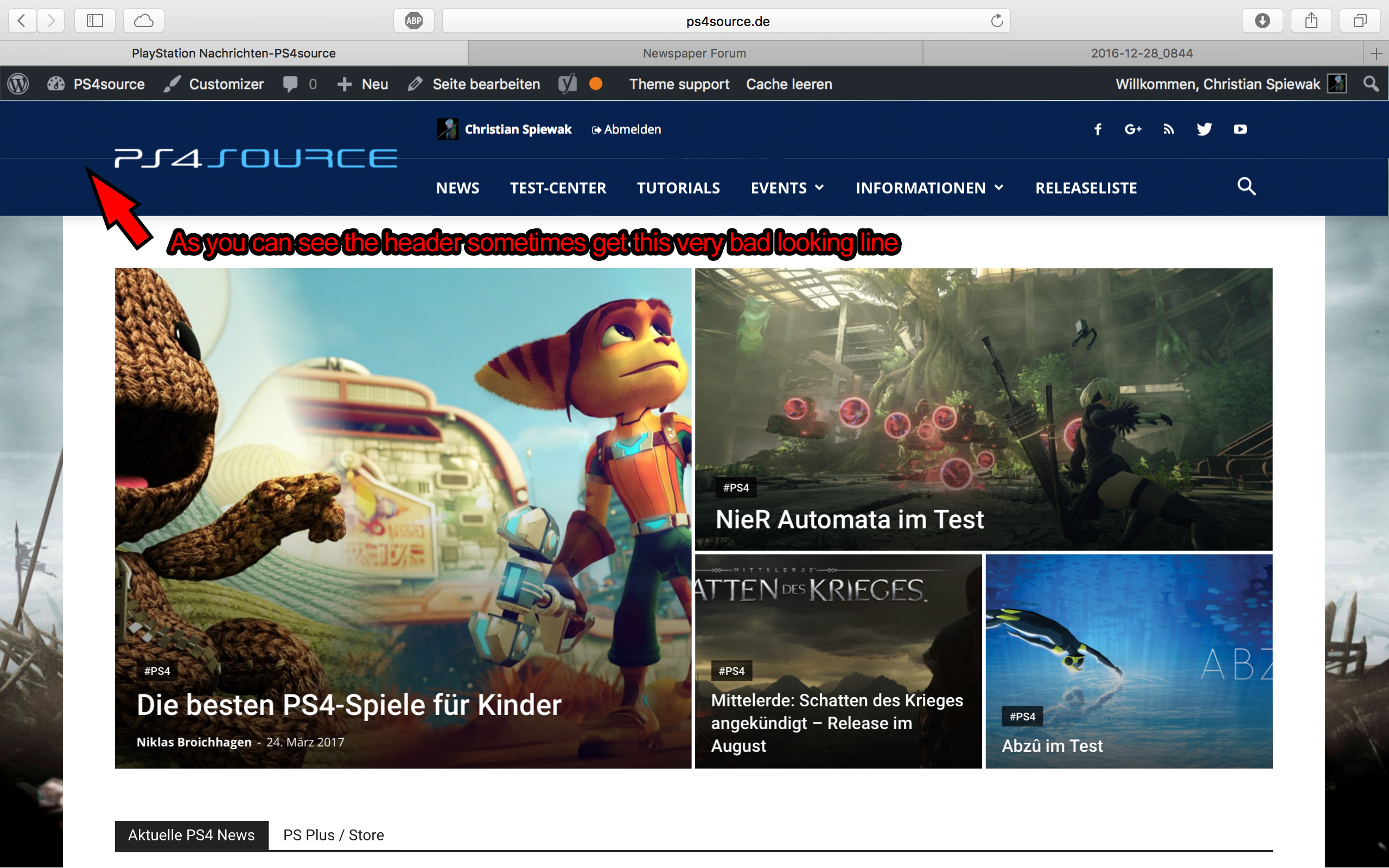
2) Which register plugin should I use? I don’t want to let new users to set a new password on the bad looking interface of WordPress. Im sure you guys know what I mean and have a good recommendation for that. Beside that, what should I use to prevent registrations from bots?
3) Is it possible to have a gradient header and footer, instead of just one color? It looks a bit boring.
4) How can I change the menu just for the mobile page, without using td-mobile-plugin?
5) How can I change the the font style and size of quotes? At default settings it looks way too big (see here)
6) Is it ok too use the responsive options, to create one site with different blocks and grids for mobile and desktop? Im asking cause I don’t know if my site will load much longer, if it has to load information even though there are not displayed. (see details here)
7) My current page speed is a disaster (see here). Why is it so bad, since Im using kraken.io image optimizer and WP Super Cache? How can I improve the score?
8) How can I use td-speed-booster, without uninstalling my plugins? (Disqus Comment System, TablePress, TotalPoll…) I really need those plugins, but I still want to have a fast homepage!
9) If I set [Template Setting->Force Full width->Header Menu] to “No Stretch”, the logo of my site is not at the correct position.

10) validator.w3.org shows, that my page has 33 errors (see here). How can I fix them?
 Marcus_S
Hello!
Is it poosible to add a custom single row in the Posts on the Post Settings-Block? And which file must be edited?
Thanks
ben.hinc AMP needs custom classes, compliant post meta code, special ad unit setup, custom hooks for plugins, no use of javascript stuff, https-only elements, etc., etc.
Most of these issues have been solved by the AMP for WP plugin I linked to in an earlier reply (when used in conjunction with Automattic’s plugin). Therefore, they CAN be solved.
There’s no reason why tagDiv’s mobile plugin can’t solve all the same issues in the exact same way this plugin has and deliver a full Newspaper-like mobile experience while maintaining AMP compliance.
And trust me — I’m aware of the HTTPS requirement. We’ve moved our site as well as our podcast to HTTPS in order to comply with it.
ben.hinc You can’t make a page identical to your desktop version for AMP as that defeats the purpose of the mobile friendly AMP framework. It’s supposed to be “lean and mean.”
I feel like none of you are actually listening to what I’m saying.
I’m NOT advocating that the AMP version be identical to the DESKTOP version.
I’m advocating it be identical to the mobile plugin version provided by tagDiv which, as I understand it, was developed to be “lean and mean.”
I don’t want a responsive version of my site to be the AMP version. I don’t want responsiveness at all.
I want tagDiv’s mobile plugin with AMP compliance. That is it. Until this happens, I will continue to advocate for it. And, for the third time, the first news theme for WordPress that can offer a mobile experience (NOT a desktop experience) that is also AMP compliant will win my business.
ben.hinc Using Accelerated Mobile Pages plugin (Khaludi) AND WordPress AMP plugin AND Yoast Glue (if using Yoast WordPress SEO) all work perfectly for me and have done for months – ALL used together never failed – some cutomisation options built in too.
Thanks for your note. This is the solution I’m using.
But as I tried to state in my reply above, until the experience using an AMP-compliant page is indistinguishable from a non-AMP page, the solution remains incomplete as far as I’m concerned.
 Simion C.
 Hi,
If you mean the titles alignment here – https://www.screencast.com/t/GZK378OOSv7e you could do it with a code like this – https://www.screencast.com/t/2uj1KfLmfKz5
This is the code used, just enter it in Theme panel->Custom Css – https://www.screencast.com/t/dmO09DR8zc9x
.td-footer-wrapper .block-title span {

padding-left: 0;

}
Thanks
Simion C. Hi,
The theme creates all the thumbs needed for each module size that are used on blocks. You could identify the modules that you use on your page and disable the other sizes in theme panel – https://www.screencast.com/t/tmD90yR52 so they will not be automatically generated anymore.
More about the theme thumbs here – https://forum.tagdiv.com/theme-thumbs/
Thanks
 Catalin
 Hello iamzifei,
Please notice that you should adjust the post title limit from Revolution Slider option. For our blocks/modules exist an option in Theme panel->Excerpts section, like this -> https://forum.tagdiv.com/newsmag-excerpts-introduction/
Hope this helps!
Thanks for your understanding!
 22p
22p Hopefully we are talking about a few days not a few months but we cannot say for sure.
Hi Bodgan, do you have some update about final testing of wpml?
I read that Otto of WPML support are working on that.
Please let me know.
Simion C. Hi,
The posts that are displayed first are based on the sort order, from those categories. For a latest post sorting, if you add posts only to one of those categories they will be displayed first. If a post has multiple categories, then a primary category has to be set to control this – https://forum.tagdiv.com/primary-category/
A solution in your case would be to use different blocks filtered by specific category so they only display posts from that category. There is no option for a case with multiple category filtering to assign priority categories.
Thanks
 Bogdan B.
 Hello,
The category tags can be removed from particular modules and blocks from the theme panel: https://www.screencast.com/t/oRn1wt1rBt
If you want to remove the tag only on mobile I can provide a css code for it but I will need a link to your site so I can see what modules and blocks you use as the code must be added for each block in particular.
Thank you!
Simion C. Hi,
I do not understand exactly what is the problem you are having. You can simply place the video link inside a text block for example, or directly in the page content – https://www.screencast.com/t/6rfyH1hQ and make a list with these links if that is what you want.
Thanks
Bogdan B. Hello,
There are multiple settings you can add to your blocks to prevent duplication and have better control over the posts shown. Please read this guide: https://forum.tagdiv.com/block-settings-guide/
Thank you!
Bogdan B. Hello,
The related articles in our theme can only show posts from the same category or tag as the current post: https://www.screencast.com/t/XMlCwY4J
That is why it;s called a “related” articles post. The articles must be related. If you want to show other posts, you can try to activate visual composer on posts and add a block to your posts. This however is not tested and could provide mixed results: https://www.screencast.com/t/2JEVrikwJl
As for the post titles, please provide an example as I cannot see the issue on your site.
Thank you!
 STEFEN1
 https://gamersarsenal.it/
I see in the animal demo tehre is a gap between the slider and the blocks.
One more question, how can i change the logo’s background color on header 10? i would like to have a full grey bar as header without showing my custom image.
Thank you for the help
Bogdan B. Hello,
Adding blocks to a post is not tested on our theme and could provide mixed results. You can try to activate visual composer on posts and give it a shot but keep in mind that it is not tested or recommended: https://www.screencast.com/t/2JEVrikwJl
Thank you!
Bogdan B. Hello,
The requests depend on the number of visitors you have and on the number of complex elements on your site. If you have lots of blocks with pagination and ajax filters, the requests could go up. Please make sure you use a caching plugin : https://forum.tagdiv.com/cache-plugin-install-and-configure/ and a cdn server is also recommended: https://forum.tagdiv.com/cloudflare-cdn/
Thank you!
Bogdan B. The second block spacing is a custom css you added. Please remove this code from your advanced css box:
.td_block_big_grid_3 {padding-bottom: 20px;}
Thanks.
Simion C. Hi,
The elements on the page can be edited/removed/added by opening your page in Visual composer and make the modifications to each of them – https://www.screencast.com/t/cjJSC6CrIiy but I see that you have already managed to remove or modify the respective section from your homepage.
More information about block settings here – https://forum.tagdiv.com/block-settings-guide/
Thanks
Simion C. Hi,
The blocks that are used when creating a page in Visual composer contain different modules. Here you can see the thumbnail sizes for each of these modules – https://forum.tagdiv.com/theme-thumbs/
Also on the theme demo you can see all the blocks and Big grids available – https://demo.tagdiv.com/newspaper/block-1/ – https://demo.tagdiv.com/newspaper/big-grid-1/
These elements are specially designed and come predefined within the theme, it would not be easy to change their properties, and multiple factors have to be taken into account if you want to try and modify them.
Thanks
 pokeweb
When viewed on a mobile device, category tags in blocks often cover a large portion of thumbnail images.
How can I hide category tags on blocks, but only when viewed on a mobile device?
 simchris
 Of course, that being said —
I did have to do that on a non-TD theme we use for one of our ecommerce solutions, where the method used to put featured block on front page was using “blah-ad_blah” … and so ad filters in browers would show blank boxes on front page of store thinking they were “ads” — we had to do a search/replace in the theme (I think we used either TextPad 5 or Dreamweaver) — I mentioned it to the theme foundry (a major foundry …); i still don’t think they’ve fixed that as they did it in *all* their themes. Had to fix all the “ad” classes to “neo” short for our company trademark and all that. Works fine. But — we tested the heck out of that before customer every saw it!
My lesson from THAT was not to us “ad” in any classes 😉
 ozfiddler
 OK – I think I have it. The different modules are the blocks that you load up using Visual Composer.
