- NewspaperHow to Use tagDiv Cloud Library
- NewspaperCloud Library Templates
- NewspaperCloud Library – Category Templates
- NewspaperDesign your Post Pages using the Cloud Library Templates
- NewspapertagDiv Cloud Library Plugin
- NewspaperCloudflare (CDN)
- NewspaperSingle External Shortcode and External Shortcode
- NewspaperSearch setup for custom post type
- NewspapertagDiv Composer – Website Manager
- NewspaperFlex Block Builder and Flex Loop Builder
- NewspaperModules Builder in Newspaper Theme
- NewspaperIntroduction to CPT and ACF with Newspaper Theme
- NewspaperCreate a frontend submission form
- NewspaperFilters and sorting for taxonomies
- NewspaperUser review system
- NewspaperHow to use the Google Maps API
- NewspaperWooCommerce: Happy “Add to Favorites!”
- NewspaperHow to insert a block inside the content of a post
- NewspaperHow to setup the Contact Page
- NewspaperPosts Loop Element
 newspatron
Hello Team,
I’m running a local development environment of my production site newspatron.com using Docker.
The site and database were cloned from the live website.
Theme + required plugins are installed and activated:
Newspaper theme 12.7.3 (active)
Newspaper Child theme
td-composer 5.4.2
td-cloud-library 3.9.2
td-standard-pack 2.7.1
td-social-counter latest
Everything is working except:
❌ “Edit with TagDiv Composer” button is missing
❌ TagDiv frontend editor won’t load
⚠ Editing a page only shows a blank white screen
This happens only on the local site.
The live site works perfectly with the same setup.
Other info:
Local URL: http://newspatron.local
Database cloned from Jetpack backup
wp_debug enabled, no TagDiv-specific errors yet
Capabilities granted using WP-CLI
Request:
👉 Please provide any additional required settings, database flags, or licensing constraints needed to restore the TagDiv Composer button and frontend editor in a local dev environment.
Thanks.
 Calin
Calin Hi,
In case you are not using the mobile theme plugin, then there are two other 2 situations.
Unfortunately, i can not see the image because the Cloudflare is down – https://i.imgur.com/DnPm99f.png
– in case you are using a mobile page /template https://tagdiv.com/newspaper-10-3-7-update-brings-customizable-and-fast-mobile-pages/
– in case you are using the option to disable the desktop zone on mobile and the mobile zone on desktop – https://i.imgur.com/TT2slI3.png https://i.imgur.com/jWPKhXS.png
In the above scenarios, there is a need to use a cache that can create and provide a cache per device (mobile and desktop cache), most of the cache plugins have this option.
Thank you!
Calin Hi,
Our theme does not have an element for FAQ, but we have a page that can be imported from the cloud libraryhttps://i.imgur.com/AhGIx9i.png (custom-made). This can be used for creating a nice FAQ, but the schema will be need to be created and add to the page (in a raw HTML element)
Thank you!
Calin Hi,
Unfortunately, the theme do not have any option to restrict the editors from using the cloud templates.
What can be done is what you already tried, to use a plugin that restricts the user to different sections of your website.
Do you want to restrict only the cloud templates or also teh option to edit with tagDiv Composer? I’m asking because from tagDiv Composer, you can import cloud templates, sections, and elements.
Thank you!
Calin Hi Claudio Souza, how are you?
I believe you are referring to this section – https://i.imgur.com/jhItDSn.png right? I se that there the elements are one under the other and normally should be one beside other. Unfortunately, only changing the page, I do not know exactly what settings are there. If you can contact us via email at contact@tagdiv.com and provide temporary WP-Admin access, we’ll check it and adjust the layout to be displayed nicely.
The child theme is provided with the theme in the theme package – https://forum.tagdiv.com/the-child-theme-support-tutorial/ but can you please let me know for what you’ll like to use it? I’m asking because the pre-built website you have installed can be entirely edited in front-end with tagDiv Composer and is using cloud templates, which can be edited using the builder, without needing to touch the code.
Thank you!
 developer@idees-digital.gr
 I purchased the Sucuri Security Platform Basic today (18/11/2025) for $229.00 per year, and it is reporting that the tagDiv Cloud Library has issues, as are the free versions of MalCare and Wordfence. All security-related plugins indicate that the tagDiv Cloud Library has a problem. As a result, my website is not functioning correctly. What else can I do? Also, users visiting the site are receiving warnings from their antivirus software stating that the site has an issue.
The website is hosted on a server by the company called Hetzner. Even from there (Hetzner), they are reporting that the website contains malware.
Calin Hi,
This is related to teh settings that are made on your website. To make sure that you display the publish date, please check those settings:
– theme panel > block settings > meta info on modules > show modified date -https://i.imgur.com/S4jayR2.png This should be off.
– for single post template if is a cloud it can be diedt uwit tagDiv Composer and make sure you are using the Single Post Date
Thank you!
Calin Hi,
This is because the search element you have is a pop-up element, but you do not have the page with the search elements, if you want, you can import it from the cloud and just assign it to the pop-up element with TagDiv Composer – https://i.imgur.com/I2SWqBS.png – https://i.imgur.com/Nci3caP.png
Another method is to replace the pop-up element with the search element (can be done with Composer).
Thank you!
 tbmedia
Hello tagDiv Support Team,
I need to restrict access to Cloud Templates for users with the Editor role on my Newspaper theme website. Currently, editors can still see and edit Cloud Templates in the backend, which I need to prevent.
What I’ve tried:
– Installed “User Role Editor” plugin and adjusted capabilities
– Added custom code to functions.php to remove menu items and capabilities
– None of these solutions have successfully hidden or blocked access to Cloud Templates
What I need:
– Only Administrators should be able to access, view, and edit Cloud Templates
– Editors should be completely blocked from accessing Cloud Templates (both in the admin menu and via direct URL access)
– Editors should still be able to create and edit regular posts and pages
Questions:
1. Is there a built-in setting in Newspaper theme to restrict Cloud Templates access by user role?
2. What is the correct capability or hook to use to prevent editors from accessing the Cloud Templates custom post type (tdb_templates)?
3. Can you provide the recommended code solution to implement this restriction?
Theme Details:
– Theme: Newspaper
– Plugins: tagDiv Composer, tagDiv Cloud Library (both active)
– WordPress Version: 6.8.3
– Theme Version: 12.7.3
Thank you for your assistance!
Best regards
Calin Hi,
There may be a misunderstanding. Changing a template will not delete anything — it will only change the layout and display the elements included in the new template.
However, when you say “template,” you might actually be referring to a demo (a pre-built website). If that’s the case, then the confusion makes sense. A Cloud Template can be applied independently of the demo you’re using, so none of your current content (articles, categories, etc.) will be affected.
But if you want to change the demo itself, then yes, you will lose everything that was installed with that demo.
Thank you!
 happypeoplepickleball
Received this warning from WordFence …
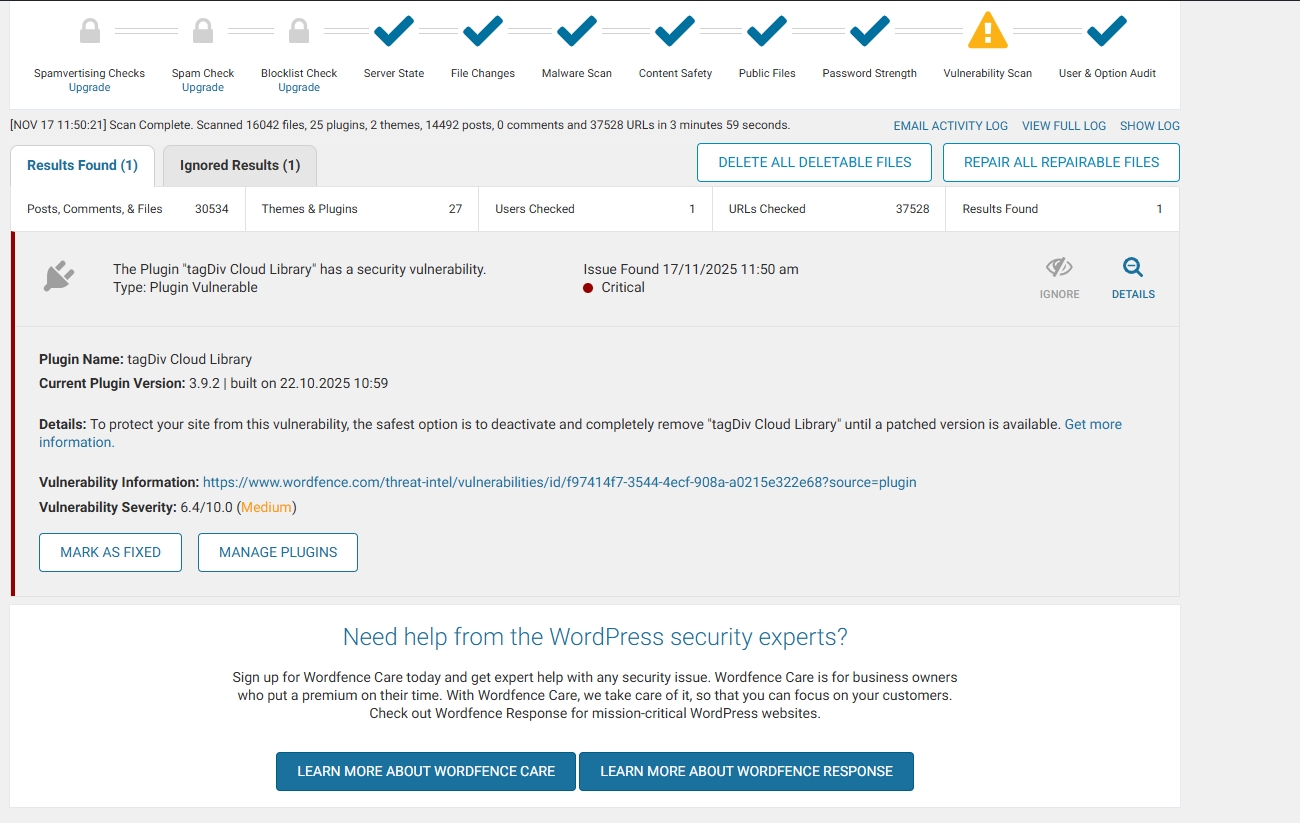
The Plugin “tagDiv Cloud Library” has a security vulnerability.
Type: Plugin Vulnerable
Issue Found November 16, 2025 9:10 am
Critical
Plugin Name: tagDiv Cloud Library
Current Plugin Version: 3.9.2 | built on 22.10.2025 10:59
Details: To protect your site from this vulnerability, the safest option is to deactivate and completely remove “tagDiv Cloud Library” until a patched version is available. Get more information.
Vulnerability Information: https://www.wordfence.com/threat-intel/vulnerabilities/id/f97414f7-3544-4ecf-908a-a0215e322e68?source=plugin
Vulnerability Severity: 6.4/10.0 (Medium)
developer@idees-digital.grSince yesterday, 16/11/2025, my site has been hacked.
My site is a blog with 14,482 articles and 14 page.
With the help of Wordfence, I have managed to locate all the malicious files and delete or replace them with new ones. The only thing I still cannot address is the tagDiv Cloud Library plugin. Can you help me with this? I have deleted all the files of the Newspaper theme and reinstalled them from scratch, as well as all the WordPress files and the other plugins.
It is very important for me to solve this problem quickly, because the site has very high traffic.
link: https://exostis.gr/wp-content/uploads/2025/11/tagDiv-Cloud-Library.jpg
After scab with Wordfence and the same from malcare
Plugin Name: tagDiv Cloud Library
Current Plugin Version: 3.9.2 | built on 22.10.2025 10:59
Details: To protect your site from this vulnerability, the safest option is to deactivate and completely remove “tagDiv Cloud Library” until a patched version is available. Get more information.(opens in new tab)
Vulnerability Information: https://www.wordfence.com/threat-intel/vulnerabilities/id/f97414f7-3544-4ecf-908a-a0215e322e68?source=plugin(opens in new tab)
Vulnerability Severity: 6.4/10.0 (Medium)
Calin Hi,
I think that you are referring to the fact that you have installed a different pre-built website, right? If so, then all content that has been added with the previous install will be removed https://i.imgur.com/SH6Zg73.png – https://forum.tagdiv.com/installing-demos/
What can be done to keep everything you have and change the website layout is to get only the cloud template you like and keep the current install.
– https://forum.tagdiv.com/tagdiv-cloud-library-plugin/
– https://forum.tagdiv.com/how-use-tagdiv-cloud-library-templates/
Thank you!
Calin Hi,
Most of the time, this issue is caused by a shortcode that isn’t compatible with our theme or by a plugin conflict. As a result, after you configure the page or cloud template with tagDiv Composer and save it, you may encounter this error the next time you try to edit it.
If the problem occurs on only one page or cloud template (including header or footer templates), it’s likely due to specific settings or shortcodes used there. You can test this by temporarily switching the header or footer to see if the issue persists. In many cases, the problem can be resolved by restoring a previous version of the page using the revision feature: https://wordpress.com/support/page-post-revisions/
Thank you!
Calin Hi,
You are right regarding the theme blocks. If you have a site with categories like “Movie News” and others, it becomes much easier to create a single cloud template that will work for all categories. To achieve this, you can use the Flex Posts Loop element. It will automatically filter and display articles from the category you are currently viewing, so there’s no need to add additional filters.
If the element is placed on a standard page, it will display the latest articles from all categories.
Thank you!
 Kira Nevo
Hi!
Is there a way to display a third-party review plugin in the Cloud Templates module? I know the theme includes a very powerful user review system, but it doesn’t suit my website’s needs (I think)
I’m working with a third-party plugin that works perfectly for single posts, but I don’t know how to display those reviews in a Cloud Templates module.
https://i.ibb.co/FLC5HYzK/Captura-de-pantalla-2025-11-16-a-la-s-17-54-56.png
*******
Or, failing that, is it possible for the user review system to function solely as a 5-star rating without requiring a written review? Something like this:
https://i.ibb.co/YTw8LnZQ/Captura-de-pantalla-2025-11-16-a-la-s-17-59-44.png
Thanks in advance!
 Saudi Football Fanatics
Dear Support Team,
Apologies, a beginner question here… I use for my portal a template from cloud via tagDIV Composer and it works very well on laptop view. However, the order of blocks on mobile view is very much different from what I would like to see. For example, the main article is always on the top in the centrer in laptop view, but on mobile I have to scroll down a lot to be able to see that block/article.
How can I change the order of these blocks on mobile view?
Thank you!!!
 DocDigit
Hello team,
Can you tell us where we can find the translation(s) of the est. reading time text string?
Pls refer for an example (under the blog article title) to
https://cloudzeeland.nl/brein-op-de-bres-voor-nieuwsmedia/
Just checked the English language file, but cannot find it. Also in the Dutch language (site default) file no result.
Thank you.
Calin Hi,
The Chained News PRO is made using tagDiv Composer and cloud templates and it can be edited using the theme builder.
– https://forum.tagdiv.com/tagdiv-composer-tutorial/
– https://forum.tagdiv.com/header-manager/
– https://forum.tagdiv.com/tagdiv-cloud-library-plugin/
-> https://i.imgur.com/9ioGHfF.png – https://i.imgur.com/4ZZ7tTo.png also the logo from that demo is an SVG, so you need to remove the SVG from the logo tab.
Thank you!
 robertorubio
Good evening, I am struggling to add Google AdSense ads to my website. I already followed your instructions, and it still isn’t working. I’ve been inputting the code on the different Cloud Templates and still cannot get it right. I can give you access to my site so you can take a quick peek and see if I am doing something wrong.
 msgarra
Hello guys,
i removed the background and layout breaks…
as you can see: https://wordpress-919309-5834713.cloudwaysapps.com/ now content section have some padding on both side, i need that of same width of header and footer.
And at least i need help to remove the shadow on bottom content section.
It’s little urgent, pls help.
 RENATO
 @Calin Hi! It’s improved a bit, but it’s still freezing. I disabled some plugins. You know what I think? At the end of last month it wasn’t like this, it was running smoothly.
I found something that might be causing the slowness. You know? It could be this: the theme isn’t identifying the caching plugin. Look at this: https://ibb.co/hFjWZy65
It says: “No caching plugin detected – for best performance we recommend using WP Super Cache”, even though I’m using LiteSpeed Cache, as you can see in the image.
However, there’s a message saying:
WARNING: The LSCache caching functions on this page are currently unavailable! To use the caching functions, you must have a LiteSpeed web server or be using the QUIC.cloud CDN. Learn more: https://ibb.co/fzyWqtg2
Then this page appears to click, to learn more: https://encurtador.com.br/nqXP. From what I understand, LiteSpeed doesn’t support PHP pages, or doesn’t work with caching PHP pages, and they have a paid service that performs better.
This might be causing the site to be slow. And this also appears:
5120M – Images, themes and plugins larger than this cannot be loaded. To learn how to change this, see our guide here.
What should be the ideal value for post_max_size? https://ibb.co/d0G7rfvG. “Images, themes and plugins larger than this cannot be loaded”. It could be a slow theme issue. This needs to be resolved, but I don’t know how.
Another thing: I need your help. Do you know the related channels block? This one: https://ibb.co/BVz63DqM.
You need to filter the main category: it appears here: https://ibb.co/NngYKwhK and is configured here: https://ibb.co/XxbXd2RT in the dav composer filter configuration. There’s no option to show only the main category: https://ibb.co/ksSHH8Bq.
Could you send me a custom CSS to do this? To show only the main category as shown here: https://ibb.co/RpdJ3VGT. It should appear in that block, but I don’t know what to do. I need a working CSS.
I ask for your help in solving these problems. Thank you for your attention.
 jjgoi
jjgoi Yep that works for single post template, I managed to edit the date time format.
However it seems for posts (w/ title, description, categories, date, reading time) inside a Flex Block Builder that came with the default Forest Beat example, there’s no way to edit the “date element” inside the Flex Block Builder. Clicking on the date brings me to the “Flex Block Builder” instead of the date element.
So it’s still not working for me specifically for the posts on Forest Beat homepage. Still has its own date time format.
I had to dig into the source code (i.e. via Edit instead of tagDiv composer) to find out:
[tdb_flex_block_builder limit=”2″ tdc_css=”eyJhbGwiOnsibWFyZ2luLWJvdHRvbSI6IjAiLCJkaXNwbGF5IjoiIn19″ cloud_tpl_module_id=”23″ modules_on_row=”eyJhbGwiOiI1MCUiLCJwaG9uZSI6IjEwMCUifQ==” modules_gap=”eyJhbGwiOiI0MCIsInBvcnRyYWl0IjoiMzAifQ==” modules_vert_align=”stretch” all_modules_space=”eyJwaG9uZSI6IjMwIn0=” offset=”1″]
There’s no way to edit the date field inside tdb_flex_block_builder!
-
This reply was modified 11 months by
jjgoi.
Calin Hi,
Yes, this is possible, using a cloud header you can assign it globally (for the entire website) and you can also use it as an individual, only for a page or cloud template (the individual option will apply over the global one). This can be done using tagDiv Composer – https://i.imgur.com/5AtRPwa.png select the manager and in the header click on the header name – https://i.imgur.com/4D0lqVN.png (not on global, only on name to make it green, this means it is assigned as an individual on that page/template).
Thank you!
Calin Hi,
Our theme do not use no-cache or DONOTCACHEPAGE.
Also, testing with a theme like “Twenty Twenty-Four” that does not have any features and comparing it with the Newspaper theme that you can build almost anything, I think, is not a good comparison, but if this is indeed something related to our theme make some tests like this. Use only the Newspaper theme without any extra plugins except the cache plugin. If it’s ok, go on with tagDiv Composer, this is the hard part of the theme. Then, with tagDiv Cloud Library and so on, until you test it with all the theme plugins you are using.
The text step after you identify the plugin that is interfering with the cache is to check the cache settings. From my experience, setting ‘/’ in cache fields will be interpreted to not cache the homepage, but this is maybe only my interpretation.
As a suggestion you can try a code like this one in the child theme (the code needs to be adjusted):
add_action( 'template_redirect', function() {

    if ( class_exists( 'LSCache\\LSCWP' ) ) {

        // Remove any DONOTCACHEPAGE flag that may have been set earlier

        if ( defined( 'DONOTCACHEPAGE' ) && DONOTCACHEPAGE ) {

            // Un-define the constant (only works if not locked), or override via filter

            // Note: PHP doesn't allow undefining a constant, so we use filter below

        }

        // Use our filter to override caching logic

        add_filter( 'litespeed_cache_allow_cache', function( $allow ) {

            return true;

        }, 99 );

        // Clear any HTTP headers forcing no-cache

        header_remove( 'Cache-Control' );

        header_remove( 'Pragma' );

    }

}, 0 );
Thank you!