
- NewspapertagDiv Composer – Website Manager
- NewspaperWhen tagDiv Composer is Not Working
- NewspapertagDiv Composer Tutorial
- NewspaperScroll Animation
- NewspaperSingle External Shortcode and External Shortcode
- NewspaperCredit System
- NewspaperBookmark – Save For Later
- NewspaperFlex Block Builder and Flex Loop Builder
- NewspaperModules Builder in Newspaper Theme
- NewspaperIntroduction to CPT and ACF with Newspaper Theme
- NewspaperCreate a frontend submission form
- NewspaperHow to Use the Tabbed Content shortcode
- NewspaperCreate a form contact page
- NewspaperFilters and sorting for taxonomies
- NewspaperUser review system
- NewspaperCustom Fields Support
- NewspaperWooCommerce: Happy “Add to Favorites!”
- NewspaperWoo Brands
- NewspaperModal Popup
- NewspaperShortcodes
 Simion C.
 Hi,
Website credentials should only be sent to us by email, at contact@tagdiv.com. Include a link to this topic in the email. We can take a look to the composer issues you are having. Provide admin login and also cPanel if possible.
Seems that the other issues you are having happen only in Firefox, try and clear the browser cache in it’s settings and check again.
Regarding SSL issues with Firefox, I did find some similar topics you could read
– https://support.mozilla.org/en-US/questions/1132690
– https://support.mozilla.org/en-US/questions/1216292
– https://comodosslstore.com/blog/ssl-errors-how-to-fix-ssl-certificate-errors-on-chrome-firefox.html
Let us know.
Thanks
 doctorresidual
I have been on my site since morning having issue installing the updated version of TD composer plugin.
It has crashed my website.
It has affected hundreds of other websites too.
Kindly fix this plugin.

 Calin
Calin Hi,
This can be done using the header manager for tagDiv Cloud Library and tagDiv Composer -> https://www.screencast.com/t/Yq77Z7eMPfR -> https://www.screencast.com/t/8R3mph59Oh
Thank you!
Calin Hi,
This can be done using the header manager for tagDiv Cloud Library and tagDiv Composer -> https://www.screencast.com/t/Yq77Z7eMPfR -> https://www.screencast.com/t/8R3mph59Oh
Thank you!
Simion C. Hi,
The 9.7 update was a somewhat major update, now the tagDiv composer has to be active at all times in order to maintain the same functionality. Most issues that can happen after update are related to how the theme is updated.
For example if you update by FTP the old theme has to be deleted and the new one uploaded. Then the plugins have to be updated as mentioned in the guide provided above. If you use a child theme this may not work anymore, the recent changes are the cause.
You can however not update for the time being and keep using the previous theme version, that depend on you entirely. You can update in the future if you should consider it. Maybe try it on a local copy of the site to see what happens, while having the main website kept safe. There are plugins that can duplicate a website if you should consider this suggestion.
If you want us to take a look you can send us an email at contact@tagdiv.com and provide admin access as well as FTP or cPanel. Let us know.
Thanks
Calin Hi,
To change the amp header color and hide the social shares you need to go in wp-content/plugins/td-composer/mobile/amp/functions.php -> https://www.screencast.com/t/m0ufXi3tuW
?>
<style>
    .amp-mode-touch .td-post-sharing-top, .amp-mode-touch .td-post-sharing-bottom {
        display: none;
    }
    .amp-mode-touch .td-header-wrap {
        background-color: red;
    }
    body [class^="td-icon-"]:before, body [class*=" td-icon-"]:before {
        line-height: unset ;
    }
    .single .td-social-network, .single .td-social-handler i {
        padding-top: 13px;
    }
</style>
Fell free to change the colors!
Hope this will help you!
Thanks!
 PFN365
Hi,
When my writers are saving their post, it goes to a blank white screen. The post saves, but they are led to the white screen. Also, some are having issues previewing the post as it leads to a white screen. I just installed this theme the other day. Website: http://www.profootballnetwork.com.
Here are the plugins I have active:
AMP
Bluehost
Classic Editor
Google Analytics for WP
Internal Link Building
Jetpack by WordPress.com
Members
Open external links in a new window
Publish to Apple News
Really Simple SSL
TablePress
tagDIV Composer
tagDIV Mobile Theme
tagDiv Social Counter
Yoast SEO Premium
 Catalin
 Hi all,
Most of the theme files were moved into the tagdiv composer plugin as per the requirements of envato: https://help.author.envato.com/hc/en-us/articles/360000472383-WordPress-Theme-Requirements. We wrote an article on the subject here: https://tagdiv.com/updating-the-core-of-tagdiv-themes/
Moving forward with such requirements, a child theme will only work with functions.php, and style.css as there are very few files left in the main theme as envato requires all functionality to be added through plugins.
Sorry for the inconvenience and thank you for understanding!
 epitets
Hi!
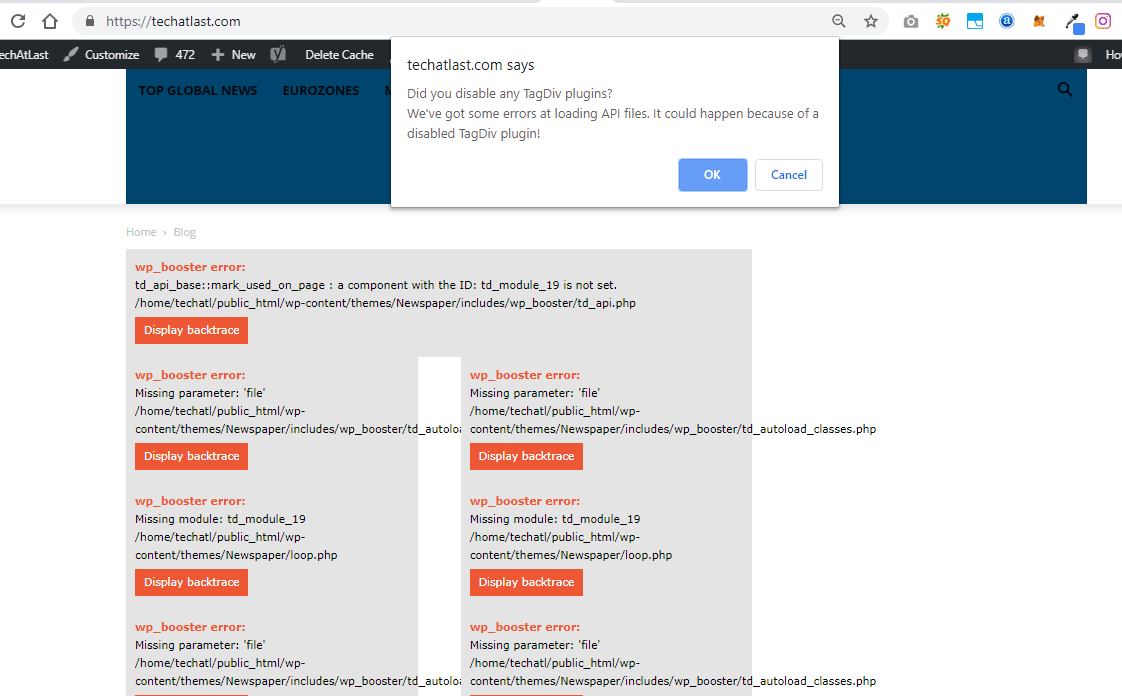
After your last update I`m having problems. First of all, my website crashed. It looked like this:
Only after enabling you TagDiv composer everything started to work. But I dont need your composer. And I dont have any other composer. They just make my website to load slower.
I would like to disable / delete tagdiv composer without crashing my website. Can you fix it please?
Thanks!
Valts
Simion C. Hi,
I see what is happening. What you need to do is to edit that cloud header template in the composer. Then activate the sticky mode – http://prntscr.com/nfn7ty now you should see what the sticky menu displays and modify it as you want.
This way you can display totally different elements normal vs sticky. Let us know if you have more questions.
Thanks
Calin Hi,
The cloud post templates don’t have PHP files like the default predefined post templates. So adding PHP code in them is not possible, unless maybe you try using a widget that accepts PHP code and place it in the cloud template while editing with the composer composer. But that may not work.
Please check this similar topic -> https://forum.tagdiv.com/topic/adding-custom-php-code-to-show-up-on-posts-while-using-cloud-library-templated/
Thank you!
Simion C. Hi,
That is possible, you can display videos and embed audio in pages or posts.
For example in a column text element you can paste a link to a video and it will appear in the page – https://forum.tagdiv.com/topic/video-from-youtube/
Or an entire playlist maybe, like this – https://forum.tagdiv.com/topic/youtube-playlist-instead-of-each-video-individually/
Audio can also be displayed in a page, like this – https://www.sitepoint.com/4-simple-ways-add-audio-wordpress-site/
So it is possible to display video and audio in a page with the composer.
Thanks
Simion C. Hi,
There will be a left and right padding on mobile, most elements will have it with some exceptions.
There are some things you could try. For the top form, edit the page with the composer and select the mobile mode
– http://prntscr.com/nfmnnd then set a negative margin left and right for the raw HTML element used – http://prntscr.com/nfmoe3 set a -20px value.
Or use a code like this one – http://prntscr.com/nfmox8 in the mobile CSS field of the Theme panel->Advanced CSS
.home .vc_raw_html {

margin-left: -20px;

margin-right: -20px;

}
For the column title lower down the page, you could try something like this
– http://prntscr.com/nfmw0e
.home .tdc-content-wrap .td-stretch-content:nth-child(6) {

padding-left:0;

padding-right:0;

}
Enter it in the same phones field – http://prntscr.com/nfmwdq
There may be other solutions, let me know if these work or I will think of a different way.
Thanks
Calin Hi,
The mobile theme is a plugin that provide you a better speed then responsive version of theme, but in order to achieve that speed you’ll need to create a new content for pages because in the most of cases those were made with builders ( tagDiv Composer, WPBakery ) and you need to use only the mobile editor ( you need to set the content for pages in mobile editor and this content will be display on mobile theme)
-> https://www.screencast.com/t/ebUIzt4se
If you want the responsive version and amp you should use this opinion -> https://www.screencast.com/t/jZct5ueBqOrb but if you have amp activate on pages you’ll need to create in Mobile editor a content for AMP version of page.
Also please check our documentation for Mobile Theme: Automatic Optimization for Mobile with Newspaper Theme -> https://tagdiv.com/mobile-theme-automatic-optimization-for-mobile-newspaper-theme/
I think that you are referring to those 3 blocks, for those you’ll need to have set seam feature posts (that have set feature category) -> https://forum.tagdiv.com/featured-posts-2/ -> https://www.screencast.com/t/QsJ6ppY4
You’ll need to add some post in feature category -> https://forum.tagdiv.com/featured-posts-2/ if you do not have this category you can create it, just make sure that you set the category name to be
Featured
Let me know if you have more questions!
Thank you!
Calin Hi,
We tried to get your attention for child theme in our article, for the moment that a lots of files was moved in tagDiv Composer plugin, these files that was moved will not work in child theme because now these are in plugin not in theme -> https://www.screencast.com/t/z5pqD3i116Uw -> https://tagdiv.com/updating-the-core-of-tagdiv-themes/
Unfortunately, the old td-api-plugin plugin does not work anymore and we recommend using this -> https://forum.tagdiv.com/developer-info/
You can create these modules that you made with that api using the flex blocks and you can save the element in a shortcode to can use it later in orders pages -> https://www.screencast.com/t/a2ikt4tq
Thank you for your understanding!
Catalin Hi,
All the theme core files were moved on the td composer plugin and the above screen was made with the new path of this folder -> Now, the td_block_authors.php will find in plugins/td-composer/legacy/Newspaper/includes/shortcodes/td_block_authors.php.
Hope this helps!
Thank you!
Calin Hi,
Unfortunately in Newspaper v9.7 the td-api-plugin will not longer work, sorry! you can achieve the modules that you made with that api using the flex blocks and you can save the element in a shortcode to can use it later in orders pages -> https://www.screencast.com/t/a2ikt4tq
Most of the theme files were moved into the tagdiv composer plugin as per the requirements of envato: https://help.author.envato.com/hc/en-us/articles/360000472383-WordPress-Theme-Requirements.
We wrote an article on the subject here: https://tagdiv.com/updating-the-core-of-tagdiv-themes/
Moving forward with such requirements, a child theme will only work with functions.php, and style.css as there are very few files left in the main theme as envato requires all functionality to be added through plugins.
Sorry for the inconvenience and thank you for understanding.
Simion C. Hi,
Due to changes made in the theme in the 9.7 update the file where the thumbnails are made is now part of the composer plugin – http://prntscr.com/nfm73c
More about it here – https://tagdiv.com/updating-the-core-of-tagdiv-themes/
You could modify the cropping there if this is required, but the modifications will be lost after a theme update when the plugin is updated.
However maybe there is a different way of achieving the results you want. For example if you want to have more control over how a thumb looks in a module, you could use a flex block or flex grid – http://prntscr.com/nfmaaj – http://prntscr.com/nfmaer these have some settings for customizing how the image looks. Let me know if you have more questions.
Thanks
Calin Hi,
You need to check with tagDiv Composer the margin on News Ticker -> https://www.screencast.com/t/rew3e3H3 also you can check the margin for the row -> https://www.screencast.com/t/QzK1vIG1X9Wm -> https://www.screencast.com/t/FbagukfbVQ6
Hope this will help you!
Thanks.
Simion C. Hi,
A list of the files that were affected by the 9.7 update can be seen here
– https://tagdiv.com/td_deploy/Newspaper/changed_files_9.6.1_9.7.html
Due to many theme files being moved in the composer plugin, a child theme now has limited functionality when it comes to making modifications to theme files. Prior to 9.7 there were many files that could be modified in a child theme – https://forum.tagdiv.com/the-child-theme-support-tutorial/
But now most files are in the composer plugin, so they cannot be used in a child theme.
Thanks
Calin Hi,
Most of the theme files were moved into the tagdiv composer plugin as per the requirements of envato: https://help.author.envato.com/hc/en-us/articles/360000472383-WordPress-Theme-Requirements.
We wrote an article on the subject here: https://tagdiv.com/updating-the-core-of-tagdiv-themes/
Moving forward with such requirements, a child theme will only work with functions.php, and style.css as there are very few files left in the main theme as envato requires all functionality to be added through plugins.
Sorry for the inconvenience and thank you for understanding.
Calin Hi,
You can use the tagDiv Composer to edit a single post template from tagDiv Cloud Library and set in ad box were you want.
Thank you!
Calin Hi,
You ned to set with tagDiv Composer the filter with ajax categories drop-down -> https://www.screencast.com/t/ovIpxAbgmRIG
Please check our documentation for block settings, filter tab -> https://forum.tagdiv.com/block-settings-guide/
Thank you!
 MichaelEditorInChief
I have tried several times to load this plugin and it keeps crashing word press??? Am I missing something here?
Michael
 anilnetto
 Yes, thanks, the webhosting company has identified the cause for my blog: they said the issue was coming from output_buffering (I am not sure what that is), which had been disabled. This they have now enabled and now wp-admin automatically redirects to wp-login.php
Earlier, I could only get access to wp-admin when I disabled the tagdiv composer plugin. But now, with the output-buffering enabled, I am able to use the plugin and still have wp-admin working.
Thanks!
-
This reply was modified 7 years by
anilnetto.
