
- NewspapertagDiv Composer – Website Manager
- NewspaperWhen tagDiv Composer is Not Working
- NewspapertagDiv Composer Tutorial
- NewspaperScroll Animation
- NewspaperSingle External Shortcode and External Shortcode
- NewspaperCredit System
- NewspaperBookmark – Save For Later
- NewspaperFlex Block Builder and Flex Loop Builder
- NewspaperModules Builder in Newspaper Theme
- NewspaperIntroduction to CPT and ACF with Newspaper Theme
- NewspaperCreate a frontend submission form
- NewspaperHow to Use the Tabbed Content shortcode
- NewspaperCreate a form contact page
- NewspaperFilters and sorting for taxonomies
- NewspaperUser review system
- NewspaperCustom Fields Support
- NewspaperWooCommerce: Happy “Add to Favorites!”
- NewspaperWoo Brands
- NewspaperModal Popup
- NewspaperShortcodes
 emalgumlugardomundo
 Check, even in TagDiv Composer
emalgumlugardomundoHi there,
I am having some issues with images and I hope that you can help me! I am not able to put to images side by side on blog posts. I tried to put one align left and than the other one, tried both at same time, tried one than the other no align, I tried everything and I just need to have two or more images. I don’t want to use visual composer in the articles. Can you help me?
A another thing is that I am trying to put a image on my home and it is cropping.
How is in my page:
https://snag.gy/jxLVt9.jpg
The image as in the visual composer, full size (225×225)
https://snag.gy/7Ohw1k.jpg
The uploaded size:
https://snag.gy/k64C9q.jpg
What am I doing wrong?
Thanks
 Plexus7
Hello tagDiv team,
I’ve just updated to new version 4 and have a problem with icons – down arrow in menu bar, search button, visitors icon and so on. I’ve never experienced such a problem till this version. My site is with Let’s Encrypt SSL and SSL plugin to deal with mixed content. Also I’ve switched to your new composer.
Also I’ve experiencing slower load speed, worse google speed test, lagging after update ;(
You can see my site on vivata.bg
 Downunder
 I should just add that it appears that the Front End Editor option is not appearing in the options under Visual Composer and its also not possible to select it when on a post/page etc.
So I’m not sure how I’m meant to recreate the pages and I can’t wait for you guys to put out a release that may fix the issue. Would appreciate your advice.
 Simion C.
 Hi,
I cannot replicate this issue. The row layout settings are working properly
– https://www.screencast.com/t/ULfCiFj9
What you could try is to deactivate all your plugins except the tagDiv composer and the plugins included in the theme package, and clear any installed caching.
Then create a new page and test again. Please let us know if you still have problems.
Thanks
Simion C. Hi,
At the moment there is no option in the theme to change the post width. The tagDiv composer can only be used on pages, not posts.
This is an example of a post with sidebar
– https://demo.tagdiv.com/newspaper/td-post-microsoft-subsumes-open-tech-unit-back-inside-mothership/
Here is a post with no sidebar, the post content has the full theme width
– https://demo.tagdiv.com/newspaper/td-post-five-things-you-may-have-missed-over-the-weekend-from-the-world-of-business/
Changing the post content width could only be done with custom code, and it is not recommended. The elements used depend on the theme’s fixed width, changing it could damage the layout.
Thanks
Simion C. Hi,
Specific Visual composer elements are affected by the tagDiv composer, and may not display properly in some cases. If you are using Visual composer and addons for it, please disable the tagDiv composer and everything should work without any problems.
Pages created with one of the composers should not be edited with the other.
Thanks
 TechDragon12
 Here is some more information from Query Monitor: I’m also looking into how to fix it, but you would know better than me.
PHP Error
Warning
Cannot modify header information – headers already sent by (output started at /nfs/c12/h01/mnt/220821/domains/fabulously50.com/html/wp-admin/includes/template.php:1995)
Count
107
Location
wp-includes/rest-api.php:492
Call Stack
header()
wp-includes/rest-api.php:492
rest_handle_deprecated_function()
Unknown location
do_action(‘deprecated_function_run’)
wp-includes/functions.php:3817
get_currentuserinfo()
wp-content/plugins/js_composer/include/classes/core/class-vc-mapper.php:116
Vc_Mapper->userHasAccess()
wp-content/plugins/js_composer/include/templates/editors/partials/vc_welcome_block.tpl.php:13
vc_include_template()
wp-content/plugins/js_composer/include/classes/editors/class-vc-backend-editor.php:91
Vc_Backend_Editor->renderEditor()
Unknown location
do_meta_boxes()
wp-admin/edit-form-advanced.php:703
Component
Plugin: js_composer
 tagdivstar
Hello,
There is a part on the front page that I cannot edit / customize by tagDiv Composer.
That’s the part right above the footer (I am using the default demo).
I think the elements are “td-pd-sapn8.tb-main-content” and “td-pd-span4.td-main-sidebar”.
Please let me know how to edit / customize them.
 Aldemi
 Hi Macksix,
I think this is a small detail that can be solved by yourself
Do some tests with the plugins, cache and the php version
My wp-config has the configuration
http://www.screencast.com/t/pm08YTPcDcu
Define (‘WP_DEBUG’, false);
I deactivated all the installed plugins, including “Visual composer”
I deactivated it, permanently.
Do the same, disable the plugins and enable one by one and then clean the cache
See if you have any plugins that have some of these settings
If you find something similar disable the options.
http://www.screencast.com/t/MKZ4dCje
Depending on if you do not find a brief solution
You can install the previous PHP version
Until a new version of the theme is released adapted to the new php version. It would not be possible?
Adding something similar in .htacess
# Habilitar o PHP 7.0
AddHandler application/x-httpd-php70 .php
<IfModule mod_suphp.c>
suPHP_ConfigPath /opt/php70/lib
</IfModule>
DownunderHi,
Like many people here reading the forums it would seem that I made the mistake and updated Visual Composer to version 5.2 which is clear has caused a lot of problems as you know. I followed your advice and deleted 5.2 and re-installed 5.1.1 from the Theme however all the problems are essentially still there.
Is there a current solution to this as I have many pages impacted and I’m not quite sure what to do?
 nfranc01
Hi there,
When making a new page some of the options for adding modules are gone. Were these elements removed from the theme? When I try to edit the page which was previously made in visual composer, it’s now all code.How can I fix this?
 ardideari
The plugin does not have a valid header.
Downloading install package from https://englishforlife.mk/wp-content/themes/Newsmag/includes/plugins/td-composer.zip…
Download failed. Forbidden
 macksix
 My problem is a combination of PHP 7.1.2 plus define(‘WP_DEBUG’, false); in wp-config.php.
The warning from the offset posts not being set causes the spinner to keep going. If I set it to 0, the spinner stops and it shows it is added.
Turning off WP_DEBUG doesn’t cause the problem.
See:
https://forum.tagdiv.com/topic/error-in-composer-page-and-post/#post-185283
 MikeMcElwee
Hi
I’m busy trying to change all my pages to the Tag Div Composer. However when I try to create a 2/3 + 1/3 column setup I get stacked columns instead
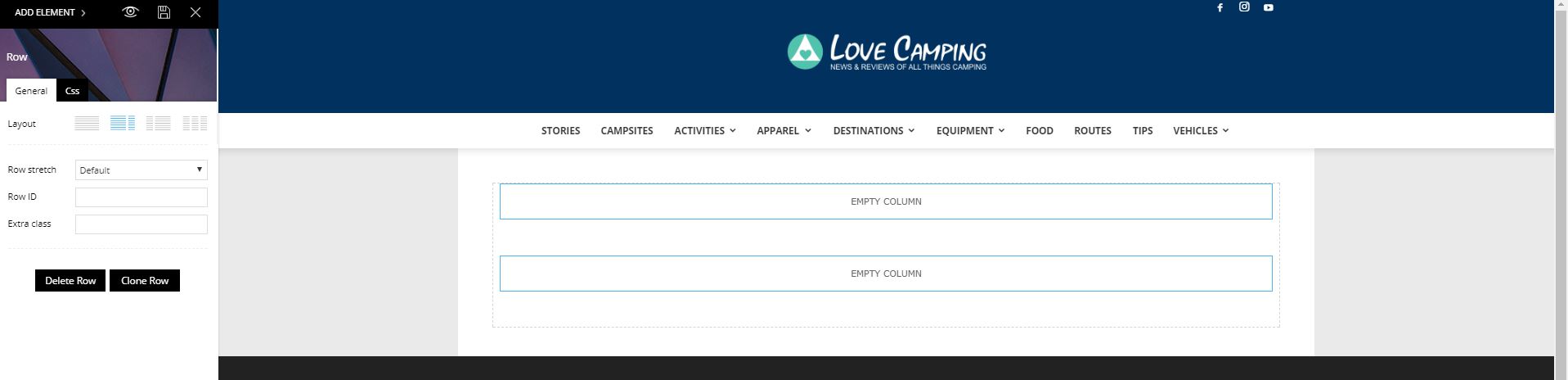
Please advise how to fix this. Obviously I want to update the site use you latest system but being able to create a sidebar is pretty fundamental.
Aldemi Hello Catalin See here my post
here is one of the possible causes, are some settings in some https plugins that are making conflict.
Now the plugin tagDiv Composer, is working perfectly, NICE!!!!.
https://forum.tagdiv.com/topic/tagdiv-composer-not-loading-spinning-cirlce-always-2/#
Thank you Catalin
Aldemi Helo my friend AliahMAd, See here my post and see if you fit here!
https://forum.tagdiv.com/topic/tagdiv-composer-not-loading-spinning-cirlce-always-2/#
AldemiHello everyone, sharing information
1 – TagDiv Composer not Loading, spinning cirlce always!
For you who have the problem when editing page with tagDiv Composer,
When editing the main page or any other page, the page turns gray
And, with a circle in the middle of the page always turning.
http://www.screencast.com/t/RWC1f6hN0W
How to solve:
Do you use HTTPS?
Do you use any plugins for the https configuration?
In particular this here “HTTP headers to improve web site security“?
http://www.screencast.com/t/6mFgyqjeGGoz
or
LH HSTS
Really Simple SSL
If your answer is yes, disable any plugins that are specific to https.
And if you have the “HTTP headers to improve web site security” plugin, delete this plugin that your site will work, and you will be able to edit the main page
2 – If you have another specific plugin that contains some of this confiction here:
http://www.screencast.com/t/B4b5py3H9
Some of these settings are causing the problem, and if you have other plugins that have some of these options here, DISABLE Possibly this is also the cause of the problem.
Now it’s just joy !!!! It is only to use tagDiv Composer, and enjoy this powerful and wonderful tool.
I hope I have helped!!!
Aldemi
 DarkStarzs
Hi,
I’ve just switched my demo to “Clearvoice” from “Tech” and i can not make the same spaces that in the demo: https://puu.sh/wSFZs/c69220cc3d.PNG
In my homepage it looks like that, with borders and white color instead of the background color https://puu.sh/wSFZd/68bcb66491.PNG. I use TD COmposer, i make an empty space and drop row in it: /
Thanks in advance
Simion C. Hi,
First please check the theme system status and make modifications to the parameters mentioned in this guide, if necessary
– https://forum.tagdiv.com/system-status-parameters-guide/
Also deactivate all other plugins except the tagDiv composer, and try adding the Slide on a new page. Please let us know if it is working properly.
Thanks
 Catalin
 Hello muratozer,
Please keep in mind that until now, we do not receive any bad reports in this case, sorry! Please try to make a new fresh install to a sub-domain and re-install the WordPress and the theme and use only the required plugins which come bundled with the theme core files and check the results. TD Composer was fully tested with the theme and should not cause any problem with the admin panel accessing, sorry!
Thanks for your understanding!
Aldemi I use the W3 Total Cache, It works great with the theme, I’ve never had problem with W3 Total Cache.
The theme works like an airplane, very fast!!!!!
But the problem is not from the cache plugin
Today I will find out what is causing this problem
I’ll post the possible problem here.
… if I can solve it, of course!
But, If I can not solve the problem, I will continue using Visual Composer!
Catalin Hello Eeroshi,
Please notice that if you are using the latest theme version you can use the Visual COmposer as page builder without problems, please do not wrong understand. The latest theme version will be bundled with our page builder and by default, this plugin will be installed but if you do not like it, you simply disable it and enable the Visual Composer. Also, if you want an older version of Newspaper, you should contact us via email at contact@tagdiv.com and we will provide the theme version desired.
please notice that our theme is in continuous development and if you will not have the latest theme version, probably you will bring some errors and we will not provide an accurate technical support for older theme version, sorry! Notice that all the time you should adapt with the latest versions of everything if you want to bring good results.
Maybe the following useful guide will help you for taking your decision -> https://forum.tagdiv.com/visual-composer-tagdiv-composer-transition/ -> https://forum.tagdiv.com/tagdiv-composer-tutorial/
Thanks for your understanding!
Catalin Hello Aldemi,
Do you have checked your system status parameters? All of these are right increased according to our documentation here -> https://forum.tagdiv.com/system-status-parameters-guide/? Otherwise, please increase them according to the guide and check the results.
For more information about a right using our page builder, please check here -> https://forum.tagdiv.com/visual-composer-tagdiv-composer-transition/ -> https://forum.tagdiv.com/tagdiv-composer-tutorial/
Thanks for the message!
Catalin Hello ABrash350,
Please read all of our documentation here -> https://forum.tagdiv.com/visual-composer-tagdiv-composer-transition/ -> https://forum.tagdiv.com/tagdiv-composer-tutorial/ before using the latest theme version.
Thanks for your understanding!



