
- NewspapertagDiv Composer – Website Manager
- NewspaperWhen tagDiv Composer is Not Working
- NewspapertagDiv Composer Tutorial
- NewspaperScroll Animation
- NewspaperSingle External Shortcode and External Shortcode
- NewspaperCredit System
- NewspaperBookmark – Save For Later
- NewspaperFlex Block Builder and Flex Loop Builder
- NewspaperModules Builder in Newspaper Theme
- NewspaperIntroduction to CPT and ACF with Newspaper Theme
- NewspaperCreate a frontend submission form
- NewspaperHow to Use the Tabbed Content shortcode
- NewspaperCreate a form contact page
- NewspaperFilters and sorting for taxonomies
- NewspaperUser review system
- NewspaperCustom Fields Support
- NewspaperWooCommerce: Happy “Add to Favorites!”
- NewspaperWoo Brands
- NewspaperModal Popup
- NewspaperShortcodes
 Anamaria
 Hello,
The footer template does not have the button to be edited with tagDiv Composer in the backend. Please check this guide:https://forum.tagdiv.com/footer-templates/
If you a Pro Prebuilt Website you can edit with tagDiv Composer the footer template can be edited only from the frontend if it is assigned, edit a page/post template with tagDiv Composer and go down to the footer. => https://www.screencast.com/t/rpfNhfyrF
Thank you!
 jnmcabee
Footer templates don’t give me the option to edit in TagDiv composer? Every other template works but no footers?
Anamaria Hello,
If you a Single Post Template from Cloud Library, then you need to edit the post with tagDiv Composer => https://www.screencast.com/t/jHatJGC1qRf, select the Single Post Views => https://www.screencast.com/t/NhUGCRfI and with right-click, you can delete it.
Thank you!
 Bettina
 Hello!
First of all, try to do these steps as quickly as possible, so your visitors do not notice the process:
1. disable TagDiv Composer
2. uninstall(delete) TagDiv Composer
3. clear cache (if cache plugin exists)
4. install TagDiv Composer
5. activate TagDiv Composer
6. clear cache (if cache plugin exists)
Also, make sure your WordPress and plugins are up to date.( Standard Pack for default templates)
Sometimes, the issue can be from a plugin conflict, that’s why, please deactivate ALL plugins except tagDiv ones, also if you are using a cache plugin, deactivate it, clear all cache(also from your browser) and try again.
Let me know the results!
Thank you!
Anamaria Hello,
You use a Single Post Template from Cloud Library, so you need to edit with tagDiv Composer, select the Single Post Author and with right-click you can delete it =>https://www.screencast.com/t/pStpdfZgz
Thank you!
Bettina Hello!
Edit the page with TagDiv Composer, click on that flex block, in the tab Layout: Article meta info -> Vertical align: Center.
Hope that helps you!
Thank you!
 teknobilimadami
 Hi @Bettina ,
Look at the picture please : https://prnt.sc/137ts76
I know about here. and I have done the same process . but it didn’t work.
https://forum.tagdiv.com/topic/errors-at-columns-1models-0dom-the-model-does-not-match-the-content-curr/
I’ve already done what you wrote here. I’ve tried them all. But he makes the same mistake 🙁
1. disable TagDiv Composer
2. uninstall(delete) TagDiv Composer
3. clear cache (if cache plugin exists)
4. install TagDiv Composer
5. activate TagDiv Composer
6. clear cache (if cache plugin exists)
for that, you an e-mail I sent. admin@teknobilimadami.com if you can get a return via email, I want the problem solved. Please help. Thank you.
 americaretail
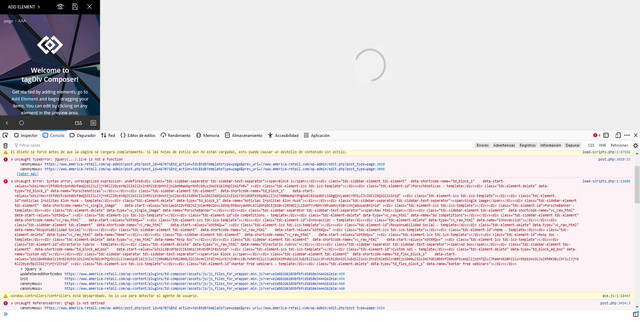
Hi all, I want to ask for your help because a few days ago an error appeared with tagdiv composer. Tagdiv composer is not loading and is generating the errors shown in the following image. I am using the newspaper 8 theme and the problem appeared after updating to the wordpress version 5.7.1
 <br />gif h<br />
I would like to know if it can be fixed without having to update the newspaper theme and thanks for any help you can give me to solve it if possible. Thank you very much in advance.
teknobilimadamiHi ,
I get an error in this way when I edit the Tagdiv page. https://forum.tagdiv.com/tagdiv-composer-not-working/ I know the link here. I disabled the Cache plugin on the page. but again the same mistake. I can’t edit my page 🙁 can you help me ?
admin@teknobilimadami.com I emailed you with.
Bettina Hello!
Unfortunately, there is no way to edit a default footer with TagDiv Composer plugin.
In order to edit a page with TagDiv Composer you need to use a PRO/cloud template and not a default one. If you have a cloud/PRO template, but you can’t edit the footer, then edit your homepage with TagDiv Composer, scroll till footer, click on footer zone and you can edit/delete the elements there.
You can only modify the footer with TagDiv Composer if you go to a page where it is assigned and edit that page with TagDiv Composer, and then you will have access to the footer also. You should modify once the footer and that footer template will be automatically modified on the other pages where it is assigned.
For more information about this plugin, please check this tutorial: https://forum.tagdiv.com/tagdiv-composer-tutorial/
Thank you!
 Chris Baird
 Thank you – I kinda figured a round about way about it – i added 5px padding top and bottom and it made it stay visible in the backend . .
However –
Now I’m having issues with the Default Footer Template –
I made edits to it – and saved it – went out – and then went to go back in – but there is no longer the option in the Cloud Templates to edit it via composer?
Any idea why?
Note – it was the default footer pro – and I removed the top row.
I then thought – maybe I could start from scratch and create a new footer in the templates section – so i pulled in a blank template – created a single row – for a single black line at the bottom – and then added a menu . . saved it – went out of it. tried to go back in – and no longer allowed to be edited. not sure why.
Anamaria Hi,
If you have the right skills, maybe you can achieve that, but for this, you need to have very good programming skills. For the moment we don’t have a solution for this, because the cloud templates are made so that you can make changes using tagDiv Composer, not in the files of the theme.
Unfortunately, implementations and customizations are not covered by support, but if you want you can contact our team our custom work team here: https://tagdiv.com/premium-customization-services/
Thank you for your understanding!
Bettina Hello!
First, try to remove and re-install the tagDiv Composer plugin.
Also we have a guide for how to investigate these problems and fix them: https://forum.tagdiv.com/tagdiv-composer-not-working/
Please check if you set up some HTML code or some special characters in the element’s settings when you edit the page with TagDiv Composer.
Hope that helps you!
Thank you!
Anamaria Hello,
You can add the author box on the page, with tagDiv Composer => https://www.screencast.com/t/YnD23Ill8D ->https://www.screencast.com/t/R5w8qQa9MZ , like in the post.
Thank you!
Bettina Hello!
Edit that category page with TagDiv composer, click on that element and verify if the offset field is clear and let it empty with no space, no value.
Let me know the results!
Thank you!
Chris BairdHello
in the tagdiv composer I placed an html block – edited -placed the html code. saved it – added a ad block below it.
On front end I can see the outcome of the html block and the ad block.
However – when I go back into the composer backend – i don’t see the html block and can’t select it or make changes to it.
How do I fix this?
 stefanegirard
 Thank you. I have also completed all the steps but still see the same error.
No cache plugin installed. WP and all plugins up to date.
1-I create a page
2-I give a title
3-I click on “publish”
4-I click on “TAGDIV COMPOSER”
5- I have the error. No time to do something on this page, no code added.
Thanks for your help
Anamaria Hello,
If you want to make the layout full width, then to change the website width, you need to make sure that you don’t have set a background color/image in the Theme Panel because this makes your website boxed. Make sure this option is disabled => https://www.screencast.com/t/ejiNPCBF
To set a page to full width, you’ll need to edit it with tagDiv Composer like this -> https://i.imgur.com/i5IUJ9E.jpg add or select a row and stretch it after your needs -> https://i.imgur.com/WKYebPX.jpg -> https://i.imgur.com/TO1BZ3M.png -> https://i.imgur.com/Yq8UCv3.jpg
Hope this helps you!
Thank you!
Bettina Hello!
Please check if the TagDiv Composer plugin is installed and active.
For more information about this plugin, please check our documentation: https://forum.tagdiv.com/tagdiv-composer-tutorial/
Thank you!
Bettina Hello!
Then please edit the mobile page, verify how is it looking in Composer editor and change the design from there.
Thank you!
 widesign
 Hello,
We have done each step and enabled the options as you mentioned in the document.
Even though the Tag div composer is not loading correctly and unable to create or edit a page.
Please let us know if there is any other solution to solve this issue.
Thank You,
 yasinnar
 Thank you for your advice.
You mean there is no option to disable a row in tagDiv Composer. I have to use or delete, I can’t hide row by using tagDiv Composer. Is it right?
 ikeafrica
The TagDiv composer option to edit my theme is no longer showing on my site
 Enzo
EnzoHello,
I'm experiencing an issue on how the article shows using the desktop template.
When set in the TagDiv Composer the single article template looks like this:

but when I open an article on ANY browser, ANY desktop OS, it shows up like this
 .
.
The side panel with other articles simply goes on the bottom area and looks ugly.
 .
.
What you see from the pics is a zoomed out version because I wanted to show a full page, but it doesn't affect how it looks in a 100% zoom.
The website link is THIS ONE.
The article template is the one I have to use, cannot change it.
Any help is apreciated.
Thank you
 sourabhkesharwani1
Fatal error: Uncaught Error: Class ‘td_style’ not found in /home3/asianati/public_html/wp-content/plugins/td-newsletter/styles/tds_newsletter/tds_newsletter1.php:9 Stack trace: #0 /home3/asianati/public_html/wp-includes/template.php(730): require_once() #1 /home3/asianati/public_html/wp-content/plugins/td-composer/legacy/common/wp_booster/td_autoload_classes.php(42): load_template(‘/home3/asianati…’, true) #2 [internal function]: td_autoload_classes->loading_classes(‘tds_newsletter1’) #3 /home3/asianati/public_html/wp-content/plugins/td-newsletter/shortcodes/tdn_block_newsletter_subscribe.php(46): spl_autoload_call(‘tds_newsletter1’) #4 /home3/asianati/public_html/wp-content/plugins/td-composer/legacy/common/wp_booster/td_global_blocks.php(27): tdn_block_n…



