
- NewspaperModules Builder in Newspaper Theme
- NewspaperIntroduction to CPT and ACF with Newspaper Theme
- NewspaperHow to edit modules for Flex Block X
- NewspaperStripe Setup
- NewspaperPayPal Setup
- NewspaperAdd Cryptocurrency Price Ticker Widget
- NewspapertagDiv Shop
- NewspaperDesign your post pages using the Default Templates
- NewspaperTheme modules and blocks
- NewspaperUsing the Theme Translations with WPML
- NewspaperHow to Set the Image Avatar
- NewspaperNewspaper theme documentation
- NewsmagInstalling pre-built websites
- NewsmagIntroduction
- NewsmagSmart Lists
- NewsmagTheme thumbs
- NewspaperSmart Sidebar
- NewspaperBreadcrumbs
- NewspaperFooter Builder
- NewspaperMain Menu
 statproyects
In yours demos there is at right “Demos” button that open a window. Is it a feature of Newspaper theme?
If it is not a feature, could you recommended me a plugin for that functionality?
 lazdim
Hi,
For some weird reason, the texts in the Latests Articles block, all down to pagination are blurred.
Can you, please, help me fix that?
Here is my demo.
 Simion C.
 Hi,
You could use a post template that doesn’t show the featured image in the post page, template 5 and 12
– https://demo.tagdiv.com/newspaper/td-post-mcdonell-kanye-west-highlights-difficulties-for-celebrities/
– https://demo.tagdiv.com/newspaper/td-post-blake-griffin-posterizes-aron-baynes-twice-in-clippers-spurs-game/
Or design a cloud post template with the tagDiv composer and don’t use a featured image element
– https://forum.tagdiv.com/tagdiv-cloud-library-plugin/
Or modify one of the cloud post templates designed by us and remove the featured image element from it, here you can preview the cloud post templates
– https://affiliate.tagdiv.com/#/load/Single
Or disable the featured image from the theme panel, if you want to do this for the whole website
– http://prntscr.com/melj7s
Thanks
 Calin
Calin Hi,
Please make sure that the theme system status is configured as mentioned in the requirements guide. Please follow the guide carefully
– https://forum.tagdiv.com/requirements-for-newspaper/
and please increase all requirements that are lower.
Try to increase WP_MEMORY_LIMIT
After that to install again the demo -> https://forum.tagdiv.com/installing-demos/
Thank you.
 Souad
SouadI get without photos without categories without anything
” tagdiv importer diceted an error the importer will try recover and continue”..
 kotikatu
Hi there!
I am using City news -demo, and for some reason I am missing header/caption in the post-view. How do I make it visible?
Simion C. Hi,
Those settings you mention from the theme panel will affect the header and footer socials only. I believe that section is found in the news week demo
– https://demo.tagdiv.com/newspaper_week/
Those are set in the page content, in this case you can edit the page with the tagDiv composer and configure them there – http://prntscr.com/me78io
Thanks
Calin Hi,
There is no specification for this, because different size of screens, and the background need to adapt/resize to all of them, for example in our demo we have an background image -> https://www.screencast.com/t/FSGWKlorX with this size width: 670px and height: 1058px; but this is just an example.
Thank you.
Simion C. Hi,
Don’t edit the demo posts, create your own posts. If in the future you decide to uninstall the demo or install a different one, the demo posts and pages will be removed
– https://forum.tagdiv.com/installing-demos/
Create new pages or edit the homepage provided with the demo (note what is said above), and add what you want want from the available elements in the tagDiv composer, grids, blocks etc. These will display your posts, configure them as you want. Editing a page is possible from many places
– http://prntscr.com/me555s – http://prntscr.com/me55fs – http://prntscr.com/me55ue
Be sure to set featured images or videos for the posts so the theme can create thumbnails from them (these are the images that represent the post in blocks/grids)
– https://forum.tagdiv.com/featured-image-or-video/
– https://forum.tagdiv.com/theme-thumbs/
– https://forum.tagdiv.com/thumbnails-vs-featured-image-size/
That message you are receiving will not cause any problems. It can appear when changes have been made to the page in the backend.
Note that in themeforest only the latest version of the theme is available at all times. You can check the theme version here – http://prntscr.com/me58ao
Changelog for all theme updates here at the bottom
– https://themeforest.net/item/newspaper/5489609 – http://prntscr.com/me58l6
We can’t sell older version of the theme, if you downloaded the theme before an update you can download it again now, latest version is 9.2.2.
Thanks
Simion C. Hi,
Predefined blocks don’t have such settings. They will always looks as they were designed
– https://demo.tagdiv.com/newspaper/block-12/
Modifying the thumbnail is not possible by a setting, each module has it’s thumb size created by the theme, Block 12 (module 11) uses this size – http://prntscr.com/me48f9
– http://prntscr.com/me492f
Only flex blocks available in the tagDiv composer have options to load a bigger thumbnail and modify it’s height and width – http://prntscr.com/me4bo6
For example these block examples are made with flex blocks, you can preview and even edit them here – https://affiliate.tagdiv.com/#/load/Blocks
Each can be imported through the cloud library plugin – https://forum.tagdiv.com/tagdiv-cloud-library-plugin/
Thanks
 syawedis
I’ve updated the “Social Networks” section in the theme panel, but I am still seeing undefined social networks on the homepage here specifically:
https://www.dropbox.com/s/lgawa9qzorgvflf/social.jpg?dl=0
These 4 social icons are not connected to anything and just show ahref=#
But the social networks I did change and save in the theme settings work fine in the header and footer.
How do I update those social networks links, and remove the youtube one?
Thanks,
Nathan
 DADDY
DADDYI would like to change “Hollywood” & “Music” title from front page body (not from header). I’ve changed Post -> Catagories, but it won’t change in front body page.
 esemmel
I’ve been looking to change over to this theme. However each time I do, it seems I run into another issue.
When I install a demo theme (without content) sometimes the images in my posts (created while using another theme) show, with others demo’s they do not.
When I try to use the cloud templates, for some templates they load in and are editable in the page editor – other times, they never load and the page editor seems to get caught in a loop and just spins. I was told to deactivate the mobile theme plugin to fix this. Problem is, I never had that plugin active.
I install a demo theme – such as “Blog fitness” to give myself a starting point, and it starts off well. Then I try to build out a sidebar and start by adding the tag div social counter widget and that causes some conflict that results in all the images in the content column not loading. I tested that around 4 times.
It’s a shame because the ease of the customizations of this theme and the choices by clicks, as well as the many other features, brought me to it. But, it just seems to be very buggy in unpredictable ways and various times.
 raheem092
 So I have to create post and pages first correct? What about the demo how do I edit the content and image. You’re still not clear. You can not edit it with from the front end. the video doesn’t help much. Again!!, how do I edit the content and images of the demo????????
 PW2512
I really love the theme… but I’m wondering how you import any news? Is there a feature to import RSS feeds and display them on the site? All your articles in the demos are always up to date so I’m assuming there must be a feature to do this?
If not… what program/plugin is used in conjunction with the theme as it seems to work flawless.
Thank you!
 Tima369
Hello,
I want to know why some unavailable demos like Food Blog or Lifestyle Blog….. and others ones?
Thank you
Calin Replay in this topic -> https://forum.tagdiv.com/topic/change-content-in-demos/
 Edward
 @WebMasterhi, also read here: https://forum.tagdiv.com/post-formats-for-tinymce/
Quotes – This option lets you set up your quotes with style. There are 8 types of formatting options to make your quotes eye-catching.
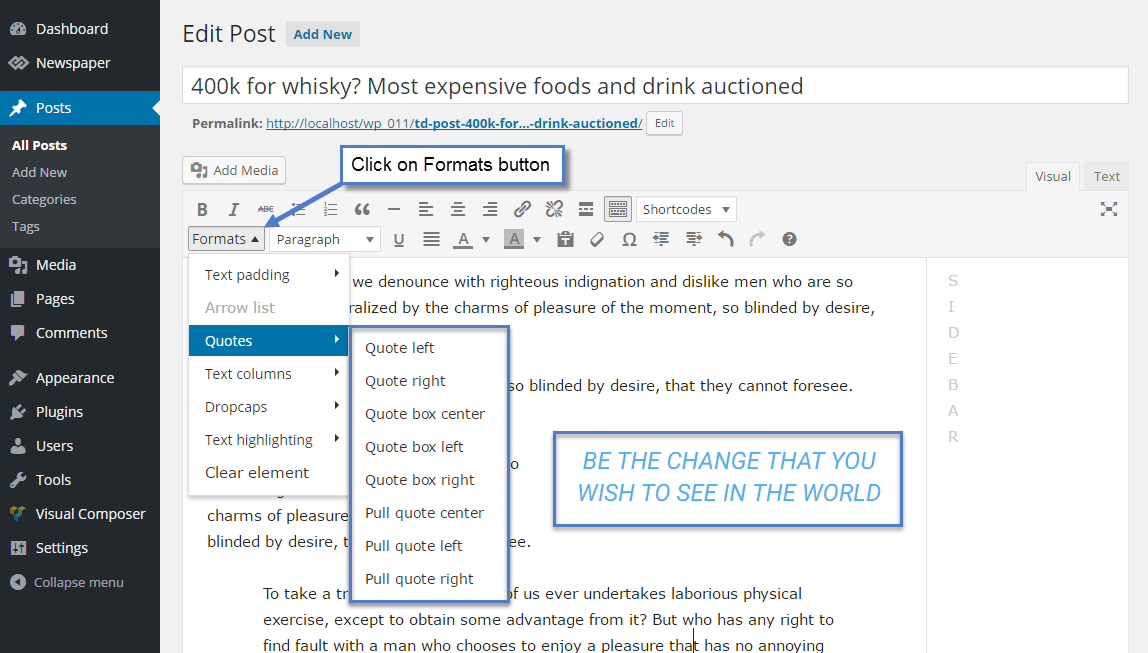
Live examples: https://demo.tagdiv.com/newspaper/blockquotes-pullquotes/
Simion C. Hi,
You mean the demo content when you install the demo with content? Start from the top for example, with the header. Set your own log and menu, configure the header with your own data. The homepage which is provided when the demo is installed with content can be edited with the tagDiv composer, each element in it can be customized
– https://forum.tagdiv.com/tagdiv-composer-tutorial/
– https://forum.tagdiv.com/block-settings-guide/
Then move on the footer, replace the demo data with your own there as well. Here is the theme documentation – https://forum.tagdiv.com/newspaper-theme-documentation/
If you need help or have more questions, please let me know. Provide as many details about it as possible, screenshots are also helpful or a link to the website.
Thanks
Calin Hi,
1. In order to do that you need to edit the page, select the row and set ‘-48′ margin top and ’48’ padding top
-> https://www.screencast.com/t/85F59Sn48js
-> https://www.screencast.com/t/rMhbQE6fmtl
Results: https://www.screencast.com/t/JeNAhr0jLtM
2. First please check our documentation about how to install Revolution Slider v5 -> Import Revolution Sliders on demos
In order to use the Revolution Slider in posts/pages, notice that first of all, you need to create your slider from the plugin, and then, take the generated shortcode and place it inside your desired post page (switch to code editor).
– https://www.screencast.com/t/VgOkSnGNH
copy the shortcode -> https://www.screencast.com/t/5UGIQh2he and paste it in post https://www.screencast.com/t/E8oWNi2OYT
Here is the results ( on this post I remove the feature image and I set the Revolution Slider at the beginning of post ) -> https://www.screencast.com/t/sS6zehbT9Yvj
Hope this will help you!
Thanks.
Simion C. Hi,
That is a customization specific to the travel demo – http://prntscr.com/mdlhrb Some demos when installed will import an additional stylesheet containing various customizations for theme elements.
I could try and adapt it to the elements in your website, please post a link to the page where you want to do this modification. The solution will be more accurate this way. Or specify the type of block used so I can try it on my end.
Thanks
raheem092Can you explain in English, how to edit demos content and images? I have worked with several page builders and this one is the most confusing!!! This should be very simple to edit the demos and images. HOW is it DONE!!!!
raheem092I’m sorry. I meant how do I change content in demos?
 tharawat
 Hi Calin,
thanks for your quick reply. Nevermind my previous question. I found the plugin inside /includes/plugins/td-speed-booster.zip in the Newspaper directory.
I have now added all the css/js files that I would like to move to the footer using the following code:
$this->move_style_to_footer_queue(‘td-theme-demo-style’);
After saving and reloading the page, I noticed that any of the files have been added to the footer, they still keep loading in the head of the page. What’s happening here? Can you help me do some troubleshooting?
Thanks!
 GregRichards
 Hi
Many thanks for your assistance. I have now manged to remove this.
I have two more questions i would like to ask.
1. How do i get this part shown on the image black instead of white. i want to have my whole page black and this is part and a section just above the footer remains white
2. How do i insert a rev slider to appear just under the menu. one the demo page installed, after removing the Trending Now it has a gap between the menu and the first element.
Thank you once again.

