- NewspaperModules Builder in Newspaper Theme
- NewspaperIntroduction to CPT and ACF with Newspaper Theme
- NewspaperHow to edit modules for Flex Block X
- NewspaperStripe Setup
- NewspaperPayPal Setup
- NewspaperAdd Cryptocurrency Price Ticker Widget
- NewspapertagDiv Shop
- NewspaperDesign your post pages using the Default Templates
- NewspaperTheme modules and blocks
- NewspaperUsing the Theme Translations with WPML
- NewspaperHow to Set the Image Avatar
- NewspaperNewspaper theme documentation
- NewsmagInstalling pre-built websites
- NewsmagIntroduction
- NewsmagSmart Lists
- NewsmagTheme thumbs
- NewspaperSmart Sidebar
- NewspaperBreadcrumbs
- NewspaperFooter Builder
- NewspaperMain Menu
 Simion C.
 Hi,
It is mentioned in the plugin page that it requires Visual composer to work. It also mentioned that it will not work with newer versions of Visual composer (now WPBakery Page Builder).
So you would need to use older versions of Visual composer and never update.
Note that the plugin may present incompatibilities with the theme, if there is a demo plugin try that first before purchasing it.
Thanks
 Bogdan B.
 Hello,
You will have to import the revolution slider elementhttps://forum.tagdiv.com/import-revolution-sliders-on-demos/ for the demo. Please use this guide:
https://forum.tagdiv.com/import-revolution-sliders-on-demos/
Thank you!
Simion C. Hi,
We are sorry for the issues you are encountering. We will try to solve each of them together.
1. Regarding the social icons, it seem the global header style is not applying when importing the demo. Please edit the page with the tagDiv composer and set the block header style of the social counter to global, like this
– https://www.screencast.com/t/IHwnZr5hD6
This should have been set by default.
2. That is an image box element, when editing the page with the composer it would appear like so
– https://www.screencast.com/t/jEfxhONC
It can be removed and replaced with an image of your choosing. In your case it seems that no image is appearing in the composer edit screen. I would suggest to try as a quick test to deactivate all plugins except theme plugins and check again. The image should appear.
3. The demo design is with a black header background, this is set manually in the demo stylesheet. I believe at the time of creation of the demo there was no theme panel option to set a header background color, so it was set with CSS.
The black color will appear automatically as long as header style 10 is used. If you want to keep using this header style with your own color from the theme panel, a small modification will be necessary in the demo stylesheet
– https://www.screencast.com/t/1uPQyhmuE
Then any color set in the theme panel will be displayed as a header background.
Regarding the featured video for posts, notice the allowed video sources which are Youtube, Vimeo, Dailymotion or Facebook. It will only work with these, use the recommended post templates, select the video post format as well. In case you are doing everything properly and it is not working properly, please provide more details about the issue it would be helpful.
The screenshot you posted with the problem cannot be viewed unfortunately
– https://www.screencast.com/t/p86Y3MN6FOs
Or the website – https://www.screencast.com/t/0V8uloTg
Thank you!
 icolive
Hello,
I’m a little confused.
Can I use it immediate after install demo?
And Why I didn’t see the child theme folder in the host after install DEMO?
Look forward to your help.
:lol
 oliviaperegrino
 Ok, I’m going to ask my question again, but in a different way. How can I make my slider look the same size as the demo slider? Why does not my slider look the same size?
Bogdan B. Hello,
If you want a boxed site, it is enough to add a background image to the site and it will go into boxed mode.
If you install a demo without content, only the general colors and style will be grabbed.
Thank you!
 halilbaki
i installed travel blog demo and i recieved this error message on the web site
Revolution Slider Error: Slider with alias td-travel not found.
 mifwebid
 Sure I’ve done those before I asked. The link I gave you is the new fresh install on my subdomain and I’m pretry sure that I’ve done everything according to the documentation.
Another issue is that I can’t find the social share buttons as they appear on your demos. They’re always combined with the “plus” icon.
Please help ASAP.

 yourlifeupdated
Hello, my blog is this one: http://www.yourlifeupdated.net/
I’d like to set the theme as this: https://demo.tagdiv.com/newspaper_local_news/
How can I change the width?
Whats does it happen if I install the demo (without content) on my blog?
Thanks
 Catalin
 Hello mifwebid,
Most likely, all of these errors happened due to a bad theme installing. My advice is to make a new fresh install to another sub-domain, clear all the caches, purge CDN files if you are using the Cloudflare and check the results. Regarding on feature video, make sure that you have correctly added the Video according to our documentation from here -> https://forum.tagdiv.com/featured-image-or-video/ I have made some tests on my side with this demo and everything seems to work as expected.
Thanks for the message!
Simion C. Hi,
The thumbnails sizes used by the modules are predefined, they cannot be changed in the theme panel, only disabled or enabled. This grantees they will always display properly. If you were to change them this could affect the other elements of the module.
Each module has it’s own size, see them all here
– https://forum.tagdiv.com/theme-thumbs/
Blocks and grids are simply containers form modules, of the same type or multiple types
– https://demo.tagdiv.com/newspaper/block-1/
– https://demo.tagdiv.com/newspaper/big-grid-1/
– https://demo.tagdiv.com/newspaper/full-big-grid-1/
I believe you will surely find a different block that you can use. Each one is different than the other.
Thanks
Catalin Hello Cahtryn,
Make sure that your old version of Visual Composer has been removed and then you should follow these steps. Also, if the problem is still there, you should make a new clean install from scratch to another sub-domain via FTP way, clear all the caches, purge all CDN files if you are using the Cloudflare and check the results. Please check our useful guide for theme installing from here -> https://forum.tagdiv.com/newsmag-installing-demos/
Thanks for the message!
oliviaperegrino Hi Simion, my pictures have the same size (1920) but look different than demo slider. Look at this:
Comparison of sliders:
http://www.radarenlinea.com/wp-content/uploads/2018/01/Demo-Pictures.jpg”
 rafael-l
First of all, the theme is just wow, easy to setup, and the best you can get in WordPress.
That being said, i have only 2 problems that i will ever need help with.
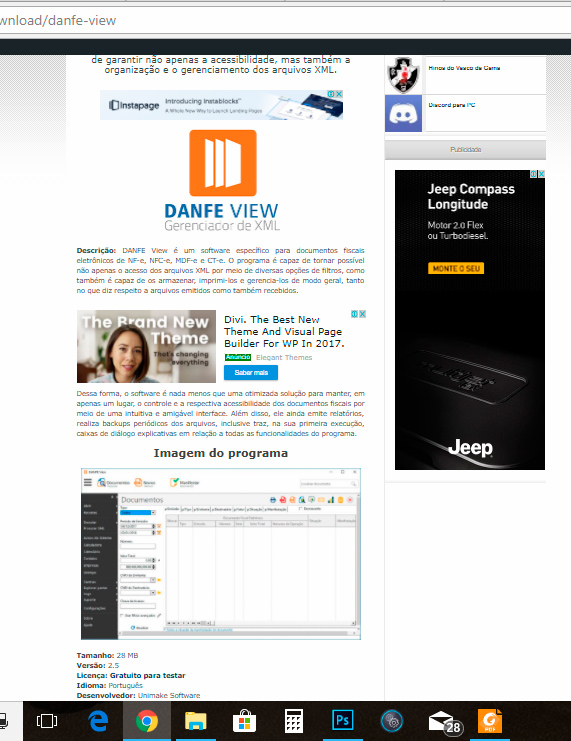
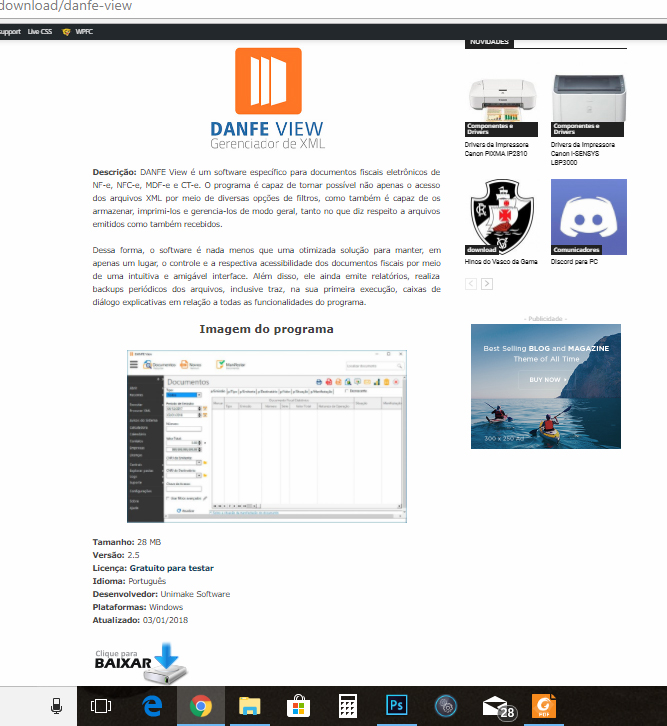
1) How do i change the content width? i know the original is best, but i’m migrating from the old theme to the newspaper, and for now it just don’t fit, i will demonstrate with screenshot links:
Currently my site is still running in old theme, i’m developing in a “laboratory” to apply the new config all at once, so this is the actual post format:
https://www.baixesoft.com/wp-content/uploads/2018/01/demonstration-1.jpg
and in the new theme, the newspapper, it just not fit good, so i want to apply the old width (later i will modernize posts, but for now i need to reduce de content width) please look:
https://www.baixesoft.com/wp-content/uploads/2018/01/demostration-2.jpg
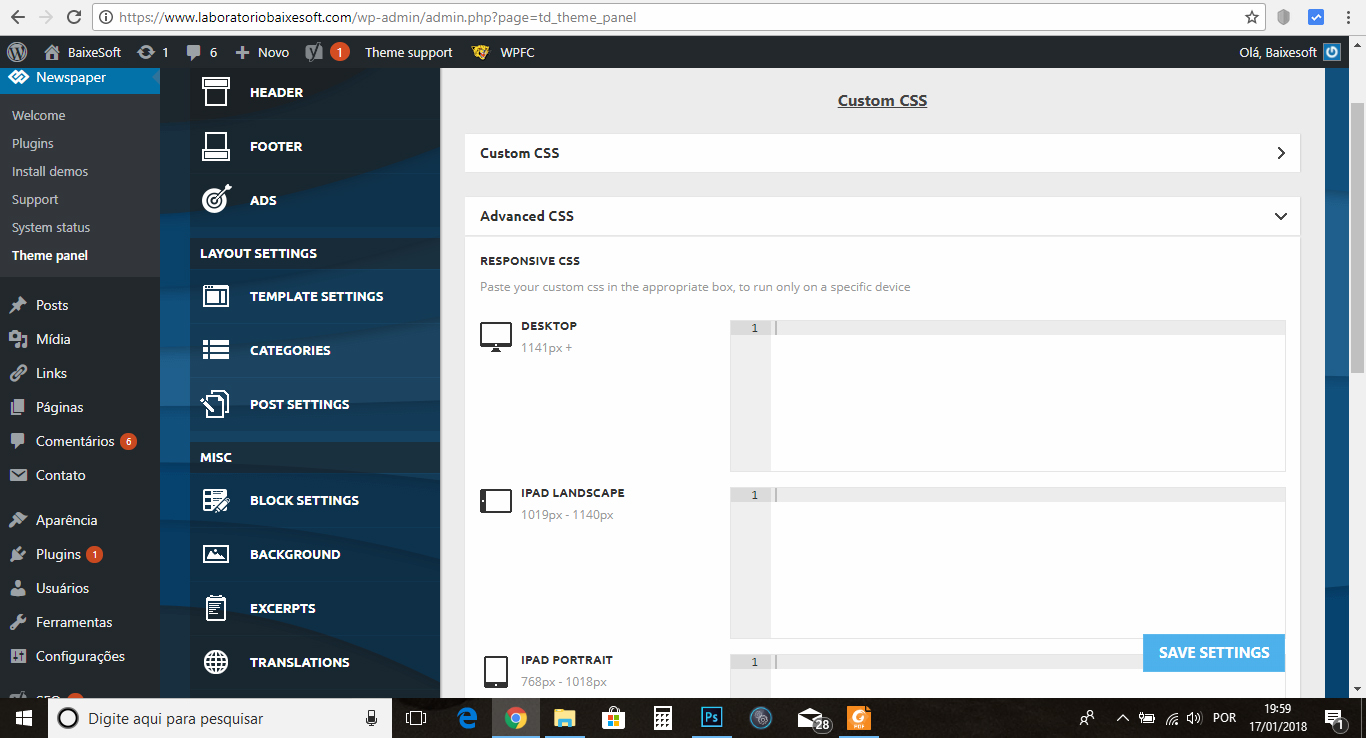
I think i find place to reduce in Theme panel >> custom code >> Advanced css like the screenshot:
https://www.baixesoft.com/wp-content/uploads/2018/01/demonstration-3.jpg
… or some adjust in line 455 or bellow in Style.css. The question is, how do i reduce the post width for desktops? any code that i can insert to reduce?
And the other thing…
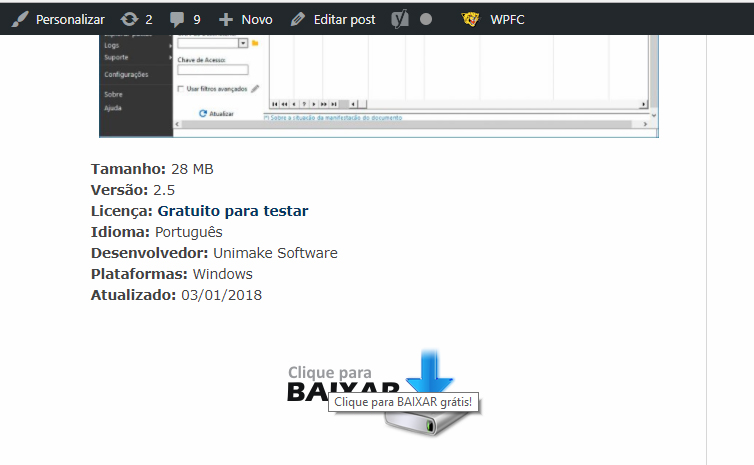
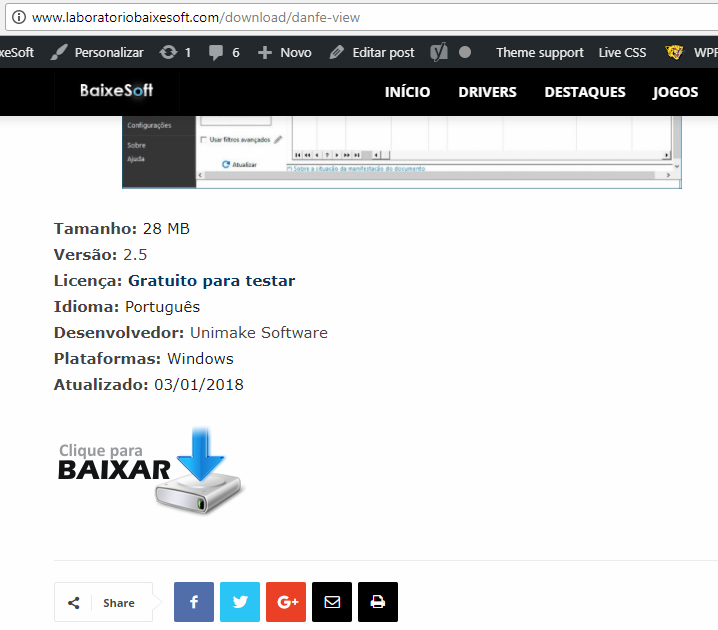
2) My website is like a download portal, and have a download button like this in the current theme
https://www.baixesoft.com/wp-content/uploads/2018/01/demonstration-4.jpg
but in the new theme it gets bugged for some theme thing, some newspapper particularity, and it gets like this:
https://www.baixesoft.com/wp-content/uploads/2018/01/demonstration-5.jpg
This is the code button:
https://www.baixesoft.com/wp-content/uploads/2018/01/code-button.txt
… it will not be a problem to adjust one by one of 2245 posts manualy, but it gets bugged annyway because you can click in empty space in the sides, and this is very bad for Google position, please see for yourself:
https://www.baixesoft.com/download/danfe-view (the actual website)
http://www.laboratoriobaixesoft.com/download/danfe-view (the laboratory)
So, how do i fix this other issue?
And this is the only two things i will ever ask here, if i have to pay for some support it will not be a problem.
Thank you very musch for the attention, and sorry for any bad english, i’m from Brazil!
Catalin Hello Marie,
You should use the Default Demo install with or without content if you have your own content and then, you should inspect this example with Inspector browse to see what kind of blocks are used in it. Please check our useful tutorial from here -> https://forum.tagdiv.com/create-custom-code-using-the-browsers-inspector/
Hope this helps!
Thanks for your understanding!
 offrezleweb
 Hi,
Great thanks! How can I know which single and loop-single file is used with my website? I used the demo “Video News”.
Thanks again! 🙂
mifwebidHi, I installed the Art Creek demo and found these issues:
1. The social widgets aren’t on the right place
2. I cannot find the way to change the hero image https://drive.google.com/file/d/1u2c8mYxJ5wi4nZKKcqtpczBEYPrHsV6C/view
3. The tried to change theme color such as header background color but didn’t work.
Simion C. Hi,
The color is coming from the demo, demos contain custom design. The same color is displayed here for example
– https://www.screencast.com/t/9BlLbBvQ
In this case you could if you want to change the demo design, you could remove this code here
– https://www.screencast.com/t/CiR8ggwWLM9
Then the default colors will apply
– https://www.screencast.com/t/hfT265ituKMp
– https://www.screencast.com/t/WdwRH7aXzJ2
Another way would be to override the demo color with a similar code in Theme panel->Custom CSS
– https://www.screencast.com/t/8UBO8jMhU
But it would be better to make the modification in the demo stylesheet as shown instead of the CSS solution.
Thanks
Simion C. Hi,
Seems I pasted the wrong link above, meant to show a screen of the slider width settings
– https://www.screencast.com/t/O2B6kCdsGsl
Abut the issue, I don’t quite understand what you are referring to, the slide already is full width at the moment. The image that is used is the post featured image. In the demo you mention the image used is of this size
– https://www.screencast.com/t/8d1XoeED5z6Y
Bigger images such as this will result in a more quality image in the slider, if that is what you are asking.
Thanks
 PruthviSimion C.
 Hi,
Please try removing the demo class td-travel-header from the row. Check the general row settings for the top row and remove the custom class found there. It is added by the demo for custom design used on the default elements. Let us know the results.
Thanks
Simion C. Hi,
I believe that is the background color of the black demo. The demo has custom design, most of the theme elements are meant to be dark. The background color is added through CSS in the demo stylesheet, setting a color in the theme panel will make the website boxed.
You could set a background color for the row like this if you want it for a specific row
– https://www.screencast.com/t/KcAGaZsAT
Or if you want to change the general dark demo background color, do it in the demo stylesheet directly
– https://www.screencast.com/t/4dXQlUpAYCtH
The author name, date and comment count can be disabled in the theme panel
– https://www.screencast.com/t/vpsaxIEmj
This will affect all the website, if you want this only for a specific element I could give you a custom code. Provide a link to the page and I will give you a solution, if that is what you want to do.
Thanks
Simion C. Hi,
That would be the case if you have installed the Business demo
– https://demo.tagdiv.com/newspaper_business/
This demo has custom design that will position the logo on the right, when using header style 1. All the demos have custom design, based on modifications made to the default theme elements.
In this case you could either change the header style (the design is only for header style 1), or remove the code that is responsible for the modification, in the demo stylesheet directly
– https://www.screencast.com/t/oE3x6hLon
Thanks
Catalin Hello mrgergoke,
Ensure that you are using the latest version of the theme, remove all of the untested plugins, clear all the caches and check the results. If the problem is still there, I suggest you make a new clean install from scratch via FTP way to another sub-domain for testing, use only the tested plugins and check the results. Notice that our TagDiv Gallery should works as expected, as you can see in our demo preview.
Thanks for the message!
oliviaperegrinoHow could I have my pictures in the revolution slider as wide as the World News Demo?
This is my website: http://www.radarenlinea.com
Thank you!