
- NewspaperModules Builder in Newspaper Theme
- NewspaperIntroduction to CPT and ACF with Newspaper Theme
- NewspaperHow to edit modules for Flex Block X
- NewspaperStripe Setup
- NewspaperPayPal Setup
- NewspaperAdd Cryptocurrency Price Ticker Widget
- NewspapertagDiv Shop
- NewspaperDesign your post pages using the Default Templates
- NewspaperTheme modules and blocks
- NewspaperUsing the Theme Translations with WPML
- NewspaperHow to Set the Image Avatar
- NewspaperNewspaper theme documentation
- NewspaperSmart Sidebar
- NewspaperBreadcrumbs
- NewspaperFooter Builder
- NewspaperMain Menu
- NewspaperInstalling Pre-built Websites
- NewspaperPre-built Websites: Introduction
- NewspaperWhat’s Included in the Newspaper Theme Package
 Simion C.
 Hi,
The demo with content includes ready made menus, categories, posts etc. These will not be available if you install the demo without content. You will have to create your own categories and menus for example
– https://forum.tagdiv.com/how-category-settings-work/
– https://forum.tagdiv.com/mega-menu/
The settings that are imported are the demo css stylesheet and the theme panel settings.
It would be easier if you would install the demo you want with content and then gradually see how things work, and replace the dummy data with your own as you create it.
Thanks
 Fareeowais
 hello
as you said: “If you install a demo without content, only the design settings will be imported. You will have to recreate the homepage for example using the same elements from the demo, and then the settings will apply.”
i want to know where is design settings and how can i recreate the homepage with same demo elements? coz i have checked all option in theme panel and if i create homepage with visual composer its dont have page navigation because it is static page.
regards
Simion C. Hi,
If you install a demo without content, only the design settings will be imported. You will have to recreate the homepage for example using the same elements from the demo, and then the settings will apply. If you install the demo with content this will import some dummy data and everything is predefined, you would just have to replace (not edit) this dummy data with your own content – https://forum.tagdiv.com/installing-demos/
If you want to use an ad in the page structure you can use an Ad box element and select from your available ads
– https://www.screencast.com/t/v0MDdAuVu
The ad code must be entered in Theme panel->Ads in the respective section
More about the ad capabilities of the theme here – https://forum.tagdiv.com/header-ads-adsense/
Here is a tutorial about creating your page in Visual composer and using it as Homepage
– https://forum.tagdiv.com/homepage-how-to-build-and-set-it/
Thanks
Fareeowaisi have tried so many times to install default demo with or without including content. when i install including content it shows newspaper theme posts and categories.
when i m install without including content my home page shows nothing.
home page is http://kutegroup.com
kindly tell me how can i use only settings of default demo and how can i edit.
Fareeowaishi
when i m trying to install default demo without content my page is not showing any templates. how do i edit my home page. if i install demo without content or with content.
page is here
http://kutegroup.com
i also want to know how to use custom ad. if i create my home page with visual composer and try to add some custom ad its not showing. and big grid also not working.
Simion C. Hi,
There is no option to make the block to rotate posts or other content, if that is what you want. The block will display posts depending on the filtering and sorting settings set. Here you can find all the available options for the blocks
– https://forum.tagdiv.com/block-settings-guide/
You can see how all the blocks look in different layouts in the live demo
– https://demo.tagdiv.com/newspaper/block-1/
It is up to you to decide what you would like to use for the purpose you want. I am sorry for overlooking the respective questions, I know that time is short and we have to make the best of it. Sorry for the inconvenience.
Thanks
 Bogdan B.
 Hello,
Please disable all your plugins as they can interfere with the process and also increase your system status parameters like so: https://forum.tagdiv.com/system-status-parameters-guide/
The try to install the demo again.
Thanks.
 simchris
 To be fair, the description doesn’t say “set your own custom widths” anywhere, either, and there is a link to full theme documentation prior to purchase.
However, you *can* hack the CSS yourself for ANY theme, you just need to be prepared to adjust some things since the fixed layouts (as shown in all their demos), have certain blocks and elements designed to “fit” the base width in pixels, and then adjust on viewport for responsive layouts.
Many have done so, but you need to understand how CSS works and experiment to see if you can get the result you want.
(I don’t work here)
 micanatkins
I’m trying to install the demo with full content. I’m specifically trying to install the college newspaper demo. But the images are not being installed/uploaded into media. I get a prompt telling me there’s an error. Please help. The demo installs without the images.
 nothereatm
 One more question, how to use plugins for the Slider Revolution: http://prntscr.com/f1f5xm
Do we also have it in package? Seems like I cannot activate them without registering Slider Revolution.
Also I would love to use this slider https://revolution.themepunch.com/food-carousel-slider/
It’s not in the demo sliders folder.
-
This reply was modified 9 years by
nothereatm. Reason: added one more question
Bogdan B. Hello,
1. Sorry but the mobile theme homepage layout is predefined and cannot be changed. Please read this guide: https://forum.tagdiv.com/the-mobile-theme/
Block 15 is the only block in our theme that can show 2 posts on 1 column on a mobile device layout: https://demo.tagdiv.com/newspaper/block-15/
But unfortunately the mobile theme does not use visual composer so it is not possible through the mobile theme plugin.
2.Sorry but our theme does not have this kind of feature.
Thanks.
Simion C. Hi,
The Revolution slider plugin as well as the Visual composer editor plugin are provided pre-activated in the theme package, and you do not have to activate either of these. You already have full access to the plugin features and you can use it without activation. Updates for the plugins bundled within the theme package will be included in the theme updates.
Please ignore any at all activation messages from Revolution slider and Visual composer.It’s just a missing condition from the plugin authors for these versions and we cannot make any changes to the plugins as it will break the license agreement we have with the plugin authors.
Here is a link to the official Revolution slider documentation
– https://www.themepunch.com/revslider-doc/slider-revolution-documentation/
This is a very complex plugin that features a wealth of options and settings. To get started you can import a demo slider and just assign your categories from which the posts will be displayed
– https://forum.tagdiv.com/import-revolution-sliders-on-demos/
Thanks
 leonardoandrade
Hi! Good morning.
I installed the Newspaper theme in a demo version on my website. The slider has been incorporated and is running after a few adjustments. However, the images of the posts are appearing with a space in white at the bottom.
What do I do if the images are filled at the slider?
My website is: https://www.tracionando.com.br/
Simion C. Hi,
Please try and download the theme package again and install it, then select the demo you want and install it with or without content. Everything is working properly now.
Thanks
Simion C. Hi,
The Revolution slider plugin as well as the Visual composer editor plugin are provided pre-activated in the theme package, and you do not have to activate either of these. You already have full access to the plugin features and you can use it without any need to enter a activation key. Updates for these plugins and the other plugins bundled in the theme package will be provided along with the theme updates. You do not have to worry about activation messages or update prompts.
Probably that error message appears when you are trying to activate Visual composer, but as explained you do not have to do that.
Please check the theme status and make modifications to the parameters mentioned in this guide if necesarry
– https://forum.tagdiv.com/system-status-parameters-guide/
The problem with the theme panel can be caused by that, try and follow the guide and check if the issue is resolved.
By installing one of the demo slider you will have the options to use a ready made slide on your website. You will just have to use your own categories from which to pick posts to display. These sliders can be seen in the live demos, like this one for example, the Politics demo
– https://demo.tagdiv.com/newspaper_politics/
Unfortunately the Visual composer editor can be used only for creating static pages
– https://forum.tagdiv.com/homepage-how-to-build-and-set-it/
For a blog you can choose from the available modules to display your articles
– https://www.screencast.com/t/fLJWLi6CLH9
– https://www.screencast.com/t/6cyXmdrJQHT
Please let us know if you have any more questions or need further clarifications.
Thanks
 csp17
csp17Hey folks
Using Newspaper, with the Sports demo. I’m playing around with category templates via Theme Panel and noticed they will not change.
Here’s what I did:
Newspaper > Theme Panel > Layout Settings > Categories > Category global settings
Currently on Style 6. If I change to any other style, nothing happens. My site stays on Style 6.
So I decided to test with an individual category. No matter what category I try, I’m being forced to use Style 6.
Interestingly, on the same settings page, I can turn the category pull-down filter on or off, and that works. I can also change the background on individual pages, I simply cannot change style.
Any suggestions?
 roger770507
Hi
I just import the default demo file of Newspaper7, but I found I can’t remove the category of “LATEST ARTICLE” section.
Please refer the following screenshot.
Please help me remove this section.
 krisztinabenedek
 Hi Simion!
Thanks for the useful information! I’ve been able to install Visual Composer, but I can’t create a copy of it. This error message is displayed, no changes are made to the update.

There are missing options in the theme panel. For example, they do not open:

I can’t activate Slider revolution plugin, I enter the purchase code and send this error message:

If I install the demo slider, the content of my site can’t be lost?
And another question, Visual Composer works only on pages, can’t be used for entries? My site is blog, there are only writings in the posts. How can I put these into blocks?
Thanks
Simion C. Hi,
Basically you need to install the Revolution slider plugin using this guide
– https://forum.tagdiv.com/how-to-install-revolution-slider-v5/
Then import a demo slider from the sliders provided in the theme package
– https://forum.tagdiv.com/import-revolution-sliders-on-demos/
And select the category from which the slider will display posts
Then place the slider in the page structure
– https://www.screencast.com/t/jkKVT0Odv
And choose the preferred installed slider if you have multiple sliders
– https://www.screencast.com/t/hJfUXxl7tI
If you have already tried these steps and the slider is not displaying, please check the theme status and make modifications to these parameters if necessary
– https://forum.tagdiv.com/system-status-parameters-guide/
Thanks
 Edward
 Try this:
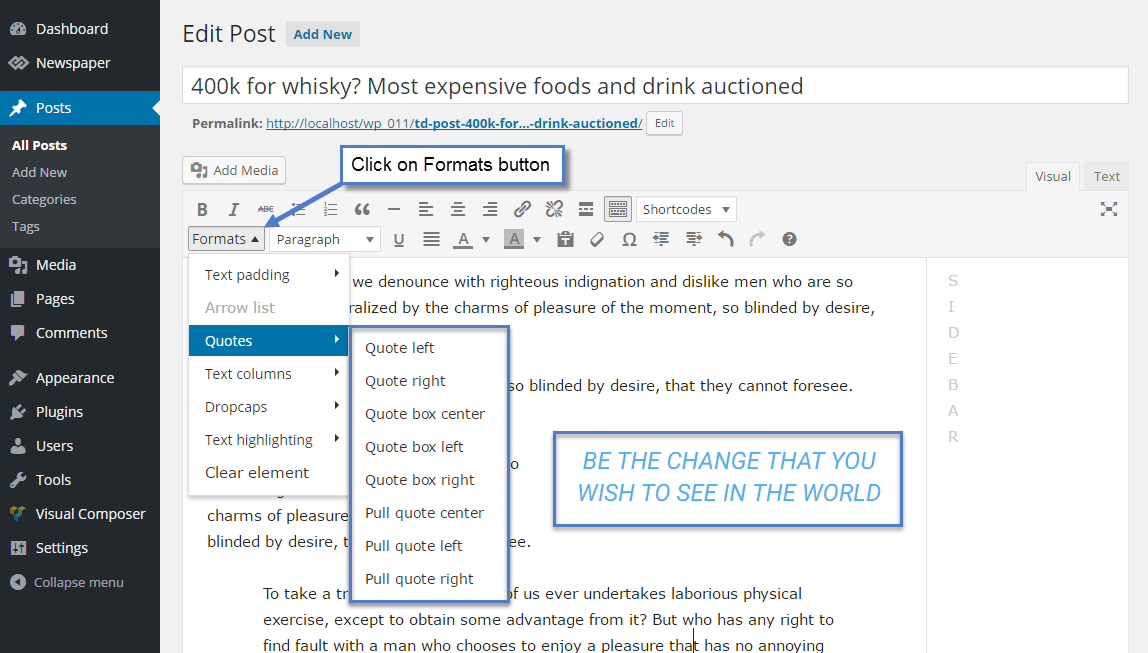
Result: https://demo.tagdiv.com/newspaper/blockquotes-pullquotes/
Also you can change font options for quotes here:

Simion C. Hi,
Please explain in more details the problem you are having. From what I understand there are missing options in the theme panel or missing entirely. Some screenshots would be very useful to describe the issue, if it is possible.
After finishing installing the theme, you need to install the Visual composer editor to be able to use the page building elements available.
Here you can find some useful information about installing the plugin and how to use it
– https://forum.tagdiv.com/how-to-update-visual-composer-plugin/
– https://forum.tagdiv.com/how-to-use-visual-composer/
Then you can use all the available blocks and create the layout you want for your website
– https://www.screencast.com/t/4HM9yXE23
The Revolution slider is provided in the theme package and can be installed like this
– https://forum.tagdiv.com/how-to-install-revolution-slider-v5/
It would be best to import a predefined demo slider, provided in the theme package as well
– https://forum.tagdiv.com/import-revolution-sliders-on-demos/
The Revolution slider is a very complex plugin with a huge amount of options, and can be difficult to master entirely. Here you can find all the official documentation regarding the slider
– https://www.themepunch.com/revslider-doc/slider-revolution-documentation/
And here you can find all the available theme documentation
– https://forum.tagdiv.com/newspaper-theme-documentation/
Please let us know if you have any more questions or need further clarifications.
Thanks
 Fitaddictnl
Hi Everyone,
I just installed the newspaper theme with the beauty blog demo. But now I want to show my articles on date, but it doesn’t do that. I want to do the following:
– Pick which articles will show on top in the grid with the images
– The rest of the articles that are sorted in a list when you scroll down, need to be sorted on date.
Can somebody help me 🙁 ?
leonardoandrade Remembering that I’m doing this by importing the demo slider (Wedding)
 Scorpion21
Hello i bought the newspaper theme and love it but running into issue with the way google displays the url in the search engines.
For example from the demo content the google displayed this
Modern Language Wars, PHP vs Python vs Ruby | Lifestyle 3D Plus
http://www.mywebsite.com › Streaming › Amazon Prime
Mar 4, 2017 – The model is talking about booking her latest gig, modeling WordPress underwear in the brand latest Perfectly Fit campaign, which was shot
Instead of “www.mywebsite.com › Streaming › Amazon Prime” i would like for google to show the real domain address
http://www.mywebsite.com/2017/03/04/modern-language-wars-php-vs-python-vs-ruby/
This is happening with the posts i did … it shows the catagories instead of the website address in google search engine?
Any idea how to fix it?
Simion C. Hi,
You could try to uninstall the demo, the install it again. It seems some parts of the demo are not working or displaying properly. Maybe something happened during the install process. If this does not fix this issue, you can send us email at contact@tagdiv.com and provide admin login information. You should not post valuable information like login credentials here on the forum.
Also paste a link to this topic so we can identify you.
Thanks
