- NewspaperModules Builder in Newspaper Theme
- NewspaperIntroduction to CPT and ACF with Newspaper Theme
- NewspaperHow to edit modules for Flex Block X
- NewspaperStripe Setup
- NewspaperPayPal Setup
- NewspaperAdd Cryptocurrency Price Ticker Widget
- NewspapertagDiv Shop
- NewspaperDesign your post pages using the Default Templates
- NewspaperTheme modules and blocks
- NewspaperUsing the Theme Translations with WPML
- NewspaperHow to Set the Image Avatar
- NewspaperNewspaper theme documentation
- NewsmagInstalling pre-built websites
- NewsmagIntroduction
- NewsmagSmart Lists
- NewsmagTheme thumbs
- NewspaperSmart Sidebar
- NewspaperBreadcrumbs
- NewspaperFooter Builder
- NewspaperMain Menu
 Bogdan B.
 Hi,
The travel demo uses the background image a bit different. It has it set on the row in visual composer. You need to edit your homepage and access row settings: http://screencast.com/t/Z2VHdgzUTuV3
Thank you!
 Andrei L.
 Hi
Please check this topic for more details about this errors: https://forum.tagdiv.com/topic/issue-with-installing-and-uninstalling-demos/
Thanks!
Bogdan B. Hi,
If you want to have a different element besides the big grid, you can edit the homepage in visual composer and use a ‘homepage post’ element. This comes very close to your request: http://demo.tagdiv.com/newspaper/homepage-one-top-post/
Thank you!
 efaq
efaq Hello,
thank you very much! Helped a lot!
Now it is possible to activate a mega menum which shows up different categories with posts. But how can I add a page into that mega menu which already includes categories (www.travelisfun.de –> Orte) Under the point “USA” I want to add just a page.
2. https://forum.tagdiv.com/menus-newsmag/
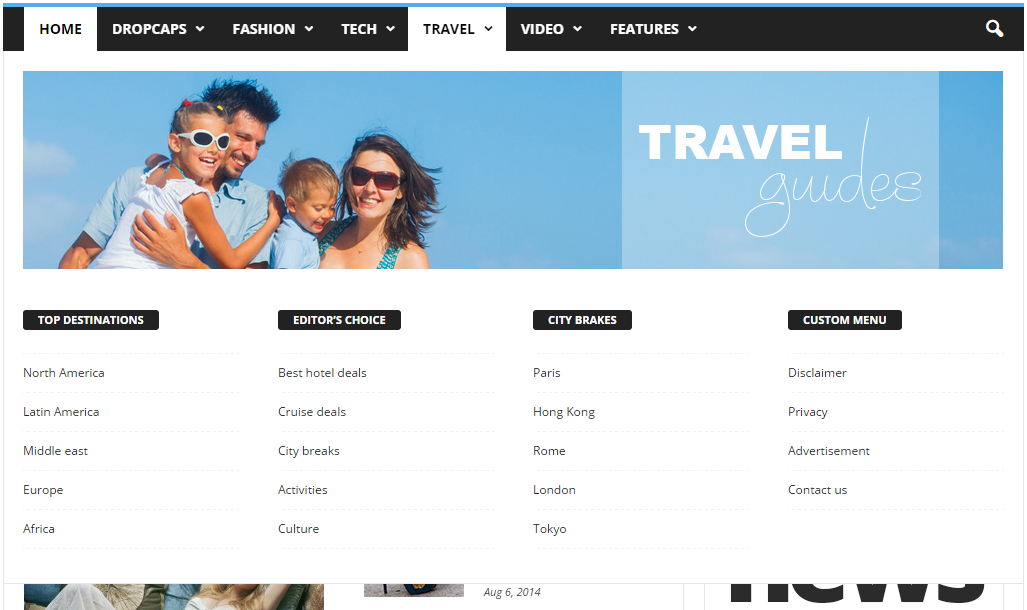
I do not understand how point C is made? Do you have maybe a short video, where you can explain how to make that page menu grid? Because in the descprition it says, that I should add the page ID. But this is only one page id. I want to add a grid system, where more than one pages are listet. like here: https://forum.tagdiv.com/wp-content/uploads/2014/10/page-menu.png ( Top Destinations, Editors choice… Under these categories the pages are listed. How can I do this?)
And could you provide me that html code for your demo page menu like in that picture?
3. The ajax filter in the blocks: Is it only possible to show content, which is categorized? Or can I show specific posts? And if yes, can I show more than one specific post? And is it also possible, to show the page?
Thanks a lot! Have a nice weekend! 🙂
 Nassim
Hi there,
While trying to upload on of the provided demos, I am receiving a message informing me that there is an Ajax Error (please let me know how I can send you the screen shot).
At the end of the process, the same data are not in.
Could you please help me ?
Best regards,
Nassim
 ImSoCute
Hi,
I’m having problem getting this to work properly. The thumbnails are not generated as I wish. Tried to use different sizes of featured images but it seems it behaves randomly.
I installed demo on our dev server and it works ok. I tried use image sizes as in the demo (800×533) but on my site even this size doesn’t work. What am I doing wrong? The website Im talking about is https://pokerground.com/en
Bogdan B. Hi,
Instead of paying money to a developer to modify the theme files and having to re-add the modifications on updates (custom modifications are not update proof even if a child theme is used) why not select another block for your content that uses a different thumbnail like for example: http://demo.tagdiv.com/newspaper/block-6/
Please try to select different blocks from the menu to see how they display images. There are 21 blocks to chose from and each have different image sizes.
Thank you!
Bogdan B. Hello,
Unfortunately thumbnail sizes cannot be changed so easy as they are fixed and set by us to align properly with the rest of the content. If you want to have bigger images on blocks, then simply chose a block that displays a bigger thumbnail. You can see see different content blocks here: http://demo.tagdiv.com/newspaper/block-1/ If you are referring to the big image at the top of your page, that is a custom added image, not a featured image. You can edit that element by editing the page in visual composer.
Thank you!
 Catalin
 Hello lettogsunn,
1)As you can see in our demo preview, for post template default, the content is already BELOW the top picture and it is not above of it, like this -> http://demo.tagdiv.com/newspaper/120-er-visits-linked-synthetic-wordpress-nyc-past-week/ -> http://screencast.com/t/TlFbWEE5 If is not what you mean, please provide more details in this regard.
2)It is required for your website URL so I can further inspect your icons and also, so I will be able to provide a more accurate response.
3)You have to leave to active this option from your panel and then you have to use a bit of CSS code to do that. Please try the code below and place it in Theme panel->Custm CSS area.
The code is ->
.home .td-module-meta-info {

display:none;

}

.td-ss-main-sidebar .td-module-meta-info {

display:none;

}
4)This is our block 13 -> http://demo.tagdiv.com/newspaper/block-13/ It shows the title and the excerpts below the title. I do not know what introduction you are referring to. Please provide more details in this regard.
5)Unfortunately, this is the standard design for our blocks and if you want to change the structure of this you can damage the layout of them. Also, please notice that is not a simple task and require some additional customizations. As a hint, you can begin to block 20 with the below code.
The code is ->
.td_block_20 .td_module_14 .td-module-meta-info {

bottom: -170px;

}

.td_module_14 .td-excerpt {

margin-top: 170px;

}
6)Please try the code below.
The code is ->
.td_block_related_posts .td-related-right {

display:none!important;

}
7)I suppose that you are reffering to our smart side bar. For more information about how you can create this, please check our documentation here -> https://forum.tagdiv.com/smart-sidebar-2/
Hope this helps!
Thanks.
Bogdan B. Hi,
Please provide more details as I’m not sure how you want the colors. Elements do not pick up the category color except for the category tag on posts. These will pick up the color set here: http://screencast.com/t/qbAO056fz1uA but other than this, there is no category color.
On pages you can set the block title and hover colors like you can see on our demo: http://demo.tagdiv.com/newspaper/ but the colors on blocks are set from the block settings and they do not depend on category.
Thank you!
 Toni
Toni Sorry to get in the middle of the post… I am also trying to get my sidebar on the left, and I can do it in every post, but sidebar position in homepages and frontpage still is right…
I have changed it in every place you mention there,
I am using one of the demos (the default one) and building over it.
Please is there any other place wher I have to change the sidebar position to get a left sidebar in homepage?
Thank you,
Bogdan B. Hi,
For the hover color of the menus, you need to change the teheme accent color from here: http://screencast.com/t/HvjDNqe4ORQW The active button will remain ‘hovered’ with the color you set in the theme panel
You can increase the font size for the menu from the fonts section here: http://screencast.com/t/oakNT1Bmbsoy
For the travel demo image, you cannot decide exactly what part of the image will show. You will have to use an image that has the appropriate dimensions. aprox: 1920 x 815.
Your image is nowhere near that aspect ratio and that size. Please use an image at least 1000 px wide and at least 500 px heigh. (but not too high, as it needs to be wide).
For the block 5 on 2 columns: this represents 2 columns: http://screencast.com/t/c3Pdo5wZc
This is done from the columns selection in visual composer: https://forum.tagdiv.com/how-to-use-visual-composer/
If you want to replicate the homepage in the travel layout please follow this topic: https://forum.tagdiv.com/topic/how-to-stop-top-header-image-from-stretching/
Important: please read the theme documentation as you will find much useful information there regarding our theme settings: https://forum.tagdiv.com/wordpress-information/
Thank you!
Catalin Hello papilleclandestine,
Please ensure that you have used the same header style as in the demo, like this -> http://screencast.com/t/OQrhrHT4H ->> td_header-style-11 because this header uses the full logo. If you are using another header style, the logo will be resized. For more information about header styles, please check our documentation here -> https://forum.tagdiv.com/header-styles/
Thank you for your understanding!
efaq Edit;
http://demo.tagdiv.com/newspaper/block-5/
What do you mean by 2 columns ( Block 5 on 2 columns) What do you mean by this and how is it possible to configurate this?
 papilleclandestine
hi, just a little question. i’d like to have a bigger logo on the classic blog demo, just as this one:
http://demo.tagdiv.com/newspaper_classic_blog/ (which is 500 x 234)
but on the theme panel i still only have the possibility of the “normal” logo (272 x 90) and as i long as i try uploading bigger logos o just the retina one, theme always resizes it.
is there a chance of fixing it by the theme panel or should i work on the code?
thank you in advance!
giulio
Catalin Hello Navito,
I have checked your website and I saw that you are using the Visual Composer for posts. Please notice that this plugin is not tested with our theme to be used for posts but only for pages. You can use it for creating posts, but please notice that this requires doing some additional customizations for better results and that involve custom work. In your case, this page ->http://demo.tagdiv.com/newspaper/category/tagdiv-fashion/tagdiv-street-fashion/ is a category page from our demo. You can try to use Visual Composer for pages and not for posts.
However, if you want to use the VC for posts, for better results you should not use the default sidebar and you have to create it from Visual Composer, using an adequate layout with Widgetised Sidebar, like this -> http://screencast.com/t/F6DUv2XA and the result you should see here -> http://screencast.com/t/bZOTzvNK
Hope this helps!
Thank you for the message!
 now4dw
Where will I find this template?
http://demo.tagdiv.com/newspaper/homepage-fashion/
Many thanks.
David Wilks
Bogdan B. Hi,
1) The sidebar or any other element cannot be made wider as our theme uses a fixed width and all elements depend on this fixed width. in order to change you have to adapt every element to the new size and this will be no walk in the park.
2) Blocks are these content boxes that display posts: http://demo.tagdiv.com/newspaper/block-1/
We created 21 blocks so far so you can chose from a wide variety.
A module on the other hand is the base element. Basically a module is a single post element inside a block. A block is only a container for one or more modules. Here is an example of how a block is made out of modules:
http://screencast.com/t/avnmJSJxm3s A module is the base element.
You can see what block uses what modules here: http://screencast.com/t/jW3kPZ7BYLE
Hope this helps.
Thank you!
 Socialfeed
 hello,
Thanks for ur support everytime.i just want to know how can i publish my ads code below content in which file i do need to paste the ad codes..
demo ss : http://prntscr.com/axqt0v
live link : http://beingindian.com/featured/tiger-shroff-said-hed-like-his-wife-to-be-housewife-type-errm/
 Navito
 schindyguy
 @temporary_saint, were you able to get demand partner SSP/exchanges working within adglare? Took a look at their demo which seems to only show adsense backfill. Do you run DFP in parallel and take DFPs ad tag and put into adglare?
If you are just using adsense as demand, then tagdivs theme out the box does this by using responsive adsense ad tags:
For one, the ads scale in size, so they look great and proportional on all devices.
and this if you customize what size you want by width within the theme panel options
Secondly, I was able to show ads in different places, depending on the screen size… meaning I could have a box ad in the sidebar when on desktop or tablet, but then have it jump into the content when on mobile (so that it didn’t end up with the sidebar waaaaaaay down at the bottom).
 Oasontu
 Thanks for the message, Catalin. I went ahead and disabled plugins to make sure they weren’t responsible for the issue. To reproduce the behavior, take a post like this demo and paginate the content using <!--nextpage-->. The full screen header image (of the laptop) shows up on both the first page and the second page. Is that intended? Or is it potentially a bug?
Thanks for the support.
 samjames
 Hello, Bogdan,
I put the block 16 module, with six posts. Just as the example of the demo site. The post shows vertical (down) as opposed to horizontal(across)the way the newspaper demo site displays.
The pictures are sized correctly (324×235) when they appear verticaly they are smaller as well.
you can see this on http://www.livefromtheatl.com
thanks in advance.
Sam
Catalin Hello dennisjpitocco,
Please notice that our theme does not have the links opening in New Windows. You can check our demo preview here -> http://demo.tagdiv.com/newspaper/ and check what I mean. Please try to disable all the active plugins, leave just the Visual Composer to Active, clear all cache and install only the plugins that come bundled with our theme and rule out the conflicting plugins. If could be possible that one of your untested plugins whcih you are using in the theme -> http://screencast.com/t/1zTU3b83 to interact whit our theme and create this behaviour of your links. Please try without these plugins and check after the results and also, let us know how it goes.
Thank you for your understanding!
Andrei L. Hi
This could be due to a server configuration which is not responding, it could be due to a delay or it could also be a temporary issue.
You can try this a few times and if you still get this error please contact your host provider and let him know about this, ask them to unblock our demo in order to retrieve the theme data.
It could also happen due to your wp install or a plugin conflict so try to deactivate all plugins except Visual Composer then test again. Also make sure that your permission for the upload folder are set correct.
You can check this by trying to upload an image in media library. If the process succeeds then the permission are ok. If not you can use the c-panel to change permissions (set them to 777) or if you do not have access to the cpanel, please contact your hosting provider. For more details about changing permissions in wordpress check this link: https://codex.wordpress.org/Changing_File_Permissions
Also make sure that your serer meet the requirements for Newsmag: https://forum.tagdiv.com/newsmag-requirements-for-newsmag/
If you still cannot install the demo, please send us an email at contact@tagdiv.com with your login credentials and we will inspect this issue as soon as possible, also include a link to this topic.
Thanks!