
- NewspaperModules Builder in Newspaper Theme
- NewspaperIntroduction to CPT and ACF with Newspaper Theme
- NewspaperHow to edit modules for Flex Block X
- NewspaperStripe Setup
- NewspaperPayPal Setup
- NewspaperAdd Cryptocurrency Price Ticker Widget
- NewspapertagDiv Shop
- NewspaperDesign your post pages using the Default Templates
- NewspaperTheme modules and blocks
- NewspaperUsing the Theme Translations with WPML
- NewspaperHow to Set the Image Avatar
- NewspaperNewspaper theme documentation
- NewsmagInstalling pre-built websites
- NewsmagIntroduction
- NewsmagSmart Lists
- NewsmagTheme thumbs
- NewspaperSmart Sidebar
- NewspaperBreadcrumbs
- NewspaperFooter Builder
- NewspaperMain Menu
 DutchReview
 Hey Bettina,
Thanks for your response. I have explained and demonstrated the errors here: https://www.loom.com/share/5084db8b41b944d388282e363bbf1336
Thanks!
Sam
 Calin
Calin Hello!
I’m sorry to hear about this. Please note that every page speed needs some improvement, and it is not enough to install the theme alone because there are many factors which can affect your page speed quality.
Some factors which you need to take into account are:
External factors: server speed, if you are using CDN or not, the external resources loaded by your website like ads, fonts, tracking scripts like Facebook Pixel, Google Analytics, Twitter analytics, Hotjar and so on.
Internal factors: the number of elements on the page, image size, image formats, if you are using mobile optimized layouts, console errors, if you are using the Standard Pack plugin or not, if you are using the PRO demo or a standard one.
https://forum.tagdiv.com/topic/optimize-script-to-improve-site-speed/
– https://forum.tagdiv.com/topic/a-few-tips-for-newspaper-x-speed-high-cpu-usage-issues/
– https://tagdiv.com/how-to-increase-page-loading-speed/
– https://forum.tagdiv.com/how-to-make-the-site-faster/
– https://forum.tagdiv.com/topic/score-100100-pagespeed-with-newspaper-wordpress-theme/
– https://www.infophilic.com/get-almost-100-pagespeed-newspaper-theme/
– https://developers.google.com/speed/docs/insights/v5/about
– https://www.youtube.com/watch?v=tnkVapqhIHc
Please check the tutorials from those platforms gt metrix and Google Pagespeed Insights and I’m sure you can increase the page speed.
Please note that page speed is not covered by the support team: https://forum.tagdiv.com/newspaper-theme-support/
Thank you for understanding!
 vegaecom
 Hello Bettina,
Can you show me how to arrange everything in one line in your demo with below conditions
– Use Dropcase for the numbers. Round circle i mean
– Has only one line of text and not multiple.
https://demo.tagdiv.com/newspaper_recipes/td-post-girl-scout-cookie-samoa-shake/
i have tried block editor as mentioned before and don’t se anyway to do the horizontal alignment.
Is there a way i can share a video with you to know what i mean.
Thanks,
Gautam
 MikeWilmette
I have just launched your Newspaper Theme at CorporateSocialResponsibility.org and then chose to import the Influencer Pro Demo site. Most of that import went successfully, but some of the text on the home page is garbled, as you can see in this image:

How do I fix this?
 Jose
JoseHello team,
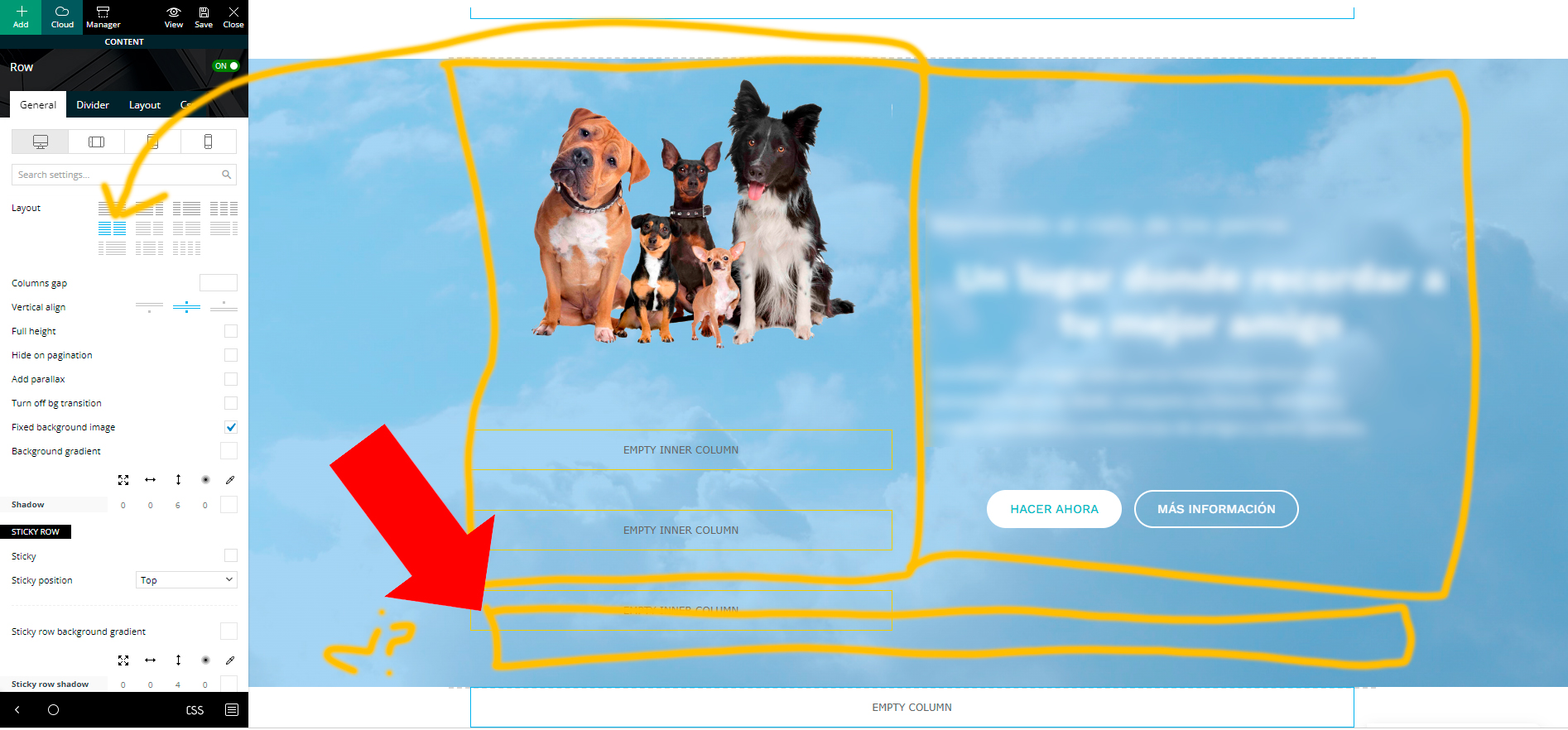
I am trying to create a custom layout with tagdiv composer.
I have used part of the design already made from (dental studio demo), and I am adjusting it to my idea.
The first part of the web, is a row column, divided in two sections with inner-rows. There is a background (background image) that moves when scrolling.
So far so good. Now I want to add another Inner-row column at the bottom (but inside the image as well) and make it full width. But I can’t do it hehe
All the inner row columns that I add, are only half the width (I imagine it is, because the main row is divided in two).
Is there any way to add a full width inner row in here?
 yoyo
yoyo I can’t remove the existing sidebar.
I manage to create a new sidebar with the widgets or on the post with tagdiv. but it does not appear it seems that there is a conflict between what I imported in demo and the new sidebar ..
when I open an article there is in sidebar the last articles in pop up mode and at the middle of the article appears “most popular”
The articles appear in full page and not on the left side with the sidebar on the right
Thank you for your help.
 Bettina
 Hello!
I’m sorry to hear about this. Please note that every page speed needs some improvement, and it is not enough to install a plugin alone because there are many factors which can affect your page speed quality.
Some factors which you need to take into account are:
External factors: server speed, if you are using CDN or not, the external resources loaded by your website like ads, fonts, tracking scripts like Facebook Pixel, Google Analytics, Twitter analytics, Hotjar and so on.
Internal factors: the number of elements on the page, image size, image formats, if you are using mobile optimized layouts, console errors, if you are using the Standard Pack plugin or not, if you are using the PRO demo or a standard one.
https://forum.tagdiv.com/topic/optimize-script-to-improve-site-speed/
– https://forum.tagdiv.com/topic/a-few-tips-for-newspaper-x-speed-high-cpu-usage-issues/
– https://tagdiv.com/how-to-increase-page-loading-speed/
– https://forum.tagdiv.com/how-to-make-the-site-faster/
– https://forum.tagdiv.com/topic/score-100100-pagespeed-with-newspaper-wordpress-theme/
– https://www.infophilic.com/get-almost-100-pagespeed-newspaper-theme/
– https://developers.google.com/speed/docs/insights/v5/about
– https://www.youtube.com/watch?v=tnkVapqhIHc
Please check the tutorials from those platforms gt metrix and Google Pagespeed Insights and I’m sure you can increase the page speed.
Please note that page speed is not covered by the support team: https://forum.tagdiv.com/newspaper-theme-support/
Thank you for understanding!
 webmastermetrozita
Hello,
I want to add video articles coming from YouTube.
How should they be added so that they appear with a play icon in the category overview and also on invidual level they should be showing the video embed like here in the demo: https://demo.tagdiv.com/newspaper_video/dota-2-great-games-cheating-pros-are-ruining/
Currently our is not showing the video screen: https://staging-zita.kinsta.cloud/nieuws/video/tram-kan-niet-verder-rijden-wegens-geparkeerde-wagen-dus-doen-omstaanders-dit-video
Kind regards
vegaecom Yes, Anamaria. I was just told by the administrator that the website is not available outside our region.
Would you please check the demo here and show me at least one recipe which has just one like statement and it still shows the text as aligned. I think the demo is smartly showing multiple lines so this flaw is not clearly visible. I checked the demo with some changes and was not able to see the fix.
https://demo.tagdiv.com/newspaper_recipes/
I will see if the admin can relax the restrictions, however the chances are low.
thanks,
G
 tenacemente
Ciao, perché non riesco a cambiare nulla nella pagina di errore 404? Esempio pagina: https://tenacemente.com/news/oggi/page/3/
Se clicco su “Go to the homepage” non rimanda alla mia home ma alla home della demo.
Ho provato a cambiare URL tramite tagDiv composer ma anche dopo aver salvato le modifiche resta tutto uguale.
Inoltre non riesco a cambiare la scritta ‘Go to the homepage’ sia da tagDiv composer che dalla sezione traduzioni di theme panel. Grazie
 abc
abcMy site is https://komeda.shop/
My site red color line is double,demo site is single as https://snipboard.io/rM5v76.jpg shows
Double is it normal?
If I want to make it single,how can I do that?
 dano1066
 Hey Calin, you are correct and i have observed the comments working this way on demo sites. I have tried disabling plugins and I have not been able to find it. I have two websites, both using Newspaper and one works, the other doesn’t. I can’t identify the differences between them that is causing this. My last resort for now is to add the event handler back. If you can tell me what JS function I can call, I will be able to quickly add this back for now until I can find the actual cause. There are no JS errors in the console.
Edit
I have found the cause. I disabled Rocket Loader™ from Cloudflare and comment replies are working again. Is this a known conflict with the theme?
-
This reply was modified 4 years by
dano1066.
Bettina Hello Debra!
Use the cloud/PRO templates in order to have the possibility to edit them with the TagDiv Composer which contains a lot of functions and features, please check our tutorial here: https://forum.tagdiv.com/tagdiv-composer-tutorial/
Documentation here:
– https://forum.tagdiv.com/cloud-library-templates/
– https://forum.tagdiv.com/design-post-pages-using-cloud-library-templates/
– https://forum.tagdiv.com/cloud-library-category-templates/
Check also our video tutorials here: https://www.youtube.com/c/tagdivThemes/videos
You can import any cloud templates from any demos you like from the Cloud Templates and assign it on your website, or you can build them from scratch by importing a blank template(in order to make it editable with the Composer).
When you edit the page with the TagDiv Composer, add the element called “Flex block” and there you can see the settings from that screenshot.
Thank you!
 pixelnews
Hi we are using Reel News Pro Template on our website pixelnews.ch but we have a big issue with the mobile view.
– the layout is not the same as showed in the demo – how we can change it?
– the menu bar contains a icon and wrong logo, even with uploading our logo it still remains
– we have a Hero Section in our desktop version which we really need also to be visible on the mobile version
Please advice how we can achieve the same layout for mobile as for desktop (the demo was working properly in your demo/preview)
dano1066I seem to have a bug on my site and can’t get to the bottom of it. I am running the latest version of newspaper and the “Reply” link under comments is not working anymore. I can see the click event is not attached to any of the comments so it’s impossible to reply.
I have seen from the demo site that when you click Reply normally, it will bring you down to the comment input and the title there will change to “Reply to Bob”. For the moment, I think the best I can do is add my own click event manually. I just need some advice on what to call.
If i use the comment below as an example
<a rel="nofollow" class="comment-reply-link" href="#comment-37353" data-commentid="37353" data-postid="1145" data-belowelement="comment-37353" data-respondelement="respond" data-replyto="Reply to Roxanna" aria-label="Reply to Roxanna">Reply</a>
I could use some jQuery to capture the click and I just need to know what function from the newspaper js library I need to call to trigger the comment reply?
$( ".comment-reply-link" ).click(function() {

	var commentId = $(this).data("commentid")

	triggerReply(commentId); //What function can I call here?

});
 Anamaria
 Hi,
This plugin is not required from version 10.4, because the new demos are using cloud templates, also, maybe some plugins blocked the process to install and activate the plugin.
Thank you!
tenacementeSalve, sito tenacemente.com uso la demo default pro, header template 6, footer podcasts. Che font utilizza il tema di Default? Come posso disattivare i google fonts e impostare tutto su qualcosa di più leggero da caricare come Verdana? Grazie
tenacemente Ciao,
Utilizzo la demo DEFAULT PRO e i post sono tutti su Standard Default.
Non uso Facebook Pixel, non ho sul sito il codice Google Analytics, Twitter analytics, Hotjar. Nessun blocco causato dalle immagini.
In questo momento il mio sito ha un tempo di caricamento di 98/100 su PageSpeed Insights e un ottimo punteggio su GTmetrix, tuttavia le singole metriche sono insufficienti e mi causano un’esperienza utente insufficiente.
Anche se cambio testo o formato i tempi di LCP (3,6 s) su desktop e quelli di CLS (0,23) su dispositivi mobili non cambiano ma restano uguali, e sicuramente l’uso di Google Fonts non aiuta.
Vi prego di lavorare per migliorare questi aspetti nei prossimi aggiornamenti.
Grazie.
Calin Hi,
I notified developers about your suggestion, but for the moment I have not received any feedback.
As a suggestion, if you want you can try another slider -> https://i.imgur.com/yfqliiu.png, our theme provides 2 sliders from the theme and the revolution slider plugin.
Thank you!
Bettina Hello!
I’m sorry to hear about this. Please note that every page speed needs some improvement, and it is not enough to install a plugin alone because there are many factors which can affect your page speed quality.
Some factors which you need to take into account are:
External factors: server speed, if you are using CDN or not, the external resources loaded by your website like ads, fonts, tracking scripts like Facebook Pixel, Google Analytics, Twitter analytics, Hotjar and so on.
Internal factors: the number of elements on the page, image size, image formats, if you are using mobile optimized layouts, console errors, if you are using the Standard Pack plugin or not, if you are using the PRO demo or a standard one.
Every code is needed for your great design of the page. It depends on what and how you insert the content and how many elements do you use for that page.
Unfortunately, we can help you only with some advice. Please note that page speed is not covered by the support team: https://forum.tagdiv.com/newspaper-theme-support/
Thank you for understanding!
Bettina Hello!
You are not wrong. We have clients who have a 100 % pagespeed score with our theme, but it will require a little bit of interest in optimizing. Our developers are working hard to improve the page speed in every update, so make sure you use the latest update.
Some factors which you need to take into account are:
External factors: server speed, if you are using CDN or not, the external resources loaded by your website like ads, fonts, tracking scripts like Facebook Pixel, Google Analytics, Twitter analytics, Hotjar and so on.
Internal factors: the number of elements on the page, image size, image formats, if you are using mobile optimized layouts, console errors, if you are using the Standard Pack plugin or not, if you are using the PRO demo or a standard one.
Please note that every page speed needs some improvement and it is not enough to install a plugin alone because there are many factors which can affect your page speed quality.
Thank you for understanding!
 AgentSmith01
My Site, ( https://micheletorr.net ) is based on Newspaper 11.5 with the igossip demo. The site works very well, on both desktop and mobile, there are only a few little design problems with ACF-Fields. My site is a Fan-Site, and for Fan-sites of any kind the user-experience is one of the most important things. So i ask any one who reads this: Is there a real good advantage for the User-Experience, made by the mobile theme ? And is it worth to change a running system.
An example with smartphones. If you have an iPhone 5, and you are very satisfied with it, you have a big advantage when you switch to an iPhone 12, despite all your satisfaction. A bigger one than if you switch from an Iphone 12 to an Iphone 13 Plus. This is what i want to know.
Greets from Germany
Bettina Hello!
Unfortunately, in our theme we do not have dark mode and light mode features.
You have to do it manually. Change the background color into white from Newspaper -> Theme panel -> Theme colors -> General theme colors. And also the global colors which are used in the demo, you can find and change them if you edit the homepage for example with the TagDiv Composer, access Website Manager : https://prnt.sc/LJVqfzmJ72wi.
Thank you!
 nwnuyhs nwnuyhs

