
- NewspaperHow to Make the Site Faster
- NewsmagUsing the theme translations together with WPML
- NewspapertagDiv AMP Plugin Tutorial
- NewspaperNewspaper Theme Support
- NewsmagRequirements for Newsmag
- NewsmagSmart sidebar
- NewsmagTheme thumbs
- TutorialsWhat is Ajax preloading?
- NewspaperCustom ad spots
- NewspaperRequirements for Newspaper
 Catalin
 Hello alderion,
Notice that caching plugin should work as expected and you should check the following useful guide here -> https://forum.tagdiv.com/how-to-make-the-site-faster/ if you want to optimize your website.
Thanks for the message!
 Bogdan B.
 Hello,
The only cache plugin tested and recommended to be used with our theme is Wp super cache and these settings: https://forum.tagdiv.com/cache-plugin-install-and-configure/
As you can imagine, we did not pick this plugin randomly. We are aware there are faster cache plugins out there but this one is the only one we found so far that is fully compatible with our theme. The other cache plugins all have different issues that prevented us from marking them as recommended.
Thank you!
Catalin Hello modaestrat,
To have no problem you should use images with have 1980x1080px and therefore you should not bring poor results if you are using these. Notice that our theme uses thumbnails and each image will be cut after the size of each thumb. If you want to know more details and useful steps which have to be followed in order to achieve a good page speed loading, please consult our documentation here -> https://forum.tagdiv.com/how-to-make-the-site-faster/
If you are unhappy with our services and if our theme does not satisfy with your goal, you should request a refund and we will give your money back. Request a full refund, accessing this link here -> https://themeforest.net/refund_requests/new and we will provide your money back so you can buy other our theme.
Thanks for your understanding!
 Simion C.
 Hi,
It seems you have a lot of images in the posts, that is why it is recommended to use a caching plugin. I see you have WP Super Cache installed, the website should work properly with this caching plugin. To make it faster you could follow this guide – https://forum.tagdiv.com/how-to-make-the-site-faster/ and further optimize the loading speed.
The error you are having could be fixed with the solution provided in this topic
– https://forum.tagdiv.com/topic/fetching-with-google/
Hope this helps
Thanks
Simion C. Hi,
I have inspected your website and it seems to be very fast on all the pages you mention
– https://www.screencast.com/t/3AyDVQ4zt
– https://www.screencast.com/t/Q4U5T9QMNz
The difference between the loading speed is very small, almost non existent. You could follow this guide to further improve website loading speed – https://forum.tagdiv.com/how-to-make-the-site-faster/
Also it is recommended to use the WP Super Cache plugin along with the settings provided in this tutorial
– https://forum.tagdiv.com/cache-plugin-install-and-configure/
Thanks
 nurul1khan
 and please dont comment something like this>>
=======================================================================================================
Please follow this guide to increase your loading speed: https://forum.tagdiv.com/how-to-make-the-site-faster/
As a note on the speedbooster plugin: https://forum.tagdiv.com/topic/tinymce-advanced-and-other-various-disabling-speed-boster/
Thank you!
=====================================================================================================
 asap1
asap1 I fixed the thumbnail issue.
So do you have any idea how I can get my website’s width like the below site?
example site: http://www.familytentinfo.com/best-beach-tent-review/
my site: http://africanamericanhairstyles.org/how-to-grow-african-american-hair-faster/
 Caylean
Hello together,
Is there any way to add another row of Postings to the Header Menu.
I would like to have instead of just the default 5 simply 10 Postings to the desired category.
I have only started with a New Project and 20 Postings in a single Category and it will get much more over time.
So to have 10 instead of the default 5 Postings per Scroll sould make it more convinient for a user to fast scroll through the Postings in the categories.
Sure, a simple click on the Category would give the user a much more convinient view, but with 10 Posts to choose directly, the user might get much faster to his/her goal if s/he could find it via Menu directly.
Help would be really appreciated.
Simion C. Hi,
If the website is loading slowly, here is the recommended cache plugin and the settings to use for best results
– https://forum.tagdiv.com/cache-plugin-install-and-configure/
And some advice to help improve page loading speed
– https://forum.tagdiv.com/how-to-make-the-site-faster/
Please note that also plugins can have a negative effect in this matter. For the link you have provided above you can see the time spent on loading all the resources – https://www.screencast.com/t/ylP6a4Tcc
You need to identify the causes and remove them, or think of a way to optimize them further.
Thanks
 fenomeno0chris
 1) CHECK
2) CHECK
3) Too bad you can’t help me with that. It is just one line to edit -.-
4) CHECK
5) Since my team has written a lot of news before I changed the theme, can I somehow edit the default Quote-Style to “Quote box left”?
6,7,8) I have edit my functions.php file with the code from your pagespeed tutorial. Those are the css and js files, which appeared on the top of the page:
registered scripts

common | /wp-admin/js/common.min.js

farbtastic | /wp-admin/js/farbtastic.js

admin-bar | /wp-includes/js/admin-bar.min.js

jquery-ui-sortable | /wp-includes/js/jquery/ui/sortable.min.js

utils | /wp-includes/js/utils.min.js

svg-painter | /wp-admin/js/svg-painter.js

wp-auth-check | /wp-includes/js/wp-auth-check.min.js

td_social_counter | http://www.ps4source.de/wp-content/plugins/td-social-counter/js/td_social_counter.js

yoast-seo-admin-global-script | http://www.ps4source.de/wp-content/plugins/wordpress-seo/js/dist/wp-seo-admin-global-460.min.js

media-editor | /wp-includes/js/media-editor.min.js

media-audiovideo | /wp-includes/js/media-audiovideo.min.js

mce-view | /wp-includes/js/mce-view.min.js

image-edit | /wp-admin/js/image-edit.min.js

td_wp_admin | http://www.ps4source.de/wp-content/themes/Newspaper/includes/wp_booster/wp-admin/js/td_wp_admin.js

td_wp_admin_color_picker | http://www.ps4source.de/wp-content/themes/Newspaper/includes/wp_booster/wp-admin/js/td_wp_admin_color_picker.js

td_wp_admin_panel | http://www.ps4source.de/wp-content/themes/Newspaper/includes/wp_booster/wp-admin/js/td_wp_admin_panel.js

td_edit_page | http://www.ps4source.de/wp-content/themes/Newspaper/includes/wp_booster/wp-admin/js/td_edit_page.js

td_page_options | http://www.ps4source.de/wp-content/themes/Newspaper/includes/wp_booster/wp-admin/js/td_page_options.js

td_tooltip | http://www.ps4source.de/wp-content/themes/Newspaper/includes/wp_booster/wp-admin/js/tooltip.js

td_confirm | http://www.ps4source.de/wp-content/themes/Newspaper/includes/wp_booster/wp-admin/js/tdConfirm.js

thickbox | /wp-includes/js/thickbox/thickbox.js

gadwp-backend-ui | http://www.ps4source.de/wp-content/plugins/google-analytics-dashboard-for-wp/admin/js/ui.js
registered styles
farbtastic | /wp-admin/css/farbtastic.min.css
admin-bar | /wp-includes/css/admin-bar.min.css
zilla-popup | http://www.ps4source.de/wp-content/plugins/zilla-shortcodes-2.0/assets/css/admin.css
colors | 1
ie | /wp-admin/css/ie.min.css
wp-auth-check | /wp-includes/css/wp-auth-check.min.css
seedprod_plugin | http://www.ps4source.de/wp-content/plugins/ultimate-maintenance-mode/inc/css/admin-style.css
wysija-admin-css-widget | http://www.ps4source.de/wp-content/plugins/wysija-newsletters/css/admin-widget.css
yoast-seo-adminbar | http://www.ps4source.de/wp-content/plugins/wordpress-seo/css/adminbar-460.min.css
yoast-seo-admin-global | http://www.ps4source.de/wp-content/plugins/wordpress-seo/css/admin-global-460.min.css
yoast-seo-dismissible | http://www.ps4source.de/wp-content/plugins/wordpress-seo/css/wpseo-dismissible-460.min.css
google-font-ubuntu | http://fonts.googleapis.com/css?family=Ubuntu:300,400,500,700,300italic,400italic,500italic,700italic&subset=latin,cyrillic-ext,greek-ext,greek,latin-ext,cyrillic
td-wp-admin-td-panel-2 | http://www.ps4source.de/wp-content/themes/Newspaper/includes/wp_booster/wp-admin/css/wp-admin.css
wp-color-picker | /wp-admin/css/color-picker.min.css
media-views | /wp-includes/css/media-views.min.css
imgareaselect | /wp-includes/js/imgareaselect/imgareaselect.css
thickbox | /wp-includes/js/thickbox/thickbox.css
gadwp | http://www.ps4source.de/wp-content/plugins/google-analytics-dashboard-for-wp/admin/css/gadwp.css
woocommerce_admin_menu_styles | http://www.ps4source.de/wp-content/plugins/woocommerce/assets/css/menu.css
I tried every single jss and css ID in the td-speed-booster.php file, but none of them could fix the missing errors which google pagespeed displays. So how can I put those 9 JS and 5 CSS to the footer?
JSS Error:
http://ajax.googleapis.com/ajax/libs/jquery/1.11.1/jquery.min.js?ver=1.11.1

http://www.ps4source.de/wp-includes/js/jquery/ui/core.min.js?ver=1.11.4

http://www.ps4source.de/wp-includes/js/jquery/ui/widget.min.js?ver=1.11.4

http://www.ps4source.de/wp-includes/js/jquery/ui/accordion.min.js?ver=1.11.4

http://www.ps4source.de/wp-includes/js/jquery/ui/tabs.min.js?ver=1.11.4

http://www.ps4source.de/wp-content/plugins/zilla-shortcodes-2.0/assets/js/zilla-shortcodes-lib.js?ver=4.7.3

http://www.ps4source.de/wp-content/plugins/background-manager/resources/js/functions.js?ver=1.2.5.2

http://www.ps4source.de/wp-content/plugins/background-manager/resources/js/flux.js?ver=1.2.5.2

http://www.ps4source.de/wp-content/plugins/background-manager/resources/js/pub.js?ver=1.2.5.2
CSS Error:
http://www.ps4source.de/wp-content/plugins/wysija-newsletters/css/validationEngine.jquery.css?ver=2.7.8

http://www.ps4source.de/wp-content/plugins/zilla-shortcodes-2.0/assets/css/shortcodes.css?ver=4.7.3

http://www.ps4source.de/wp-content/tablepress-combined.min.css?ver=6

http://www.ps4source.de/wp-content/plugins/wp-jquery-lightbox/styles/lightbox.min.css?ver=1.4.6

http://www.ps4source.de/wp-content/plugins/background-manager/resources/css/pub.css?ver=1.2.5.2
9) Im patiently waiting for the fix!
10) CHECK
11) I have changed my PHP version to 7.0. Everything seems to work faster.
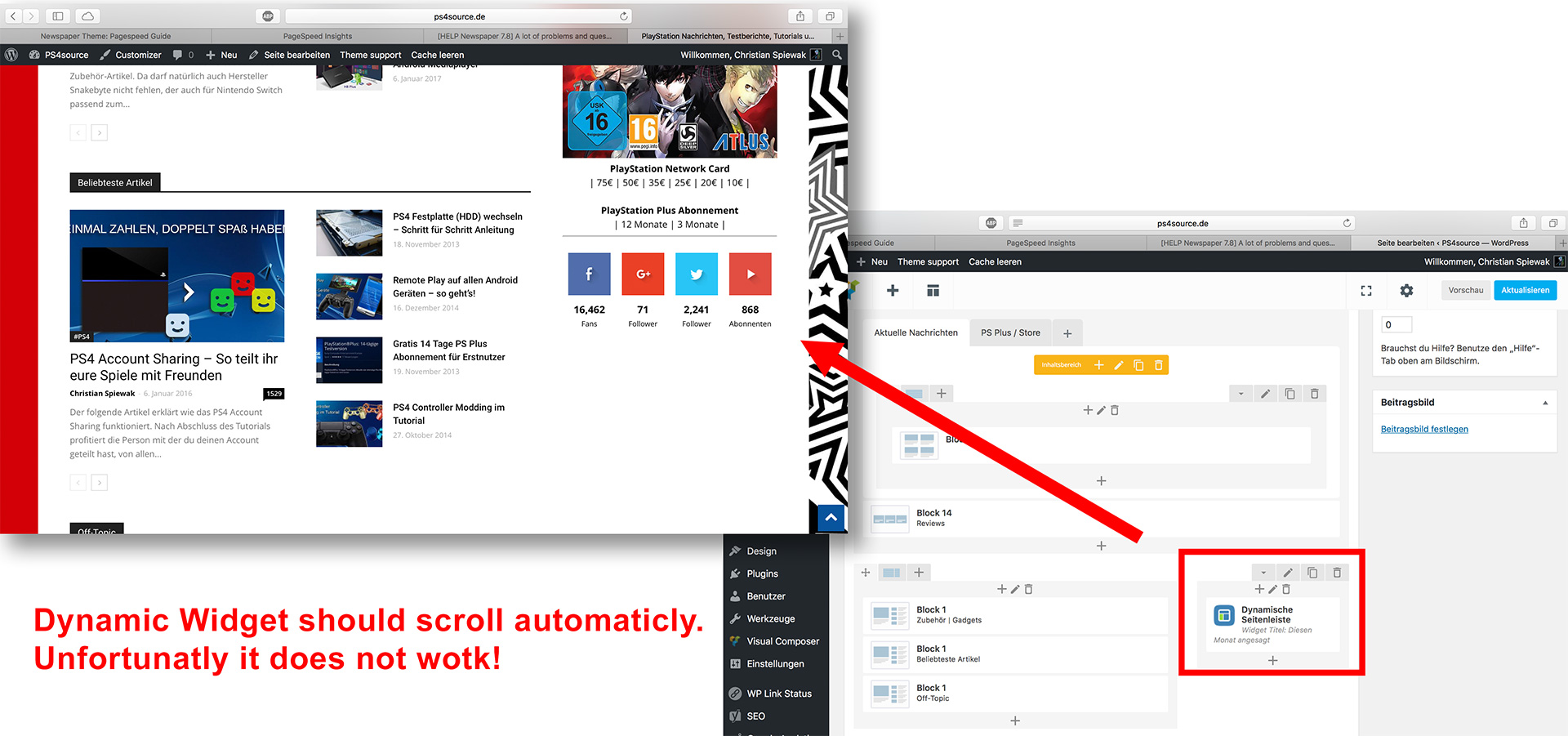
12) As you can see my dynamic widget on the homepage does not work:
Bogdan B. Hello David.
Please use this guide to increase your site’s loading speed: https://forum.tagdiv.com/how-to-make-the-site-faster/
Also make sure you increase your memory allocation like this guide shows: https://forum.tagdiv.com/system-status-parameters-guide/
As a note on the speedbooster plugin: https://forum.tagdiv.com/topic/tinymce-advanced-and-other-various-disabling-speed-boster/
Thank you!
Simion C. Hi,
The mobile theme has no default option to change the font properties. I believe this is meant to help performance on mobile devices. Maybe options in this regard will be available in future updates, and also not have a major imapact on speed. We have not made any extensive tests with custom fonts, and I could not say how it would be best to use or modify the method provided in the topic. You will just have to make tests and see what is the best way to implement this for your website.
To upload multiple fonts you could check this topic
– http://stackoverflow.com/questions/7018535/use-multiple-custom-fonts-using-font-face
If you would like to remove google fonts you can check this topic – https://forum.tagdiv.com/topic/do-i-really-need-to-change-all-the-text-fields-for-fonts/
The fonts loaded will be only the fonts used on the website, not all the fonts available.
If you would like to make your website faster you can follow this tutorial
– https://forum.tagdiv.com/how-to-make-the-site-faster/
Thanks
Simion C. Hi,
We have not had any reports regarding this issue that you are having with the admin panel. Usually plugins are responsible for causing problems and interfering with the functionality.
The theme has these requirements for the server – https://forum.tagdiv.com/requirements-for-newspaper/ and also some modifications to these parameters if needed – https://forum.tagdiv.com/system-status-parameters-guide/
Also I see that your website is taking some time to load the images – https://www.screencast.com/t/36E3Eyg4 and the whole content.
You can try and use this caching plugin with the recommended settings – https://forum.tagdiv.com/cache-plugin-install-and-configure/ and this guide to optimize page loading speed – https://forum.tagdiv.com/how-to-make-the-site-faster/
Thanks
 Nano
NanoHere is the issue,
I have tried 3-4 different method to insert inline ads after several paragraphs under post content ( both using plugins and without plugins) . It works perfectly.
But I noticed that when we use it with speed booster plugin, it has one weird issue.
First of all, based on info available here- https://forum.tagdiv.com/how-to-make-the-site-faster/ , I delete this code from speed booster file to make it work with other plugins:
        // disable the plugins if there are incompatible plugins
        $active_plugins = get_option('active_plugins');
        //print_r($active_plugins);
        //die;
        foreach ($active_plugins as $active_plugin) {
            if (!in_array($active_plugin, $this->allowed_plugins)) {
                define('TD_SPEED_BOOSTER_INCOMPATIBLE' , $active_plugin);
                return;
            }
        }
and then move the JS and css file to footer using file ID. It works very well with all other plugins installed on my website. But for this example- let’s consider that I don’t move any other files.
before activating speed booster. Here is how ad looks on my site: https://s30.postimg.org/6gjkrz7cx/ads-1.jpg
you can see that the ad after pragraph-1 is properly aligned to center within post content.
After activating speed booster, here is how it looks- https://s12.postimg.org/8lqlmqmp9/ads-2.jpg
You can notice that the ad leaves the post content and probably get aligned to the center of whole website, not just post content.
On further checking, I noticed that the issue is caused by the following line:
$this->move_style_to_footer_queue('td-theme');
When I delete this line from speed booster, the ads start displaying correctly. But then a new issue arises, the homepage gets broken like this: https://s11.postimg.org/6tk42duer/2017-04-13_14-14-13.jpg
So, either I can run these ads properly but then homepage gets broken or display homepage correctly, then ads gets misaligned.
I do want to use speed booster for optimisation purpose. So, please look into the issue and see if anything can be done.
Thank you.
Simion C. Hi,
The Revolution slider is a very complex element, and could have an impact when placed on pages but should not be anything major. You can use these guides to configure the recommended cache, and also improve page loading speed and optimize your website
– https://forum.tagdiv.com/cache-plugin-install-and-configure/
– https://forum.tagdiv.com/how-to-make-the-site-faster/
Thanks
NanoHello,
Yesterday I asked a question https://forum.tagdiv.com/topic/google-fonts-not-working-on-mobile-theme/ and Simion C. redirected me to a link. The solution actually worked and now I am able to use my own uploaded fonts to the mobile theme.
But now when I know that, I only use few selected fonts like Poppins, Open Sans, Georgia, and Merriweather. Is there any need to load Google fonts on the desktop or anywhere? What I understood that mobile theme does not load google fonts so we need to upload and define new fonts under style.css to use it. But the same is not the case with the desktop version. So, here are few confusions/questions of mine. Please help me understand/resolve it:
1. When I download Poppins font from https://www.fontsquirrel.com/fonts/poppins , it has 4-5 TIFF files which I further converted into .WOFF to use it. But do we need to upload all these files which had different font-weight?
Can’s we upload just one normal font-weight Poppins theme and then define different font-weight under style.css like this:
  font-family: 'poppins-bold', sans-serif;

  font-size: 12px;

  font-weight: 600;
Or do we have to upload all kinds of fonts with different font-weight and then there simply write the name of font-family under style.css and then there is no need to separately write font-weight? Please help me understand this.
2. To upload multiple font files, do I need to write this code again and again under style.css
@font-face {

font-family: 'add your font family here';

src: url('add the source url for the font. insert the path that leads to the font') format("opentype");

font-weight: normal;

font-style: normal;

}
If we have already defined font-weight while loading the font ( font-weight: normal;) as shown in the above code, can we change the font-weight again after specifying font-weight while using it under style.css or under custom style.css?
3. Since I use only 4 fonts throughout the site. Can we simply upload it and then remove loading all another kind of fonts including google fonts to increase the site speed? If yes, how can I remove it?
4. Our default font is roboto and open sans. Is the only way to change it with desired one is by replacing these fonts-family name or do we need to delete is from somewhere?
5. Does site loads all the uploaded fonts every time user visits a page or does it call only the used fonts on that specific page?
I know these questions are silly, but will help me a lot making my site faster.
Thank you.
 pavel@earnware.com
Since last update the styles.css file has become too big.
For example I am not using bbpress or instagram or even woocommerce – why would I want those styles to be loaded? Also I am not even using all blocks and module – it would be nice to have the styles.css dynamic somehow.
If for example I am not using instagram, why would that css show – why not take it out?
Is this even possible?
P.S. I know you will point out that the template is scoring great, true. But when I am not using even half of it’s features – and it would be even faster than it is – who wouldn’t want that?
Please make these things dynamic!
You’re the best! Thanks for the great work!
Bogdan B. Hello,
Please follow our official page speed guide here: https://forum.tagdiv.com/how-to-make-the-site-faster/
Also please make sure your memory allocation is correct: https://forum.tagdiv.com/system-status-parameters-guide/
You cna also switch to php 7.0 (only if you use the latest version of the theme. right now you have 7.6 so you need to update your theme as well) as it is faster than the previous version.
Thank you!
Catalin Hello Alvino,
Please keep in mind that our theme is only tested with Google Insights tool but only for Homepage and not for others post pages, sorry! Also, notice that our demo does not use the Speed Booster plugin and that’s why appears some render blocking when you test it on this tool. Try to use our useful guide information from here -> https://forum.tagdiv.com/how-to-make-the-site-faster/ to make your site to load more faster.
Thanks for your understanding!
 simchris
 See the theme docs and ‘tutorials’ section for tips on how to optimize your site for final deploy.
Any theme with complex CSS pre-builds, Visual Composer, and multiple options, will be “heavier” than a simple blog theme. Normally you determine your design choices, then optimize.
see
https://forum.tagdiv.com/the-child-theme-support-tutorial/
https://forum.tagdiv.com/how-to-make-the-site-faster/
https://forum.tagdiv.com/best-of-forums/
( I don’t work here. )
-
This reply was modified 9 years by
simchris.
Bogdan B. Hello,
Css works in cascades. If you have more than 1 rewrite on the same element you will be able to see the cascades happen. The default color is blue. If you cahange to a demo that changes the color to green as the news magazine demo does and then set your own custom color again, the rewrites will be seen on the front-end especially on a slow connection. In this case you can increase your site loading speed so this effect will be less visible. Please use this guide: https://forum.tagdiv.com/how-to-make-the-site-faster/
Thank you!
Simion C. Hi,
Please note this delay that you are observing depends mostly on how well the website is optimized and there are many factors could have a negative impact on page speed. You can improve your website loading speed using this guide
– https://forum.tagdiv.com/how-to-make-the-site-faster/
It is also recommended to use this recommended cache for best results with the settings specified here
– https://forum.tagdiv.com/cache-plugin-install-and-configure/
Another way would be to make changes directly in the theme’s files, then these will be loaded instantly with the rest of the stylesheet.
Thanks
Simion C. Hi,
Please note this delay that you are observing depends mostly on how well the website is optimized and there are many factors could have a negative impact on page speed. More information here – https://forum.tagdiv.com/how-to-make-the-site-faster/ The speed booster plugin moves all the stylesheets and javascripts to the bottom of the page and a delay is visible if the website loading speed is not optimized. It is also recommended to use the cache recommended for best results as mentioned above.
Another way would be to make changes directly in the theme’s files, then these will be loaded instantly with the rest of the stylesheet.
Thanks
Bogdan B. Hello,
I understand but our theme adds the css for all cases including woocommerce and bbpress. You will have absolutely no gain in removing 10 lines of css code from your site. If you are looking to increase your site’s loading speed you will be far better off using this guide: https://forum.tagdiv.com/how-to-make-the-site-faster/
As for the images, you cnnot crop all images to the same dimensions as our theme use different thumbnail for each case in particular: https://forum.tagdiv.com/theme-thumbs/
Thank you!
Bogdan B. Hello,
We recommend using our official page speed guide: https://forum.tagdiv.com/how-to-make-the-site-faster/
As a note on speedbooster: https://forum.tagdiv.com/topic/tinymce-advanced-and-other-various-disabling-speed-boster/
Thank you!



