
- NewspaperHeader Builder
- NewspaperHeader ads
- NewspaperHeader styles
- NewspaperSearch setup for custom post type
- NewspapertagDiv Composer – Website Manager
- NewspaperBookmark – Save For Later
- NewspaperWooCommerce: Happy “Add to Favorites!”
- NewspaperModal Popup
- NewspaperFlex Block Settings Guide
- NewspaperPosts Loop Element
- NewspaperHow to Add a Logo in Newspaper
- NewspaperDefault Category Settings
- NewspaperWhen tagDiv Composer is Not Working
- NewspapertagDiv Cloud Library Plugin
- NewspapertagDiv Composer Tutorial
- NewspaperUsing the Theme Translations with WPML
- NewspaperInstagram in Newspaper WordPress Theme
- NewspaperWeather Shortcode
- NewspaperThe Mobile Theme
- NewspaperLogin – How to Enable User Registration
 samdyz
Hello,
My website is – https://bikeadvice.in/
I recently downloaded few headers/module templates from the cloud library and applied them on my website.
The problem is – they display fine when I am on edit (with TagDiv Composer) mode but after I save them they show the default fonts at the front end.
What could be the issue..?
 badolhossen22
I applied for Google Adsense and google says the i need to add a code on my theme header under head tag. i have successfully add the code but after i did this when i check i saw that there have no code Under Head tag. If anyone know about this please help me.
 Alin
Alin The option in your image only shows up if I use an image ad. We are using an Ad Network that relies on its code.
Attached is the screenshot of the theme options back-end. We are calling the header Ad unit with the cloud header.
The website is sneakerbardetroit.com
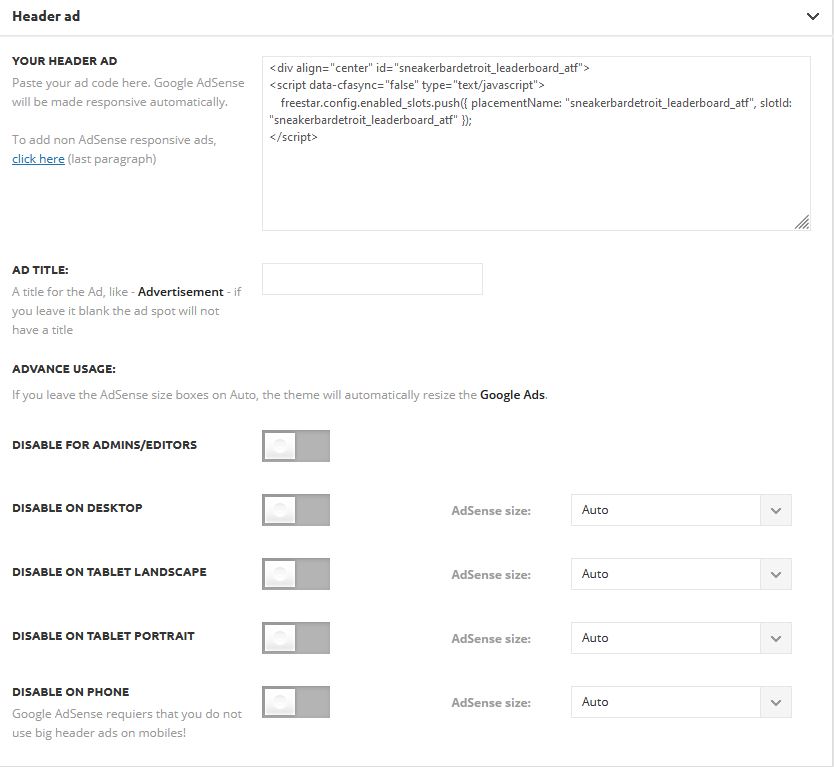
Also here is a screenshot of our cloud template.

If I click on image ad – non of the hiding check-boxes are marked.
-
This reply was modified 5 years by
Alin.
 sidusinfieri
 Thank you Bettina! Actually is a different topic: I don’t have problems with the background color under the shading, that I can change with no problems (it was just a problem of row padding), but I would like to remove – if possible – the default ‘drop shadow’/gradient under the style 10 header
 Bettina
 Hello!
Please continue the discussion in your own topic: https://forum.tagdiv.com/topic/how-to-remove-style-10-headers-shadow/
Do not create multiple topics with the same issue.
Thank you for understanding!
 Emirelkz
Hi Support team,
I created header with Cloud template and applied it on Theme Panel
It looks good everywhere except Category pages, where Header looks like it lost all its CSS
How I can fix this?
sidusinfieriHi, can someone please tell me how to remove the shading under the main menu in header style 10? Thanks in advance!
 Anamaria
 Hello,
You can change the header background image with tagDiv Composer => https://www.screencast.com/t/9NCnIaZERkh select the row on the header menu and in the tab called “CSS” you can add/remove the Background Image => https://www.screencast.com/t/fwWK3AvGyA
If you don’t mean this, then please provide me with more details and screenshots.
Thank you!
Anamaria Hello,
If you created the header is from the cloud library, then please make sure if the option from the ad box is set to no hiding the ads on the mobile => https://www.screencast.com/t/YkQ9euUwD4
Also, please send the link to your website to inspect it
Thank you!
 Vlad S
 Hello!
If you are using AdSense auto ads, you have to insert the code in only 1 place. For example, insert it in Theme Panel – Ads – Header Ads. And that is the only place where this code should be.
If you insert it in more than 1 place, the code will be broken or will not work. Based on your most intense areas where users put their finger (on mobile) and cursor on desktop, Google will autoplace ads so that you will get maximum out of them.
Please make sure that after you are making any changes, clear your cache and test your changes on an incognito page.
You can if you want to switch to standard templates but that would be a shame when there is so much more potential on cloud library templates.
Please let me know the result of the instructions above! If this doesn’t work please contact us via email at contact@tagdiv.com and provide the following:
– admin url and credentials
– A link to this topic in order to identify you
Our team will take a look ! Please note that at the moment the support is a bit crowded. Replying may take up to 24 hours.
Thank you !
 Calin
Calin Hi,
If the options for header are not apply on footer elements, then please try this custom css -> https://i.imgur.com/fNUuHKu.png
.td-footer-container .block-title > span, .td-footer-container .block-title > a, .td-footer-container .widgettitle {

    background-color: #000;

}
Please set the code in theme panel > custom code> custom css.
I hope this will help you!
 abbasmohsin
Hello friends!
It’s my first day here working on a theme. I am sorry for my silly questions. How I can replace the Header image for a newspaper theme? If there is a video tutorial I would appreciate the link.
TIA
Mohsin
 lulimonteleone
When I am editing at Composer, the header works properly. But on my blog, It does not show the dropdown menu and the search does not work.
Alin Hi,
Yes the option is turned on. This is a header that was created using the cloud templates if that matters. But it’s the tagdiv preset option.
 mcmben
Hi team
I have experienced an issue with displaying the header logo in the header menu properly on mobile responsive.
Preview mode (what i expect): https://finkab.com/img/screen2.png
Live mode (what i actually see on mobile): https://finkab.com/img/screen1.jpeg
My site: https://www.visualfinance.co
This problem only exists on the frontpage of my site, and it works perfectly fine on other pages.
Note that I have disabled AMP or tagdiv mobile themes. Thanks a lot.
 IndianStartupNews
 Okay, I have done this.
How to lower the distance between title and header and enable the clickable feature for featured image (like zoom in when clicked)
https://imgur.com/v6D9Qcs
And If the title is getting in two or three lines how to increase the distance of one line from another? I hope you understood
Also, How to bring whole content including post content, title, everything in the center area of the page if there is no sidebar
 steveroberts
Hello,
I want to create a landing page, but without the header and footer showing on other pages in the site.
How do I create a “blank” page and then add the elements I desire?
Thanks,
Rob
 duck1970
 Hello Ana Maria. It is perfect, it is what I needed, although I have changed it to -45 now if it is perfect. Thank you
.td-header-style-4 .td-header-menu-wrap-full {
top: -45px;
}
.td-main-page-wrap {
padding-top: 0px;
}
Anamaria Hello,
This can be achieved using a custom code CSS =>https://www.screencast.com/t/keyKSSIf2dO
.td-header-style-4 .td-header-menu-wrap-full {

  top: -40px;

}

.td-main-page-wrap {

    padding-top: 0px;

}
Set the code in Theme Panel -> Custom Code -> Costum CSS.
Hope this helps you!
Thank you!
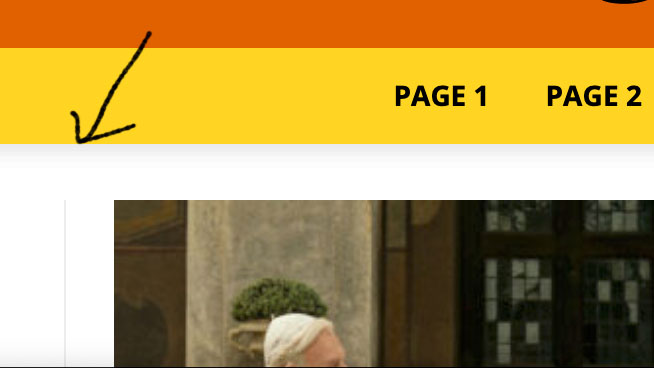
duck1970Hello, I show in my header a photo that changes every hour depending on the program that is being broadcast on my website. This photo is shown through a SHORT CODE that I have inserted in ADS / YOUR HEADER AD
My problem is that I would like the photo to be placed just above the bar, now I don’t know why it leaves a small space.
I attach a photo of how it is shown now and how I would like it to be shown.
I do not know if there is any code so that this small space is not displayed
This is my home https://www.radiomarcabarcelona.com
I hope your help. THANK YOU
https://www.radiomarcabarcelona.com/goodnews-design/Photo-Menu.png
 EDFU
EDFUHello, I have two problems with the footer. I have importet a footer from the tagDiv Cloud Templates. The first edit was okay but now in the cloud templates it’s not possible to open the footer with the tagDiv Composer:
https://www.screencast.com/t/g0UrnkwvtB
For example the header has the function:
https://www.screencast.com/t/o35QcnCwGjNx
The second problem is that the footer is not complete displayed in the mobile version.
Desktop:
https://www.screencast.com/t/toMZmO2Fy
Mobile:
https://www.screencast.com/t/Zhqro7jR0S
Thank you and best regards,
Martin
Calin Hi discdemo, for this you can use the settings from theme panel -> https://i.imgur.com/HCtrKcG.png -> https://i.imgur.com/TurkpMl.png or if you want you can try this css -> https://i.imgur.com/tXRKVo7.png
.sf-menu > .current-menu-item > a, .sf-menu > .current-menu-ancestor > a, .sf-menu > .current-category-ancestor > a, .sf-menu > li > a:hover, .sf-menu > .sfHover > a {

    background-color: #f35;

    color: #eee;

}

.sf-menu > li > a, .header-search-wrap .td-icon-search, #td-top-mobile-toggle i {

    color: #fff;

}
Thank you!
 Edged
Edged Hello, I don’t understand what you mean by this “just make sure that you have set the auto ads only once”. I added the Adsense auto ad code to my Headers and footer plugin. Why would it be set more than once unless adding non-auto Adsense ads manually? As for the Gourmet Pro, so it doesn’t allow for auto ads meaning that I can only have 3 in-article ads max?
-
This reply was modified 5 years by
Edged.
Anamaria Hello,
I’m not sure I fully understand what you are looking to edit => https://imgur.com/BhMNhDs
Also, to add space in the menu, you can add it in the tab called “General” for Header main menu => https://www.screencast.com/t/BTTHDGek1F7i
Thank you!
Anamaria Hello,
Usually, this happens when you set the page content in the header section or footer section.
-> https://i.imgur.com/381J9qm.jpg
-> https://i.imgur.com/wVGxYeg.jpg
-> https://i.imgur.com/0O3iGEg.jpg
So, please check if you have set the elements in the header zone.
I am not sure I fully understand what you mean by” to add a static text block”, please provide more details.
Also, you can check our channel https://www.youtube.com/user/tagdiv that can help you to design.
Thank you!



