
- NewsmagHomepage – How to build and set it
- NewspaperHomepage – How to build and set it
- NewspaperHow to edit modules for Flex Block X
- NewspaperGeneral Options that May Interfere with the Newspaper Theme
- NewspaperThe Newspaper Mobile Theme: Introduction
- NewspaperHow to Add a Logo in Newspaper
- NewspapertagDiv Shop
- NewspaperHow to Use tagDiv Cloud Library
- NewspaperDesign your Post Pages using the Cloud Library Templates
- NewspaperHeader Builder
- NewspapertagDiv Cloud Library Plugin
- NewsmagtagDiv Composer Tutorial
- TutorialsFrom WPBakery to tagDiv Composer
- NewspapertagDiv Composer Tutorial
- NewspaperNewspaper theme documentation
- NewspaperThe Mobile Theme
- NewsmagNewsmag documentation
- NewsmagMain menu
- NewsmagLogo & Favicon
- NewsmagPage templates
 brokenpot
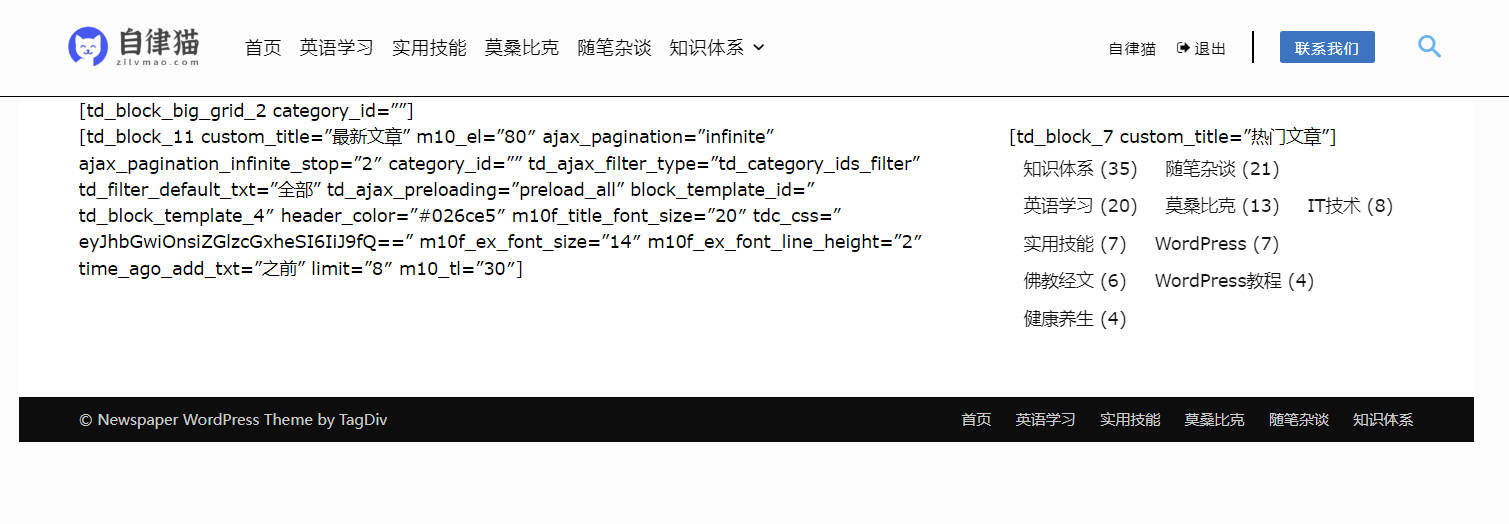
After updating to Newspaper 12.1, our website homepage has changed to black & white and displays a long page of code. The other pages are fine. Please suggest how to correct the homepage.
 tafieb
 Fatal error: Uncaught Error: Call to undefined function iconv() in /home/zbcnewsco/public_html/wp-content/plugins/td-composer/legacy/common/wp_booster/td_util.php:4250 Stack trace: #0 /home/zbcnewsco/public_html/wp-content/plugins/td-composer/legacy/common/wp_booster/td_css_res_compiler.php(58): mb_detect_encoding(‘{“all”:{“margin…’) #1 /home/zbcnewsco/public_html/wp-content/plugins/td-composer/legacy/Newspaper/includes/shortcodes/td_block_trending_now.php(196): td_css_res_compiler->load_settings(‘td_block_trendi…’, Array) #2 /home/zbcnewsco/public_html/wp-content/plugins/td-composer/legacy/common/wp_booster/td_block.php(1616): td_block_trending_now->get_custom_css() #3 /home/zbcnewsco/public_html/wp-content/plugins/td-composer/legacy/Newspaper/includes/shortcodes/td_block_trending_now.php(254): td_block->get_block_css() #4 /home/zbcnewsco/public_html/wp-content/plugins/td-composer/legacy/common/wp_booster/td_global_blocks.php(27): td_block_trending_now->render(Array, ”) #5 /home/zbcnewsco/public_html/wp-includes/sho in /home/zbcnewsco/public_html/wp-content/plugins/td-composer/legacy/common/wp_booster/td_util.php on line 4250
This is what I am getting when I try to do a simple edit of the homepage.
 aurelienmatte
Hi,
I’d like to try to do this (the exemple into the red rectangle) :

I’m thinking of a spreasheet but it doesn’t seem possible on a homepage.
What would be the best way to do it please ?
Thank you very much for your help 🙂
 Anamaria
 Hi,
Using our theme you can choose from 3 mobile versions
-> mobile responsive => https://www.screencast.com/t/oJ2ShOp47
-> mobile theme plugin => https://forum.tagdiv.com/the-mobile-theme/
-> mobile page => https://tagdiv.com/newspaper-10-3-7-update-brings-customizable-and-fast-mobile-pages/
If you created the mobile pages with tagDiv Composer, then when you install the Mobile Theme plugin, your pages will be overwritten by the plugin (the mobile theme comes with its templates for page, post, category, etc so your current templates from the desktop theme will get converted to the mobile theme layout, the page content is made without builders in mobile editor => https://www.screencast.com/t/xbgZG8kH also, the options that are provided to edit the mobile theme version are limited (this keeps the things simple)).
This is a video about Responsive Newspaper Theme, AMP & Mobile Theme, Mobile Pages & Templates -> https://www.youtube.com/watch?v=SpGkOnJeNZY
So, the mobile responsive is what you see then that you select the viewport on phone => https://www.screencast.com/t/matV17hH, so some settings may apply for each viewport(where is the border blue), and others are not(where the border is black).
The mobile page has the mobile templates from Cloud Library => https://www.screencast.com/t/YCcZ8rL8
Mobile responsive version of the theme and the mobile page editor can be edit with tagDiv Composer, the mobile theme plugin not.
For example, you can have the mobile theme plugin activate and use the mobile page/mobile responsive version for the homepage/pages, but for the categories pages/404 page you can’t use the mobile page/mobile responsive version if you have the mobile theme plugin activate.
So, if you want to design the pages with tagDiv Composer, you can use the mobile page or mobile responsive version.
Hope this helps you!
Thank you!
Anamaria Hello,
For logo please edit with tagDiv Composer, select the viewport on phone, select the header logo and change it => https://i.imgur.com/cR7F0v4.png https://www.youtube.com/watch?v=HXQQygkCCJo -> https://forum.tagdiv.com/add-logo-newspaper/
Seems you have the Mobile theme plugin activated, and it is disabled for the homepage. When you install and activate the Mobile Theme plugin, your pages will be overwritten by the plugin (the mobile theme comes with its own templates for page, post, category, etc so your current templates from the desktop theme will get converted to the mobile theme layout, the page content is made without builders in mobile editor => https://www.screencast.com/t/xbgZG8kH also, the options that are provided to edit the mobile theme version are limited (this keeps the things simple)).
Better deactivate the plugin and see the results
Also, if you create a mobile page, please make sure you assign it like this https://www.screencast.com/t/lektAhyjd
This is a video about Responsive Newspaper Theme, AMP & Mobile Theme, Mobile Pages & Templates -> https://www.youtube.com/watch?v=SpGkOnJeNZY
Please check this topic where I explained each mobile version -> https://forum.tagdiv.com/topic/mobile-version-not-working-properly-2/ and choose what mobile version you want.
Thank you!
 nwnuyhs
After the update, the homepage of my website was destroyed. It seems that the previous modules did not work. I re-created a new homepage page, and now it has returned to normal.
I’m just reporting this issue, no help needed
 axelrlt
Hi,
I have an issue on my homepage, as you can see on the screen below I setup a block (flexbox 1) with the lastest articles, but the lastest article is displaying at the right and left block (so x2).
https://imgur.com/a/9Jz2C6d
I saw there is an feature to exclude an ID but It doesnt fit to my need (multiple articles per day – too much time consuming) – is it possible for the same category/tag to show the lastest article at right, and second/third lastest article at left ?
Thanks in advance
 robbyyy
Hi – I have just implemented a version of Newspaper on my site and noticed that their is a significant delay in having the main menu load.
Please find the URL below:
https://www.platformexecutive.com
How do I fix this in order to speed things up?
If you browse the homepage, you’ll notice that the newspaper theme seems slow… with Google fonts taking a while to load too. Based on observations, any other ideas to speed it up?
I am using Hummingbird and Smush to optimise.
 Skudsi490
Hello,
I had installed the NewsPaper TodayNews Pro Theme and for some reason, the posts that should be in certain categories are not where they suppose to be on the homepage. I thought that it was my mistake and I deleted and reinstall the theme again where I needed to delete all the posts I was working on and took me a lot of time but it shows that the problem is from the theme itself.
For example: In the default homepage have Catagories for Entertainment, Celebs, Fashion, Travel, etc but under each category down the page, the post is only related to one category and not to the others.
Please Help!
 francescodanna02
Hi,
I’ve been set google site kit and all adsens for my personal site, this one is approved and all the options are setted.
I added adsense code in all the ads section inside the theme panel, but when i add an adbox in the homepage it doesn’t appears
 suraj barai
I want to design my homepage like cardekho.com
Is it possible to design or show my blog posts on slider like my example cardekho.com
Please visit this site on mobile and give me tips that how can I design that homepage with tagdiv or posts loop elements.
Please…
 sangminoh
We are creating a homepage using the news paper theme. There is no problem with the screen shown in the PC version, but when I access the homepage on mobile, the news paper logo comes out and changes to the logo I registered. Even if I log on again, the news paper logo comes out and changes to the one I registered. Why is it like this?

 sergbarkh
Hello,
I have added header menu in homepage via tagdiv editor, but it is not visible in categories and posts page.
Home page link is here https://www.staging8.businessinsuranceusa.com/news
Thank you!
Anamaria Hello,
Please check this topic with a similar issue https://forum.tagdiv.com/topic/tagdiv-composer-does-not-save-only-content-of-homepage/.
Thank you!
Anamaria Hi,
please check this topic https://forum.tagdiv.com/topic/tagdiv-composer-does-not-save-only-content-of-homepage/ if the settings are not saved.
Also, please make sure you don’t have an object cache.
Thank you!
 Bettina
 Hello!
Did you solve the issue? Because I can see your mobile homepage is working well.
If the issue is not solved, then we need to take a look and see what happened there.
Please contact us via email at contact@tagdiv.com and provide the following:
– admin url and credentials
– cpanel url and credentials
– a link to this topic in order to identify you
Thank you!
Anamaria Hello,
Please note that we don’t recommend you use WP Bakery anymore since there can be conflicts between TagDiv Composer and WP Bakery; also WP Bakery can’t edit the tagDiv Composer templates. You can use the cloud library and directly import a homepage template if you want: https://forum.tagdiv.com/homepage-how-to-build-and-set-it/
All the Cloud library templates are fully editable using tagDiv Composer.
Also, on our channel https://www.youtube.com/channel/UCOT1RiNysIPCTPSnVZskwtQ, you can find more videos that can help you and documentation https://forum.tagdiv.com/newspaper-theme-documentation/, and you can ask us here on the forum if you have any questions.
Thank you!
Anamaria Hello,
I think the problem is the settings are not saved; please check this topic https://forum.tagdiv.com/topic/tagdiv-composer-does-not-save-only-content-of-homepage/.
Also, please make sure you don’t have an object cache.
You need to edit with tagDiv Composer and change the font for each element that you want https://i.imgur.com/xp4zoTb.jpg
-> https://www.youtube.com/watch?v=SoGQ0d5kIBg -> https://www.youtube.com/watch?v=jQvA64uTLkI
Also, on our channel https://www.youtube.com/channel/UCOT1RiNysIPCTPSnVZskwtQ, you can find more videos that can help you and documentation https://forum.tagdiv.com/newspaper-theme-documentation/ and you can ask us here on the forum if you have any questions.
Thank you!
 nebofinance
 Hey friend,
Log in to you admin page. Go to Settings and click on reading and on the homepage dropdown select the page you want to make as your new homepage.
I hope this helps.
 darkap89it
Hi, after the latest update the “Primary Category” field in the Post Settings area is Resetting to “Auto select a category” each time I open the post inside Wp-Admin for the editing. In short: the module is not saving my choices.
This is also reflecting in the home page: now every new post has the first category shown, ignoring my own choice for the “Primary Category” and so the label shown.
The “Primary Category” I’m talking about is this one.
Example
1) I go online with this post: “Strictly come dancing: what happens tonight on BBC One”. It has categories: “Watch Now”, “BBC”, “TV”, “Live streaming”, etc
2) I’m selecting “BBC” as Primary Category in the Post Settings, because I want that category to be shown under the post title in the homepage (using Block 14)
3) Instead, the Home Page is showing “Watch Now”
4) I go back in Wp-Admin to edit the post and I find that Primary Category is set on “Auto” (while I had selected “BBC”)
5) I select again “BBC” and save the post
6) But it’s not working. Everytime I go back to editing, the field is on “Auto”. It’s not saving.
So, what went wrong? How to resolve?
 Aarti Shah
Hi
deleted homepage front-page because it was giving error in tagdiv. Tried to restore it but turned into Home. How do I convert it to Homepage front page?
Anamaria Hello,
I think the problem is the settings are not saved; please check this topic https://forum.tagdiv.com/topic/tagdiv-composer-does-not-save-only-content-of-homepage/.
Also, please make sure you don’t have an object cache.
Thank you!
 Sinis Group
Hello there,
I am trying to change the font family from the theme options and it does not change.
The same thing with the social links I am trying to put a Facebook link and it is not appearing on the homepage.
I believe that the theme options don’t respond to the front end changes.
 TGINN24x7!
Hi,
Please check the website – https://nrinews24x7.com We have to understand how to remove this loader – http://sc.com.ly/show/6a237ffe-fffc-44d8-962e-bcf09958160a from the theme because we don’t want it
 luigiboschi
Hi there.
I have an issue with the ads.
I have placed Google Ads code inside the custom ad block of the theme and then added it inside the homepage, below the image grids.
However, 3 ads appear instead of 1


