
- NewspaperHomepage – How to build and set it
- NewspaperHow to edit modules for Flex Block X
- NewspaperGeneral Options that May Interfere with the Newspaper Theme
- NewspaperThe Newspaper Mobile Theme: Introduction
- NewspaperHow to Add a Logo in Newspaper
- NewspapertagDiv Shop
- NewspaperHow to Use tagDiv Cloud Library
- NewspaperDesign your Post Pages using the Cloud Library Templates
- NewspaperHeader Builder
- NewspapertagDiv Cloud Library Plugin
- NewspapertagDiv Composer Tutorial
- NewspaperNewspaper theme documentation
- NewspaperThe Mobile Theme
- NewspaperPage templates
- NewspaperTheme Colors Introduction
- NewspaperFooter Builder
- NewspaperMain Menu
- NewspaperPre-built Websites: Introduction
 AhmadiKatu
 Hi Bettina,
I have problem when I trying to create homepage using tagdiv, my blog will be showing a error (refer https://imgur.com/a/yq2r0au).
Please advice
thanks
 Bettina
 Hello!
Can you let us know what exactly you need to achieve? You can use the default version if you do not edit the page with the tagdiv composer. Check the guide: https://forum.tagdiv.com/homepage-how-to-build-and-set-it/
Thank you!
AhmadiKatuHi, just want to ask who have homepage default for newspaper theme? Can share with me?
 technologyinnovatorsmedia
 our home page gone
we are getting error like this
Error at zones: 6(models) : 7(dom). The model does not match the content Current state has involved an issue. You could try an UNDO operation (CTRL+Z / CTRL+SHIFT+Z)
Homepage – Free News
this one home page need but its not import also
Please check soon what its going on
 KatiaWaegemans
I have an image block in the right column of my site (www.theveniceinsider.com, on pages, not homepage) which shows 2 images of my books. There is however a dark overlay on top of it which I don’t find in the settings. Can I remove this? I would prefer the real colours to show.
 aline@nordsip.com
 Hello Bettina,
Yes, I have built a mobile page etc. but the ad does not show there. That’s my problem. Do you know what can be wrong?
Just to recap:
1) The ad is set up in “custom ad 1” in format 320×320 with Google Ad Manager code.
2) If I set up the ad in an ad box on top of a page in desktop view, it works.
3) If I view a page with this ad box in mobile, I can see it provided I don’t have a mobile page associated with it.
–> the problem arises when the ad box is set up in a custom mobile page. The it doesn’t show.
You can see this when you go to nordsip.com on a mobile. The mobile homepagemobile should show a 320×320 ad but it doesn’t. I’ve also set up a test page here: https://nordsip.com/irri-survey-2019-the-nordic-cut/
There you can see that there is no mobile page but there you can see the ad in both desktop and mobile.
Bettina Hello Aline!
You can hide any shortcode, including the ad box shortcode, on each viewport. You can hide it on desktop and tablet viewport and make it visible only on mobile: https://app.screencast.com/ocBb9hWOVZRPs?conversation=hTxKinRUQnBBLCqE2JpJlM
Also, you can build a mobile page, copy homepage content, and add your ads with the help of the Ad box too. Mobile pages: https://tagdiv.com/newspaper-10-3-7-update-brings-customizable-and-fast-mobile-pages
Thank you!
Bettina Hello!
Make sure you’ve placed them in the right place. Do you have any errors? Ads won’t show until your site is reviewed and approved. Make sure you do not have any ad blockers in your browser. I can see some ads on your homepage, but the ads are using images. Our theme will only display the ads as they are. Also, make sure the code you’ve added is correctly written.
Thank you!
 Simion C.
 Hi,
To clarify, the composer can be used for static pages only, the wordpress default blog page as shown here https://ibb.co/PG13VnzT will not have the option to use the composer.
Clicking on the logo will always direct to the website homepage.
If we can help with something on the website, then I suggests to send us an email at contact@tagdiv.com and there you can provide a link to the website, admin login, and details about the problem or what you would like to do. This way we can help directly on the website. Let us know at any time.
Thank you!
Bettina Hello!
Yes. You can also have multiple post templates in the Newspaper theme. You can duplicate the existing post template from the Cloud templates: https://app.screencast.com/FADNKzU6PHwpG, give it another name, make the changes in the tagdiv Composer(in your case, delete the featured image), and then assign it to your special posts. There is an easy way to assign a post template depending on its category. This can be done from the theme panel settings -> categories -> per category settings.
More documentation about the cloud templates is here:
– https://forum.tagdiv.com/cloud-library-templates/
– https://forum.tagdiv.com/design-post-pages-using-cloud-library-templates/
– https://forum.tagdiv.com/cloud-library-category-templates/
About pages here: https://forum.tagdiv.com/page-templates-2/ -> https://forum.tagdiv.com/homepage-how-to-build-and-set-it/
Check out this video about how to create a website from scratch: https://www.youtube.com/watch?v=SoGQ0d5kIBg
Thank you!
 nikkigaskins
Hi there,
I just recently installed the Newsmag template.
I’m currently facing two dilemmas.
PROBLEM #1: The right side of my posts look so empty right now. (See example: https://www.berkeleyobserver.com/2025/05/02/berkeley-county-enters-drought-as-dry-spell-worsens/) How do I add the widgets that are on my homepage to the posts of my articles?
I attempted to add the widgets to my posts by going to Appearance –> Widgets; however, after uploading this Newsmag, I’m missing A LOT of blocks.
For the homepage, I used the TagDiv Composer to drop/drag the widgets. I don’t appear to have that option with article posts.
PROBLEM #2: Because I appear to be missing a lot of blocks, I believe this is why I also cannot also edit the footer.
Any assistance with these two issues would be greatly appreciated. I have tried to YouTube the solution and Google it, but I’m striking out.
Thank you for your help with this!
Sincerely,
Nikki
Simion C. Hi,
Numbered pagination in the homepage can be added by selecting this page template https://prnt.sc/qPU10cU0DhP1 That template will add a post loop at the bottom of the page, with numbered pagination. From what I see at this time you are using the fault page template, please edit the page and set the page template with pagination instead. Please try it.
Thank you!
 abirahemmed
Hello, everyone!
I hope you’re all doing well. I’m encountering an issue with my homepage, and I’m hoping someone here can help me out.
For some reason, the “Next Page” option that typically appears on my homepage (for pagination) is no longer showing. I’ve checked everything I can think of, but I’m not sure where the issue lies.
Has anyone experienced something similar or know where I can find this option? Any guidance on how to restore it would be greatly appreciated!
Here is One Website With the Next Page Option: https://ibb.co/k60hNbQ4
And check my website, no option there: https://topbuzztimes.com
Thanks in advance for your help!
 petar.dodevski
Website homepage and most of the page templates are rendering code instead of the actual content after latest update.
Tried to revert to the previous version, still the same.
website: sportmanija.mk
 YoonHo, Lee
 No. The layout at the top of the homepage is cut off.
Could you please check my video & image (link)?
https://drive.google.com/file/d/1lcgFSIo5L_JNHBdKAO_Gw_bWuz_Gb-FY/view?usp=sharing
https://drive.google.com/file/d/1jJrQVtfd8GlkpnKmr8tAn1jsHQJ0tAPT/view?usp=sharing
Bettina Hello!
Can you see the issue while you edit the homepage with the tagdiv Composer? If not, then it could be a browser glitch.
Thank you!
YoonHo, LeeHello. Thank you for your hard work.
BlockChain PRO pre-built theme (including content) has been successfully installed.
After that, the first section of the homepage works normally on large screens. However, on mobile (small screens), there is an issue where the pages overlap behind the menu, or the screen is cut off and overlaps again after a little manipulation.
It seems that the basic settings such as height are different from the example (sample) theme. Please let me know what to do.
* Use the latest version of Chrome browser on desktops (PCs).
* Use iPhone and Chrome browser on mobile devices.
* Please refer to the attached My site, video, and images.
https://xn--9y2bv4wp6fc6a.com/
https://drive.google.com/file/d/1lcgFSIo5L_JNHBdKAO_Gw_bWuz_Gb-FY/view?usp=sharing
https://drive.google.com/file/d/1jJrQVtfd8GlkpnKmr8tAn1jsHQJ0tAPT/view?usp=sharing
 fnewsmag
Molongui Co-Authors plugin seems to work great for co-authors except for this one critical glitch –
when using the tdb_module_author_name block inside of a custom module, it seems like my admin author is always listed instead of the correct author name. Curiously though, it does seem to link the href to the correct author page. Therefore, on category pages such as fnewsmagazine.com/category/news where i’m using the module template, the author is always fnewsmagazine, although when clicked it does bring you to the correct author. This can also be seen on our homepage and the date archive page. It just says F Newsmagazine as the author rather than the actual authors and co-authors.
In contrast, it works properly (including the multiple authors) on the author page we’ve created, which is using the Flex Block 1 element – td_flex_block_1
shown here: https://fnewsmagazine.com/wp62/author/d-l-adams/
One other curious element of this – when i load the module template editor, it lists the admin author in the box, but when i place a new author name module block in the composer, it does correctly get the name of the author, however when i save and reload the template, it seems to load the admin author name again instead of the correct author.
Disabling the Molongui plugin stops this behavior. I’m using the latest versions of TagDiv and Molongui
Thanks for your time in looking into this!
In the meantime, i’m curious if I can just add a shortcode that molongui provided in this link explaining the integration issues with TagDiv in place of the author module name. The link says to just add a text element with [[molongui_byline]] shortcode in it, however it seems like when I add an inline text with the shortcode as the content, it just shows the shortcode code and doesn’t actually display the data. Let me know if you have any guidance on this as well.
Thanks for your time!
Bettina Hello!
Make a test and deactivate ALL plugins except the tagDiv ones. Also, if you are using a cache plugin, deactivate it, clear all cache, and try again.
For more customizations, please import a header cloud template.
We recommend using cloud/PRO templates to have the possibility to edit them with the TagDiv Composer, which contains a lot of functions and features; please check our tutorial here: https://forum.tagdiv.com/tagdiv-composer-tutorial/
More documentation about the cloud templates is here:
– https://forum.tagdiv.com/cloud-library-templates/
– https://forum.tagdiv.com/design-post-pages-using-cloud-library-templates/
– https://forum.tagdiv.com/cloud-library-category-templates/
About pages here: https://forum.tagdiv.com/page-templates-2/ -> https://forum.tagdiv.com/homepage-how-to-build-and-set-it/
Check out this video about how to create a website from scratch: https://www.youtube.com/watch?v=SoGQ0d5kIBg
Thank you!
Bettina Hello!
Make sure your homepage SEO Title is set correctly in Yoast: In WordPress, go to Yoast SEO → Search Appearance → General. Check the Homepage title settings.
If you have a static page set as homepage, go to Pages → Edit Homepage → Yoast SEO section, and set the SEO title. Your SEO title should be something like:
Home – My Awesome Site
Google decides what to show even if you set it correctly in Yoast. Sometimes they: Ignore your SEO title if they think another text is clearer.
Temporarily show the URL if the page title or content is missing/broken.
Again, check the live page using Google’s URL Inspection Tool and Request Indexing.
If you have wrong or strange redirects, Google might get confused about which page to show. In Yoast, make sure no weird canonicals are set manually.
Chekc this guide to see how you should set the homepage: https://forum.tagdiv.com/homepage-how-to-build-and-set-it/
Thank you!
 detlev
Hello dear support team,
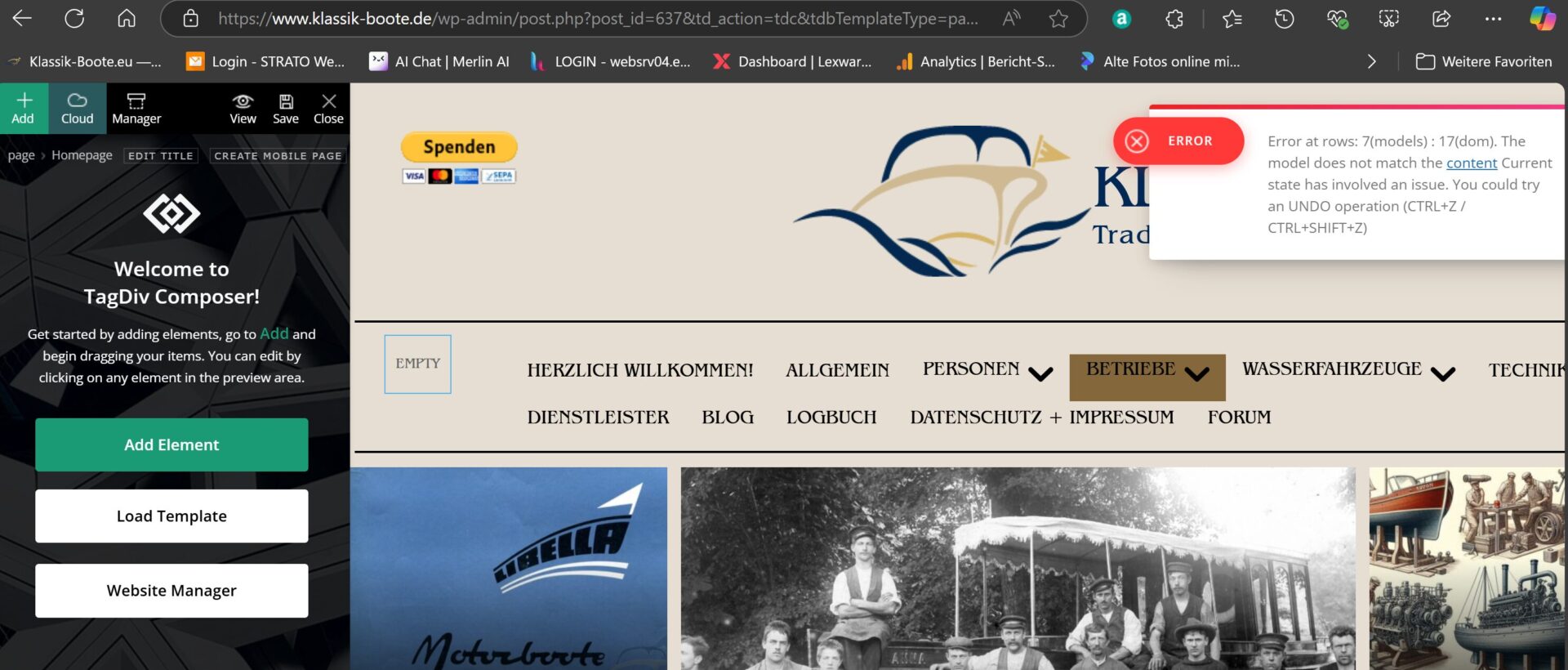
I urgently need your support. I suddenly get an error on the homepage without having changed this page. Can you see the mistake? Unfortunately, I can’t edit the page with the tagDIV composer either. The error message is:
Error at rows: 7(models) : 17(dom). The model does not match the content Current state has involved an issue. You could try an UNDO operation (CTRL+Z / CTRL+SHIFT+Z)
Would you please help me? Thank you for your great work.
Kind regards Detlev
 munnyndonuts
Hello again! So I’ve made sure to check my Homepage title in both WordPress and my Yoast SEO plugin, but for some reason, whenever my site shows up in Google search results, it displays the site URL and not the title itself. Using the Echoverse theme for reference. Is there a need to edit the H1 from the theme file editor or something? Thanks!
Bettina Hello!
Please make sure that the block from the homepage doesn’t have any offset value: https://app.screencast.com/o6aa6j75BHWn8 -> https://forum.tagdiv.com/offset-feature/
Thank you!
Bettina Hello!
Please edit the homepage with the tagdiv Composer, access the mobile version, and edit the page from that modal: https://app.screencast.com/rX6iLJpheqPNg -> click on the blue button tagdiv Composer and customize the page as you want: https://app.screencast.com/oPm0o4UUzsj8s
Thank you!
 Anamaria
 Hello,
Please disable the AMP and tagdiv mobile theme plugins. AMP is deprecated as of January 2023-> https://developer.bigcommerce.com/docs/storefront/wordpress/platform-integration/enabling-amp so we don’t longer recommend it.
Using our theme, you can choose from 3 mobile versions
-> mobile responsive => https://www.screencast.com/t/oJ2ShOp47
-> mobile theme plugin => https://forum.tagdiv.com/the-mobile-theme/
-> mobile page => https://tagdiv.com/newspaper-10-3-7-update-brings-customizable-and-fast-mobile-pages/ The option that you need to use.
Suppose you created the mobile pages with tagDiv Composer. In that case, when you install the Mobile Theme plugin, your pages will be overwritten by the plugin (the mobile theme comes with its templates for page, post, category, etc, so your current templates from the desktop theme will get converted to the mobile theme layout, the page content is made without builders in mobile editor => https://www.screencast.com/t/xbgZG8kH also, the options that are provided to edit the mobile theme version are limited (this keeps the things simple)).
This is a video about Responsive Newspaper Theme, AMP & Mobile Theme, Mobile Pages & Templates -> https://www.youtube.com/watch?v=SpGkOnJeNZY.
So, the mobile responsive is what you see when that you select the viewport on phone => https://www.screencast.com/t/matV17hH, so some settings may apply for each viewport(where is the border blue), and others are not(where the border is black).
The mobile page has the mobile templates from Cloud Library => https://www.screencast.com/t/YCcZ8rL8
The Mobile responsive version of the theme and the mobile page editor can be edit with tagDiv Composer, the mobile theme plugin cannot.
For example, you can have the mobile theme plugin activated and use the mobile page/mobile responsive version for the homepage/pages, but for the categories pages/404 page, you can’t use the mobile page/mobile responsive version if you have the mobile theme plugin activated.
So, if you want to design the pages with tagDiv Composer, you can use the mobile page or mobile responsive version.
Thank you!
