
- NewsmagHomepage – How to build and set it
- NewspaperHomepage – How to build and set it
- NewspaperHow to edit modules for Flex Block X
- NewspaperGeneral Options that May Interfere with the Newspaper Theme
- NewspaperThe Newspaper Mobile Theme: Introduction
- NewspaperHow to Add a Logo in Newspaper
- NewspapertagDiv Shop
- NewspaperHow to Use tagDiv Cloud Library
- NewspaperDesign your Post Pages using the Cloud Library Templates
- NewspaperHeader Builder
- NewspapertagDiv Cloud Library Plugin
- NewsmagtagDiv Composer Tutorial
- TutorialsFrom WPBakery to tagDiv Composer
- NewspapertagDiv Composer Tutorial
- NewspaperNewspaper theme documentation
- NewspaperThe Mobile Theme
- NewsmagNewsmag documentation
- NewsmagMain menu
- NewsmagLogo & Favicon
- NewsmagPage templates
 bel
belGood Afternoon,
The mobile theme does not seem to be displaying the 3 post grid on the homepage. I can’ figure out any way to configure this, its only showing the individual post list.
seesomethingnew.com.au
Do I need to change a setting somewhere?
Kind Regards
Bel
 kevintunis
Where do I find the page template “homepage one top post”?
 letsteach
Site: http://www.Lets-teach.com
Issue: I would like to remove TEACHER RESOURCE REVIEWS (scroll down on the home page and you’ll see this section before LATEST ARTICLES). I’d like to replace that section with one called EDUCATION IN THE NEWS. It seemed very straight forward when I did this months ago but for some reason I’m unable to figure out how to edit the home page.
Thanks for your help in advance.
 sainthilaire
Hi i have some problem with mobile theme because it lost the style for example this categary http://www.sabanetasr.com/category/locales/ doesnt see like the others or the homepage style. Also this post http://www.sabanetasr.com/empresario-se-quita-la-vida-noticia-proceso/ lost the style and i cant see it in the mobile homepage
 Nano
NanoHey,
look at this image:

There is so much gape between the header and the first block of the homepage ( Big Grid). Similarly, when I tried to add “Facebook Like Page plugin” on the right side, there was so much gape between one block and other.
How can I narrow this gape?
Thank you
 Equapio
Hi
i want to display an overview of all categories and sub-categories of my page like this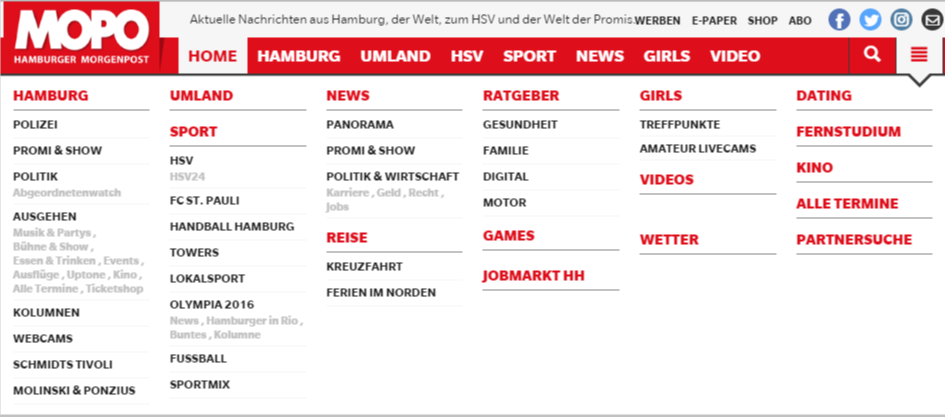 in the main menu under the 3 bar icon.
It looks good and correct on the main page but as soon as you view (click on) the nav icon from a different page or post the overview is displayed from top to bottom instead of next to each other like this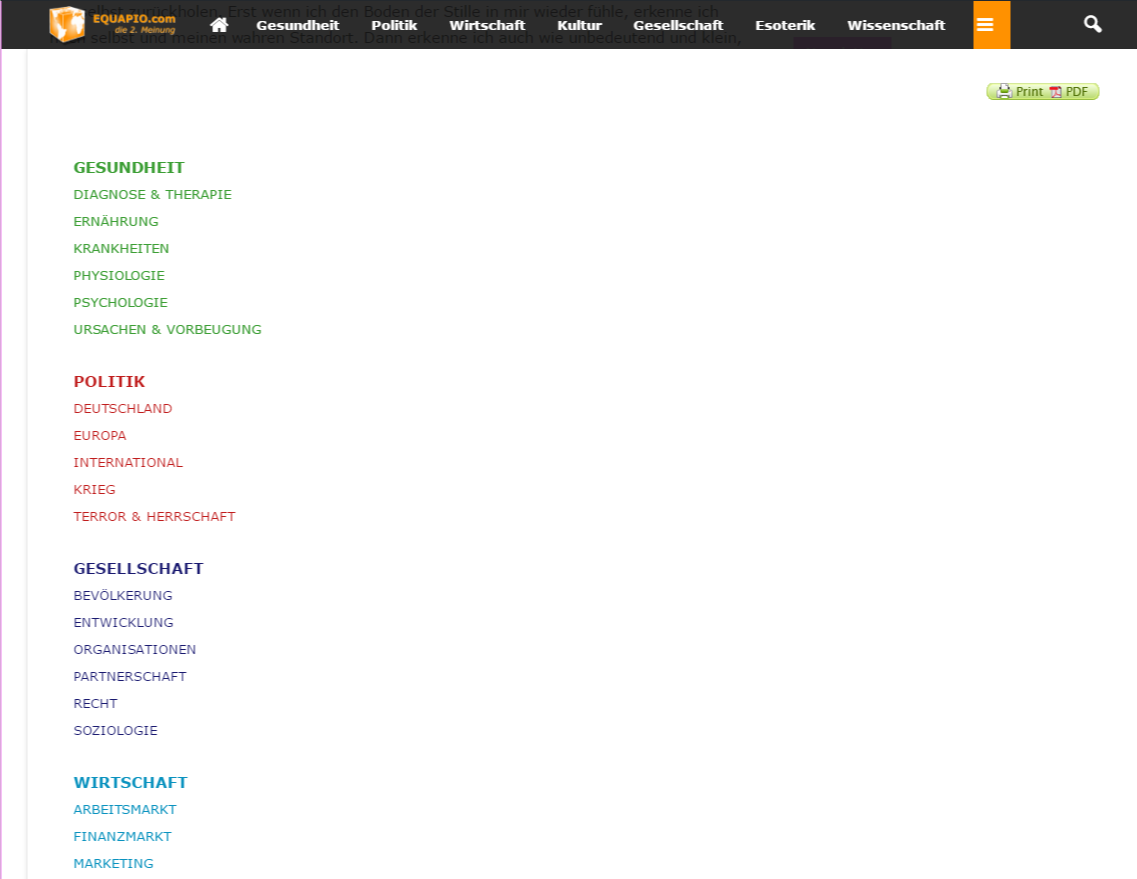 without being able to scroll.
I created the page with the visual composer using a blue layout (3 columns). Why does it work on my homepage and not on other pages and posts?
i actually like to have 6 columns like in the example pic and since you recommend not to use other layouts i tried it with a table. But the table won’t show proberly either.
Any advice how to get it done as in the example pic showing correctly on all pages and posts?
Help is much appreciated!
Thanks in advance
NanoHey,
On every big grid top post layouts, I only see only one animation effect that is Zoom-in. Since it appears on all themes made on Newspaper theme. It steals the “uniqueness” of it. I have seen many homepage image animations like “image slides left or right” after hovering.
Can’t we do something with it?
Also, how to disable it or how can I enable it some of the blocks too?
Please reply. Thank you.
 Lewis
LewisHello there
How can i change Travel demo background? i install the demo but i couldnot find the background in homepage
newsmag 2.3.7
thanks
 WakeUpCallProject
Hi,
Need some help on the following please:
1) Sidebar on the homepage pushes down the other block categories:
http://smallcaps.com.au
How can I have it be a normal looking sidebar?
And for mobile to have the sidebar load in-between the end of the content and before the footer?
Here is an image of it pushing down content leaving a big white space:
http://smallcaps.com.au/wp-content/uploads/2016/08/Sidebar-pushing-content-down-on-homepage.jpg
2) How do I remove the submenu that is the same as the main menu?
http://smallcaps.com.au/wp-content/uploads/2016/08/Remove-submenu-identical-to-main-menu.jpg
3) How can I reduce the gap in the footer between the social media icons/free newsletter and the copyright section?
http://smallcaps.com.au/wp-content/uploads/2016/08/Reduce-gap-in-footer.jpg
There is a bit too much black space.
4) In the sidebar the “Follow us on Facebook” part of the widget shows up black. How can I make the heading text white to match the others?
http://smallcaps.com.au/wp-content/uploads/2016/08/Sidebar-Facebook-text-to-be-white.jpg
Thanks in advance
 blessingsanyanga
i bought newspaper theme yesterday and have just installed it to my wordpress.the problem is that the social counter is showing something like this:
[td_block_social_counter custom_title=”” style=”style5 td-social-boxed” facebook=”tagDiv” facebook_app_id=”1681822448721994″ facebook_security_key=”0c9736ad42429693db22e688e7c8f2bc” facebook_access_token=”1681822448721994|6bEmHSty2HH0MY5hgco64Jd7m5U” twitter=”envato” youtube=”tagDiv”]
how can i have the social counter working on my homepage and remove this coding language which i do not understand
Please help
 Arved007
 Hi, Andre.
I’m also interested in this.
I want to use the video format due to the “play” icon outside the article (visible on homepage and categories), but at the same time display the featured image inside the video post and embed the code manually where I want. It would be really useful if we can set the video format and if not video is set in the right menu, the theme displays the featured image we uploaded.
Is that possible?
Thanx in advance.
-
This reply was modified 10 years by
Arved007.
 nigelpradeep
Hi,
I need some help in implementing this code to the Newsmag theme. It’s for the Event Calendar widget.
This link shows how to do it – but not in an ELI5 way. I have no clue how to go about doing it, please help.
https://www.wpfangirl.com/2015/modifying-the-list-widget-in-events-calendar-pro-to-show-images/
Regards,
Nigel
 cyberlism7
Hi guys
When I press the “search” icon on the top-right corner of my site on a mobile device, the whole content block floats up.
From there I can’t scroll down to see the rest of the homepage. The only things I can do are clicking on the post, and refreshing the page to be able to scroll down again. Please advise me on how to fix this.
Thanks in advance!
 blogatrompa
Hello
I’m trying to disable the homepage latest articles and sidebar block but I’m stucked and I don’t konw how…
Can you help me please?
Thx
Rui
 Catalin
 Hello arnaudl,
As for the image sizes, there is no ideal image size I can recommend. You will have to assess the containers and thumbs you plan on using on your site and the post templates as well. if you use post templates that use the full-size images like: http://demo.tagdiv.com/newspaper/td-post-2015-awards-all-of-the-best-and-worst-moments-from-the-show/ then a full-width image is required. If not, you need to inspect every element, especially on the homepage. If you use big grids, your images must be at least the size of the big grid container otherwise, they will not fit inside and not display properly. Here is a list of all thumbs used in our theme:
https://forum.tagdiv.com/theme-thumbs/ also -> https://forum.tagdiv.com/thumbnails-vs-featured-image-size/
Hope this helps!
Thanks for your understanding!
 mpdimitrov
Hi,
I want to know how can I turn off repetition of posts on the mobile theme. On my homepage – http://fintechroundup.com/ in the mobile version we have the three articles at the top which are marked as featured, but they then show in the latest articles below as well. I want them to only show in the top three articles at the top to avoid duplicate posts.
Thanks!
 Bogdan B.
 Hello,
The theme’s modules and blocks will not pick up the colors of the category tags you set in the theme panel. That option is for posts only. The homepage has all of it’s category tags the same color. I cannot provide any solution for this unfortunately. CSS cannot do that. it will have to be done through hard-coding which falls beyond what the theme support can offer you.
Thank you!
 SirBrayden
The theme is working excellent!
In the live preview demos of the theme with the “news ticker” Visual Composer feature, the ticker is equidistant from the blocks and the menu. No matter how I change the spacings within the Visual Composer I can’t get this to happen. Is there some custom CSS I need to add in the Theme Pannel to make this possible for the homepage only? Specifically just editing the pixels from menu on the top of the homepage? (Spacing good on all other pages) Thanks!

 gossiponthis
 Thanks for the update, glad to hear you guys plan on making updates to the post, homepage and smart templates.
Our responsive mobile site was slow, clunky, cluttered and FULL of those nasty ads that redirect you off the page and sends you to the app store, Google Play store or some weird, unobscure blank page. The mobile theme takes care of ALL of that, so overall, I’m happy, and our readers are happy that they can finally view our content on smartphones 🙂
Thanks again, and looking forward to the updates. Keep up the great work!
 PkChris
Hi, I’m having trouble importing the Newspaper politics demo slider. After importing the slider in the slider revolution options I see the message “ERROR: The param slider_template_id not found in slider params.” When I try to save the slider options I get the error “The slider should have a template, please create a slider through ‘Create New Slider Template’ that will be a template to this slider.” When I try to view the slider on the homepage I see the message “Revolution Slider Error: The param navigaion_type not found in slider params.” I’m using the latest version of the Newspaper theme on a fresh WordPress install.
Thanks!
 christinarroot
I am having a problem changing the Title’s background and text colors for my sidebar widgets. Currently, thee backgounds are white and the text is green, they should be the reverse.
This can be seen in this screenshot: https://www.dropbox.com/s/7pzmhbsyy1pfsie/Screenshot%202016-08-25%2009.00.17.png?dl=0
This is the URL for the homepage where the problem exists:
http://anythingpawsable.com/themebuilder
Bogdan B. Hello,
You can show anything you want on a static page. Either a list of all posts, or a list of specific posts or a grid or blocks etc.
Please use this guide to see how you can create a homepage: https://forum.tagdiv.com/homepage-how-to-build-and-set-it/
Also start using visual composer a bit to get a feel of what can be created with it. Only through visual composer can the theme show it’s blocks and grids and other cool content.
Thank you!
Bogdan B. Hello,
Our theme does not have different image spots for the post and for the homepage blocks unfortunately. Our theme only uses one featured image creating different size thumbs for it and used both on the post itself and on modules and blocks.
I will add this to our list of feature requests and if it grows in demand we will consider implementing such an option.
Thank you!
 Carmelo Nicolosi
Hi, i have a strange problem…after updating theme all seems ok but every link (post, menu, etc…) on the homepage does’nt work. If i open that links on another page they are ok…but if i clik on the link normally nothing appen…like i have no clik.
Can you help me please?
my site is http://www.falcri-is.com
Bogdan B. Hello,
Thank you for your appreciation. Customer feedback is very important to us. You can also rate us if you want from this link 🙂 https://themeforest.net/item/newspaper/reviews/5489609
To the matter at hand, we do plan on implementing further options into the mobile theme. For the moment it;s only version 1.0 and we launched it to see if it grows in popularity and if users like it so we can asses if we will spend time and effort into improving it and adding more options to it. The mobile theme is a success and we will add updates to it and implement more options in future updates. But for the moment the there is only 1 smart list style and 1 post template and one homepage template. It’s limited, I know, but we plan on updating and providing more options in the future.
Thank you for your understanding.



