
- NewsmagInstall via WordPress
- NewsmagInstall via FTP
- NewsmagInstalling pre-built websites
- NewsmagUsing the theme translations together with WPML
- NewsmagHow to update a plugin
- NewsmagNewsmag theme support
- NewsmagCustom Post Type Support
- NewsmagImport / Export theme settings
- NewsmagHow to add icons in the menu
- NewsmagRequirements for Newsmag
- NewsmagNewsmag documentation
- NewsmagHow to update the theme
- NewsmagBlock settings tutorial
- NewsmagHow to update the WPBakery plugin
- NewsmagIntroduction
- NewsmagMain menu
- NewsmagFeatured image or video
- NewsmagAuthor card
 unnanego
Fresh install with php 8.3 and all the limits set to way more than recommended
 Calin
Calin Hi,
When installing the theme on a new domain or moving it to a new server, the cloud access provided will include what is available in our cloud setup, not the custom changes you’ve made.
If you want to move from one server to another, please make sure you migrate your website. This will ensure that everything you currently have is transferred correctly.
https://www.wpbeginner.com/wp-tutorials/how-to-move-wordpress-from-local-server-to-live-site/
Thank you!
 owentomm
We configured and customized the Newspaper theme on a development server and are preparing to go live with it on our production server. Will our customized Cloud Library templates be available to us on the other server/WordPress installation when logged in with the same account?
We have for example, imported the Single Post Template – InsightAI template but then applied our own customizations using the tagdiv editor. Are those changes synced?
Thank you
 keverix3
I have had your themes for years and I don’t think I have ever had it set up properly for Google indexing and my rankings have always been low. Since I started doing a deeper dive into AI, I have discovered my titles on my posts are not <h1> which is a Google requirement and my Meta tags, Meta descriptions and Canonical tags were all missing … FOR YEARS. Upon researching the Newspaper theme, I have gotten feedback that you do not supply these elements with your theme and I am unable to find any documentation on how to implement them with your theme. Is this correct? I do not use Yoast, Rank Math or AIOSEO because they are very bait and switch and they consistently bombard you to upgrade to a paid app and with ads which is extremely annoying. I have paid for that before and when I cancelled my xml got screwed up. I have tried to install MU plugins to fix the current issue but your theme keeps overriding my settings with the default settings, sending me back to square 1. Your tagdiv plugin is also installing Internet Explorer references in the first few lines of my site which has been obsolete for years. Before switching to a whole new theme for all my sites can you assist with this extremely important issue?
Calin Hi,
Which version of the theme were you using before updating?
After a theme update, it’s usually necessary to install or update some theme plugins, such as tagDiv Composer, tagDiv Cloud Library (for cloud templates), and tagDiv Standard Pack (for older templates and blocks).
If you’re using the newsletter plugin or the social counter, those plugins should be installed as well.
All theme plugins can be installed, updated, and activated from Newspaper → Plugins – https://forum.tagdiv.com/newspaper-how-to-update-a-plugin/
 petar777
 Hey there, I installed v12.7.4 (was on v12.7.3) and the problem persists.
Our home page is made of a few rows (each with a sidebar) and on desktop it looks like this https://ibb.co/xtNbYk4M
On tablet landscape we keep the sidebar by not touching the settings at all. On tablet portrait I want to hide the sticky column because the screen is too narrow. Instead I want to show the columns with full width as on mobile.
To achieve this wherever we have these rows (with 2 columns) I set the column width to 100% on both to achieve full screen width. On the desktop’s sidebar sticky column I just uncheck the sticky checkmark and I believe that it should work. What happens, however, looks like this, check the urls below.
1. https://ibb.co/vvPDDnbp
2. https://ibb.co/0RqZsM75
3. https://ibb.co/VWhxnW51
4. https://ibb.co/Pz0VJfPb
It looks all mixed up.
In the composer it seems to look fine:
1. https://ibb.co/C3xLSddg
2. https://ibb.co/5WYyQH7n
I have set the column (which is sticky on desktop) like this:
1. https://ibb.co/TqKTFHRf – here you can see that I have the sticky checkbox unmarked.
2. https://ibb.co/ZpxcCj8G – here you can see the way I set its width to 100% (I did the same thing for the width for the first column, which is nonsticky on desktop).
Please give me guidance on how to fix this because it is really annoying. See that on mobile it works perfectly but you can see how the sticky checkbox is greyed out by default – why is that?
1. https://ibb.co/Q7Sthxwh – maybe it has something to do with this issue? I want to achieve the same result but on tablet portrait.
 Calin
Calin Hi,
In case you see shortcodes on your website when you are logged in, then some theme plugins are not installed. Have you checked whether the theme plugins are installed and activated? The same theme plugins that you had before the theme update should also be updated and enabled. Those can be installed from the newspaper > plugins. You need to have tagDiv Composer, tagDiv Cloud Library, and for old templates, you’ll need tagDiv Standard Pack plugins (those are the most used theme plugins).
Thank you!
Calin Hi,
Unfortunately, in your situation, it won’t be easy, and most likely you’ll need a developer to update the theme from the old version you are using to the latest version, 12.7.4.
Normally, you should update both the theme and the theme plugins. In your case, you need to install the following plugins: tagDiv Composer and tagDiv Standard Pack. If you are using any other theme plugins, those also need to be installed or updated. This can be done from Newspaper > Plugins.
When the theme is updated, it will be replaced with the new version, so all changes made directly to the theme files will be removed. If a child theme is used, it should be disabled and updated to the latest child theme version provided in the theme package from ThemeForest.
If you would like one of our developers to update the theme for you, please contact us at services@tagdiv.com and provide FTP and WP-Admin access. One of our developers will check your setup and let you know if we can help and how much it will cost.
Thank you!
 chiku212
Hi tagDiv Team,
I am using Newspaper theme v12.7.4 on my live site:
Hosting: Hostinger Shared Hosting
WordPress Version: 6.9
PHP Version tested:
– PHP 8.2.27 (default)
– PHP 8.1.31 (downgraded)
Problem:
As soon as I activate the plugin “tagDiv Composer” (td-composer), WordPress admin AJAX breaks.
When I open:
https://odishajobsdesk.in/wp-admin/admin-ajax.php
Instead of returning “0”, it shows wp_booster errors like:
– The tdc_state::$is_live_editor_ajax is NOT set
– wp_booster error: component with ID tds_util is not set
– Missing parameter: file
File paths:
wp-content/plugins/td-composer/legacy/common/wp_booster/td_api.php
wp-content/plugins/td-composer/legacy/common/wp_booster/td_autoload_classes.php
Effects:
– Newspaper panel shows “Ajax error” for Composer and Cloud Library
– Plugin installer fails
– WordPress login shows:
“Cookies are blocked due to unexpected output”
– Dashboard becomes unstable until td-composer is disabled
If I rename td-composer folder, admin-ajax.php returns normal “0” again.
Request:
Please provide the latest PHP 8.1/8.2 compatible td-composer build or advise the correct plugin/theme version combination for Newspaper 12.7.4.
Thank you.
Calin Hi,
Have you tried translating that template before? I just ran a test and noticed that when using the Duplicate option, the template can be duplicated for the other languages https://imgur.com/DPOXyzs
If possible, could you provide temporary wp-admin access to the website? We’d like to check it directly and see what might be happening with your installation. Before doing so, please make a full backup of the site.
After that, contact us by email at contact@tagdiv.com and include the wp-admin access details so we can investigate the issue further.
Thank you!
 jmanz
jmanzHello,
I need to update the license key for my site, but I am unable to do so in the backend.
The Issue: My site was originally installed using a different license key that I no longer have access to. I have purchased a new license, but when I go to the “My License” tab, I only see the “Manage your domains” message.
There is no input field to enter my new purchase code and no button to deregister the old one.
Please let me know how I can clear the old activation data so I can register my new key.
 wesicily
 Good morning,
as you can see from the screenshots I attached, even after following exactly the procedure described in your guide and in the forum thread, the Cloud Templates with WPML are still not working correctly.
I have been trying to solve this issue for several days now without success, and I am honestly struggling to make it work.
I have:
– duplicated the Cloud Templates for the other languages
– tried assigning them correctly
– followed your documentation step by step
– checked both WPML and theme settings
Despite this, the templates are not being properly linked to the correct language, or duplicated items are created but remain in the original language.
At this point, I strongly suspect there may be a bug in the theme or a real compatibility issue with WPML in my installation.
I kindly ask you to help me identify the exact cause of this problem, because right now I do not know how to proceed further.
I look forward to your technical feedback.
Thank you for your support.
Best regards


 damirvujinovic
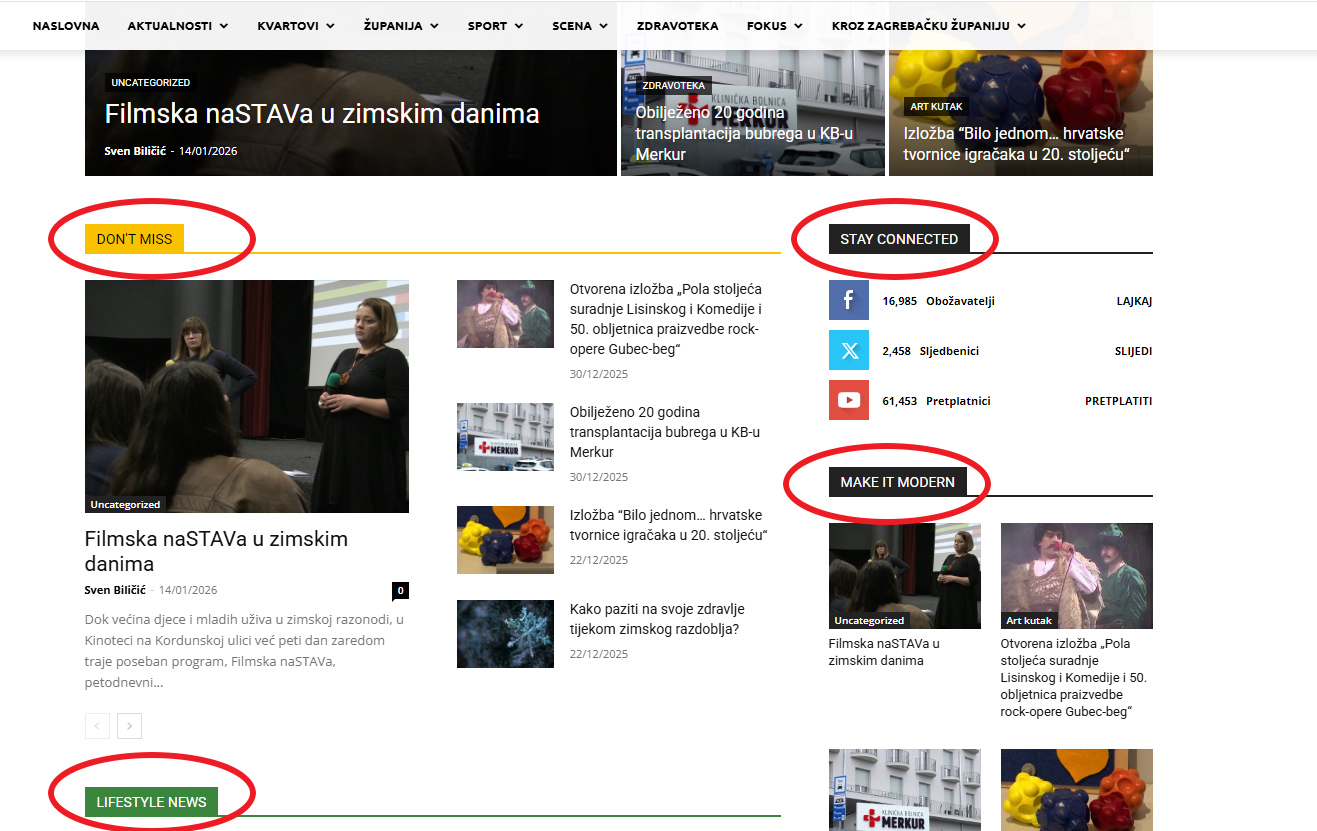
Hello, I installed prebuilt template “default pro”. Everything went fine, but I can’t find where I can change headings on frontpage. Headings of categories like “Lifestyle news”, “Don’t miss”, “Make it modern” etc. Screenshot in the attachment.
 mrjukic
 Hello,
I’m experiencing the same issue, even after performing a completely fresh installation.
Currently, only Instagram follower counts are displaying correctly. Facebook and YouTube both show “0” followers, despite being properly connected.
What I’ve already done:
Added the YouTube API key
Confirmed the API key is active and not restricted
Completed all steps according to the documentation/instructions
Tested after a full new installation
Unfortunately, the issue persists.
Using a fixed follower count is not an acceptable workaround for us, as it requires manual updates and defeats the purpose of dynamic counters.
Is there a known solution or additional configuration required to correctly fetch Facebook and YouTube follower counts?
Thank you in advance for your help. I’m looking forward to your guidance.
Best regards,
 RECORD EUROPA
 Hi Calin,
Thanks for the suggestions — we tested exactly as requested (logged in, no cache, and only tagDiv/theme plugins active) and the issue still reproduces reliably on our side on both desktop and mobile.
From comparing the DOM between an installation where the search works and our installations where it fails, the key difference is where the theme’s Accessibility module ends up placing/targeting #maincontent. The module (via tdAccessibility.js) assigns/normalises the #maincontent container based on what it detects in the page structure (e.g., presence/absence of a proper <main> element and the surrounding wrappers). On our affected sites, #maincontent resolves to a wrapper that also contains the header/search trigger, so when the search is opened the script attempts to apply aria-hidden/inert to #maincontent while focus is still on the search trigger. Chromium then blocks aria-hidden in that state (“descendant retained focus”), and the page ends up in an inconsistent/blocked interaction state.
This would also explain why the same setting appears to work on a generic installation: if #maincontent resolves to the actual content area (excluding the header), the search trigger is not a descendant of #maincontent, so the focus/aria-hidden conflict never happens.
Thank you.
Calin Hi,
I just made some tests on one of my installations with the mentioned settings and everything seems to work correctly – https://i.imgur.com/havZ7YM.png https://i.imgur.com/BOkRFrQ.png I believe there is something extra that is interfering, can you do some tests:
– try when you are logged in and no cache is apply so there is nothing interfering with the theme js
– test it using only the theme plugins and without any cache applied
Thank you!
Calin Hi, krtarunsingh@gmail.com. Is it possible to have the tagDiv Standard Pack plugin not be installed? Please go to Newspaper > plugins and install it from there. https://i.imgur.com/oHs32uQ.png
Hi SteveWA, please ensure that you are using the latest theme version 12.7.4 if have an old version, make a full backup and update the theme and theme plugins. If you are already at version 12.7.4, please disable and delete all theme plugins you are currently use and after that reinstall the theme from Newspaper > plugins
 dmforum
Hi,
I have installed the module “Module Template – APP Listing – 2 – APP Find PRO” and am tring to use it in one of the pages of “Free News”. But still I am getting the error Requires Module Module Template – APP Listings – 2 from App Find PRO Demo. Before importing this template on your website, make sure to install it from your Admin Dashboard > Cloud Templates. Go to the Modules tab. Click on the plus icon and search for it using the tagDiv Cloud Library. After installing it, you can use any templates that requires it.
 icedge
 Why WordPress + Newspaper creates ~27 image sizes
Two things are happening at once:
1️⃣ WordPress core creates image sizes
By default WordPress generates:
thumbnail
medium
medium_large
large
plus retina variants (2x)
2️⃣ Newspaper theme (tagDiv) adds many custom sizes
Newspaper is optimized for:
blocks
sliders
modules
mobile / tablet / desktop
retina (2x)
So it registers 20+ custom image sizes, which is why every upload explodes into ~27 files.
👉 This is normal behavior for Newspaper — not a bug.
What image sizes does Newspaper REALLY use?
In practice, Newspaper mostly uses these core groups:
✅ Commonly used sizes
td_696x0 → main article featured image
td_1068x0 → full-width layouts
td_300x220 → small blocks
td_534x462 → medium blocks
td_80x60 → widgets / lists
Retina (2x) versions of the above
⚠️ Many other sizes are edge cases (rare modules, legacy layouts, demos).
Option 1 (Recommended): Reduce image sizes SAFELY ✅
Step A: Disable unused sizes via code
Add this to functions.php (or a custom plugin):
add_filter(‘intermediate_image_sizes_advanced’, function ($sizes) {
$allowed = [
‘thumbnail’,
‘medium’,
‘large’,
‘td_696x0’,
‘td_300x220’,
‘td_534x462’
];
foreach ($sizes as $key => $value) {
if (!in_array($key, $allowed)) {
unset($sizes[$key]);
}
}
return $sizes;
});
📌 This:
Keeps only important Newspaper sizes
Stops WordPress from generating the rest
Option 2: Disable Retina Images (Huge win 🚀)
Newspaper creates 2x images by default.
Turn them off:
Newspaper → Theme Panel → General Settings → Retina Display
➡️ Disable Retina Images
💡 This alone can cut image generation almost in half.
Option 3: Use a plugin (Easiest, no code)
Install Disable Media Sizes or Perfmatters.
Then:
Disable unused WordPress sizes
Leave Newspaper core sizes enabled
⚠️ Don’t blindly disable everything — Newspaper needs some sizes to avoid layout breaks.
Option 4: Regenerate after cleanup (IMPORTANT)
After changing sizes:
Install Regenerate Thumbnails
Regenerate
Delete old unused thumbnails (plugin or server cleanup)
❌ What NOT to do
Don’t disable all td_* sizes
Don’t edit Newspaper core files
Don’t rely only on CDN offloading (it hides the problem but doesn’t fix disk usage)
Best setup for Newspaper (my recommendation)
✅ Disable Retina
✅ Keep 6–8 essential sizes only
✅ Use Bunny / CDN for delivery
✅ Use WebP/AVIF
This keeps:
Layout intact
Disk usage low
CDN fast
 bdp
bdpHello TAGDIV team, I would like to know if is safe install the last veriosn of WordPress WordPress 6.9 “Gene” with Newspaper theme or you are known about some issue.
Thanks
 SBC
SBC Hi Calin
I made another installation with newsmag5 on another site http://www.italianfoodtoday.it
I configured the same way as travelling.net that had that background problem that you couldn’t click.
I used the same string:
#td-outer-wrap {
width: 1021px;
margin: 0 auto;
}
But in this case, even if inserted correctly in the same way as last time, it does not work..
I don’t understand why considering that the two sites are made with the same model and very similar
Thank you
Calin Hi,
I understand. The only elements that have similar options are the Slide and Big Grid Slide elements. However, I believe you can achieve this more easily by using Revolution Slider.
You can set the Revolution Slider (Import Revolution Sliders) to display the latest articles and choose a specific category, if you want to use a special one. After configuring the slider, simply add it in tagDiv Composer using the dedicated Revolution Slider element.
This approach should give you more flexibility and better control over the layout.
 Akinsal
 Hello Calin,
Thank you for your reply. I had one extra plugin installed, Forminator, and disabling it fixed the problem. Thank you!
 degelcreatives
 other issue i have is this situation i installed plugn to use facebook feed but it sucs and i deleted i saw facebook feed title when i open blank page how to remove look at this image becouse my language is so broken i hope to undrestand
Calin Hi,
The Center Magazine Pro does not have a shop design, but this can be done, you can install the tagDiv Shop plugin and WooCommerce, and you can get from the cloud a template you like and adjust it using tagDiv Composer.
Thank you!



