
- NewsmagInstall via WordPress
- NewsmagInstall via FTP
- NewsmagInstalling pre-built websites
- NewsmagUsing the theme translations together with WPML
- NewsmagHow to update a plugin
- NewsmagNewsmag theme support
- NewsmagCustom Post Type Support
- NewsmagImport / Export theme settings
- NewsmagHow to add icons in the menu
- NewsmagRequirements for Newsmag
- NewsmagNewsmag documentation
- NewsmagHow to update the theme
- NewsmagBlock settings tutorial
- NewsmagHow to update the WPBakery plugin
- NewsmagIntroduction
- NewsmagMain menu
- NewsmagFeatured image or video
- NewsmagAuthor card
 earen
earenHello,
I created a sub domain to work on an already existing website and installed the Newspaper theme. I was wondering if I will have any issues by activating the theme on the subdomain now. Because later I will need to activate it on the main domain after I complete the project and replace the new site with the current one.
Thanks
 turma99
 Hello Bettina!
Standard Pack plugin is installed and active.
Thanks!
 Bettina
 Hello!
The issue can be from a plugin conflict, that’s why, please deactivate ALL plugins except tagDiv ones, also if you are using child theme or cache plugin, deactivate them, clear all cache(also from your browser) and try again.
We recommend using WP Super Cache plugin https://forum.tagdiv.com/cache-plugin-install-and-configure/
If this problem is not solved after that, then we need to take a look and see what happened there.
Please contact us via email at contact@tagdiv.com and provide the following:
– admin url and credentials
– a link to this topic in order to identify you
Our team will take a look!
Thank you!
Bettina Hello!
Please note that you can modify only a cloud/PRO template with TagDiv Composer and not a default one.
Try to:
1. disable TagDiv Composer
2. uninstall(delete) TagDiv Composer
3. clear cache (if cache plugin exists)
4. install TagDiv Composer
5. activate TagDiv Composer
6. clear cache (if cache plugin exists)
Also, make sure your WordPress and plugins are up to date(specially Standard Pack installed and active if you use default templates).
Sometimes, the issue can be from a plugin conflict, that’s why, please deactivate ALL plugins except tagDiv ones, also if you are using a cache plugin, deactivate it, clear all cache(also from your browser) and try again.
Thank you!
 sathuinfotech
 Dear Sir/Mam,
I have purchased premium theme. how to i get original theme. every theme is showing demo theme..
Current demo installed: Default PRO
how to install original theme?
 IamLegend
 Hi,
I haven’t set any setting to it, new WordPress installation with Newspaper demo. You can check on your end.
Bettina Hello!
Please make sure you have Standard Pack installed and active.
The issue can be from a plugin conflict, that’s why, please deactivate ALL plugins except tagDiv ones, also if you are using child theme or cache plugin, deactivate them, clear all cache and try again.
Hope that helps you!
Thank you!
 madamcza
 Hi Bettina,
unfortunately it is not working. The category tag ‘featured’ is shown like in attached screenshots. I am doing this test on a fresh demo install, so you can check at your end.
First i removed the featured category, then added it manually and assigned it to a post. Now it shows in the post single page and in category pages as sibling. It does not behave as hidden category.
Thanks,
Michal
 rafacastillo
Hello, I am trying to install the demos and no matter how hard I try, it always tells me to contact support or that the server is not configured, but I made the pertinent fixes to the server.
Please tell me how to solve this.
 arunsmarty
 After I installed the mobile theme plugin, even in windows showing only the mobile version templates, same mobile display is showing in windows also. please help me
 Anamaria
 Hello,
Please do these steps
1. disable tagDiv Composer and tagDiv Cloud Library
2. uninstall tagDiv Composer and tagDiv Cloud Library
3. clear cache (if cache plugin exists)
4. re-install tagDiv Composer and tagDiv Cloud Library again from Newspaper plugins => https://www.screencast.com/t/WLy01lbc
5. activate tagDiv Composer and tagDiv Cloud Library
6. clear cache (if cache plugin exists)
Let me know the results!
Thank you!
 Atithya
Hi Team,
After I turned on the AMP version on 10.4 newspaper on my website (https://www.opensourceforu.com/) and installed amp-analytics code also. But not able to track the amp traffic in Google Analytics. My all pages have been changed to /?amp at the end of URLs. Now when I am searching Behaviour>>Site content>>all pages. And, adding /?amp to search nothing is showing up in traffic data. What am I missing here?
Anamaria Hello,
When you install and activate the Mobile Theme plugin, your pages will be overwritten by the plugin (the mobile theme comes with its own templates for page, post, category, etc so your current templates from the desktop theme will get converted to the mobile theme layout, the page content is made without builders in mobile editor => https://www.screencast.com/t/xbgZG8kH also, the options that are provided to edit the mobile theme version are limited (this keeps the things simple)).
You can check this video about the Newspaper theme version on mobile and how to edit them -> https://www.youtube.com/watch?v=SpGkOnJeNZY.
Hope this helps you!
Thank you!
Bettina Hello!
First of all, try to do these steps as quickly as possible, so your visitors do not notice the process:
1. disable TagDiv Composer
2. uninstall(delete) TagDiv Composer
3. clear cache (if cache plugin exists)
4. install TagDiv Composer
5. activate TagDiv Composer
6. clear cache (if cache plugin exists)
Also, make sure your WordPress and plugins are up to date(specially Standard Pack installed and active if you use default templates).
Sometimes, the issue can be from a plugin conflict, that’s why, please deactivate ALL plugins except tagDiv ones, also if you are using a cache plugin, deactivate it, clear all cache(also from your browser) and try again.
If this problem is not solved after that, then we need to take a look and see what happened there.
Please contact us via email at contact@tagdiv.com and provide the following:
– admin url and credentials
– a link to this topic in order to identify you
Our team will take a look!
Thank you!
Anamaria Hello,
Unfortunately, we have not tested Litespeed Cache Plugin and we do not know what settings should be made.
We recommend using WP Super Cache plugin https://forum.tagdiv.com/cache-plugin-install-and-configure/
Thank you for your understanding!
Anamaria Hello,
Usually, when this is happening, it is from an object cache that can be from a plugin that you have installed or from your host. Please check this and if you can not find it, just make a test using only theme plugins and see if the problem persists.
Thank you!
Anamaria Hello,
Usually, this error appears when the requirements aren’t set like in our guide, please make sure you have added the limit also in your wp-config.php file, in config is WP_MEMORY_LIMIT not PHP Memory Limit (there is a typo, sorry) – https://forum.tagdiv.com/requirements-for-newspaper/
please increase all lower requirements and follow all steps => https://www.screencast.com/t/3eF7oKMSOr2J
Also, is possible to be from the firewall or security module which blocks the admin-ajax.php request. Please verify the console for error when you try to install the template, sually, it displays a 403 or 404 error.
If you don’t use a security plugin, please ask your host about this, maybe you have a security module that blocks this, as an object cache on the host.
If you use a plugin like Wordfence please set it in learning mode.
Also, check if you don’t have a plugin conflict, that’s why, please deactivate ALL plugins except tagDiv ones, also if you are using a child theme or cache plugin, deactivate them, clear all cache and try again.
Thank you!
 Oldmagio
 Hi Calin,
The WPBakery didn’t work and other parts of the theme too. Anyway I follow your suggestion about a potential error and I reinstalled everything, there was a problem between my client FTP and the upload to the database that corrupted some files and generated the problems.
I’m trying to make all the website with every pages and articles full width to fit everything to the borders, the voices in the menu too and the row of the footer too, usually is very fast and easy to do it, but here I can’t find the way.
Could you help me, please?
Thanks for your attention.
 urbandigital
Hey,
I am facing the issue that when I update my Newspaper theme to the 10.4 version then the images are not being displayed anymore. Also, the icon boxes are destroyed. I even installed the jQuery Migrate Helper but unfortunately nothing helped.
Therefore, I changed it back to the 10.3.9.1 version of the theme. Can you please let me know how I can solve this issue and make the update?
Best
Dimitri
 acelbramg
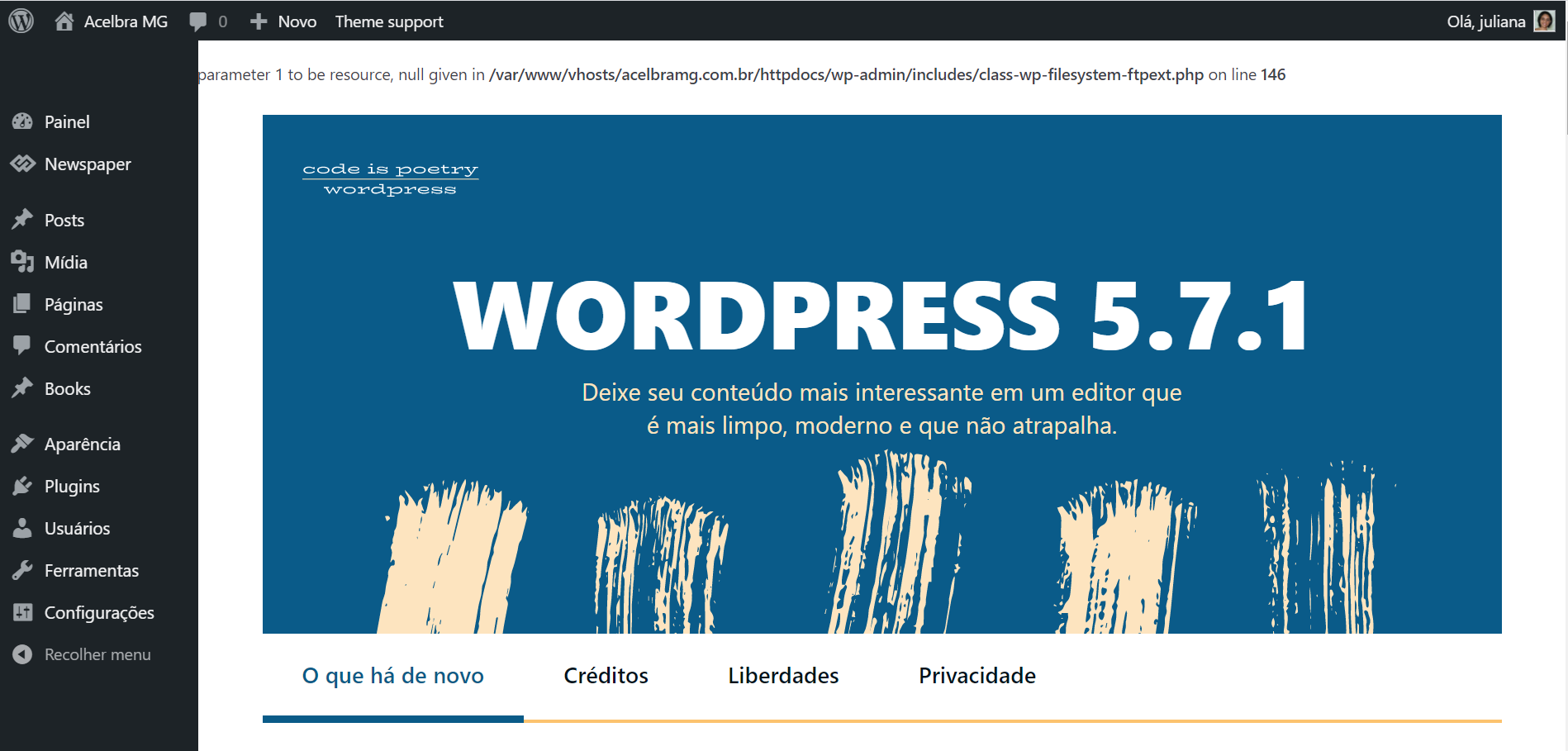
 Reinstalled the wordpress using the Panel and FTP, still with the same error. For some reason when I disable the td-composer this error stops.
Other information about this issue, the media library is not loading the images and I am not able to add new images to the site.
 loslunes
 Three more time since I posted:
FIRST ONE HAPPENS IN A VISIT TO THIS URL : https://www.loslunesseriefilos.com/2019/12/series-merli-sapere-aude-critica.html (the url is not the same each time happens so that makes this error more strange and makes url not important).
190.230.166.66 - - [01/May/2021:02:53:17 +0200] "GET /wp-content/plugins/td-standard-pack/Newspaper/assets/css/images/sprite/weather/broken-clouds-n.png HTTP/2" 500 1053 "-" "Mozilla/5.0 (Windows NT 10.0; Win64; x64; rv:88.0) Gecko/20100101 Firefox/88.0"
190.230.166.66 - - [01/May/2021:02:53:17 +0200] "POST /wp-admin/admin-ajax.php?td_theme_name=Newspaper&v=10.4 HTTP/2" 500 138 "https://www.loslunesseriefilos.com/2019/12/series-merli-sapere-aude-critica.html" "Mozilla/5.0 (Windows NT 10.0; Win64; x64; rv:88.0) Gecko/20100101 Firefox/88.0"
190.230.166.66 - - [01/May/2021:02:53:17 +0200] "GET /wp-content/plugins/td-standard-pack/Newspaper/assets/css/images/sprite/weather/mist.png HTTP/2" 500 1053 "-" "Mozilla/5.0 (Windows NT 10.0; Win64; x64; rv:88.0) Gecko/20100101 Firefox/88.0"
190.230.166.66 - - [01/May/2021:02:53:17 +0200] "GET /wp-content/plugins/td-standard-pack/Newspaper/assets/css/images/sprite/weather/shower-rain-d.png HTTP/2" 500 1053 "-" "Mozilla/5.0 (Windows NT 10.0; Win64; x64; rv:88.0) Gecko/20100101 Firefox/88.0"
190.230.166.66 - - [01/May/2021:02:53:17 +0200] "GET /wp-content/plugins/td-standard-pack/Newspaper/assets/css/images/sprite/weather/scattered-clouds-d.png HTTP/2" 500 1053 "-" "Mozilla/5.0 (Windows NT 10.0; Win64; x64; rv:88.0) Gecko/20100101 Firefox/88.0"
190.230.166.66 - - [01/May/2021:02:53:17 +0200] "GET /wp-content/plugins/td-standard-pack/Newspaper/assets/css/images/sprite/weather/snow-n.png HTTP/2" 500 1053 "-" "Mozilla/5.0 (Windows NT 10.0; Win64; x64; rv:88.0) Gecko/20100101 Firefox/88.0"
190.230.166.66 - - [01/May/2021:02:53:31 +0200] "GET /wp-content/uploads/2021/04/Nasdrovia-segunda-temporada-324x400.jpg HTTP/2" 200 18724 "https://www.loslunesseriefilos.com/2019/12/series-merli-sapere-aude-critica.html" "Mozilla/5.0 (Windows NT 10.0; Win64; x64; rv:88.0) Gecko/20100101 Firefox/88.0"
190.230.166.66 - - [01/May/2021:02:53:17 +0200] "GET /wp-content/plugins/td-standard-pack/Newspaper/assets/css/images/sprite/weather/shower-rain-n.png HTTP/2" 500 1053 "-" "Mozilla/5.0 (Windows NT 10.0; Win64; x64; rv:88.0) Gecko/20100101 Firefox/88.0"
190.230.166.66 - - [01/May/2021:02:53:17 +0200] "GET /wp-content/plugins/td-standard-pack/Newspaper/assets/css/images/sprite/weather/clear-sky-d.png HTTP/2" 404 51210 "-" "Mozilla/5.0 (Windows NT 10.0; Win64; x64; rv:88.0) Gecko/20100101 Firefox/88.0"
190.230.166.66 - - [01/May/2021:02:53:17 +0200] "GET /wp-content/plugins/td-standard-pack/Newspaper/assets/css/images/sprite/weather/clear-sky-n.png HTTP/2" 404 76739 "-" "Mozilla/5.0 (Windows NT 10.0; Win64; x64; rv:88.0) Gecko/20100101 Firefox/88.0"
190.230.166.66 - - [01/May/2021:02:53:17 +0200] "GET /wp-content/plugins/td-standard-pack/Newspaper/assets/css/images/sprite/weather/few-clouds-d.png HTTP/2" 200 0 "-" "Mozilla/5.0 (Windows NT 10.0; Win64; x64; rv:88.0) Gecko/20100101 Firefox/88.0"
190.230.166.66 - - [01/May/2021:02:53:17 +0200] "GET /wp-content/plugins/td-standard-pack/Newspaper/assets/css/images/sprite/weather/few-clouds-n.png HTTP/2" 200 0 "-" "Mozilla/5.0 (Windows NT 10.0; Win64; x64; rv:88.0) Gecko/20100101 Firefox/88.0"
190.230.166.66 - - [01/May/2021:02:53:17 +0200] "GET /wp-content/plugins/td-standard-pack/Newspaper/assets/css/images/sprite/weather/scattered-clouds-n.png HTTP/2" 200 0 "-" "Mozilla/5.0 (Windows NT 10.0; Win64; x64; rv:88.0) Gecko/20100101 Firefox/88.0"
190.230.166.66 - - [01/May/2021:02:53:17 +0200] "GET /wp-content/plugins/td-standard-pack/Newspaper/assets/css/images/sprite/weather/broken-clouds-d.png HTTP/2" 404 29438 "-" "Mozilla/5.0 (Windows NT 10.0; Win64; x64; rv:88.0) Gecko/20100101 Firefox/88.0"
190.230.166.66 - - [01/May/2021:02:53:17 +0200] "GET /wp-content/plugins/td-standard-pack/Newspaper/assets/css/images/sprite/weather/rain-d.png HTTP/2" 404 0 "-" "Mozilla/5.0 (Windows NT 10.0; Win64; x64; rv:88.0) Gecko/20100101 Firefox/88.0"
190.230.166.66 - - [01/May/2021:02:53:17 +0200] "GET /wp-content/plugins/td-standard-pack/Newspaper/assets/css/images/sprite/weather/rain-n.png HTTP/2" 404 40552 "-" "Mozilla/5.0 (Windows NT 10.0; Win64; x64; rv:88.0) Gecko/20100101 Firefox/88.0"
190.230.166.66 - - [01/May/2021:02:53:17 +0200] "GET /wp-content/plugins/td-standard-pack/Newspaper/assets/css/images/sprite/weather/thunderstorm.png HTTP/2" 200 0 "-" "Mozilla/5.0 (Windows NT 10.0; Win64; x64; rv:88.0) Gecko/20100101 Firefox/88.0"
SECOND TIME: https://www.loslunesseriefilos.com/2012/12/y-tu-de-quien-eres-shield-o-sons-of.html
190.190.228.108 – – [01/May/2021:07:15:16 +0200] “POST /wp-admin/admin-ajax.php?td_theme_name=Newspaper&v=10.4 HTTP/2” 200 0 “https://www.loslunesseriefilos.com/2012/12/y-tu-de-quien-eres-shield-o-sons-of.html” “Mozilla/5.0 (Windows NT 10.0; Win64; x64; rv:88.0) Gecko/20100101 Firefox/88.0”

190.190.228.108 – – [01/May/2021:07:15:16 +0200] “GET /wp-content/plugins/td-standard-pack/Newspaper/assets/css/images/sprite/weather/rain-n.png HTTP/2” 500 1053 “-” “Mozilla/5.0 (Windows NT 10.0; Win64; x64; rv:88.0) Gecko/20100101 Firefox/88.0”

190.190.228.108 – – [01/May/2021:07:15:16 +0200] “GET /wp-content/plugins/td-standard-pack/Newspaper/assets/css/images/sprite/weather/scattered-clouds-d.png HTTP/2” 500 1045 “-” “Mozilla/5.0 (Windows NT 10.0; Win64; x64; rv:88.0) Gecko/20100101 Firefox/88.0”

190.190.228.108 – – [01/May/2021:07:15:16 +0200] “GET /wp-content/plugins/td-standard-pack/Newspaper/assets/css/images/sprite/weather/clear-sky-d.png HTTP/2” 500 1016 “-” “Mozilla/5.0 (Windows NT 10.0; Win64; x64; rv:88.0) Gecko/20100101 Firefox/88.0”

190.190.228.108 – – [01/May/2021:07:15:16 +0200] “GET /wp-content/plugins/td-standard-pack/Newspaper/assets/css/images/sprite/weather/scattered-clouds-n.png HTTP/2” 500 1053 “-” “Mozilla/5.0 (Windows NT 10.0; Win64; x64; rv:88.0) Gecko/20100101 Firefox/88.0”

190.190.228.108 – – [01/May/2021:07:15:16 +0200] “GET /wp-content/plugins/td-standard-pack/Newspaper/assets/css/images/sprite/weather/few-clouds-d.png HTTP/2” 500 1053 “-” “Mozilla/5.0 (Windows NT 10.0; Win64; x64; rv:88.0) Gecko/20100101 Firefox/88.0”

190.190.228.108 – – [01/May/2021:07:15:16 +0200] “GET /wp-content/plugins/td-standard-pack/Newspaper/assets/css/images/sprite/weather/shower-rain-n.png HTTP/2” 500 1016 “-” “Mozilla/5.0 (Windows NT 10.0; Win64; x64; rv:88.0) Gecko/20100101 Firefox/88.0”

190.190.228.108 – – [01/May/2021:07:15:16 +0200] “GET /wp-content/plugins/td-standard-pack/Newspaper/assets/css/images/sprite/weather/rain-d.png HTTP/2” 500 15632 “-” “Mozilla/5.0 (Windows NT 10.0; Win64; x64; rv:88.0) Gecko/20100101 Firefox/88.0”

190.190.228.108 – – [01/May/2021:07:15:16 +0200] “GET /wp-content/plugins/td-standard-pack/Newspaper/assets/css/images/sprite/weather/broken-clouds-d.png HTTP/2” 500 1053 “-” “Mozilla/5.0 (Windows NT 10.0; Win64; x64; rv:88.0) Gecko/20100101 Firefox/88.0”

190.190.228.108 – – [01/May/2021:07:15:16 +0200] “GET /wp-content/plugins/td-standard-pack/Newspaper/assets/css/images/sprite/weather/snow-n.png HTTP/2” 404 76740 “-” “Mozilla/5.0 (Windows NT 10.0; Win64; x64; rv:88.0) Gecko/20100101 Firefox/88.0”

190.190.228.108 – – [01/May/2021:07:15:16 +0200] “GET /wp-content/plugins/td-standard-pack/Newspaper/assets/css/images/sprite/weather/thunderstorm.png HTTP/2” 404 76799 “-” “Mozilla/5.0 (Windows NT 10.0; Win64; x64; rv:88.0) Gecko/20100101 Firefox/88.0”

190.190.228.108 – – [01/May/2021:07:15:16 +0200] “GET /wp-content/plugins/td-standard-pack/Newspaper/assets/css/images/sprite/weather/few-clouds-n.png HTTP/2” 404 76714 “-” “Mozilla/5.0 (Windows NT 10.0; Win64; x64; rv:88.0) Gecko/20100101 Firefox/88.0”

190.190.228.108 – – [01/May/2021:07:15:16 +0200] “GET /wp-content/plugins/td-standard-pack/Newspaper/assets/css/images/sprite/weather/snow-d.png HTTP/2” 404 76714 “-” “Mozilla/5.0 (Windows NT 10.0; Win64; x64; rv:88.0) Gecko/20100101 Firefox/88.0”

190.190.228.108 – – [01/May/2021:07:15:16 +0200] “GET /wp-content/plugins/td-standard-pack/Newspaper/assets/css/images/sprite/weather/mist.png HTTP/2” 404 76738 “-” “Mozilla/5.0 (Windows NT 10.0; Win64; x64; rv:88.0) Gecko/20100101 Firefox/88.0”

190.190.228.108 – – [01/May/2021:07:15:16 +0200] “GET /wp-content/plugins/td-standard-pack/Newspaper/assets/css/images/sprite/weather/shower-rain-d.png HTTP/2” 404 76714 “-” “Mozilla/5.0 (Windows NT 10.0; Win64; x64; rv:88.0) Gecko/20100101 Firefox/88.0”

190.190.228.108 – – [01/May/2021:07:15:16 +0200] “GET /wp-content/plugins/td-standard-pack/Newspaper/assets/css/images/sprite/weather/broken-clouds-n.png HTTP/2” 404 76740 “-” “Mozilla/5.0 (Windows NT 10.0; Win64; x64; rv:88.0) Gecko/20100101 Firefox/88.0”

190.190.228.108 – – [01/May/2021:07:15:16 +0200] “GET /wp-content/plugins/td-standard-pack/Newspaper/assets/css/images/sprite/weather/clear-sky-n.png HTTP/2” 404 76676 “-” “Mozilla/5.0 (Windows NT 10.0; Win64; x64; rv:88.0) Gecko/20100101 Firefox/88.0”
THIRD ONE: https://www.loslunesseriefilos.com/2021/04/critica-el-inocente-serie-oriol-paulo-netflix.html
83.58.233.81 – – [01/May/2021:12:29:21 +0200] “GET /wp-content/plugins/td-standard-pack/Newspaper/assets/css/images/sprite/weather/few-clouds-d.png HTTP/2” 404 76739 “-” “Mozilla/5.0 (iPhone; U; CPU iPhone OS 4_0 like Mac OS X; en-us) AppleWebKit/532.9 (KHTML, like Gecko) Version/4.0.5 Mobile/8A293 Safari/6531.22.7”

83.58.233.81 – – [01/May/2021:12:29:21 +0200] “GET /wp-content/plugins/td-standard-pack/Newspaper/assets/css/images/sprite/weather/clear-sky-n.png HTTP/2” 404 76735 “-” “Mozilla/5.0 (iPhone; U; CPU iPhone OS 4_0 like Mac OS X; en-us) AppleWebKit/532.9 (KHTML, like Gecko) Version/4.0.5 Mobile/8A293 Safari/6531.22.7”

83.58.233.81 – – [01/May/2021:12:29:21 +0200] “GET /wp-content/plugins/td-standard-pack/Newspaper/assets/css/images/sprite/weather/clear-sky-d.png HTTP/2” 404 76714 “-” “Mozilla/5.0 (iPhone; U; CPU iPhone OS 4_0 like Mac OS X; en-us) AppleWebKit/532.9 (KHTML, like Gecko) Version/4.0.5 Mobile/8A293 Safari/6531.22.7”

83.58.233.81 – – [01/May/2021:12:29:29 +0200] “GET /wp-content/plugins/td-standard-pack/Newspaper/assets/css/images/sprite/weather/scattered-clouds-d.png HTTP/2” 404 76713 “-” “Mozilla/5.0 (iPhone; U; CPU iPhone OS 4_0 like Mac OS X; en-us) AppleWebKit/532.9 (KHTML, like Gecko) Version/4.0.5 Mobile/8A293 Safari/6531.22.7”

83.58.233.81 – – [01/May/2021:12:29:29 +0200] “GET /wp-content/plugins/td-standard-pack/Newspaper/assets/css/images/sprite/weather/few-clouds-n.png HTTP/2” 404 76713 “-” “Mozilla/5.0 (iPhone; U; CPU iPhone OS 4_0 like Mac OS X; en-us) AppleWebKit/532.9 (KHTML, like Gecko) Version/4.0.5 Mobile/8A293 Safari/6531.22.7”

83.58.233.81 – – [01/May/2021:12:29:29 +0200] “GET /wp-content/plugins/td-standard-pack/Newspaper/assets/css/images/sprite/weather/scattered-clouds-n.png HTTP/2” 404 76713 “-” “Mozilla/5.0 (iPhone; U; CPU iPhone OS 4_0 like Mac OS X; en-us) AppleWebKit/532.9 (KHTML, like Gecko) Version/4.0.5 Mobile/8A293 Safari/6531.22.7”

83.58.233.81 – – [01/May/2021:12:29:34 +0200] “GET /wp-content/plugins/td-standard-pack/Newspaper/assets/css/images/sprite/weather/broken-clouds-d.png HTTP/2” 404 76740 “-” “Mozilla/5.0 (iPhone; U; CPU iPhone OS 4_0 like Mac OS X; en-us) AppleWebKit/532.9 (KHTML, like Gecko) Version/4.0.5 Mobile/8A293 Safari/6531.22.7”

83.58.233.81 – – [01/May/2021:12:29:34 +0200] “GET /wp-content/plugins/td-standard-pack/Newspaper/assets/css/images/sprite/weather/shower-rain-d.png HTTP/2” 404 76713 “-” “Mozilla/5.0 (iPhone; U; CPU iPhone OS 4_0 like Mac OS X; en-us) AppleWebKit/532.9 (KHTML, like Gecko) Version/4.0.5 Mobile/8A293 Safari/6531.22.7”

83.58.233.81 – – [01/May/2021:12:29:34 +0200] “GET /wp-content/plugins/td-standard-pack/Newspaper/assets/css/images/sprite/weather/broken-clouds-n.png HTTP/2” 404 76740 “-” “Mozilla/5.0 (iPhone; U; CPU iPhone OS 4_0 like Mac OS X; en-us) AppleWebKit/532.9 (KHTML, like Gecko) Version/4.0.5 Mobile/8A293 Safari/6531.22.7”

83.58.233.81 – – [01/May/2021:12:29:39 +0200] “GET /wp-content/plugins/td-standard-pack/Newspaper/assets/css/images/sprite/weather/shower-rain-n.png HTTP/2” 404 76713 “-” “Mozilla/5.0 (iPhone; U; CPU iPhone OS 4_0 like Mac OS X; en-us) AppleWebKit/532.9 (KHTML, like Gecko) Version/4.0.5 Mobile/8A293 Safari/6531.22.7”

83.58.233.81 – – [01/May/2021:12:29:39 +0200] “GET /wp-content/plugins/td-standard-pack/Newspaper/assets/css/images/sprite/weather/rain-n.png HTTP/2” 404 76740 “-” “Mozilla/5.0 (iPhone; U; CPU iPhone OS 4_0 like Mac OS X; en-us) AppleWebKit/532.9 (KHTML, like Gecko) Version/4.0.5 Mobile/8A293 Safari/6531.22.7”

83.58.233.81 – – [01/May/2021:12:29:39 +0200] “GET /wp-content/plugins/td-standard-pack/Newspaper/assets/css/images/sprite/weather/rain-d.png HTTP/2” 404 76713 “-” “Mozilla/5.0 (iPhone; U; CPU iPhone OS 4_0 like Mac OS X; en-us) AppleWebKit/532.9 (KHTML, like Gecko) Version/4.0.5 Mobile/8A293 Safari/6531.22.7”

83.58.233.81 – – [01/May/2021:12:29:43 +0200] “GET /wp-content/plugins/td-standard-pack/Newspaper/assets/css/images/sprite/weather/thunderstorm.png HTTP/2” 404 76714 “-” “Mozilla/5.0 (iPhone; U; CPU iPhone OS 4_0 like Mac OS X; en-us) AppleWebKit/532.9 (KHTML, like Gecko) Version/4.0.5 Mobile/8A293 Safari/6531.22.7”

83.58.233.81 – – [01/May/2021:12:29:44 +0200] “GET /wp-content/plugins/td-standard-pack/Newspaper/assets/css/images/sprite/weather/snow-n.png HTTP/2” 404 76713 “-” “Mozilla/5.0 (iPhone; U; CPU iPhone OS 4_0 like Mac OS X; en-us) AppleWebKit/532.9 (KHTML, like Gecko) Version/4.0.5 Mobile/8A293 Safari/6531.22.7”

83.58.233.81 – – [01/May/2021:12:29:44 +0200] “GET /wp-content/plugins/td-standard-pack/Newspaper/assets/css/images/sprite/weather/snow-d.png HTTP/2” 404 76714 “-” “Mozilla/5.0 (iPhone; U; CPU iPhone OS 4_0 like Mac OS X; en-us) AppleWebKit/532.9 (KHTML, like Gecko) Version/4.0.5 Mobile/8A293 Safari/6531.22.7”
Just crazy, if this happens so few times its not so important but would like to know why this png are called. It should be asked always if its a general error, not 3-4 times each day…
I have entered in the route and obviously this resources doesn´t exist. Maybe an installation error of the plugin? How to solve it?
-
This reply was modified 5 years by
loslunes.
 adrian_van_hal
Hello,
Could you please help me with providing the css code that I can add in the theme panel to make the gradient background not visible, just white. I have installed the Default Pro demo.
Earlier you provided this for the Default theme, which worked perfect with that: .td-header-gradient:before{display:none;}
However, it does not work with the Default Pro.
Many thanks,
Adrian
 newsroomearth
Howdy!
This is my third install of Newspaper for a new site. This time I have been stopped by a new issue I had not experienced before.
When I attempt to install the TagDiv plugins from the theme page, I see an ajax error and the site shows:
“There has been a critical error on your website. Please check your site admin email inbox for instructions.”
This error also happens if manually install a plugin (td-composer) and then try to activate it.
I have made sure the settings for php.ini and wp-config are correct. I also have tried installing WP Super Cache and clearing the cache before installing or activating the TagDiv plugins. I have also tried rebooting the server before installing.
Even without any plugins enabled It results in the same error.
Can you help? Thanks so much!
David
 Nick
NickHello,
Trying to install template of Fast News home page and cannot doing it.
It is just not installing and not redirecting to any other page or error message from Cloud Templates interface.
Please help.
loslunesHi, I´n not using any weather widget but since updating to 10.4 I have received at last 4-5 visits that cause a RAM peak at the same time that log registered this 404 url errors:
/wp-content/plugins/td-standard-pack/Newspaper/assets/css/images/sprite/weather/few-clouds-n.png
/wp-content/plugins/td-standard-pack/Newspaper/assets/css/images/sprite/weather/scattered-clouds-d.p
/wp-content/plugins/td-standard-pack/Newspaper/assets/css/images/sprite/weather/clear-sky-d.png
/wp-content/plugins/td-standard-pack/Newspaper/assets/css/images/sprite/weather/thunderstorm.png
/wp-content/plugins/td-standard-pack/Newspaper/assets/css/images/sprite/weather/broken-clouds-d.png
/wp-content/plugins/td-standard-pack/Newspaper/assets/css/images/sprite/weather/few-clouds-n.png
/wp-content/plugins/td-standard-pack/Newspaper/assets/css/images/sprite/weather/rain-n.png
/wp-content/plugins/td-standard-pack/Newspaper/assets/css/images/sprite/weather/scattered-clouds-d.png
/wp-content/plugins/td-standard-pack/Newspaper/assets/css/images/sprite/weather/shower-rain-n.png
/wp-content/plugins/td-standard-pack/Newspaper/assets/css/images/sprite/weather/scattered-clouds-n.png
/wp-content/plugins/td-standard-pack/Newspaper/assets/css/images/sprite/weather/few-clouds-d.png
As I said I´m not using ANY weather widget. I´m sure you´re going to say me PLEASE DEACTIVE PLUGIN, DEACTIVE AND REINSTALL TD STANDARD PACK, CLEAR CACHES.
No, this is not the solution. I don´t understand why this pngs are called if I don´t have any weather widget. And why 404 error?
