- NewsmagInstall via WordPress
- NewsmagInstall via FTP
- NewsmagInstalling pre-built websites
- NewsmagUsing the theme translations together with WPML
- NewsmagHow to update a plugin
- NewsmagNewsmag theme support
- NewsmagCustom Post Type Support
- NewsmagImport / Export theme settings
- NewsmagHow to add icons in the menu
- NewsmagRequirements for Newsmag
- NewsmagNewsmag documentation
- NewsmagHow to update the theme
- NewsmagBlock settings tutorial
- NewsmagHow to update the WPBakery plugin
- NewsmagIntroduction
- NewsmagMain menu
- NewsmagFeatured image or video
- NewsmagAuthor card
 Calin
Calin Hi michaelaulia,
I also have an install where I updated the WordPress to 5.7 and until now everything is working correctly on Newsmag theme, indeed I have few plugins and elements on that but everything seems to be fine.
Thank you!
 diogoom
Hello all,
Is there a way to use Snazzy maps with tagdiv composer? And if there is, could you direct me to the correct path.
I’m using newsmag and I have the snazzy maps plugin installed and the wp google maps plugin.
Thank you
DOM
 Bettina
 Hello!
1. This situation appear when you are using the mobile theme plugin and the cache plugin that you have does not feature options for a separate mobile theme plugin therefore do not know when to deliver the mobile version and when to deliver the desktop version.
We tested with our theme the WP Super Cache and with the settings from our guide this is working correctly: https://forum.tagdiv.com/cache-plugin-install-and-configure/
Hope that helps you!
2. Your child theme needs to contain in the style.css file the following code:
/*!

Theme Name:     Newspaper Child theme

Theme URI: 		http://themeforest.net/user/tagDiv/portfolio

Description:    Child theme made by tagDiv

Author:         tagDiv

Author URI: 	http://themeforest.net/user/tagDiv/portfolio

Template:       Newspaper

Version:        9.0c

*/
Thank you!
Bettina Hello!
1. If you mean Mobile theme, then yes you can uninstall it and you will have a responsive version automatically. You could have a great quality depends about your customizations made there.
2. I don’t know exactly which menu you mean. Maybe, you can show me a screenshot with it. But, the existing menu from header is the same on both pages. Also, you can edit a post with TagDiv Composer and add/delete an element from the post page easily. Take a look on this tutorial: https://forum.tagdiv.com/tagdiv-composer-tutorial/
3. Please make sure that you have activated the proper thumbs in order to show the featured images properly. This can be found in here: https://www.screencast.com/t/N18dR3qZrh
After activating the thumbnail sizes you need to regenerate your thumbnails using a plugin. Check this: https://forum.tagdiv.com/using-the-theme-with-existing-content/
4. Edit the page with TagDiv Composer and you can assign which header and footer you need by accessing the Website Manager. Please note that you need to use a cloud/PRO template for that and also you can not customize the Mobile Theme templates.
5. 6. 7. 8. I checked your website and it seems you haven’t this section there, count of views, social icons or autoscrolling posts.
Thank you!
Bettina Hello!
The issue can be from a plugin conflict, that’s why, please deactivate ALL plugins except tagDiv ones, also if you are using child theme or cache plugin, deactivate them, clear all cache(also from your browser) and try again.
Also, make sure you have the Newsletter plugin installed and active.
Let us know about your results!
Thank you!
Bettina Hello!
The demo which you find in Newspaper -> Prebuilt Websites could be used in your website. So, you just install it on your website with content or not and you can use the design & content also.
Thank you!
Bettina Hello!
Normally it should reflect the changes on your website if you set this option.
Sometimes, the issue can be from a plugin conflict, that’s why, please deactivate ALL plugins except tagDiv ones, also if you are using child theme or cache plugin, deactivate them, clear all cache(also from your browser) and try again.
Also, please make sure that all the requirements are met as you can see here: https://forum.tagdiv.com/requirements-for-newspaper/
You can try and remove and re-install the tagDiv Composer plugin.
Let us know the results!
Thank you!
Calin Hi ARBMedia, you are not using the Newsmag theme, you are using the Newspaper theme and you have installed a PRO Pre-build Website, that was made using cloud templates, for this you need to use tagDiv Composer, edit each page and cloud template and remove the ads from ad element .
For further questions please make a topic here https://forum.tagdiv.com/forum/newspaper/
Thank you for your understanding!
 danna
dannaHey!
i don’t know why, but the google bot has big problems rendering my page (f. ex. https://rauf-und-davon.at/sommerprojekt-seven-summits-osterreich/). The thing is that most of the siteresources can’t be loaded (images, javascript and stylesheets). That’s why i always get notifications from my search console that there are issues on my mobile pages. I guess it would be good for SEO, that google thinks i have a proper page online. I tried everything (deactivated all the plugins except the ones from tagdiv as you can see on the screenshot) but that didn’t fix the problem (so the plugins can’t be the problem):
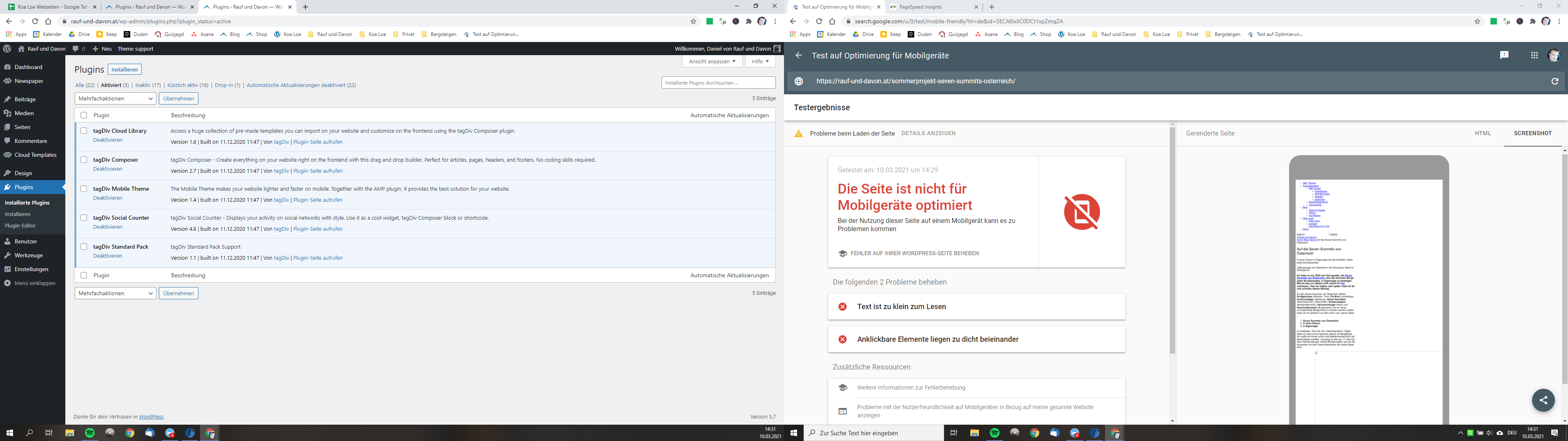
We use the theme on another page and there it gets rendered by google without any problems. Even on my subdomain (with an extra installation) it’s working (so the server can’t be the problem too). Can you maybe help me and tell what the problem could be?
I use Newspaper 10.3.9.1 | WordPress 5.7 | Mobile Theme activated
That would be awesome as i try to fix that problem for months!
All the best,
Daniel
Bettina Hello!
You should be able to edit that page with TagDiv Composer plugin, click on it and you will see a recycle bin basket there for deleting or you can drag & drop the element on the red zone at the bottom of the page.
For more information about TagDiv Composer, check our tutorial here: https://forum.tagdiv.com/tagdiv-composer-tutorial/
Please note that you need to have TagDiv Composer plugin active and installed.
Let me know about your results!
Thank you!
Bettina Hello!
Normally it should reflect the changes from TagDiv Composer in frontend.
For example, if you created the mobile pages with TagDiv Composer, then when you install Mobile Theme plugin, your pages will be overwritten by the plugin.
The Mobile Theme is a performance optimized theme included in the Newspaper main theme and it loads only for mobile devices. It comes with its own templates for page, post, category, etc so your current templates from the desktop theme will get converted to the mobile theme layout. For more details, please take a look here: https://forum.tagdiv.com/the-mobile-theme/
Better deactivate the plugin and see the results.
Also, if you create mobile pages or a cloud template for category, posts, etc , then you need to assign that template to your website in both cases.
If you are not talking about those situations, then probably there you have a plugin conflict which can destroy your displaying elements.
Please note that the default templates or CPT you can not modify with TagDiv Composer plugin.
Thank you!
 Anamaria
 Hello,
From what you describe it seems you have installed Mobile theme plugin. If you created the mobile pages with TagDiv Composer, then when you install Mobile Theme plugin, your pages will be overwritten by the plugin.
Better deactivate the plugin and see the results.
Also, if you create a mobile page, please check if is set correctly => https://tagdiv.com/newspaper-10-3-7-update-brings-customizable-and-fast-mobile-pages/
Hope this helps you!
Thank you!
Anamaria Hello,
This is a document with what is included in the theme packaged https://forum.tagdiv.com/whats-included/
To install the theme, you can follow one of our guides
-> Install via WordPress -> https://forum.tagdiv.com/install-via-wordpress/
-> Install via FTP -> https://forum.tagdiv.com/install-via-ftp/
How to activate the theme -> https://forum.tagdiv.com/newspaper-6-how-to-activate-the-theme/
Those are the requirements for Newspaper => https://forum.tagdiv.com/requirements-for-newspaper/
Hope this helps you!
Thank you!
 Jens H.
Has anyone installed WordPress 5.7 on their sites with NewsMag (Latest version: 4.9.6)
 Mystic
 Anamaria
I followed the instructions to the ‘T‘ and even deleted the folder Newspaper from the wp-content/themes folder and tried a re-install and the result is still the same – can’t save my changes.
 comfr3ak
 It was fixed by my web host. In my case, there were two object cache plugins that were interfering with each other and preventing the Newspaper theme panel from saving updates properly. My web host had to fix the issue by removing the unused plugin. One of the object cache plugins was a leftover from migrating from a previous web host.
Response from my host tech support:
“I reviewed your plugin configuration and noticed that you had WP Redis and Redis Object Cache plugins both installed (but deactivated). I saw that WP Redis was throwing some PHP errors as I was interacting with the WordPress CLI. Removing WP Redis in its entirety allowed these to go away. It’s possible that WP Redis and Redis Object cache were conflicting with each other.”
 newspaper-user-2
If I use AMP Transitional mode and Redirect mobile visitors to AMP, is that impossible for setting up Google Tag manager.
I cant see Google Tag Manager tutorial for Newspaper amp theme on google.
Installing Google Tag Manager requires two GTM installation codes for <head> and <body>
 socalemc
 Thank you for the quick response. Unfortuantely, that does not work. I do not currently have any other plugins installed except the two required by the theme. Here is a link to the under construction website. I have temporarily made it accessible.
-
This reply was modified 5 years by
 Calin.
 Padanub
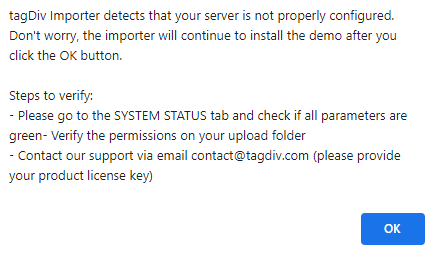
I’ve been trying to install a prebuilt website, I did so successfully twice (uninstalling each time) but now when I try I get the attached error message. My server status is all green, what is going wrong?
 Dejmien
 Hello Bettina,
the problem looks same as listed above.
I have created the mobile page using tagdiv composer, then I deleted the mobile page from page section in WordPress, re-installed the tagdiv composer, but still on mobile header, footer and other elements display as in the mobile page I already deleted. I want to get back to the view I have set up in the main page in tagdiv composer.
Link to the page: ns24.onlinemarketingsolutions.pl
Thanks for your help!
Bettina Hello @Dejmien!
If you have Mobile Theme plugin installed, then please uninstall it and see the results!
If the issue is still there please provide more information about your issue, a screenshot or an url to your website in order to inspect more into your issue.
Thank you!
PadanubI’ve just installed the London News Pro Demo, but there’s adverts everywhere. I want them all gone. I’ve disabled them all in the theme panel but they’re all still there, especially on posts!
https://i.gyazo.com/e8198d7e2509ac95f4518151f33df65a.png
See on on the sidebar and one below the featured image but before the text of the post.
Mystic Anamaria
I have done several updates in the past of the Newspaper theme – the WordPress version is 5.6.2 and Newspaper is 10.3.9.1. I did it exactly as per the documentation of the Newspaper theme. I even re-installed it once, just to be sure. From past experience, I know this for a fact – once it gets into this mode, it is very difficult to fix it. Pl. help as our mobile version is not working.
Dejmien I have the same issue. I removed the mobile page, but on mobile it is still showing the mobile theme. I have already re-installed tagdiv composer and the issue still exitsts.
Bettina Hello!
Sometimes, the issue can be from a plugin conflict(check also if you have WP Bakery and uninstall it), that’s why, please deactivate ALL plugins except tagDiv ones, also if you are using child theme or cache plugin, deactivate them, clear all cache(also from your browser) and try again.
Let us know about your results!
Thank you!