
- NewsmagInstall via WordPress
- NewsmagInstall via FTP
- NewsmagInstalling pre-built websites
- NewsmagUsing the theme translations together with WPML
- NewsmagHow to update a plugin
- NewsmagNewsmag theme support
- NewsmagCustom Post Type Support
- NewsmagImport / Export theme settings
- NewsmagHow to add icons in the menu
- NewsmagRequirements for Newsmag
- NewsmagNewsmag documentation
- NewsmagHow to update the theme
- NewsmagBlock settings tutorial
- NewsmagHow to update the WPBakery plugin
- NewsmagIntroduction
- NewsmagMain menu
- NewsmagFeatured image or video
- NewsmagAuthor card
 Anamaria
 Hello,
Please make sure that the theme install was done correctly
Install via WordPress -> https://forum.tagdiv.com/install-via-wordpress/
Install via FTP -> https://forum.tagdiv.com/install-via-ftp/
How to activate the theme -> https://forum.tagdiv.com/newspaper-6-how-to-activate-the-theme/ , you can activate the theme manually => https://www.screencast.com/t/GDo5doWPUM1M.
Also, please disable if you have any plugins activated.
Those are the requirements for Newspaper => https://forum.tagdiv.com/requirements-for-newspaper/
Let me know about your results!
Thank you!
 pzphone
I have been waiting for 2 hours on the activation page but nothing change.
[url=https://ibb.co/XWzqQrP][img]https://i.ibb.co/S6Kzj4g/tagdiv.png[/img][/url]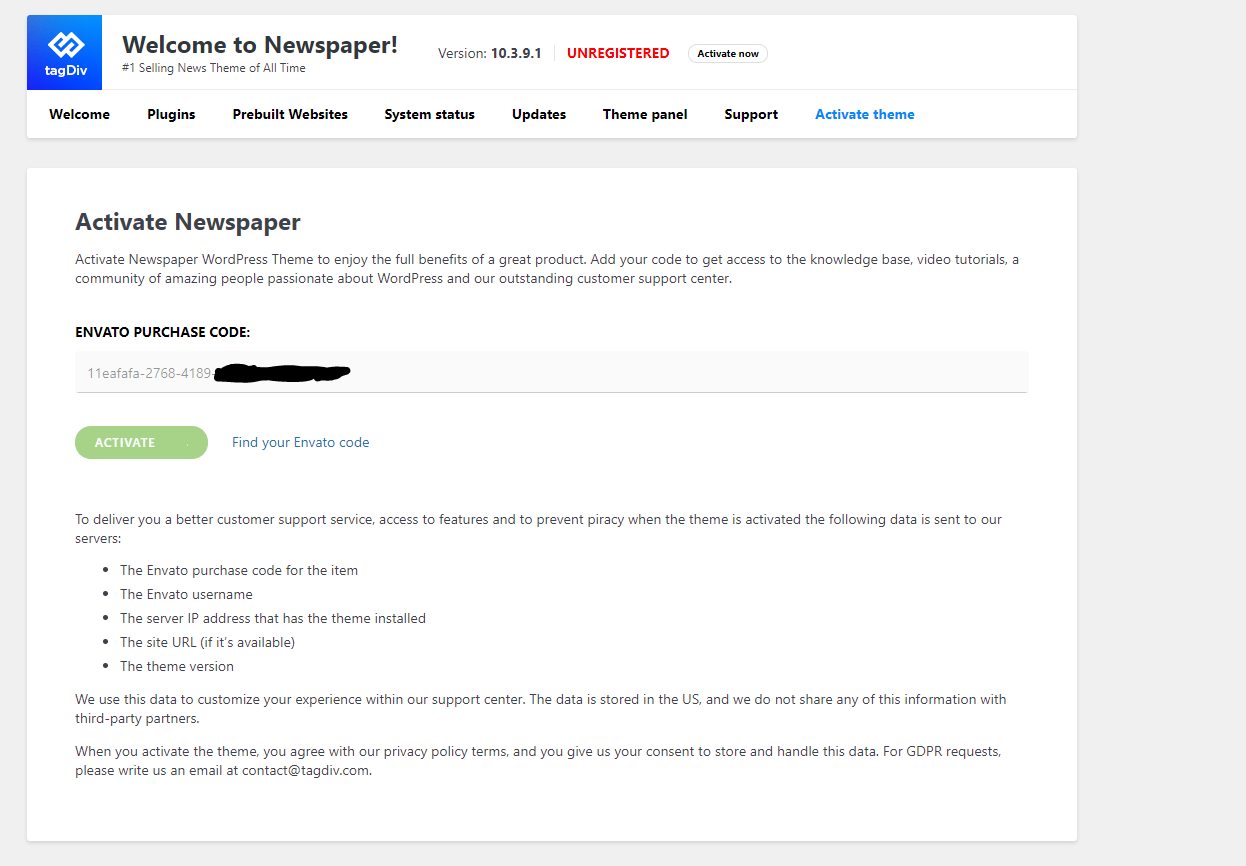
And I also can’t install the pre-built website.
 Bettina
 Hello!
When you install a demo with content/without content and a cloud/PRO template, you can modify the design of that page with TagDiv Composer plugin ( tutorial here: https://forum.tagdiv.com/tagdiv-composer-tutorial/ )
So, in this case you can delete easily every elements that you don’t want on the page/post by clicking on them, drag & drop the element at the bottom of the page in the red zone.
We have a lot of elements which you can add with TagDiv Composer and some settings for each element also. If you will search about them in our documentation from this website, then you will find out how to use and which is suitable for your needs.
Tag Manager google account should be ok if they are inserted here: https://www.screencast.com/t/VIM9TBV9
For some basic things, you can check these documentations:
– https://forum.tagdiv.com/newspaper-theme-documentation/
– https://forum.tagdiv.com/requirements-for-newspaper/
– https://forum.tagdiv.com/whats-included/
– https://forum.tagdiv.com/newspaper-6-how-to-activate-the-theme/
– https://forum.tagdiv.com/how-to-update-the-theme-2/
– https://forum.tagdiv.com/demos_introduction/
Hope that helps you!
Thank you!
 theoctant
 Hello,
I’ve installed and configured it according to the link. I still find that changes to the front end are not being updated immediately!
Thanks!
 spurt
spurt It’s some kind of conflict between newly installed theme (Fitness blog) and search function. This was not before with former theme, and came up with this new theme. I’ve deactivated all plugins, but that did not help.
Other error with search now is that I can not search up spesfic posts, something easily could be done before.

 Vlad S
 Hello !
This happens due to cache. Please follow our guide and make sure that WP Super Cache has been installed properly: https://forum.tagdiv.com/cache-plugin-install-and-configure/
Let us know the result.
Thank you !
Anamaria Hi,
We tested with our theme the WP Super Cache and with the settings from our guide this is working correctly: https://forum.tagdiv.com/cache-plugin-install-and-configure/
Hope that helps you!
Thank you!
 brainwashed
Hello,
just installed London Pro theme demo.
in the demo, below logo – menu there is a block with
“Corona Virus United Kindom COVID-19 Statistics”.
Question is:
1) is it possible to show a different set of data? Example from Google Analytics or Social media stats (like: reach, engagement, followers, …etc…)? If yes, how to do it? Any simple instruction for a noob like me?
2) 2nd question: is there a guide and/or “how to” page with basic instructions for Newspaper theme? Am a starter in WP too, so don’t know if you could share some links for that too…
Thanks a lot,
Emil
 MDNM2017
 First we uninstalled other wirdpress plugins to see if they were conflicting. They were not. So, we had to totally uninstall the demo theme we selected and had to rebuild everything back. Once we did that, the crazy codes went away.
brainwashedHello everyone,
have installed SeedProd as plugin to set a Coming Soon page.
Would like this to happen:
– all external users/visitors can only see Coming Soon page as they load the homepage (example: http://www.newsite.com)
– I as Admin, instead, will be able to see newspaper homepage (have installed “london news pro” to play with and do some live testing).
1) first thing i have to do is create a ComingSoon page with SeedProd (let’s say have created it @ http://www.newsite.com/comingsoon01)
2) if i want to set the coming soon page as homepage i should go to Appearance=>Themes=>Customize=>HomePage Settings. Here i will change the static page from “home” to “comingsoon01”. This way, when i load the homepage i’ll see the Coming Soon page. Is it correct?
3) enable Admin to see the newspaper homepage. Now, i haven’t understood how i can do this. What is the correct way to set this so while am logged in as Admin I can play with “london news pro” theme in the backend and do live testing? Am a bit confused how Admin will be able to see the newspaper homepage if, in step 2, i’ve set the homepage settings to load “comingsoon01”.
Can you please help?
Thanks a lot in advance.
 anderss1
 I would put the settings in the “.user.ini” file, not the “php.ini” file. The .user.ini file goes into the wordpress installation root. In the htaccess file I would remove everything – I don’t think it’s working unless you have a very special server setup. Anyway, you should only have your settings in one single file.
Observe that if you execute a function the htaccess file and php.ini in that folder will take precedence over you htaccess file in the root and also php.ini and .user.ini in the root. So be careful!
The only thing I have in my php.ini file is:
expose_php = Off
You should check all your settings with the phpinfo function from PHP yourself:
https://www.php.net/manual/en/function.phpinfo.php
Do not rely on the Newspaper theme for this (they do not check the real server settings at times)
 newspaper-user-2
 Tagdiv said they recommend WP Super Cache
https://tagdiv.com/wp-super-cache-plugin-install-and-configure/
 adexbkw
After which I have installed a prebuilt website, there are sections that comes with the theme on the homepage like, fashion week , gadgets, smartphone, I want to change it to a category on my blog.
how can I do that
 matsati
Hello,
I am having trouble with getting the correct values for the PHP Execution Time and PHP Max Input Vars for Newspaper theme. I am currently on PHP 7.4 installed and am running Newspaper Version: 10.3.9.1. I followed the system setup guide (https://forum.tagdiv.com/system-status-parameters-guide/) I restarted the php and load pages on the website, but nothing I do seems to get these settings to change (ie. PHP Execution Time 30 and PHP Max Input Vars 1000). Any suggestions on why this is happening?
I also noticed after this new theme update, basically bricked my cron scheduler. Nothing is running. I get this error:
“cURL error 28: Connection timed out after 3001 milliseconds”
Cant seem to figure out how to fix this either, any comments and suggestions would be greatly appreciated! 🙂
—
Duane
 MarketingENG
I noticed that my menus were not showing up, and now when I try to edit any page or post …the TagDiv Composer doesn’t load…it keeps spinning
Is there a solution without uninstalling and installing again? this will waste weeks of work done
Bettina Hello!
5. If you have a responsive version, then you can edit the post with TagDiv Composer, click on mobile viewport: https://www.screencast.com/t/XDQJedlggSB ; click on the element and delete the form.
6. 7. You can delete those elements how I explained already above at point 5.
8. In our theme we have a setting when you edit the post template with TagDiv Composer. You need to disable that setting like this: https://www.screencast.com/t/JaSHpq10Y
9. You should be able to delete with TagDiv Composer like in point 5, click on the element and you can simply drag & drop the element at the bottom of the page or just press the button delete when the element is selected.
For example – https://wordpress.org/support/topic/the-link-you-followed-has-expired/
In that case the max upload size was limited, increasing it solved the problem. Usually this is the main cause.
Check this guide carefully and make modifications if needed to have set the requirements as in our guide: https://forum.tagdiv.com/requirements-for-newspaper/
If everything is set properly there should be no problem. Contact your hosting provider if needed and ask them to make changes as the guide suggests.
You can also install the theme by FTP, that is not difficult to do and it’s very useful to know how to use FTP. If our guide is not detailed enough check some more online:
– https://dappercodes.com/installing-wordpress-theme-via-ftp/
– https://docs.presscustomizr.com/article/141-how-to-manually-install-or-update-a-wordpress-theme
– https://www.shoutmeloud.com/install-wordpress-theme.html
If you want, you can send us an email at contact@tagdiv.com and provide admin login, as well as cPanel or FTP if possible. We will take a look. Include a link to this topic in the email.
Thank you!
brainwashed hello @Calin, apologies for my stupid question….. bit of a dumb here.
From what you write, to add coming soon i’ll simply need to install a plugin (won’t need to remove theme).
Then i will simply have to activate plugin when i need to show coming soon to visitors. With coming soon active i will be able to work on theme/blog. Correct?
Apologies again ….
Thanks,
Emil
 chvojkapavel@gmail.com
 Hello Bettina,
thanks, the thumbnails have been solved.
Regarding 5. – is it possible to delete the comments only under each article? Or is there a common setting – this is only visible on a mobile phone: https://www.manzelskyslub.sk/manzelstvo-ako-sa-vyvarovat-apokalypse-vo-vztahu-s-tvojim-manzelom/
6.7.8 I was writing about the mobile version (desktop works well), please see e.g.:https://www.manzelskyslub.sk/manzelstvo-ako-sa-vyvarovat-apokalypse-vo-vztahu-s-tvojim-manzelom/
9. Very below on a mobile version there is word ABOUT US (under the articles) and please, could you let me know where I can delete it? e.g.:https://www.manzelskyslub.sk/manzelstvo-ako-sa-vyvarovat-apokalypse-vo-vztahu-s-tvojim-manzelom/
And one other thing if I want to create a new page there is an error code:
“The Link You Followed Has Expired”. This happens only if I want to create a new page. If I want update a page this will let me do it. Also I can create and update articles. The only issue are creating new pages. My PhP is 7.4 Apache 2.4, my execution time is 600, memory limit 512 MB, upload max filesize 256 MB, post max size 256 MB. I already tried to follow the steps written on the page: https://www.wpbeginner.com/wp-tutorials/how-to-fix-the-link-you-followed-has-expired-error-in-wordpress/ and this didn’t help. Please, do you have any idea what can be the issue? This happens only after installing this News x Paper Theme.
Thanks!
-
This reply was modified 5 years by
chvojkapavel@gmail.com.
 margot
(Spanish) Hola, acabo de instalar NewsMag en mi WordPress. El site (tietarteve.com) funciona en el computer pero no funciona bien en el móvil.
No se puede acceder a muchas de las páginas, no se actualizan los cambios en las páginas, los menus funcionan mal y no llevan a las páginas. Un desatre.
Están instalados los plugins tagDiv Composer, tagDiv Mubile Theme, tagDiv Newslwtter, tagDiv Social Counter y AMP
El wordpress es el 5.6.2 con PHP 7.3.27 en alojamiento Siteground y funcionaba todo bien con otro tema.
Esto es un grave problema para mi, mis clientes usan mucho mi site con el movil.
Necesito ayuda urgente
(Eng) Hi, I just installed NewsMag on my WordPress. The site (tietarteve.com) works on the computer but it does not work fine on the mobile.
Many of the pages cannot be accessed, changes to pages are not updated, menus work poorly and do not lead to pages. A disaster.
The tagDiv Composer, tagDiv Mubile Theme, tagDiv Newslwtter, tagDiv Social Counter and AMP plugins are installed
The wordpress is 5.6.2 with PHP 7.3.27 on Siteground hosting and it worked all fine with another theme.
This is a serious problem for me, my clients use my site a lot with their mobile.
I need help, urgently
Thanks in advanced
 azurik
Hi tagDiv,
I want to switch from Classic Blog to Classic Blog Pro to improve Google PageSpeed performance. I created a staging area to make sure things look right, but I feel like whenever I change something in the theme, it doesn’t show up.
For example, I edited the sidebar to include specific boxes, but the preview still shows the preinstalled ones (latest comments, latest posts, etc.) and my main staging page doesn’t have the sidebar at all even though I changed it in the settings.
anderss1 This fixed all my problem. I created a file called .user.ini in the root folder of the wordpress installation.
I then added this to it:
memory_limit = 256M
You can also add:
max_input_vars = 5000
Anamaria Hello,
This is a document with what is included in the theme packaged https://forum.tagdiv.com/whats-included/
You are probably uploading the whole theme package. You have to upload only the theme zip file, not the whole package which contains other items.
To install the theme, you can follow one of our guides
-> Install via WordPress -> https://forum.tagdiv.com/install-via-wordpress/
-> Install via FTP -> https://forum.tagdiv.com/install-via-ftp/
How to activate the theme -> https://forum.tagdiv.com/newspaper-6-how-to-activate-the-theme/
Those are the requirements for Newspaper => https://forum.tagdiv.com/requirements-for-newspaper/
Hope this helps you!
Thank you!
 Francy
Hi,
I’m Francesca.
Last week I installed Newspaper theme in my website. I’m not using the mobile theme plugin because I would like to use the same layout for both the mobile version and the desktop version.
Now I have two problems:
1. I have a problem with the header. The homepage shows a different header than the rest of the site. But the header should be the same.
I set up the header template in the theme panel and if I check the homepage in the dashboard of WordPress everything is fine.
2. Checking my site on a mobile phone, many often a fatal error appears clicking on the category pages.
I disabled all the not TagDiv plugins and cleaned many times the cache, but the error appears again after a while.
Website: https://www.wearable-home.com
Fatal error: https://www.wearable-home.com/wp-content/uploads/2021/03/IMG_3196.jpg
Can you help me, please?
Francesca
Anamaria Hello,
Seems you have installed the Mobile theme plugin. If you created the mobile pages with tagDiv Composer, then when you install the Mobile Theme plugin, your pages will be overwritten by the plugin.
Better deactivate the plugin and see the results.
Also, if you create a mobile page, please check if is set correctly => https://tagdiv.com/newspaper-10-3-7-update-brings-customizable-and-fast-mobile-pages/
Hope this helps you!
Thank you!
 affnads
I have downloaded Newspaper Theme but The theme is not installing in WordPress

