
- NewspaperThe Newspaper Mobile Theme: Introduction
- NewspaperThe Mobile Theme
- NewspaperModules Builder in Newspaper Theme
- NewspaperNewspaper theme documentation
- NewsmagTheme colors introduction
- NewspaperTheme Colors Introduction
- NewspaperWhat’s Included in the Newspaper Theme Package
- ApiUsing the Theme API in plugins
- NewspaperFilters and sorting for taxonomies
- NewspaperHow to Add a Logo in Newspaper
- NewspaperBig Grid Flex Settings
- NewspaperHeader Builder
- NewspapertagDiv AMP Plugin Tutorial
- TutorialsFrom WPBakery to tagDiv Composer
- NewsmagSmart list ads
- NewspaperBest Of Forums
- NewspaperCache plugin – install and configure
- NewsmagIntroduction
- NewsmagMain menu
- NewsmagLogo & Favicon
 Calin
Calin Hi,
1. Unfortunately using the mobile theme plugin there is no option to filter the “LATEST ARTICLES”, sorry!
2. You can use both. The mobile ads can be displayed or both mobile and amp, but the amp will be display only on the amp version.
3. The only way you can set in the mobile theme a newsletter subscription is in an ad filed. Unfortunately I’m not sure if this will work on amp (it will be displayed but I do not know if the request will be made, but this can be tested).
Thank you!
Thank you!
 c386
c386Hi,
We find the Mobile Theme plugin extremely useful. It does a lot of the basics very well, but I’m eager to know if any additional features are planned?
In particular, here are some features I’d like:
*Ability to modify 404 page (we use a custom cloud template for the desktop site, but this has no effect on the mobile theme)
*Ability to define multiple categories for the front-page grid
*Ability to exclude certain categories from latest posts
*Option to adjust maximum length of post titles
Some of these would be really handy if at all possible.
Calin Hello!
I’m sorry to hear about this. Please note that every page speed needs some improvement, and it is not enough to install the theme alone because there are many factors which can affect your page speed quality.
Some factors which you need to take into account are:
External factors: server speed, if you are using CDN or not, the external resources loaded by your website like ads, fonts, tracking scripts like Facebook Pixel, Google Analytics, Twitter analytics, Hotjar and so on.
Internal factors: the number of elements on the page, image size, image formats, if you are using mobile optimized layouts, console errors, if you are using the Standard Pack plugin or not, if you are using the PRO demo or a standard one.
https://forum.tagdiv.com/topic/optimize-script-to-improve-site-speed/
– https://forum.tagdiv.com/topic/a-few-tips-for-newspaper-x-speed-high-cpu-usage-issues/
– https://tagdiv.com/how-to-increase-page-loading-speed/
– https://forum.tagdiv.com/how-to-make-the-site-faster/
– https://forum.tagdiv.com/topic/score-100100-pagespeed-with-newspaper-wordpress-theme/
– https://www.infophilic.com/get-almost-100-pagespeed-newspaper-theme/
– https://developers.google.com/speed/docs/insights/v5/about
– https://www.youtube.com/watch?v=tnkVapqhIHc
Please check the tutorials from those platforms gt metrix and Google Pagespeed Insights and I’m sure you can increase the page speed.
Please note that page speed is not covered by the support team: https://forum.tagdiv.com/newspaper-theme-support/
Thank you for understanding!
 vivreausmic
 Calvin, you are the best, all works perfectly !! Thanks ??
I have 3 more questions :
1. In the amp/mobile version of the theme, below the posts, articles to read are proposed. How to limit the posts to the current category?
2. What is better to use in theme panel, the mobile ads or amp ads? What a difference? And especially which one is better for page loading speed?
3. Can I add a newsletter subscription form (in html) to an amp post ? If so where and how? Footer? Sidebard? For your information I don’t use tagdiv newsletter because sendinblue is not supported.
Thanks, your simply et direct answers help me save a lot of time !!
A.
Calin Hi,
1. To resolve this problem please be sure that the mobile theme and amp settings are like this:
-> https://i.imgur.com/8RWemCR.png -> https://i.imgur.com/mD7Gjgb.png -> https://i.imgur.com/KtdEgAg.png
2. To change the Exclusive text an color can be change for desktop version using the settings from the block -> https://i.imgur.com/ZF02usD.png now for amp it can be changed only with a custom css like this one:
https://i.imgur.com/g53emAn.png
.td-module-exclusive .td-module-title a:before {

    content: "Premium";

    color: #fff;

    background-color: #555;

    padding: 2px 8px ;

}
The css need to be set in this place -> https://i.imgur.com/5gmi8Gn.png
I hope this will help you!
Thank you!
 Anamaria
 Hello,
Yes, you can use a mobile menu without mobile theme, so you can choose between mobile horizontal menu -> https://i.imgur.com/iaey0g9.png and mobile menu -> https://i.imgur.com/qv8yo8u.png
To change the font and colour for the mobile menu please go in Theme Panel -> Theme Colors -> Mobile menu/mobile search => https://www.screencast.com/t/0CvSgXp9H to set a background image go in Theme Panel -> Background -> Mobile menu/mobile search => https://www.screencast.com/t/uvDejzbX to change the font from Theme Fonts => https://www.screencast.com/t/ANBQe7hQhJd
Thank you!
 mode8.jp
Hi Team,
I am now looking for the way to add a “mobile menu” WITHOUT using the plugin “Mobile theme”.
This plugin (= Mobile theme) is not suitable and does not display as we wish.
To adjust the website with default style + standard pack is the best way to customizing the design (= with CSS).
I do notice that we can change the mobile menu by installing the plugin.
Still, we do not wish to install this and do some more work on mobile. = the default style is the best.
Therefore, I would like to know if there is any way to change the menu ONLY mobile WITHOUT installing the mobile theme.
Creating the menu for Mobile + adding “mobile menu” on the menu list of WP (with Header Menu, Footer Menu and Top Header Menu). This will be a normal way to do it so.
Hooks, shortcode might work. I will check on that too.
Thank you for your support in advance.
 jasongavin
My ad network recommended I should add placeholder containers to my images to prevent layout shift. They said the Theme Developer should be able to help take care of that.
Tested page:
https://boraboraphotos.com/where-is-bora-bora/
As the image loads in, it pushes the content down. This single shift is causing 0.06 CLS. Just this one fix should be enough to get mobile CLS within the passing range of <0.1.
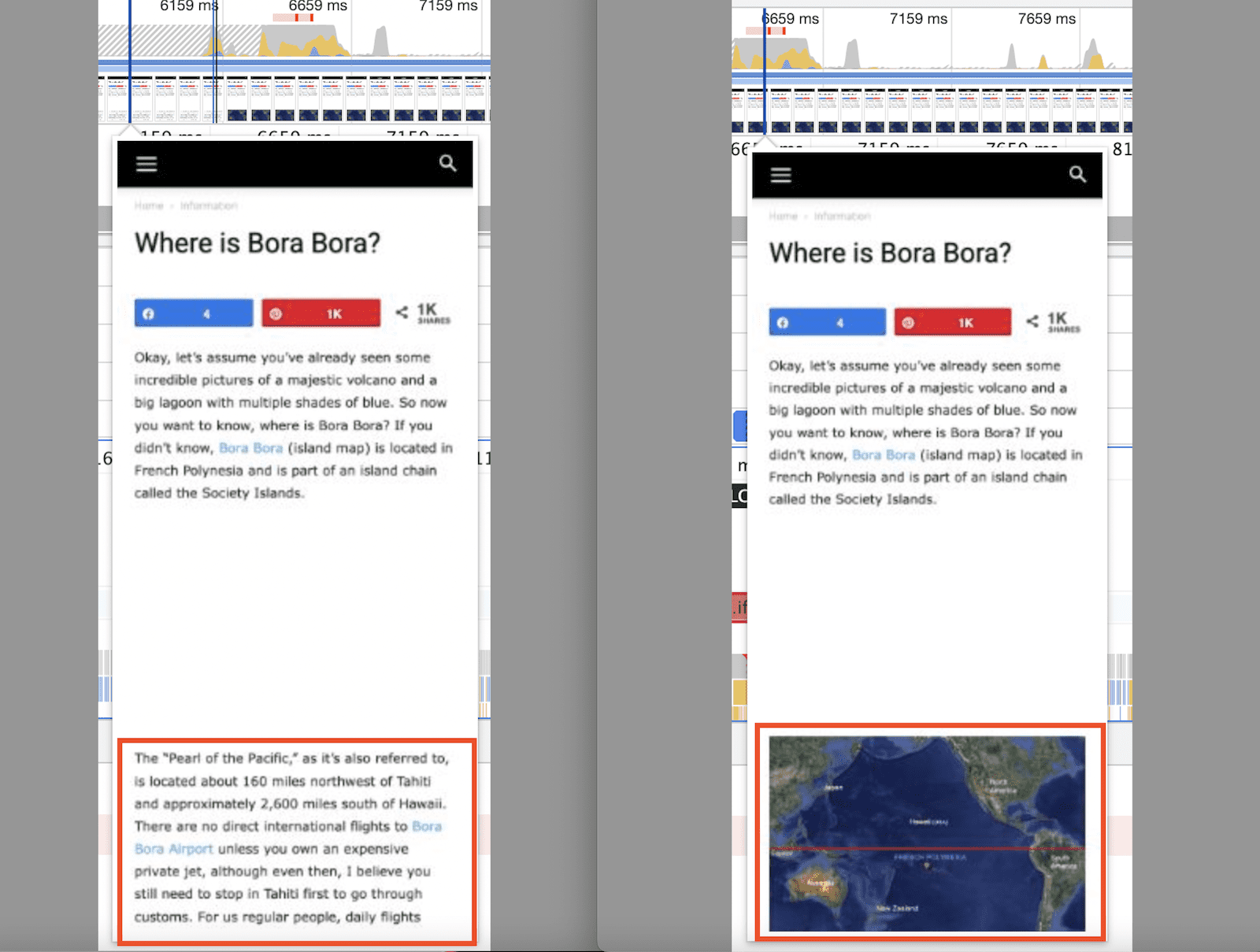
This shows the CLS measurement from the above image pushing the content down.
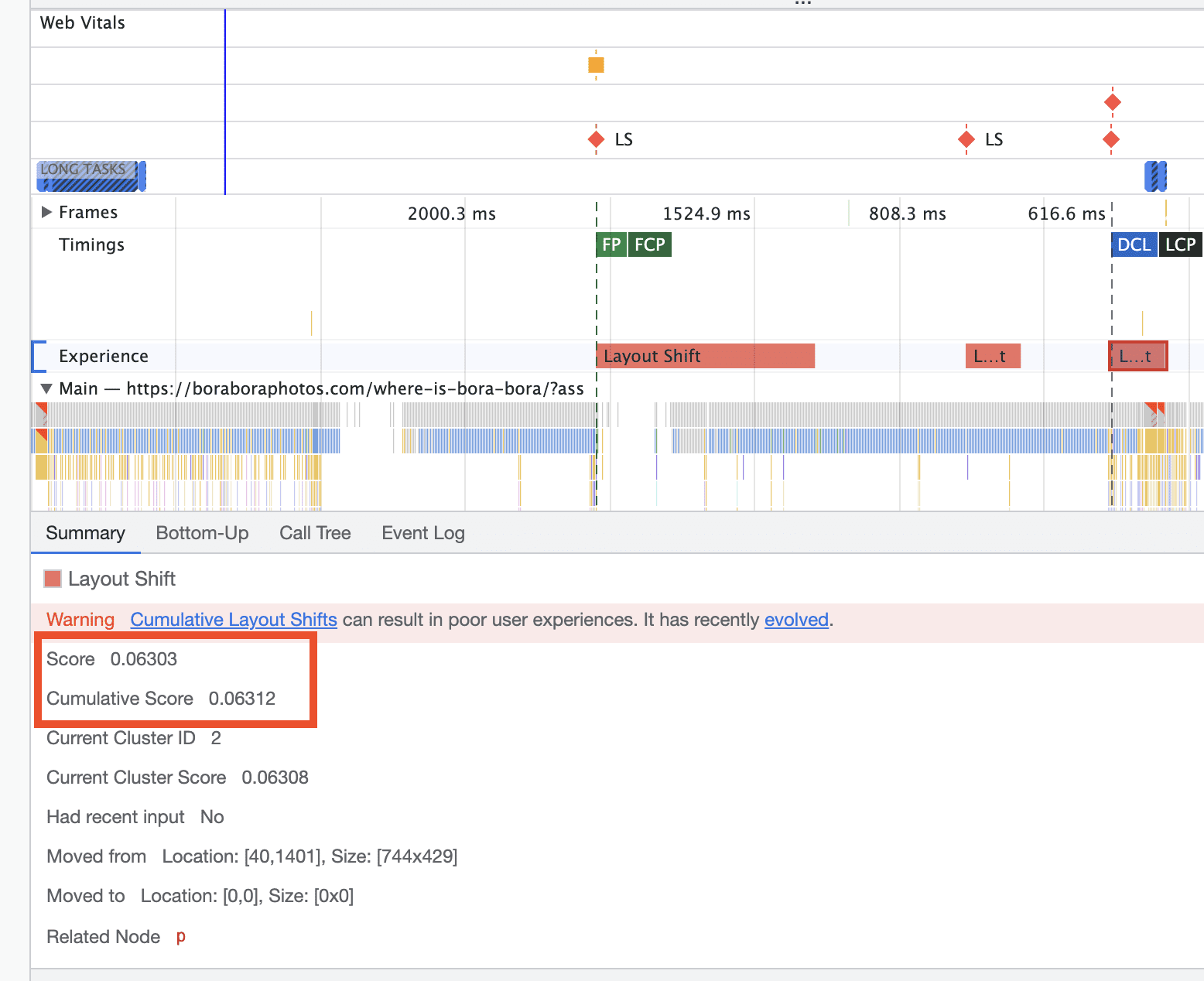
They said once I take care of that, I will be in a great position to get passing CLS scores. The question is, how do I go about doing this??
thanks
 Jose
Jose Hello again,
I found the problem. The background image of the row is not saved in the mobile version.
When I insert an image, I save the changes. But when I update, the image is not there. Attached video: https://vimeo.com/736181967
Is it possible that it is a bug in the theme?
website: https://cutt.ly/0ZUSHQA
vivreausmicHello,
I have several questions about the mobile and AMP version of the theme.
I would like AMP to be used automatically for mobile users, but only on the posts. I want the pages, the categories and all the rest of the website is in
So, in the AMP wordpress plugini choose tansitional and in advanced settings > compatible templates > Content type > I checked articles then in templates > singular
Then in Newspaper Theme Panel > Mobile theme > Use Mobile Theme for AMP
Problem 1: Visitors who click from a page to a post are not automatically redirected to the AMP version. The responsive version of the theme displays (just like on desktop).
If in the AMP wordpress plugin I choose in Other > redirect mobile visitors to AMP, the transition is done well, except that the category pages are also presented in a Mobile theme version. What I don’t want. I want all the pages except the articles to remain as on the computer version.
Problem 2: In the amp/mobile version of the theme, below the posts, articles to read are proposed. How to change the label Exclusive on a red background and write PREMIUM or something else with another color instead?
Thanks for your help.
A.
 dipen10
Guys
I have recently brought
Newsmag – Newspaper & Magazine WordPress Theme
my mobile version is not showing the way I’m expecting
my website is https://kanali.in/beta/
The above URL is completely different from the desktop. It’s different from Mobile.
also, the category page is not showing at all
Calin Hello,
For the moment using the mobile theme plugin you can set only one inline ad -> https://i.imgur.com/TNxveAZ.png -> https://i.imgur.com/yucehy6.png
Now if you choose the responsive eversion or a mobile page template there you can set with tagDiv Composer on the single post content shortcodes in ads tab up to 3 inline ads -> https://i.imgur.com/qwXErls.png
Thank you!
Calin HI,
Indeed for the mobile theme you need to do those changes in the mobile files, those are on this path -> wp-content/plugins/td-composer/mobile there you can edit the single.php file for the mobile page, unfortunately those changes need to be done after each theme update.
Thank you!
Calin Hi,
With the mobile theme the only way to display the sidebar will be if the code is changed/adapted.
To change the avatar picture please check this guide – https://forum.tagdiv.com/how-to-set-the-avatar/
Thank you!
 Rahul chauhan
I want to add some more inline ads in mobile theme plugin. is it possible or not?
 Bettina
 Hello!
I recommend you to set a homepage and do not let the blog page created by WordPress: https://i.imgur.com/mwjp18K.png
Any other page seems to be displayed well.
We have 3 options for mobile versions that you can use:
1. Responsive version: A responsive version of your website looks similar to the desktop version. Edit the page with TagDiv Composer. Click on the mobile viewport: https://www.screencast.com/t/XDQJedlggSB; there you can see your mobile version and edit or adjust the elements to look better.
2. Mobile pages: https://tagdiv.com/newspaper-10-3-7-update-brings-customizable-and-fast-mobile-pages
3. Mobile theme plugin: The Mobile Theme is a performance-optimized theme included in the main Newspaper theme that only loads on mobile devices. It comes with its own templates and design for pages, posts, categories, etc., so your current templates from the desktop theme will get converted to the mobile theme layout. Please see https://forum.tagdiv.com/the-mobile-theme/ and https://forum.tagdiv.com/mobile-theme-introduction/ for more information.
A full explanation you can find here: https://www.youtube.com/watch?v=SpGkOnJeNZY
You can choose to use whichever one is more affordable and useful for you.
For the option 1 and 2, you need to deactivate the Mobile Theme plugin.
Thank you!
 mudit300
Hey, As you see in the screenshot the text alignment is not very proper, it has lot of gap between lines, + I can see some blank space in footer in smartphone @Mobile theme, Please assist
Link for screenshot: https://drive.google.com/file/d/1F0h-UCfZXrDcW0VDZLEOZ7-IsAILAlKA/view?usp=sharing
Link of website: outdoorhints.com
Bettina Hello!
I’m sorry to hear about this. Please note that every page speed needs some improvement, and it is not enough to install a plugin alone because there are many factors which can affect your page speed quality.
Some factors which you need to take into account are:
External factors: server speed, if you are using CDN or not, the external resources loaded by your website like ads, fonts, tracking scripts like Facebook Pixel, Google Analytics, Twitter analytics, Hotjar and so on.
Internal factors: the number of elements on the page, image size, image formats, if you are using mobile optimized layouts, console errors, if you are using the Standard Pack plugin or not, if you are using the PRO demo or a standard one.
https://forum.tagdiv.com/topic/optimize-script-to-improve-site-speed/
– https://forum.tagdiv.com/topic/a-few-tips-for-newspaper-x-speed-high-cpu-usage-issues/
– https://tagdiv.com/how-to-increase-page-loading-speed/
– https://forum.tagdiv.com/how-to-make-the-site-faster/
– https://forum.tagdiv.com/topic/score-100100-pagespeed-with-newspaper-wordpress-theme/
– https://www.infophilic.com/get-almost-100-pagespeed-newspaper-theme/
– https://developers.google.com/speed/docs/insights/v5/about
– https://www.youtube.com/watch?v=tnkVapqhIHc
Please check the tutorials from those platforms gt metrix and Google Pagespeed Insights and I’m sure you can increase the page speed.
Please note that page speed is not covered by the support team: https://forum.tagdiv.com/newspaper-theme-support/
Thank you for understanding!
Calin Hi,
I’m not sure that I correctly understand the situation. Do you use the mobile theme plugin? In this case is no longer need to set for the mobile ads those tabs, just set the image in mobile ads -> https://i.imgur.com/QQvYa21.png -> https://forum.tagdiv.com/the-mobile-theme/
Nor if you are using the responsive version, then you can try this strategy on pages and cloud templates. Use the tagDiv Composer to edit theme and check those options -> https://i.imgur.com/lKXcpmn.jpg
Now for article ads indeed you need to use those codes -> https://i.imgur.com/vgSsTrZ.png
I hope this will help you!
 narbariya
Newspaper Theme Header Menu not showing but proper work with mobile?
narbariya.com
Anamaria Hi,
The mobile theme comes with its own templates for page, post, category, etc so your current templates from the desktop theme will get converted to the mobile theme layout, the page content is made without builders in mobile editor => https://www.screencast.com/t/xbgZG8kH also, the options that are provided to edit the mobile theme version are limited (this keeps the things simple)).
So, if you want to use the cloud templates, then you need to disable the mobile theme and AMP plugins, and then use the responsive version.
You can use cloud templates with AMP.
Also, please check this topic where I explained each mobile version -> https://forum.tagdiv.com/topic/mobile-version-not-working-properly-2/ and choose what mobile version you want.
Thank you!
Anamaria Hello,
The mobile theme comes with its own templates for page, post, category, etc so your current templates from the desktop theme will get converted to the mobile theme layout, the page content is made without builders in mobile editor => https://www.screencast.com/t/xbgZG8kH also, the options that are provided to edit the mobile theme version are limited (this keeps the things simple)).
So, if you want to use the cloud templates, then you need to disable the mobile theme and AMP plugins, and then use the responsive version.
You can use cloud templates with AMP.
Also, please check this topic where I explained each mobile version -> https://forum.tagdiv.com/topic/mobile-version-not-working-properly-2/ and choose what mobile version you want.
Thank you!
Anamaria Hello,
The mobile theme comes with its own templates for page, post, category, etc so your current templates from the desktop theme will get converted to the mobile theme layout, the page content is made without builders in mobile editor => https://www.screencast.com/t/xbgZG8kH also, the options that are provided to edit the mobile theme version are limited (this keeps the things simple)).
So, if you want to use the cloud templates, then you need to disable the mobile theme and AMP plugins, and then use the responsive version.
You can use cloud templates with AMP.
Also, please check this topic where I explained each mobile version -> https://forum.tagdiv.com/topic/mobile-version-not-working-properly-2/ and choose what mobile version you want.
Thank you!
Anamaria Hello,
The mobile theme comes with its own templates for page, post, category, etc so your current templates from the desktop theme will get converted to the mobile theme layout, the page content is made without builders in mobile editor => https://www.screencast.com/t/xbgZG8kH also, the options that are provided to edit the mobile theme version are limited (this keeps the things simple)).
So, if you want to use the cloud templates, then you need to disable the mobile theme and AMP plugins, and then use the responsive version.
You can use cloud templates with AMP.
Also, please check this topic where I explained each mobile version -> https://forum.tagdiv.com/topic/mobile-version-not-working-properly-2/ and choose what mobile version you want.
Thank you!
Anamaria Hi,
Please check if you have the mobile theme plugin activated, if yes, please disable it.
Also, please check this topic where I explained each mobile version -> https://forum.tagdiv.com/topic/mobile-version-not-working-properly-2/ and choose what mobile version you want.
Thank you!



