
- NewspaperThe Newspaper Mobile Theme: Introduction
- NewspaperThe Mobile Theme
- NewspaperModules Builder in Newspaper Theme
- NewspaperNewspaper theme documentation
- NewsmagTheme colors introduction
- NewspaperTheme Colors Introduction
- NewspaperWhat’s Included in the Newspaper Theme Package
- ApiUsing the Theme API in plugins
- NewspaperFilters and sorting for taxonomies
- NewspaperHow to Add a Logo in Newspaper
- NewspaperBig Grid Flex Settings
- NewspaperHeader Builder
- NewspapertagDiv AMP Plugin Tutorial
- TutorialsFrom WPBakery to tagDiv Composer
- NewsmagSmart list ads
- NewspaperBest Of Forums
- NewspaperCache plugin – install and configure
- NewsmagIntroduction
- NewsmagMain menu
- NewsmagLogo & Favicon
 Bettina
 Hello!
If you do not use Mobile Theme plugin, then I recommend you to uninstall it.
We recommend using the WP Super Cache plugin https://forum.tagdiv.com/cache-plugin-install-and-configure/
This issue appears when your page is not loading so fast. A solution for this could be to increase your page speed or change your server with a faster one.
Please make sure that all the requirements are met as you can see here: https://forum.tagdiv.com/requirements-for-newspaper/
You can check also if there is a plugin conflict, please deactivate ALL plugins except tagDiv ones, also if you are using child theme or cache plugin, deactivate them, clear all cache(also from your browser) and try again.
Hope that helps you!
Thank you!
 Vlad S
 Hello!
Image background on the mobile menu can be done from Theme panel – Background as you can see here: https://www.screencast.com/t/ecuAotX0B1V
Thank you!
Bettina Hello!
The AMP has its own design, so if you will use it on your cloud templates, then the pages will be overwritten by the plugin. Unfortunately, AMP is faster and works better only with Mobile Theme.
For more information, check our documentation here:
– https://forum.tagdiv.com/tagdiv-amp-plugin-tutorial/
– https://forum.tagdiv.com/the-mobile-theme/
Thank you!
 sidusinfieri
Hello, I would please like to know (if possible) how to modify mobile theme in order to obtain the following results:
1 – hide author and/or date from grid in mobile homepage
2 – increase height of grid elements in mobile homepage
3 – change the gradient overlay to a flat overlay in mobile homepage
4 – hide the “latest articles” title (without removing the “latest articles” module) in mobile homepage
Thanks in advance for your possible help! Best regards!
 stephanwhelan
Hi team – is there a means of changing the position of the Ads displayed on AMP version of the template. The Mobile theme has an option to show ads above the body content, but the AMP version only has one option and it appears above the title (i.e. so first thing the user sees). We’d like to get them to match.
 Carlnec
Hello, please how do I add images like adverts or banners on the Newspaper mobile theme?
The option is only available on the main theme.
stephanwhelanHi support – upgraded to Newspaper 11 and doing some tests. Looks like the Mobile Theme has an issue. On first load the search icon doesn’t appear and the logo is offset to the left. This is on all pages on the mobile theme version. After about 15-20 seconds the search icon appears and the logo resets properly. See examples:
https://pasteboard.co/K8mv6vk.png
https://pasteboard.co/K8mvl0q.png
 haizattabdul
Hi i just updated newspaper theme 11 but the my website got a missing/broken menu and search button in homepage.
URL: https://www.yoy.my/
Photos: 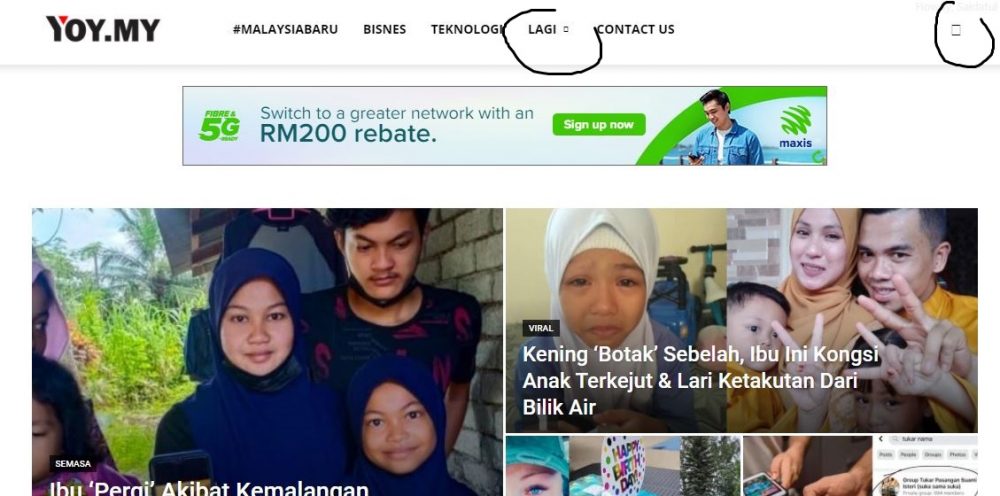

Please help.
 Jeewan
 frullino2
Hi I have a problem: if I visit the site with chrome everything is fine but if I open it with firefox the homepage (only the homepage) is that of the mobile theme. What can I do? Thanks so much.
 channeld
Hi. Can you please check this? https://www.fmh.gr/wp-content/plugins/td-composer/legacy/Newspaper/js/tagdiv_theme.min.js?ver=11. What is that? Where it is used and how it can be unloaded?
The magnific popup code is shown as unused js.
I also run the clean css and generate fallback css for the theme. But it doesn’t seem to clean. See the pagespeed results: https://developers.google.com/speed/pagespeed/insights/?url=https%3A%2F%2Fwww.fmh.gr%2F&tab=mobile
 Anamaria
 Hello, Andrea,
Please let me know what setting do you use mobile+amp or amp,
Since when did you notice that this problem occurred?
Also, please do a test using only the plugins from the theme plugins and see if this issue persists.
Thank you!
Anamaria Hello,
You can disable the back to top from Theme Panel -> Template Settings -> ToTop button => https://www.screencast.com/t/JVYklvqk
Also, if you use mobile theme, you can only hide it using custom code, but for mobile responsive version and mobile page will apply the option from Theme Panel.
Thank you!
 Nagarig
 @Bettina If we disable Google Fonts and Mobile Google Fonts from Theme panel font customization settings, it will not show any fonts on site? Or then fonts will be served from Server Side? We don’t have to upload custom fonts right? We can use default theme fonts and at the same time we can disable Google Fonts, right?
-
This reply was modified 5 years by
Nagarig.
Bettina Hello!
You should add the ads in Newspaper -> Theme panel -> Mobile Theme -> Mobile ads in order to display on that mobile layout.
Thank you!
Anamaria Hello,
Seems you use the AMP plugin, so you need to create the page in mobile editor => https://www.screencast.com/t/ycIRAQLLK5S -> https://forum.tagdiv.com/tagdiv-amp-plugin-tutorial/
This is a video about Responsive Newspaper Theme, AMP & Mobile Theme, Mobile Pages & Templates -> https://www.youtube.com/watch?v=SpGkOnJeNZY
Thank you!
Anamaria Hello,
Seems you have the mobile theme plugin activate, and this is displayed also, on the desktop=> https://www.screencast.com/t/MmKBKYISUHq
Usually, this problem when the mobile theme is displaying on the desktop, then you have a cache conflict, the plugin for the cache that you are using do not recognize the mobile and desktop cache. We recommend using the WP Super Cache plugin https://forum.tagdiv.com/cache-plugin-install-and-configure/
Also, if you don’t want to use the mobile theme plugin, you can deactivate the plugin.
Thank you!
 robink
Hello Support,
There is this strange bug on mobile only, when you click on a main Category on header menu, on desktop, all is ok, articles showing on the Flex Bloc 2 and 1 are loading the correct current Category articles.
Desktop Beauty Cat :
http://prnt.sc/16m55ua
but on mobile, i’m getting articles from “AUTOMOBILE” categroy, in these Flex Blocs 1 and 2 instead of current cat articles.
Mobile Beauty Cat :
https://prnt.sc/16m5bpp
Look at this page for example :
https://www.trendsinriviera.com/category/beaute/
and look at it on Desktop and also on mobile, you will see that on mobile, it loads ATOMOBILE articles instead of BEAUTE articles in the top flex blocs.
Theme version 10.4, WP 5.7.2
Any clues ?
MAny thanks
Robin
 elandroide
Hi,
I’m using the Newspaper theme and I’m trying to hide the scroll to top button that appears on the botton right side of every page and post. ¿Can you help me with the CSS code?
I’ve tried with this code but it only seems to work on the mobile version (inserting the code in Theme Panel -> Mobile Theme -> Custom Code):
.td-scroll-up{ display: none !important;}
If I use this same code in Theme Panel -> Custom Code -> Custom CSS it simply has no effect. I’ve tried cleaning de caché but it doesn’t solve the problem. My site is https://misterkernel.com
Thanks for your help!
 papp0us
 No need after all, it seems it’s a problem of Facebook Mobile Browser.
It’s affecting every site redirecting the link (in our case, redirecting to amp)
https://developers.facebook.com/support/bugs/386564952789501/?join_id=f22e1cd3806adb8
The only feasible workaround for now is to disable automatic redirect to amp for all mobile users, and use a mobile theme.
https://wordpress.org/support/topic/amp-problem-with-facebook-mobile-browser/#post-14592164
Thank you, i hope it gets fixed soon.
Anamaria Hi,
I’m sorry, but I don’t understand exactly what you mean by ” scroll down the screen slides from side to side. ”, Can you provide more details, like screenshots?
Also, it looks like you still have mobile theme plugins enabled => https://www.screencast.com/t/3866LUBidzO
Thank you!
 qrssaw
If I change it to a mobile theme on the newspaper, I can’t see AdSense anchor ads, is there a solution?
 johnu101
 Thanks for your late reply.
Early I use mobile theme + amp that time I have an issue with the Facebook browser, now I change the only mobile theme. now working fine.
Please check mobile theme + amp
Vlad S Hello!
The adsense code on Mobile theme plugin must be inserted in here in the place you want: https://www.screencast.com/t/QDmC0Dkx
Thank you!
Vlad S Hello!
The adsense code on Mobile theme plugin must be inserted in here in the place you want: https://www.screencast.com/t/QDmC0Dkx
Thank you!


