
- NewspaperThe Newspaper Mobile Theme: Introduction
- NewspaperThe Mobile Theme
- NewspaperModules Builder in Newspaper Theme
- NewspaperFilters and sorting for taxonomies
- NewspaperHow to Add a Logo in Newspaper
- NewspaperBig Grid Flex Settings
- NewspaperHeader Builder
- NewspapertagDiv AMP Plugin Tutorial
- NewspaperNewspaper theme documentation
- NewspaperBest Of Forums
- NewspaperCache plugin – install and configure
- NewspaperFont Customization
- NewspaperTheme Colors Introduction
- NewspaperBackground Introduction
- NewspaperHeader ads
- NewspaperPost template ads
- NewspaperCustom ad spots
- NewspaperMain Menu
- NewspaperHow to Install Newspaper via FTP
- NewspaperHow to Install Newspaper via WordPress
 webowner001
Hi,
How do I get my MOBILE header to appear on ALL pages, of course on the mobile version of my site?
Right now I am individually adding a customized mobile header to EVERY PAGE or SECTION – and there must be an easier way??
I do not see anywhere in CLOUD – Templates to set the MOBILE header – Globally
Please offer your tips & Suggestions to fix this.
Right now, as you can see – some pages (ON MOBILE) are reverting to the Newspaper LIVING Magazine header – NOT what I want. You can check this page for example – http://fodphotosite.com/latest-photos-galleries/downtown-vancouver
I have MANY other pages that also come up with the LIVING MAGAZINE LOGO / Header on Mobile. I want to change this to my Mobile Header – but on ALL pages…
There must be an easy way???
Thank you.
 SamW2023
When editing in mobile view, the 3rd party link (eg – Spotify player) shows but in real-time mobile view, it is not showing. The desktop view is working fine, it’s just the mobile view that is not showing the Spotify Player.
 duliom
 but where do you edit the global mobile model? which part ????
 libertylens
 It help a little, but I don’t understand how to actually DO that. Can you provide a recording? These are the areas where I need understanding and help:
– I don’t really understand the difference between a “post” template, and the “block” templates.
– I need to have different versions of each of these templates.
I need to understand how to modify these templates.
– There appear to be separate templates for mobile and desktop (both block templates and post / page templates.
I had everything the way it needed to be, but I wanted to adjust one template / content type without affecting others. I need help repairing this, and setting myself up for being able to edit templates and content types, independently, without compromising others.
Thanks,
Ken
 Anamaria
 Hello,
The footer applies globally only if you use for all templates a mobile template; you can copy and paste the row with all the elements where you want.
Thank you!
 propagare
I’m using advanced css to change the height of a div but the mobile css is not getting inserted into the page
https://i.imgur.com/QkhWRym.png
Site: eshoje.com.br/portal
 ePublisher
BG fixed in laptop view not in mobile view. please let me know how to fix this
https://bruist.eddy.one/alkmaar/
please check this section in mobile https://paste.pics/ORWPO
duliom hi, what I want is to edit footer mobile to customize, and stay on all pages and posts, where I edit footer mobile???
duliom Hi,
how to create global footer for mobile version to appear in post and pages. I have to do it as it is in the image but nothing appears when I put content
 Calin
Calin Hi,
The mobile version is not the same like the desktop when the mobile theme plugin is used. To have the same layout on mobile like on desktop, use the mobile theme plugin only for ump, or disable the plugin.
Thank you!
 Peterchoge
I am setting up the website and the homepage in the mobile version is not similar to the desktop version.
here is the website https://sportsafrica.net/
webowner001 Hi Again,
Not sure what I did – but it seems ALL pages now on Mobile have same header – Except for the NEWS page.
Please see my earlier post for NEWS problem and let me know how to fix.
Thank you so much!
webowner001Hi,
So, I have played with this multiple times and felt sure the mobile header is set on the “Edit Mobile page” section – I hit save, and ensure the ON button is on (left side menu options) – but when I view the site on my mobile – it seems to keep reverting back to the default header which I do NOT want – Living Magazine…
I feel like I am missing a section somewhere.
In Cloud-Templates, I do not see anywhere to set a mobile header for ALL mobile pages.
For instance please look at – http://fodphotosite.com/about-us – as you can see it shows LIVING MAGAZINE header, and not the newly created FOD Mobile Header I have set in place.
I am going into EVERY page – “edit mobile header” – to set the FOD Mobile header and SAVE – but it seems like it does not show up on a mobile.
SECOND PROBLEM:
Then on the NEWS page – it comes up with my mobile header, but the LOGO is there – not a text/icon logo that I would like instead. I have imported my good FOD Mobile Header and Saved, but same problem.
I have a S23 Ultra and have also checked in numerous browsers. I have also cleaned cache of my mobile browsers – same problem.
Please confirm the same, and send me immediate Tips & Suggestions to fix this immediately. I can give you access if absolute necessary so you can fix at your end. Ideally I would want ALL Mobile headers on ALL pages, the Same – and ALL regular headers on all pages the same.
Thank you soooo much.
 bduhamel
 No, my mobile version looks fine in the composer, but it does not load properly on any actual mobile devices. The formatting is way off. I see no way to fix this. It must be an issue with the caching or something. It wasn’t happening until the last theme update.
 Archerix
 “there are no problems with the INP – https://i.imgur.com/gAncpfD.png”, well in reality there is, i have received the warning for “202ms” and yours is “214ms”, so my website is better optimized than yours Demo, meaning tagDiv Mobile Theme is performing better than your newspaper pro on mobile
Everything over 200ms will receive a warning
 platamun47
 I do not know What I would say more
Wp-rocket is only plugin with
a have performance of your mobile theme over 90.
More thinks not working…
I spend 2 mounts clicking and clicking…
Sincerely I’m really dissapointed…
and not working after disabled wp-rocket!
-
This reply was modified 3 years by
platamun47.
Anamaria Hi,
@analia, To add a menu, you need to select the viewport for phone select the hamburger menu and assign the menu -> https://i.imgur.com/0LEgkTh.pngTo change the font and color for the mobile menu please go to Theme Panel -> Theme Colors -> Mobile menu/mobile search => https://www.screencast.com/t/0CvSgXp9H to set a background image go in Theme Panel -> Background -> Mobile menu/mobile search => https://www.screencast.com/t/uvDejzbX to change the font from Theme Fonts => https://www.screencast.com/t/ANBQe7hQhJd
@greenbooks You can use the slide element, but this will display posts. Also, you can use the element gallery with ACF Pro.
Thank you!
Calin Hi,
This depends on how well is your website optimized, for example this demo – https://demo.tagdiv.com/newspaper_pro/ was optimized by our developer and there are no problems with the INP – https://i.imgur.com/gAncpfD.png
Mark Gilbert, here is the section that you can improved – https://i.imgur.com/qYREfsD.png also if you can replace all standard elements and disable the tagDiv Standard pack then you’ll load low resources.
Also, you can use flex blocks and use cache on them – https://forum.tagdiv.com/use-flex-blocks-cache-option/
Another alternative is to try a different cache plugin, like WP Rocket and you can use the page template – https://tagdiv.com/newspaper-10-3-7-update-brings-customizable-and-fast-mobile-pages/
Archerix if the form is on mobile theme plugin, please try the smart list 2 and also, make a test with the mobile theme only for amp and try the page template – https://tagdiv.com/newspaper-10-3-7-update-brings-customizable-and-fast-mobile-pages/
Thank you!
Calin Hi Central, this https://prnt.sc/pT6olWAKrpcZ is not the theme cache, is the cache that applies individually on each flex block and according to our documentation this will be clean at the time that is set – https://forum.tagdiv.com/use-flex-blocks-cache-option/ – https://i.imgur.com/zzwFmEc.png this is how it should work to reduce the database requests made by each flex block.
Hi bduhamel, I think that you are referring that the mobile version is not looking so good like the desktop version, right? If so, then it can be edited using the tagDiv Composer – https://i.imgur.com/4pSTGQZ.jpg – https://i.imgur.com/ena4yXH.png
Thank you!
Anamaria Hi,
Do you don’t want to have a different color for each category? Then use this cutom code css .td-post-category, .td-category-header .entry-category
{
background-color: #4fa1f2;
}
Set the code in Newspaper -> Theme panel -> Mobile Theme -> Custom code.
Thank you!
Anamaria Hello,
You can disable the back to the top from Theme Panel -> Template Settings -> ToTop button => https://www.screencast.com/t/JVYklvqk (if you have the mobile page or mobile resposive)
Also, for the mobile theme plugin, you can only hide using a Custom Code CSS
.td-scroll-up

{

display: none;

}
Set the code in Newspaper -> Theme panel -> Mobile Theme -> Custom code.
Thank you!
 dvndrvliet
geekanything.com
Our homepage is suddenly stopped working (see image)
When I update the page and save it (not changing anything), it works for reload or two, then reverts. Not sure what changed.
It is only happening on the mobile site. And links to posts work fine, it’s just the homepage that is having issues.
Archerix Hi, have recieved the same email
The problem is only in “mobile”, i’m using the tagDiv Mobile Theme
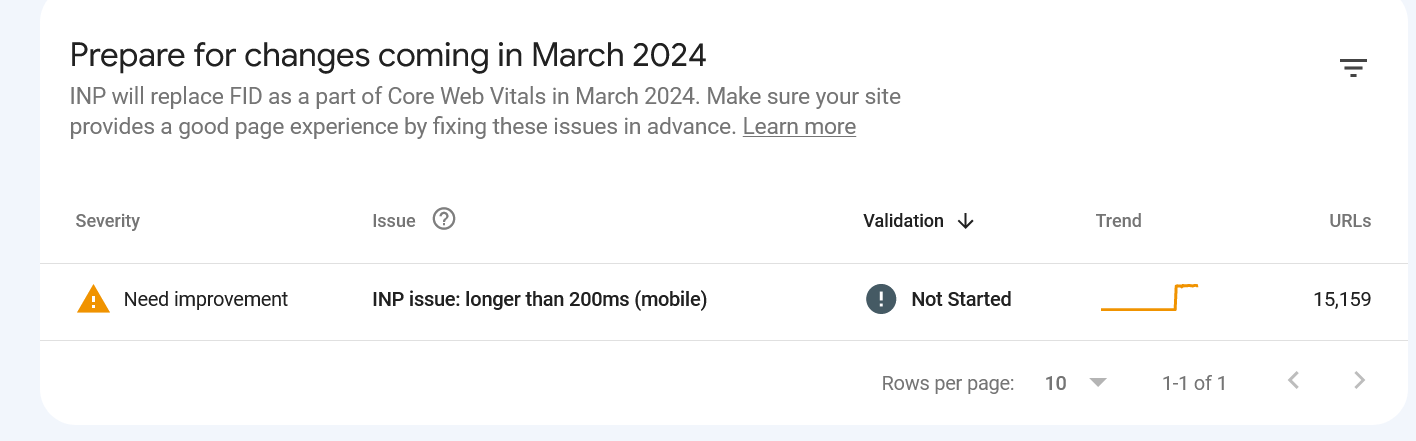
Also, the tagDiv Mobile Theme as a problem with “smartlist” forcing always in mobile the “smartlist 1” ignoring options we have selected and that shows correctly on desltop
 analia
 Hello ! could you tell me where I can modify the menu in mobile ? I can not find the option, I leave screenshot . By the way I do not want to use the plugin tagDiv Mobile Theme leaves me a very basic design. But however I can not find the mobile options without that plugin
 Sikandar
My website is failing badly on Desktop CLS and now INP on mobile. I am not a programmer so I don’t know how to fix and improve things. I tried cache, lazy loading, and thinking about a redesign of the current theme.
https://respawnfirst.com/ this is my website. Please let me know how I can fix CLS and INP issues on my Newspaper theme.



