
- NewspaperThe Newspaper Mobile Theme: Introduction
- NewspaperThe Mobile Theme
- NewspaperModules Builder in Newspaper Theme
- NewspaperFilters and sorting for taxonomies
- NewspaperHow to Add a Logo in Newspaper
- NewspaperBig Grid Flex Settings
- NewspaperHeader Builder
- NewspapertagDiv AMP Plugin Tutorial
- TutorialsFrom WPBakery to tagDiv Composer
- NewsmagSmart list ads
- NewspaperNewspaper theme documentation
- NewspaperBest Of Forums
- NewspaperCache plugin – install and configure
- NewsmagIntroduction
- NewsmagMain menu
- NewsmagLogo & Favicon
- NewsmagHeader ads
- NewsmagSmart sidebar
- NewsmagSharing buttons
- NewsmagCategory tag on modules/blocks
 Vlad S
 Hello !
As you can see here your website does not have AMP: https://www.screencast.com/t/X0xnEy0CJY Please make sure that you set AMP properly: https://forum.tagdiv.com/tagdiv-amp-plugin-tutorial/
At the moment your ads are running fine on your website, mobile and desktop. For the page speed please make sure that all the requirements are met:https://forum.tagdiv.com/requirements-for-newspaper/
Thank you!
 Calin
Calin Hi, I just checked the website with my mobile and the menu for me seems to work now ->https://i.imgur.com/w6eNqaN.png
If there is still a problem and I miss it, please let me know!
Thank you!
 Micha
MichaThe comments are not displayed in the mobile version of the website (I don’t use the mobile theme). They are there in the desktop version.
I have already checked the settings and the tips in the forum already tried (and also whether I was stupid enough to hide the comments in the mobile version), but no matter what I try, there is still no comment field on the mobile version.
is there another trick i can do to show the comments section?
 infanta_2001
Hello! On your website https://ladyinfantahealth.ru/category/sadovodstvo/ I made a new category and this is what happened in the header – https://pastenow.ru/ad4ca8d0c3afb112bcd75bbef3b85bb2 and below https://pastenow.ru/c2cb163f04c35188ad8d8ff200a3d0c6. In one word, the heading header is broken. The mobile version is the same. Everything is fine on the main page. Cleaned the cache. Nothing has changed. Can you tell me what I need to do?
 brael
braelHi,
If I’m using for example, block 16.
I have it set to display 5 posts. On desktop it displays these 5 posts horizontally which is great. It also has pagination for access to any remaining posts.
Now on mobile, I just want it to display 1 post with pagination for access to the remaining posts.
Is this possible?
 Sud
SudHi,
Thanks for this wonderful theme.
After almost 1.5 years, again I have to switch back to Newspaper day before.
While implementing the MObile Theme on my website (URL – https://discovervibe.blog ) mobile theme Home page is not appearing with message – No matching template found
– Pls find the screenshot – http://prntscr.com/12zmk9a
– While I have prepared the Home page through Tagdiv Builder, as advised in front end panel, the URL of the mobile theme page is – https://discovervibe.blog/home-mobile/
My all other posts are also not appearing in their AMP version.
Pls guide me to solve this issue.
Best Regards,
Sudhir
 webjump
Hi team,
Pleas help with my current issues with Newspaper:
https://farewells.co.uk
1. Performance
Since we have upgraded, our site has significantly slowed down when open and saving pages and posts.
—-
2. Post display issue
Posts are this section are now dispaying errors when viewed on Safari. As you can see, it appears to be a template error. Please see example links:
https://farewells.co.uk/funeral-inspiration/
https://farewells.co.uk/letter-of-wishes-funeral-app/
Please note that these posts DO display Chrome and Firefox (not yet checked on a PC browser yet), however they are displaying 2 images – both the thumbnail and featured image. How can we resolve this please?
—–
3. Image Ads are not display
Image ads in the header do not display on mobile phone devices.
Please understand that our website is a business and employs 4 people. We survive on advertising revenue and provding an information service. We chose Newspaper because we thought it was a stable platform. We have hundreds of posts and now live in fear that this will continue breaking.
We humbly request your assistance.
Many many thanks in advance.
Ken
 rsm181090
Hi,
On website gkinmarathi.com Loop ads are not showing in mobile and amp version.
Can you please check what’s the issue.
 Tinystepsbabyclub
 I just wanted to add to this. When I am logged into my WordPress site on my mobile the mobile theme homepage looks perfect. Everything is exactly as it should be. But if I go to an incognito browser and check the site….it shows a non-mobile homepage theme version of my site? Other people also see this weird version on the homepage. It only appears to be the home page that is wrong, because all the posts and other pages seem to be in the mobile theme.
Very odd and i’d like to return the homepage to the normal mobile theme that appears to look great when I view the site logged into my WordPress on my mobile handset please.
Thanks
Sarah
TinystepsbabyclubHi Guys
I’ve noticed that all of a sudden my mobile theme is not being displayed on mobiles anymore. Its been working fine for a long time. I’ve not installed any recent plugins. Weirdly, the mobile theme option under theme panel, mobile theme, mobile settings is now greyed out and I can’t select any option 9mobile, mobile +amp, Amp – these are all greyed out).
My website is tinystepsbabyclub.co.uk
I’d be grateful if you could help.
Thanks
Tiny Steps
 Oldmagio
 Hello,
I done what you suggest. Now lot of thing works better but not the revslier and the column. Now I try to recreate the page for the problem of the column. The slider now appear also in mobile page but there is also a lot of space over and under the revslider. I can see that space that increase gradually when I minimize the window of the browser.
Maybe I wrong something in the creation of dimensions of the slider?
Could you help me?
Best regards
 jaswinder singh
Hi, I have been using the Newspaper theme from last many years. However, off lately i am facing trouble with the responsive tables especially for mobile device view. I was earlier using Tablepress plugin but later tried the WP NInja Tables Pro also but still of no use.
My basic problem is the tables appears like image 1 ( ) on mobile devices while I am looking to appear like image 2.(
 )
)
Pl let me know what I need to do to get the expected view for tables on Mobile devices.
My site is https://cricangel.com
 satperi
Hello all and thanks for the amazing Newspaper theme.
Is it in your plans to offer another AMP theme with more modules than the current mobile theme plugin (too limited)? I discovered another AMP theme called “Newspaper for AMP” but i think it’s not built by TagDiv, although it refers to your brand. Moreover it uses the “AMP for WP” plugin and not the official.
Thanking you in advance
 luke-tt
Hi,
I’ve changed from Newsmag to Newspaper.
Then I’ve created a mobile optimized site: https://www.eronite.com/homepage-magazine-pro/new_cloud_templatehomepage-mobile-magazine-pro/
But why is this so unsatisfying slowly? See https://developers.google.com/speed/pagespeed/insights/?url=https%3A%2F%2Fwww.eronite.com%2Fhomepage-magazine-pro%2Fnew_cloud_templatehomepage-mobile-magazine-pro%2F
Any idea?
Thank you in advance,
Luke
 antkoo
 Hi, I am getting the same error message when the site loads on mobile. New buyer here and wasn’t expecting this.
 danna
dannaHello,
my Search Console tells me, that i have a very high CLS on mobile pages (i use the tagdiv mobile theme). Now i checked the page with the Developer Tools from Chrome and it seems, that the “div.td-container” causes this problem. Everytime you Scroll, there seems to be an invisible CLS. Do you know how to fix that?
This problem occures on every post URL. F. ex.: https://rauf-und-davon.at/die-schoensten-hochtouren-in-oesterreich/
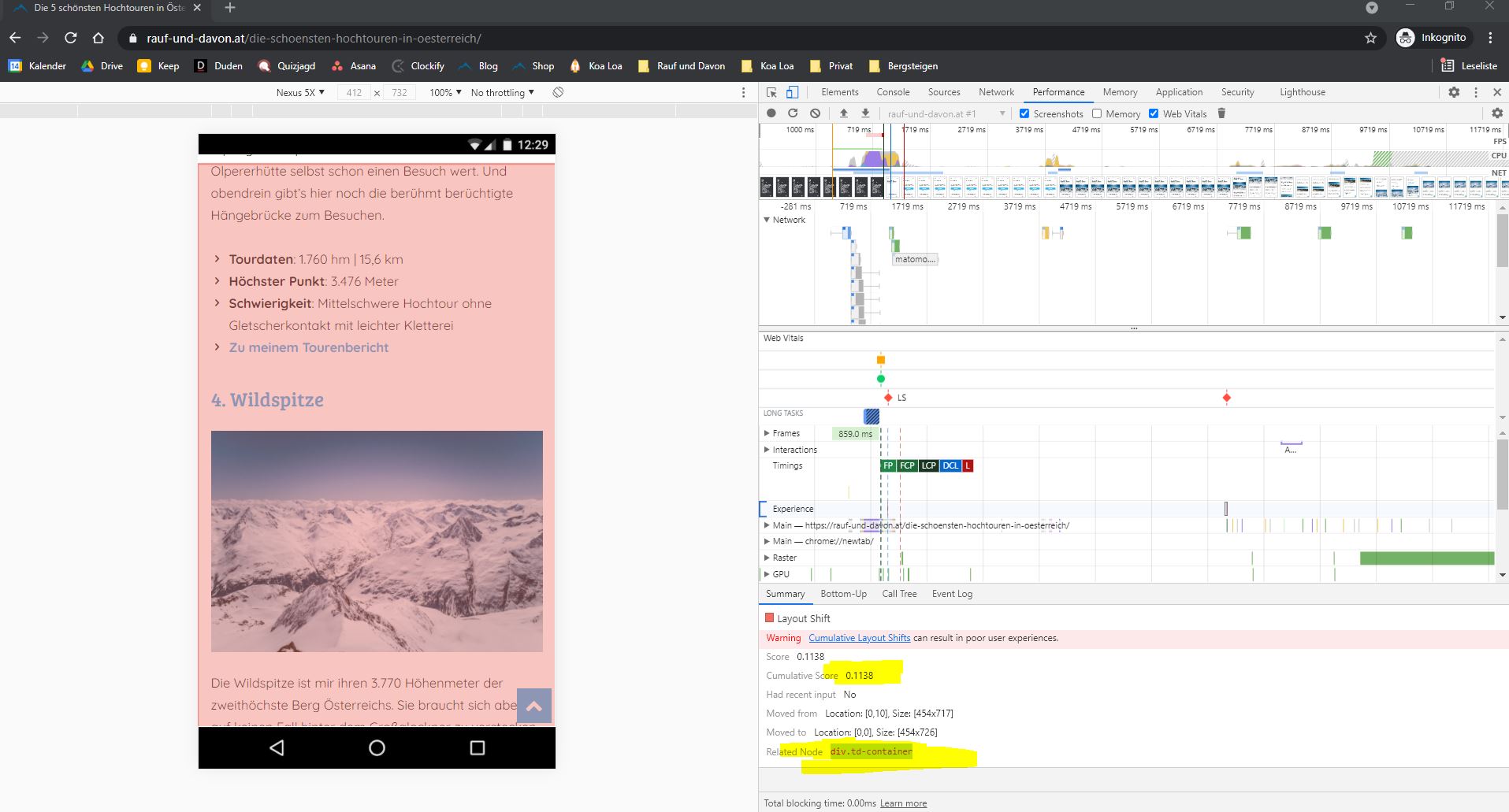
All the best,
Daniel
 VisualSuspect
I created a a custom mobile header template and tried to apply it globally. It show very nice in the front page which where i created but i pressed to be global but it didn’t. When i get into a post the old header comes back.
 peanutbutter
 great it works now. had to uninstall the mobile plugins like you said 🙂
 Bettina
 Hello!
If you want to use a mobile page, then you need to assign it to your homepage. For more information about this mobile version please take a look in this article: https://tagdiv.com/newspaper-10-3-7-update-brings-customizable-and-fast-mobile-pages/
A full explanation you can find here: https://www.youtube.com/watch?v=SpGkOnJeNZY
Please check to have the Mobile Theme plugin uninstalled.
Thank you!
Bettina Hello!
Edit the homepage with TagDiv Composer, access Website Manager click on Header -> Mobile Menu(you should be able to see your mobile version in Composer now), click on the logo and there you can change it.
Thank you!
 Anamaria
 Hi,
Using our theme you can choose from 3 mobile versions
-> mobile responsive => https://www.screencast.com/t/oJ2ShOp47
-> mobile theme plugin => https://forum.tagdiv.com/the-mobile-theme/
-> mobile page => https://tagdiv.com/newspaper-10-3-7-update-brings-customizable-and-fast-mobile-pages/
If you created the mobile pages with tagDiv Composer, then when you install the Mobile Theme plugin, your pages will be overwritten by the plugin (the mobile theme comes with its templates for page, post, category, etc so your current templates from the desktop theme will get converted to the mobile theme layout, the page content is made without builders in mobile editor => https://www.screencast.com/t/xbgZG8kH also, the options that are provided to edit the mobile theme version are limited (this keeps the things simple)).
This is a video about Responsive Newspaper Theme, AMP & Mobile Theme, Mobile Pages & Templates -> https://www.youtube.com/watch?v=SpGkOnJeNZY
So, the mobile responsive is what you see then that you select the viewport on phone => https://www.screencast.com/t/matV17hH, so some settings may apply for each viewport(where is the border blue), and others are not(where the border is black).
The mobile page has the mobile templates from Cloud Library => https://www.screencast.com/t/YCcZ8rL8
Mobile responsive version of the theme and the mobile page editor can be edit with tagDiv Composer, the mobile theme plugin not.
For example, you can have the mobile theme plugin activate and use the mobile page/mobile responsive version for the homepage/pages, but for the categories pages/404 page you can’t use the mobile page/mobile responsive version if you have the mobile theme plugin activate.
So, if you want to design the pages with tagDiv Composer, you can use the mobile page or mobile responsive version.
I hope this information helps you!
Thank you!
 engrwaseemraja
 please i dont need further detail i just want to solve my issue please just guide me how can i show this page https://www.thecivilengineerings.com/contact/ to this page https://www.thecivilengineerings.com/contact/?amp. I already type the same coding from top to bottom (in mobile editor) but it is showing an error. please tell me the simple way that how can i show this page to mobile theme i am very tense about this issue please solve my problem. I have no much knowledge about coding so please tell me in simple way.
Anamaria Hello,
Usually, the problem is from a cache plugin, because you are using the mobile theme plugin, the mobile layout will have a different design and most of the cache plugins do not recognize this and provide the mobile version for desktop (or vice versa). We recommend using WP Super Cache plugin with the settings from our guide -> https://forum.tagdiv.com/cache-plugin-install-and-configure/
Thank you!
Anamaria Hello,
Please make sure you have set the limit of posts in the Theme Panel -> Mobile Theme -> Latest Articles => https://www.screencast.com/t/k4qTN7IyUBy, also, please let the field empty for offset posts.
Also, please check if you have set the “Blog pages show at most” from WordPress -> settings -> Reading => https://www.screencast.com/t/AQebprOg, please clear all cache.
Hope this helps you!
Thank you!
Bettina Hello!
If you use a cloud header template, then edit the page with TagDiv Composer, click on the mobile viewport: https://www.screencast.com/t/XDQJedlggSB ; there you can see your mobile version and you can edit/add the elements there.
Thank you!

