- NewspaperThe Newspaper Mobile Theme: Introduction
- NewspaperThe Mobile Theme
- NewspaperModules Builder in Newspaper Theme
- NewspaperFilters and sorting for taxonomies
- NewspaperHow to Add a Logo in Newspaper
- NewspaperBig Grid Flex Settings
- NewspaperHeader Builder
- NewspapertagDiv AMP Plugin Tutorial
- NewspaperNewspaper theme documentation
- NewspaperBest Of Forums
- NewspaperCache plugin – install and configure
- NewspaperFont Customization
- NewspaperTheme Colors Introduction
- NewspaperBackground Introduction
- NewspaperHeader ads
- NewspaperPost template ads
- NewspaperCustom ad spots
- NewspaperMain Menu
- NewspaperHow to Install Newspaper via FTP
- NewspaperHow to Install Newspaper via WordPress
 RickBouwmeister
Hi there,
The mobile version of my website shows 2 different mobile menu’s. The one on the homepage is not the one it should be. The other pages do have the menu as it should be.
How can I change this homepage mobile menu just like the other ones?
Kind regards, Rick
website: http://www.costablanca.nl
 Piotrk87
 Hi Vlad,
I am actually not able to edit the footer at all. There is no editable content there.
The issue occurs after I turn on the mobile template. The content of the footer gets copied only partially.
I am attaching screenprints on how it works on mobile when the mobile template is enabled and how when it is not.
As mentioned, with tagDIV compser I am not able to edit the footer.
Any hint?
With mobile template on (does not look good): https://ibb.co/CnnDRxR
Without mobile template: https://ibb.co/wLdFQjW
 Fabio
FabioHi,
I notice an horizontal scrollbar on my website in desktop version and only with chrome browser (last stable version) (https://www.ciscozine.com/catalyst-9000-upgrade/). Why? https://ibb.co/Px6wsz6
Moreover, I notice that on mobile version, my website has same space on the left (checked with android mobile)
https://ibb.co/NVkY74Q then check https://ibb.co/DCx8G3p
Thanks
fabio
 Nagarig
 ok, so I removed the Insta widget in hope of it will increase the Site Speed in the Mobile view. But sadly, it does not. please check the page speed score for https://globaltechgadgets.com/ and tell what could we do? You can see Insta widget in desktop view. We have “hidden” some more widgets in mobile view. But still we are getting Bad Score. Please Help.
 Calin
Calin Hi,
I think that you are using the mobile theme plugin, you’ll gain a better speed then responsive version of theme, but in order to achieve that speed you’ll need to create a new content for pages because in the most of cases those were made with builders or shortcodes ( tagDiv Composer, WPBakery ) and you need to use only the mobile editor ( you need to set the content for pages in mobile editor and this content will be display on mobile theme, also the mobile theme will not display any sidebar)
-> https://i.imgur.com/9d0UWLT.png
Also you can show the responsive version on mobile theme (to get the same layout as on desktop on mobile) -> https://i.imgur.com/m0bVB5T.png you can check more details about mobile theme in our documentation -> https://tagdiv.com/mobile-theme-get-mobile-ready-with-newsmag-theme/ or if you want to have the responsive version only, you can use the amp option from mobile theme -> https://i.imgur.com/oofST3D.png (to use the mobile theme template on amp) or you can disable the plugin.
These options are like this:
Mobile -> the mobile theme will apply only on mobile version.
Mobile + amp -> it will apply on both and it will have the same layout.
Amp -> the mobile theme plugin layout will be use only for amp version.
Hope this will help you!
Thank you!
Calin Hi,
This is because you are using the mobile theme plugin, this problem was discussion in this topic https://forum.tagdiv.com/topic/hello-my-main-menu-it-doesnt-work-properly-on-phone/
If there are still some problems, let me know!
 esadd93
Hello again! First of all i wanted to say im really enjoying this theme. I dont know if this is right place to open a topic for suggestions but i have some.
Customizing this theme is something else. For the next update or coming updates i have some suggestions.
1. Hide sections/content on mobile when customizing with tagdiv composer.
2. Limit posts on mobile, you can show posts as many as you want on desktop but limiting post option on mobile might be helpful.
3.Show related posts by “post title”.
4.Back to top button on mobile
These are what comes on my mind. Can update this post later.
Thank you very much! Best theme ever! 🙂
 Anamaria
 Hello,
The “#sb_instagram” is the id element set by the footer widget for Instagram that you use.
That is only custom CSS that will hide the Instagram widget on mobile (as long the code is set in Theme Panel -> Custom Code -> Advanced CSS -> Phones).
Thank you!
 Vlad S
 Hello !
The plugin is moving away from any use of /amp/ in favor of ?amp because it allows for an AMP version to be used for every URL, without conflicting with other rewrite endpoints added by WordPress. The query var ?amp and the endpoint /amp/ are functionally the same, and there should be no difference in terms of SEO. (There used to be an SEO reason against it in the past, but this has not been the case for some time.) This cannot be changed.
For the exit mobile button please use this css code: #amp-mobile-version-switcher {
display:none;
}
This code must be inserted here: https://www.screencast.com/t/ahwdwZk93
Thank you !
 Tati_Santos
I used TagDiv Composer to edit the mobile version of my website and I see the page like this:
When I access the page from a mobile device the theme is different and does not update on all pages of the site. How to solve this problem?

 dmxsta
Hello All,
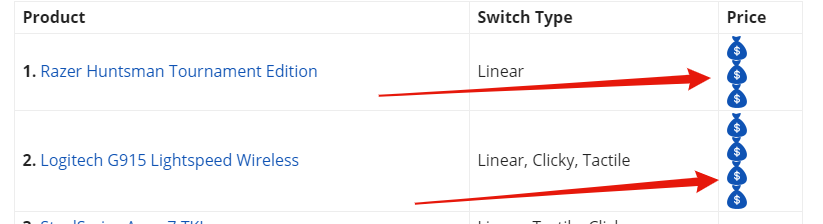
I’m looking for someone who can help me add inline images to a WordPress table.
As you can see at the moment, the images are stacked on top of each other: https://i.gyazo.com/c1a04ac5e89c040864e68cb265181d4a.png
I’m trying to set the images so they are inline as shown in the following picture: https://i.gyazo.com/55db732dbf4863f70ec12946b712c9f7.png
I achieved this by unchecking the box “display: block;” on inspect in chrome: https://i.gyazo.com/6b23c7ef5006cf42c3e3c5edc4c6faea.png
However, I assume this is for all the images and I don’t want to break any code within my theme, I’m also not sure how to make this change permanent.
It would be great if someone could help me with this.
Ps. It works fine on the mobile theme, the images do not stack.
URL: https://gadgetgang.com/the-best-tkl-mechanical-keyboard/
Thanks very much,
Regards,
Dan
 erickimani
Contributors who login using a mobile phone can edit any post or even page on my site yet they have restricted roles that prevents them from doing this. On a desktop this works fine.
See a screen shot of a contributors login to submit posts using USP pro plugin
https://paste.pics/73b38848f744137e8f86f26c611150f0
How can I remove the admin options on the top bar from showing so that thye click and are able to edit. How come mobile and desktop work differently
My site constructionreviewonline.com
 obiozorhenry@gmail.com
i created a page on the theme contact , but on the mobile device i cannot see the content of the page. how do i create a page and the content would display when i click the link on mobile device like phone. It looks blank . pls guide me on how to create a page and the page would display on mobile device after clicking the menu link
 rpmdna
 Thank you for the reply. I was unable to do that after the first time it was customized – closest I got was the first one I customized was appearing above a new footer that could be edited. I removed all the plugins and this time put AMP and mobile themes back on and activated them first and now I can edit them. Not sure why it worked/don’t care, but it works.
Should Posts be editable with TagDiv Composer? I do not have the option to edit existing posts with TagDiv, or edit a new post with TagDiv after the default editor loads from Add New.
 bidhanmandal910@gmail.com
 how remove bottom line showing ‘exit mobile version’ and how change amp url example remove this ‘?’ simbol and this ‘=1’ simbol.
please solve this problem
https://www.screencast.com/t/gH0DJWMGXpAZ
 danielkostuj
the template is very slow. Sometimes the version on the computer runs the version for mobile devices.
after many problems with the template crashing I installed a new wordpress and the new template problem still comes back. Angielski
strona działa tak wolno, że nawet po kliknęciu w arytkuł nie włącza się on.
the website works so slowly that even after clicking the article, it does not start.
esadd93 Thank you for your respond. Social icons are now working perfectly.
About mobile page editing conflict, i dont know which plugin may cause it but now its working exactly how i wanted. Hope it doesnt change, will update this post. Thanks again
 Bettina
 Hello!
It seems you have installed Mobile theme plugin. When you install Mobile Theme plugin, your pages on mobile will be overwritten by the plugin.
The Mobile Theme is a performance optimized theme included in the Newspaper main theme and it loads only for mobile devices. It comes with it’s own templates for page, post, category, etc so your current templates from the desktop theme will get converted to the mobile theme layout. For more details, please take a look here: https://forum.tagdiv.com/the-mobile-theme/
Better deactivate the plugin and see the results.
Thank you!
 poporil
I installed theme mobile and I have the following questions:
1) Except for mobile, it appears just like on mobile when I enter from a pc.
2) I have chosen AMP: Disabled on pages I have configured with Tagdiv composer, and the pages inside are empty when.
Website https://www.epeisodia.com/
Bettina Hello!
1. When you edit the page with TagDiv Composer, please write your full link in the “Social icons” element. After that it should be working.
2. You can not modify Mobile Theme plugin to show the same you created your desktop version because the plugin has its own template. But you can improve your pagespeed, check this article: https://www.infophilic.com/get-almost-100-pagespeed-newspaper-theme/#preload-newspaper-theme-fonts
3. Check about a plugin conflict. Deactivate ALL plugins except tagDiv ones, also if you are using child theme or cache plugin, deactivate them, clear all cache and try again.
Hope that helps you!
Regarding to Mobile Theme plugin, I explained you above why you can not modify it, also, for more information, check our documentation from here: https://forum.tagdiv.com/the-mobile-theme/
Thank you!
Anamaria Hello,
For hiding the Instagram for mobile you need to use this custom CSS => https://www.screencast.com/t/vvTxUYxjGD
#sb_instagram

{

display: none;

}
The code need be insert in Theme Panel -> Custom Code -> Advanced CSS -> Phones => https://www.screencast.com/t/hDBYSbJ4X8
Hope this helps you!
Thank you!
 stepanmika
Hello, I have problems with resposive version of my homepage (www.suvmag.cz). When I make some change in the TagDiv editor, the change is not applied to the responsive version and so they both look absolutely different. For example, now I have Revolution slider in desktop version (I am using Car Blog theme), but in the responsive version, there is no Revolution slider at all. I tried even creating a mobile home page, but the changes I make on mobile homepage are not seen anywhere… Thank you for your help in advance!
 IndianStartupNews
Hi there,
I’m using tech news pro demo on my site. I have changed the font size but the change is not appearing on mobile phone.
What to do?
Bettina Hello!
Responsive version I mean the version you will see in your mobile viewport without AMP or Mobile Theme plugin.
Thank you!
 chodina
 Hi,
The mobile view is not the same as like desktop view. It is coming through the default template which is not editable and the website using 3 types of footer for mobile view. 1st for the home page, 2nd for the listing page, and 3rd for the detail page 1 want only 1 type of footer for the whole website. Will you please suggest me a solution how I can resolve it.