
- NewspaperLoading Image Effects
- NewspaperIntroduction to CPT and ACF with Newspaper Theme
- NewspaperFlex Block Settings Guide
- NewspaperThe Newspaper Mobile Theme: Introduction
- NewspaperBig Grid Flex Settings
- NewspaperDesign your post pages using the Default Templates
- NewspaperBlock settings tutorial
- NewspaperMore articles box
- NewspaperRequirements for Newspaper
 serene
Dear support
I set Row id in row element of tagdiv composer.
And setting link tag .
When clicking it, top line of it is as same as top of header.
So top line of linked part hides under header.
Please tell me how to move it to under header bottom.
Regards
 Anamaria
 Hello,
You need to edit with tagDiv Composer a page, and you can remove the breadcrumbs with a right-click you can delete => https://www.screencast.com/t/BEJIVduVFyZ , or selecting the element and with drag & drop place into the deleting red zone from the bottom right of the page.
Or maybe you need to use a custom code -> .td-crumb-container{
display: none
}
Hope this helps you!
Thank you!
Anamaria Hello,
Usually, the ads are set in the element AD BOX, and you can remove it, edit with tagDiv Composer, select the Ad box element and with right-click you can delete it => https://www.screencast.com/t/2GfCVx9BCAw7 or with drag & drop place it into the deleting red zone from the bottom right of the page.
Also, please provide some screenshots.
Thank you!
 Estar
Estar Thanks for replying, but I can’t remove that element with the TagDiv Composer.
I also get an error that says: InstagramInstagram data error: The data could not be retrived using the https://www.instagram.com/revistaestar/ Instagram ID. If you own this account, please connect to it in Theme’s Panel Social Networks > Instagram Account Access Configuration section.
The social media section is empty. At the beginning of the month I did put the Instagram data, because we are doing a test, but then I deleted the information but it continues to appear at the bottom of the site and the duplicate link on itself, so it leads to a page that does not exist .
Attached link to a screenshot.
https://we.tl/t-INURCbYuuF
 joema
joemaHi,
I’ve installed a premade website (Downtown Magazine Pro) and am trying to connect categories to the sections you have on the home page.
I removed all the posts and created posts named 1-6 so that I could see where the posts showed up on ‘All Categories’, but this has confused me more.
As you can tell, I’m confused right now ?
I’ve created a screenshot so that my explanation below makes more sense.
https://joe.ma/wp-content/uploads/2022/09/newspaper-screenshot-scaled.jpg
Some of the sections seem to be showing things correctly, but not all of them, and I can’t see in the settings why that is.
BREAKING NEWS
I see this is in two sections, but for some reason the top section shows 4 posts ago, and then the main bottom section shows them from the most recent first.
Is there a way to have the first section show the most recent, then that second section show from the next one? So the top section would be post 6, then the next section would start with post 5?
MARKETING
This seems to start on post 4, which is 3 posts ago. How can I get this to show from the most recent post?
TECHNOLOGY
This shows 2 posts from the most recent, then 3 posts from the most recent. Is it possible to have the bottom row start from post 4, so it continues as a full section.
 insessionfilm
I have a question about the header/menu. In the screenshot above, you see the word “Interviews” above the slider of images. How do I remove that? Also, the submenu at the bottom is not the order I have it set at. In fact, with some categories (such as Podcasts in the main menu), not only is the submenu out of order, but some of them are missing completely. How can I fix this?
For context, if you go to insessionfilm.com (current live site), you can see the menu that I’m trying to copy over.
 christopherkevil8838
 Thank you, Bettina! I did manage to move the header logo element to the left margin.
However, there is still a 20 px padding between the logo and the left margin that I can’t remove. Also, I the 20 px padding between the bottom of the logo and the menu header has returned. So weird! I followed Simion C. and your instructions to remove it but incredibly, it came back.
 Simion C.
 Hi,
So this space here https://i.imgur.com/5C2coQ0.png
There’s a padding bottom set for the row here https://i.imgur.com/3ogr8k3.png
If that is removed -> https://i.imgur.com/3FgFyWG.png
I believe that is what you want, please try it. Let me know if I can help with something else.
Thank you!
 dc1
dc1Hi,
I’d like to remove the “More by this author” tab next to the “Related articles” one on posts. From the documentation it isn’t clear to me how to do so. You can find an example here (near the bottom of the page): https://www.qxmagazine.com/2022/08/brawn-mediocre-white-male-and-bi-baileigh-are-boys-boys-boys/.
Thanks in advance.
Anamaria Hello,
I’m sorry but maybe you didn’t understand how our theme works, but we’ll try to help you.
1. Usually, the ads are set in the element AD BOX, and you can remove it, edit with tagDiv Composer, select the Ad box element and with right-click you can delete it => https://www.screencast.com/t/2GfCVx9BCAw7 or with drag & drop place it into the deleting red zone from the bottom right of the page.
You can add a sidebar like in this guide https://forum.tagdiv.com/sidebars-tutorial/
We have some settings for the rows and different stretch sizes: https://www.screencast.com/t/bsbB5P97A
2. I checked and seems you have the mobile theme plugin activated, but the cache plugin doesn’t recognise the mobile version and desktop version.
This problem is caused by the cache plugin. If the cache plugin does not have mobile support then the mobile theme version can be delivered instead.
The solution would be to use the recommended WP Super Cache plugin instead and activate these settings (especially the mobile device support): https://forum.tagdiv.com/cache-plugin-install-and-configure/
Also, please make sure you have enabled the mobile cache if the plugin has this option
3. Please check this topic where I explained each mobile version -> https://forum.tagdiv.com/topic/mobile-version-not-working-properly-2/ and choose what mobile version you want.
The AMP works better only with the Mobile Theme plugin. From my point of view, if you don’t use the Mobile Theme plugin, then there is no reason or benefit to AMP. Please read all about AMP here: https://forum.tagdiv.com/tagdiv-amp-plugin-tutorial/
4. Please follow the steps from point 1 to delete the ads.
Thank you!
 yourexpatfinance
Hi,
How do I completely remove this social icon option from my posts?
OR how can I move this to the bottom of the post?
I don’t want anything to appear at the top of the post, I just want my article.
P.S. I have already tried removing all options in “Social Share” on the Theme Panel

Anamaria Hello,
You can remove the comment section from Single Post Template, edit with tagDiv Composer => https://www.screencast.com/t/4VoyAOlzgd6, select the element Single Post Comments and with right-click you can delete or selecting the element and with drag & drop place into the deleting red zone from the bottom right of the page.
You can set the ads in Single Post Template from tagDiv Cloud Library and you can set top ad, 3 inline ads set after x paragraphs and bottom ad, please check this article -> https://forum.tagdiv.com/article-ads/ and video https://www.youtube.com/watch?v=biTpVVlr8j8
Thank you!
 Jose
JoseHello team,
I am trying to create a custom layout with tagdiv composer.
I have used part of the design already made from (dental studio demo), and I am adjusting it to my idea.
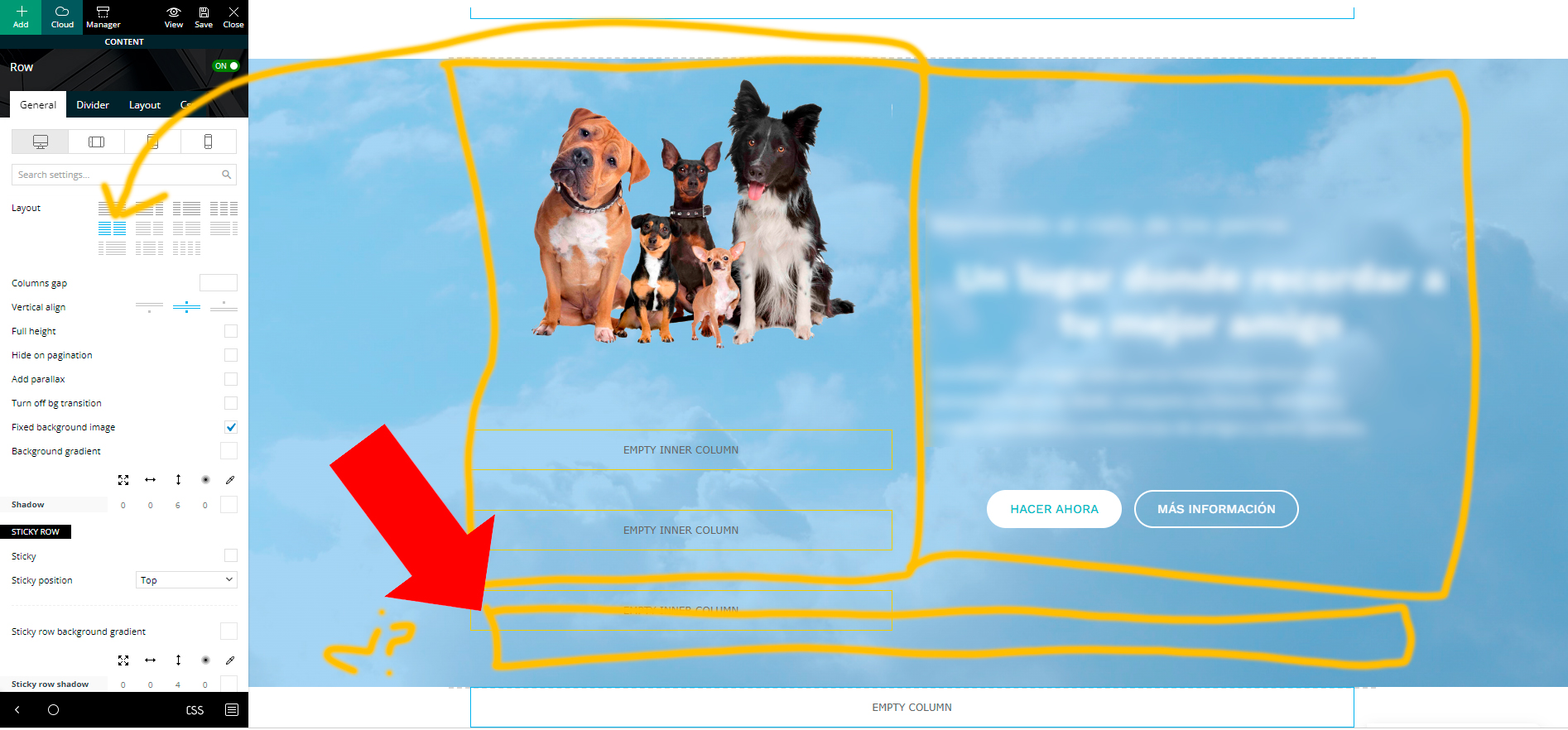
The first part of the web, is a row column, divided in two sections with inner-rows. There is a background (background image) that moves when scrolling.
So far so good. Now I want to add another Inner-row column at the bottom (but inside the image as well) and make it full width. But I can’t do it hehe
All the inner row columns that I add, are only half the width (I imagine it is, because the main row is divided in two).
Is there any way to add a full width inner row in here?
Anamaria Hello,
Usually, the ads are set in the element AD BOX, and you can remove it, edit with tagDiv Composer, select the Ad box element and with right-click you can delete it => https://www.screencast.com/t/2GfCVx9BCAw7 or with drag & drop place it into the deleting red zone from the bottom right of the page.
Thank you!
Anamaria Hello,
1. Usually, the ads are set in the element AD BOX, and you can remove it, edit with tagDiv Composer, select the Ad box element and with right-click you can delete it => https://www.screencast.com/t/2GfCVx9BCAw7 or with drag & drop place it into the deleting red zone from the bottom right of the page.
2. To have the exclusive badge you need to have that post locked.
Please check this article -> https://forum.tagdiv.com/lockers/
3. Please provide a screenshot.
Thank you!
Anamaria Hi,
Usually, the ads are set in the element AD BOX, and you can remove it, edit with tagDiv Composer, select the Ad box element and with right-click you can delete it => https://www.screencast.com/t/2GfCVx9BCAw7 or with drag & drop place it into the deleting red zone from the bottom right of the page.
Also, if you have Singel Post Template, then you need to set the ads in Single Post Content -> Ads -> https://forum.tagdiv.com/article-ads/ -> https://www.youtube.com/watch?v=biTpVVlr8j8
Thank you!
 stpke
stpke sorry about the link here it is: https://www.safaritravelplus.com/travel/
I’m try to remove the follow on Instagram at the bottom of the page.
Also i dont know how to get the top slider to work. How to add the images or set it up.
stpkeI’m try to remove the follow on Instagram at the bottom of the page.
shorturl.at/inrzR
Also i dont know how to get the top slider to work. How to add the images or set it up.
Anamaria Hello,
If you can import a block -> https://i.imgur.com/OuI1yYm.png the block will be set at the bottom page content, but you can move it where you want, select the row => https://i.imgur.com/mn4bY73.png
Also, you can use the single image if you want to add image and column text to set text.
Thank you!
 bitfinsider
 Hi,
<quote>Also for this other tabs, how do I sort base on article release? as all the other tabs look the same.
https://bitfinsider.com/category/news/</quote>
I’ve solved this by using loop post 1, may I know the difference between loop post 1 and loop post 2 and also flex block 4? Thank you.
For screenshot 1 – https://ibb.co/2098R53
How do I remove the logo at the bottom and removing about us, follow us and the social links.
Also, there is the footer Contact us and Privacy Policy on the mobile site, but it is not appearing on the PC h5 site.
For screenshot 2 – https://ibb.co/wscYSrn
How do I change the logo at the top of the header?
For screenshot 3 – https://ibb.co/W5y6sM6
How do I insert the social links? and can I remove the join / SIGNUP and replace with a subscribe to our mailing list instead?
Thank you
-
This reply was modified 4 years by
bitfinsider.
 SidCowans33
This one looks easy but having spent hours searching through DivMag Composer, I can’t work it out !
At the foot of all of my simple posts, I have a bunch of default social media icons plus a random column of “Recent Posts”, I don’t want either of these so how do I remove these from posts as the various template options don’t seem to include them ?
Also, how do I add my own footer to the bottom of default posts as I can only find options for pages, not posts ?
 Calin
Calin Hi,
Please try the follow steps -> https://i.imgur.com/irRsG03.png select the column from the row that holds the menu and in layout tab set the layout off-> https://i.imgur.com/9IfXANW.png after that select the menu element and align it center -> https://i.imgur.com/7lAxcnT.png then select the row that holds the menu and in css tab remove the border -> https://i.imgur.com/A3CIsp6.png let that filed empty, then add a separator above the menu -> https://i.imgur.com/fvs38HA.png and in css tab set margin bottom 0 -> https://i.imgur.com/qSuD7jr.png
I hope this will help you!
Thank you!
 grezako
Hi.
I specify once again that we are currently using the Theme “Newspaper – The Rimont Pro” whose demo link is: https://demo.tagdiv.com/newspaper_the_rimont_pro/.
We want to add videos on the Home Page in the form of Stories on Facebook and a bit like the CGTN news site already does as you can see on the part circled in RED on this screenshot: https://imgur.com/a/NOZ1qNV.
So, we would like to move the avatar located at the bottom of the Title of each post from the “STORIES” part circled in RED on the following screenshot: https://imgur.com/a/Bf82Q1D.
So that it goes up and positions itself at the bottom of the post card like this: https://imgur.com/a/3dB5uac.
But, the problem on my end is that when I try to do that, adding a margin-top: -122px; for example, hoping to succeed in bringing up the icon of the avatar in question, it does not work at all. Here is the code and CSS class of the avatar in question that I am trying to pull up to the bottom of the post card:
img.avatar.avatar-96.photo.td-animation-stack-type0-2 {

  margin-top: -122px;

}
How then, manage to move this icon of the avatar in question to the bottom of each post so that it looks like the second screenshot above ???
Please, answer us through sample demonstrations in screenshots because it will help us best to quickly understand and solve our problems.
Thank you please help me.
 alcova
I noticed that my articles do not show the related articles box at the bottom of the page. I thought I had disabled that option God-knows-when, but with my surprise, I wasn’t able to find the option in the Newspaper “Post settings” tab as also described in the manual.
Has this option been removed? There might be any kind of conflict with other plugins, preventing this option from showing? Or am I searching in the wrong place (and the instructions are wrong?).
thanks :))
Anamaria Hello,
The image ads are added in demos, so to remove them you need to edit with tagDiv Composer, select the element Ad Box and with right-click, you can delete it => https://www.screencast.com/t/2GfCVx9BCAw7 or with drag & drop place it into the deleting red zone from the bottom right of the page.
The ad box has 3 sections for ads: using theme panel ads -> https://i.imgur.com/KFa9ibl.png, using images/banners -> https://i.imgur.com/MfAPTaE.png and custom code -> https://i.imgur.com/2rh8SuD.png save it and will appear on the post (you can set a shortcode like a shortcode from adrotate plugin or other plugins)
Thank you!



