
- NewspaperAutoptimize Plugin – install and configuration
- NewspaperWP Rocket and Newspaper Theme: Optimization Guide
- NewspapertagDiv Composer – Website Manager
- NewspaperModules Builder in Newspaper Theme
- NewspaperThe Newspaper Mobile Theme: Introduction
- NewspaperBest Of Forums
- NewspaperHow to Make the Site Faster
 Anamaria
 Hi,
It is not recommended to use two plugins for cache because of interferes. Also, for optimization, you can let only Autoptimize and LiteSpeed Cache and check after if the issue persists.
Thank you!
 diegocoru
 I have actived A3 Lazy Load, Autoptimize, LiteSpeed Cache, Speed Optimizer and WP Super Cache.
Are they ok? Could you please tell me the right configurations?
Many thanks.
Anamaria Hi,
Then maybe you have a plugin conflict, a plugin that you use to optimize the CSS and js.
Thank you!
 Ericky
I’m doing some optimizations through WP Rocket, but I’m having some issues when I enable the Optimize CSS Delivery and Remove unused CSS features.
For example, a huge white space appears in the area I have marked. How can I exclude this?
Hello,
I recommend creating mobile pages and templates and disabling the mobile theme plugin.
Also, if you run ads on your website, I recommend using the WP Rocket plugin to optimize the scripts.
There are many optimization guides provided by our users here in the forum, some made by us; you could check some of them
– https://www.infophilic.com/get-almost-100-pagespeed-newspaper-theme/
– https://forum.tagdiv.com/cache-plugin-install-and-configure/
– https://forum.tagdiv.com/how-to-make-the-site-faster/
– https://forum.tagdiv.com/topic/high-number-of-ajax-request/
– https://forum.tagdiv.com/topic/score-100100-pagespeed-with-newspaper-wordpress-theme/
– https://www.andraware.com/wp-rocket-for-newspaper-theme/
– https://forum.tagdiv.com/topic/page-speed-guide-for-2023-beginners-and-advanced/
– https://forum.tagdiv.com/topic/newspaper-theme-speedify-your-website/
– https://forum.tagdiv.com/topic/tutorial-chriss-custom-optimizations-for-functions-php-etc/
– https://forum.tagdiv.com/cloudflare-cdn/
– https://forum.tagdiv.com/topic/theme-causing-high-cpu-usage-2/
– https://forum.tagdiv.com/topic/sql-querys-high-cpu/
– https://forum.tagdiv.com/topic/newspaper-theme-slow-to-respond/
– https://premium.wpmudev.org/blog/optimizing-your-wordpress-database-a-complete-guide/
– https://underconstructionpage.com/optimize-wordpress-database/
– https://crunchify.com/better-optimize-wordpress-database-all-in-one-guide/
Thank you!
Anamaria Hello,
For mobile, you can create mobile templates/pages, and you can use the WP Rocket plugin.
There are many optimization guides provided by our users here in the forum, some made by us; you could check some of them
– https://www.infophilic.com/get-almost-100-pagespeed-newspaper-theme/
– https://forum.tagdiv.com/cache-plugin-install-and-configure/
– https://forum.tagdiv.com/how-to-make-the-site-faster/
– https://forum.tagdiv.com/topic/high-number-of-ajax-request/
– https://forum.tagdiv.com/topic/score-100100-pagespeed-with-newspaper-wordpress-theme/
– https://www.andraware.com/wp-rocket-for-newspaper-theme/
– https://forum.tagdiv.com/topic/page-speed-guide-for-2023-beginners-and-advanced/
– https://forum.tagdiv.com/topic/newspaper-theme-speedify-your-website/
– https://forum.tagdiv.com/topic/tutorial-chriss-custom-optimizations-for-functions-php-etc/
– https://forum.tagdiv.com/cloudflare-cdn/
– https://forum.tagdiv.com/topic/theme-causing-high-cpu-usage-2/
– https://forum.tagdiv.com/topic/sql-querys-high-cpu/
– https://forum.tagdiv.com/topic/newspaper-theme-slow-to-respond/
– https://premium.wpmudev.org/blog/optimizing-your-wordpress-database-a-complete-guide/
– https://underconstructionpage.com/optimize-wordpress-database/
– https://crunchify.com/better-optimize-wordpress-database-all-in-one-guide/
Thank you!
 Bettina
 Hello @Ericky !
Please make sure you have the latest update of the theme, plugins, WordPress and PHP version.
Check these guides: https://www.wpbeginner.com/wp-tutorials/what-is-google-inp-score-and-how-to-improve-it-in-wordpress/ -> https://web.dev/articles/inp
We have 3 options available for mobile versions that you can use:
1. Responsive version: A responsive version of your website looks similar to the desktop version. TagDiv Composer is used to edit the page.Click on the mobile viewport: https://www.screencast.com/t/XDQJedlggSB. There, you can see your mobile version and edit or adjust the elements to look better.
2. Mobile pages: https://tagdiv.com/newspaper-10-3-7-update-brings-customizable-and-fast-mobile-pages
3. Mobile theme plugin: The Mobile Theme is a performance-optimized theme included in the main Newspaper theme that only loads on mobile devices. It comes with its own templates and designs for pages, posts, categories, etc., so your current templates from the desktop theme will get converted to the mobile theme layout. Please see https://forum.tagdiv.com/the-mobile-theme/ and https://forum.tagdiv.com/mobile-theme-introduction/ for more information.
A full explanation is here: https://www.youtube.com/watch?v=SpGkOnJeNZY
If you need to use mobile version 1 or 2, then you need to uninstall the Mobile Theme plugin and AMP.
Try to optimize your website and increase the page speed score.
Please check the tutorials from Google Pagespeed Insights and I’m sure you can increase the page speed.
Please note that page speed is not covered by the support team: https://forum.tagdiv.com/newspaper-theme-support/
Please also follow this thread’s advices: https://forum.tagdiv.com/topic/technical-issues-with-shop-theme-and-poor-performance/
Thank you!
ErickyThe INP values on the mobile version of my website are really high. How can I optimize this?
Tagdiv Mobile theme and AMP almost completely destroy the site design so I don’t use them. Is there any way to lower the INP?
 Gonbolise
Hi Support,
We are running koko.ng website with Newspaper theme and current server which we are running the website is having Intel(R) Xeon(R) E-2288G CPU with 6 core 62GB ram SSD disk. Our users as well as back end data staff always complain regarding slowness with the website. Our system admins and developers has done detailed investigation regarding this and we could see that “tagDiv Composer” and “tagDiv Cloud Library” plugins creating high mysql load and it is creating performance issues. Is there some method we could optimize these plugins for improving performance?
Anamaria Hello,
I recommend optimizing your images and fonts and using the WP Rocket plugin.
There are many optimization guides provided by our users here in the forum, some made by us; you could check some of them
– https://www.infophilic.com/get-almost-100-pagespeed-newspaper-theme/
– https://forum.tagdiv.com/cache-plugin-install-and-configure/
– https://forum.tagdiv.com/how-to-make-the-site-faster/
– https://forum.tagdiv.com/topic/high-number-of-ajax-request/
– https://forum.tagdiv.com/topic/score-100100-pagespeed-with-newspaper-wordpress-theme/
– https://www.andraware.com/wp-rocket-for-newspaper-theme/
– https://forum.tagdiv.com/topic/page-speed-guide-for-2023-beginners-and-advanced/
– https://forum.tagdiv.com/topic/newspaper-theme-speedify-your-website/
– https://forum.tagdiv.com/topic/tutorial-chriss-custom-optimizations-for-functions-php-etc/
– https://forum.tagdiv.com/cloudflare-cdn/
– https://forum.tagdiv.com/topic/theme-causing-high-cpu-usage-2/
– https://forum.tagdiv.com/topic/sql-querys-high-cpu/
– https://forum.tagdiv.com/topic/newspaper-theme-slow-to-respond/
– https://premium.wpmudev.org/blog/optimizing-your-wordpress-database-a-complete-guide/
– https://underconstructionpage.com/optimize-wordpress-database/
– https://crunchify.com/better-optimize-wordpress-database-all-in-one-guide/
Thank you!
Anamaria Hello,
1. Yes, you can add the logo more near to the menu, but you need to set the row layout like this -> https://i.imgur.com/DMqn02Y.jpeg and stretch row https://i.imgur.com/29Aet0y.jpeg You can not delete the empty column, only the row that contains empty columns.
If you want to delete a row, you can delete a row with the empty column using the right click on the row icon -> https://i.imgur.com/JodWvlW.png -> https://i.imgur.com/e6bb8U5.png or using the drag and drop or you can simply click on the row and press the delete button from your keyboard -> https://www.screencast.com/t/Mai7iyEG The same steps are to delete the elements.
2. Please disable the mobile theme and amp plugins.
Using our theme, you can choose from 3 mobile versions
-> mobile responsive => https://www.screencast.com/t/oJ2ShOp47
-> mobile theme plugin => https://forum.tagdiv.com/the-mobile-theme/
-> mobile page => https://tagdiv.com/newspaper-10-3-7-update-brings-customizable-and-fast-mobile-pages/ The option that you need to use.
Suppose you created the mobile pages with tagDiv Composer. In that case, when you install the Mobile Theme plugin, your pages will be overwritten by the plugin (the mobile theme comes with its templates for page, post, category, etc, so your current templates from the desktop theme will get converted to the mobile theme layout, the page content is made without builders in mobile editor => https://www.screencast.com/t/xbgZG8kH also, the options that are provided to edit the mobile theme version are limited (this keeps the things simple)).
This is a video about Responsive Newspaper Theme, AMP & Mobile Theme, Mobile Pages & Templates -> https://www.youtube.com/watch?v=SpGkOnJeNZY.
So, the mobile responsive is what you see when that you select the viewport on phone => https://www.screencast.com/t/matV17hH, so some settings may apply for each viewport(where is the border blue), and others are not(where the border is black).
The mobile page has the mobile templates from Cloud Library => https://www.screencast.com/t/YCcZ8rL8
The Mobile responsive version of the theme and the mobile page editor can be edit with tagDiv Composer, the mobile theme plugin cannot.
For example, you can have the mobile theme plugin activated and use the mobile page/mobile responsive version for the homepage/pages, but for the categories pages/404 page, you can’t use the mobile page/mobile responsive version if you have the mobile theme plugin activated.
So, if you want to design the pages with tagDiv Composer, you can use the mobile page or mobile responsive version.
3. Format need to be MP4, File size for embedded video should ideally be 500KB, as the ideal page size from Google’s standpoint is <1MB. File size of 1-2MB is acceptable.
Video duration should be no longer than 25 seconds.
4. You need to use a plugin that provides this option. Please check our guide -> https://forum.tagdiv.com/using-theme-translations-together-wpml/
5. The images are responsive; please let me know what you mean.
6. I recommend using the WP ROCKET plugin.
Also, we don’t recommend to using amp, because it is deprecated -> https://developer.bigcommerce.com/docs/storefront/wordpress/platform-integration/enabling-amp
There are many optimization guides provided by our users here in the forum, some made by us; you could check some of them
– https://www.infophilic.com/get-almost-100-pagespeed-newspaper-theme/
– https://forum.tagdiv.com/cache-plugin-install-and-configure/
– https://forum.tagdiv.com/how-to-make-the-site-faster/
– https://forum.tagdiv.com/topic/high-number-of-ajax-request/
– https://forum.tagdiv.com/topic/score-100100-pagespeed-with-newspaper-wordpress-theme/
– https://www.andraware.com/wp-rocket-for-newspaper-theme/
– https://forum.tagdiv.com/topic/page-speed-guide-for-2023-beginners-and-advanced/
– https://forum.tagdiv.com/topic/newspaper-theme-speedify-your-website/
– https://forum.tagdiv.com/topic/tutorial-chriss-custom-optimizations-for-functions-php-etc/
– https://forum.tagdiv.com/cloudflare-cdn/
– https://forum.tagdiv.com/topic/theme-causing-high-cpu-usage-2/
– https://forum.tagdiv.com/topic/sql-querys-high-cpu/
– https://forum.tagdiv.com/topic/newspaper-theme-slow-to-respond/
– https://premium.wpmudev.org/blog/optimizing-your-wordpress-database-a-complete-guide/
– https://underconstructionpage.com/optimize-wordpress-database/
– https://crunchify.com/better-optimize-wordpress-database-all-in-one-guide/
7. I recommend using Duplicator plugin, but you can try other plugins from this list -> https://www.bluehost.com/blog/best-wordpress-backup-plugins/
8. Usually, the color and image are set on the row, so please edit with tagDiv Composer and select the row and go in the tab CSS, and there you can set it https://i.imgur.com/IkbGWUS.png -> https://forum.tagdiv.com/topic/background-color-of-the-main-menu-be-changed/
Thank you!
 Max
Max Hi,
I would have to create dozens of menus can’t be done plus I would have to update the menus every time I add an article.
But since your template is seo optimized and the structure <ul ><li >< /li >< /ul > is very important. You could implement it in a next update.
Thank you
 Bettina
 Hello!
We have 3 options available for mobile versions that you can use:
1. Responsive version: A responsive version of your website looks similar to the desktop version. TagDiv Composer is used to edit the page.Click on the mobile viewport: https://www.screencast.com/t/XDQJedlggSB. There, you can see your mobile version and edit or adjust the elements to look better.
2. Mobile pages: https://tagdiv.com/newspaper-10-3-7-update-brings-customizable-and-fast-mobile-pages
3. Mobile theme plugin: The Mobile Theme is a performance-optimized theme included in the main Newspaper theme that only loads on mobile devices. It comes with its own templates and designs for pages, posts, categories, etc., so your current templates from the desktop theme will get converted to the mobile theme layout. Please see https://forum.tagdiv.com/the-mobile-theme/ and https://forum.tagdiv.com/mobile-theme-introduction/ for more information.
A full explanation is here: https://www.youtube.com/watch?v=SpGkOnJeNZY
If you need to use mobile version 1 or 2, then you need to uninstall the Mobile Theme plugin and AMP.
Thank you!
Bettina Hello David!
It is an old suggestion. We need to delete it.
We have 3 options available for mobile versions that you can use:
1. Responsive version: A responsive version of your website looks similar to the desktop version. TagDiv Composer is used to edit the page.Click on the mobile viewport: https://www.screencast.com/t/XDQJedlggSB. There, you can see your mobile version and edit or adjust the elements to look better.
2. Mobile pages: https://tagdiv.com/newspaper-10-3-7-update-brings-customizable-and-fast-mobile-pages
3. Mobile theme plugin: The Mobile Theme is a performance-optimized theme included in the main Newspaper theme that only loads on mobile devices. It comes with its own templates and designs for pages, posts, categories, etc., so your current templates from the desktop theme will get converted to the mobile theme layout. Please see https://forum.tagdiv.com/the-mobile-theme/ and https://forum.tagdiv.com/mobile-theme-introduction/ for more information.
A full explanation is here: https://www.youtube.com/watch?v=SpGkOnJeNZY
If you need to use mobile version 1 or 2, then you need to uninstall the Mobile Theme plugin and AMP.
Thank you!
 LBN_2024
Hey TagDiv Team,
We are facing some technical issues with the theme. Recently, we optimized the mobile view by using a cloud template with a separate design for mobile, but it’s not working. Can you help us resolve this?
Thank you.
Bettina Hello Varun!
I can see that you have mobile theme plugin installed and active.
We have 3 options available for mobile versions that you can use:
1. Responsive version: A responsive version of your website looks similar to the desktop version. TagDiv Composer is used to edit the page.Click on the mobile viewport: https://www.screencast.com/t/XDQJedlggSB. There, you can see your mobile version and edit or adjust the elements to look better.
2. Mobile pages: https://tagdiv.com/newspaper-10-3-7-update-brings-customizable-and-fast-mobile-pages
3. Mobile theme plugin: The Mobile Theme is a performance-optimized theme included in the main Newspaper theme that only loads on mobile devices. It comes with its own templates and designs for pages, posts, categories, etc., so your current templates from the desktop theme will get converted to the mobile theme layout. Please see https://forum.tagdiv.com/the-mobile-theme/ and https://forum.tagdiv.com/mobile-theme-introduction/ for more information.
A full explanation is here: https://www.youtube.com/watch?v=SpGkOnJeNZY
If you need to use mobile version 1 or 2, then you need to uninstall the Mobile Theme plugin and AMP.
Thank you!
Bettina Hello!
1. Check this guide: https://forum.tagdiv.com/modal-popup/
For customization and other services, you can contact our custom work team here: https://tagdiv.com/premium-customization-services/.
2. I think you should add the style as well in the raw html or raw CSS. A shortcode can be inserted also by using the element called “Column text” or “Text with title”. “Column text” and “text with title” elements have a button called “edit content” and if you click on that button, the WP Editor will open, and you can add some text/code/shortcode there. Close the WP Editor from X, save the changes from Composer and view the page to see the changes. It could be possible to be a conflict there, that’s why the shortcode do not display as you want. Please check.
3. You should build it to be responsive from the plugin source. Or you can use some CSS style added with the help of a raw CSS element from the tagdiv Composer. Check the guide: https://forum.tagdiv.com/create-custom-code-using-the-browsers-inspector/
4. We have 3 options available for mobile versions that you can use:
1. Responsive version: A responsive version of your website looks similar to the desktop version. TagDiv Composer is used to edit the page.Click on the mobile viewport: https://www.screencast.com/t/XDQJedlggSB. There, you can see your mobile version and edit or adjust the elements to look better.
2. Mobile pages: https://tagdiv.com/newspaper-10-3-7-update-brings-customizable-and-fast-mobile-pages
3. Mobile theme plugin: The Mobile Theme is a performance-optimized theme included in the main Newspaper theme that only loads on mobile devices. It comes with its own templates and designs for pages, posts, categories, etc., so your current templates from the desktop theme will get converted to the mobile theme layout. Please see https://forum.tagdiv.com/the-mobile-theme/ and https://forum.tagdiv.com/mobile-theme-introduction/ for more information.
A full explanation is here: https://www.youtube.com/watch?v=SpGkOnJeNZY
If you need to use mobile version 1 or 2, then you need to uninstall the Mobile Theme plugin and AMP.
Thank you!
Anamaria Hello,
I see that you have many ads scripts. To optimize those, I recommend using the WP ROCKET plugin.
Also, we don’t recommend to using amp, because it is deprecated -> https://developer.bigcommerce.com/docs/storefront/wordpress/platform-integration/enabling-amp
There are many optimization guides provided by our users here in the forum, some made by us; you could check some of them
– https://www.infophilic.com/get-almost-100-pagespeed-newspaper-theme/
– https://forum.tagdiv.com/cache-plugin-install-and-configure/
– https://forum.tagdiv.com/how-to-make-the-site-faster/
– https://forum.tagdiv.com/topic/high-number-of-ajax-request/
– https://forum.tagdiv.com/topic/score-100100-pagespeed-with-newspaper-wordpress-theme/
– https://www.andraware.com/wp-rocket-for-newspaper-theme/
– https://forum.tagdiv.com/topic/page-speed-guide-for-2023-beginners-and-advanced/
– https://forum.tagdiv.com/topic/newspaper-theme-speedify-your-website/
– https://forum.tagdiv.com/topic/tutorial-chriss-custom-optimizations-for-functions-php-etc/
– https://forum.tagdiv.com/cloudflare-cdn/
– https://forum.tagdiv.com/topic/theme-causing-high-cpu-usage-2/
– https://forum.tagdiv.com/topic/sql-querys-high-cpu/
– https://forum.tagdiv.com/topic/newspaper-theme-slow-to-respond/
– https://premium.wpmudev.org/blog/optimizing-your-wordpress-database-a-complete-guide/
– https://underconstructionpage.com/optimize-wordpress-database/
– https://crunchify.com/better-optimize-wordpress-database-all-in-one-guide/
Thank you!
Bettina Hello!
You should optimize your website and increase the page speed score as much as you can.
Please check the tutorials from Google Pagespeed Insights and I’m sure you can increase the page speed.
You should have all the needed tagdiv plugins active.
Thank you!
Bettina Hello!
I can see that you use mobile theme plugin.
We have 3 options available for mobile versions that you can use:
1. Responsive version: A responsive version of your website looks similar to the desktop version. TagDiv Composer is used to edit the page.Click on the mobile viewport: https://www.screencast.com/t/XDQJedlggSB. There, you can see your mobile version and edit or adjust the elements to look better.
2. Mobile pages: https://tagdiv.com/newspaper-10-3-7-update-brings-customizable-and-fast-mobile-pages
3. Mobile theme plugin: The Mobile Theme is a performance-optimized theme included in the main Newspaper theme that only loads on mobile devices. It comes with its own templates and designs for pages, posts, categories, etc., so your current templates from the desktop theme will get converted to the mobile theme layout. Please see https://forum.tagdiv.com/the-mobile-theme/ and https://forum.tagdiv.com/mobile-theme-introduction/ for more information.
A full explanation is here: https://www.youtube.com/watch?v=SpGkOnJeNZY
If you need to use mobile version 1 or 2, then you need to uninstall the Mobile Theme plugin and AMP.
Thank you!
Bettina Hello!
Deactivate the cache plugin that you use and check again to see if the problem is still there.
We have 3 options available for mobile versions that you can use:
1. Responsive version: A responsive version of your website looks similar to the desktop version. TagDiv Composer is used to edit the page.Click on the mobile viewport: https://www.screencast.com/t/XDQJedlggSB. There, you can see your mobile version and edit or adjust the elements to look better.
2. Mobile pages: https://tagdiv.com/newspaper-10-3-7-update-brings-customizable-and-fast-mobile-pages
3. Mobile theme plugin: The Mobile Theme is a performance-optimized theme included in the main Newspaper theme that only loads on mobile devices. It comes with its own templates and designs for pages, posts, categories, etc., so your current templates from the desktop theme will get converted to the mobile theme layout. Please see https://forum.tagdiv.com/the-mobile-theme/ and https://forum.tagdiv.com/mobile-theme-introduction/ for more information.
A full explanation is here: https://www.youtube.com/watch?v=SpGkOnJeNZY
If you need to use mobile version 1 or 2, then you need to uninstall the Mobile Theme plugin and AMP.
Thank you!
Bettina Hello!
We have 3 options available for mobile versions that you can use:
1. Responsive version: A responsive version of your website looks similar to the desktop version. TagDiv Composer is used to edit the page.Click on the mobile viewport: https://www.screencast.com/t/XDQJedlggSB. There, you can see your mobile version and edit or adjust the elements to look better.
2. Mobile pages: https://tagdiv.com/newspaper-10-3-7-update-brings-customizable-and-fast-mobile-pages
3. Mobile theme plugin: The Mobile Theme is a performance-optimized theme included in the main Newspaper theme that only loads on mobile devices. It comes with its own templates and designs for pages, posts, categories, etc., so your current templates from the desktop theme will get converted to the mobile theme layout. Please see https://forum.tagdiv.com/the-mobile-theme/ and https://forum.tagdiv.com/mobile-theme-introduction/ for more information.
A full explanation is here: https://www.youtube.com/watch?v=SpGkOnJeNZY
If you need to use mobile version 1 or 2, then you need to uninstall the Mobile Theme plugin and AMP.
Thank you!
 mauta
mautaHi, I want to ask why the little undo arrows at the bottom right of edit only appear for a few seconds while the page loads and then disappear.
Furthermore, the text with image shortcode creates an error (look image below) and on the homepage it is placed at bottom and the whole page looks messy.
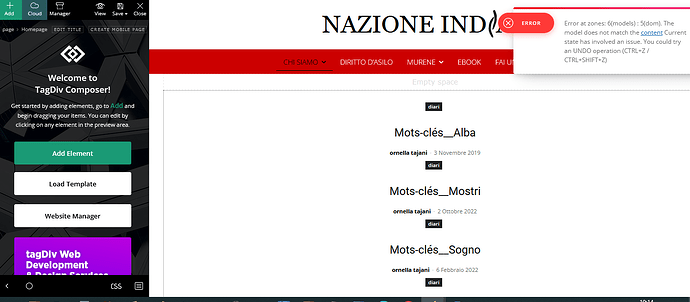
Since undo arrows doesn’t work I could only restore the homepage from wordpress page revisions. It’s really very inconvenient and problematic.
Thank you and best regards
 Alex
AlexHi Calin,
In addition to the previously reported bug with the Webp option in theme panel, I have found another bug.
Environment:
1. Theme version: 12.6.6
2. Webp format is generated by Ewww Image Optimizer as per your guide. – All images become Webp and all are lazyloaded.
4. For CWV / speed, we must disable lazyload for the first image (in the first flex or any block / logo is text). For this we use define( ‘EIO_LAZY_FOLD’, 1 ); in wp-config as per Ewww’s guide – under Exclude Images header.
5. The result is that the first image on the page converts to Web but is not lazyload – so this is correct. The Theme’s option Use Webp Format is meant to show this first image in Webp, because it exists on the server.
Issue:
The theme stops using the webp file for the first image when any caching system is on. This includes the “Cache block results” option on the block, WP super cache as per your guide.
How to test:
1. Make sure you have caching enabled – WP super cache as per your guide. Also can enable “Cache block results” on the actual block.
2. If you are logged-in, you will see a webp. If you are logged out – the theme will also be showing webp for some time, but a little later – once the cache is generated – the theme will start showing jpg (despite having webp on the server).
– I have tested this on various websites and demo sites. On the dev sites that do not have caching, there is no problems.
(!) As previously discussed, this post is only for Calin.
Other TD team members, please do not respond.
Thank you.
AlexHi Calin,
Can you please check.
1. Theme version: 12.6.6
2. Webp format is generated by Ewww Image Optimizer as per your guide. But Lazy Load is disabled.
3. Theme Panel >> Block Settings >> Thumbs on Moduls/Blocks >> Use Webp Format enabled.
Issue: The system applies the Use Webp Forma option to Flex blocks, but does not seem to be applying it to the Posts Loop block. It still loads jpg instead of Webp.
(!) As previously discussed, this post is only for Calin.
Other TD team members, please do not respond.
Thank you.



