
- NewsmagUsing other ads
- NewspaperUsing Other Ads
- NewsmagSidebar ads
- NewspaperSidebar ads
- NewspaperIntroduction to CPT and ACF with Newspaper Theme
- NewspaperHow to edit modules for Flex Block X
- NewspaperHow to use the Posts List shortcode
- NewspaperCreate a frontend submission form
- NewspaperHow to Use the Tabbed Content shortcode
- NewspaperWooCommerce: Happy “Add to Favorites!”
- NewspaperHow to generate Facebook App ID
- NewspaperLink Tracker
- NewspaperFlex Block Settings Guide
- NewspaperGeneral Options that May Interfere with the Newspaper Theme
- NewspaperSocial Icons
- NewspaperPosts Loop Element
- NewspaperSet a Background for Category Page
- NewspaperThe Newspaper Mobile Theme: Introduction
- NewspaperHow to Add a Logo in Newspaper
- NewspapertagDiv Shop
 slickshellz
ok so theme only shows sliders no post or ads when i scroll down its blank but if i click its goes to one of my articles.. so this is whats happening every page only shows sliders except my home page my home page shows all articles post ect… but all other pages like gagets only display slider no articles no category and no ads but if i click on the white screen i see the links to my articles help please
 mc_kot
Hello,
Recently I received a mail from google adsense that it is not allowed to show adsense ad in the articles with tragedy/crimes etc (like news about terrorist attacks, robberies, plane crashes, car crashes etc.). So they told that it is necessary to restrict the google adsense ad from that kind of news. To do it, I need to remove adsense from some specific categories. Can you please advise if it is possible to do so?
An ideal way if I may replace adsense AD to some other type of AD on some particular category.
Thanks.
 simchris
 Hey!
I’ll post updated version once I finish the tweak of doom! Have been messing with the new TD Composer beta, so got sidetracked, as I wanted to leave VC behind entirely from “now” onward.
I will actually update and add the #comments on what couple of the things actually do. And I’ll include my AMP footer injection code, too!
Actually the trick with the stupid render blocking thing is three step
a) generate ‘critical CSS’ for your post page; insert this into the header.php right before </head>
b) in functions.php – “de-enqueue” the main style.css from being generated and placed in the head.
c) put link to the main style.css file in the footer.php file.
d) if you don’t want to use functions.php to move the other .js stuff; use the “Scripts to Footer” WP plugin.
THAT is the super secret way we do it for my SEO service here (not a sales pitch). What this does is load the important CSS “above the fold” inline, then page loads on mobile (and I have 98 MPS score to prove it; the last gotcha is the CSS for stupid ‘tap targets’ — ugh) without waiting for anything, then main CSS loaded at end.
This simply works. If you have weirdo plugins injecting css and js in the head, you’ll have to de-enqueue them and move to footer.php manually. But the speed rating improvement is insane as there is literally *no* “render blocking” of any kind for Google on mobile or desktop. Period.
I was writing an ebook on all of this but personal life intruded so that didn’t happen.
-
This reply was modified 10 years by
simchris.
 Nano
NanoSo, I have purchased this theme from ThemeForest ( perhaps the only place to buy this theme) with 6 months support and I haven’t extended the support . So, I want to know few things about what will happen once my support period ends.
1. Will I be able to login to this tagdiv forum and will be able to read all my published threads and Tagdiv team’s response on my threads?
2. Will I be able to read other helpful threads and your responses to it ?
3. Will I be able to extend my support for concessional rate or to get the support ever again I have to buy the theme even when I already have the lifetime update license of this theme?
4. Will I be able to edit/modify my all responses or threads here under this post?
5. What are any other limitations that will be imposed on me other than asking for a help or to create a new support tickets?
Thank you.
 saucestevo
 You guys have the best customer service. Thank you for everything!
Are there other threads or information on how to turn certain things back to Newspaper 4?
 sainthilaire
Hi i have some problem with mobile theme because it lost the style for example this http://www.sabanetasr.com/wp-content/uploads/2016/08/Screenshot_2016-08-30-16-06-45.png doesnt see like the correct homepage style. the correct is http://www.sabanetasr.com/wp-content/uploads/2016/08/14045424_1263535043687314_1765977916_o.jpg lost the style and an other problem is that views counter post takes to upgrade; for example desktop theme show that have 500 views and in the mobile thema only 172 Views.
 UHR
UHRHi,
Can you explain how I can get an Adsense Ad to appear in the header to the right of the Logo? This would be in a format like header style 1 – default with the blue menu bar at the top of the header and the black menu bar on the bottom of the header.
I got some help from my brother that does some coding to get the ad to appear there but it is stuck to the top or even cut off by the blue menu bar. So I’m looking for a solution from you guys since you should understand the mechanics of the theme better than my brother.
Best,
Josh
 foxxx.sale
I want to put myself the same form as a widget on the demo , but I do it another, and can not find where to adjust. Tell me please.
What i want:

What i have:

simchris Sorry.
We ‘hacked’ the plugin a couple of years back (4 years?) when it was very simple and there was no pro version, as at the time it didn’t work well with https or couple of other things, so we “modified” the code. Since it still works with latest WP, and PHP, we’ve just left it as is. Might have to revisit when we start mucking with PHP7, but have not gotten to that YET.
Initially very simple plugin to create ad groups, a “weight” for each ad, and then rotate those ads, randomly in a widget. That was it. Still, we’ve been recommending it on these forums for 3 years now (has it been THAT long since TagDiv launched? Yikes!).
I think I used “hacked” in the wrong sense here. Should have said “modified.”
We license everything up the wazoo over here as a legal business/company in California, USA.
No “warez” here !
((I don’t work here; we just run “most” of our sites on TagDiv themes.))
-
This reply was modified 10 years by
simchris To anyone considering this plugin; it works very well and we’ve been using it for years, although in a slightly hacked version. 50,000 installs and counting on the repo.
The trick is to use to rotate ads randomly on view which is default behavior and NOT try to set funky schedules to have ads rotate every xx minutes, which is wrong and will overload system and violate most ad networks.
if you READ THE FRIENDLY MANUAL for the plugin; it’s designed to ROTATE ads; meaning each time a page is loaded, a different ad is served. This violates no ad terms; so you can serve an AdSense ad one time, then house ad the next time, in same ad spot, very simply.
Put another way, knowing the terms of use for any ad service like AdSense is important if using that, whereas loading your own ads off your own site you can do whatever you want.
AdRotate does NOT work like an animated GIF ad server.
Traditionally it has been used to “randomly” load ads from a set ad group which you can define, and you can put any ad group into any widget or ad spot you wish.
Only you can be responsible for knowing the “rules” for any ad network to which you participate and act accordingly. An ad server plugin is only a tool, it’s not making choice for you.
And reading the instructions properly, helps too.
Share and enjoy 🙂
 DeannaIsaacs
 @Cat:
I updated my site’s FTP to the new Newspaper theme and, once again, I have an error and NO FRONT/HOME PAGE on my site. (VERY BAD!!) http://www.theautoreporter.com

Theme config
Theme name i Newspaper
Theme version i 7.3
Theme database version i 7.3
Theme aurora version i 1.1
Theme Mobile Newspaper mobile version
php.ini configuration
Server software i Apache
PHP Version i 5.6.24
post_max_size i 65M – You cannot upload images, themes and plugins that have a size bigger than this value. To see how you can change this please check our guide here.
max_execution_time 30 – the execution time should be bigger than 60 if you plan to use the demos. To see how you can change this please check our guide here.
max_input_vars 1000 – the max_input_vars should be bigger than 2000, otherwise it can cause incomplete saves in the menu panel in WordPress. To see how you can change this please check our guide here.
SUHOSIN installed false
WordPress and plugins
WP Home URL i http://www.theautoreporter.com
WP Site URL i http://www.theautoreporter.com
WP version i 4.6
WP multisite enabled i No
WP Language i en_US
WP Memory Limit 40 MB/request – We recommend setting memory to at least 64MB. The theme is well tested with a 40MB/request limit, but if you are using multiple plugins that may not be enough. See: Increasing memory allocated to PHP. You can also check our guide here.
WP_DEBUG False
Caching plugin WP super cache – for best performance please check the plugin configuration guide here.
simchris Mobile devices need smaller footprint page loads for better user experience and SEO, etc.
Complex page => desktop
Simpler page, less bandwidth, smaller footprint => mobile
This is why Google and others have come with alternate solutions like AMP, etc.
Mobile speed *is* now a ranking factor for mobile with majority of web traffic NOW on mobile devices.
So, the idea is NOT ridiculous, but clever way of serving two version of site when “responsive” alone is not enough for some people. And surprise, you can turn it off if you RTFM.
Welcome to webdev, always a learning experience.
DeannaIsaacs 
System information:
Theme config
Theme name i Newspaper
Theme version i 6.2
Theme database version i 6.2
php.ini configuration
Server software i Apache
PHP Version i 5.6.24
post_max_size i 65M – You cannot upload images, themes and plugins that have a size bigger than this value.
max_execution_time 30 – the execution time should be bigger than 60 if you plan to use the demos
max_input_vars 1000 – the max_input_vars should be bigger than 2000, otherwise it can cause incomplete saves in the menu panel in WordPress
SUHOSIN Installed False
WordPress and plugins
WP Home URL i http://www.theautoreporter.com
WP Site URL i http://www.theautoreporter.com
WP version i 4.6
WP multisite enabled i No
WP Language i en_US
WP Memory Limit 40 MB/request – We recommend setting memory to at least 64MB. The theme is well tested with a 40MB/request limit, but if you are using multiple plugins that may not be enough. See: Increasing memory allocated to PHP
WP_DEBUG False
Caching plugin WP super cache
 Equapio
Hi
i want to display an overview of all categories and sub-categories of my page like this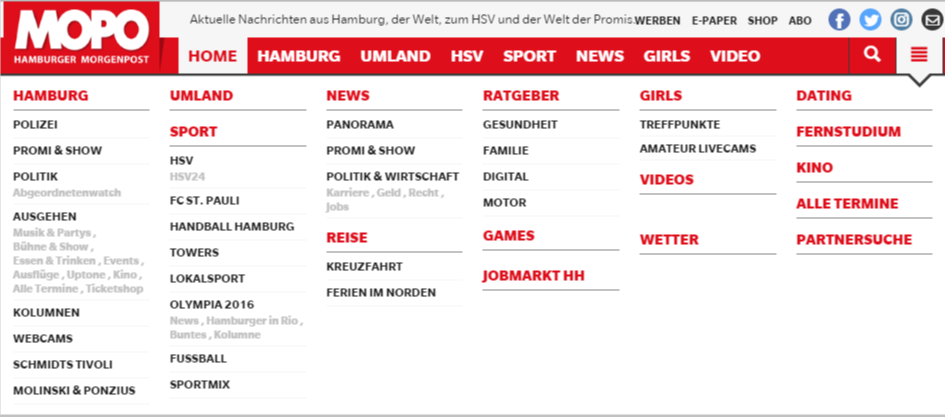 in the main menu under the 3 bar icon.
It looks good and correct on the main page but as soon as you view (click on) the nav icon from a different page or post the overview is displayed from top to bottom instead of next to each other like this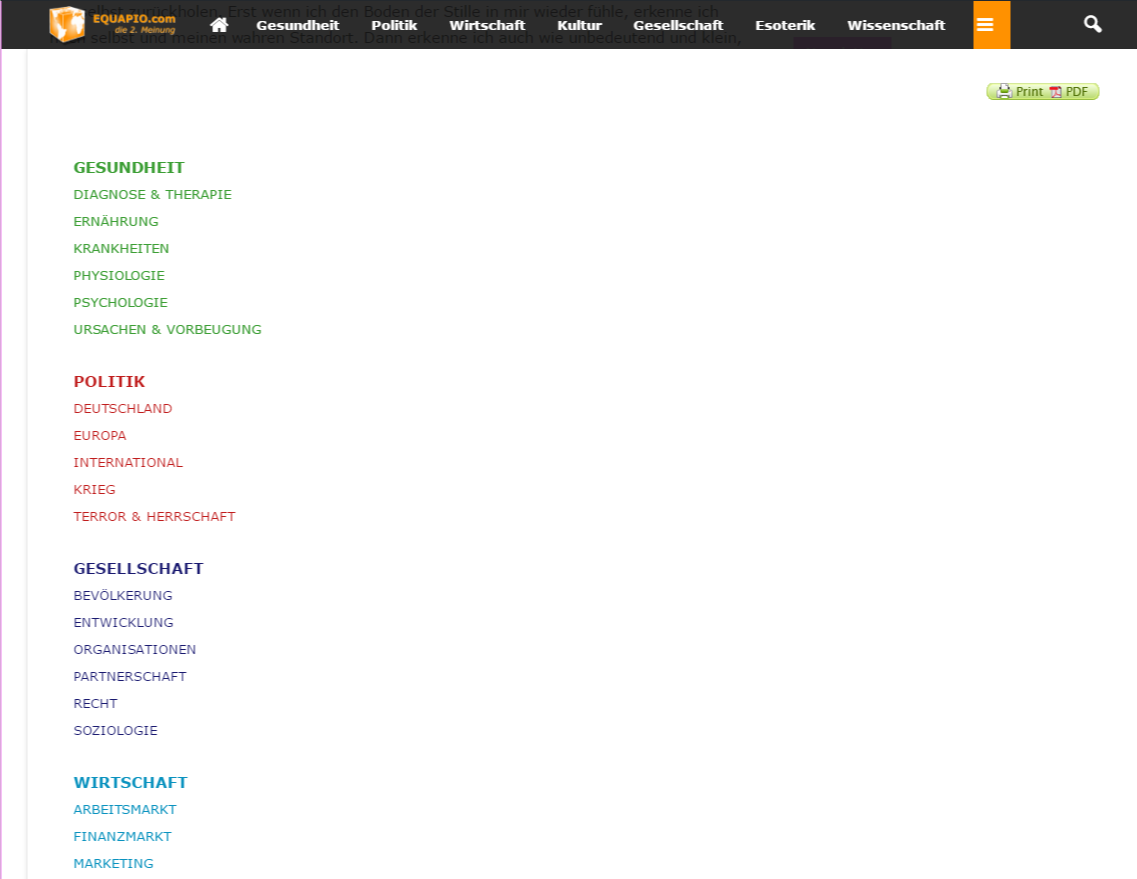 without being able to scroll.
I created the page with the visual composer using a blue layout (3 columns). Why does it work on my homepage and not on other pages and posts?
i actually like to have 6 columns like in the example pic and since you recommend not to use other layouts i tried it with a table. But the table won’t show proberly either.
Any advice how to get it done as in the example pic showing correctly on all pages and posts?
Help is much appreciated!
Thanks in advance
 kreativewire
Seriously, this has to be one of the worst themes, I’ve ever had to use.
Here are my issues I’m now experiencing after having you guys work on it.
1. I can no longer see ‘Video’ section for a post format, so I can no longer show videos on my website cause the format is stuck on standard cause there is no more option to add video now. THANK YOU!
2. You guys are horrible at understanding emails, I’ve told you I do not see anywhere to update the social counter, even then you send me a tutorial where I can look, okay, I’ve already viewed that cannot see it!
3. I had a white gap on my sidebar, it’s against TOS adsense to have it on a floating box, what do you guys do instead of fix your coding issue? enable the sticky sidebar, thanks, lets get me banned from adsense why dontcha.
Seriously, I regret paying you guys the $60, should of went with Flex Magazine, nice to know I wasted money here.
I can no longer post any damn video to my website right now cause you guys started disabling all my plugins and who knows what, thanks for making me not be able to upload any content to my website *video wise*.
THANK YOU!!!!!!!!!!!!!!!!!!!!!!!!!!!!!
 WakeUpCallProject
Hi,
Need some help on the following please:
1) Sidebar on the homepage pushes down the other block categories:
http://smallcaps.com.au
How can I have it be a normal looking sidebar?
And for mobile to have the sidebar load in-between the end of the content and before the footer?
Here is an image of it pushing down content leaving a big white space:
http://smallcaps.com.au/wp-content/uploads/2016/08/Sidebar-pushing-content-down-on-homepage.jpg
2) How do I remove the submenu that is the same as the main menu?
http://smallcaps.com.au/wp-content/uploads/2016/08/Remove-submenu-identical-to-main-menu.jpg
3) How can I reduce the gap in the footer between the social media icons/free newsletter and the copyright section?
http://smallcaps.com.au/wp-content/uploads/2016/08/Reduce-gap-in-footer.jpg
There is a bit too much black space.
4) In the sidebar the “Follow us on Facebook” part of the widget shows up black. How can I make the heading text white to match the others?
http://smallcaps.com.au/wp-content/uploads/2016/08/Sidebar-Facebook-text-to-be-white.jpg
Thanks in advance
 Bogdan B.
 Hello,
The page-level ad needs a custom implementation as this topic suggests: https://forum.tagdiv.com/topic/page-level-ads-problems/ however if you use the mobile theme you need to implement it in the mobile header.php as it;s a different file. We have not tested the page-level ads with our theme so I cannot say for sure they will actually work in the mobile theme. This fluctuation you mention could be the result of another issue that affects wp super cache and the latest version of wordpress: https://forum.tagdiv.com/topic/mobile-theme-does-not-work-properly/
Pleas provide an example of what type of ad is in the article inline ad spot and provide a link to your site so we can inspect it.
Thank you!
 pierpaolocorso
Good morning
how can I enlarge , and make it visible, the text in the right widget ?
Very nice the first article with text above preview, but the other text is small . I can enlarge it ? As ?
I use block 18 widget. Thank

 failmuch
Hey guys,
For the past month, my article inline ad is not appearing. I have it enabled and no size settings are implemented. As a result on the desktop version, 2 google ads are shown (article top and sidebar). While on mobile both of these appear also alongside a page-level ad. How can I fix this?
Ideally I want the ads to appear as follows:
Desktop – Top, inline, sidebar
Mobile – top, inline, page-level
This is how they were appearing briefly a moth or so ago.
One other problem with the ads is:
Often the page-level ad does not show up on mobile. Sometimes it appears when viewed through facebook and other times it only shows up on a browser. Any ideas?
Could the page level ad be affecting the inline ad?
Thanks so much!
 Hack4Life
Hi there!
I can only save my ADs for the spaces:
- Header ad
- Sidebar ad
- Article top ad
- Article inline ad
- Article bottom ad
All other spaces show -1 like you can see in the screenshot:
How can I fix this?
Greetings from Austria,
Fabian
 Boke
BokeWhenever you insert a Youtube code ( such as ….https://youtu.be/lGjYcU0Y_0Y…)into the relevant box in the post, it plays perfectly well. The problem is at the end of this video, Youtube adds up other related videos on your screen. They do say on. This does not sound professional.
Searching online for a solution to this problem, I was provided with relevant instructions. I was told to
1. go back to Youtube
2. click share—-and then embed
3. The result is this code …..<iframe width=”560″ height=”315″ src=”https://www.youtube-nocookie.com/embed/lGjYcU0Y_0Y” frameborder=”0″ allowfullscreen></iframe> ( This code has been designed for the kind of post where there is not a <iframe…to host the video. In the case of your post, the most appropriate code is ….https://youtu.be/lGjYcU0Y_0Y…) Therefore, using the new code would be problematic as we shall see.
4. After that I am told to click ‘SHOW MORE’
5. By clicking on, I have a series of options
I was basically told that this particular problem arises from the fact that this first statement that reads….Show suggested videos when the video finishes.. has been clicked. If you remove the click, Youtube modifies its code.
6. The new code reads…<iframe width=”560″ height=”315″ src=”https://www.youtube-nocookie.com/embed/lGjYcU0Y_0Y?rel=0″ frameborder=”0″ allowfullscreen></if…
Two major additional elements are introduced in the make up of the first code:
– rel=0 is the culprit cookie. It has been added up to connect the video back to other unrelated videos in Youtube. That is not all.
– the new code has also this bit…nocookie.com/embed/…that is inserted in the final code. As a result, having included the two additional elements, the new code …<iframe width=”560″ height=”315″ src=”https://www.youtube-nocookie.com/embed/lGjYcU0Y_0Y?rel=0″ frameborder=”0″ allowfullscreen></if…could be copied and pasted into the post or the box where the Youtube should be placed.
Unfortunately, your post accept the code formatted in this way…https://youtu.be/lGjYcU0Y_0Y
Therefore, my impression was if I correct the new code, it will be something like this…https://www.youtube-nocookie.com/embed/lGjYcU0Y_0Y?rel=0… Yet, it was rejected by the post. Another option was to remove or replace nocookie.com/embed/ and see what will happen. I have run into the same problem of the video not playing.
WHAT ARE APPROPRIATE SOLUTIONS?
1. I am not good at playing around with your in-built CSS file and other related files. So, I don’t want to make a mess of the whole website.
Can you help me out?
Thanks
Boke
 StuartStPaul
 the reply I posted was from Adsense, they don’t like the code your adsense friendly web theme produces. I bought the theme as it was easy, now I have to learn and ad plug ins. Seems that is miss selling.
I am trying to flag a potential problem. Adsense want to see their variable auto sizing codes, your adsense theme apparently destroys them, and apparently could have been coded differently.
Is there another solution.
Adsense are taking a special look at my adverts now, manually as their auto system throws it out.
Just saying…… just trying to make stuff work. So you can tell me not to put fixed sizes in when they have told me to do that. So, does this theme hate fixed sizes, is that another problem…..
simchris Hi, sorry if my reply sounded mean 🙂
Critical CSS is the “needed CSS” to render the above the fold content. Which might only be 20% of the CSS loaded for entire page, but when loaded inline with every page the page itself is a little bigger, but the browser doesn’t need to wait for ANY of the css and js files. This is the only way I’ve found to fully eliminate the “render blocking” message from Pagespeed Insights.
While the SpeedBooster plugin does pretty good job of moving stuff to footer (and I presume you know how to look at your page source to see if that actually happened, and WHAT is being loaded in the header), as I stated in many cases with WP, you cannot just move everything to the footer as then nothing actually loads until you get there.
TagDiv are doing a “sort of” version of this by front loading some of the CSS, and then moving the stuff to footer; but if you still get the message then it means this “scheme” didn’t quite work, and not really their fault — it will NOT work for everyone; even if they can do it with some (ahem, not all) of their demos.
Go test their demo post for example, see what happens 😉
So, the trick is to use a custom css “critical css generator” that scans your post and then figure out WHAT needs to load first “critical” in the sense it’s needed to load the page BEFORE all the css/js crap in the footer.
For this example “critical” would be defined as :
critical

· adj.

having a decisive importance in the success or failure of something.
So … TagDiv might want to — and will — weigh in as part of their lovely support effort, but you should concentrate on ALL OTHER pagespeed elements, and leave that one thing for last. Or it will drive you insane until you just learn how to get the “critical CSS’ added to the header.php file right above the body tag. Seriously. Been there. 🙂
Bogdan B. Hi,
Please read this guide: https://forum.tagdiv.com/using-other-ads-non-adsense-ads/
Thank you!
Bogdan B. Hello,
@both please create new topics if you have a request
@CollectiveM In order to use custom ads please use this guide: https://forum.tagdiv.com/using-other-ads-non-adsense-ads/
You can choose different ad sizes for each viewport from here:
http://screencast.com/t/EbC7jWX3
The mobile footer ad does not have sizes added to it. All mobile ads are responsive ads as mobile phone screens are very different and a fixed width in a responsive layout will break the design.
Thank you!



